Reading about VLANs has never once configured a VLAN. The CCNA 200-301 grades you on a live IOS topology through its simulation questions, and the only preparation that transfers is time at a real CLI. This page collects every hands-on lab in our CCNA series into one index: 19 config-backed labs covering the four configure-and-verify CCNA domains, plus the Security Fundamentals labs inside their guides, each with a topology, a set of tasks, the objective it drills, and the full working solution configs. Nothing here is theoretical. Every lab was built on real Cisco IOS images (IOSv and IOSvL2) in GNS3, verified end to end, and captured into its companion article.
The solutions live in the free c4geeks/ccna-labs repository on GitHub as paste-ready config files, so you can attempt each CCNA lab exercise on your own first and diff your work against a tested answer. The same configs run in GNS3, Cisco Packet Tracer, EVE-NG, or on real gear.
The lab set is current as of July 2026. Every solution config was captured from a live GNS3 run, not written from memory.
One practice topology runs most of these labs
You do not need a new project file for every exercise. Two routers, two switches, and two hosts cover the bulk of the CCNA lab exercises on this page: the routed links carry the addressing, static routing, OSPF, NAT, and services labs, while the trunk and access ports carry the VLAN, STP, EtherChannel, and Layer 2 security work. Build it once, save it, and reuse it.
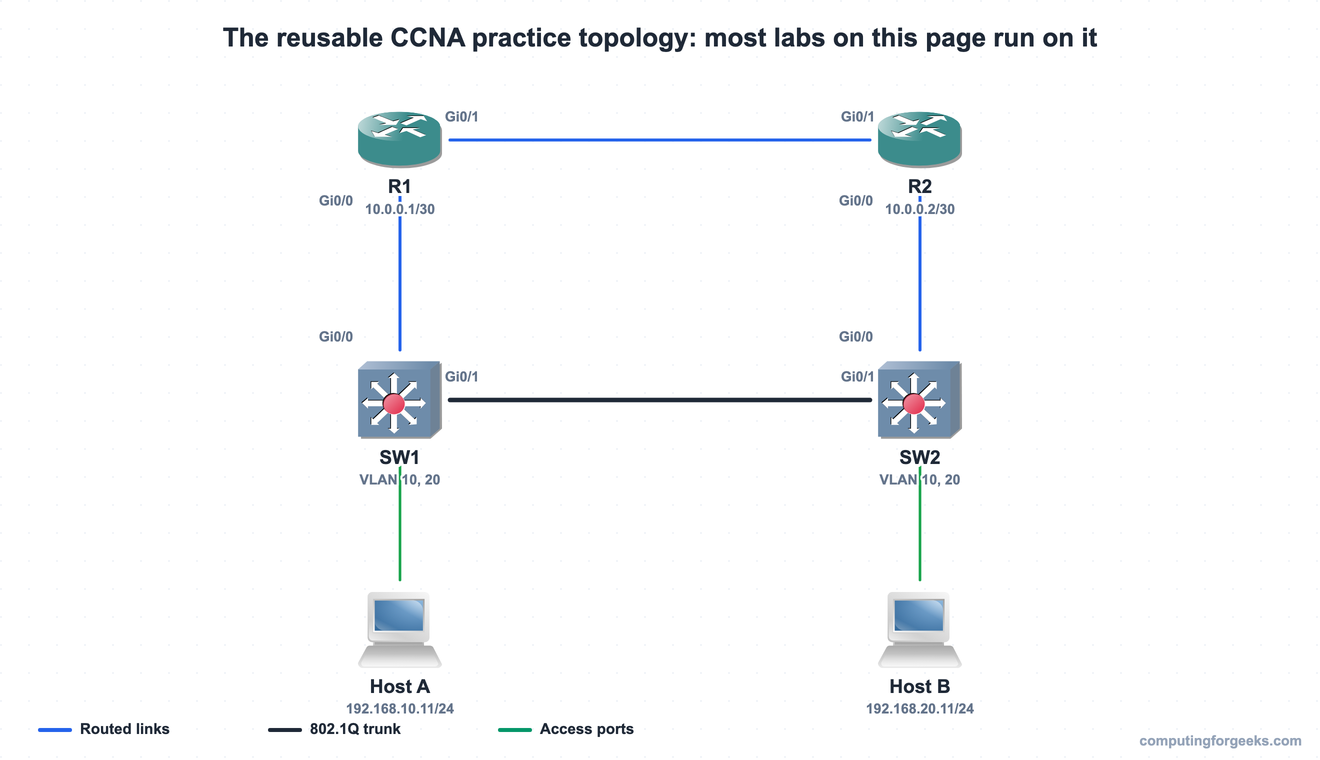
In GNS3 the same build looks like this: IOSv routers, IOSvL2 switches, and two endpoints, exactly the scale the CCNA simulation questions use. Smaller labs on this page use a subset of it; the three-switch Spanning Tree triangle swaps in an extra switch, and the two OSPF labs add a third router.
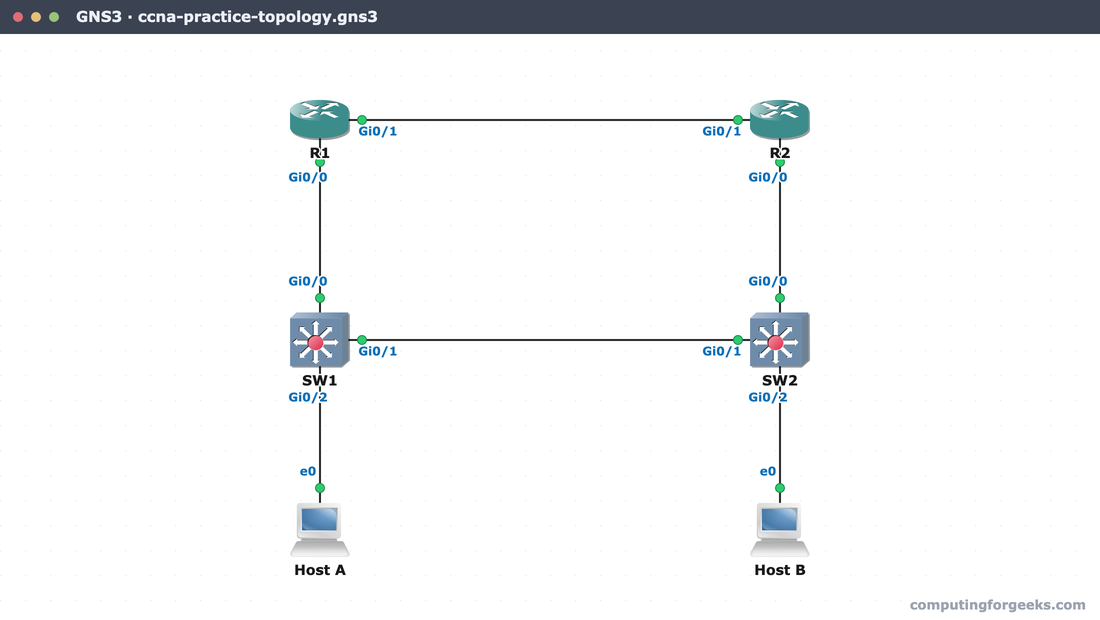
Interface numbering differs per lab, so treat the canvas above as the shape, not the port map. Each lab’s README and article carry the exact interfaces and addressing for that build, and if your images enumerate ports differently, adjust the interface lines when you paste.
Pick your lab platform
All 19 labs are plain Cisco IOS, so the platform is your choice. GNS3 with IOSv images is the closest thing to real hardware and what we built these on; we keep install guides for Ubuntu, Fedora, Debian, macOS, and Kali Linux, plus running the GNS3 VM on VirtualBox. The one cost to know about: Cisco IOS images require a Cisco license, so GNS3 suits you best if you already have image access.
Cisco Packet Tracer is the no-cost route. It is free after enrolling in a Cisco Networking Academy course (also free), and it covers nearly all of the CCNA command set. One practical note: Packet Tracer saves labs in its own encrypted .pkt format with no supported way to generate it outside the program, so there are no .pkt downloads here. Instead, drop the devices onto the canvas and paste the solution config into each device CLI. The commands are standard IOS and work unchanged, apart from the small command subset Packet Tracer does not implement, which the affected labs call out. Real gear and EVE-NG take the configs exactly as written.
How the labs and solutions are organized
Each lab in the tables below links two things. The guide link opens the full article: the teaching topology, the objective walkthrough, every command explained, and the real verification output captured from the lab run. The configs link opens that lab’s folder in the GitHub repository, which holds a README with the topology and addressing table, a topology.json describing nodes and links, and one paste-ready .txt config per device, with configuration mode and write memory included.
The passwords in the solution files (Cisc0-Lab! and friends) are throwaway lab values, and the addressing uses private RFC 1918 ranges plus RFC 5737 documentation ranges where a lab needs a public-looking address. Change the passwords before any of this touches a network you care about.
The free CCNA labs, by exam domain
Levels are relative to the series: Beginner labs assume only the guides before them, Intermediate labs assume the switching and addressing work is solid, and Advanced labs combine multiple objectives the way real simlet questions do. Work them in table order within each domain.
Domain 1: the foundation lab
Every other lab assumes you can bring a device from a blank config to secured remote access, so this one comes first.
| Lab | Devices | You practice | Level | Solutions |
|---|---|---|---|---|
| Device base configuration | R1 + SW1 | Hostname, local users, enable secret, banners, SSH-only vty lines | Beginner | configs |
The same folder backs the SSH access lab, which extends the base build with RSA keys and login verification.
Domain 2: switching labs
Four labs cover the configure-and-verify half of Network Access, from your first VLAN to a redundant switched triangle.
| Lab | Devices | You practice | Level | Solutions |
|---|---|---|---|---|
| VLANs and trunking | SW1 + SW2 | VLANs 10 and 20, access ports, an 802.1Q trunk, and a hardened trunk with a non-default native VLAN | Beginner | configs |
| CDP and LLDP discovery | SW1 + SW2 | Reading neighbor tables, enabling LLDP, scoping discovery per interface | Beginner | configs |
| EtherChannel with LACP | SW1 + SW2, two links | Bundling two links into one Port-channel, LACP modes, verifying the bundle | Intermediate | configs |
| Rapid PVST+ Spanning Tree | SW1 + SW2 + SW3 triangle | Root bridge election, port roles, PortFast, BPDU guard on a real Layer 2 loop | Intermediate | configs |
Domain 3: routing labs
The heaviest exam domain gets the most labs: nine, running from reading a routing table to a full first-hop failover drill.
| Lab | Devices | You practice | Level | Solutions |
|---|---|---|---|---|
| Read the routing table | R1 + R2 | Every route code the CCNA tests (C, L, S, S*, O) in one show ip route | Beginner | configs |
| Packet forwarding with CEF | R1 + R2 | The FIB and adjacency table behind every forwarding decision | Intermediate | configs |
| IPv4 static routes | R1 + R2, two links | Static, default, host, and floating routes, then a live failover to the backup path | Beginner | configs |
| IPv6 static routes | R1 + R2, two links | Enabling IPv6 routing, link-local next hops, floating IPv6 routes | Intermediate | configs |
| OSPF concepts | R1 + R2 + R3 on a switch segment | Neighbor adjacencies, DR and BDR election, reading the LSDB | Intermediate | configs |
| Single-area OSPF | R1 + R2 + R3 in a line | OSPFv2 configuration, router IDs, passive interfaces, verification | Intermediate | configs |
| Router-on-a-stick | R1 + SW1 + two hosts | 802.1Q subinterfaces routing between two VLANs over one trunk | Intermediate | configs |
| Layer 3 switch SVIs | SW1 + two hosts | Inter-VLAN routing on the switch itself with one SVI per VLAN | Intermediate | configs |
| HSRP virtual gateway | R1 + R2 + SW1 | Priority, preemption, and a failover you trigger and watch recover | Advanced | configs |
Domain 4: services labs
Small domain, heavy simlet presence. NAT in particular turns up inside multi-step scenarios far more often than its 10 percent weight suggests, so it earns the Advanced tag.
| Lab | Devices | You practice | Level | Solutions |
|---|---|---|---|---|
| NAT and PAT | R1 + R2 + two hosts | All three inside-source NAT forms: static, dynamic pool, and PAT overload | Advanced | configs |
| DHCP server and relay | R1 + R2 + two clients | An IOS DHCP server plus ip helper-address relaying across subnets | Intermediate | configs |
| NTP client and server | R1 + R2 | Stratum hierarchy, NTP authentication, reading sync state | Beginner | configs |
| SNMP and syslog | R1 + a monitoring host | Severity levels, a remote logging host, SNMP traps | Intermediate | configs |
| DNS on IOS | R1 + R2 | Static ip host records and a router resolving names as a DNS client | Beginner | configs |
Domain 5: security labs inside the guides
The Security Fundamentals labs currently live inside their articles, full topology and configs included, with repository folders to follow. Work them in this order: device access control, AAA with RADIUS and TACACS+, standard and extended ACLs, port security with violation modes, DHCP snooping against a rogue server, and dynamic ARP inspection. The IP connectivity troubleshooting walkthrough makes a good capstone across Domains 3 and 5: it hands you a broken network and a symptom, which is precisely what the hardest simlet questions do.
How to run each lab so it actually sticks
The solution configs are the answer key, not the exercise. Read the lab’s article, build the topology, and attempt every task from the article’s prose before opening the repo. Type the commands rather than pasting them; the real exam gives you a CLI and a clock, and typing speed on switchport mode trunk is trained, not innate. When you finish, or when you are stuck past the 20-minute mark, diff your running config against the solution file and read the explanation for whatever you missed.
Verification matters as much as configuration. Every lab article closes with the show commands that prove the feature works, and those same commands are what the CCNA verification questions screenshot. If you can predict what show ip ospf neighbor or show etherchannel summary will print before you run it, that objective is done. The command cheat sheet collects them all in one place, and the practice questions hub tests the same material from the question side.
Rebuild it from a blank canvas
The readiness test for any lab on this page is simple: delete the project and rebuild it from nothing, no article open, no solution file, just the topology diagram and the task list. If you can take the practice topology from blank devices to a verified, working feature in under 20 minutes, you are faster than the real exam requires. Most candidates discover a gap between recognizing commands and producing them; the second and third blank-canvas runs are where that gap closes. Pair the labs with the study roadmap for sequencing and the exam topics list to confirm coverage, and the configure-and-verify half of the CCNA stops being the part you fear.