Three switches cabled into a triangle have exactly one Layer 2 loop. Spanning Tree Protocol blocks one port to break it, and which port it blocks is decided by three numbers: the bridge priority, the path cost to the root, and the MAC address on a tie. Set those numbers deliberately and the topology is predictable. Leave them at the defaults and the switches decide for you, usually not the way you want.
This guide configures Spanning Tree Protocol in Rapid PVST+ mode on a three-switch triangle, forces a chosen root bridge, and reads the resulting port roles and states from real output. The blocked port is the whole point: it is the loop being broken, held in reserve until a link fails. Verified June 2026 on Cisco IOS 15.2 (Rapid PVST+).
Why Spanning Tree exists
A switched network wants redundant links for resilience. Layer 2 has no TTL to kill a looping frame, so a single physical loop turns redundancy into a failure: broadcasts circulate forever (a broadcast storm), the same source MAC arrives on two ports so the MAC address table flaps, and frames are duplicated. STP keeps the redundant cabling but logically blocks enough ports to leave exactly one active path between any two points.
The lab is the smallest topology that produces a loop: three switches, each connected to the other two.
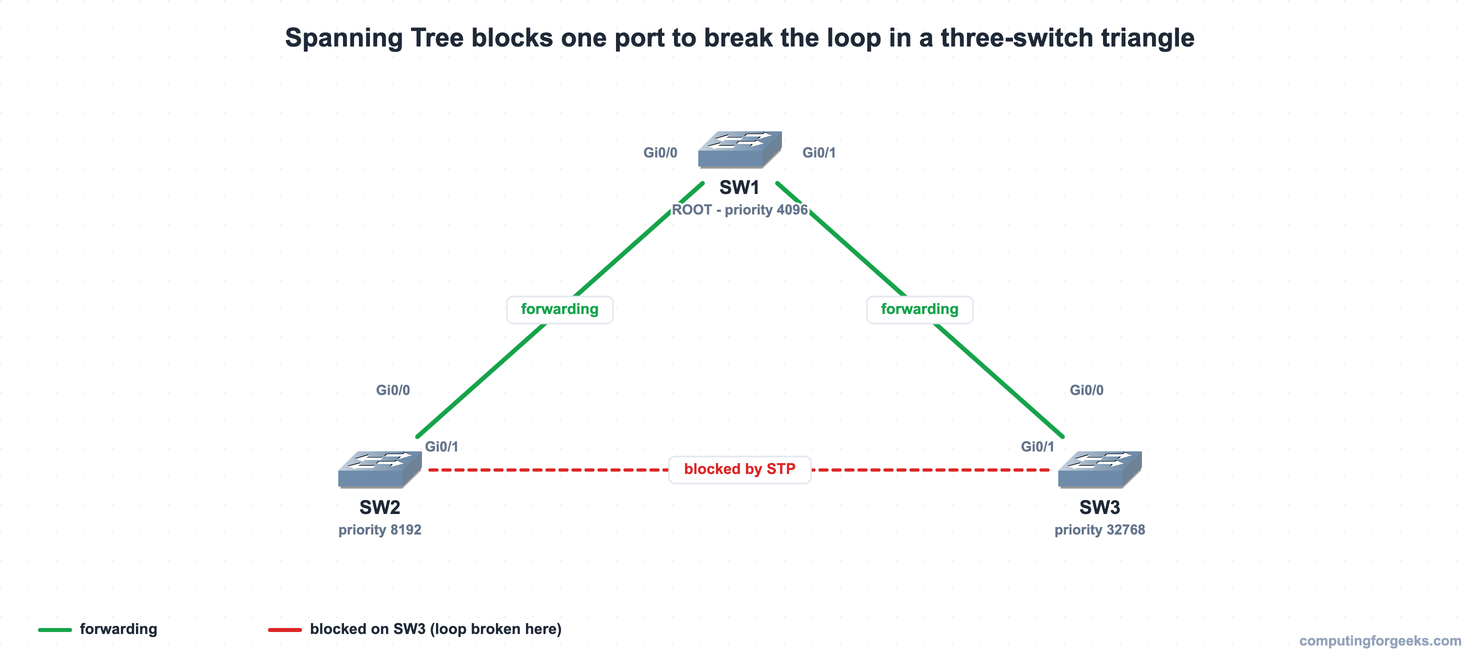
SW1 is forced to be the root. The SW1-SW2 and SW1-SW3 links forward; the SW2-SW3 link is the one STP blocks, and it blocks it on SW3. The same triangle was built on three IOSvL2 switches in GNS3, which produced every capture below:
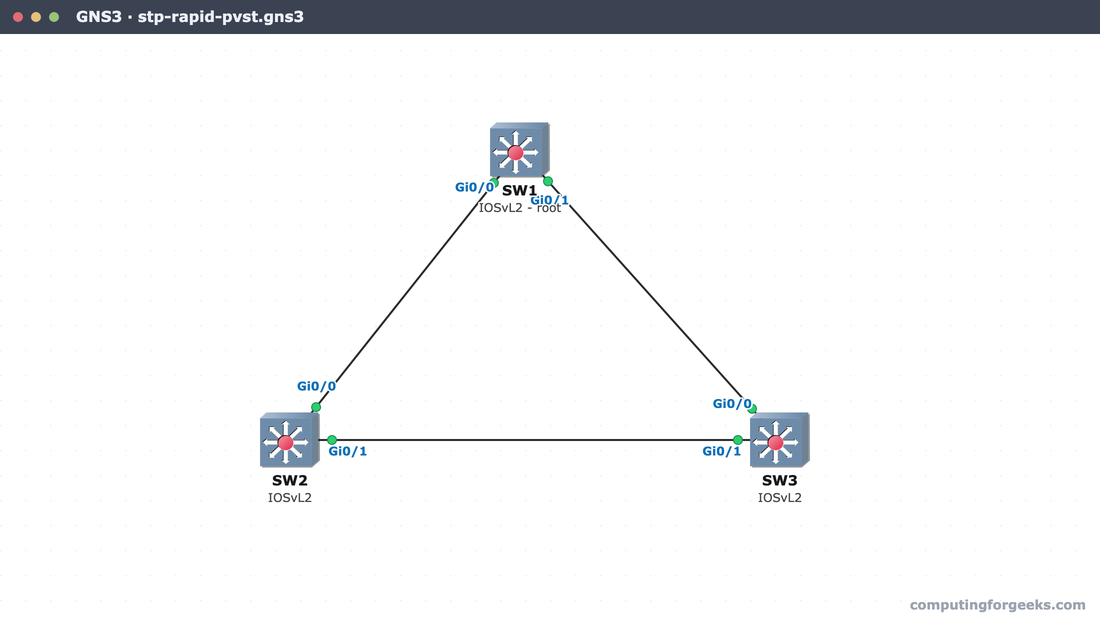
With the cabling in place and a loop present, the configuration starts by choosing which switch should be the root.
Step 1: Set the mode and elect the root bridge
The root bridge is the reference point the whole tree is measured from, so it should be a deliberate choice, not an accident of MAC addresses. The election is won by the lowest Bridge ID. A Bridge ID is 8 bytes: a 2-byte priority followed by the switch’s 6-byte MAC. With per-VLAN spanning tree the priority field is a 4-bit base priority plus the 12-bit VLAN ID, so the default 32768 shows as 32769 for VLAN 1. Priority is configurable only in steps of 4096.
Set the mode to Rapid PVST+ on all three switches, then give SW1 the lowest priority so it wins:
configure terminal
spanning-tree mode rapid-pvst
spanning-tree vlan 1 priority 4096
end
SW2 takes 8192 (the backup root), and SW3 keeps the default 32768. The root primary and root secondary keywords are a shortcut that picks the priority for you (24576 and 28672), but setting an explicit 4096 and 8192 makes the intent and the math obvious. Run the mode command on every switch; a switch left in the default per-VLAN mode still interoperates, but the topology should be one mode throughout.
Step 2: Verify the root bridge
On SW1, confirm it actually won. show spanning-tree vlan 1 states it plainly when a switch is the root:
show spanning-tree vlan 1SW1 reports itself as the root for VLAN 1:
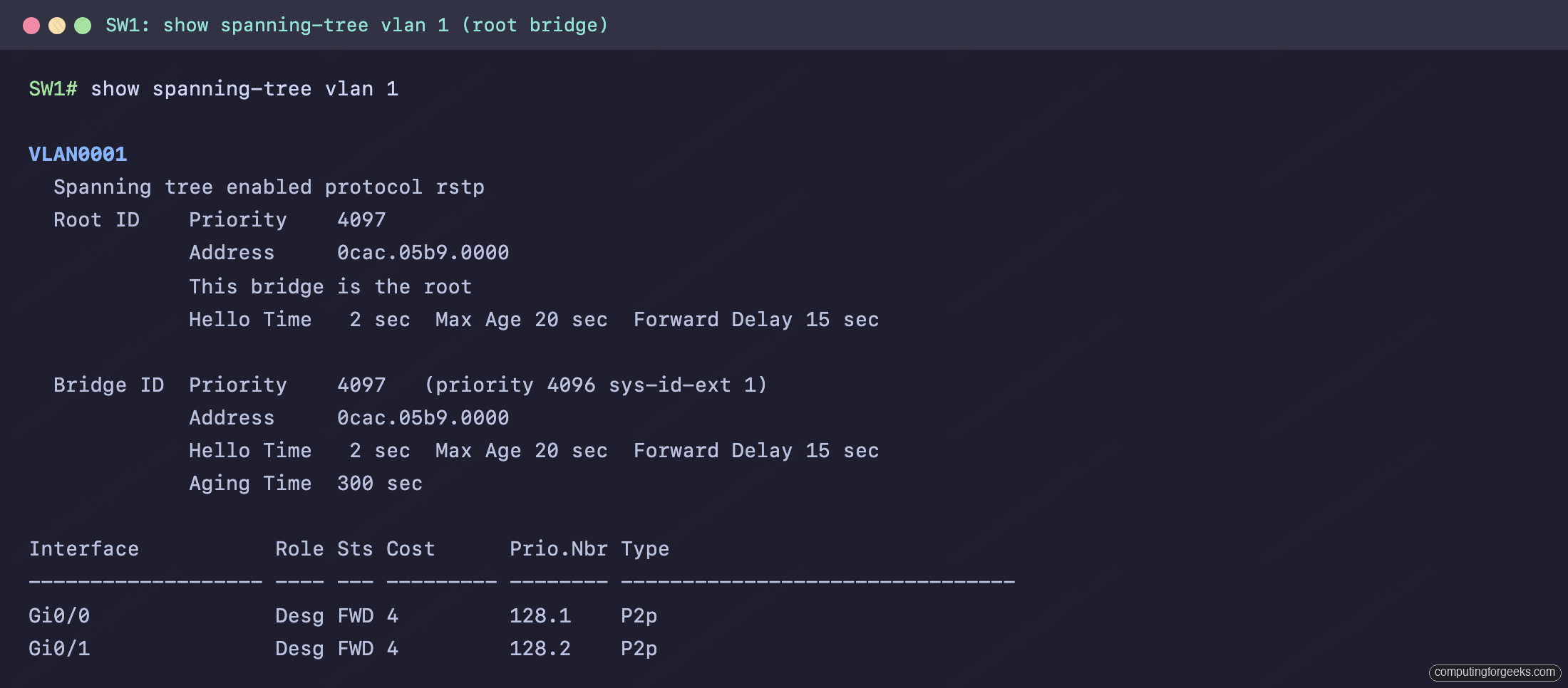
The number that matters is the priority: 4097, which is the configured 4096 plus the VLAN-1 system ID extension. The Root ID and the Bridge ID are identical, and the line “This bridge is the root” confirms it. Every port on the root bridge is a designated port in the forwarding state (Desg FWD), because the root never blocks. The protocol line reads rstp, which is what Rapid PVST+ runs per VLAN.
Step 3: Read the non-root switch and find the blocked port
The interesting output is on SW3, the switch with the highest priority. It has two paths to the root: the direct SW1-SW3 link at a cost of 4, and the indirect path through SW2 at a cost of 8. It picks the lower cost, so its root port is Gi0/0 toward SW1.
show spanning-tree vlan 1
show spanning-tree root
SW3 shows the root port and the one port STP is holding down:
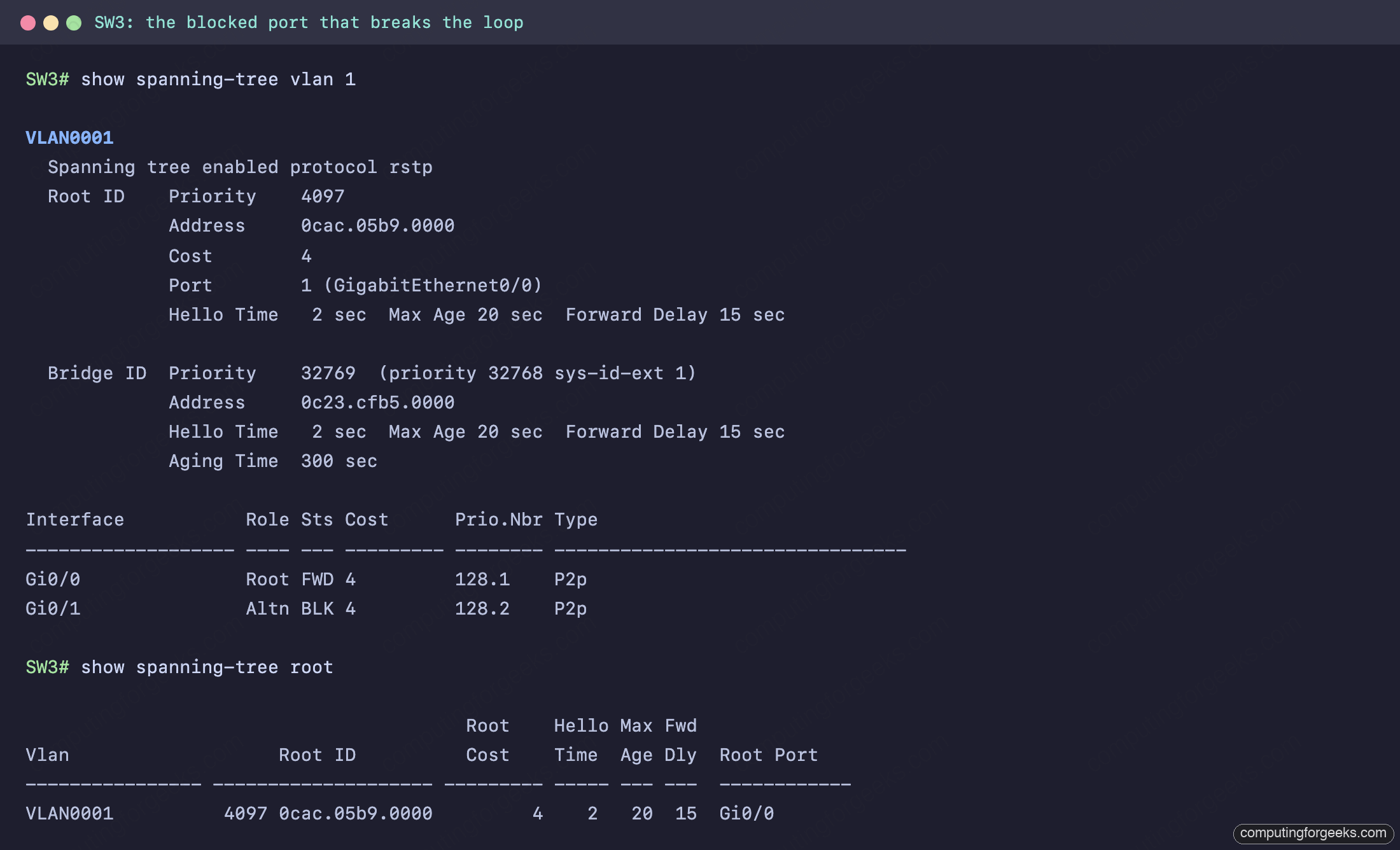
Gi0/0 is the root port, forwarding (Root FWD). Gi0/1, toward SW2, is the alternate port in the blocking state (Altn BLK). That is the loop being broken. The decision on the SW2-SW3 segment came down to a Bridge ID comparison: both switches reach the root at a cost of 4, so the tie goes to the lower Bridge ID, and SW2 at priority 8192 beats SW3 at 32768. SW2 becomes the designated port for that segment, which leaves SW3’s port as the alternate. show spanning-tree root summarises it in one line: root ID 4097, root cost 4, root port Gi0/0.
Step 4: Port roles, states, and the mode
Every port lands in one role and one state. The roles answer “what is this port for”, the states answer “is it passing traffic”. On the root bridge all ports are designated; on a non-root switch there is exactly one root port and the rest are designated or alternate.
| Port role | Meaning |
|---|---|
| Root port (RP) | Lowest-cost path to the root. One per non-root switch. Always forwarding. |
| Designated port (DP) | The forwarding port for a segment. One per segment. The root has all designated ports. |
| Alternate port | A blocked backup path to the root. Takes over if the root port fails. |
The states differ between classic and rapid STP. The original 802.1D walks a port through four states over roughly 30 to 50 seconds; RSTP, which Rapid PVST+ is built on, collapses them to three and converges in seconds:
| 802.1D (classic STP) | RSTP / Rapid PVST+ | Passing traffic? |
|---|---|---|
| Blocking | Discarding | No |
| Listening | Discarding | No |
| Learning | Learning | No (learns MACs) |
| Forwarding | Forwarding | Yes |
Confirm the mode and the cost method with show spanning-tree summary:
show spanning-tree summaryThe mode and the cost method are near the top of the output:
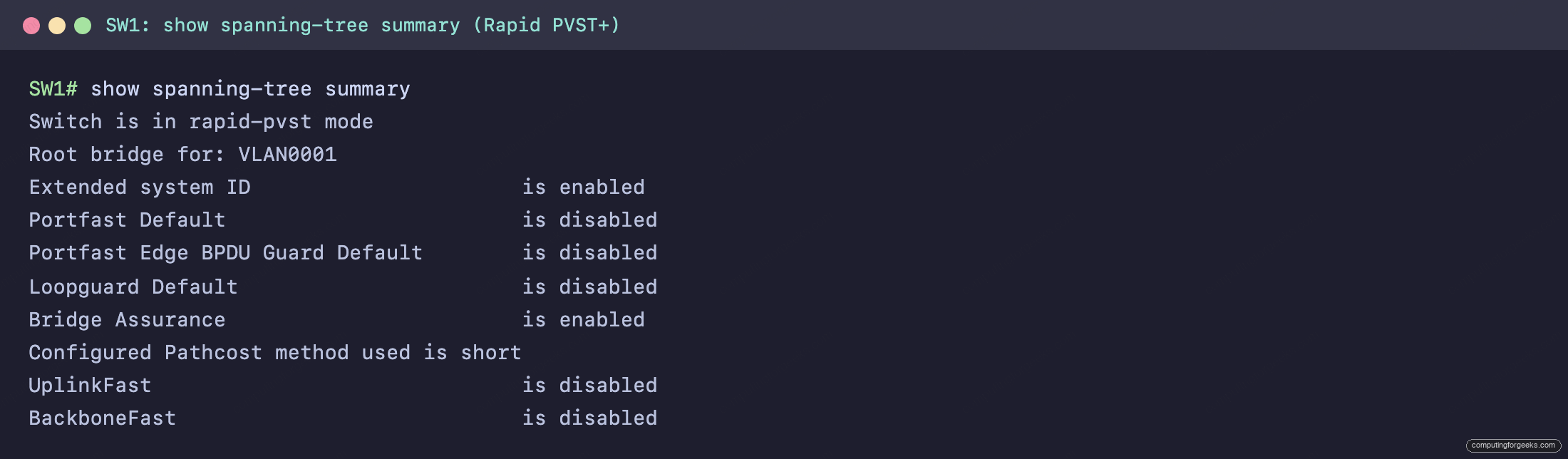
Two lines matter here. “Switch is in rapid-pvst mode” confirms the protocol, and “Configured Pathcost method used is short” sets the cost values: 10 Mbps = 100, 100 Mbps = 19, 1 Gbps = 4, 10 Gbps = 2. Those are the numbers that decided SW3’s root port. Because this is per-VLAN spanning tree, every VLAN that crosses an 802.1Q trunk runs its own instance, so a trunk can forward VLAN 10 on a port while blocking VLAN 20 on the same port.
Step 5: PortFast and BPDU Guard on host ports
A port connected to a single host, a server, or an access point should not wait through the spanning-tree states on every link-up. PortFast moves an access port straight to forwarding, skipping the transition delay every other port takes, so a host gets a usable link immediately. Apply it only to host-facing access ports, never to a switch-to-switch link:
interface GigabitEthernet0/3
 switchport mode access
 spanning-tree portfast
 spanning-tree bpduguard enable
BPDU Guard is the safety net that makes PortFast safe. A host port should never receive a BPDU. If one arrives, something that speaks spanning tree (a switch) was plugged into a port that assumes a host, which is exactly how an accidental loop forms. BPDU Guard err-disables the port the moment a BPDU lands, shutting the threat down instead of letting it forward. The two are configured together on every access port that faces a user. To verify the global defaults instead of per-port settings, show spanning-tree summary lists the PortFast and BPDU Guard default state.
Practice Spanning Tree Protocol
This topic is in the Network Access section of the CCNA 200-301 study roadmap. The three-switch triangle, paste-ready for GNS3, Cisco Packet Tracer, or real gear, is in the companion repo: c4geeks/ccna-labs. Build SW1, SW2, and SW3, wire the triangle, paste the configs, and watch STP block one port on its own.
Test the root election, port roles, and cost math with the quiz:
Then drill the roles, states, and numbers with the flashcards, or load the deck into Anki:
STP port roles and states at a glance
Reading a spanning-tree topology comes down to four checks, in order:
- Who is root? The lowest Bridge ID (priority, then MAC). On the root,
show spanning-treesays “This bridge is the root” and every port is Desg FWD. - Which port is the root port? On each non-root switch, the one port with the lowest path cost to the root (1 Gbps = 4, 100 Mbps = 19). It is always forwarding.
- Which port is blocked? The alternate port (Altn BLK / discarding). It is the redundant path STP holds in reserve, and it is where you confirm the loop was broken.
- Is it converging fast?
show spanning-tree summaryshould read rapid-pvst, not the slower classic mode. Pair it with PortFast and BPDU Guard on host ports, the same way you would verify neighbors with CDP and LLDP.
Run those four checks against the output and a spanning-tree topology stops being a guess. The numbers decide the tree, and the numbers are all in show spanning-tree.