Local accounts on every device stop scaling the moment you have more than a handful of them. Add an engineer and you touch every router and switch; remove one and you hope you caught them all. AAA fixes that by moving identity off the devices and onto a central server, and the two protocols that carry it are RADIUS and TACACS+. Knowing what each A stands for and which protocol to reach for is the heart of this topic.
This guide explains authentication, authorization, and accounting, compares RADIUS against TACACS+ point by point, and configures the AAA client side on a Cisco router with real output. It builds on the local passwords from device access control, which become the fallback when the AAA server cannot be reached.
Configured and captured on a Cisco IOS 15.2 router in June 2026; the AAA client config below is real, and the server addresses are examples.
What AAA stands for
AAA is three separate questions about a user, answered in order. Authentication proves who you are, authorization decides what you may do, and accounting records what you did.
| The A | Question it answers | What it controls |
|---|---|---|
| Authentication | Who are you? | Verifying identity with a username and password, a token, or a certificate |
| Authorization | What are you allowed to do? | Which commands, privilege level, or resources the identity may use |
| Accounting | What did you do? | Logging commands run, session length, and data sent, for audit or billing |
The three are independent. A user can be authenticated (the login succeeds) but still be authorized for only a handful of commands, and every action they take can be accounted to their name in a log. Separating them is what lets you give a junior engineer read-only access while the logs still show exactly who did what.
The AAA players: client, server, and the NAS
AAA has two roles. The AAA server holds the identities and makes the decisions. The network access server (NAS) is the device a user connects to, which forwards the request to the server and enforces the answer. On a Cisco network the NAS is the router or switch itself, acting as the AAA client.
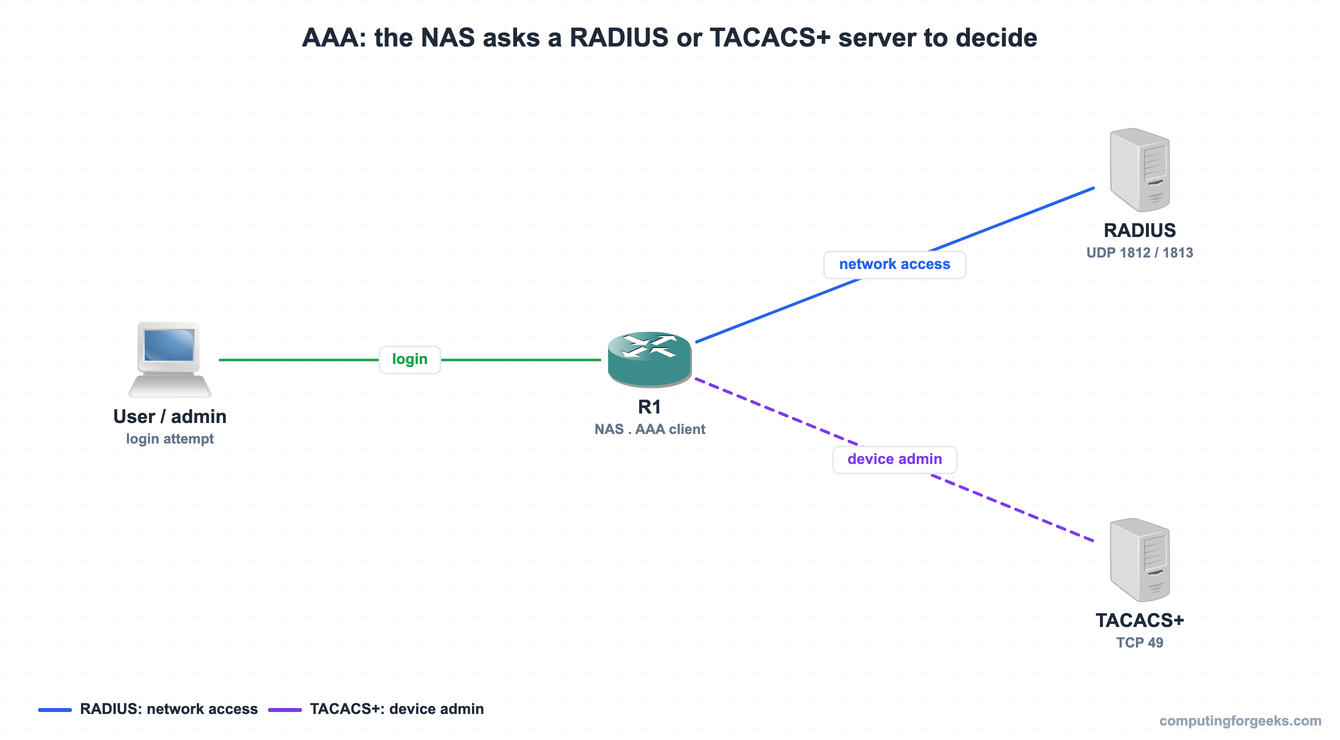
A user or admin never talks to the AAA server directly. They log in to the NAS, the NAS asks the server over RADIUS or TACACS+, and the server replies with a permit or deny. The routers and switches are the clients in this exchange, never the decision makers, which is exactly why a central server scales: change a password once on the server and every device honors it.
RADIUS vs TACACS+
Both protocols carry AAA between the NAS and the server, but they were built for different jobs, and the CCNA expects you to tell them apart.
| Property | RADIUS | TACACS+ |
|---|---|---|
| Standard | Open standard (RFC 2865) | Cisco proprietary |
| Transport and ports | UDP 1812 auth, 1813 accounting (older 1645/1646) | TCP 49 |
| Encryption | Only the password in the packet | The entire packet body |
| AAA functions | Combines authentication and authorization | Separates all three independently |
| Per-command authorization | Limited | Yes, command by command |
| Primary use | Network access: 802.1X, VPN, end users | Device administration |
| Multivendor | Broad support | Mostly Cisco |
Two rows decide most exam questions. RADIUS encrypts only the password and runs over UDP, while TACACS+ encrypts the whole packet over TCP, so TACACS+ hides the commands and replies, not just the credentials. And because TACACS+ separates authorization, it can approve or deny each command a network admin types, which RADIUS was never designed to do well. That separation is why device administration leans on TACACS+ and network access leans on RADIUS.
Configure AAA on a Cisco router
Everything AAA starts with one command. aaa new-model switches the device from the legacy line-password model to AAA method lists:
configure terminal
aaa new-model
Next, define the servers. Modern IOS uses a named server block for each one, with the shared key the NAS and server must both agree on:
radius server RAD1
 address ipv4 10.10.10.10 auth-port 1812 acct-port 1813
 key RadSecret123
 exit
tacacs server TAC1
 address ipv4 10.10.10.20
 key TacSecret123
 exit
The key is a shared secret, not a hash, and it appears in clear text in the config unless you turn on service password-encryption, so treat it like any other credential. With the servers defined, point the method lists at them and keep local as a fallback:
aaa authentication login default group tacacs+ local
aaa authorization exec default group tacacs+ local
aaa accounting exec default start-stop group tacacs+
Each method list reads left to right. The login list tries the TACACS+ group first and falls back to the local database only if no server answers, which is the safety net that keeps you from being locked out. A server that is reachable but rejects your credentials does not fall through to local; the fallback fires only when the server is unreachable, not when it says no. Verify the AAA framework after configuring it:

The output confirms aaa new-model is on and shows the three method lists, each using group tacacs+ with a local fallback. The server definitions carry the ports that separate the two protocols on the wire:

The RADIUS server shows its auth and accounting ports, 1812 and 1813, while the TACACS+ server uses the single TCP port 49. Actually authenticating a user still needs a reachable RADIUS or TACACS+ server holding the accounts; the configuration above is the client side that every Cisco device needs before it can ask one.
When to use RADIUS and when to use TACACS+
The choice follows the job. Reach for TACACS+ for device administration: logging engineers into routers, switches, and firewalls over SSH, where per-command authorization and full-packet encryption matter, and where the audit trail of who typed what is the point. Reach for RADIUS for network access: authenticating end users and devices onto the network through 802.1X on wired and wireless, VPN logins, and any multivendor environment, because RADIUS is an open standard that nearly everything speaks. Many networks run both, TACACS+ for the admins and RADIUS for the users, against the same identity store.
Practice AAA, RADIUS, and TACACS+
Run the questions to lock in the three A’s, the RADIUS-versus-TACACS+ differences, and the configuration commands, then use the flashcards for quick recall.
Flip through the deck until the ports and differences are automatic, or grab the Anki pack to review them anywhere:
The AAA mistake that locks out everyone
The most common AAA failure is configuring aaa authentication login default group tacacs+ with no local fallback, then watching every login fail the moment the server is unreachable, including yours. Always end the method list with local (or enable) so a server outage degrades to local accounts instead of a total lockout, and keep a console session open while you test, exactly as with base device configuration. The other classic trip-up is a shared key that does not match on both ends: the server silently rejects the request and the NAS reports an authentication failure that looks like a wrong password. With AAA centralizing identity, the CCNA 200-301 study roadmap shows where the rest of the Security Fundamentals topics fit.