A switch port with nothing plugged into it is still a live network jack. Anyone who can reach it, a visitor in a meeting room, a contractor at an empty desk, can connect a laptop or a small unmanaged switch and land directly on your LAN. Cisco port security is the Layer 2 control that closes that door. It ties an access port to the specific MAC addresses allowed to use it, and shuts the port down the moment an unexpected device appears.
This guide configures port security on a real switch, learns a host MAC with sticky learning, then plugs a different device into the same jack to trip a genuine violation. Every show port-security output and the err-disabled state below came off a live Cisco IOS switch, not a textbook.
Built and broke this on a Cisco IOS 15.2 switch in June 2026.
How port security works
Port security runs per access port. You tell the switch how many MAC addresses the port may use (the maximum), which addresses count as secure, and what to do when a frame arrives from any other address. Until the limit is reached the switch learns and forwards normally. Once it is reached, any new source MAC is a violation.
A secure MAC address gets onto the port in one of three ways, and the difference is where the address is stored.
- Static: you type the address into the config with
switchport port-security mac-address H.H.H. It lives in the running-config and survives a reboot once saved. - Dynamic: the switch learns it from traffic and keeps it in the address table only. It is lost on reload or when the port goes down, so you start over each time.
- Sticky: the switch learns it dynamically but writes it into the running-config, so it behaves like a static entry without you typing each MAC. Save the config and it persists. This is the usual choice for an access port with one known device.
The maximum defaults to one. For a desk where an IP phone passes through to a PC you raise it to two or three, but for a single workstation the default of one is exactly what you want.
Violation modes
When traffic from an unauthorized MAC hits a secured port, the violation mode decides the response. There are three, and they differ in whether the port keeps forwarding and whether you ever hear about it.
| Mode | Drops bad traffic | Syslog / SNMP | Violation counter | Port state |
|---|---|---|---|---|
| protect | Yes | No | Does not increment | Stays up, silent |
| restrict | Yes | Yes | Increments | Stays up, logged |
| shutdown (default) | Yes | Yes | Increments | err-disabled, port down |
Shutdown is the default and the safest stance: a violated port stops passing any traffic until an administrator looks at it, so an attacker gains nothing and you get a log entry. Restrict is for ports where downtime is costly but you still want the alert. Protect is rarely the right call, because it hides the event entirely.
The lab topology
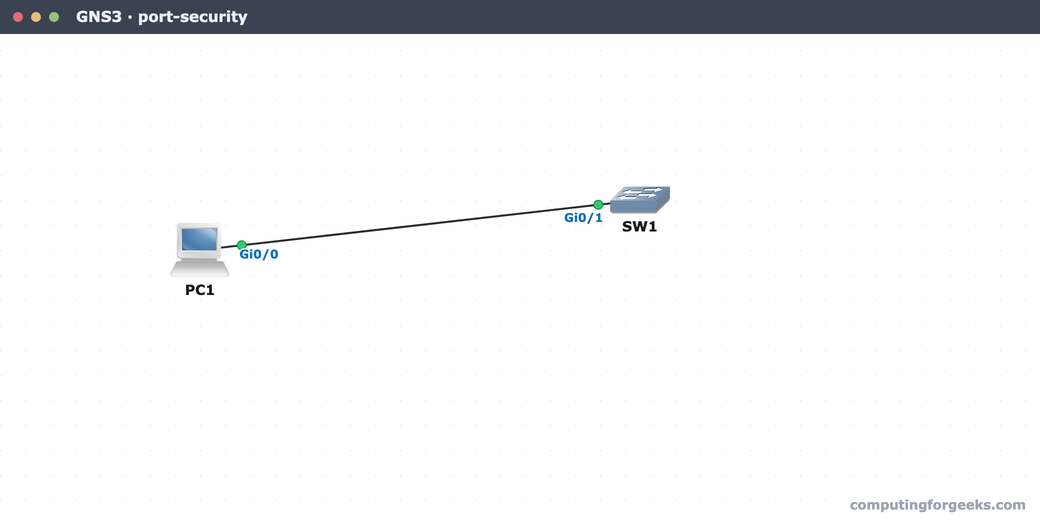
The lab is one switch and one host. SW1 has an access port, Gi0/1, in a VLAN with a switched virtual interface at 192.168.10.1 so the host has something to ping. Port security on Gi0/1 allows a single sticky MAC. The authorized PC learns its place on the port; an unknown laptop on the same jack is what trips the violation.
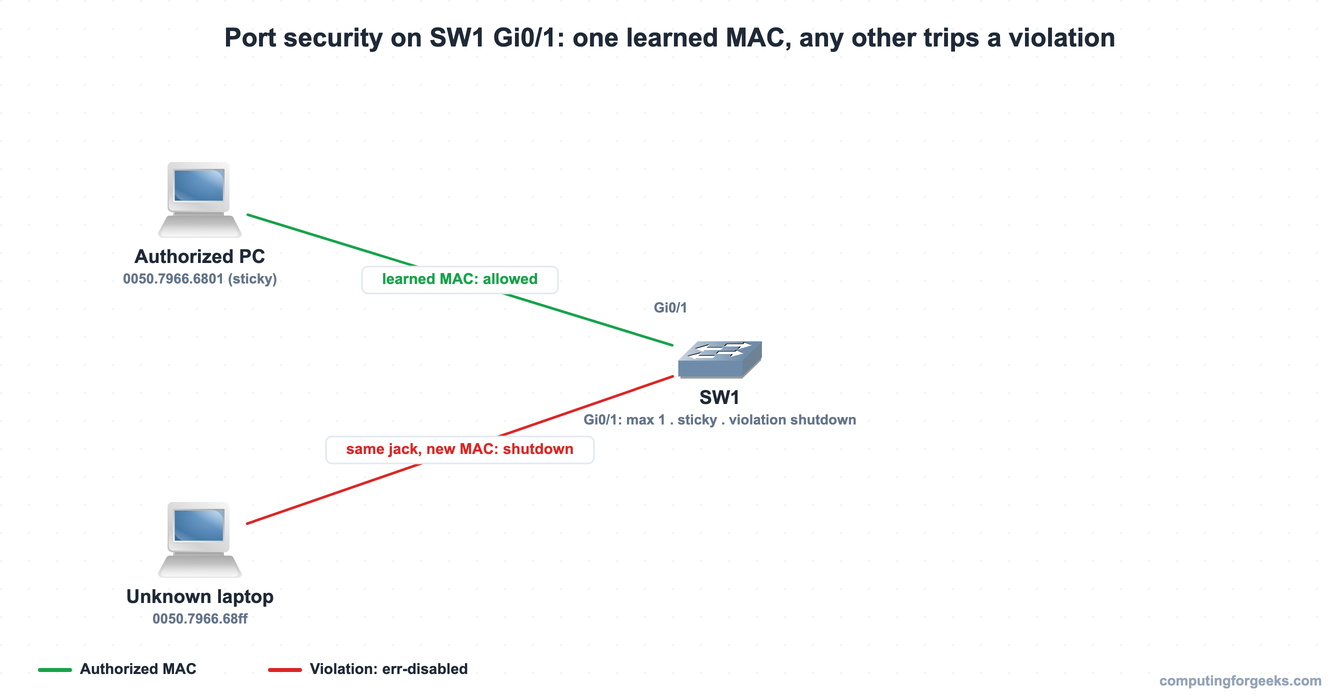
The same two nodes built in GNS3, where the configuration below was applied and tested on real Cisco IOS:
With the host wired to Gi0/1, secure the port.
Configure port security on an access port
Port security only applies to a port that is statically an access or trunk port, never one left on dynamic (auto) negotiation. Set the mode first, then enable port security and pick sticky learning with a shutdown response:
interface GigabitEthernet0/1
 switchport mode access
 switchport port-security
 switchport port-security maximum 1
 switchport port-security mac-address sticky
 switchport port-security violation shutdown
 exit
The maximum 1 and violation shutdown lines are written out here for clarity, but both match the IOS defaults, so the switch will not actually store them in the running-config. The first frame the port sees is learned as the sticky secure address, and from then on it is the only MAC allowed.
Verify the secure port
After the host sends its first frame, show port-security interface is the command that tells you everything: whether the port is secure and up, how it will react to a violation, the maximum, and how many addresses it has learned.
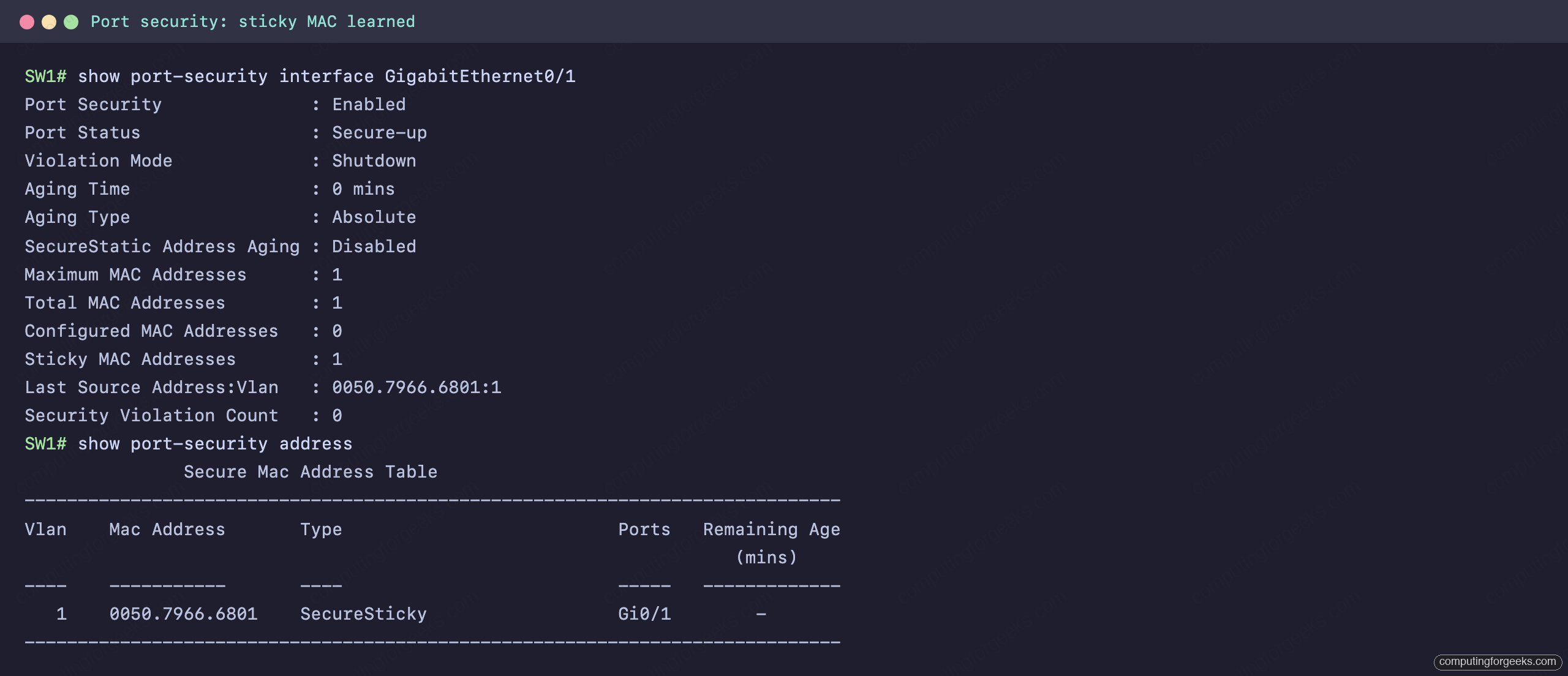
The port status is Secure-up, one sticky MAC has been learned, and the violation count is zero. The show port-security address table confirms the learned address is type SecureSticky on Gi0/1. The proof that sticky did its job is in the running-config, where the switch has written the learned MAC as a permanent line:
interface GigabitEthernet0/1
 switchport mode access
 switchport port-security mac-address sticky
 switchport port-security mac-address sticky 0050.7966.6801
 switchport port-security
That second sticky line was not typed by hand. The switch learned 0050.7966.6801 from the host and saved it. Run write memory and the address survives a reload, so the legitimate device keeps its port and nothing else can take it.
Trigger and confirm a violation
Now the real test. The authorized MAC is locked to Gi0/1, so we unplug that host and connect a different laptop to the same jack. Its MAC, 0050.7966.68ff, is not the secure address, and the maximum of one is already used. The instant it sends a frame, the switch acts:
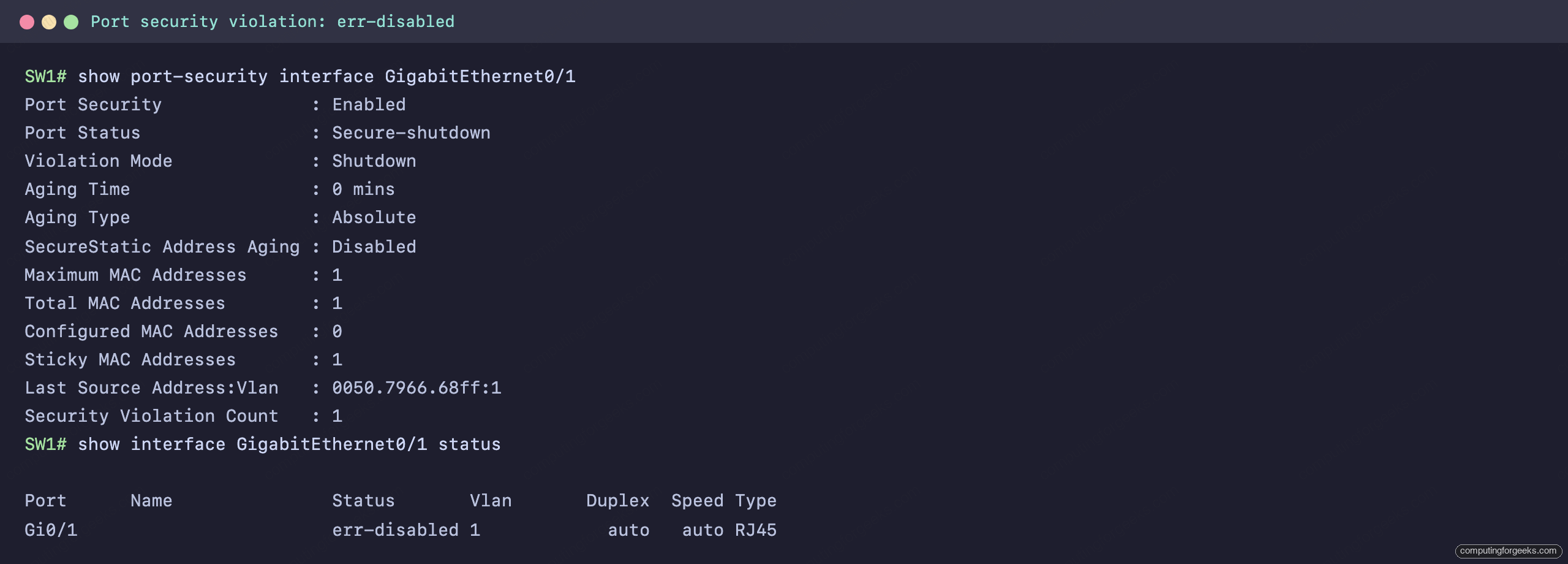
The port status flips to Secure-shutdown, the violation counter reads 1, and the last source address is the intruder’s MAC, caught and recorded. The companion show interface status shows the port as err-disabled, which is IOS for “shut down by a protection feature, not by an administrator”. The laptop’s ping to the gateway returns nothing, a clean zero percent success rate, because the port stopped forwarding the moment the violation fired.
Recover an err-disabled port
An err-disabled port does not come back on its own by default. Bouncing it with shutdown then no shutdown re-enables it, but clear the cause first, reconnect the authorized device or remove the offending one. Skip that and the port comes straight back up and violates again on the very next frame:
interface GigabitEthernet0/1
 shutdown
 no shutdown
 exit
If you would rather the switch recover ports automatically after a cool-off period, enable error-disable recovery for the port-security cause and set an interval, anything from 30 to 86400 seconds. The recovery state is its own command, and on a fresh switch every cause is disabled:
errdisable recovery cause psecure-violation
errdisable recovery interval 300
With that set, the switch re-enables the port 300 seconds after a violation. Use it with care. If the unauthorized device is still attached, the port will violate, recover, and violate again on a loop, so automatic recovery is a convenience for transient mistakes, not a substitute for fixing the real cause.
Practice Cisco port security
Run the questions to lock in the secure MAC types, the three violation modes, and how to read a violated port, then use the flashcards for quick recall.
Flip through the deck until sticky versus static, the default maximum, and err-disable recovery are automatic, or grab the Anki pack to review them anywhere:
What port security does not protect against
Port security is a strong first layer, but it is exactly that, one layer. It matches on source MAC, and a MAC address is easy to spoof, so a determined attacker who learns the allowed address can clone it and slide past. It also belongs only on access ports facing end devices. Never put it on a trunk or an uplink to another switch, where many MAC addresses are normal and a violation would black-hole the link.
The Layer 2 attacks port security cannot see, a rogue DHCP server handing out a false gateway or an ARP spoofer poisoning the segment, are stopped by the next two features in the same toolkit: DHCP snooping and dynamic ARP inspection. Together with the access control lists that filter at Layer 3 and the wider network security concepts behind them, they form the defense in depth a switched network needs. The CCNA 200-301 study roadmap lays out where each of these pieces fits.