Security on a network is not one product you buy. It is a stack of controls, each one covering what the layer below it cannot, so that a single mistake does not hand an attacker the whole network. Every device in this series, the routers, the switches, the access points, is a target, and the job is to name the danger, the weakness it goes after, and the control that blunts it.
This guide covers the foundations the CCNA groups under Security Fundamentals: the difference between a threat, a vulnerability, and an exploit; the CIA triad; the attacks you need to recognize on sight; the mitigation techniques that stop them; and the human side, user awareness, training, and physical access control. It is aligned to the current CCNA 200-301 (v1.1) Security Fundamentals topics as of June 2026, and it is the foundation the hands-on security guides in this series build on.
Threat, vulnerability, exploit, and risk
These four words get used as if they mean the same thing. They do not, and keeping them straight is the first thing the security topics expect of you. A vulnerability is the weakness. A threat is the danger that could act on it. An exploit is the specific thing that does. Risk is how likely that is and how much it would hurt.
| Term | What it is | Example |
|---|---|---|
| Vulnerability | A weakness in a system that could be abused | Unpatched software, a default password, an open management port |
| Threat | The potential danger: the who or what that could act on a weakness | A ransomware crew, a worm, a careless insider |
| Exploit | The specific code or technique that takes advantage of a vulnerability | A script that triggers a known buffer overflow on that unpatched service |
| Risk | The chance a threat acts on a vulnerability, times the damage if it does | High when a critical, internet-facing server is left unpatched |
One sentence ties them together. An unpatched file-sharing service is the vulnerability, a ransomware group is the threat, the exploit is the code that abuses that unpatched service to run, and the risk is high because the impact is encrypted, unrecoverable data. Remove any one piece, patch the service, and the risk drops sharply even though the threat still exists.
The CIA triad: what security actually protects
Every control you will configure exists to protect one of three goals. The CIA triad is the shorthand for them, and it is worth knowing because it tells you why a given control matters.
| Goal | What it means | A control that defends it |
|---|---|---|
| Confidentiality | Only authorized people can read the data | Encryption, access control lists, AAA |
| Integrity | Data is not altered in transit or at rest without detection | Hashing, checksums, digital signatures |
| Availability | The service is up and reachable when users need it | Redundancy, backups, denial-of-service protection |
A useful habit: when you meet a new security feature, ask which leg of the triad it holds up. Encryption protects confidentiality. A first hop redundancy protocol protects availability. Dynamic ARP inspection protects integrity by stopping traffic from being silently redirected. The control makes more sense once you know the goal behind it.
Attacks the CCNA expects you to recognize
You are not expected to launch these, only to recognize what each one does and name the control that stops it. The pattern to learn is attack to mitigation, because that mapping is exactly how the rest of Domain 5 is organized.
| Attack | What it does | Mitigation |
|---|---|---|
| Reconnaissance and scanning | Maps reachable hosts, open ports, and services before a real attack | ACLs, disabling unused services, an IPS |
| Denial of service (DoS / DDoS) | Floods a target so legitimate users cannot reach it | Rate limiting, an IPS, upstream scrubbing by the ISP |
| Spoofing (IP or MAC) | Forges a source address to impersonate a trusted host | ACLs, DHCP snooping, dynamic ARP inspection |
| On-path (man in the middle) | Sits between two parties to read or alter their traffic | Encryption (IPsec, TLS), dynamic ARP inspection |
| ARP spoofing | Poisons ARP caches to redirect LAN traffic through the attacker | Dynamic ARP inspection, paired with DHCP snooping |
| MAC flooding | Overflows the switch MAC table so it floods frames out every port | Port security |
| VLAN hopping | Reaches a VLAN the attacker should have no access to | Disable DTP, use a dedicated native VLAN, prune trunks |
| DHCP spoofing | A rogue DHCP server hands clients a malicious default gateway | DHCP snooping |
| Social engineering (phishing, tailgating) | Tricks people into giving up access or credentials | User awareness and training, multifactor authentication |
| Malware (virus, worm, trojan, ransomware) | Runs hostile code on a host to steal, encrypt, or spread | Endpoint protection, patching, network segmentation |
| Password attacks (brute force, dictionary) | Guesses credentials at scale until one works | Strong password policy, MFA, login lockout, AAA |
Notice how many of the bottom rows are Layer 2 attacks that hit the access switch: MAC flooding, VLAN hopping, DHCP spoofing, ARP spoofing. Those are exactly what port security, DHCP snooping, and dynamic ARP inspection exist to stop, and they get their own hands-on guides later in this domain.
Mitigation techniques and defense in depth
No single control is enough, because no single control sees everything. A firewall does not stop a poisoned ARP cache inside the LAN, and dynamic ARP inspection does nothing about a phishing email. The answer is defense in depth: layer independent controls so traffic has to pass several of them, and a gap in one is covered by the next.
The diagram below shows where each control from this domain sits, from the untrusted internet down to a user and a server on segmented VLANs:
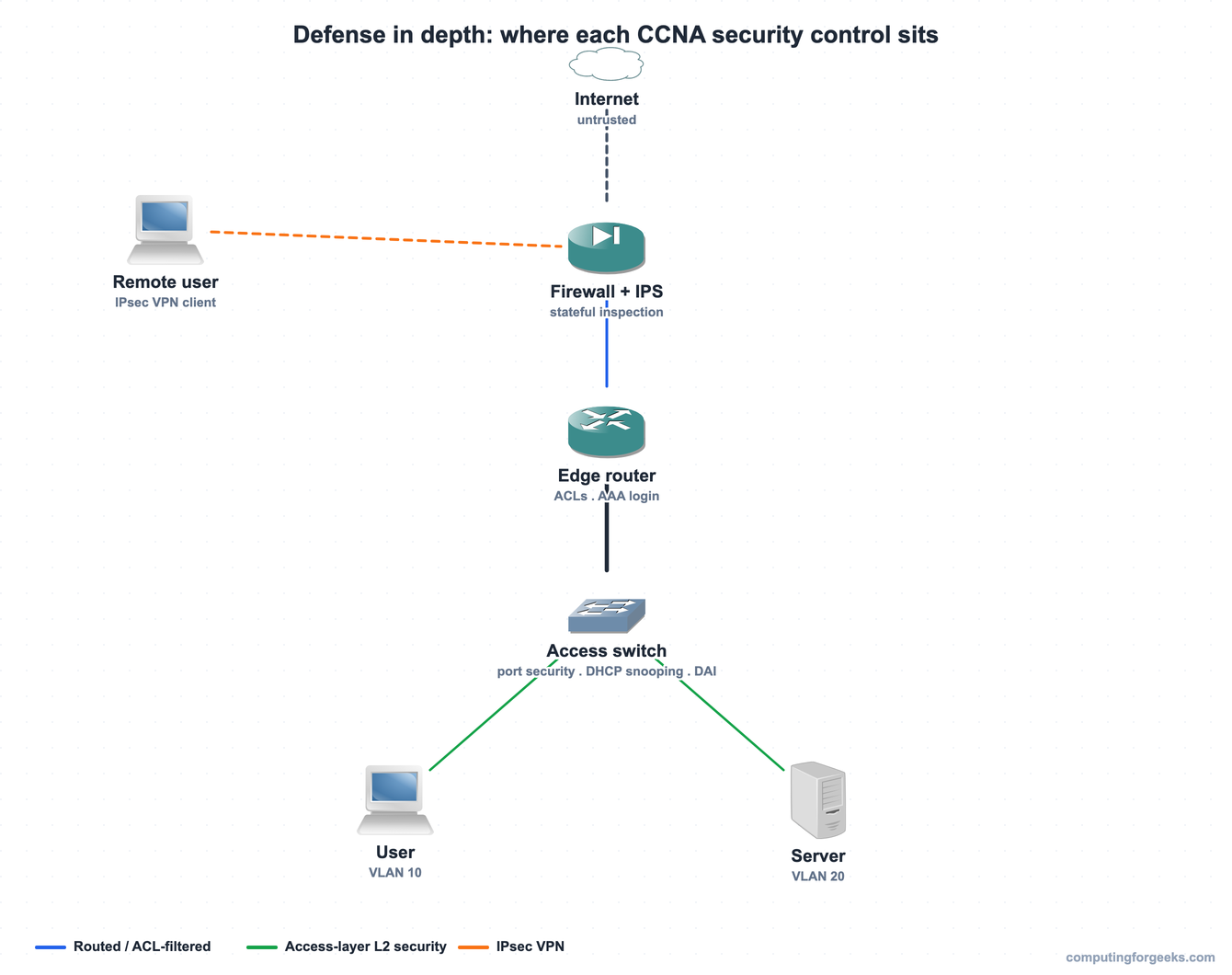
Reading it top to bottom, each layer adds a control the one above cannot provide. The firewall and IPS filter and inspect traffic at the perimeter. The edge router applies access control lists and forces administrators to authenticate before they can manage it. The access switch enforces the Layer 2 protections that defend the part of the network closest to users. Splitting users and servers into separate VLANs limits how far an attacker can move if a single host is compromised, and a remote worker reaches all of this only through an encrypted IPsec VPN.
Two ideas run through every layer. Least privilege means each user, device, and service gets only the access it needs and nothing more, so a compromised account cannot reach the whole network. Hardening means shrinking the attack surface: patch software, disable unused services and ports, change default credentials, and turn off protocols you do not use. Firewalls, an IPS, ACLs, AAA, VPNs, 802.1X, VLAN segmentation, and encryption are the tools; least privilege and hardening are the mindset that decides how you apply them.
Security program elements: the people, not just the devices
Most breaches start with a person, not a protocol, so the CCNA also expects you to know the non-technical side of a security program. Three elements come up, and the distinction between the first two matters.
| Element | What it is | Example |
|---|---|---|
| User awareness | Keeping security top of mind in an ongoing, informal way | Simulated-phishing emails, posters, a login banner warning of monitoring |
| User training | Formal, scheduled instruction, often specific to a role | Annual security training, an onboarding module for new staff |
| Physical access control | Stopping physical reach to network gear in the first place | Badge readers, door locks, biometrics, mantraps, CCTV, locked wiring closets |
Awareness is the steady drip that keeps people alert; training is the scheduled, measurable instruction that teaches them what to do. Physical access control matters because most of the device protections fall away once someone can touch the hardware. A person with console access to a switch in an unlocked closet can perform password recovery and own it, which is why a locked wiring closet is a security control every bit as real as an ACL.
Putting these concepts to work in the rest of Domain 5
Everything here turns into configuration in the guides that follow. Locking down management access starts with SSH for device access instead of clear-text Telnet, and grows into centralized AAA with RADIUS or TACACS+. The mitigations in the attack table become real commands: access control lists to filter traffic, port security, DHCP snooping, and dynamic ARP inspection for the Layer 2 attacks, and an IPsec VPN for the remote worker in the diagram. The wireless side carries its own encryption, which the wireless networking fundamentals guide introduces with WPA2 and WPA3. The firewalls and intrusion prevention systems from Domain 1 are the perimeter those controls sit behind, and VLAN segmentation is what keeps a single compromise from spreading.
Practice network security concepts
Run through the questions to lock in the threat-versus-vulnerability distinction, the attack-to-mitigation mappings, and the security program elements, then use the flashcards for quick recall before exam day.
Flip through the deck to drill the definitions until they are automatic, or download the Anki pack to review them anywhere:
With the vocabulary and the defense-in-depth model clear, the rest of Domain 5 is mostly a matter of turning each control on a real device and watching it work, then proving you have it with the Domain 5 practice test. The CCNA 200-301 study roadmap shows where these security topics fit in the wider CCNA 200-301 path.