When something breaks on a network at 3 a.m., the device already knew. It logged the interface going down, the neighbor it lost, the config someone changed. The question is whether that message reached anywhere you can read it. Syslog and SNMP are the two protocols that get a Cisco device to tell a central system what is happening, Syslog by streaming text log messages and SNMP by exposing health data an NMS can poll and receive alerts from. This guide configures both on Cisco IOS and reads the real verification output from a lab router.
This guide shows how to configure SNMP and Syslog on Cisco IOS: a logging host with a severity trap level, the eight Syslog severity levels, and SNMP in both the old community-based v2c and the secure user-based v3. The CCNA 200-301 exam asks you to configure and verify these network management protocols and to know what each severity level means. The same commands work on an IOS switch as on a router.
Ran this on a Cisco IOS 15.2 router logging and sending SNMP to a monitoring host in GNS3, June 2026.
Why you monitor a device with Syslog and SNMP
A router or switch generates a running commentary of events: links going up and down, routing changes, configuration edits, security violations. Locally that commentary scrolls past the console and is lost. Syslog ships each message to a central server so you keep a searchable history across every device, with timestamps that line up (which is exactly why NTP on the same devices matters: a log is only useful if its clock is right).
SNMP answers a different question. Where Syslog tells you what happened, SNMP lets a network management station read how a device is doing right now, interface counters, CPU, memory, uptime, by polling values out of the device’s MIB. The device can also push unsolicited alerts, called traps, the moment something crosses a threshold. Syslog is the device talking; SNMP is the manager asking, plus the device raising its hand.
The eight Syslog severity levels
Every Syslog message carries a severity from 0 to 7, and the number is backwards from what you might expect: lower is more severe. Level 0 is a dead box, level 7 is debug noise. This ordering is the whole reason a single command can filter logs, and it is heavily tested.
| Level | Keyword | Name | Meaning |
|---|---|---|---|
| 0 | emergencies | Emergency | System is unusable |
| 1 | alerts | Alert | Immediate action needed |
| 2 | critical | Critical | Critical conditions |
| 3 | errors | Error | Error conditions |
| 4 | warnings | Warning | Warning conditions |
| 5 | notifications | Notification | Normal but significant |
| 6 | informational | Informational | Informational messages |
| 7 | debugging | Debug | Debugging messages |
The trick to remember the order is the mnemonic “Every Awesome Cisco Engineer Will Need Ice cream, Daily” (Emergency, Alert, Critical, Error, Warning, Notification, Informational, Debug). When you set a logging level, the device sends that level and everything more severe than it. Set logging trap informational (level 6) and you get levels 0 through 6, everything except debugging. Set logging trap warnings (level 4) and you cut out the chatty notice and informational messages, keeping only levels 0 through 4.
The lab topology
The lab is one monitored router, R1, sending its logs and SNMP traps to a monitoring host (NMS) at 10.20.20.50. R1 is the device a real network runs; the NMS stands in for whatever collects the data, a Syslog server like rsyslog or Graylog and an SNMP platform like LibreNMS or Zabbix.
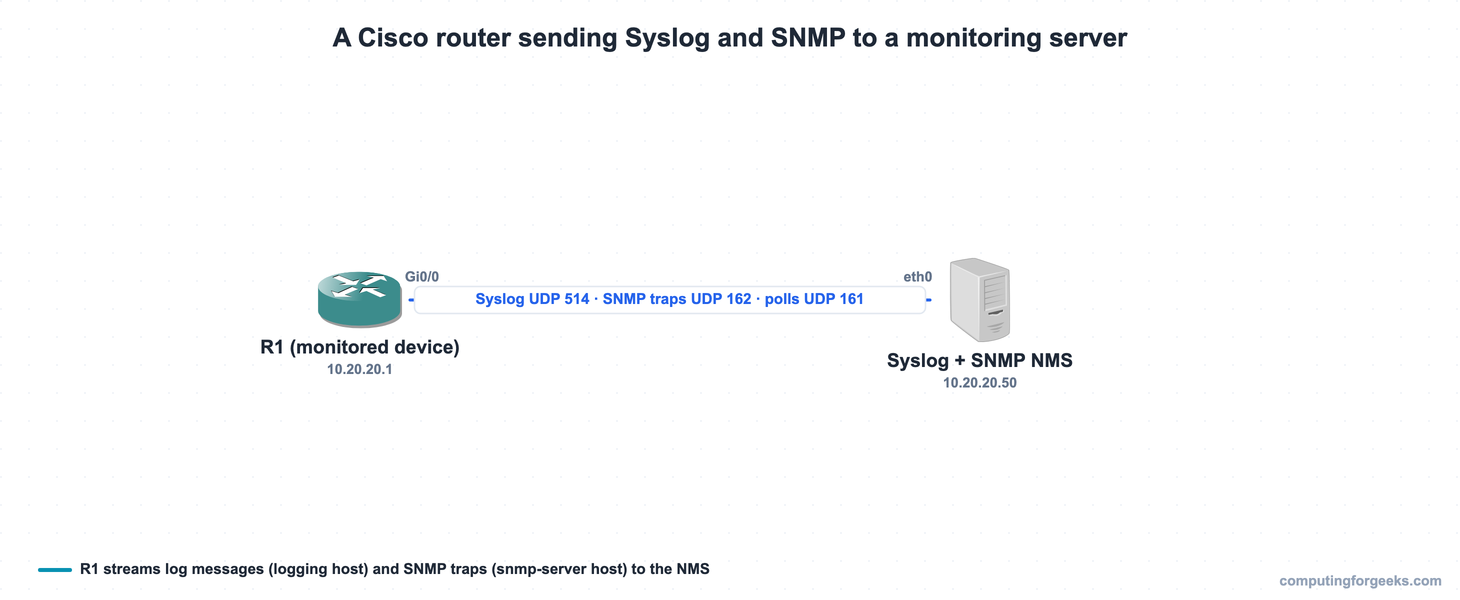
R1 uses Gi0/0 (10.20.20.1) to reach the NMS on the same subnet. Here is the same lab as it ran in GNS3 on real Cisco IOS, with a second router standing in for the management host:
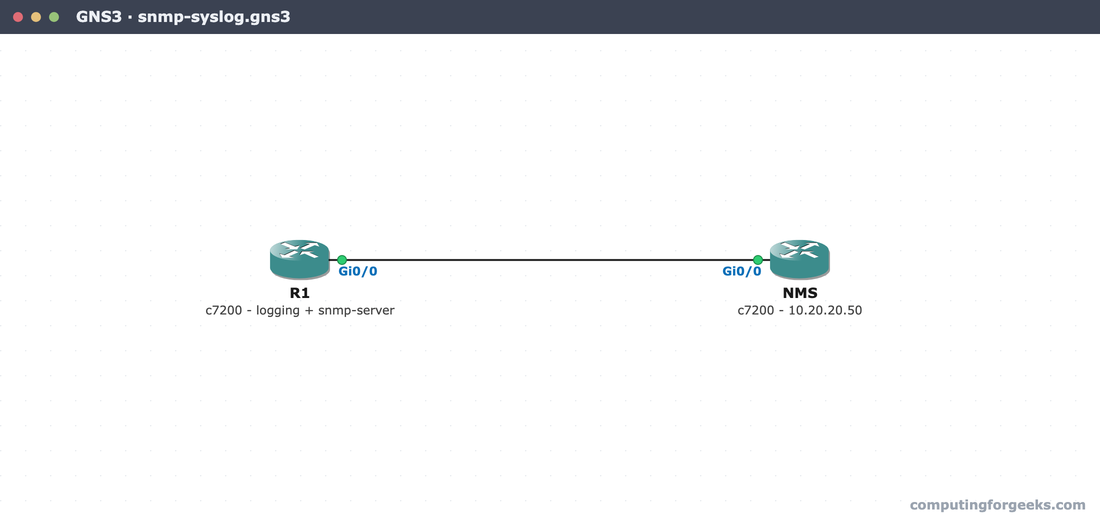
Every device config in this lab is paste-ready in the companion repo, c4geeks/ccna-labs/snmp-syslog.
Configure Syslog on a Cisco router
Start with timestamps. Without them, log messages carry only an uptime counter, useless for correlating across devices. Turn on real date and time stamps, then set the buffer and the remote host:
service timestamps log datetime msec
logging buffered 32768 informational
logging host 10.20.20.50
logging trap informational
logging source-interface GigabitEthernet0/0
Each line earns its place. logging buffered keeps a local copy in RAM so show logging works even with no server reachable. logging host names the Syslog server. logging trap informational sets the severity threshold for what is sent there (levels 0 through 6). logging source-interface fixes the source IP of those messages, so they always arrive from the same address no matter which path they take. With service timestamps log datetime msec, each entry is stamped to the millisecond.
The buffered log fills as events happen. After bouncing a loopback interface, show logging shows the configuration in the header and the real messages below it:
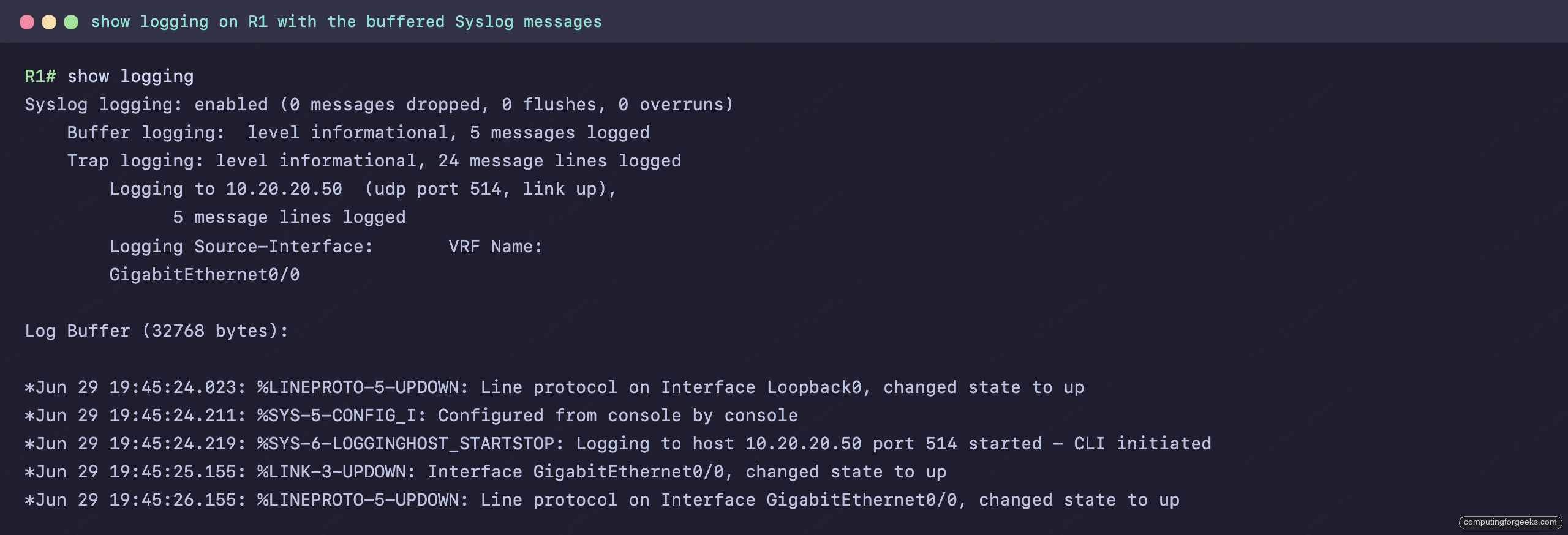
The header confirms the threshold and destination: logging to 10.20.20.50, trap level informational. Below it are the actual events, each a real Syslog line: the severity is the digit after the facility (a %LINK-3-UPDOWN is severity 3, a %SYS-5-CONFIG_I is severity 5), followed by the millisecond timestamp and the message. This is the text that would also be streaming to the server.
SNMP versions: v2c versus v3
SNMP has three versions, and the only one you should deploy is the newest. The difference between them is entirely about security:
| Version | Security model | Authentication | Encryption |
|---|---|---|---|
| v1 | Community string | Plaintext community | None |
| v2c | Community string | Plaintext community | None |
| v3 | User based (USM) | MD5 or SHA | DES or AES |
v1 and v2c authenticate with a community string, which is a password sent in clear text on the wire. v2c adds bulk transfers and inform messages but no security. v3 replaces the community with a named user and supports three levels: noAuthNoPriv (a username, nothing else), authNoPriv (the user is authenticated with MD5 or SHA), and authPriv (authenticated and the payload encrypted with DES or AES). Only authPriv is safe on a network you do not fully trust, which is why production SNMP is v3. The manager polls the agent on UDP 161; the agent sends traps on UDP 162.
Configure SNMP on Cisco IOS
For learning and for legacy NMS platforms, v2c is a two-line setup. Define a read-only community and point traps at the NMS:
snmp-server community CFG-RO ro
snmp-server location DC1-Rack4
snmp-server contact [email protected]
snmp-server host 10.20.20.50 version 2c CFG-RO
The ro keyword makes the community read-only, the safe default; rw would let the NMS change config and is almost never warranted. The location and contact strings show up in the NMS inventory. For the secure setup, build a v3 group at the priv level, then a user inside it with an authentication and a privacy passphrase:
snmp-server group CFGADMIN v3 priv
snmp-server user cfgmon CFGADMIN v3 auth sha Auth-Pass-2026 priv aes 128 Priv-Pass-2026
snmp-server host 10.20.20.50 version 3 priv cfgmon
snmp-server enable traps snmp linkdown linkup
That defines user cfgmon authenticated with SHA and encrypted with 128-bit AES, in a group that requires both. snmp-server enable traps turns on the trap types you want pushed to the host, here link up and down events. The community and the v3 user are independent; a device can serve both while you migrate an NMS from v2c to v3.
Verify Syslog and SNMP
For SNMP, three show commands prove each piece landed. show snmp community lists the v2c communities and their access, and show snmp user lists the v3 users with their authentication and privacy protocols:
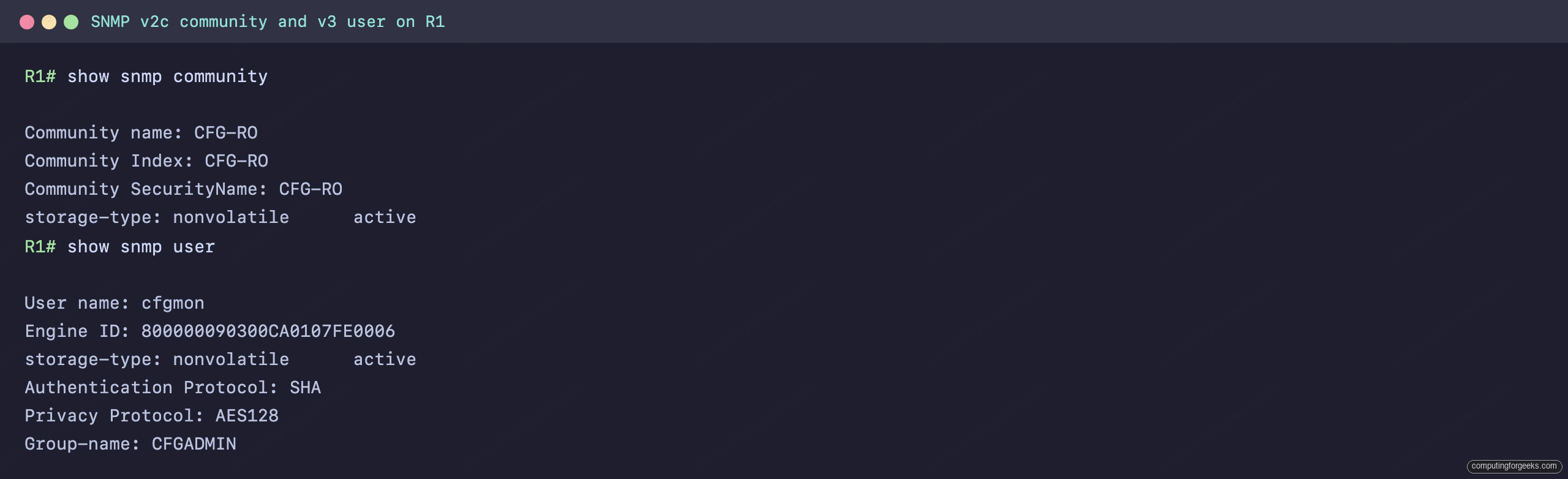
The community CFG-RO is present with read-only access, and the v3 user cfgmon shows its authentication protocol (SHA) and privacy protocol (AES128), confirming the secure user was built correctly. To see where alerts are sent, show snmp host lists every configured trap destination with its version and security level:

Both destinations point at 10.20.20.50: one over v2c with the community, one over v3 at the priv security level. The show snmp command (without an argument) rounds it out with the chassis ID, contact, location, and the running counters of SNMP packets in and out, which is how you confirm the agent is actually exchanging data with a manager.
Practice SNMP and Syslog
Run the quiz, then the flashcards, and read the explanation on anything you miss. The severity levels, what logging trap actually sends, and the v2c versus v3 security difference are the three things worth knowing cold.
Drill the eight severity levels and the SNMP versions until they are automatic:
What to actually run in production
Two decisions matter once you understand the mechanics. For Syslog, logging trap informational (level 6) is the sensible default: it captures config changes, interface events, and everything more serious, without the flood of debug output that level 7 unleashes. Drop to warnings (level 4) only on a device whose notice and informational messages are genuinely too noisy, and never leave a device at debugging in production. For SNMP, run v3 with authPriv on anything reachable from outside a trusted management segment; v2c communities travel in clear text and belong only on an isolated, trusted network, if at all. Pair this with synchronized clocks from the NTP configuration so every log timestamp lines up, lock down the device itself with access control, and the CCNA 200-301 study roadmap maps the rest of the IP Services domain.