A packet arrives on one interface and leaves on another, and everything a router does happens in the microseconds between those two events. The routing table tells you the map, but it does not tell you what the router does the instant a frame lands. Plenty of candidates picture the router scanning show ip route top to bottom for every packet. A modern Cisco router does not work that way at all.
This guide walks the real packet forwarding machinery: the two planes a router runs, the forwarding table that Cisco Express Forwarding (CEF) builds, the adjacency table that stores the Layer 2 rewrite, and finally one packet followed from arrival to wire. Every screen below is real output from a two-router lab, not a sketch. If you want the protocol-level overview of how routes are chosen in the first place, the IP routing and routing protocols guide covers that side.
Ran this on two Cisco IOS 15.2 routers in GNS3 in June 2026; every CEF, adjacency, and ARP line below is real device output.
The two planes: one decides, one forwards
A router splits its work into two jobs. The control plane runs the routing protocols, talks to neighbors, and builds the routing table. It is the slow, thoughtful brain that decides which path is best. The data plane is the muscle: it moves packets out interfaces as fast as the hardware allows, and it does not want to wait on the brain for every single frame.
CEF is the bridge between them. The control plane settles on the best route per destination, then CEF distills that into a compact forwarding table the data plane can read at line rate. The lab below is two routers, R1 and R2, joined on a 10.0.12.0/30 link running OSPF, with R1 holding a couple of loopbacks and a static route so its tables have something interesting to show.
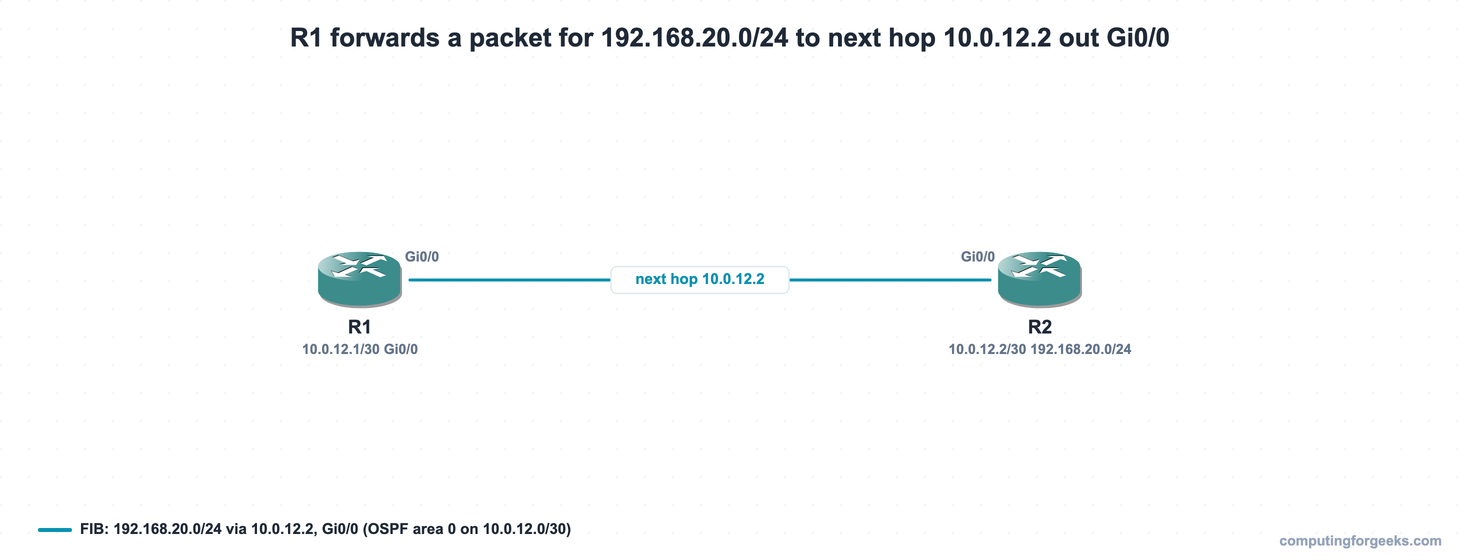
To prove the path actually forwards before dissecting how, a ping from R1’s 172.16.1.1 loopback to R2’s 192.168.20.1 stands in for a host behind R1 reaching a network behind R2:
ping 192.168.20.1 source 172.16.1.1All five replies come back, so the forwarding path is live end to end:
Type escape sequence to abort.
Sending 5, 100-byte ICMP Echos to 192.168.20.1, timeout is 2 seconds:
Packet sent with a source address of 172.16.1.1
!!!!!
Success rate is 100 percent (5/5), round-trip min/avg/max = 20/20/24 ms
RIB vs FIB: the table you read vs the table that forwards
The routing table you inspect with show ip route is the Routing Information Base, the RIB. It is the control plane’s conclusion: the single best route per prefix, with the source, administrative distance, and metric attached. The data plane does not forward from the RIB directly. CEF copies it into the Forwarding Information Base, the FIB, where every prefix is already resolved down to a next hop and an exit interface. View the FIB with show ip cef:
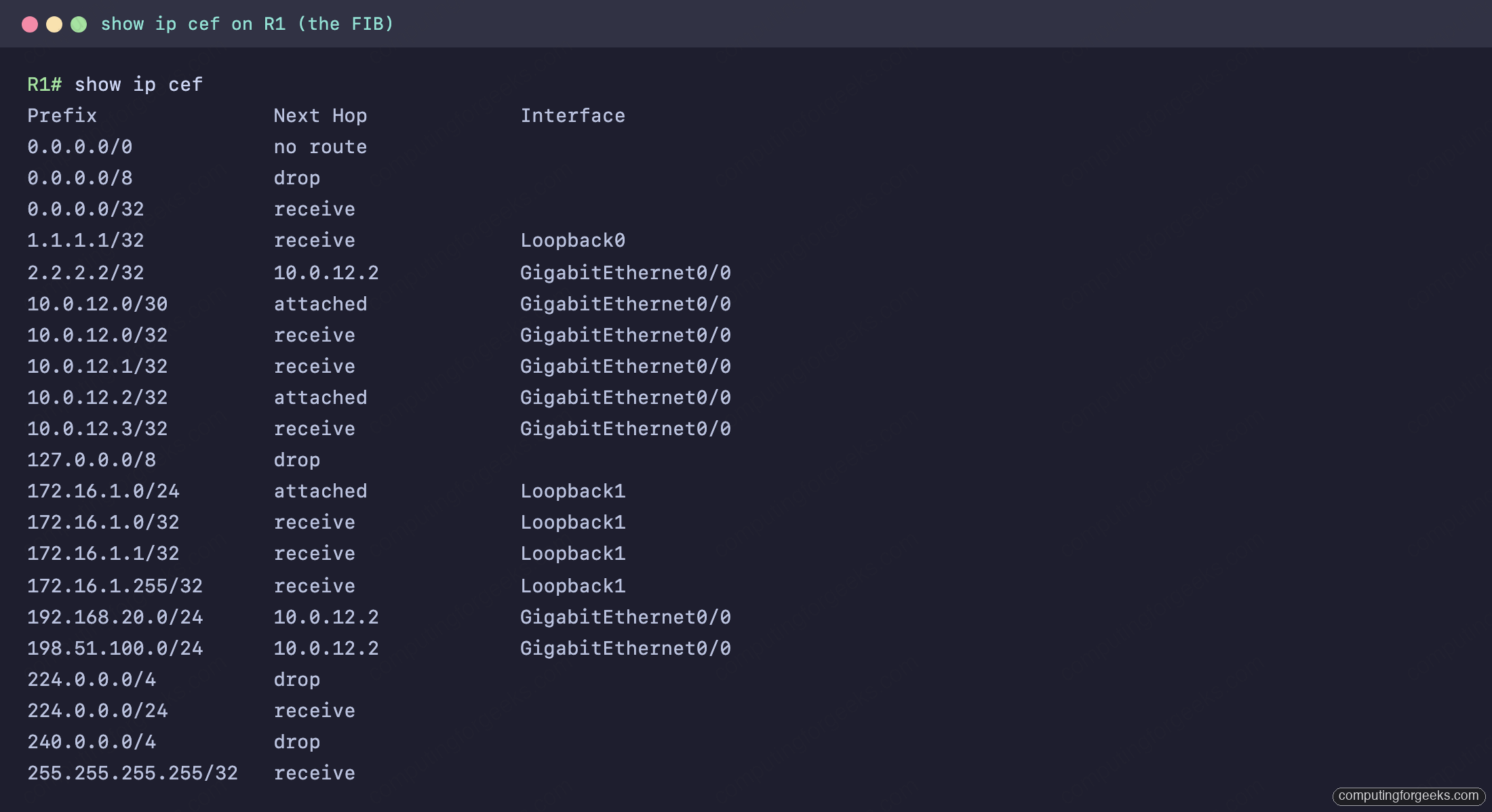
Read it as a flat lookup table. Each prefix maps straight to what the data plane needs. 192.168.20.0/24 and 2.2.2.2/32 point at 10.0.12.2 on GigabitEthernet0/0: those came from OSPF. The static route’s 198.51.100.0/24 resolves to the same next hop and interface. The other entry types matter just as much, and they are worth memorizing because they appear on every router.
| FIB entry | What it means |
|---|---|
receive | Destined to the router itself (its own interface IPs, plus the network and broadcast of its subnets). Punted to the control plane, not forwarded. |
attached | A directly connected network. The router reaches hosts in it directly rather than through a next-hop router. |
10.0.12.2 Gi0/0 | A route: forward toward this next hop, out this interface. |
drop | A reserved or martian range (0.0.0.0/8, 127.0.0.0/8, 224.0.0.0/4) that is silently discarded. |
no route | Nothing matches. Here 0.0.0.0/0 shows it because this router has no default route configured. |
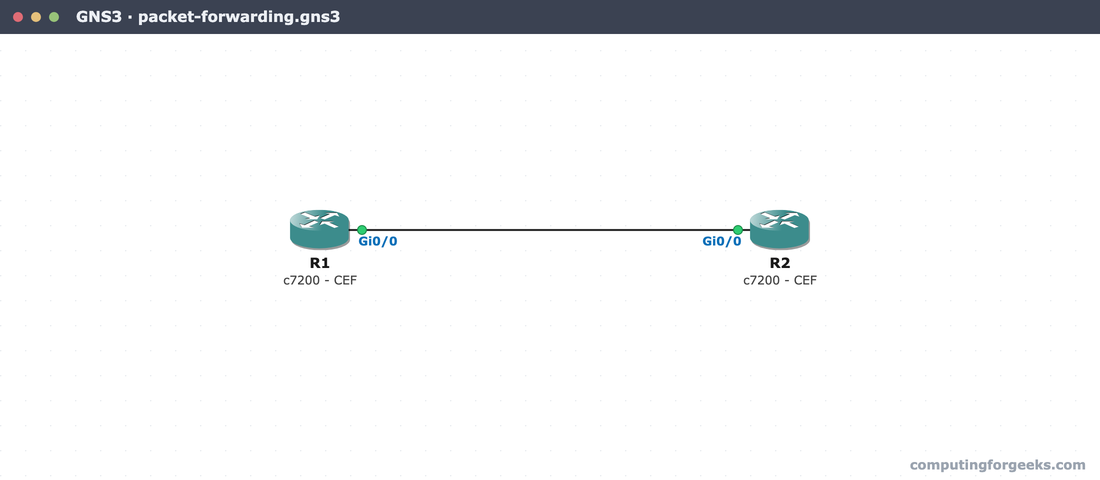
The whole lab runs on a clean GNS3 canvas, two c7200 routers cabled Gi0/0 to Gi0/0, so anyone can rebuild it and reproduce these exact tables:
The adjacency table: the Layer 2 header the router pushes
Knowing the next hop is half the job. To put the packet on an Ethernet link, the router needs the exact frame header to wrap around it: a destination MAC, a source MAC, and an EtherType. CEF keeps that ready-made header in the adjacency table, one entry per next hop, so it never has to build the frame from scratch per packet. show adjacency ... detail prints the literal bytes, and show ip arp reveals where they came from:
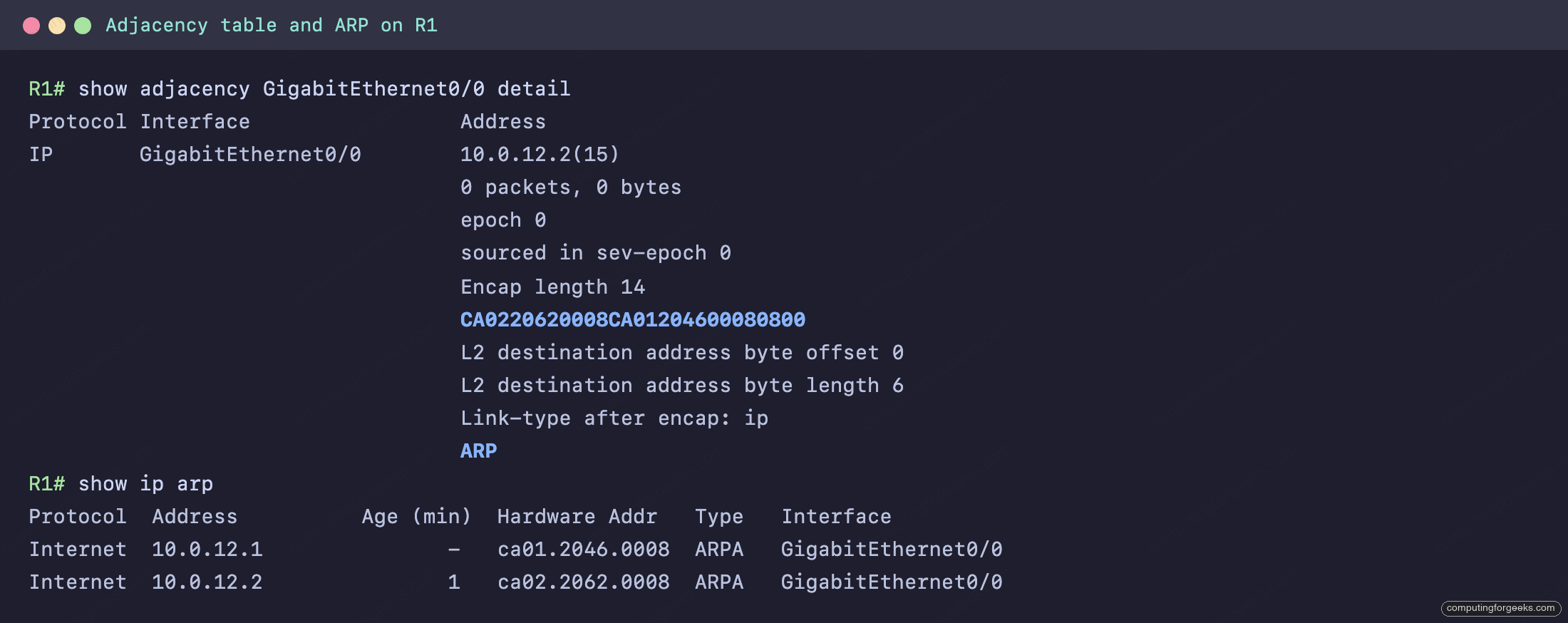
The line Encap length 14 is the size of an Ethernet header: 6 bytes of destination MAC, 6 of source MAC, 2 of EtherType. The rewrite string right below it, CA0220620008CA01204600080800, is those 14 bytes verbatim. Split it and every piece maps to something you can confirm in the ARP table:
| Bytes (hex) | Field | Value |
|---|---|---|
CA0220620008 | Destination MAC | ca02.2062.0008, R2’s Gi0/0 (the next hop, 10.0.12.2 in ARP) |
CA0120460008 | Source MAC | ca01.2046.0008, R1’s own Gi0/0 (10.0.12.1 in ARP) |
0800 | EtherType | IPv4 |
That is the entire reason ARP matters to routing: the next hop’s MAC, learned by ARP, becomes the destination MAC in this rewrite. The trailing ARP in the adjacency output names exactly how the entry was resolved. The Layer 3 addressing that the IPv4 addressing rules describe stays untouched; only this Layer 2 wrapper changes hop to hop.
The packet forwarding decision, start to finish
Put the pieces together and a single forwarded packet runs through five steps:
- Longest-prefix match. The destination IP is matched against the FIB, and the most specific entry wins.
- Next hop and interface. That entry yields the next hop IP and the exit interface.
- Layer 2 rewrite. The adjacency table supplies the destination and source MAC for the new frame.
- TTL and checksum. The router decrements the IP TTL by one and recomputes the header checksum.
- Send. The packet, in its new Layer 2 frame, goes out the exit interface.
You can watch the lookup resolve for a single destination. show ip route 192.168.20.0 shows the RIB’s reasoning, and show ip cef for a host inside that prefix shows the resolved forwarding result the data plane uses:
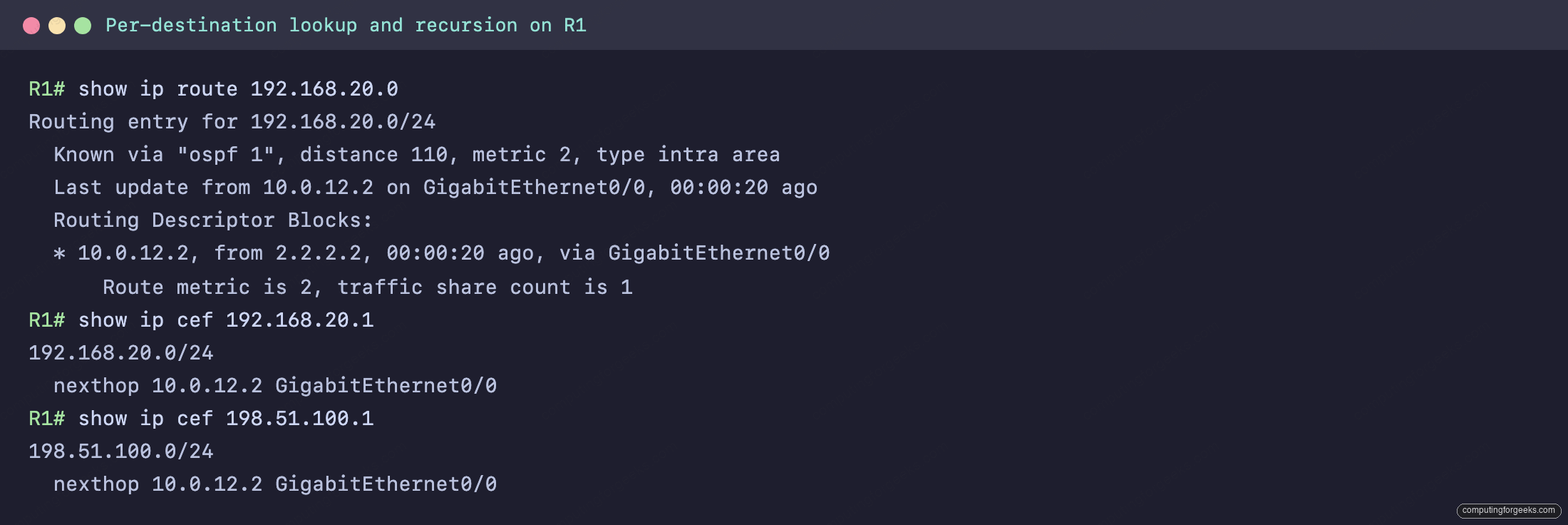
The routing entry reports Known via "ospf 1", distance 110, metric 2 via 10.0.12.2, the control plane’s decision. The CEF lookup for 192.168.20.1 collapses all of that into one line: nexthop 10.0.12.2 GigabitEthernet0/0. Longest-prefix match is what decides forwarding here. A packet for 192.168.20.55 matches 192.168.20.0/24 over any broader entry because it is the most specific, regardless of administrative distance or metric.
Recursion: a static route via a next-hop IP
R1’s static route to 198.51.100.0/24 points at the next-hop IP 10.0.12.2, not at an exit interface. On its own that is incomplete: to send a frame, the router still needs an interface and a destination MAC. So it performs a recursive lookup, finding the route to 10.0.12.2 (directly connected on Gi0/0) and borrowing its interface and adjacency. CEF does this resolution once, ahead of time, which is why show ip cef 198.51.100.1 already reads nexthop 10.0.12.2 GigabitEthernet0/0 with no recursion left to do at forwarding time.
This is also the gap between CEF and the old process-switching model. Process switching had the CPU examine and look up each packet the slow way. CEF builds the complete FIB and adjacency table in advance, so even the first packet to a new destination is forwarded fast and the CPU stays out of the per-packet path. CEF is enabled by default on modern routers, which is why these tables are simply there to read.
Practice on your own lab
Paste-ready R1 and R2 configurations for this exact topology are in the ccna-labs repository. Build the two routers, load the configs, then run show ip cef, show adjacency detail, and show ip arp and trace the rewrite string back to the ARP table yourself. When you are comfortable, the CCNA 200-301 study roadmap maps where this fits in Domain 3, and the network devices guide places the router among the rest of the gear.
What changes and what stays the same as a packet crosses a router
The cleanest way to hold all of this in your head is to track what a router rewrites and what it leaves alone. The Layer 2 header is rebuilt at every hop: the source MAC becomes the router’s exit interface, the destination MAC becomes the next hop’s interface, both pulled from the adjacency table. The Layer 3 source and destination IP addresses do not change as the packet crosses the router. The TTL drops by one each hop, and when it reaches zero the packet is dropped and an ICMP time-exceeded is returned, which is precisely the mechanism traceroute relies on. Keep that split straight, the IPs ride through while the MACs and the TTL change, and the routing table, the FIB, and the adjacency table all stop being three mysteries and become three views of the same forwarding decision.