You sit down at a brand-new router, type show ip interface brief, and every line says unassigned. Before that box forwards a single packet it needs an IPv4 address, and before you can hand it one you need to know what the address actually means: which part identifies the network, which part identifies the device, and why some addresses you will never be allowed to assign.
This guide explains how IPv4 addressing works from the ground up. We cover the 32-bit structure of an address, the A, B, and C address classes with their default masks, the difference between public and private (RFC 1918) addresses, and the exact commands to configure and verify an address on a Cisco router (and on a Windows, macOS, or Linux client). Every value here is computed, and every command was run on a real IOS device so the output is the genuine article.
Ran every command below on a Cisco IOS router (a GNS3 c7200) in June 2026, so the output you see is exactly what the device printed.
If the IOS prompts and modes are still new, work through the IOS CLI editing basics first. This guide assumes you can already move between user EXEC, privileged EXEC, and configuration mode.
What an IPv4 address actually is
An IPv4 address is a 32-bit number, written as four 8-bit octets in dotted-decimal notation like 192.168.10.1. Those 32 bits split into two parts: a network portion that identifies the network, and a host portion that identifies one device on it. The subnet mask is what marks the boundary between the two.
Take 192.168.10.1 with mask 255.255.255.0. The mask sets the first 24 bits as network and the last 8 bits as host, which is why you also see this written as 192.168.10.1/24 in CIDR notation. The network is 192.168.10.0 and the host part is .1.
| Property | Value |
|---|---|
| Total length | 32 bits |
| Structure | 4 octets of 8 bits, dotted-decimal |
| Example address | 192.168.10.1 |
| Mask | 255.255.255.0 (/24) |
| Network portion | 192.168.10.0 (first 24 bits) |
| Host portion | .1 (last 8 bits) |
Seeing the same address broken into octets, then into binary, then against the mask makes the split obvious. The green octets are network, the amber octet is host, and the bottom row is the mask that draws the line:
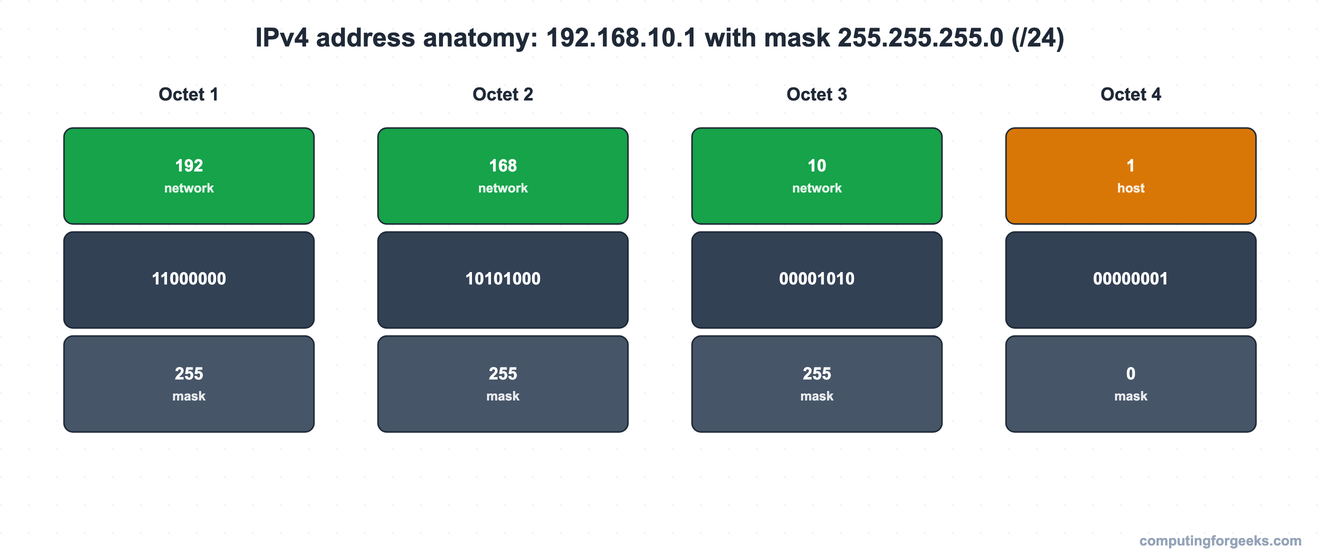
A mask octet of 255 means all eight bits in that octet belong to the network; a 0 means all eight belong to the host. The host bits are the ones that change as you move from one device to the next on the same network.
IPv4 address classes and their default masks
The class of an IPv4 address is decided by the value of its first octet alone. That single number tells you the historical default mask and how many hosts the network could hold.
| Class | First-octet range | Default mask | Network / host bits | Max hosts per network |
|---|---|---|---|---|
| A | 1 to 126 | 255.0.0.0 (/8) | 8 / 24 | 16,777,214 |
| B | 128 to 191 | 255.255.0.0 (/16) | 16 / 16 | 65,534 |
| C | 192 to 223 | 255.255.255.0 (/24) | 24 / 8 | 254 |
| D | 224 to 239 | multicast, not assignable to hosts | n/a | n/a |
| E | 240 to 255 | reserved, not assignable to hosts | n/a | n/a |
Two ranges are carved out of Class A: 127.0.0.0 through 127.255.255.255 is reserved for loopback (that is why 127.0.0.1 always points back at the local host), and 0.0.0.0 is reserved. Classes D and E exist but you never put them on a host interface.
One honest caveat: real networks have been classless since the 1990s. Modern routing uses the mask, not the class, to decide where the network ends, so a Class B address with a /24 mask is perfectly normal. Classes still matter for the default-mask intuition and for reading older configurations, and they remain a Cisco CCNA exam topic, which is why they are worth knowing cold.
Subnet ID, host range, and broadcast address
Inside any IPv4 network, two addresses are reserved and can never be assigned to a host: the subnet ID (the numerically lowest address in the range) and the directed broadcast (the numerically highest). Everything between them is a usable host address. The count of usable hosts is 2 raised to the number of host bits, minus those two reserved addresses, so the formula is (2^H) - 2 where H is the host bit count.
For a /24, H is 8, so usable hosts are (2^8) - 2 = 254. The first usable address is the subnet ID plus one, and the last usable is the broadcast minus one. Here are two networks worked out the same way:
| Network | Subnet ID | First usable | Last usable | Broadcast | Usable hosts |
|---|---|---|---|---|---|
| 192.168.10.0/24 | 192.168.10.0 | 192.168.10.1 | 192.168.10.254 | 192.168.10.255 | 254 |
| 172.16.1.0/24 | 172.16.1.0 | 172.16.1.1 | 172.16.1.254 | 172.16.1.255 | 254 |
The second row is a Class B network (172.16.0.0) carrying a /24 host mask, which produces 256 Class-C-sized subnets. Working those boundaries out for any mask is exactly what subnetting is. When you are ready for it, the step-by-step subnetting guide walks the math, and the VLSM guide shows how to size each subnet to its real host count.
Public vs private IPv4 addresses, and why private exists
Public IPv4 addresses are globally unique and routable across the Internet; private addresses are free to reuse, never routed across the public Internet, and the reason your home and office networks all quietly share the same 192.168.x.x space without colliding.
The reason private addressing exists is simple arithmetic. IANA handed out its last block of public IPv4 space in early 2011, and the North American registry (ARIN) ran dry in 2015. Three things kept the Internet running past that wall: IPv6 (a vastly larger address space), CIDR (more efficient allocation), and NAT paired with private addresses. The private ranges are defined in RFC 1918:
| Class | Private range | CIDR block | Networks |
|---|---|---|---|
| A | 10.0.0.0 to 10.255.255.255 | 10.0.0.0/8 | 1 |
| B | 172.16.0.0 to 172.31.255.255 | 172.16.0.0/12 | 16 |
| C | 192.168.0.0 to 192.168.255.255 | 192.168.0.0/16 | 256 |
NAT is the bridge between the two worlds. A router translates a private inside address into a public address on the way out, so thousands of organizations can reuse the same 10.0.0.0/8 internally because those packets never reach each other directly. ISPs typically filter RFC 1918 prefixes at the edge, so a misconfigured NAT that leaks a private source address usually gets its packets dropped rather than delivered.
Configure an IPv4 address on a Cisco router
Assigning an address is three commands once you are at the interface: set the address and mask, bring the interface up, and leave configuration mode. From a fresh prompt:
enable
configure terminal
interface GigabitEthernet0/0
ip address 192.168.10.1 255.255.255.0
no shutdown
end
The no shutdown is the step that catches people. Cisco router interfaces are administratively down by default, so without it the address is configured but the interface never comes up. Confirm the address landed in the running configuration:
show running-config | include ip addressThe interface you just configured shows the address you set, while the interfaces you left alone still read no ip address:
 no ip address
 ip address 192.168.10.1 255.255.255.0
 no ip address
 no ip address
So far the address lives only in the running configuration, which is wiped on reload. Save it to the startup configuration so it survives a reboot:
copy running-config startup-configThis is just the addressing slice of a full device bring-up. The complete first-boot workflow (hostname, secrets, SSH, console and VTY logins) is in the base device configuration guide.
Verify the address with show ip interface brief
The fastest way to confirm an address took effect is show ip interface brief. It prints one line per interface with the address, how it was set, and the link state.
show ip interface briefGigabitEthernet0/0 now carries 192.168.10.1, the Method column reads manual (the address was set by hand, not by DHCP), and both Status and Protocol are up, which is the healthy state:
Interface              IP-Address      OK? Method Status                Protocol
Ethernet0/0            unassigned      YES unset  administratively down down
GigabitEthernet0/0     192.168.10.1    YES manual up                    up
GigabitEthernet1/0     unassigned      YES unset  administratively down down
GigabitEthernet2/0     unassigned      YES unset  administratively down down
Read the columns left to right: the interface name, its address, an OK flag, the Method (manual for static, DHCP if leased), then the Status (layer 1) and Protocol (layer 2) states. administratively down means the interface is still shut, so it is the first thing to check when an address is set but nothing pings.
For the full picture on a single interface, including the mask in CIDR form and the line rate, use show interfaces:
show interfaces GigabitEthernet0/0The first lines confirm the interface is up at gigabit speed and that the Internet address is 192.168.10.1/24, the CIDR form of the mask you typed:
GigabitEthernet0/0 is up, line protocol is up
  Hardware is i82543 (Livengood), address is ca01.b2dc.0008 (bia ca01.b2dc.0008)
  Internet address is 192.168.10.1/24
  MTU 1500 bytes, BW 1000000 Kbit/sec, DLY 10 usec,
     reliability 255/255, txload 1/255, rxload 1/255
  Encapsulation ARPA, loopback not set
Practice IPv4 addressing
Drill the facts with the flashcards, then check yourself on the quiz. The cards remember which ones you have marked as known, and you can grab the deck for Anki if you study with spaced repetition.
Now test what stuck:
IPv4 addressing mistakes that trip people up
These are the snags that turn a five-minute task into a twenty-minute one, all of them seen on real gear.
The address is set but the interface stays down. If show ip interface brief shows administratively down, the no shutdown was skipped. If Status is up but Protocol is down, the problem is one layer lower: a missing cable, a speed or duplex mismatch, or the device on the other end is shut.
Assigning the subnet ID or the broadcast to a host. In a /24, the .0 and the .255 are reserved. The usable range runs from .1 to .254. Hand a server 192.168.10.0 or 192.168.10.255 and it either refuses the address or talks to nothing.
Thinking the address class still controls routing. It does not. The mask defines where the network ends, and the mask is independent of the class. A 172.x address with a /24 is a /24 network, full stop, no matter what the old class tables say.
Expecting a private address to work across the Internet. A 10.x, 172.16-31.x, or 192.168.x address is typically filtered at the ISP edge. To reach the public Internet it has to be translated to a public address by NAT first. Internally it works perfectly; that is the whole point of RFC 1918.
Get these four right and addressing stops being a mystery. The natural next step is sizing networks for a real host count, which is where subnetting and VLSM pick up. If you are studying for the CCNA, the CCNA 200-301 study roadmap shows where addressing sits in the full path.