PC1 cannot reach PC2. The ping times out, and a whole subnet of users is stuck on the LAN with no way off it. Two routers, R1 and R2, run OSPF between them and everything looked fine yesterday. The fastest way back to a working network is not guesswork, it is a fixed order of checks that walks down (or up) the stack until the broken layer gives itself away.
This guide works a real two-fault failure end to end: confirm and scope the problem, read the routing table, separate an OSPF adjacency problem from an advertisement problem, check interface status, fix each fault, and verify. Every command and its output below is captured from the live lab, broken state and fixed state both.
Ran the broken-then-fixed sequence on two Cisco IOS 15.2 routers in June 2026.
Start with the symptom and scope it
Here is the network. PC1 (10.0.1.10) sits on LAN1 behind R1; PC2 (10.0.2.10) sits on LAN2 behind R2; the routers share a /30 link and run OSPF in area 0.
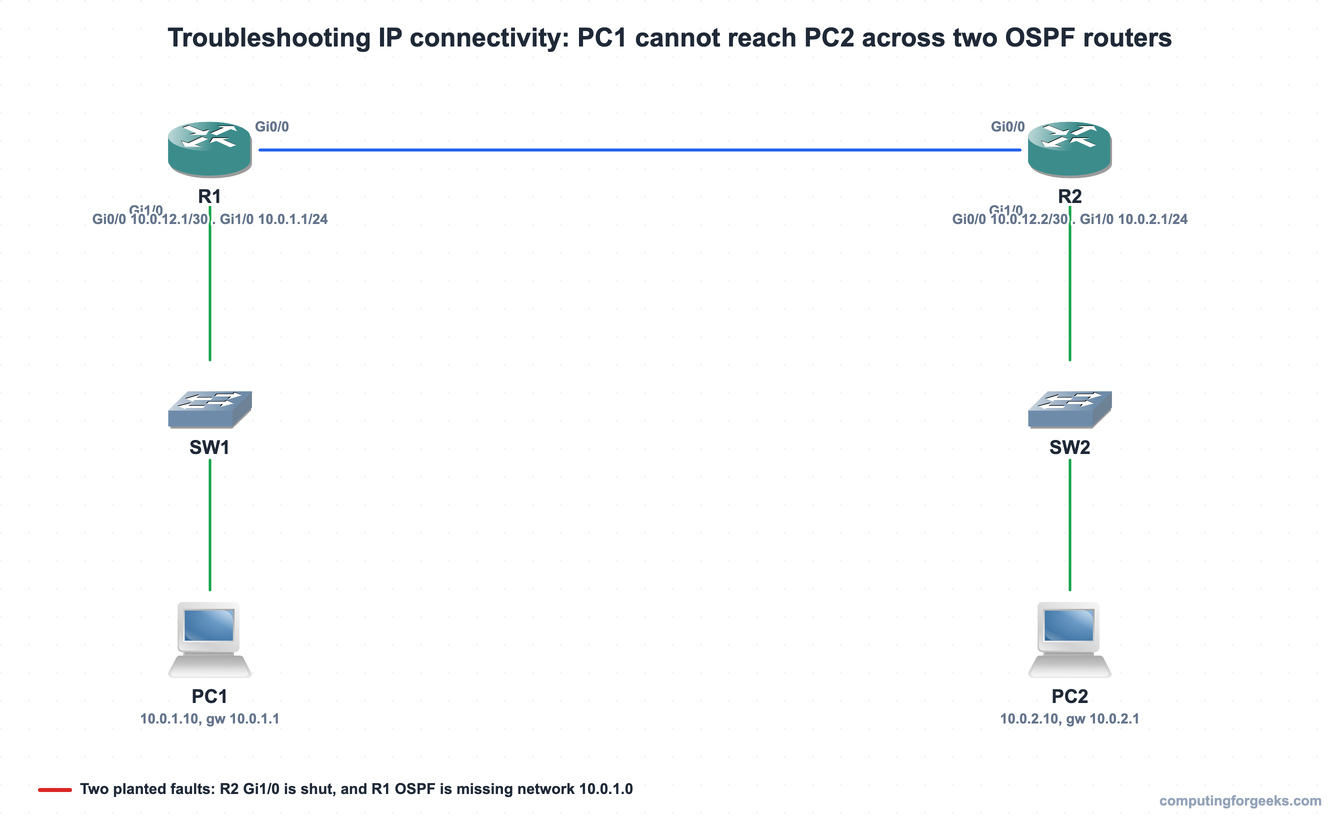
Scope the failure before touching anything. From R1, source a ping off the LAN1 interface toward PC2’s gateway so you test the exact path real user traffic takes:
R1# ping 10.0.2.1 source 10.0.1.1
Type escape sequence to abort.
Sending 5, 100-byte ICMP Echos to 10.0.2.1, timeout is 2 seconds:
Packet sent with a source address of 10.0.1.1
.....
Success rate is 0 percent (0/5)
Five dots, zero replies. The local interface answered (the source address was accepted), so R1’s own LAN side is up. The failure is somewhere between here and 10.0.2.1. Time to follow the packet.
Read the routing table next
Layer 3 reachability is a routing question, so ask the routing table whether R1 even knows how to get to 10.0.2.0/24. Reading show ip route is the single most useful habit in connectivity troubleshooting:
R1# show ip route
<codes legend omitted>
Gateway of last resort is not set

      10.0.0.0/8 is variably subnetted, 4 subnets, 3 masks
C        10.0.1.0/24 is directly connected, GigabitEthernet1/0
L        10.0.1.1/32 is directly connected, GigabitEthernet1/0
C        10.0.12.0/30 is directly connected, GigabitEthernet0/0
L        10.0.12.1/32 is directly connected, GigabitEthernet0/0
There is the first hard fact. R1 has its two connected networks and nothing else. There is no entry for 10.0.2.0/24, so when the ping needs a route to PC2’s subnet, R1 has none and drops the packet. The question becomes: why has OSPF not handed R1 a route to LAN2?
A FULL neighbor does not mean routes are flowing
The instinct here is to blame the OSPF adjacency. Check it before you assume it:
R1# show ip ospf neighbor

Neighbor ID     Pri   State           Dead Time   Address         Interface
10.0.12.2         1   FULL/DR         00:00:31    10.0.12.2       GigabitEthernet0/0
The neighbor is in the FULL state, which means the adjacency formed and the two routers exchanged their databases. This is the lesson that trips people up: a healthy neighbor relationship does not guarantee you will receive a route for every remote subnet. OSPF only advertises a network if that network is actually up and is included in the OSPF process.
The neighbor state also tells you which way to dig. If this command had shown the neighbor stuck in INIT or EXSTART, or absent entirely, the adjacency itself would be the fault, and the usual causes are a mismatched area, mismatched hello or dead timers, a subnet mask mismatch on the link, an MTU mismatch, or authentication (the OSPF neighbor states are worth knowing cold for exactly this reason). Here it is FULL, so the adjacency is healthy and the problem is downstream: R2’s LAN is either down or unadvertised. Look at R2’s interfaces:

There is fault one. GigabitEthernet1/0 holds the right address, 10.0.2.1, but its status is administratively down, which means someone left it shut. An interface in that state carries no traffic and OSPF will not advertise its subnet. Bring it up on R2:
interface GigabitEthernet1/0
 no shutdown
The difference between administratively down and a plain down/down matters when you read that table. Administratively down is a human shutting the port; down/down is a physical or cabling problem; up/down usually means a layer 2 mismatch. Each points you at a different layer, which is exactly why the interface check is non-negotiable.
Check what OSPF is actually advertising
Bringing up R2’s interface clears the first fault, but the failure is not over. During the outage R2’s own table told the rest of the story. It knew only the directly connected link and had no route back to LAN1:
R2# show ip route
<codes legend omitted>
      10.0.0.0/8 is variably subnetted, 2 subnets, 2 masks
C        10.0.12.0/30 is directly connected, GigabitEthernet0/0
L        10.0.12.2/32 is directly connected, GigabitEthernet0/0
R2 has no route to 10.0.1.0/24, so even a reply from PC2 has nowhere to go. A reachable destination needs a working path in both directions. Since the adjacency is FULL, R1 must not be advertising LAN1. Confirm it by reading exactly what R1 put into its OSPF process:
R1# show running-config | section router ospf
router ospf 1
 network 10.0.12.0 0.0.0.3 area 0
Fault two is plain now. R1 advertises the /30 link but never the LAN1 network, so 10.0.1.0/24 is invisible to the rest of the area. Add the missing statement on R1:
router ospf 1
 network 10.0.1.0 0.0.0.255 area 0
A wrong subnet mask, a missing or mistyped network statement, and a wrong wildcard all produce the same symptom you just saw: a FULL neighbor with a route quietly absent. If you need to revisit how the network wildcard selects interfaces, the single-area OSPF configuration walks through it, and the static route guide covers the alternative when you would rather pin a path by hand.
Verify end to end
Never close a ticket on theory. Re-run the exact test that failed. R1 now has an OSPF route to LAN2, and the ping that returned five dots returns five exclamation marks:

Confirm the control plane agrees with the data plane. Both remote subnets now appear as OSPF routes, one on each router:
R1# show ip route
<codes legend omitted>
C        10.0.1.0/24 is directly connected, GigabitEthernet1/0
O        10.0.2.0/24 [110/2] via 10.0.12.2, 00:03:16, GigabitEthernet0/0
C        10.0.12.0/30 is directly connected, GigabitEthernet0/0
The O route to 10.0.2.0/24 with metric 110/2 is the proof that R1 learned LAN2 through OSPF. Reading the table is covered in depth in the IP routing table guide, and the interface-status angle continues in the show interfaces troubleshooting guide.
Practice IP connectivity troubleshooting
Flip the cards to lock in what each status and show command tells you, then take the quiz to test the diagnostic order on a fresh scenario. These checks are one stop on the wider CCNA 200-301 study roadmap.
A repeatable IP connectivity checklist
The two faults here were arbitrary; the method that found them is not. Run these checks in order and connectivity problems stop being a guessing game:
- Reproduce and scope it. Ping the destination, then the local gateway, then across the link, to localize which hop the traffic dies on.
- Read
show ip routeat each hop. A missing route for the destination subnet is the most common cause; note where it disappears. - If the route is missing and you run a routing protocol, check
show ip ospf neighbor. FULL means the adjacency is fine, so suspect advertisement or interface state, not the neighbor. - Read
show ip interface brief. Administratively down is a shut port, down/down is physical or cabling, up/down is a layer 2 mismatch. Each points at a different layer. - Confirm what the protocol advertises with
show running-config | section router ospf(orshow ip protocols). Look for a missing or wrongnetworkstatement and wildcard. - Remember that reachability is bidirectional. A fixed forward path still fails if the return route is absent, so check both routers.
- Verify by re-running the exact test that failed, and confirm the new route is in the table.
Work the layers in a fixed order and the network tells you where it broke. The protocols change from one network to the next, but reproduce, read the routing table, check the neighbor, check the interface, confirm the advertisement, and verify both directions is the sequence that keeps working.