Every device on a subnet sends off-network traffic to a single default gateway. That one address is also the network’s quietest single point of failure. When the router behind it reboots or its interface drops, every host on the subnet loses its path off the LAN until the device recovers or someone reconfigures gateways by hand. A first hop redundancy protocol removes that weakness by letting two or more routers stand in for one gateway address, so the loss of any single router goes unnoticed by the hosts.
This guide explains what a first hop redundancy protocol (FHRP) is, how the virtual IP and virtual MAC trick works, how routers elect an active and a standby, and how the three common protocols (HSRP, VRRP, and GLBP) differ. The show standby output here was captured on Cisco IOS 15.2 in June 2026 on a two-router HSRP version 2 lab.
One default gateway is a single point of failure
A host learns exactly one default gateway, either statically or from DHCP. To reach anything off its own subnet it ARPs for that gateway, caches the MAC, and forwards every off-net frame to it. The design is simple and it works, right up until that gateway disappears. If you want a refresher on how a router picks the next hop, that mechanism is what the gateway performs on the host’s behalf.
When the gateway router fails, the host keeps sending frames to a MAC address that no longer answers. It has no second gateway to try and no way to discover one. The host is stranded even when a perfectly good backup router sits on the same subnet. Editing the gateway on every host, or waiting for the dead router to come back, is not redundancy. It is an outage with a manual fix.
That is the gap a first hop redundancy protocol closes. Two routers share responsibility for the gateway address so the host never has to care which physical box is forwarding its traffic.
How a first hop redundancy protocol fixes it
The fix is a virtual gateway. Instead of pointing hosts at a router’s real interface address, you give the group a virtual IP and a virtual MAC that the routers share. Hosts use the virtual IP as their default gateway and never learn the real addresses of the routers behind it.
At any moment one router owns the virtual addresses and forwards traffic for them. The others wait and watch for it to fail. Because the gateway the hosts know is virtual, ownership can move between routers without a single host updating its configuration or even its ARP cache. The diagram below shows the shape: two routers on the same subnet as the hosts, sharing the virtual gateway 192.168.10.254.
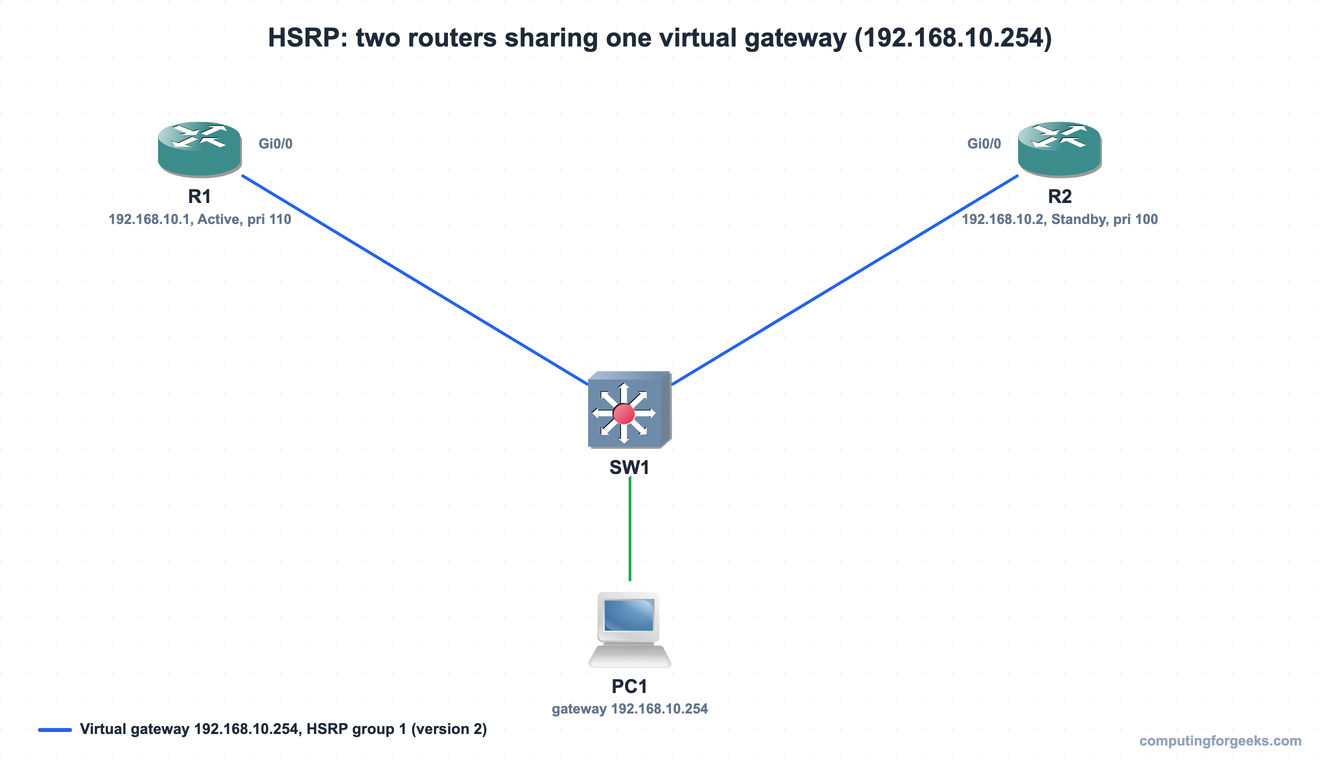
R1 and R2 keep their real addresses (192.168.10.1 and .2), but the hosts never use them. Every frame leaving the subnet is sent to 192.168.10.254, and whichever router currently owns that address forwards it.
Active, standby, priority, and preemption
The routers in a group hold an election to decide who forwards. The winner becomes the active router and answers ARP for the virtual IP with the virtual MAC. The loser becomes the standby, ready to take over. Priority decides the election: the highest priority wins, and a higher real IP breaks a tie. The default priority is 100, so you raise one router’s priority to make it the predictable active. On R1 we set priority 110 and turned on preemption, then read the state with show standby.
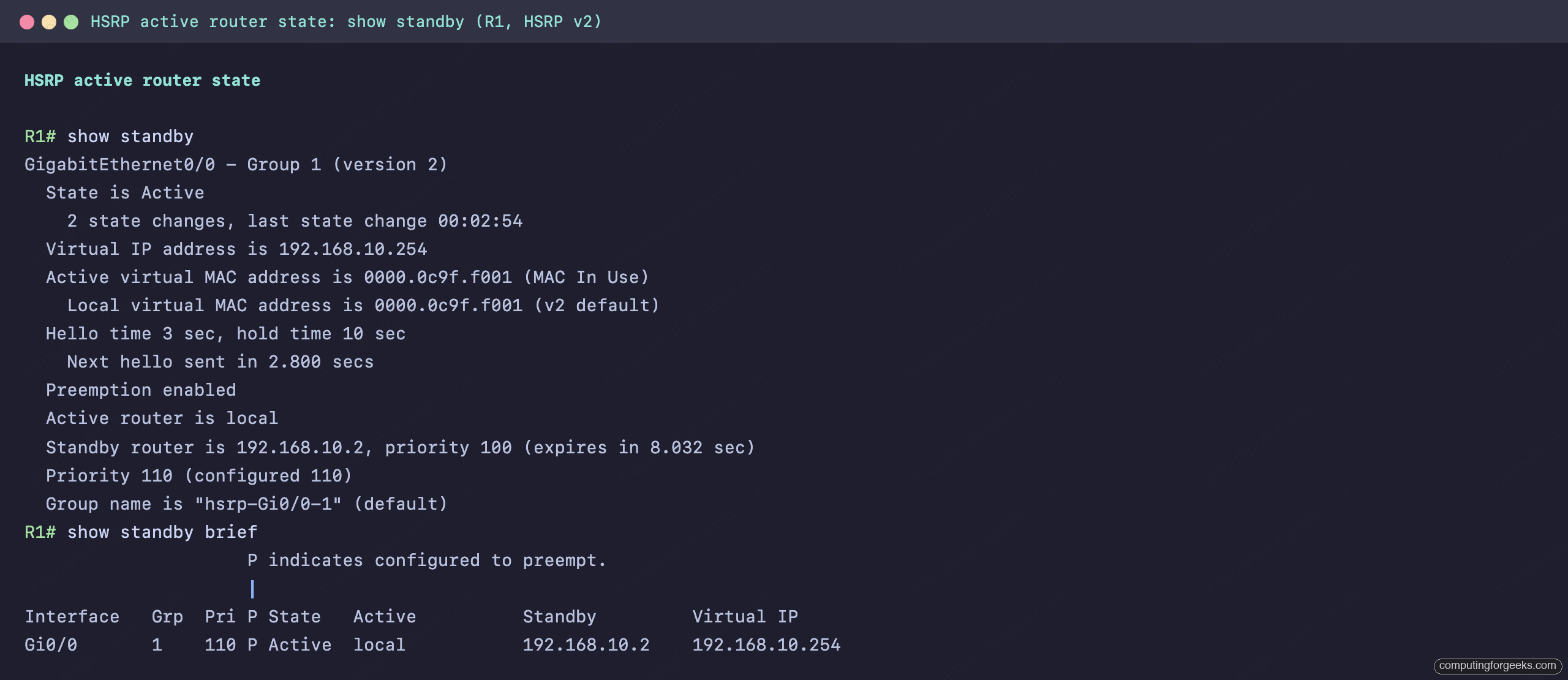
The important lines are easy to pick out. R1 is Active, the virtual IP is 192.168.10.254, and the active virtual MAC is 0000.0c9f.f001 (the HSRP version 2 format). Hellos go out every 3 seconds and a neighbor is declared dead after the 10 second hold time. The standby is 192.168.10.2 at priority 100. The condensed show standby brief view from R2 confirms both routers agree on who is active:
R2# show standby brief
                     P indicates configured to preempt.
                     |
Interface   Grp  Pri P State   Active          Standby         Virtual IP
Gi0/0       1    100 P Standby 192.168.10.1    local           192.168.10.254
Preemption is the other half of predictable behavior. Without it, a router that recovers after a failure stays standby even when it holds the higher priority. With preemption configured, the higher-priority router reclaims the active role the moment it returns. The P flag in the brief output is preemption being enabled on the group.
What a failover actually looks like
The payoff shows up when the active router dies. Shut R1’s interface and R2 promotes itself to active for the same virtual IP and virtual MAC:
R2# show standby brief
Interface   Grp  Pri P State   Active          Standby         Virtual IP
Gi0/0       1    100 P Active  local           unknown         192.168.10.254
The hosts notice nothing. Their gateway is still 192.168.10.254 and the MAC behind it has not changed, so their ARP caches stay valid and frames keep flowing, now through R2. When R1 comes back, preemption hands the active role back to it:
R1# show standby brief
Interface   Grp  Pri P State   Active          Standby         Virtual IP
Gi0/0       1    110 P Active  local           192.168.10.2    192.168.10.254
The virtual MAC staying put across the failover is the whole point. Because the MAC never changes, hosts never need to re-ARP, and the handover is invisible from the host side. Detection is not instant though: with the default 3 second hello and 10 second hold time, the standby waits out the hold timer before promoting itself, so a hard failure costs up to ten seconds. You can tune those timers down, or to sub-second with millisecond hellos, when faster convergence is worth the extra control-plane traffic.
In production you usually pair HSRP with interface tracking. A router watches its uplink toward the core and lowers its own priority when that link fails, so the standby (whose path is still good) preempts and takes over. Without tracking, a router can stay active while its own route off the network is down, which turns the active role into a black hole: hosts hand their traffic to a gateway that has nowhere to send it.
If the active role never forms in the first place, start at the interface the virtual IP lives on with the checks in the interface troubleshooting guide. For the command-by-command setup that produces this behavior, the HSRP configuration lab walks through every line on both routers.
Practice first hop redundancy
Flip the cards to lock in the terms (the virtual IP and MAC, priority, preemption, and the three protocols’ role names), then take the quiz to check yourself.
HSRP vs VRRP vs GLBP
HSRP is one of three first hop redundancy protocols you will meet. They solve the same problem in similar ways, with differences worth knowing before you commit to one. HSRP and VRRP each elect a single active forwarder while the rest stand by. You can still balance load with plain HSRP by running two groups on one subnet, making R1 active for group 1 and R2 active for group 2, then sending half your hosts to each virtual IP, but that split is manual. GLBP automates exactly that: it elects one active virtual gateway that answers every ARP request, yet it replies with a different router’s virtual MAC each time, so hosts on the same subnet spread across the routers without you assigning them.
| Feature | HSRP | VRRP | GLBP |
|---|---|---|---|
| Standard | Cisco proprietary | Open standard (RFC 5798) | Cisco proprietary |
| Roles | Active / Standby | Master / Backup | AVG / AVF |
| Default priority | 100 | 100 (address owner 255) | 100 |
| Virtual MAC | 0000.0C9F.Fxxx (v2) | 0000.5E00.01xx | 0007.B400.xxyy |
| Multicast | 224.0.0.102, UDP 1985 | 224.0.0.18, IP protocol 112 | 224.0.0.102, UDP 3222 |
| Load balancing | No (one active) | No (one master) | Yes (round robin across forwarders) |
The practical rule is short. Reach for VRRP when you need an open standard across mixed vendors, HSRP on an all-Cisco network where it is the familiar default, and GLBP when you want the backup routers carrying traffic instead of idling. On distribution switches the virtual gateway usually rides on a layer 3 switch SVI, one group per VLAN, so each subnet gets its own redundant gateway. If you are studying for the Cisco CCNA 200-301 exam, the two distinctions that come up most are which protocol is the open standard and which one load balances.