An Ansible filter runs on the control node, inside Jinja2, before a single task touches a managed host. Whatever the filter chain produces is the exact value the task applies. So when a template renders the wrong port or a loop iterates the wrong list, the cause is almost always upstream in a filter expression, not in the module. This guide works through the Ansible filters that do the real data shaping, every one run on a live control node with the output printed so you can see precisely what each transformation returns.
The set covered here is the set you reach for on the job: null-safety with default and ternary, list work with map, selectattr and set algebra, dictionary merges with combine, type casting, hashing and serialization, and the two filters that live in collections, json_query and ipaddr. The last two sections chain them into one production-style transform and catalog the errors they throw when an input is wrong.
Tested June 2026 on a Rocky Linux 10 control node (ansible-core 2.16.16, community.general 10.7.9, ansible.utils 5.1.2).
Where Ansible filters run, and why it matters
A filter is the part of a Jinja2 expression after the pipe: value | filter(args). Ansible evaluates it on the control node when it templates each task, the same engine that renders your Jinja2 template files. The managed host never sees the expression, only the result. That explains most filter confusion: a filter only sees data already available when the task is templated, such as variables, facts gathered earlier in the play, and registered results. It cannot read live state on the remote host, because the value is computed locally before the module is ever sent.
Filters chain left to right. list | first | upper takes the first element, then uppercases it. Each stage hands its output to the next, so reading a long expression is a matter of reading the pipes in order. Most of the work in a real playbook is composing three or four small filters into one expression that turns raw inventory data into something a module can consume.
Step 1: Build a one-file test harness
The fastest way to learn a filter is to print what it returns. A play targeting localhost with debug tasks needs no inventory and no remote host, so it runs in well under a second. Save this as harness.yml:
- name: Filter scratchpad
  hosts: localhost
  connection: local
  gather_facts: false
  tasks:
    - debug:
        msg: "{{ [3, 1, 2] | sort }}"
Run it the same way every time. The control node here is Rocky Linux 10 with ansible-core from the distro repos:
ansible-playbook harness.ymlThe version and the two collections used later confirm the environment the rest of this guide was tested against:

Swap the expression inside msg and re-run. Every filter in this article was validated with exactly this loop.
Step 2: Defaults and null safety
The default filter supplies a value when a variable is undefined. Pass true as the second argument to also catch empty strings, which is what you usually want for user-supplied input:
msg: "port={{ user_port | default('8080', true) }} timeout={{ missing_var | default(10) }}"With user_port set to an empty string and missing_var never defined, both fall through to their defaults:
"msg": "port=8080 timeout=10"The ternary filter turns a boolean into one of two values, with an optional third arm for None. It reads cleaner than a Jinja2 if/else when the result is a simple value:
msg: "state={{ feature_on | ternary('enabled', 'disabled') }}"
# feature_on = true  ->  "state=enabled"

msg: "{{ maybe_none | ternary('yes', 'no', 'unset') }}"
# maybe_none = null  ->  "unset"
For parameters rather than values, default(omit) is the one to know. It removes the argument entirely, so the module falls back to its own default instead of receiving an empty value. Use it on optional module parameters such as owner, group, or mode. These null-safety filters pair naturally with the patterns in the Ansible variables guide, where precedence decides which value actually reaches the filter.
Step 3: String filters
Strings are where most config values start. The basics are case and whitespace. trim strips surrounding spaces, the case filters do what their names say:
msg: "{{ ' Prod-Web-01.Example.COM ' | trim | lower }}"The result is trimmed and lowercased in one pass:
"msg": "prod-web-01.example.com"For substitution, replace handles literal text and regex_replace handles patterns. One detail catches people: regex_replace is case-sensitive by default, so a lowercase pattern will not match mixed-case input unless you pass ignorecase=True. The contrast, measured on the same string:
msg: "{{ 'Prod-Web-01.Example.COM' | regex_replace('\\.example\\.com$', '', ignorecase=True) }}"
# -> "Prod-Web-01"

msg: "{{ 'Prod-Web-01.Example.COM' | regex_replace('\\.example\\.com$', '') }}"
# -> "Prod-Web-01.Example.COM"   (no match, returned unchanged)
The second form returns the string untouched because the lowercase pattern never matched .Example.COM. That silent no-op is a frequent source of “my regex did nothing” reports. Note the doubled backslashes in the pattern. Inside a double-quoted YAML value the pattern needs \\. and \\d, because YAML rejects a lone \. or \d with “found unknown escape character” and refuses to load the playbook. Wrap the value in single quotes instead and single backslashes work.
To split and reassemble, split turns a delimited string into a list and join turns a list back into a string:
msg: "{{ 'nginx,redis,postgres' | split(',') }}"
# -> ["nginx", "redis", "postgres"]

msg: "{{ ['a', 'b', 'c'] | join(' -> ') }}"
# -> "a -> b -> c"
For extraction, regex_search returns the first match and regex_findall returns every match. Pulling an IP out of a log line is the canonical case:
msg: "ip={{ logline | regex_search('\\d+\\.\\d+\\.\\d+\\.\\d+') }}"Against a real log line the search returns the address and nothing else:
"msg": "ip=10.0.1.7"Both regex filters use Python regular-expression syntax, so the patterns you already know carry straight over. Pass a capture-group backreference such as '\1' right after the pattern to pull out just that group instead of the whole match; the result comes back as a list of the captured pieces.
Step 4: List filters
List filters are the workhorses. The cleanup pair is unique and sort, which deduplicate and order in the obvious way. The aggregate filters min, max, and length answer the questions you would otherwise write a loop for.
The two that change how you write playbooks are map and selectattr. map(attribute=...) pulls one field out of every dictionary in a list. selectattr keeps only the dictionaries whose attribute passes a test, and rejectattr drops them. Given a list of host dictionaries, extracting names and filtering by role is a single expression each:
msg: "{{ servers | map(attribute='name') | list }}"
# -> ["web01", "web02", "db01"]

msg: "{{ servers | selectattr('role', 'equalto', 'web') | map(attribute='name') | list }}"
# -> ["web01", "web02"]

msg: "{{ servers | rejectattr('cpu', 'lt', 8) | map(attribute='name') | list }}"
# -> ["web02", "db01"]
Set algebra works directly on lists. union, intersect, and difference compare two lists and return the combined, common, or left-only elements:
msg: "union={{ a | union(b) }} intersect={{ a | intersect(b) }} difference={{ a | difference(b) }}"With a=[1,2,3,4] and b=[3,4,5,6] the three operations resolve as expected:
"msg": "union=[1, 2, 3, 4, 5, 6] intersect=[3, 4] difference=[1, 2]"Running the full list playbook shows the dictionary reshaping and the set operations together. This output is what feeds the conditionals and iteration covered in the conditionals and loops guide:
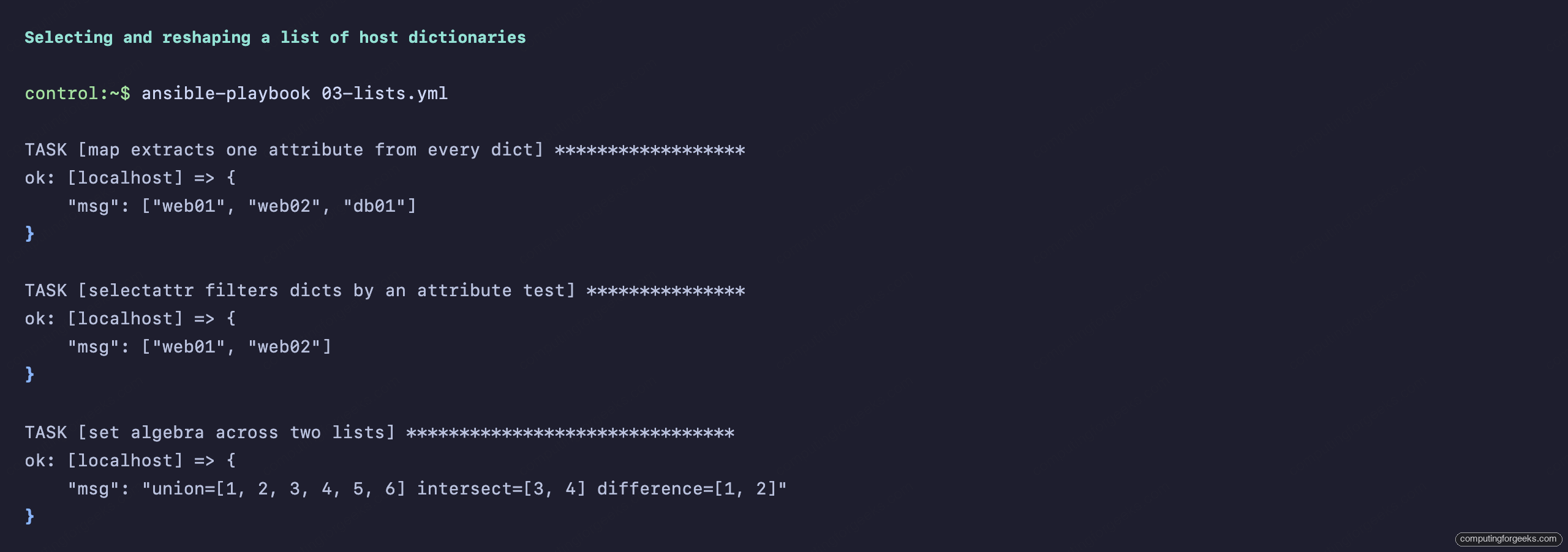
Two more are worth keeping in reach. zip pairs two lists element by element, and flatten collapses nested lists into one level. Both turn up constantly when you are stitching parallel data together.
Step 5: Dictionary filters
Dictionaries need different tools because you often have to iterate them or merge them. dict2items converts a map into a list of key/value pairs, which is the only way to loop over a dictionary in Ansible. items2dict does the reverse:
msg: "{{ {'cpu': '2', 'mem': '512Mi'} | dict2items }}"
# -> [{"key": "cpu", "value": "2"}, {"key": "mem", "value": "512Mi"}]
The merge filter is combine. It overlays one dictionary on another, and the right-hand side wins on any key collision. This is how you express a base config plus per-environment overrides:
msg: "{{ base_cfg | combine(override_cfg) }}"With a base of {port: 8080, tls: false, workers: 2} and an override of {tls: true, workers: 8}, the merge keeps the untouched key and replaces the rest:
"msg": {"port": 8080, "tls": true, "workers": 8}By default combine merges only the top level. Pass recursive=True to merge nested dictionaries instead of replacing them wholesale, which matters when your override touches one key inside a larger sub-dictionary.
Step 6: Numbers and type casting
Values that arrive as strings need casting before arithmetic. int and float convert, and they fail loudly on garbage rather than guessing. round controls precision:
msg: "sum={{ ('42' | int) + 8 }} round2={{ 3.14159 | round(2) }}"
# -> "sum=50 round2=3.14"
Two filters earn their place in storage and capacity work. human_readable formats a byte count, and human_to_bytes parses a size string back into bytes:
msg: "{{ 5368709120 | human_readable }}"     # -> "5.00 GB"
msg: "{{ '2.5 GB' | human_to_bytes }}"       # -> 2684354560
The int filter also takes a base argument, so parsing hex or binary strings needs no external tool: '0x1F' | int(base=16) returns 31.
Step 7: Encoding, hashing, and serialization
These filters move data between formats. b64encode and b64decode handle Base64, hash produces a checksum, and password_hash generates a crypt-format hash suitable for an /etc/shadow entry. The base64 round trip and a SHA1 sum:
msg: "enc={{ secret | b64encode }} dec={{ secret | b64encode | b64decode }}"
# -> "enc=UzNjcjN0LVRva2Vu dec=S3cr3t-Token"

msg: "{{ secret | hash('sha1') }}"
# -> "216d5c9034bf958b45179942c9339ae0f0df327c"
For structured data, to_json, to_nice_json, and to_nice_yaml serialize a variable, and from_json parses a JSON string back into data you can index. The nice variants add indentation for readable config output:
msg: "{{ ('{\"a\": 1, \"b\": [2, 3]}' | from_json).b }}"
# -> [2, 3]
Keep secrets out of debug output in real plays. The token above is a throwaway value; in production you would pull it from an encrypted Vault variable and never print it.
Step 8: Filters that live in collections
Not every filter ships with ansible-core. Two of the most useful are packaged in collections and must be installed first. json_query comes from community.general and runs JMESPath queries against nested data. ipaddr comes from ansible.utils and validates or slices IP addresses. Install both, the same way the collections guide covers in depth:
ansible-galaxy collection install community.general ansible.utils
pip3 install --user jmespath netaddr
The two Python libraries are not optional. json_query needs jmespath and ipaddr needs netaddr; without them the filters fail at runtime with an explicit message, shown in the troubleshooting section. With the libraries present, a JMESPath query pulls every running pod name out of a Kubernetes-style structure, and ipaddr dissects a CIDR:
msg: "{{ pods | community.general.json_query(\"items[?status.phase=='Running'].metadata.name\") }}"
# -> ["web-1", "db-1"]

msg: "network={{ '10.0.1.0/24' | ansible.utils.ipaddr('network') }} netmask={{ '10.0.1.0/24' | ansible.utils.ipaddr('netmask') }}"
# -> "network=10.0.1.0 netmask=255.255.255.0"
Both filters resolved correctly once the libraries were in place:
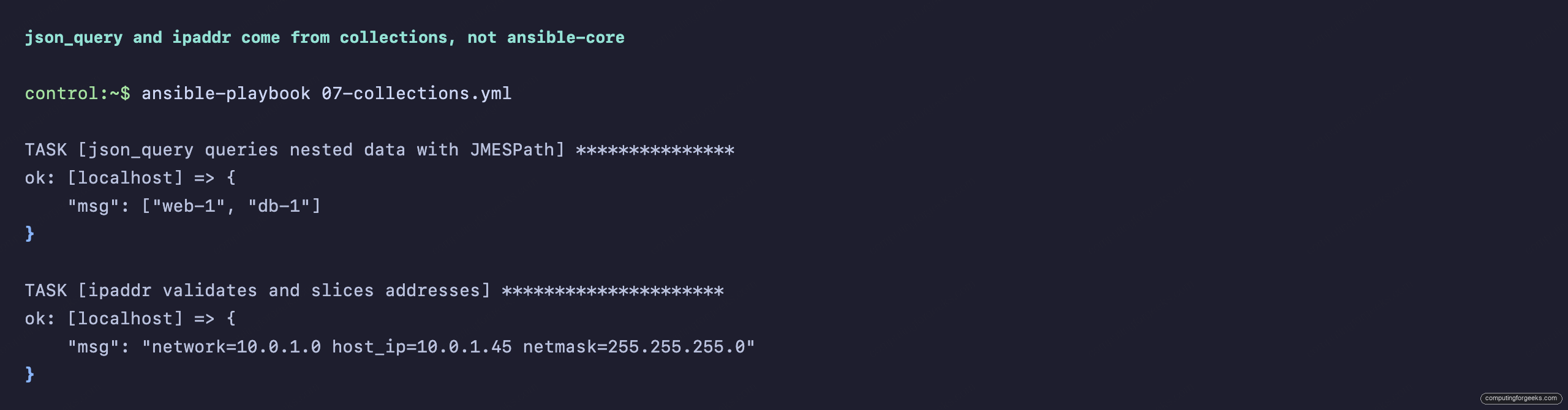
Call collection filters by their fully qualified name, community.general.json_query rather than bare json_query. The short name still resolves through the collection search path, but the FQCN states exactly which collection owns the filter and will not collide if another collection ever ships one with the same name.
Step 9: Chain filters into one transform
The payoff is composing filters into a single expression that turns raw data into something a template can drop straight into a config file. Take a fleet of host dictionaries and produce load-balancer server lines: keep the web role, drop any host marked for draining, sort by weight, then format each survivor into a config line. That is five filters in one pipe:
lines: "{{ fleet
  | selectattr('role', 'equalto', 'web')
  | rejectattr('drain')
  | sort(attribute='weight', reverse=True)
  | map(attribute='ip')
  | map('regex_replace', '^', 'server ')
  | map('regex_replace', '$', ':8080 check')
  | list }}"
The two anchored regex_replace stages prepend and append text without a backreference, which sidesteps the escaping problem entirely. The draining host drops out and the remaining two render as finished config lines:
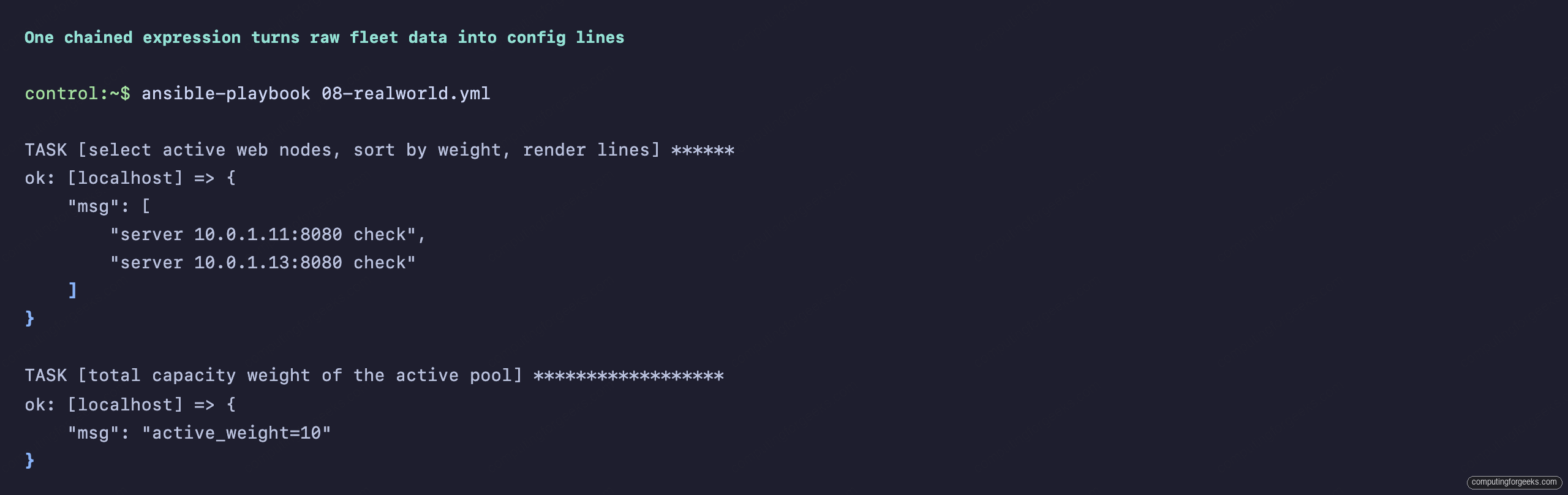
Building the same result with tasks and registered variables would take a dozen lines and a loop. The filter chain does it in one expression that you can read top to bottom. That density is the reason filters are worth learning properly rather than reaching for a custom module.
Troubleshooting filter errors
Filter failures are usually clear once you have seen them once. These are the errors captured during testing, with the exact text and the fix.
Error: “You need to install \”jmespath\” prior to running json_query filter”
The json_query filter is installed but its Python backend is missing. Install it on the control node, because the filter runs there: pip3 install --user jmespath. The matching message for ipaddr names netaddr instead; the fix is the same.
Error: “‘dict object’ has no attribute ‘name'”
A map(attribute='name') or selectattr('name', ...) hit a dictionary that lacks that key. Either the data is inconsistent or the attribute name is misspelled. Guard it with a default inside the map, or filter the list first so only well-formed items reach the attribute access.
A regex_replace returns the string unchanged
The pattern did not match, so the filter returned the input verbatim. The usual cause is a case mismatch, fixed with ignorecase=True. The playbook debugging guide covers isolating expressions like this with a throwaway debug task.
Error: “found unknown escape character”
YAML raised this before Ansible ran anything. A regex inside a double-quoted value used a single backslash, such as '\d+' inside msg: "...". Double the backslashes to '\\d+', or switch the outer value to single quotes and keep the single backslash. The playbook will not load until the escape is valid YAML.
Error: “template error while templating string … no filter named”
The filter name is wrong or it lives in a collection that is not installed. Check the spelling, and for collection filters confirm the collection is present with ansible-galaxy collection list and call the filter by its full namespace.collection.filter name.
Filter source at a glance
The single most common stumble is not knowing whether a filter ships with ansible-core or needs a collection plus a Python library. This table sorts the filters used above by where they come from:
| Filter | Source | Extra requirement |
|---|---|---|
default, ternary, map, selectattr, combine, regex_replace | ansible-core | none |
human_readable, human_to_bytes, dict2items | ansible-core | none |
b64encode, hash, password_hash, to_nice_yaml | ansible-core | none |
community.general.json_query | community.general | jmespath (pip) |
ansible.utils.ipaddr | ansible.utils | netaddr (pip) |
Keep the core filters in muscle memory and the table above bookmarked for the rest. For a denser one-page reference to the whole language, the Ansible cheat sheet collects the filter and module syntax in one place, and the full learning path lives in the Ansible automation guide.