You wrote a slick Ansible role on your laptop. It converged in 12 seconds. Three weeks later a colleague applies it to a fresh Rocky 10 box at 11 PM, the play stops on a missing package, the on-call shift turns into a debugging marathon, and the postmortem politely calls it “scope drift.” Roles fail in production for the same reason any code fails in production: they were never run anywhere except the author’s machine.
Molecule is the standard test harness for Ansible roles. It boots a container or VM, runs your role against it, asserts the result, and tears the world down before you’ve had a chance to leave a stale resource lying around. This guide builds a real role, runs it through every Molecule phase on Rocky Linux 10, then proves the same role still passes when the matrix expands to Ubuntu 24.04. The pitfalls along the way are not made up. Each one was hit during the testing pass that produced this article.
Tested April 2026 on Rocky Linux 10.1 with Ansible 2.18.16, Molecule 26.4.0, Podman 5.6.0, and the molecule_plugins podman driver 25.8.12.
What you need
- A control host running Rocky Linux 10 or another modern Linux. Two CPUs and 4 GB of RAM is plenty.
- Network access to
quay.ioanddocker.iofor the test container images. - Familiarity with writing Ansible roles and the basic playbook flow. If you are brand new to Ansible, work through the automation guide first.
The full role and Molecule scaffolding ships in the companion repo at c4geeks/ansible/intermediate/ansible-molecule-testing. Clone it if you want to skip ahead and read tested code first.
Step 1: Set reusable shell variables
Two paths show up in nearly every command below. Pin them once at the top of the session so the rest of the guide works as a copy-paste:
export LAB_DIR="$HOME/molecule-lab"
export ROLE_NAME="cfg_nginx_site"
Confirm the variables hold and aren’t blank:
echo "Lab:  ${LAB_DIR}"
echo "Role: ${ROLE_NAME}"
Re-run the two export lines if you reconnect or open a new shell.
Step 2: Bootstrap the controller
Molecule, Ansible, and the driver plugins live in a single Python virtual environment. Using a venv keeps the toolchain isolated from the system Python and lets you upgrade Molecule without breaking other Ansible work on the same host. Install the bare minimum from the OS, then use uv for the Python side because it resolves dependencies in seconds rather than minutes:
sudo dnf -y install epel-release
sudo dnf -y install python3 git podman curl
curl -LsSf https://astral.sh/uv/install.sh | sh
echo 'export PATH="$HOME/.local/bin:$PATH"' >> ~/.bashrc
source ~/.bashrc
Create the lab and the venv, then install Ansible plus Molecule and the podman driver:
mkdir -p "${LAB_DIR}" && cd "${LAB_DIR}"
uv venv .venv --python 3.12
source .venv/bin/activate
uv pip install ansible-core==2.18.* molecule molecule-plugins[podman,docker] ansible-lint pytest-testinfra
You should now have working ansible and molecule binaries:
ansible --version | head -2
molecule --version
The output reports the exact versions used in this guide:
ansible [core 2.18.16]
  config file = None
molecule 26.4.0 using python 3.12
    ansible:2.18.16
    podman:25.8.12 from molecule_plugins requiring collections: containers.podman>=1.7.0 ansible.posix>=1.3.0
Those numbers matter. Future Molecule releases sometimes change defaults, and pinning your CI image to known-good versions saves on debugging time when an unrelated PR turns the build red.
Step 3: The role under test
Real testing needs a real role. Anything trivial like “create a file” hides the failure modes that Molecule catches. The role used here, cfg_nginx_site, installs nginx, renders a virtual host with a Jinja2 template, opens the firewall when running on bare metal, and refuses to proceed if nginx -t rejects the rendered config. It supports both RHEL and Debian families through OS-conditional includes.
Scaffold the role with ansible-galaxy so the directory layout matches the convention every contributor expects:
mkdir -p "${LAB_DIR}/roles" && cd "${LAB_DIR}/roles"
ansible-galaxy role init "${ROLE_NAME}"
cd "${ROLE_NAME}"
Replace the generated stubs with the role content from the companion repo. The full source lives at roles/cfg_nginx_site. Three pieces are worth highlighting because they shape what Molecule will be asked to verify.
The OS dispatcher in tasks/main.yml keeps the entry point thin and routes installation through OS-specific include files:
- name: Include OS-family specific install tasks
  ansible.builtin.include_tasks: "install_{{ ansible_os_family | lower }}.yml"
The vhost template in templates/site.conf.j2 renders with whatever values the consumer passed in defaults/main.yml or overrode at play time. The verifier later asserts both the server name and the /healthz location are present in the rendered file. For a refresher on the templating language, see the Jinja2 templates guide.
The firewall block in tasks/main.yml is gated to skip when the play runs inside a container, because the kernel keyring is not available there:
- name: Configure firewall (skipped when running inside a container)
  when:
    - nginx_site_manage_firewall
    - ansible_virtualization_type not in ['container', 'docker', 'podman']
  block:
    - name: Open HTTP port (firewalld, RHEL family)
      ansible.posix.firewalld:
        port: "{{ nginx_site_listen_port }}/tcp"
        zone: "{{ nginx_site_open_firewall_zone }}"
        permanent: true
        immediate: true
        state: enabled
      when: ansible_os_family == 'RedHat'
That guard is non-negotiable for container-based testing. Without it the role explodes the moment Molecule tries to talk to a non-existent firewalld inside a stripped image.
Step 4: Anatomy of a Molecule scenario
Each scenario is a directory under molecule/ inside the role. Molecule auto-discovers them and runs whichever one you name. For the default scenario, six files do the work:
| File | Role in the test cycle |
|---|---|
molecule.yml | Driver, platforms, provisioner config, test sequence |
converge.yml | The play that applies the role under test |
prepare.yml | One-time setup the image needs before the role runs |
side_effect.yml | Optional: simulate drift, then re-converge to prove self-healing |
verify.yml | Assertions over the converged state |
cleanup.yml | Optional: trim before destroy so teardown is fast |
Drop the working scenario in place:
mkdir -p molecule/default
# Then create the six files from the companion repo
The molecule.yml for the default scenario is short. It uses the podman driver, runs a privileged Rocky stream10 container with systemd, and points the role lookup at the parent directory so include_role can find cfg_nginx_site:
---
role_name_check: 1

dependency:
  name: galaxy
  enabled: true

driver:
  name: podman

platforms:
  - name: cfg-rocky10
    image: quay.io/centos/centos:stream10
    pre_build_image: true
    privileged: true
    systemd: always
    command: /usr/sbin/init
    capabilities:
      - SYS_ADMIN

provisioner:
  name: ansible
  config_options:
    defaults:
      callback_result_format: yaml
      gathering: smart
    ssh_connection:
      pipelining: true
  inventory:
    host_vars:
      cfg-rocky10:
        nginx_site_server_name: rocky.test
        nginx_site_index_title: "Rocky 10 nginx, deployed by Ansible + tested by Molecule"
  env:
    ANSIBLE_ROLES_PATH: ../../../

verifier:
  name: ansible

scenario:
  name: default
  test_sequence:
    - dependency
    - syntax
    - create
    - prepare
    - converge
    - idempotence
    - side_effect
    - verify
    - cleanup
    - destroy
A few of those keys are easy to miss the first time:
privileged: truewithsystemd: alwaysand theSYS_ADMINcapability are what let nginx start under systemd inside the container. Without them,systemctl start nginxerrors out with “System has not been booted with systemd”.ANSIBLE_ROLES_PATH: ../../../climbs frommolecule/default/back up to the directory that contains the role, soinclude_role: name: cfg_nginx_siteresolves cleanly.callback_result_format: yamlturns the result blocks into multi-line YAML instead of inline JSON. Do not also setstdout_callback: yaml. That option referenced thecommunity.general.yamlcallback, which was removed incommunity.general12.0.0.
The converge.yml is just the play that exercises the role. Note become: false because the container runs as root already and the minimal centos:stream10 image does not ship sudo:
---
- name: Converge
  hosts: all
  become: false
  tasks:
    - name: Apply cfg_nginx_site role
      ansible.builtin.include_role:
        name: cfg_nginx_site
The prepare.yml handles the cross-distro fact that package names differ. Refresh the apt cache on Debian-family hosts, install diagnostic tools regardless:
---
- name: Prepare
  hosts: all
  become: false
  gather_facts: true
  tasks:
    - name: Refresh apt cache (Debian family)
      ansible.builtin.apt:
        update_cache: true
        cache_valid_time: 3600
      when: ansible_os_family == 'Debian'

    - name: Install diagnostics tools used by the verifier
      ansible.builtin.package:
        name:
          - curl
          - "{{ 'procps-ng' if ansible_os_family == 'RedHat' else 'procps' }}"
          - "{{ 'iproute' if ansible_os_family == 'RedHat' else 'iproute2' }}"
        state: present
The verify.yml is where the test earns its keep. It collects package facts, slurps the rendered vhost, hits both the index and a health endpoint over HTTP, and asserts everything came out right. Failures here are real failures, not flapping infrastructure:
---
- name: Verify
  hosts: all
  become: false
  gather_facts: true
  tasks:
    - name: Collect package facts
      ansible.builtin.package_facts:
        manager: auto

    - name: nginx package is installed
      ansible.builtin.assert:
        that:
          - "'nginx' in ansible_facts.packages"

    - name: Read rendered vhost config
      ansible.builtin.slurp:
        src: /etc/nginx/conf.d/example.conf
      register: vhost

    - name: vhost contains the expected directives
      ansible.builtin.assert:
        that:
          - "'rocky.test' in (vhost.content | b64decode)"
          - "'/healthz' in (vhost.content | b64decode)"

    - name: nginx is active and running
      ansible.builtin.systemd:
        name: nginx
      register: svc

    - name: Assert nginx state
      ansible.builtin.assert:
        that:
          - svc.status.ActiveState == 'active'
          - svc.status.SubState == 'running'

    - name: Hit the index page
      ansible.builtin.uri:
        url: "http://127.0.0.1/"
        return_content: true
        status_code: 200
      register: idx

    - name: Index page contains site title
      ansible.builtin.assert:
        that:
          - "'tested by Molecule' in idx.content"

    - name: Hit the health endpoint
      ansible.builtin.uri:
        url: "http://127.0.0.1/healthz"
        status_code: 200
        return_content: true
      register: hz

    - name: Health endpoint returns ok
      ansible.builtin.assert:
        that:
          - hz.content == "ok\n"
Confirm Molecule sees all the scenarios you have set up:
molecule listThe output is a clean ASCII table that summarises every scenario alongside its driver and current state:
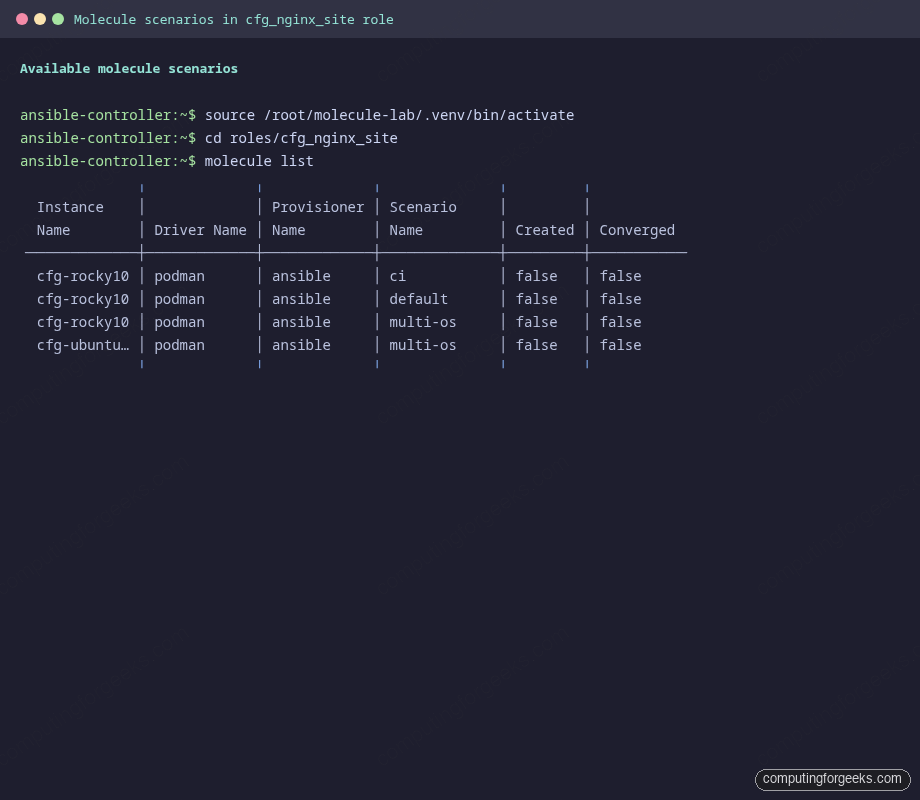
Three scenarios show up in the table because the default plus the optional CI and multi-OS scenarios from the companion repo are already present. Each one targets a different test profile.
Step 5: Run the default scenario phase by phase
Molecule has eleven possible phases. Most articles run molecule test and call it a day, but watching each phase in isolation makes the failure modes obvious. Start with a syntax check. It catches typos before any container is even pulled:
molecule syntax -s defaultA clean run looks like this:
INFO     [default > discovery] scenario test matrix: syntax
INFO     [default > prerun] Performing prerun with role_name_check=1...
INFO     [default > syntax] Executing
INFO     Sanity checks: 'podman'

playbook: /root/molecule-lab/roles/cfg_nginx_site/molecule/default/converge.yml
INFO     [default > syntax] Executed: Successful
Next, ask Molecule to create the test instance. The container is built from the image declared under platforms and registered as a managed host:
molecule create -s defaultNow run prepare and converge in one shot. converge implicitly runs prepare first if it has not been run for the current instance:
molecule converge -s defaultThe output stream tells the story of the role applying itself task by task. The PLAY RECAP at the end is what to scan for at a glance:
PLAY RECAP *********************************************************************
cfg-rocky10                : ok=12   changed=7    unreachable=0    failed=0    skipped=2    rescued=0    ignored=0
Twelve tasks succeeded, seven changed system state, the firewall and Debian-only tasks were correctly skipped, and zero failed. Run converge a second time. This is the idempotence test in disguise:
molecule idempotence -s defaultIf anything reports changed on the second run, the role is not idempotent. The first time you write a real role this almost always fails. The first idempotence run for cfg_nginx_site failed too, on the index template. The original Jinja2 template embedded ansible_date_time.iso8601, which is naturally different each second. The fix is to drop volatile values from the rendered output:
<!-- DON'T render this -->
<p>Test fingerprint: <code>{{ ansible_date_time.iso8601 }}</code></p>
With that gone, the second converge produces zero changes and idempotence passes:
PLAY RECAP *********************************************************************
cfg-rocky10                : ok=11   changed=0    unreachable=0    failed=0    skipped=2    rescued=0    ignored=0
INFO     [default > idempotence] Executed: Successful
Now the verifier asserts the actual end state, not just “Ansible thinks it converged”:
molecule verify -s defaultEach assert task announces its result. A passing verify reads as a wall of All assertions passed:
TASK [Hit the index page] ******************************************************
ok: [cfg-rocky10]

TASK [Index page contains site title] ******************************************
ok: [cfg-rocky10] =>
    changed: false
    msg: All assertions passed

TASK [Health endpoint returns ok] **********************************************
ok: [cfg-rocky10] =>
    changed: false
    msg: All assertions passed

PLAY RECAP *********************************************************************
cfg-rocky10                : ok=11   changed=0    unreachable=0    failed=0    skipped=0    rescued=0    ignored=0
Combine everything into the canonical CI command, which runs the entire sequence in one shot, then destroys the instance whether the run passed or failed:
molecule test -s defaultThe summary at the bottom is the one signal a CI job needs:
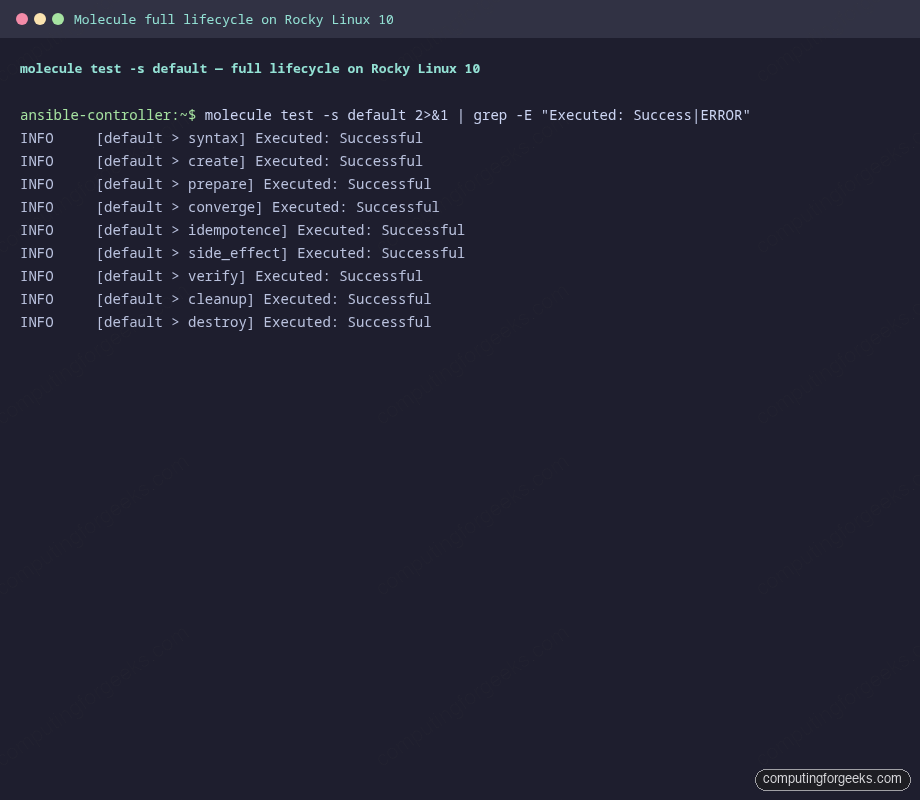
Every phase reports Executed: Successful, including the optional side_effect and cleanup phases that we will look at next.
Step 6: Side-effect tests prove self-healing
Idempotence proves the role does not flap on a clean host. It says nothing about what happens after a human SSHs in at 3 AM and edits a config by hand. Side-effect playbooks model exactly that scenario. The one used here stops nginx and overwrites the rendered vhost with garbage, then re-converges and asserts the role notices and fixes it:
---
- name: Side effect: simulate a manual config drift
  hosts: all
  become: false
  gather_facts: false
  tasks:
    - name: Stop nginx (simulating an operator typing the wrong systemctl)
      ansible.builtin.systemd:
        name: nginx
        state: stopped

    - name: Vandalise the vhost (simulating a manual edit gone wrong)
      ansible.builtin.copy:
        content: "# I broke this on purpose\n"
        dest: /etc/nginx/conf.d/example.conf
        mode: "0644"

- name: Re-converge to prove the role self-heals the drift
  hosts: all
  become: false
  tasks:
    - name: Re-apply cfg_nginx_site role
      ansible.builtin.include_role:
        name: cfg_nginx_site
When this play runs as part of molecule test, the next thing you see is the role re-rendering the vhost (because the contents differ from the template) and reloading nginx. The PLAY RECAP shows the recovery in action:
PLAY RECAP *********************************************************************
cfg-rocky10                : ok=14   changed=5    unreachable=0    failed=0    skipped=2    rescued=0    ignored=0
INFO     [default > side_effect] Executed: Successful
If a future change to the role broke its drift-recovery story, this scenario would catch it before it shipped. That is the exact failure mode that makes operations engineers grumpy at 3 AM, and it is the kind of bug a static lint cannot catch.
Step 7: Multi-OS scenario in parallel
One Molecule instance is a sanity check. Real roles run on more than one distro, so the test surface should too. Add a second scenario at molecule/multi-os/molecule.yml that spins both Rocky 10 and Ubuntu 24.04 in the same run:
platforms:
  - name: cfg-rocky10
    image: quay.io/centos/centos:stream10
    pre_build_image: true
    privileged: true
    systemd: always
    command: /usr/sbin/init
    capabilities:
      - SYS_ADMIN
  - name: cfg-ubuntu2404
    image: docker.io/geerlingguy/docker-ubuntu2404-ansible:latest
    pre_build_image: true
    privileged: true
    systemd: always
    command: /lib/systemd/systemd
    capabilities:
      - SYS_ADMIN
The Ubuntu image from Jeff Geerling is purpose-built for Ansible role testing. It ships systemd configured to run as PID 1, which is exactly what you need for service tasks. Symlink the shared playbooks so Rocky and Ubuntu both run the same converge, prepare, and verify code paths:
cd molecule/multi-os
ln -sf ../default/converge.yml converge.yml
ln -sf ../default/prepare.yml  prepare.yml
Run the full cycle on both hosts at once:
molecule test -s multi-osMolecule executes each task on every host in parallel. The PLAY RECAP at the bottom shows both passing cleanly, the Rocky-family conditional running where appropriate and the Debian-family one running on the Ubuntu host:
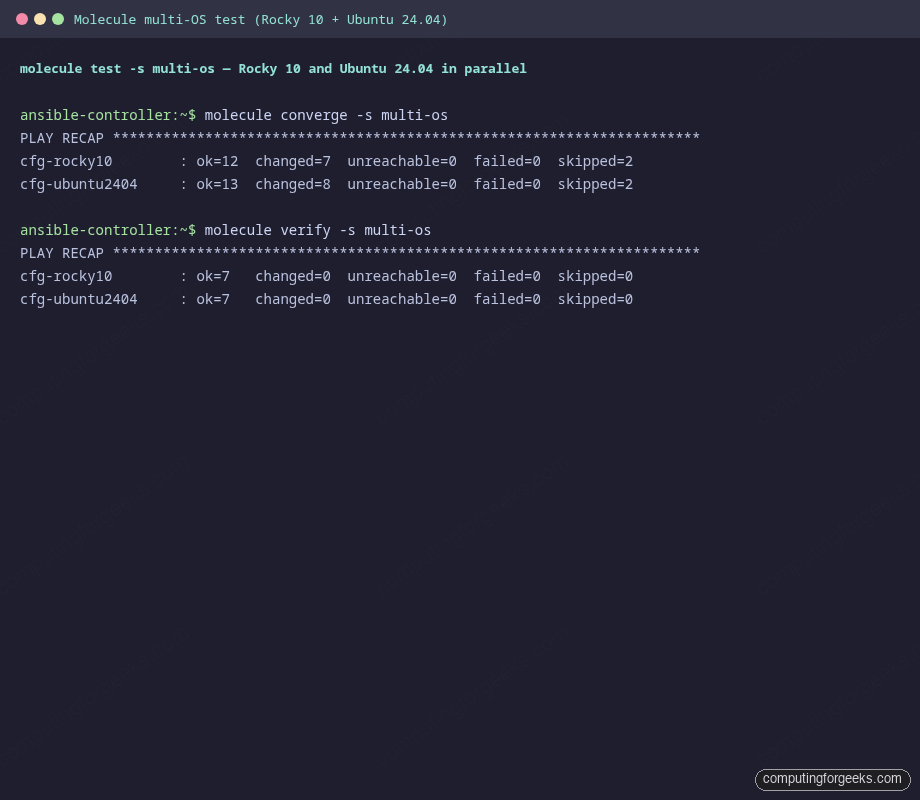
Verify ran the same assertions on each host. The role passed on both. That is the green light to merge.
Step 8: ansible-lint with the production profile
Molecule does not run the linter for you anymore. The molecule lint subcommand was removed in 6.x and never came back. Run ansible-lint separately, which is exactly what your CI should do too:
cd "${LAB_DIR}/roles/${ROLE_NAME}"
ansible-lint .
The lint config in .ansible-lint selects the production profile, which is the strictest preset. It catches role-name violations, missing handlers, modules invoked without their FQCN, and dozens of other issues that have bitten production roles in the past. With the role in this guide it passes cleanly:
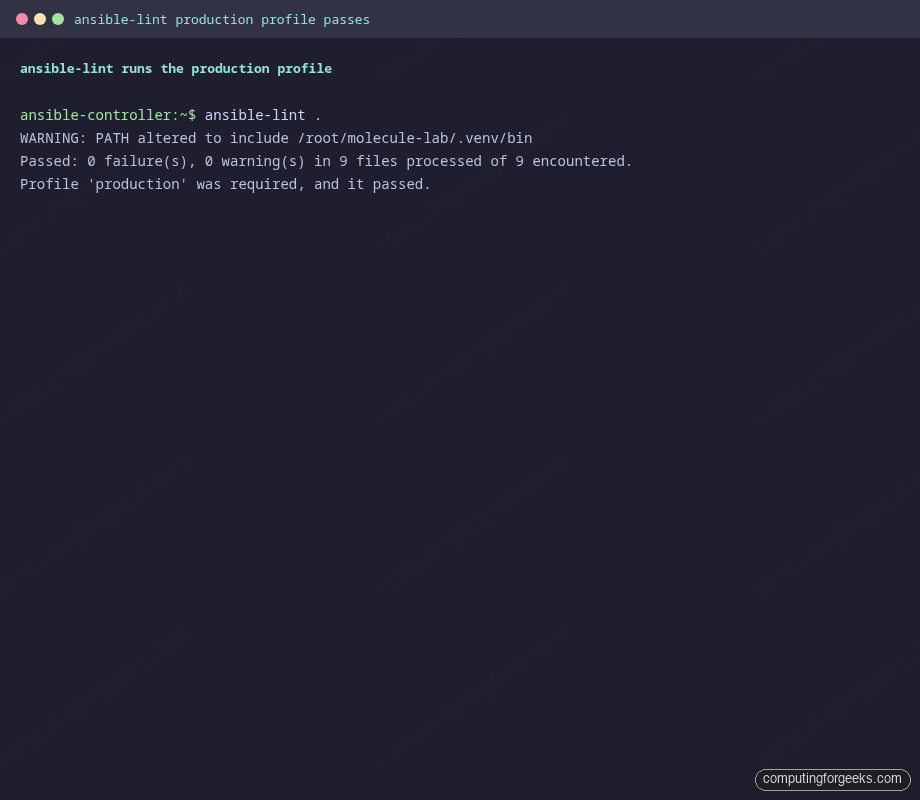
Skip rules sparingly and document the reason in the config when you do. A skip with no comment is one of the most common review-feedback items on Ansible PRs.
Step 9: Wire Molecule into GitHub Actions
Manual testing only catches the bugs your laptop bothers to run into. The whole point of Molecule is that your CI runs the same scenario every push. The minimal workflow at .github/workflows/molecule.yml looks like this:
name: molecule

on:
  push:
    branches: [main]
  pull_request:
    branches: [main]

jobs:
  test:
    runs-on: ubuntu-24.04
    strategy:
      matrix:
        scenario: [default, multi-os]
    steps:
      - uses: actions/checkout@v4
      - uses: actions/setup-python@v5
        with:
          python-version: "3.12"
      - name: Install Molecule and friends
        run: |
          pip install ansible-core==2.18.* molecule molecule-plugins[podman] ansible-lint
      - name: Lint
        run: ansible-lint roles/cfg_nginx_site/
      - name: Test
        working-directory: roles/cfg_nginx_site
        run: molecule test -s ${{ matrix.scenario }}
Two things make that workflow honest. First, the matrix runs both the default and multi-os scenarios, so a regression on either distro fails the build. Second, the lint step runs before molecule test, which short-circuits long test runs when something obvious is broken. If you are also using Event-Driven Ansible in the same repo, point a third matrix entry at its scenario.
Real pitfalls hit during testing
The fixes above did not show up by inspiration. Each one was a real failure during the writing of this article. They will hit you too if you skip the same defaults. Treat this as a triage checklist when Molecule throws a tantrum.
| Symptom | What it means | Fix |
|---|---|---|
community.general.yaml has been removed |
stdout_callback: yaml in molecule.yml points at a callback that ships in community.general 11.x and earlier. Removed in 12.0.0. |
Use callback_result_format: yaml only. Drop stdout_callback: yaml. |
tmpfs is of type list and we were unable to convert to dict |
The molecule_plugins podman driver expects tmpfs as a dict whose values are mount-option strings. |
Either omit tmpfs entirely (systemd:always handles the mounts) or use tmpfs: {/run: 'size=64m'} with a non-empty option. |
executable file 'sudo' not found in $PATH |
The play set become: true, but the minimal centos:stream10 image has no sudo binary. |
Set become: false on every play that targets a container. You are root inside it already. |
executable file 'set' not found in $PATH |
An ansible.builtin.raw task started with shell builtins like set -e, but the image has no shell on PATH. |
Drop the raw bootstrap if Python is already in the image. If not, prefix the command with /bin/bash -lc. |
the role 'X' was not found |
Molecule did not add the role’s parent directory to ANSIBLE_ROLES_PATH, so include_role: name: X failed. |
Set provisioner.env.ANSIBLE_ROLES_PATH: '../../../' in molecule.yml. Climbs from molecule/default/ to the dir containing the role. |
| Idempotence fails on a template task | The template renders something that changes between runs, usually a timestamp or a random ID. | Strip volatile values from the rendered output. If you must include them, store them in a stable file outside the template body. |
No package matching 'curl' is available |
The package module ran on a Debian-family host without a refreshed apt cache. |
Run apt update first, scoped with when: ansible_os_family == 'Debian'. Use OS-aware package names too: procps on Debian, procps-ng on RHEL. |
None of these are documented next to each other anywhere in the official docs. Most of them are written up as one-line GitHub issues that took an afternoon each to triage. Bookmark this table.
Source code and the wider series
Everything in this article is in the companion repo at c4geeks/ansible/intermediate/ansible-molecule-testing. Clone the repo, cd into the role directory, run molecule test, and you should see the same green output that produced the screenshots above. If anything in your environment makes it red, the troubleshooting table is the place to start.
Once your role tests well, the next pieces in the toolbox are usually Ansible Vault for encrypting role secrets and a dynamic inventory source so production runs do not depend on a hand-edited hosts file. The full series index lives in the Ansible automation guide, and the cheat sheet is handy when you forget which flag controls forks.