Ansible and Kubernetes meet at two points, and they pull in different directions.
The first is provisioning: turning a pile of fresh Ubuntu machines into a working cluster. kubeadm assembles the cluster, but something has to disable swap, load kernel modules, install containerd, lay down the package repo, and run kubeadm in the right order on the right hosts. That something is Ansible. The second point is day-to-day management. Once the cluster runs, you create namespaces, push Deployments, install Helm charts, and drain nodes for patching. The kubernetes.core collection does all of that declaratively, from the same control node, in the same playbook language.
This guide covers both. We provision a kubeadm cluster with a set of Ansible roles, then manage real workloads on it with kubernetes.core: a Deployment, a Helm release, a node drain, and a worker added live. If Ansible itself is new on your control node, set it up first with the install Ansible guide; this article is part of the wider Ansible automation guide.
Run in June 2026 on Ubuntu 24.04 with Kubernetes 1.36 and the kubernetes.core 6.4 collection.
How Ansible and Kubernetes fit together
Keep the two jobs separate in your head, because they use different tools.
Provisioning runs against the nodes over SSH. Ansible becomes root, installs packages, and shells out to kubeadm. This is ordinary server automation that happens to end in a cluster. Management runs against the Kubernetes API, not the nodes. The kubernetes.core modules talk to the API server with the Python Kubernetes client, so they run on the control node itself and need a kubeconfig, not SSH. One repo holds both: roles for the first job, playbooks in a manage/ directory for the second.
Lab layout
Four machines, all Ubuntu 24.04:
- Ansible controller, where you run the playbooks. It never joins the cluster.
- One control-plane node (the kubeadm “first” node).
- Two worker nodes to start. We add a third later without touching the first two.
The controller reaches every node as a sudo-capable user over an SSH key, which is the only prerequisite the roles assume. Give each node 2 vCPU and at least 2 GB of RAM; the control plane is happier with 4 GB. kubeadm refuses to start on a single CPU.
Set up the Ansible controller
The controller needs Ansible, the Python Kubernetes client in the same environment Ansible runs from, the kubernetes.core collection, and Helm. Install pipx, then layer the pieces on top:
sudo apt update
sudo apt install -y pipx python3-venv
pipx install --include-deps ansible
pipx inject ansible kubernetes
ansible-galaxy collection install kubernetes.core
curl -fsSL https://raw.githubusercontent.com/helm/helm/main/scripts/get-helm-3 | bash
The pipx inject step is the one people miss. The kubernetes.core modules import the kubernetes Python library at runtime, and they look for it in Ansible’s own virtualenv. Installing it with a separate pip puts it somewhere Ansible cannot see, and every task fails with “Failed to import the required Python library (kubernetes)”. Inject it into the Ansible venv and the problem disappears.
Confirm the collection and client are both present:
ansible-galaxy collection list | grep kubernetesThe collection and its version print on a single line:
kubernetes.core 6.4.0That confirms the collection and its Python client are both visible to Ansible, which is the combination the management playbooks depend on later.
Build the inventory
Group the nodes into a control plane and workers. The roles key off these group names, so the names matter.
[control_plane]
k8s-cp1 ansible_host=192.168.1.168

[workers]
k8s-w1 ansible_host=192.168.1.169
k8s-w2 ansible_host=192.168.1.170

[k8s_cluster:children]
control_plane
workers
A handful of cluster-wide settings live in group_vars/all.yml. This is also where the one networking decision that bites people gets made.
---
# Kubernetes minor version. This is the pkgs.k8s.io repo path; bump it to upgrade.
k8s_minor: "v1.36" # https://kubernetes.io/releases/

# Pod network CIDR handed to kubeadm and Calico.
# MUST NOT overlap your node/LAN subnet (the lab nodes are on 192.168.1.0/24).
pod_network_cidr: "10.244.0.0/16"
The pod network CIDR must not overlap the subnet your nodes sit on. Calico’s own default is 192.168.0.0/16, and plenty of home and office LANs live inside that range. If they overlap, pod traffic and node traffic fight over the same addresses and routing breaks in ways that are miserable to debug. The lab nodes here are on 192.168.1.0/24, so the pods get 10.244.0.0/16 instead. Pick any private range that your network does not already use.
Prepare every node
The common role runs on the whole cluster and does everything kubeadm expects to already be true: swap off, the bridge and overlay modules loaded, the networking sysctls set, containerd installed with the systemd cgroup driver, and the Kubernetes packages held at a fixed version.
---
# Prereqs that every node (control plane and workers) needs before kubeadm runs.

- name: Disable swap for the running session
  ansible.builtin.command: swapoff -a
  changed_when: false

- name: Disable swap permanently in fstab
  ansible.posix.mount:
    path: "{{ item }}"
    state: absent
  loop:
    - swap
    - none
  when: ansible_swaptotal_mb | int > 0

- name: Load kernel modules now
  community.general.modprobe:
    name: "{{ item }}"
    state: present
  loop:
    - overlay
    - br_netfilter

- name: Load kernel modules on boot
  ansible.builtin.copy:
    dest: /etc/modules-load.d/k8s.conf
    content: |
      overlay
      br_netfilter
    mode: "0644"

- name: Apply sysctl settings for Kubernetes networking
  ansible.posix.sysctl:
    name: "{{ item.key }}"
    value: "{{ item.value }}"
    sysctl_file: /etc/sysctl.d/k8s.conf
    reload: true
  loop:
    - { key: net.bridge.bridge-nf-call-iptables, value: "1" }
    - { key: net.bridge.bridge-nf-call-ip6tables, value: "1" }
    - { key: net.ipv4.ip_forward, value: "1" }

- name: Install containerd and apt prerequisites
  ansible.builtin.apt:
    name:
      - containerd
      - apt-transport-https
      - ca-certificates
      - curl
      - gpg
    state: present
    update_cache: true

- name: Create containerd config directory
  ansible.builtin.file:
    path: /etc/containerd
    state: directory
    mode: "0755"

- name: Generate default containerd config
  ansible.builtin.shell: containerd config default > /etc/containerd/config.toml
  args:
    creates: /etc/containerd/config.toml

- name: Use the systemd cgroup driver in containerd
  ansible.builtin.lineinfile:
    path: /etc/containerd/config.toml
    regexp: '^(\s*)SystemdCgroup\s*='
    line: '            SystemdCgroup = true'
  notify: Restart containerd

- name: Add the Kubernetes apt signing key
  ansible.builtin.get_url:
    url: "https://pkgs.k8s.io/core:/stable:/{{ k8s_minor }}/deb/Release.key"
    dest: /etc/apt/keyrings/kubernetes-apt-keyring.asc
    mode: "0644"

- name: Add the Kubernetes apt repository
  ansible.builtin.apt_repository:
    repo: "deb [signed-by=/etc/apt/keyrings/kubernetes-apt-keyring.asc] https://pkgs.k8s.io/core:/stable:/{{ k8s_minor }}/deb/ /"
    filename: kubernetes
    state: present

- name: Install kubelet, kubeadm and kubectl
  ansible.builtin.apt:
    name:
      - kubelet
      - kubeadm
      - kubectl
    state: present
    update_cache: true

- name: Hold the Kubernetes packages at their current version
  ansible.builtin.dpkg_selections:
    name: "{{ item }}"
    selection: hold
  loop:
    - kubelet
    - kubeadm
    - kubectl

- name: Enable and start kubelet
  ansible.builtin.systemd:
    name: kubelet
    enabled: true
    state: started

- name: Flush handlers so containerd restarts before kubeadm runs
  ansible.builtin.meta: flush_handlers
One edit earns its place above all the others. Containerd ships with SystemdCgroup set to false, and on a systemd host it has to be true, or the kubelet and containerd disagree about who owns the cgroups and pods never leave ContainerCreating. On containerd 2.x the setting lives under the CRI runc options in /etc/containerd/config.toml, which is why the role regenerates the default config first and edits that one line. The apt-mark hold at the end stops an unattended apt upgrade from dragging the cluster to a new minor behind your back.
Bring up the control plane
The control_plane role initialises the cluster, installs a kubeconfig for your login user, lays down the Calico CNI, and prints a join command the workers pick up. It is written to be safe to run twice: the creates: guard on kubeadm init means a second run never re-initialises a live cluster.
---
# Initialise the control plane, lay down kubeconfig, install Calico, and
# publish a join command the workers will pick up.

- name: Check whether the control plane is already initialised
  ansible.builtin.stat:
    path: /etc/kubernetes/admin.conf
  register: kubeadm_admin

- name: Pull control-plane images ahead of init
  ansible.builtin.command: kubeadm config images pull
  when: not kubeadm_admin.stat.exists
  changed_when: true

- name: Initialise the cluster with kubeadm
  ansible.builtin.command: >
    kubeadm init
    --pod-network-cidr={{ pod_network_cidr }}
    --apiserver-advertise-address={{ ansible_host }}
    --node-name={{ inventory_hostname }}
  args:
    creates: /etc/kubernetes/admin.conf
  register: kubeadm_init

- name: Create .kube directory for the login user
  ansible.builtin.file:
    path: "/home/{{ ansible_user }}/.kube"
    state: directory
    owner: "{{ ansible_user }}"
    group: "{{ ansible_user }}"
    mode: "0750"

- name: Install kubeconfig for the login user
  ansible.builtin.copy:
    src: /etc/kubernetes/admin.conf
    dest: "/home/{{ ansible_user }}/.kube/config"
    remote_src: true
    owner: "{{ ansible_user }}"
    group: "{{ ansible_user }}"
    mode: "0600"

- name: Detect the latest Calico release
  ansible.builtin.uri:
    url: https://api.github.com/repos/projectcalico/calico/releases/latest
    return_content: true
  register: calico_release

- name: Set the Calico version fact
  ansible.builtin.set_fact:
    calico_version: "{{ calico_release.json.tag_name }}"

- name: Install the Calico operator CRDs
  ansible.builtin.command: >
    kubectl --kubeconfig /etc/kubernetes/admin.conf apply --server-side --force-conflicts
    -f https://raw.githubusercontent.com/projectcalico/calico/{{ calico_version }}/manifests/operator-crds.yaml
  register: crds_apply
  changed_when: "'created' in crds_apply.stdout or 'configured' in crds_apply.stdout"

- name: Install the Tigera (Calico) operator
  ansible.builtin.command: >
    kubectl --kubeconfig /etc/kubernetes/admin.conf apply --server-side --force-conflicts
    -f https://raw.githubusercontent.com/projectcalico/calico/{{ calico_version }}/manifests/tigera-operator.yaml
  register: tigera_apply
  changed_when: "'created' in tigera_apply.stdout or 'configured' in tigera_apply.stdout"

- name: Wait for the Installation CRD to register
  ansible.builtin.command: >
    kubectl --kubeconfig /etc/kubernetes/admin.conf wait --for condition=established --timeout=90s
    crd/installations.operator.tigera.io
  changed_when: false

- name: Render the Calico Installation manifest
  ansible.builtin.template:
    src: calico-custom-resources.yaml.j2
    dest: /root/calico-custom-resources.yaml
    mode: "0644"

- name: Apply the Calico Installation
  ansible.builtin.command: >
    kubectl --kubeconfig /etc/kubernetes/admin.conf apply
    -f /root/calico-custom-resources.yaml
  register: calico_install
  changed_when: "'created' in calico_install.stdout or 'configured' in calico_install.stdout"

- name: Generate a worker join command
  ansible.builtin.command: kubeadm token create --print-join-command
  register: join_cmd
  changed_when: false

- name: Stash the join command for the worker play
  ansible.builtin.set_fact:
    kubeadm_join_command: "{{ join_cmd.stdout }}"

- name: Fetch the admin kubeconfig to the Ansible controller
  ansible.builtin.fetch:
    src: /etc/kubernetes/admin.conf
    dest: "{{ playbook_dir }}/admin.conf"
    flat: true
Calico ships as two pieces now. The operator CRDs go on first, then the operator itself, and only then does the Installation resource make sense to the API. Apply them out of order and you get error: ... installations.operator.tigera.io not found, which is exactly the trap the explicit CRD step and the kubectl wait avoid. The Installation manifest is a short template so the pod CIDR stays in one place:
apiVersion: operator.tigera.io/v1
kind: Installation
metadata:
  name: default
spec:
  calicoNetwork:
    ipPools:
      - name: default-ipv4-ippool
        blockSize: 26
        cidr: {{ pod_network_cidr }}
        encapsulation: VXLANCrossSubnet
        natOutgoing: Enabled
        nodeSelector: all()
---
apiVersion: operator.tigera.io/v1
kind: APIServer
metadata:
  name: default
spec: {}
The operator reconciles that Installation into a running Calico deployment a few seconds after the API server comes up, and the pod CIDR matches the one kubeadm was handed.
Join the workers
The worker role is short. It checks whether the node already belongs to a cluster, and if not, runs the join command the control-plane play stashed in a host fact. The stat guard is what makes re-runs cheap: a node that already joined is skipped, not rejoined.
---
- name: Check whether this node already joined the cluster
  ansible.builtin.stat:
    path: /etc/kubernetes/kubelet.conf
  register: kubelet_conf

- name: Join the node to the cluster
  ansible.builtin.command: "{{ hostvars[groups['control_plane'][0]]['kubeadm_join_command'] }}"
  when: not kubelet_conf.stat.exists
  changed_when: true
That is the whole worker role. The join runs at most once per node, which is what makes growing the cluster later a no-op for the nodes already in it.
Run the bootstrap
One playbook ties the three roles together in order: prepare every node, build the control plane, join the workers, then wait for the whole cluster to report Ready.
---
- name: Prepare every node for Kubernetes
  hosts: k8s_cluster
  become: true
  roles:
    - common

- name: Bring up the control plane
  hosts: control_plane
  become: true
  roles:
    - control_plane

- name: Join the worker nodes
  hosts: workers
  become: true
  roles:
    - worker

- name: Wait for all nodes to report Ready
  hosts: control_plane
  become: true
  tasks:
    - name: Wait for nodes to be Ready
      ansible.builtin.command: >
        kubectl --kubeconfig /etc/kubernetes/admin.conf
        wait --for=condition=Ready nodes --all --timeout=180s
      register: nodes_ready
      changed_when: false

    - name: Show the cluster
      ansible.builtin.command: kubectl --kubeconfig /etc/kubernetes/admin.conf get nodes -o wide
      register: get_nodes
      changed_when: false

    - name: Cluster nodes
      ansible.builtin.debug:
        var: get_nodes.stdout_lines
Run it from the controller:
ansible-playbook bootstrap.ymlThe first run pulls the control-plane images and takes a few minutes; later runs are quick. When it finishes, every node is Ready and running the same Kubernetes version.
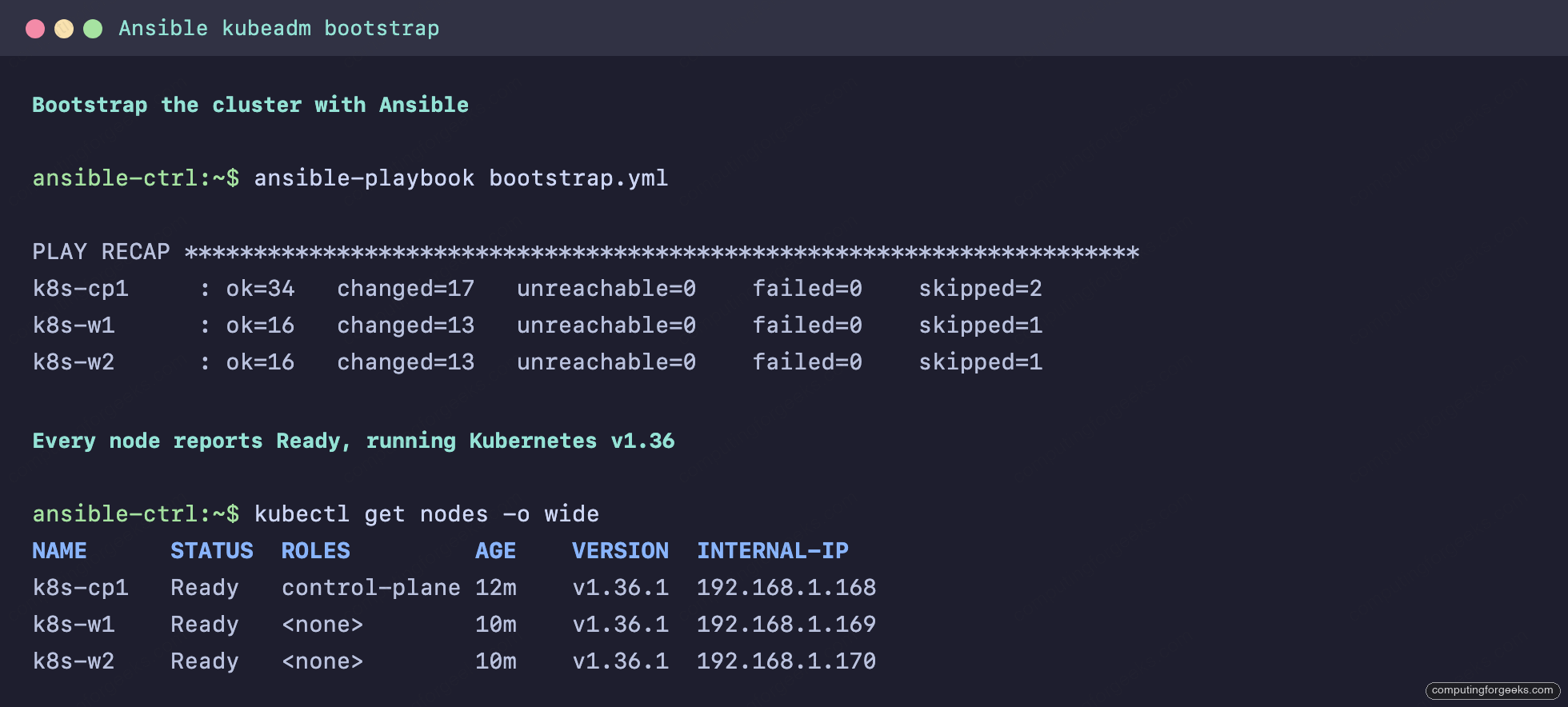
That is a working cluster, built from four blank Ubuntu installs, with no manual SSH into any node. If you would rather understand the kubeadm steps by hand before automating them, the kubeadm install walkthrough covers the same flow one command at a time.
Manage workloads with kubernetes.core
From here the job changes. The kubernetes.core.k8s module sends manifests to the API server and reconciles them, the same way kubectl apply does, except it lives in a playbook you can template, loop, and gate on conditions. The playbook below creates a namespace, a ConfigMap, a Secret, a three-replica Deployment that consumes both, and a NodePort Service, then waits until the Deployment reports Available.
---
# Manage workloads on the cluster with the kubernetes.core collection.
# Runs on the Ansible controller and talks to the API server over the kubeconfig.
- name: Deploy a demo web app with Ansible
  hosts: localhost
  connection: local
  gather_facts: false
  vars:
    kubeconfig: "{{ lookup('env', 'HOME') }}/ansible-k8s/admin.conf"
    app_namespace: demo
  tasks:
    - name: Create the namespace
      kubernetes.core.k8s:
        kubeconfig: "{{ kubeconfig }}"
        api_version: v1
        kind: Namespace
        name: "{{ app_namespace }}"
        state: present

    - name: Publish the landing page as a ConfigMap
      kubernetes.core.k8s:
        kubeconfig: "{{ kubeconfig }}"
        state: present
        definition:
          apiVersion: v1
          kind: ConfigMap
          metadata:
            name: web-content
            namespace: "{{ app_namespace }}"
          data:
            index.html: |
              <h1>Deployed by Ansible</h1>
              <p>nginx on Kubernetes, managed end to end with kubernetes.core.</p>

    - name: Store an app secret
      kubernetes.core.k8s:
        kubeconfig: "{{ kubeconfig }}"
        state: present
        definition:
          apiVersion: v1
          kind: Secret
          metadata:
            name: web-secret
            namespace: "{{ app_namespace }}"
          type: Opaque
          stringData:
            api-key: rotate-me-in-vault

    - name: Deploy the web application
      kubernetes.core.k8s:
        kubeconfig: "{{ kubeconfig }}"
        state: present
        definition:
          apiVersion: apps/v1
          kind: Deployment
          metadata:
            name: web
            namespace: "{{ app_namespace }}"
            labels:
              app: web
          spec:
            replicas: 3
            selector:
              matchLabels:
                app: web
            template:
              metadata:
                labels:
                  app: web
              spec:
                containers:
                  - name: nginx
                    image: nginx:1.27
                    ports:
                      - containerPort: 80
                    volumeMounts:
                      - name: content
                        mountPath: /usr/share/nginx/html
                    env:
                      - name: API_KEY
                        valueFrom:
                          secretKeyRef:
                            name: web-secret
                            key: api-key
                volumes:
                  - name: content
                    configMap:
                      name: web-content

    - name: Expose the app on a NodePort
      kubernetes.core.k8s:
        kubeconfig: "{{ kubeconfig }}"
        state: present
        definition:
          apiVersion: v1
          kind: Service
          metadata:
            name: web
            namespace: "{{ app_namespace }}"
          spec:
            type: NodePort
            selector:
              app: web
            ports:
              - port: 80
                targetPort: 80
                nodePort: 30080

    - name: Wait until the deployment is Available
      kubernetes.core.k8s_info:
        kubeconfig: "{{ kubeconfig }}"
        api_version: apps/v1
        kind: Deployment
        name: web
        namespace: "{{ app_namespace }}"
        wait: true
        wait_condition:
          type: Available
          status: "True"
        wait_timeout: 150

    - name: List the running pods
      kubernetes.core.k8s_info:
        kubeconfig: "{{ kubeconfig }}"
        kind: Pod
        namespace: "{{ app_namespace }}"
        label_selectors:
          - app=web
      register: web_pods

    - name: Show pod names and the nodes they landed on
      ansible.builtin.debug:
        msg: "{{ web_pods.resources | map(attribute='metadata.name') | zip(web_pods.resources | map(attribute='spec.nodeName')) | list }}"
Notice it runs against localhost with connection: local. These tasks never SSH anywhere; they reach the API over the kubeconfig that bootstrap.yml fetched to the controller. The kubernetes.core.k8s_info calls at the end give you read access in the same language, with a wait_condition that blocks until the rollout is genuinely ready instead of guessing with a sleep.
ansible-playbook manage/01-deploy-app.ymlThe pods land across the workers, and the ConfigMap content is served on the NodePort.
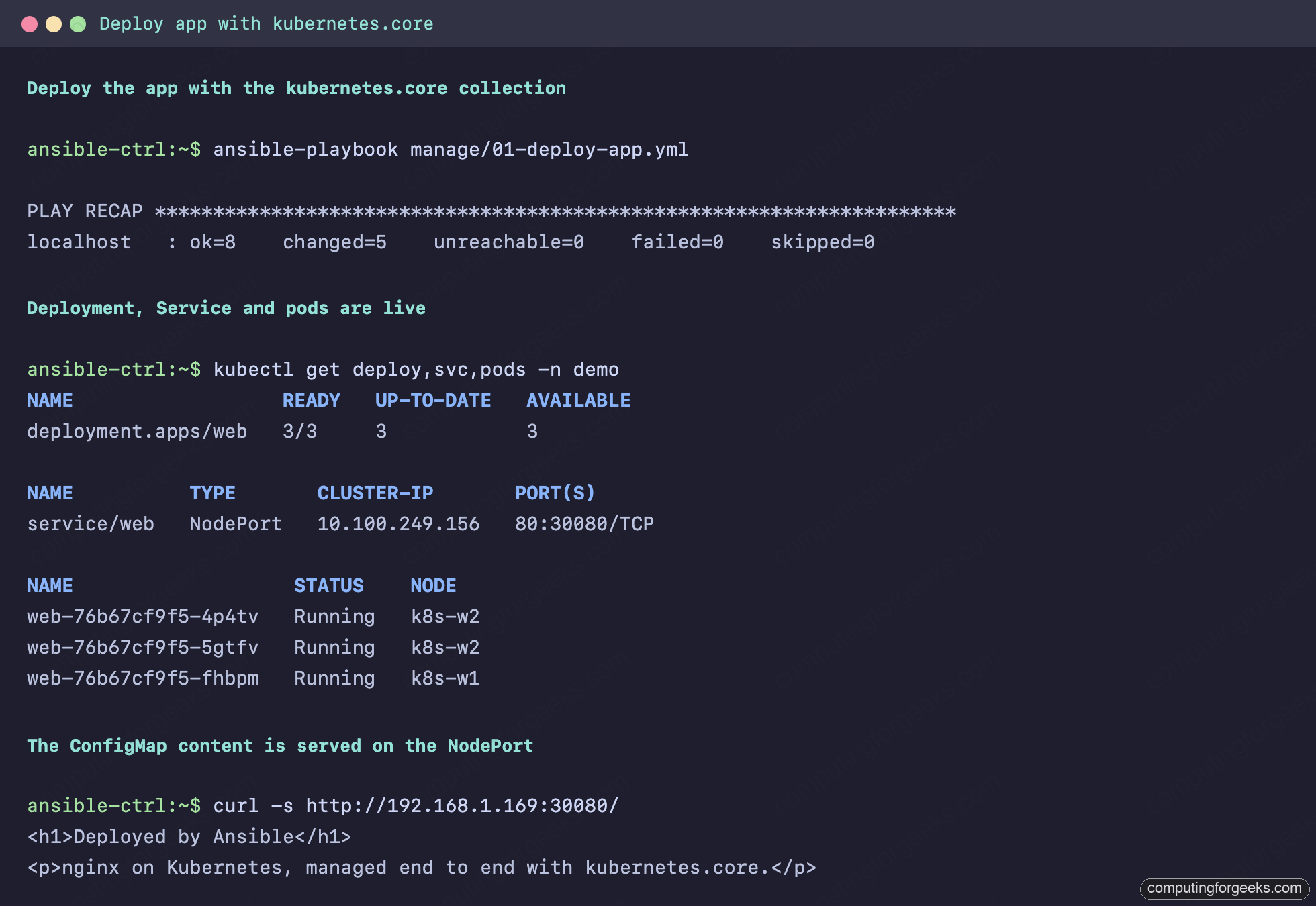
Because the module reconciles state, re-running the playbook after an edit changes only what differs. Bump replicas to 5 and run it again and the three existing pods stay; Kubernetes adds two. That is the declarative model the kubernetes.core documentation builds on, and it is why this beats a pile of shell calls to kubectl.
Install a Helm chart with Ansible
Most real clusters run Helm charts, and Ansible drives Helm without dropping to the shell. The kubernetes.core.helm and helm_repository modules add a repo and install or upgrade a release. metrics-server is a good first one: it is what kubectl top needs, and a kubeadm cluster does not ship it.
---
# Install a Helm chart with Ansible. metrics-server powers `kubectl top`.
- name: Install metrics-server with Helm
  hosts: localhost
  connection: local
  gather_facts: false
  vars:
    kubeconfig: "{{ lookup('env', 'HOME') }}/ansible-k8s/admin.conf"
  tasks:
    - name: Add the metrics-server Helm repository
      kubernetes.core.helm_repository:
        name: metrics-server
        repo_url: https://kubernetes-sigs.github.io/metrics-server/

    - name: Install or upgrade the metrics-server release
      kubernetes.core.helm:
        kubeconfig: "{{ kubeconfig }}"
        name: metrics-server
        chart_ref: metrics-server/metrics-server
        release_namespace: kube-system
        state: present
        update_repo_cache: true
        # kubeadm issues self-signed kubelet certs, so skip TLS verification to it.
        values:
          args:
            - --kubelet-insecure-tls

    - name: Wait for the metrics-server rollout
      kubernetes.core.k8s_info:
        kubeconfig: "{{ kubeconfig }}"
        api_version: apps/v1
        kind: Deployment
        name: metrics-server
        namespace: kube-system
        wait: true
        wait_condition:
          type: Available
          status: "True"
        wait_timeout: 150
The --kubelet-insecure-tls argument is the gotcha. kubeadm gives each kubelet a self-signed serving certificate, and metrics-server refuses to scrape it unless you tell it to skip that verification. Without the flag the pod runs but kubectl top answers “Metrics API not available” forever. Install it, give it a scrape cycle, and node metrics appear.
ansible-playbook manage/02-helm-metrics-server.yml
kubectl top nodes
Node CPU and memory now report through the metrics API:
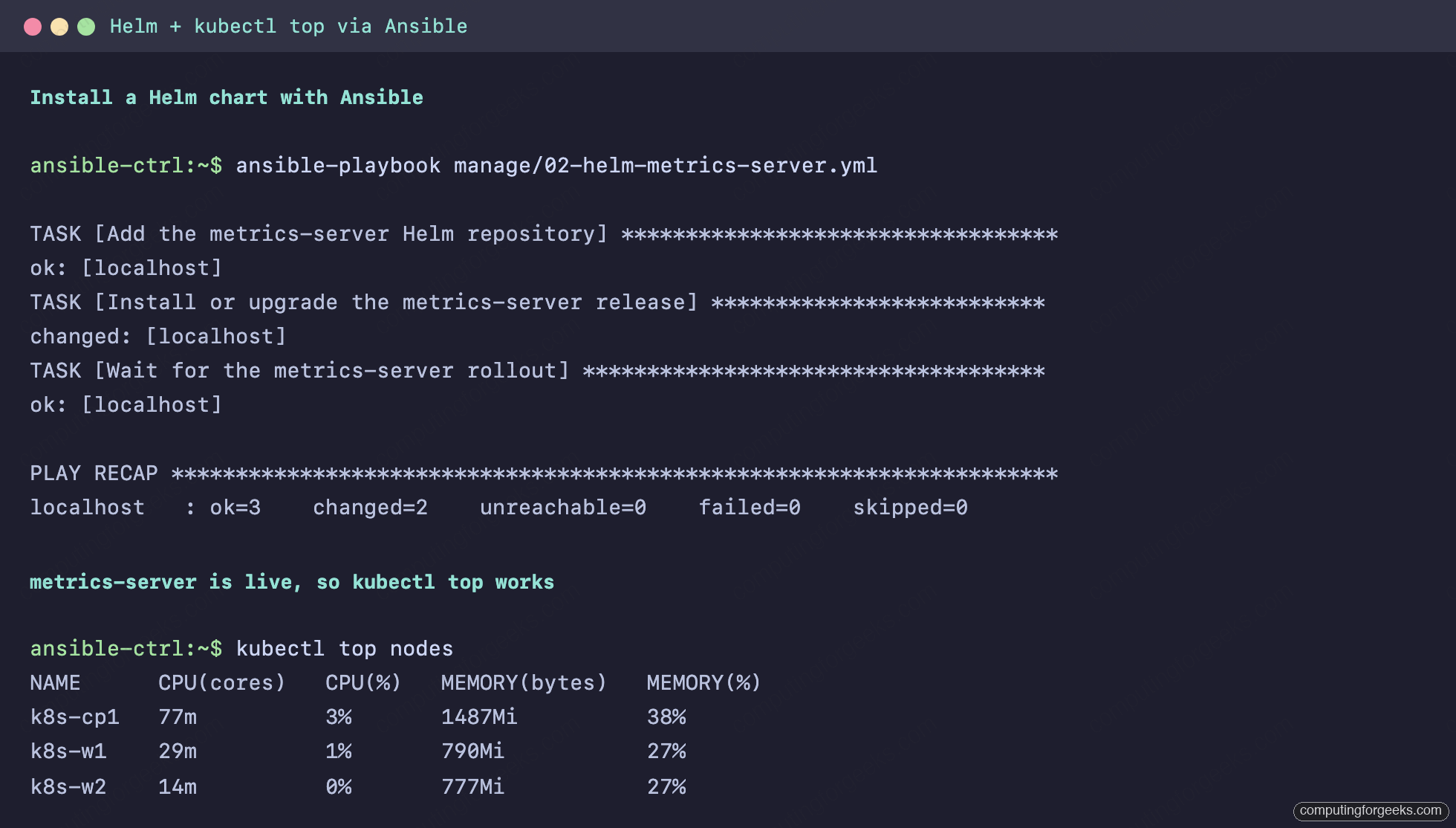
That is the case for running Helm through Ansible rather than by hand: the release is declared in a playbook you can re-run, template, and keep in version control next to everything else.
Drain a node and roll a deployment
Patching a node means moving its pods elsewhere first. kubernetes.core.k8s_drain cordons and drains in one task, and the matching uncordon brings the node back. The playbook drains a worker, confirms it is unschedulable, returns it to service, then triggers a rolling restart of the web Deployment by stamping a fresh annotation on the pod template.
---
# Day-2 operations: drain a node for maintenance, bring it back, roll a deployment.
- name: Node maintenance and a rolling restart with Ansible
  hosts: localhost
  connection: local
  gather_facts: false
  vars:
    kubeconfig: "{{ lookup('env', 'HOME') }}/ansible-k8s/admin.conf"
    target_node: k8s-w2
    app_namespace: demo
  tasks:
    - name: Cordon and drain the node
      kubernetes.core.k8s_drain:
        kubeconfig: "{{ kubeconfig }}"
        name: "{{ target_node }}"
        state: drain
        delete_options:
          ignore_daemonsets: true
          delete_emptydir_data: true
          terminate_grace_period: 30
          wait_timeout: 120

    - name: Confirm the node is unschedulable
      kubernetes.core.k8s_info:
        kubeconfig: "{{ kubeconfig }}"
        kind: Node
        name: "{{ target_node }}"
      register: drained_node

    - name: Node scheduling state
      ansible.builtin.debug:
        msg: "{{ target_node }} unschedulable = {{ drained_node.resources[0].spec.unschedulable | default(false) }}"

    # Real maintenance (kernel patch, reboot) would happen here.

    - name: Bring the node back into the scheduler
      kubernetes.core.k8s_drain:
        kubeconfig: "{{ kubeconfig }}"
        name: "{{ target_node }}"
        state: uncordon

    - name: Trigger a rolling restart of the web deployment
      kubernetes.core.k8s:
        kubeconfig: "{{ kubeconfig }}"
        state: patched
        kind: Deployment
        name: web
        namespace: "{{ app_namespace }}"
        definition:
          spec:
            template:
              metadata:
                annotations:
                  ansible.computingforgeeks.com/restartedAt: "{{ now(utc=true).isoformat() }}"

    - name: Wait for the rollout to finish
      kubernetes.core.k8s_info:
        kubeconfig: "{{ kubeconfig }}"
        api_version: apps/v1
        kind: Deployment
        name: web
        namespace: "{{ app_namespace }}"
        wait: true
        wait_condition:
          type: Available
          status: "True"
        wait_timeout: 150
Wrap the drain and uncordon around a real maintenance task and you have a repeatable patch window: drain, reboot the node with the reboot module, wait for it, uncordon. The rolling-restart trick at the end is the same one kubectl rollout restart uses under the surface, expressed as a patch.
ansible-playbook manage/03-day2-operations.ymlThe node leaves and rejoins the scheduler, and the Deployment rolls one pod at a time:
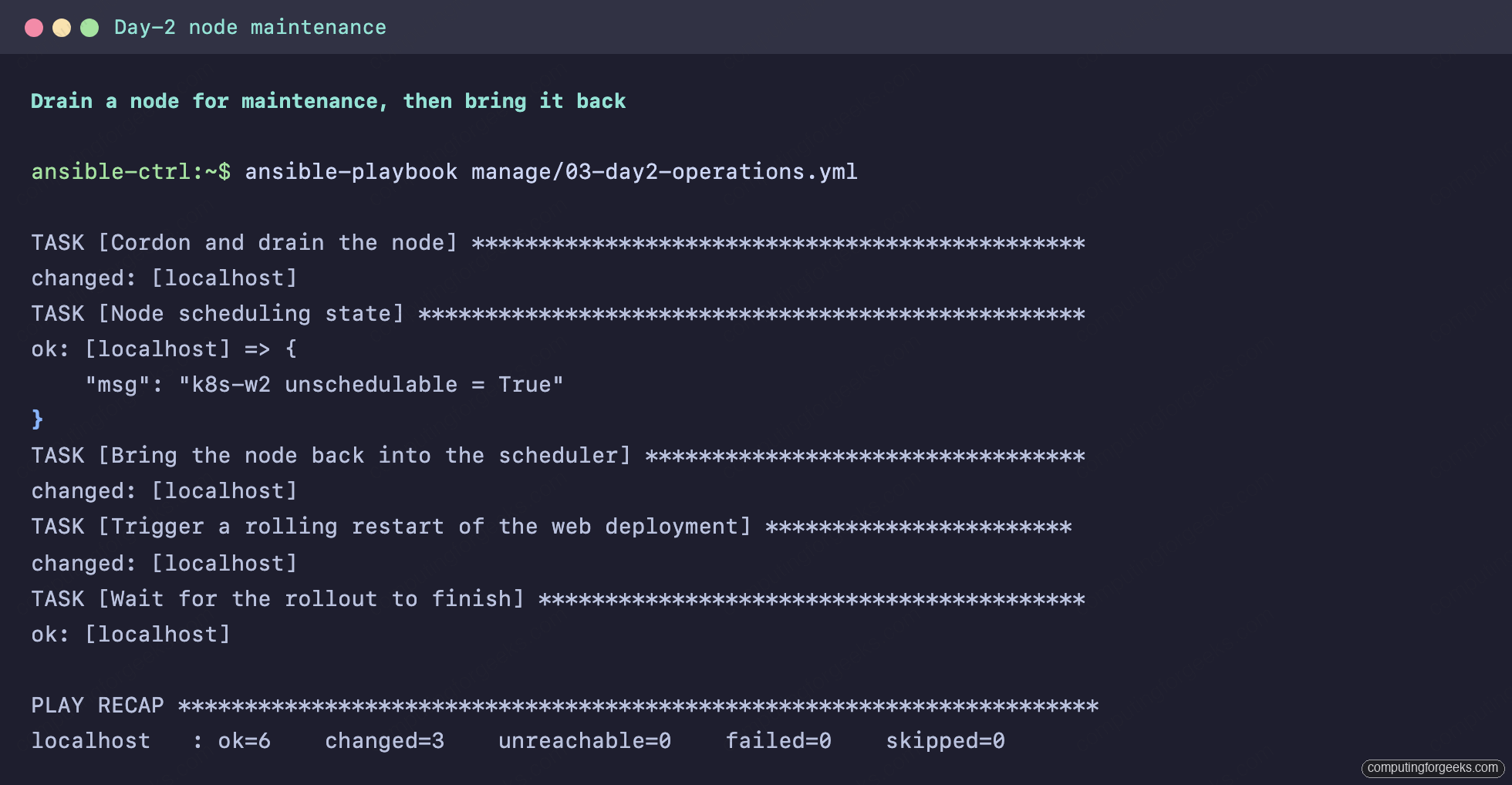
The k8s_drain module handles the eviction along with the daemonset and emptydir edge cases that a hand-rolled wrapper around kubectl drain usually forgets.
Add a worker node
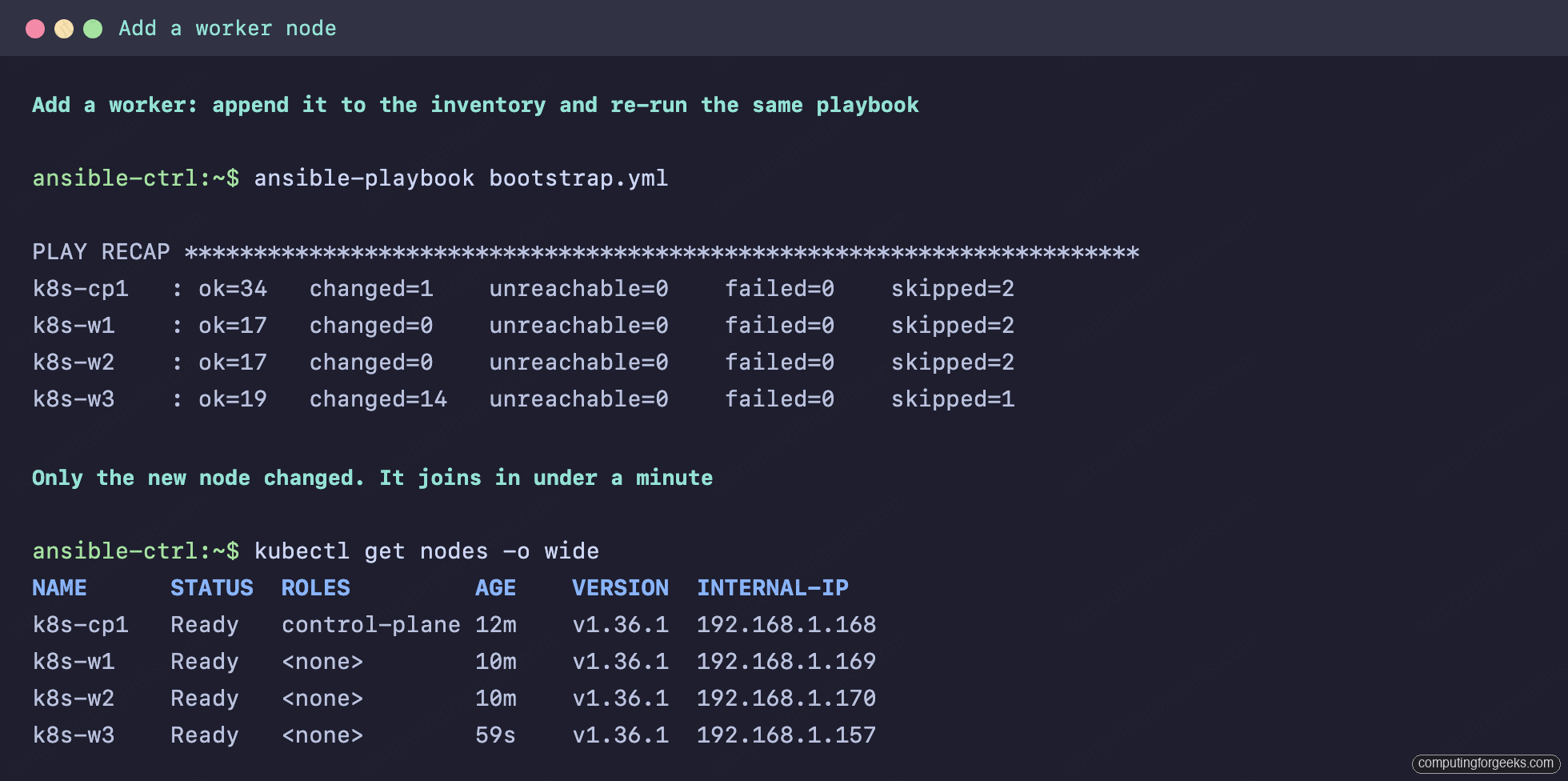
This is where the idempotent roles pay off. To grow the cluster, add the new node under [workers] in the inventory and run the same bootstrap playbook. Nothing else changes.
[workers]
k8s-w1 ansible_host=192.168.1.169
k8s-w2 ansible_host=192.168.1.170
k8s-w3 ansible_host=192.168.1.157
Then re-run the bootstrap, unchanged:
ansible-playbook bootstrap.ymlThe existing nodes report changed=0 because their state already matches. Only the new node runs the prep tasks and the join, and it is Ready in under a minute.
The same loop scales the other way for cloud fleets: instead of editing the inventory by hand, pull the node list from your provider with dynamic inventory and let the count drive itself.
Troubleshooting
Failed to import the required Python library (kubernetes)
The kubernetes.core modules cannot find the Python client. It is almost always installed into the wrong environment. If you installed Ansible with pipx, run pipx inject ansible kubernetes so the client lands in Ansible’s venv. With a system Ansible, install python3-kubernetes from apt instead.
error: … installations.operator.tigera.io not found
Calico’s Installation resource was applied before its CRD existed. Recent Calico splits the CRDs into operator-crds.yaml, which has to go on before tigera-operator.yaml. The role applies them in that order and then runs kubectl wait --for condition=established on the CRD, so the race cannot happen.
Pods stuck in ContainerCreating, nodes never Ready
Two usual causes. Either containerd is still on the cgroupfs driver (check that SystemdCgroup = true is set in /etc/containerd/config.toml and containerd was restarted), or the pod CIDR overlaps your LAN and the CNI cannot route. Confirm the value in group_vars/all.yml is a range your network does not use.
kubectl top says “Metrics API not available”
metrics-server is running but cannot scrape the kubelets. On a kubeadm cluster it needs --kubelet-insecure-tls, set through Helm values as shown above. Give it thirty seconds after the rollout for the first scrape before deciding it is broken.
Take it to production
The cluster here has one control-plane node, which is fine for a lab and wrong for anything you depend on. The same roles extend in a few clear steps. Run three control-plane nodes behind a load balancer and pass --control-plane-endpoint to kubeadm init so the API has a stable address to fail over to. Keep the Kubernetes minor pinned in group_vars and bump it deliberately, one minor at a time, rather than letting apt decide. Most of all, stop storing Secrets as plain text in a playbook: the stringData field in the deploy example is readable to anyone with the repo, so move those values behind Ansible Vault and reference them as variables. The full set of roles and playbooks, ready to clone, lives in the companion repository.