The first playbook that does one thing to all hosts is satisfying. The second you need different behavior per OS, per environment, or per host, you need control flow. Ansible gives you when for conditionals, loop for iteration, block/rescue/always for error handling, and until for retries. Combined, they turn static task lists into adaptive automation.
This guide tests every control flow pattern on real Rocky Linux 10.1 and Ubuntu 24.04 hosts, including the cross-platform gotchas that only show up when you actually run the playbook against both OS families. We use Ansible 13.5.0 (ansible-core 2.20.4). If you need to review Ansible variables first, that guide covers facts, custom vars, and precedence rules.
Current as of April 2026. Verified on Rocky Linux 10.1 and Ubuntu 24.04 with ansible-core 2.20.4
Prerequisites
You need:
- Ansible installed on a control node (Install Ansible on Rocky Linux 10 / Ubuntu 24.04)
- At least one managed host reachable via SSH (two is better for testing cross-OS conditionals)
- Tested on: ansible-core 2.20.4, Rocky Linux 10.1, Ubuntu 24.04
- Familiarity with Ansible playbooks and inventory management
The when Conditional
The when keyword on a task evaluates a Jinja2 expression. If it’s true, the task runs. If false, Ansible skips it and moves on. No YAML trickery, no nested blocks required for simple branching.
Branching by OS Family
The most common conditional in cross-platform automation: running different tasks for RHEL and Debian family systems. Facts like ansible_facts['os_family'] make this straightforward:
---
- name: OS-Specific Tasks
  hosts: all
  become: true

  tasks:
    - name: Install EPEL on RHEL family only
      ansible.builtin.dnf:
        name: epel-release
        state: present
      when: ansible_facts['os_family'] == "RedHat"

    - name: Update apt cache on Debian family only
      ansible.builtin.apt:
        update_cache: true
        cache_valid_time: 3600
      when: ansible_facts['os_family'] == "Debian"

    - name: Show which branch ran
      ansible.builtin.debug:
        msg: "{{ ansible_facts['distribution'] }} ({{ ansible_facts['os_family'] }}) handled"
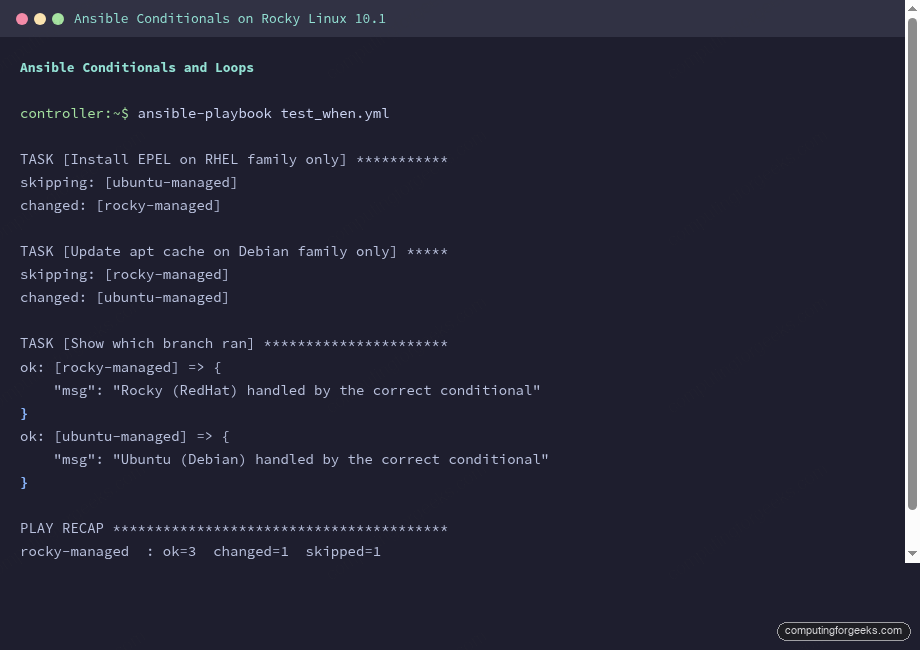
Each host runs only the task that matches its OS, and skips the other:
TASK [Install EPEL on RHEL family only] ***********
skipping: [ubuntu-managed]
changed: [rocky-managed]

TASK [Update apt cache on Debian family only] *****
skipping: [rocky-managed]
changed: [ubuntu-managed]

TASK [Show which branch ran] **********************
ok: [rocky-managed] => {
    "msg": "Rocky (RedHat) handled"
}
ok: [ubuntu-managed] => {
    "msg": "Ubuntu (Debian) handled"
}
The skipping: lines confirm that Rocky skipped the apt task and Ubuntu skipped the dnf task. This is the foundation of every cross-platform playbook.
Multiple Conditions
AND conditions use a YAML list under when. All conditions must be true:
    - name: Multiple conditions with and
      ansible.builtin.debug:
        msg: "This is a Rocky server with 2+ CPUs"
      when:
        - ansible_facts['distribution'] == "Rocky"
        - ansible_facts['processor_vcpus'] >= 2
Only the Rocky host with 2 vCPUs matches both conditions:
ok: [rocky-managed] => {
    "msg": "This is a Rocky server with 2+ CPUs"
}
skipping: [ubuntu-managed]
OR conditions use the or keyword in a single expression:
    - name: Multiple conditions with or
      ansible.builtin.debug:
        msg: "This host runs either Rocky or Ubuntu"
      when: ansible_facts['distribution'] == "Rocky" or ansible_facts['distribution'] == "Ubuntu"
Both hosts match at least one condition, so both run the task.
The in Operator and Registered Results
Testing membership in a list is cleaner than chaining OR conditions. The in operator works with any list:
    - name: Condition with in operator
      ansible.builtin.debug:
        msg: "{{ ansible_facts['distribution'] }} is a supported distro"
      when: ansible_facts['distribution'] in ['Rocky', 'Ubuntu', 'Debian', 'AlmaLinux']
Conditionals paired with registered variables let you make decisions based on command output. Check if a binary exists before trying to use it:
    - name: Check if firewalld is installed
      ansible.builtin.command: which firewall-cmd
      register: firewalld_check
      changed_when: false
      failed_when: false

    - name: Firewall management available
      ansible.builtin.debug:
        msg: "Firewall management available on {{ inventory_hostname }}"
      when: firewalld_check.rc == 0

    - name: No firewalld detected
      ansible.builtin.debug:
        msg: "No firewalld on {{ inventory_hostname }}, likely uses ufw"
      when: firewalld_check.rc != 0
The failed_when: false prevents the play from stopping when which returns a non-zero exit code on hosts without firewalld. The registered .rc attribute gives you the return code for branching logic.
Loops: Iterating Over Data
Loops prevent you from writing the same task five times with different values. The loop keyword (which replaced the older with_items in most cases) iterates over a list and makes each element available as {{ item }}.
Simple List Loop
Install multiple packages in a single task:
    - name: Install multiple packages with loop
      ansible.builtin.dnf:
        name: "{{ item }}"
        state: present
      loop:
        - tree
        - wget
        - jq
        - tmux
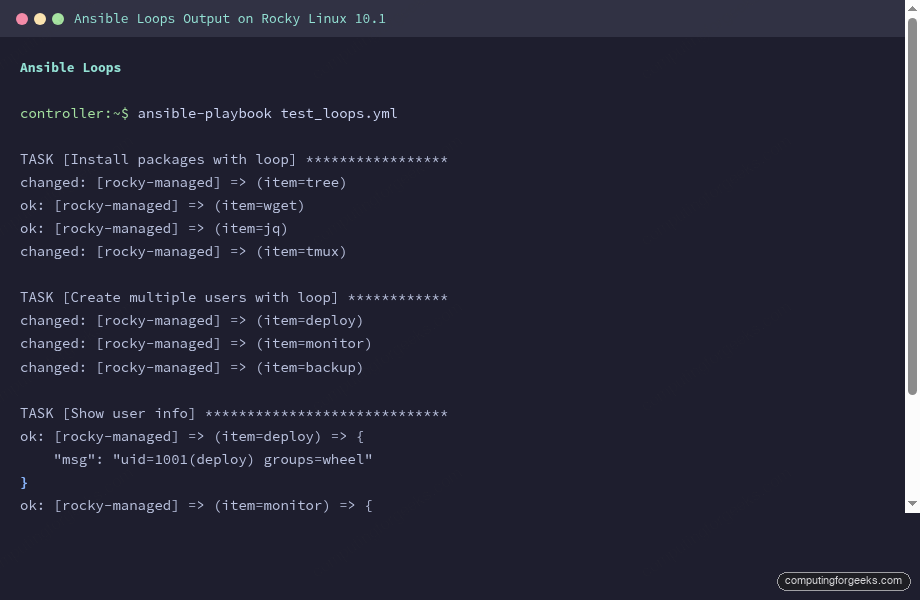
Ansible runs the task once per item, showing each result:
TASK [Install multiple packages with loop] ********
changed: [rocky-managed] => (item=tree)
ok: [rocky-managed] => (item=wget)
ok: [rocky-managed] => (item=jq)
changed: [rocky-managed] => (item=tmux)
Items that were already installed show ok, new installs show changed. This idempotent behavior is core to Ansible.
Loop Over Dictionaries
When each item needs multiple attributes, use a list of dictionaries:
    - name: Create multiple users with loop
      ansible.builtin.user:
        name: "{{ item.name }}"
        shell: "{{ item.shell }}"
        groups: "{{ item.groups }}"
        create_home: true
      loop:
        - { name: deploy, shell: /bin/bash, groups: wheel }
        - { name: monitor, shell: /sbin/nologin, groups: "" }
        - { name: backup, shell: /bin/bash, groups: "" }
All three users are created in one task:
changed: [rocky-managed] => (item={'name': 'deploy', 'shell': '/bin/bash', 'groups': 'wheel'})
changed: [rocky-managed] => (item={'name': 'monitor', 'shell': '/sbin/nologin', 'groups': ''})
changed: [rocky-managed] => (item={'name': 'backup', 'shell': '/bin/bash', 'groups': ''})
Verifying the users exist with id confirms the group assignments:
ok: [rocky-managed] => (item=deploy) => {
    "msg": "uid=1001(deploy) gid=1001(deploy) groups=1001(deploy),10(wheel)"
}
ok: [rocky-managed] => (item=monitor) => {
    "msg": "uid=1002(monitor) gid=1002(monitor) groups=1002(monitor)"
}
ok: [rocky-managed] => (item=backup) => {
    "msg": "uid=1003(backup) gid=1003(backup) groups=1003(backup)"
}
Loop with Index (loop_control)
When you need a counter, loop_control with index_var provides a zero-based index:
    - name: Loop with index
      ansible.builtin.debug:
        msg: "Step {{ idx + 1 }}: {{ item }}"
      loop:
        - Validate configuration
        - Backup current state
        - Apply changes
        - Verify deployment
      loop_control:
        index_var: idx
The numbered steps print in order:
ok: [rocky-managed] => (item=Validate configuration) => {
    "msg": "Step 1: Validate configuration"
}
ok: [rocky-managed] => (item=Backup current state) => {
    "msg": "Step 2: Backup current state"
}
ok: [rocky-managed] => (item=Apply changes) => {
    "msg": "Step 3: Apply changes"
}
ok: [rocky-managed] => (item=Verify deployment) => {
    "msg": "Step 4: Verify deployment"
}
Another useful loop_control option: label. It controls what Ansible prints next to each iteration. Instead of dumping the entire dictionary, show just the key you care about: label: "{{ item.name }}". This cleans up verbose output significantly.
Loop Over a Dictionary with dict2items
The dict2items filter converts a dictionary into a list of key/value pairs for looping:
    - name: Loop over dictionary
      ansible.builtin.debug:
        msg: "Service {{ item.key }} listens on port {{ item.value }}"
      loop: "{{ services | dict2items }}"
      vars:
        services:
          nginx: 80
          postgresql: 5432
          redis: 6379
Each key/value pair becomes an iteration:
ok: [rocky-managed] => (item={'key': 'nginx', 'value': 80}) => {
    "msg": "Service nginx listens on port 80"
}
ok: [rocky-managed] => (item={'key': 'postgresql', 'value': 5432}) => {
    "msg": "Service postgresql listens on port 5432"
}
ok: [rocky-managed] => (item={'key': 'redis', 'value': 6379}) => {
    "msg": "Service redis listens on port 6379"
}
Retry Loops with until
Some tasks need to wait for a condition. A service might take a few seconds to start, or an API might return a 503 while initializing. The until keyword retries a task until its condition is true:
    - name: Retry until condition is met
      ansible.builtin.command: cat /proc/uptime
      register: uptime_check
      until: uptime_check.stdout.split('.')[0] | int > 0
      retries: 3
      delay: 2
      changed_when: false

    - name: Show retry result
      ansible.builtin.debug:
        msg: "Uptime: {{ uptime_check.stdout.split()[0] }}s (took {{ uptime_check.attempts }} attempt)"
The task succeeded on the first attempt since the server was already up:
ok: [rocky-managed] => {
    "msg": "Uptime: 1110.61s (took 1 attempt)"
}
A more practical use: waiting for a web service to respond after starting it. Set retries: 10 and delay: 5 to give a service up to 50 seconds to become healthy. The registered variable includes an .attempts attribute so you know how many tries it took.
Error Handling with block/rescue/always
Try/catch for Ansible. The block section runs tasks normally. If any task in the block fails, execution jumps to rescue. The always section runs regardless of success or failure.
    - name: Error handling with block/rescue/always
      block:
        - name: Try to read a nonexistent file
          ansible.builtin.command: cat /etc/nonexistent.conf
          register: file_content

        - name: This will be skipped because the previous task fails
          ansible.builtin.debug:
            msg: "File content: {{ file_content.stdout }}"

      rescue:
        - name: Handle the error gracefully
          ansible.builtin.debug:
            msg: "Expected error caught: file does not exist. Creating default..."

        - name: Create a fallback config
          ansible.builtin.copy:
            content: "# Default configuration\nport=8080\n"
            dest: /tmp/fallback.conf
            mode: "0644"
          become: true

      always:
        - name: This always runs
          ansible.builtin.debug:
            msg: "Cleanup complete. Block execution finished."
The block fails at the first task, rescue catches the error and creates a fallback config, and always runs the cleanup regardless:
TASK [Try to read a nonexistent file] *************
fatal: [rocky-managed]: FAILED! => {"stderr": "cat: /etc/nonexistent.conf: No such file or directory", "rc": 1}

TASK [Handle the error gracefully] ****************
ok: [rocky-managed] => {
    "msg": "Expected error caught: file does not exist. Creating default..."
}

TASK [Create a fallback config] *******************
changed: [rocky-managed]

TASK [This always runs] ***************************
ok: [rocky-managed] => {
    "msg": "Cleanup complete. Block execution finished."
}

PLAY RECAP ****************************************
rocky-managed  : ok=6  changed=1  rescued=1
The play recap shows rescued=1, confirming the error was handled. Without block/rescue, that fatal would have stopped the entire play. Common uses: rolling back a failed deployment, sending an alert on failure, or cleaning up temporary resources in always.
Practical Example: Cross-Platform Service Setup
Combining conditionals and loops solves the real challenge of managing mixed environments. This playbook installs OS-specific packages, starts the appropriate firewall, and handles the vim-enhanced vs vim package name difference that catches people when moving from RHEL to Debian:
---
- name: Cross-Platform Service Setup
  hosts: all
  become: true

  vars:
    common_packages:
      - curl
      - rsync
    rhel_packages:
      - vim-enhanced
      - policycoreutils-python-utils
      - firewalld
    debian_packages:
      - vim
      - ufw
      - apt-transport-https

  tasks:
    - name: Install common packages
      ansible.builtin.package:
        name: "{{ item }}"
        state: present
      loop: "{{ common_packages }}"

    - name: Install RHEL-specific packages
      ansible.builtin.dnf:
        name: "{{ item }}"
        state: present
      loop: "{{ rhel_packages }}"
      when: ansible_facts['os_family'] == "RedHat"

    - name: Install Debian-specific packages
      ansible.builtin.apt:
        name: "{{ item }}"
        state: present
      loop: "{{ debian_packages }}"
      when: ansible_facts['os_family'] == "Debian"

    - name: Enable firewalld on RHEL
      ansible.builtin.systemd:
        name: firewalld
        state: started
        enabled: true
      when: ansible_facts['os_family'] == "RedHat"
Rocky installs its packages and skips the Debian ones, while Ubuntu does the reverse:
TASK [Install RHEL-specific packages] *************
skipping: [ubuntu-managed] => (item=vim-enhanced)
skipping: [ubuntu-managed] => (item=policycoreutils-python-utils)
skipping: [ubuntu-managed] => (item=firewalld)
ok: [rocky-managed] => (item=vim-enhanced)
ok: [rocky-managed] => (item=policycoreutils-python-utils)
ok: [rocky-managed] => (item=firewalld)

TASK [Install Debian-specific packages] ***********
skipping: [rocky-managed] => (item=vim)
skipping: [rocky-managed] => (item=ufw)
skipping: [rocky-managed] => (item=apt-transport-https)
ok: [ubuntu-managed] => (item=vim)
ok: [ubuntu-managed] => (item=ufw)
changed: [ubuntu-managed] => (item=apt-transport-https)
The when condition on a loop evaluates once per host, not once per item. If the condition is false, the entire loop is skipped. This is efficient because Ansible doesn’t even iterate the list on hosts where the condition doesn’t apply.
Quick Reference Table
| Pattern | Syntax | When to Use |
|---|---|---|
| Simple conditional | when: ansible_facts['key'] == "value" | OS branching, feature flags |
| AND conditions | YAML list under when: | Multiple criteria must all match |
| OR conditions | when: A or B | Any one criterion is enough |
| Membership test | when: var in [list] | Checking supported values |
| Registered check | when: result.rc == 0 | Branching on command output |
| Simple loop | loop: [a, b, c] | Same task, different values |
| Dict loop | loop: "{{ dict | dict2items }}" | Key/value pair iteration |
| Indexed loop | loop_control: index_var: idx | Numbered steps |
| Retry loop | until: condition | Waiting for service readiness |
| Error handling | block/rescue/always | Graceful failure recovery |
For the complete Ansible learning path, see the Ansible Automation Guide. The Ansible Cheat Sheet covers quick command syntax, and the Ansible Roles tutorial shows how to package conditionals and loops into reusable roles.