Restart-on-every-run is the wrong default for production. The right default is restart-only-when-something-actually-changes, and that is exactly what Ansible handlers exist for. A handler is a task that only runs when another task notifies it, and only once per play no matter how many times it was notified. The pattern keeps services responsive, avoids gratuitous downtime, and makes plays easier to read because the “what changed” intent lives next to the change itself.
This guide writes a real nginx role with three handlers wired three different ways, then breaks it deliberately to expose the gotchas that bite first-time users: handler name mismatches, handlers that never fire because a prior task failed, and the difference between notify and the wider listen.
Tested April 2026 on Rocky Linux 10.1 with Ansible 2.18.16. Controller and managed node both run as fresh cloud-init Rocky 10 VMs.
What you need
- A control host with Ansible installed. The install guide for Rocky 10 and Ubuntu covers the bootstrap.
- One managed node reachable over SSH key auth. The inventory guide covers the basics if you do not have one yet.
- Comfort with the basic playbook flow. Handlers sit on top of plain tasks, so you should be at home with one before the other makes sense.
Source for every playbook below is in the companion repo at c4geeks/ansible/beginner/ansible-handlers-tutorial. Clone it if you would rather follow along with running code than retype.
Step 1: Set reusable shell variables
Two values appear in nearly every command. Pin them so the rest of the guide is copy-paste ready:
export LAB_DIR="$HOME/molecule-lab/handlers-lab"
export TARGET_IP="10.0.1.50"
Confirm both expanded correctly:
echo "Lab:    ${LAB_DIR}"
echo "Target: ${TARGET_IP}"
Re-run those exports if you reconnect or open a new shell.
Step 2: Anatomy of a handler
Three things make a handler a handler: it lives under the play’s handlers: block, it has a unique name:, and it only runs when a task does notify: <that name>. The name match is exact and case sensitive. The handler runs after all tasks in the play have completed, and it runs at most once even if 50 tasks notify it:
tasks:
  - name: Render vhost
    ansible.builtin.copy:
      dest: /etc/nginx/conf.d/handlers-demo.conf
      content: |
        server { listen 80 default_server; root /var/www/handlers-demo; }
    notify:
      - Validate nginx config
      - Reload nginx

handlers:
  - name: Validate nginx config
    ansible.builtin.command: nginx -t
    changed_when: false

  - name: Reload nginx
    ansible.builtin.service:
      name: nginx
      state: reloaded
Two handlers, one task. The vhost change notifies both. The “validate first, reload second” ordering matters: invalid config gets caught before the reload, and the reload is a no-op when validation fails. Handlers run in the order they are listed in the handlers: block, not in the order they were notified, which is the rule you forget once and never forget again.
Step 3: A complete play that demonstrates notify, listen, and flush
The full play in the companion repo wires three handlers together using all three patterns at once. Save it as nginx_with_handlers.yml:
---
- name: nginx with three handlers
  hosts: web
  become: false
  gather_facts: true

  vars:
    nginx_root: /var/www/handlers-demo
    nginx_message: "Handlers article: notify works"

  tasks:
    - name: Install nginx
      ansible.builtin.dnf:
        name: nginx
        state: present

    - name: Render docroot
      ansible.builtin.file:
        path: "{{ nginx_root }}"
        state: directory
        owner: nginx
        group: nginx
        mode: "0755"

    - name: Render index page
      ansible.builtin.copy:
        dest: "{{ nginx_root }}/index.html"
        owner: nginx
        group: nginx
        mode: "0644"
        content: |
          <html><body><h1>{{ nginx_message }}</h1></body></html>
      notify:
        - Reload nginx
        - Log site change

    - name: Render vhost
      ansible.builtin.copy:
        dest: /etc/nginx/conf.d/handlers-demo.conf
        owner: root
        group: root
        mode: "0644"
        content: |
          server {
              listen 80 default_server;
              root {{ nginx_root }};
              index index.html;
          }
      notify:
        - Validate nginx config
        - Reload nginx

    - name: Force handlers to run before the verification step
      ansible.builtin.meta: flush_handlers

    - name: Verify nginx serves the new content
      ansible.builtin.uri:
        url: "http://{{ ansible_host }}/"
        return_content: true
        status_code: 200
      delegate_to: localhost

  handlers:
    - name: Validate nginx config
      ansible.builtin.command: nginx -t
      changed_when: false

    - name: Reload nginx
      ansible.builtin.service:
        name: nginx
        state: reloaded

    - name: Log site change
      ansible.builtin.debug:
        msg: "[{{ ansible_date_time.iso8601 }}] handlers-demo site was rerendered"

    - name: Send a webhook (placeholder)
      ansible.builtin.debug:
        msg: "Pretend webhook to PagerDuty: site changed on {{ inventory_hostname }}"
      listen:
        - Reload nginx
        - Log site change
Three things in there are worth pointing at before you run it.
First, the Render index page task notifies two handlers, Reload nginx and Log site change. They will run in handlers-block order (Reload first, then Log) regardless of the order in notify:.
Second, the Send a webhook handler does not have a unique notify: from any task. It uses listen:, which is a topic broadcast: any task that notifies Reload nginx or Log site change also fires this handler. listen is the right tool when one event needs to fan out to several handlers without each task having to know about all of them.
Third, the meta: flush_handlers task forces every queued handler to run right then and there, before the verification step. Without it, handlers would only run at the end of the play, after the verification ran against an unreloaded nginx.
Run the play against the lab:
cd "${LAB_DIR}"
ansible-playbook -i inventory.ini nginx_with_handlers.yml
The output shows the notify chain firing in the right order, the listen-broadcast picking up the same notify, and the verification step succeeding because flush_handlers reloaded nginx first:
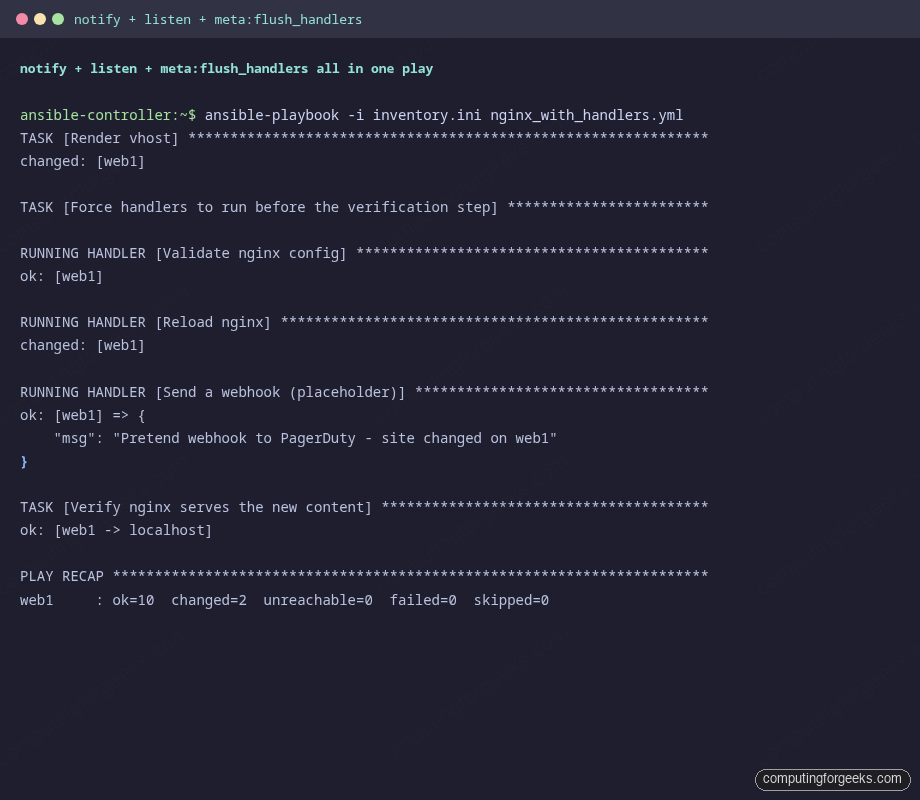
Notice Log site change did NOT fire on this run. The index file was already correct from a prior run, so the task reported ok instead of changed. Ansible only fires handlers when the notifying task reports a change. That is the most common surprise for people coming from imperative tooling: handlers are NOT a thing-to-do hook, they are a state-changed hook.
Step 4: Idempotence keeps handlers quiet
Run the same play again with no edits in between:
ansible-playbook -i inventory.ini nginx_with_handlers.ymlEvery task reports ok, no task reports changed, no handler fires. The PLAY RECAP is short and silent, which is exactly what you want from a CI run that is just confirming production is in the desired state:
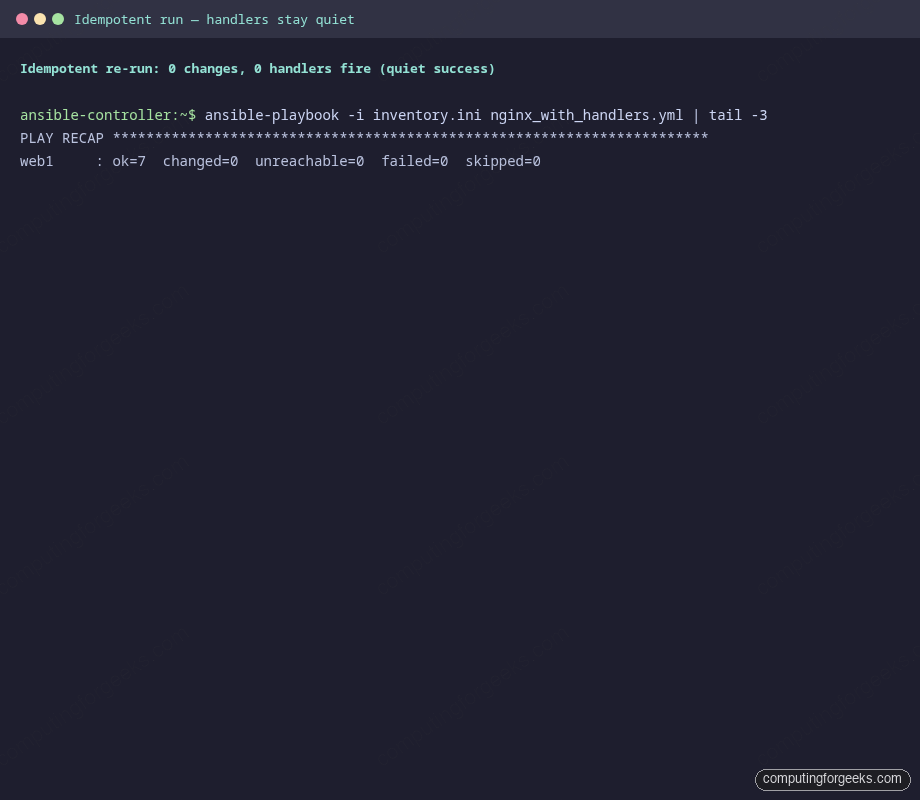
If a handler fires here, your role has a non-idempotent task somewhere. Most often it is a template that includes a timestamp or a copy task whose source bytes drift between runs. Track it down before shipping the role, because every CI run will then trigger a service reload.
Step 5: force_handlers runs even when a later task fails
By default, when any task fails, Ansible aborts the play and skips queued handlers. That is usually the right call: if you broke nginx config, you do not want to also reload nginx and lock yourself out. But sometimes you do want the handler to run regardless, because the handler itself is what restores good state. force_handlers: true at the play level enables that:
---
- name: Force handler runs after a failed task
  hosts: web
  become: false
  gather_facts: false
  force_handlers: true

  tasks:
    - name: Touch the index file (notifies the reload handler)
      ansible.builtin.copy:
        dest: /var/www/handlers-demo/index.html
        owner: nginx
        group: nginx
        mode: "0644"
        content: |
          <html><body><h1>Edit triggered by force_handlers run</h1></body></html>
      notify: Reload nginx

    - name: Deliberately fail the next task
      ansible.builtin.fail:
        msg: "Pretend something broke after the config edit"

  handlers:
    - name: Reload nginx
      ansible.builtin.service:
        name: nginx
        state: reloaded
Run it. The first task changes the index, the second task fails. Without force_handlers: true, the handler would never fire. With it, the handler runs anyway:
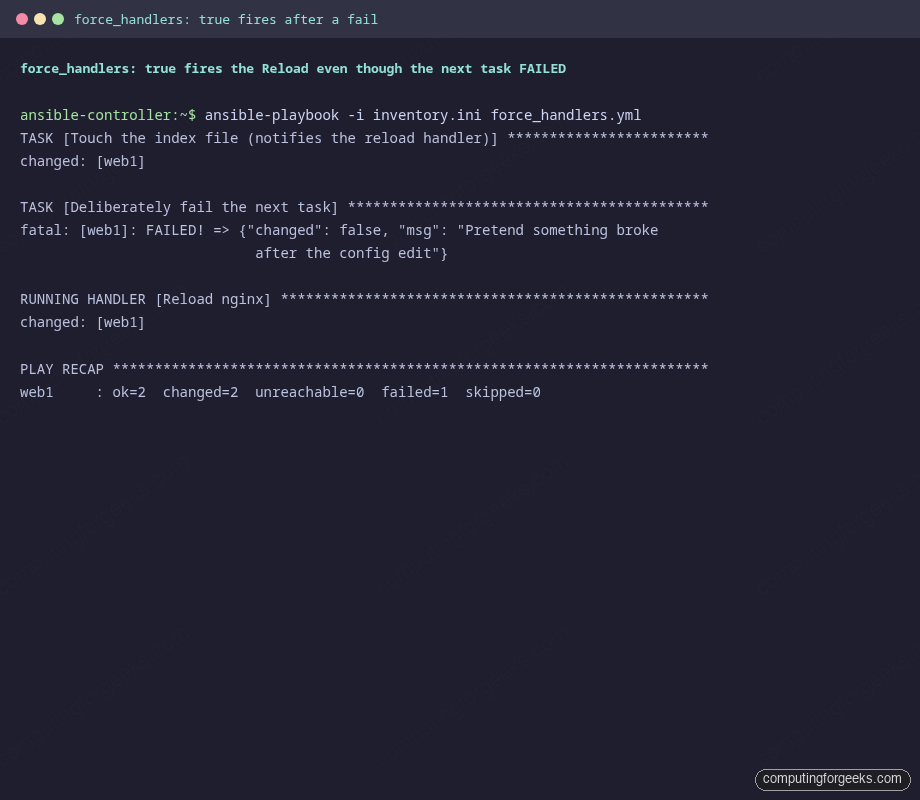
Use force_handlers when the handler ships the system into a known-good state. Avoid it when the handler is a “side effect” the failure should suppress (think: send a webhook only on success).
Step 6: The name-mismatch trap
If you typo a handler name in notify:, what happens? In Ansible 2.18 and newer, the playbook fails immediately with a clear error. Older Ansible silently skipped the unknown handler. Both behaviours bite, just differently. Here is the failure on a current Ansible:
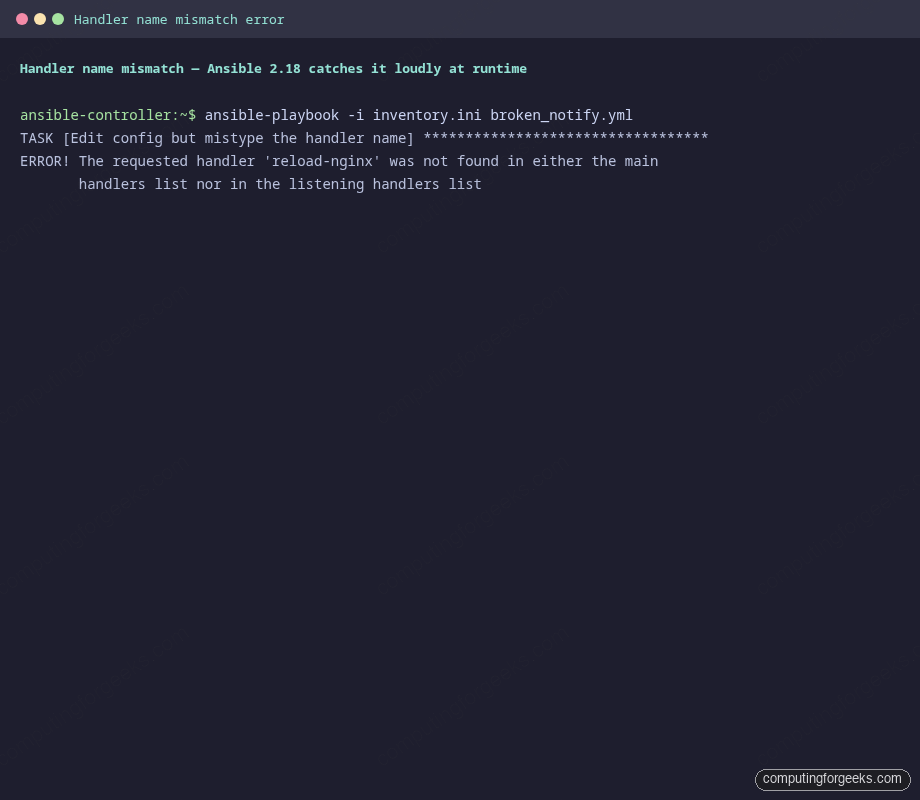
The error names the handler as Ansible heard it (reload-nginx) and tells you it is not in either the main handlers list or the listening handlers list. The fix is one character: match the handler name exactly. Two human practices avoid the trap entirely:
- Always notify in the same case and word order as the handler’s
name:. Pick a convention (verb + noun, or sentence-case) and stick to it across the role. - Run
ansible-lintbefore pushing. Theno-handlerrule catches most of these statically. The full diagnostic toolbox is covered in the debugging guide.
Step 7: Handlers in roles
The same patterns work inside a role. The role’s handlers/main.yml defines the handler, and any task in tasks/main.yml can notify: it by name. The slight wrinkle is that handlers from a role must be referenced by their handler name only, not role_name : handler_name, which is a syntax that does not exist:
# roles/nginx_site/tasks/main.yml
- name: Render vhost
  ansible.builtin.template:
    src: vhost.conf.j2
    dest: /etc/nginx/conf.d/site.conf
  notify: Reload nginx                  # right
  # notify: nginx_site : Reload nginx   # wrong, no such syntax

# roles/nginx_site/handlers/main.yml
- name: Reload nginx
  ansible.builtin.service:
    name: nginx
    state: reloaded
If two roles in the same play both define a handler called Reload nginx, the LAST one defined wins. That clash never bites in single-role plays, but in deep dependency graphs it does. The fix is a role-prefixed handler name (Reload site nginx, Reload proxy nginx) so each handler is uniquely addressable.
Step 8: Common gotchas at a glance
| Symptom | What is happening | Fix |
|---|---|---|
| Handler did not run after a task that “should” have changed state | The task reported ok instead of changed. Modules only return changed when state actually moved. |
Run with --diff and inspect the task. If the bytes really did not change, the handler shouldn’t fire. If they did but the module returned ok, check the module’s docs (register + changed_when can override). |
The requested handler 'X' was not found |
Handler name in notify does not exactly match any handler’s name: field. |
Match exactly: case, spaces, punctuation. Run ansible-lint to catch this in CI. |
| Handlers run in unexpected order | Handlers run in the order they appear in the handlers: block, not in the order they were notified. |
Re-order the handlers block to match the dependency you need (validate before reload, reload before webhook). |
| Handler runs only at end of play, but verification needs the new state immediately | Default behaviour: handlers flush at the end of all tasks. | Insert meta: flush_handlers before the verification task. Use sparingly; flushing too often defeats the batching. |
| Handler did not run because a prior task failed | Default behaviour: failures abort the play before handlers flush. | Set force_handlers: true at the play level when the handler is what restores good state. |
| One change notifies the same handler 50 times, but the handler still runs once | This is not a bug. Handlers de-duplicate per name. The 50 notifies collapse into one run at flush time. | If you need a per-task action, use a regular task with changed_when and register, not a handler. |
| Need to fan one notify out to several handlers | Plain notify targets one handler by name. |
Use listen: on the handlers. Several handlers can listen for the same topic. Notifying the topic fires them all in handlers-block order. |
Source code and going further
Every playbook from this guide (nginx_with_handlers.yml, force_handlers.yml, broken_notify.yml) is at c4geeks/ansible/beginner/ansible-handlers-tutorial. Clone the repo, edit the inventory to point at your own host, and you can run every example end-to-end.
Two next steps fit naturally on top of this. First, wrap your handler-using role into a Molecule scenario so the idempotence rule and the “handler fires on change, stays quiet otherwise” invariant are enforced on every PR. Second, when one of the handlers needs to push to a vault-managed secret (a webhook URL, an API token), keep the secret in Ansible Vault rather than committing it to defaults/main.yml. The full series index lives at the automation guide, and the cheat sheet is the quick lookup for which flag controls which behaviour.