Every Ansible run that ever broke broke for a reason. The trick is making that reason visible. By default, Ansible prints just enough information to convince you that something is wrong without telling you what. That is by design (the output is meant to be readable on a busy CI pipeline), but it makes the first hour of debugging painful. This guide goes the other way. We turn on every diagnostic Ansible has, walk a real failure end-to-end, and finish with a classification table that maps common error messages to the actual fix.
The lab is two Rocky Linux 10 hosts: a controller that runs ansible-playbook and a managed node it deploys against. Every command in the article ran for real on those boxes. The screenshots are unedited terminal output from that lab.
Tested April 2026 on Rocky Linux 10.1 with Ansible 2.18.16. Controller: a single VM with the ansible-core package installed in a Python 3.12 virtual env. Managed node: a fresh Rocky 10 cloud-init image accessed over SSH key auth.
What you need
- A control host with Ansible installed. The install guide for Rocky 10 and Ubuntu covers the bootstrap.
- One managed node reachable over SSH, with key auth set up. The inventory management primer covers the basics if you have not built an inventory file before.
- Comfort with the basic playbook flow. We are not learning what a play is here. We are learning how to see what is wrong with one.
The full lab (the deliberately broken playbook, the defensive variant, the inventory) ships in the companion repo at c4geeks/ansible/beginner/ansible-debugging. Clone it if you want to follow along with working code instead of typing.
Step 1: Set reusable shell variables
Two values show up in every command in this guide. Pin them once at the top of the session:
export LAB_DIR="$HOME/molecule-lab/debug-lab"
export TARGET_IP="10.0.1.50"
Confirm the variables hold before you run anything destructive:
echo "Lab:    ${LAB_DIR}"
echo "Target: ${TARGET_IP}"
Re-run the exports if you reconnect or open a new shell.
Step 2: Inventory introspection is the cheapest diagnostic
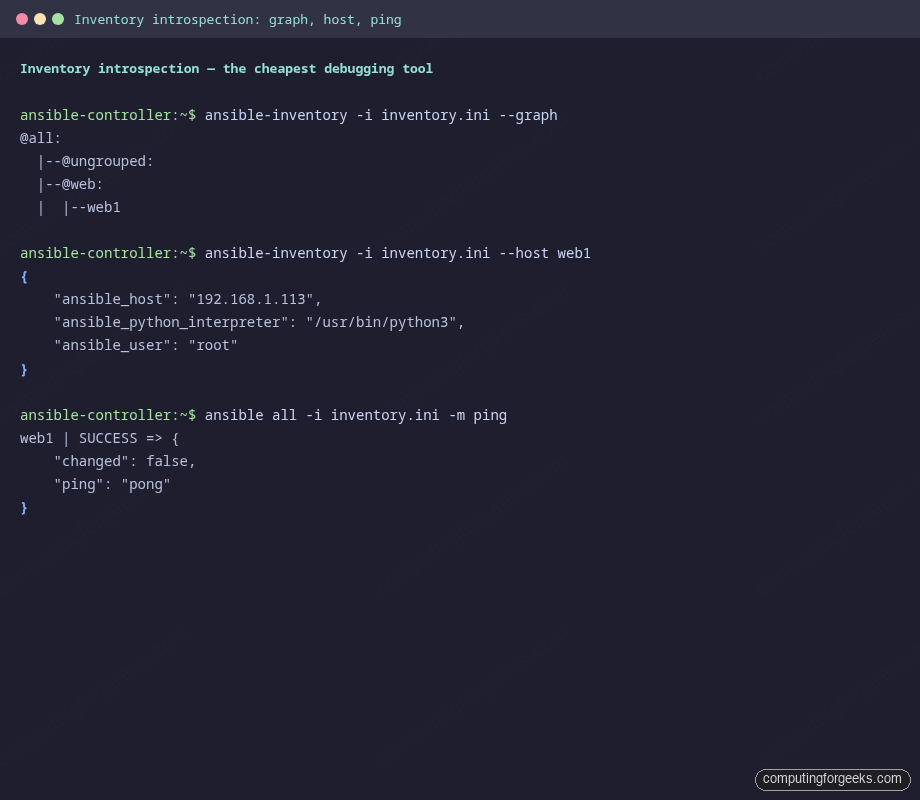
Most Ansible failures during your first hour with a new playbook are not playbook bugs. They are inventory bugs: the host is not in the group you think it is, the user is wrong, the python interpreter path is missing. ansible-inventory tells you exactly what Ansible thinks before any play runs:
cd "${LAB_DIR}"
ansible-inventory -i inventory.ini --graph
The output is a flat tree of every group and the hosts in it. If a host you expected does not appear here, no playbook is going to magically include it later:
@all:
  |--@ungrouped:
  |--@web:
  |  |--web1
For a single host, ask Ansible to dump every variable it resolved for that host. This is where you catch the silent ansible_user and ansible_python_interpreter drift between group_vars files:
ansible-inventory -i inventory.ini --host web1And the most underused command in the whole toolchain, the one-liner that proves Ansible can actually reach the host before you run anything else:
ansible all -i inventory.ini -m pingIf ping works, the connection layer is fine. If it does not, every playbook against that host is going to fail until you fix it. The output for a healthy connection is short and definitive:
Bookmark these three commands. They take five seconds and they answer the most common “why is my playbook broken” questions before you have written a single task.
Step 3: The verbosity dial
ansible-playbook has four levels of verbosity, and each one adds a different category of detail. Reach for them when you need to know what is happening, not just that something is wrong:
| Flag | What it adds | When to use it |
|---|---|---|
| (none) | One line per task, recap at end | CI runs and routine deploys |
-v | Module return values for changed/failed tasks | “What did the module actually return?” |
-vv | Above, plus the module name and ansible.cfg path | Sanity-check which config file is in effect |
-vvv | SSH command being executed and the working directory | “Why does it think the python interpreter is at that path?” |
-vvvv | Full SSH transport debug, every connection retry | Connectivity tantrums, GSSAPI weirdness, SSH multiplexing |
You almost never want -vvvv in CI (the log balloons and most CI viewers truncate it). Use it locally when SSH itself is the problem, then drop back to -v or -vv for the rest of the debug session.
Step 4: Pre-flight checks
The cheapest playbook bugs to fix are the ones you catch before any task runs against a host. Five flags do that work:
ansible-playbook -i inventory.ini --syntax-check deploy_app.yml
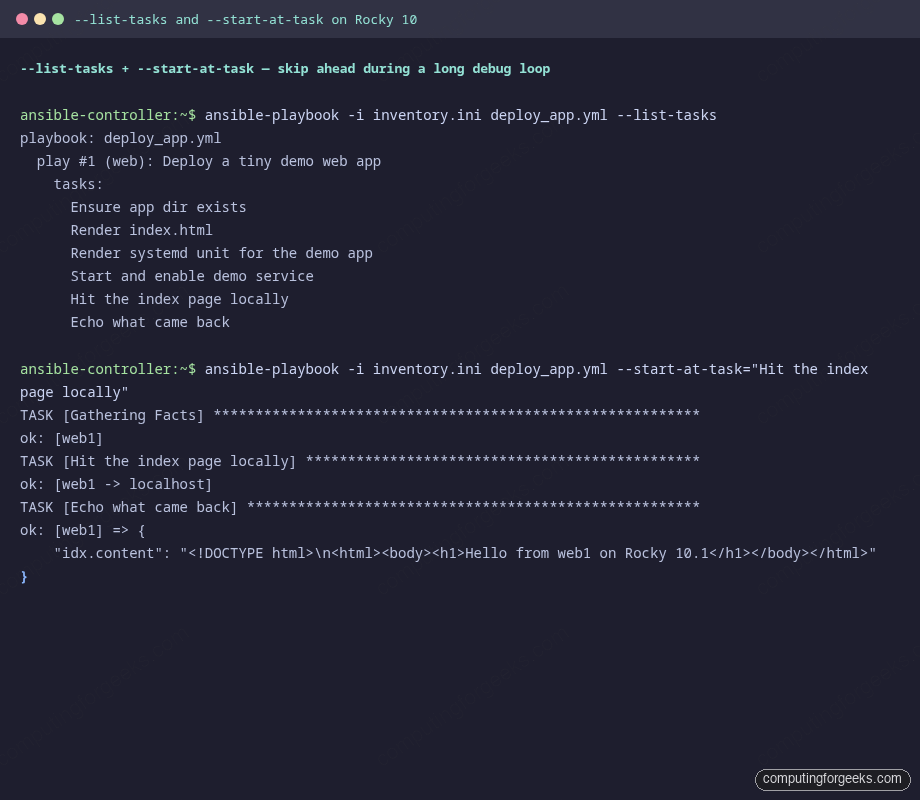
ansible-playbook -i inventory.ini deploy_app.yml --list-tasks
ansible-playbook -i inventory.ini deploy_app.yml --list-hosts
ansible-playbook -i inventory.ini --check --diff deploy_app.yml
--syntax-check parses the YAML, expands every include, and asserts the play structure is valid. It does not connect to any host. --list-tasks and --list-hosts tell you exactly what would run and against which targets, which is the answer to “is my pattern matching the hosts I think it is matching”:
--check runs the playbook in dry-run mode. Every module that supports check mode reports what it would change without changing it. Pair it with --diff and templates show you a unified diff of the rendered output. There is one important wrinkle: modules that do not support check mode (network calls, external API hits) are skipped, so any task that depends on the registered output of a skipped module fails with “VARIABLE IS NOT DEFINED” in the next debug print. Either guard those debug tasks with when: not ansible_check_mode or accept the noise.
Step 5: Walk a real failure end-to-end
Here is the playbook from the companion repo with a single character changed. app_message is referenced as apps_message on line 22 (a one-letter typo). Run it against the lab:
ansible-playbook -i inventory.ini broken_v1.ymlThe output is the kind of error that Ansible is famous for. It tells you what is wrong, which file it is in, and which line, but lies a little about which task is the actual culprit:
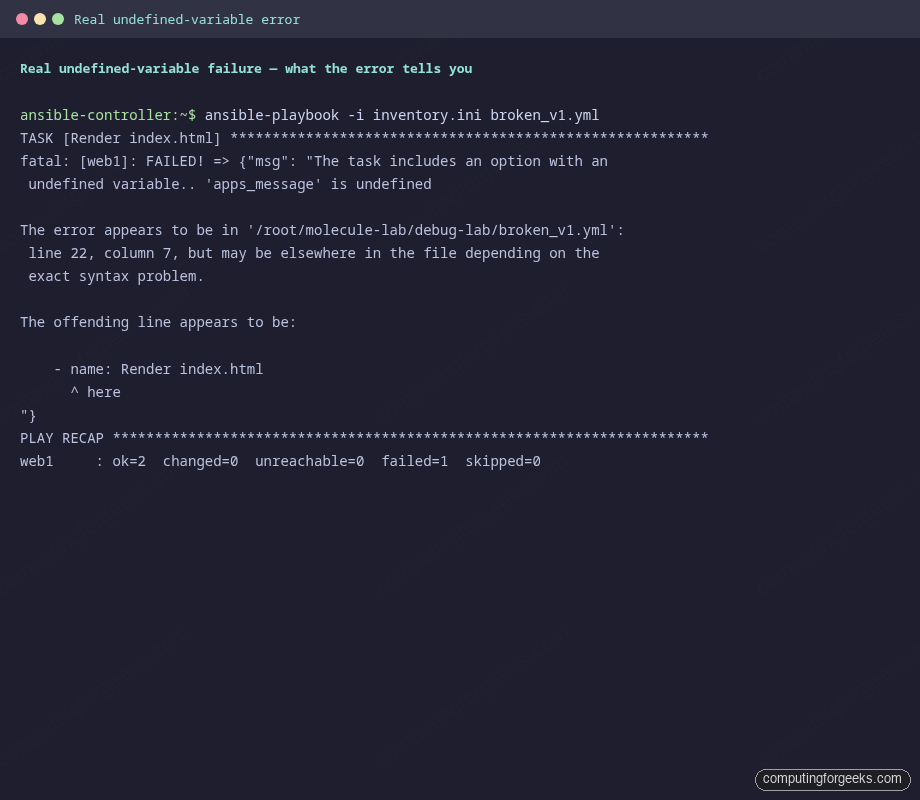
Read it carefully. Three useful pieces of information are in there:
- The task that failed:
Render index.html - The undefined name:
apps_message - A file and line:
broken_v1.ymlline 22
The line number points at the start of the failing task, not at the literal line where the typo lives, because Jinja errors bubble up to the task that referenced them. That trips up everyone the first time. Open the file at the indicated line and grep for the misspelled token. Half a minute of inspection beats fifteen minutes of guesswork.
Step 6: Defensive patterns that catch the bug pre-flight
The undefined variable above only failed when the play got to a task that needed it. A more disciplined playbook would have failed in the first second of the run with a clearer message. Two simple patterns make that possible.
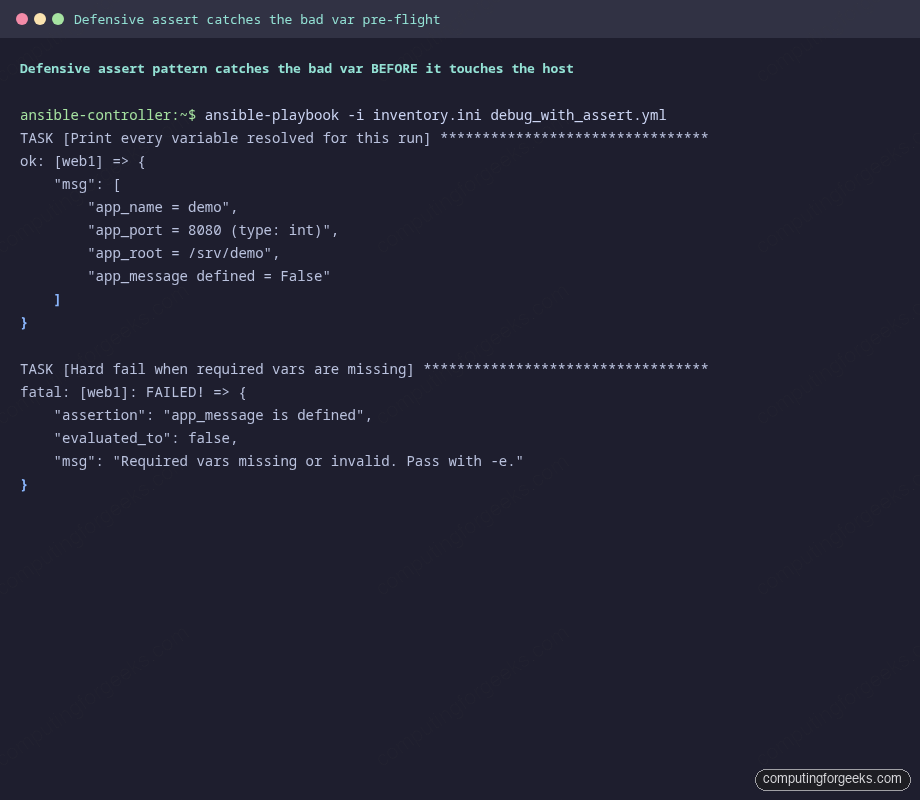
The first is the debug module used as a sanity print at the top of the play. Print every variable, with its type, before doing any real work:
- name: Print every variable resolved for this run
  ansible.builtin.debug:
    msg:
      - "app_name = {{ app_name }}"
      - "app_port = {{ app_port }} (type: {{ app_port | type_debug }})"
      - "app_root = {{ app_root }}"
      - "app_message defined = {{ (app_message is defined) | string }}"
That single block has saved more debug sessions than any tool in the kit. type_debug in particular catches the classic “I passed 8080 but Ansible thinks it is the string ‘8080’” footgun. The second pattern is the assert module, which fails fast with a custom message when an invariant breaks:
- name: Hard fail when required vars are missing
  ansible.builtin.assert:
    that:
      - app_message is defined
      - app_port | int > 1024
      - app_root is string
    fail_msg: "Required vars missing or invalid. Pass with -e."
    success_msg: "All required vars present and well-typed"
Run the play without the missing var and the assert fires before any host gets touched:
Pass the missing var with -e and the play continues:
ansible-playbook -i inventory.ini debug_with_assert.yml -e 'app_message=Hello'That two-task discipline (debug at the top, assert next) is the lowest-effort, highest-return habit you can adopt in any new role. Add it to every role you write.
Step 7: Skip ahead with –start-at-task and –step
Once you have a long playbook, re-running the whole thing every iteration of debugging is painful. --start-at-task jumps straight to a named task, skipping everything before it:
ansible-playbook -i inventory.ini deploy_app.yml \
  --start-at-task="Hit the index page locally"
The output starts at the requested task and skips the early ones entirely. Two warnings about this flag. First, the task name match is a substring match, which means you almost always want to quote the full task name to avoid accidental matches. Second, any registered values from skipped tasks are not available, so the play often crashes a few tasks in if they depend on prior register output. Useful for the last few tasks of a flow, less useful for tasks deep in a chain.
The other interactive flag is --step. It pauses before every task and asks “(N)o, (y)es, (c)ontinue: “. Useful when you want to inspect host state between tasks, run an ad-hoc ansible -m setup against a host mid-play, then continue the playbook:
ansible-playbook -i inventory.ini deploy_app.yml --stepStep mode is the closest thing Ansible has to a debugger. Pair it with the inventory introspection commands from Step 2 and you can hop in and out of the play to inspect target state without restarting the whole flow.
Step 8: Persistent logs and the deepest dial
Default Ansible output goes to stdout. For debug sessions, redirect it to a file so you can grep, diff, and share without re-running:
ANSIBLE_LOG_PATH=/tmp/ansible-debug-run.log \
  ansible-playbook -i inventory.ini broken_v1.yml
Every line includes a timestamp, a process ID, and a level, which is the format your log aggregator wants:
2026-04-23 23:07:08,671 p=81687 u=root n=ansible INFO| TASK [Render index.html]
2026-04-23 23:07:09,768 p=81687 u=root n=ansible INFO| fatal: [web1]: FAILED! =>
  {"msg": "The task includes an option with an undefined variable.. 'apps_message'
   is undefined ... line 22, column 7"}
For the deepest possible insight, set ANSIBLE_DEBUG=1. This dumps the full Python plugin loader, every callback registration, and every task argument. The log balloons by 50x. Use it once when nothing else is making sense, then turn it back off:
ANSIBLE_DEBUG=1 ANSIBLE_LOG_PATH=/tmp/ansible-deep.log \
  ansible-playbook -i inventory.ini deploy_app.yml >/dev/null
wc -l /tmp/ansible-deep.log
grep -E '^[0-9].*ERROR|loaded module|setting include_role' /tmp/ansible-deep.log | head -20
Skim the log for module load order or callback plugin sequence problems. If your custom callback is not firing, this log shows you why.
Step 9: ansible-lint vs check-mode
Both tools say they catch playbook bugs. They catch different bugs:
| Tool | Catches | Misses |
|---|---|---|
ansible-lint | Style issues, missing FQCN, deprecated module syntax, tag/changed_when discipline | Anything semantic. Will not notice that app_message is undefined. |
--syntax-check | YAML parse errors, unknown task keys, malformed include directives | Anything that depends on runtime values. |
--check --diff | Drift detection, what would change, idempotence regressions | Modules that opt out of check mode (network, custom). |
| Real run with Molecule | Everything that actually breaks against a real host. | Nothing, modulo the test container’s faithfulness to production. |
Run all three in your CI pipeline. ansible-lint is fast and catches style drift on PRs. --syntax-check is sub-second. Molecule is the expensive but definitive test. Together they cover roughly 95 percent of the bugs you would otherwise discover by hand.
Step 10: Common error messages and fixes
The error messages below are the ones that come up most often during real Ansible work. Each row maps a symptom to the actual fix. Bookmark this table and you will spend less time re-googling the same problem.
| Error message | What it means | Fix |
|---|---|---|
'X' is undefined in a task |
A Jinja expression resolved to a name that is not in scope. Could be a typo, a missing vars: entry, or a variable from a prior task that did not get registered. |
Search for X across the playbook. If it should be set elsewhere, check the prior task ran (it might be skipping). Add a defensive assert at the top of the play. |
UNREACHABLE! |
Ansible could not establish an SSH session at all. | Run ansible all -i inv -m ping -vvvv to see the SSH command being attempted. Common causes: wrong ansible_user, key not in authorized_keys, host firewall, or DNS that resolves to the wrong address. |
This module does not support running with check mode since it is not used. |
The module being called does not implement check mode, and you ran with --check. |
Either skip the task in check mode (when: not ansible_check_mode) or accept that some tasks will report skipping. |
FAILED - RETRYING: ... (300 retries left) |
An async task is polling and the underlying job is taking longer than the poll interval expects. | Look at the actual job output. Often the underlying call is hung, not slow. Increase async and poll if the long duration is real, or fix the hang. |
BECOME-SUCCESS-... printed but task fails right after |
Privilege escalation worked but the task itself errored. The misleading line is informational, not the failure. | Read the next few lines of output, where the actual error appears. Run with -vv to see the module return value. |
could not be converted to an int or similar type error |
You passed a string where the module expected an integer (or vice versa). Common in uri with status codes or port values from extra-vars. |
Cast explicitly with the int filter: {{ my_port | int }}. Add type_debug in a debug print to confirm the type. |
| Handler does not run after the notify | The handler name in notify: does not match the handler’s name: exactly, OR a prior task failed and Ansible flushed the run before reaching the handler. |
Confirm exact name match (case sensitive). Use meta: flush_handlers after a critical task to force handlers to run mid-play. |
The conditional check '...' failed. |
A Jinja boolean expression has a syntax problem, often unbalanced quotes inside when:. |
Quote the entire when: value with single quotes around the whole expression. Compare with == not =. |
NotImplementedError or stacktrace from Python |
You are mixing Ansible versions or hit a module bug. Often the controller’s ansible-core is newer than a pinned collection’s expected ansible-core. | Run ansible --version on the controller and the collection’s requirements.yml on the same host. Pin to a known-good version. |
None of those rows are theoretical. Each one was a real session that ate at least an hour the first time. Knowing the message and the fix shortens the next one to a minute.
Source code and going further
The clean playbook, the broken variant, and the defensive variant from this guide are at c4geeks/ansible/beginner/ansible-debugging. Clone the repo, edit the inventory to point at your own host, and you can reproduce every screenshot above against your own lab.
Two next steps fit naturally on top of this. First, wrap any role you debug into a Molecule scenario so the regression you just fixed never comes back. Second, when the play depends on secrets, store them in Ansible Vault instead of relying on environment variables that get lost between debug sessions. The full series index lives in the automation guide, and the cheat sheet is the quick lookup for which flag controls which behaviour.