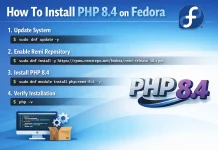
PHP is a popular server side scripting language created purposely for the development of Static and Dynamic Websites & Web applications. PHP are initials of (Hypertext Pre-processor), which earlier stood for Personal Home Pages. For you to be able to execute PHP scripts, PHP has to be installed. This guide will show you how you can install Install PHP 7.4|7.3|7.2 on Oracle Linux 8.
PHP packages are available on AppStream repositories on RHEL, CentOS and Oracle Linux starting from version 8. To get the list of PHP modules available, run the command:
$ sudo yum module list php
Hint: [d]efault, [e]nabled, [x]disabled, [i]nstalled

Oracle Linux 8 - AppStream
Name                                   Stream                                    Profiles                                                     Summary
php                                    7.2 [d]                                   common [d], devel, minimal                                   PHP scripting language
php                                    7.3                                       common [d], devel, minimal                                   PHP scripting language
php                                    7.4                                       common [d], devel, minimal                                   PHP scripting language
php                                    8.0                                       common [d], devel, minimal                                   PHP scripting language

Hint: [d]efault, [e]nabled, [x]disabled, [i]nstalled
You can then install the version of PHP available on the stream shown in the results.
Install PHP 7.4 on Oracle Linux 8
To install PHP 7.4 on Oracle Linux 8, run the command:
sudo dnf module reset php -y
sudo dnf module install php:7.4
Accept installation prompt:
...
Transaction Summary
======================================================================================================================================================================================================
Install  10 Packages

Total download size: 6.6 M
Installed size: 28 M
Is this ok [y/N]: y
Confirm PHP version:
$ php -v
PHP 7.4.30 (cli) (built: Jun  7 2020 08:38:19) ( NTS )
Copyright (c) The PHP Group
Zend Engine v3.4.0, Copyright (c) Zend Technologies
Install PHP 7.3 on Oracle Linux 8
To install PHP 7.3 on Oracle Linux 8, run the command:
sudo dnf module reset php -y
sudo dnf module install php:7.3
Accept installation.
...
Transaction Summary
======================================================================================================================================================================================================
Downgrade  6 Packages

Total download size: 6.1 M
Is this ok [y/N]: y
Verify PHP version installed on Oracle Linux 8.
$ php --version
PHP 7.3.20 (cli) (built: Jun  7 2020 07:53:49) ( NTS )
Copyright (c) 1997-2018 The PHP Group
Zend Engine v3.3.20, Copyright (c) 1998-2018 Zend Technologies
Install PHP 7.2 on Oracle Linux 8
Reset module and enable PHP 7.2 AppStream module:
sudo dnf module reset php -yYou can then install PHP 7.2 on Oracle Linux 8.
sudo dnf module install php:7.2Check PHP Version on Oracle Linux 8.
$ php --version
PHP 7.2.24 (cli) (built: Oct 22 2019 08:28:36) ( NTS )
Copyright (c) 1997-2018 The PHP Group
Zend Engine v3.2.0, Copyright (c) 1998-2018 Zend Technologies
Install other PHP extensions with the command option:
sudo dnf install php-<extension>Example:
$ sudo dnf install php-zip php-mysqlnd
...
Transaction Summary
========================================================================================================================================================
Install  4 Packages

Total download size: 428 k
Installed size: 1.0 M
Is this ok [y/N]: y
Enjoy PHP Applications development on Oracle Linux 8.
Explore More with CloudSpinx
Looking to streamline your tech stack? At CloudSpinx, we deliver robust solutions tailored to your needs.
Learn more about how we can support your journey with CloudSpinx.