Nginx Amplify is a cloud based open-source monitoring tool for Nginx, PHP and MySQL applications. It can be used to monitor the performance of your Nginx webserver and also point out errors in your configuration if any, for troubleshooting.
The agent is installed to the host where Nginx is running, it then intelligently collects various metrics and metadata and sends them to the backend for storage and visualization.
Nginx Amplify collects the following metadata from your instance:
- NGINX metrics – Nginx log files, Nginx process state, Nginx plus status API etc.
- System metrics – Various metrics from the instance where Nginx is installed e.g CPU usage, network traffic and memory usage.
- MySQL metrics – MySQL process status, other general metrics e.g current connections, current queries etc.
- PHP-FPM metrics – PHP-FPM pool status.
- System Metadata – The basic information about the Operating System where the the agent runs.
Installing Nginx Amplify
Add the following configuration file to the /etc/nginx/conf.d/ directory that will be used to scrap metrics for nginx status.
$ sudo vim /etc/nginx/conf.d/stub_status.conf

server {
    listen 127.0.0.1:80;
    server_name 127.0.0.1;
    location /nginx_status {
        stub_status on;
        access_log off;
        allow 127.0.0.1;
        deny all;
    }
}
Confirm that configuration files in /etc/nginx/conf.d/ have been included in the main configuration file:
grep -i include\.*conf nginx.confCheck if the Nginx configuration syntax is okay :
$ sudo nginx -t
nginx: the configuration file /etc/nginx/nginx.conf syntax is ok
nginx: configuration file /etc/nginx/nginx.conf test is successful
Restart Nginx process:
sudo service nginx reloadYou can verify if the metrics are being scrapped by using curl.
$ curl http://127.0.0.1/nginx_status
Active connections: 2
server accepts handled requests
 3280 3280 11339
Reading: 0 Writing: 1 Waiting: 1
Now, you need to create a free account at Nginx Amplify portal. Upon signing up, you will be prompted with agent installation instructions, which have the API key for your account. Run the commands on your instance as indicated below.
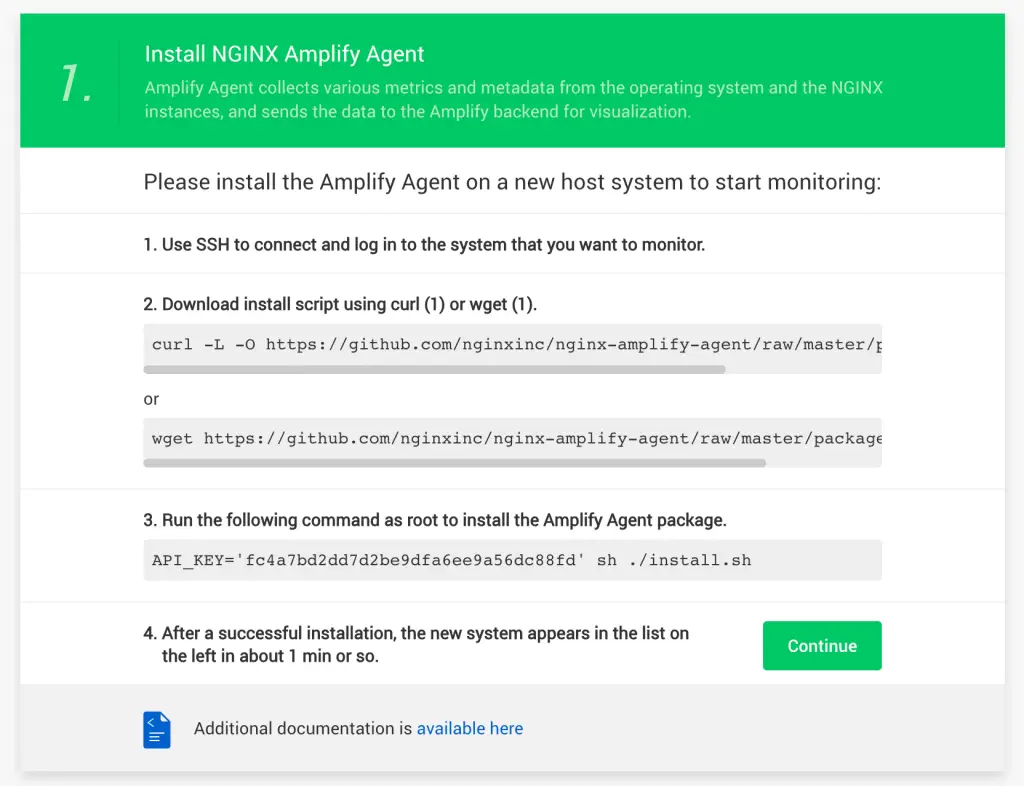
Also, modify the logging attribute to enable Nginx Amplify agent to get the metrics from the logs:

After a successful installation, you will be able to see the metrics appear on the Amplify dashboard for the host after one minute. The metrics are normally sent to the dashboard with an interval of one minute.

You can also get the system metrics for the host:

You can also configure alerts to your email address.
That’s it! Your Nginx dashboard is ready for use. Cheers!
More guides:
- Installing Nginx With PHP-FPM on Ubuntu
- Install WordPress with Nginx on Ubuntu
- How To Install Nginx with PHP-FPM on Alpine Linux