Picking the object-detection accelerator is the decision that shapes a Frigate NVR build, and it changed in 2026: the project stopped recommending the Google Coral, so the long-standing default is gone. Four options actually matter for a home setup. The short version is that a Hailo is the pick for a new low-power build, an Intel integrated GPU you already own costs nothing, an NVIDIA card makes sense only if one is already in the box, and the Coral is now a legacy choice. Here is where each one wins and where it falls short.
Current as of June 2026.
The table below uses the inference times Frigate publishes for each detector on its default models. They are the project’s documented figures, not benchmarks we ran on a bench. Power and cost are rough real-world bands, and the TOPS ratings come from the chip vendors.
| Detector | Hardware | Frigate-documented inference | Power | New cost | Best for |
|---|---|---|---|---|---|
| Hailo-8 | M.2 module or Pi AI HAT+ | ~7 ms (yolov6n) | Low | ~$110 | New low-power NVR, multiple cameras |
| Hailo-8L | M.2 module or Pi AI HAT+ | ~11 ms (yolov6n) | Low | ~$70 | A few cameras on a budget |
| Intel iGPU | Integrated graphics you own | ~15 to 25 ms (mobilenet) | Very low | $0 | Frigate already on an Intel box |
| Intel NPU | Core Ultra / Arc | ~6 ms (mobilenet) | Very low | Reuse existing | Newer Intel hardware you own |
| NVIDIA GPU | Discrete card | Single-digit ms | High | Reuse existing | A box that already has a GPU |
| Google Coral | USB or M.2 Edge TPU | Not listed by Frigate | Lowest | Legacy | An install that already works |
Hailo (Hailo-8 and Hailo-8L)
The standout for a new build, and the centre of the Hailo vs Coral question. Hailo is the accelerator Frigate now steers new users toward, and it behaves like the Coral used to: a tiny, low-power add-in that the project supports first-class. The detector type is hailo8 or hailo8l in your config, and Frigate auto-downloads a compatible YOLOv6n so there is no model wrangling on first start.
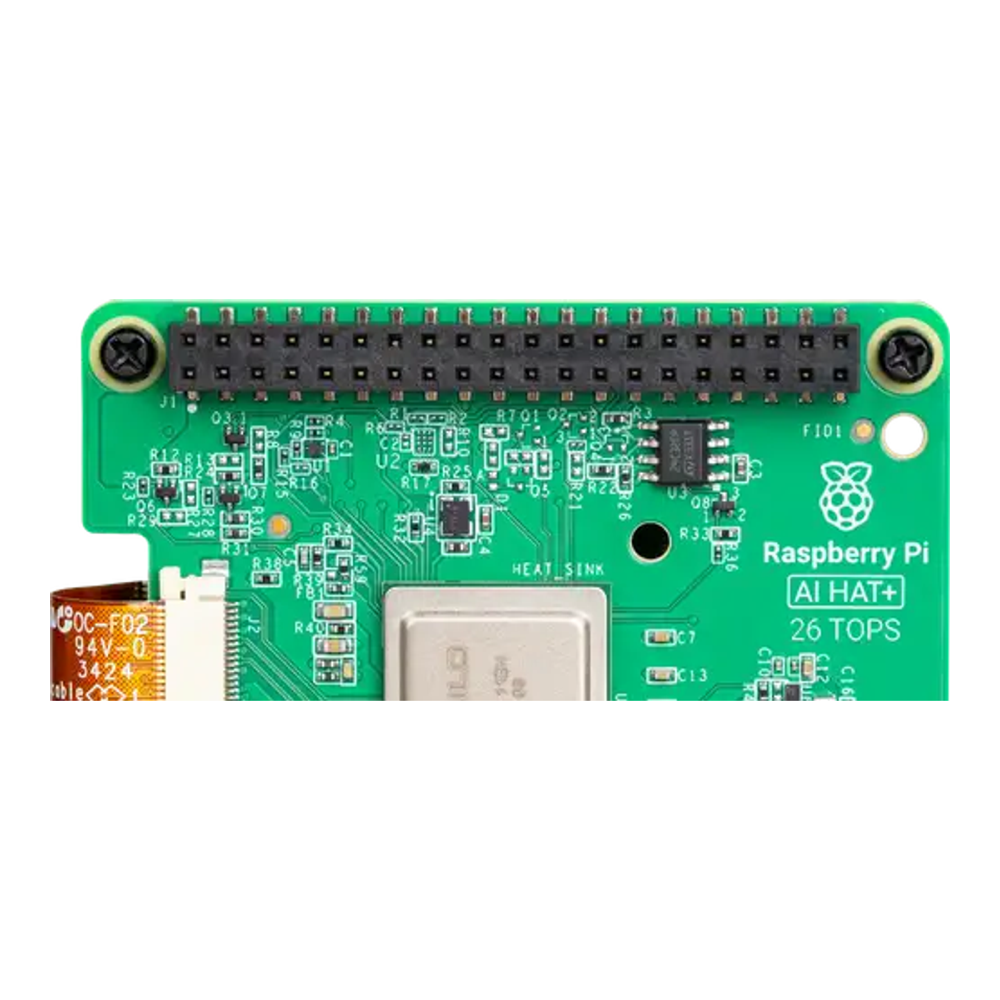
On a Raspberry Pi 5 the cleanest route is the AI HAT+ (around $110 for the 26 TOPS Hailo-8, check the live price; the 13 TOPS Hailo-8L is around $70, live price here). On an x86 mini PC, a bare Hailo-8 M.2 module drops into the same slot a Coral M.2 used. If you only pick one detector to buy for a new install, this is it. Where it falls short: it is a purchase, so if you already have capable hardware, read on before spending.
Intel iGPU or NPU (OpenVINO)
The best deal if you already run Frigate on an Intel box, because it costs nothing. Frigate’s OpenVINO detector uses the integrated GPU built into most Intel chips, and on newer Core Ultra parts it can use the dedicated NPU. An older integrated GPU lands in the 15 to 25 millisecond range on Frigate’s default model, which is plenty for several cameras, and an Intel NPU is quick enough to rival a Hailo. For most people who bought an Intel mini PC for a homelab, this is the detector to try first. Where it falls short: an AMD box without a usable iGPU, or a Raspberry Pi, has nothing for OpenVINO to use.
NVIDIA GPU (TensorRT or ONNX)
The fastest option, and the one to use only if a card is already in the machine. Frigate runs object detection on an NVIDIA GPU through its TensorRT and ONNX detectors, and inference drops to single-digit milliseconds on the smaller models, with room to run larger ones. The catch is power and cost: a discrete GPU idles far higher than a Hailo or an iGPU, so buying one purely to run Frigate makes no sense. Where it wins is a box that already has a GPU for other work, such as a machine you also use for local LLMs, where Frigate can borrow spare capacity.
Google Coral (the incumbent that lost the recommendation)
Still the most power-frugal accelerator, and still supported by Frigate, but no longer recommended for new installs. The reason is software, not silicon: the Coral PCIe driver no longer builds cleanly on current Linux kernels and its USB runtime has gone unmaintained, so a fresh setup leans on community-maintained drivers the Hailo does not need. If you have a working Coral install on an older kernel, there is no need to rip it out. If you are starting today, skip it. We walk through the full reasoning and the exact config change in the guide on why Frigate dropped the Coral and how to switch to Hailo.
Which one to actually pick
The choice comes down to what you already own:
- Building a new low-power NVR, or running on a Raspberry Pi: buy a Hailo. The 26 TOPS part for several cameras, the 13 TOPS part for a couple.
- Already running Frigate on an Intel mini PC: use the iGPU through OpenVINO and spend nothing. Try this before buying anything.
- The box already has an NVIDIA GPU: point Frigate at it, but do not buy a card just for detection.
- You have a Coral that already works: keep it. Only plan a switch when you rebuild on a new kernel.
For most new builds the honest answer is a Hailo for a Pi-class appliance or the Intel iGPU you already own for an x86 one. The Coral is no longer the default, and the only wrong move is starting a fresh install around it. Once the detector is settled, the rest of the NVR is the same whichever you choose, and Frigate slots neatly into the rest of an open-source homelab with Home Assistant in Docker handling alerts and automations.