Docker and monorepos disagree about scope. Docker wants a small, self-contained build context that produces one image. A monorepo is the opposite: one giant context holding every app, every shared package, and one lockfile that ties them all together. Copy the whole thing into a Dockerfile and you get images ten times larger than they need to be, and a layer cache that busts every time anyone touches any file in the repo.
This guide fixes Turborepo Docker builds properly: turbo prune --docker to cut the build context down to one app and its real dependencies, a three-stage Dockerfile with pnpm that took our test image from 1.82 GB to 247 MB, remote cache hits inside docker build itself, and a GitHub Actions workflow that only builds what changed. It continues the monorepo from the Turborepo and pnpm setup guide and reuses the self-hosted remote cache from part two, though neither is required to follow along. Everything below ran in July 2026 with turbo 2.10.4, Docker 29.6.1, and pnpm 11 on Ubuntu 24.04, and every size and timing is from those runs.
Why the naive monorepo image weighs 1.82 GB
Start with the Dockerfile most monorepos accumulate by accident, because it is the shortest one that works. The lab monorepo has two deployable apps (api, a Fastify service, and worker, a queue consumer) plus three shared packages, and the build host runs Docker CE with BuildKit, which every current install has. The naive approach copies all of it:
vim apps/api/Dockerfile.naiveThe whole repo goes in, everything gets installed, everything gets built:
FROM node:24

WORKDIR /app
RUN corepack enable pnpm

COPY . .
RUN pnpm install --frozen-lockfile
RUN pnpm turbo run build

EXPOSE 3000
CMD ["node", "apps/api/dist/server.js"]
Build it and check the damage:
docker build -f apps/api/Dockerfile.naive -t api:naive .
docker images api:naive
1.82 GB for a JSON API that compiles to a few hundred kilobytes of JavaScript:
REPOSITORY   TAG       SIZE
api          naive     1.82GB
The size is only half the problem. Because the second instruction is COPY . ., every layer after it is invalidated by any change to any file in the repo. Someone edits the worker, the api image rebuilds from the dependency install onwards. In our measurements later in this guide, that costs about 28 seconds per rebuild on a small lab repo. On a real monorepo with hundreds of packages it costs minutes, on every image, for every commit.
What turbo prune –docker actually produces
turbo prune generates a partial monorepo containing only one target app, the internal packages it actually depends on, and a lockfile rewritten to that subset. The –docker flag splits that output into two directories designed to map onto Docker layers:
pnpm turbo prune api --dockerTurbo walks the dependency graph and reports what made the cut. Note what is missing: the worker app is not in the list.
• turbo 2.10.4
Generating pruned monorepo for api in /root/turborepo-lab/out
 - Added @repo/config
 - Added @repo/db
 - Added @repo/logger
 - Added api
The out/ directory now holds the two halves:
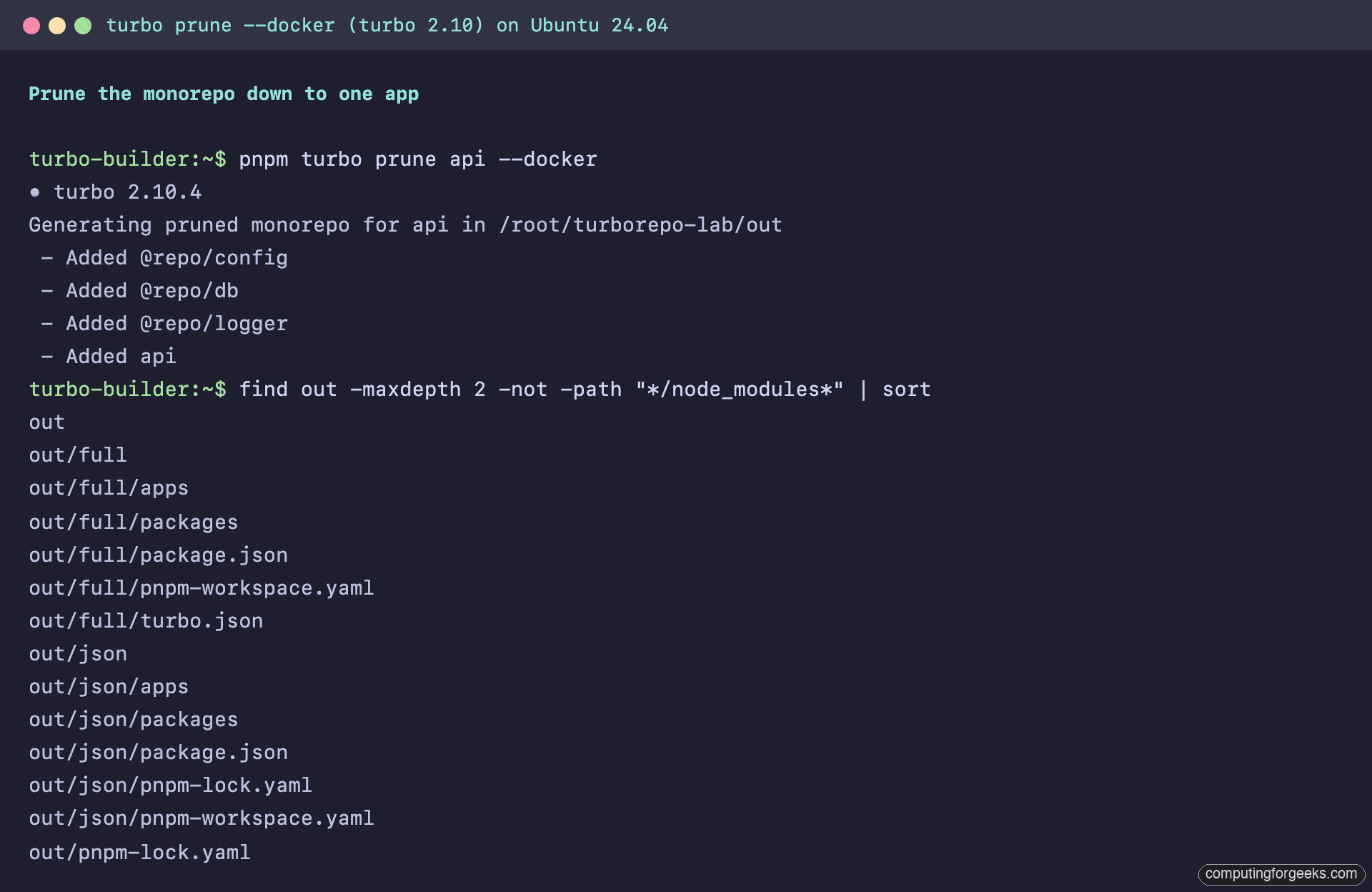
out/json/ contains only the package.json skeletons and the pruned pnpm-lock.yaml. out/full/ contains the actual source code. The split is the whole trick: dependency identity lives in the json half, source code lives in the full half. Copy them into the image as separate layers and pnpm install only re-runs when a dependency actually changes, never when someone edits a source file.
The three-stage Dockerfile
Two files make this work. First, .dockerignore, which keeps host junk out of the build context:
vim .dockerignoreExclude dependency trees, build output, caches, and the prune output itself:
node_modules
**/node_modules
.git
.turbo
**/.turbo
**/dist
out
That last out line matters more than it looks. If you ever run turbo prune on your workstation to inspect the output, a stale out/ directory gets copied into the build context, merges with the prune the container runs, and breaks the install in a genuinely confusing way. We hit that exact failure and the error is in the troubleshooting section below.
Now the real Dockerfile for the api app:
vim apps/api/DockerfileThree working stages on top of a shared base:
FROM node:24-alpine AS base
RUN corepack enable pnpm

FROM base AS pruner
WORKDIR /app
RUN npm install -g turbo@^2
COPY . .
RUN turbo prune api --docker

FROM base AS builder
WORKDIR /app
COPY --from=pruner /app/out/json/ .
RUN pnpm install --frozen-lockfile
COPY --from=pruner /app/out/full/ .
ARG TURBO_API
ARG TURBO_TEAM
RUN --mount=type=secret,id=turbo_token \
    TURBO_TOKEN=$(cat /run/secrets/turbo_token) \
    pnpm turbo run build --filter=api
RUN pnpm deploy --legacy --filter=api --prod /prod/api

FROM node:24-alpine AS runner
WORKDIR /app
RUN addgroup --system --gid 1001 nodejs && adduser --system --uid 1001 api
USER api
COPY --from=builder --chown=api:nodejs /prod/api .
EXPOSE 3000
CMD ["node", "dist/server.js"]
Walking through the stages. The pruner copies the repo and runs the prune, so the expensive stages that follow never see the whole monorepo. The builder copies out/json/ first and installs against the pruned lockfile. That layer is the one you want stable: it only busts when dependencies change. Source code from out/full/ lands afterwards, then turbo builds just this app. The ARG and --mount=type=secret lines wire in the remote cache and are covered in their own section; leave them out entirely if you do not use one, turbo just builds without it. Finally pnpm deploy assembles a self-contained production copy of the app (its dist/, its production dependencies, nothing else), and the runner stage copies only that, owned by a non-root user.
The --legacy flag on pnpm deploy is not decoration. pnpm changed the default deploy behavior in v10 and without the flag the build fails outright on a standard workspace; the exact error and the alternatives are in the troubleshooting section.
Build and boot it:
docker build -f apps/api/Dockerfile -t api:pruned .
docker run -d --name api -p 127.0.0.1:3000:3000 api:pruned
curl -s http://127.0.0.1:3000/healthz
The health endpoint answers from a container running as the unprivileged user:
{"status":"ok","uptime":2.017689607}The worker gets the same Dockerfile with three substitutions: prune worker instead of prune api, --filter=worker on the build and deploy lines, and CMD ["node", "dist/index.js"] with no EXPOSE, since a queue consumer listens to nothing. Both files live in the companion repo next to the workflow you will meet later.
Measured results: sizes and rebuild times
Numbers first, from the lab VM:
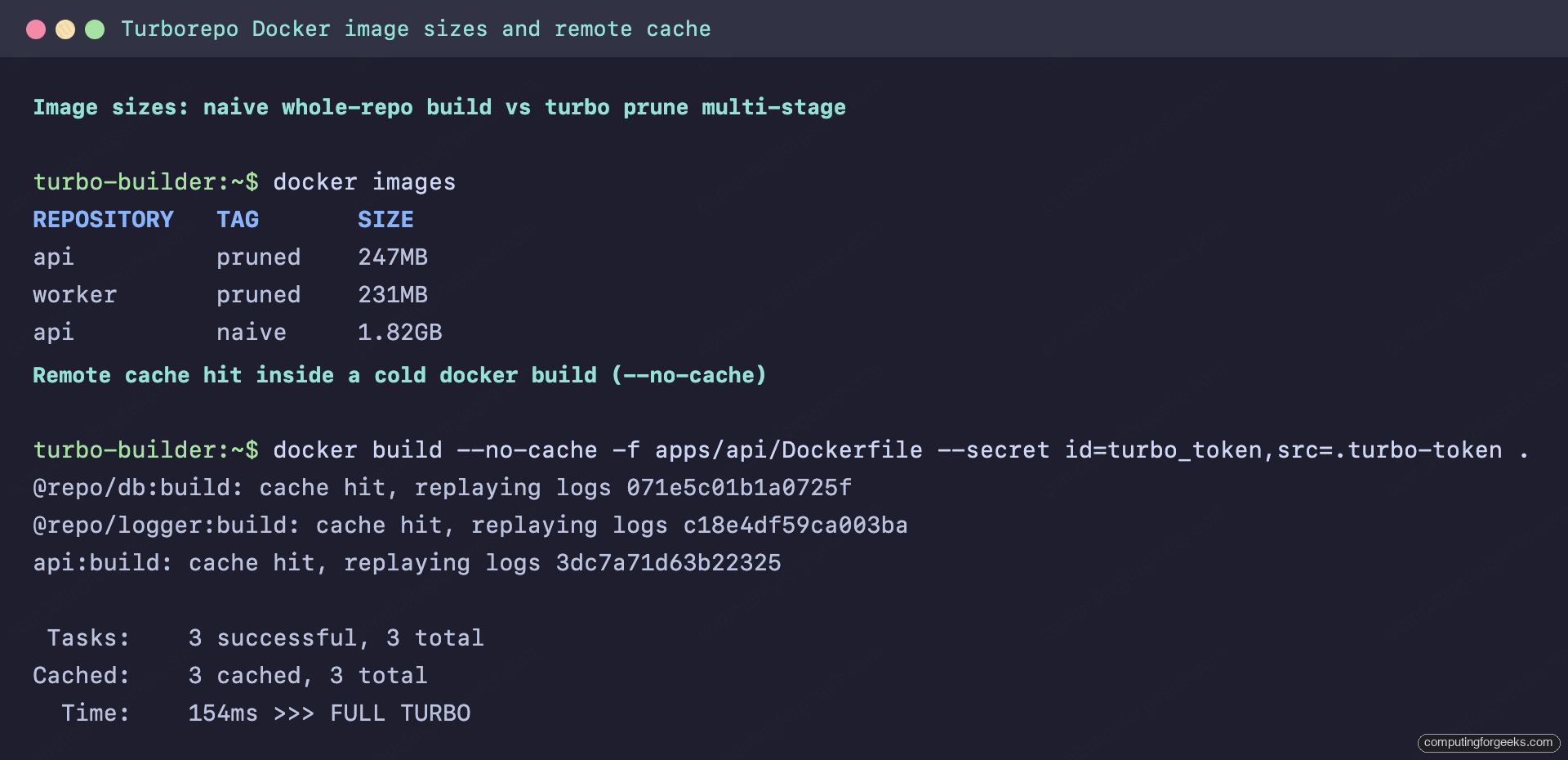
The pruned api image lands at 247 MB and the worker at 231 MB, against 1.82 GB for the naive build. That is a 7.4x reduction, and most of the remaining weight is the Node.js runtime itself. Rebuild behavior is where the layering pays off day to day:
| Scenario | Naive Dockerfile | Pruned 3-stage |
|---|---|---|
| Cold build, empty layer cache | 23.6s | 46.2s |
| Rebuild after a change in another app | 28.3s | 9.1s |
| Rebuild after a change in this app | 28.3s | 33.9s |
| Rebuild when another machine already built this content | 28.3s | build step 154ms (FULL TURBO) |
Read that table honestly. The multi-stage build is slower cold, because it does more: install turbo, prune, install, build, deploy. Where it wins is everything that happens after the first build. A colleague edits the worker and your api image rebuilds in 9 seconds instead of 28, because out/json and out/full for the api did not change, so Docker replays every builder layer from cache. And on a repo this small the absolute numbers are modest; the gap scales with the size of the dependency tree and the number of packages the naive COPY . . drags in.
The last row of the table needs the remote cache, which is next.
Remote cache hits inside docker build
Every docker build starts from a clean copy of the source, so turbo’s local cache is always empty inside the builder stage. A remote cache fixes that: if any machine already built this exact content, the compile step collapses to an artifact download. The Dockerfile above already has the wiring, the two ARG lines for the non-secret values and a BuildKit secret mount for the token, which keeps it out of image layers and build history. Pass all three at build time:
printf '%s' "your-turbo-token" > .turbo-token
docker build --no-cache -f apps/api/Dockerfile -t api:pruned \
  --build-arg TURBO_API=https://turbocache.example.com \
  --build-arg TURBO_TEAM=cfg-platform \
  --secret id=turbo_token,src=.turbo-token \
  .
With --no-cache forcing every Docker layer to re-run, the turbo step inside the build still comes back almost instantly, because the artifacts stream in from the cache server:
#16 [builder 5/6] RUN --mount=type=secret,id=turbo_token ...
#16 1.079    • Packages in scope: api
#16 1.079    • Remote caching enabled
#16 1.133 @repo/db:build: cache hit, replaying logs 071e5c01b1a0725f
#16 1.142 @repo/logger:build: cache hit, replaying logs c18e4df59ca003ba
#16 1.208 api:build: cache hit, replaying logs 3dc7a71d63b22325
#16 1.208  Tasks:    3 successful, 3 total
#16 1.208 Cached:    3 cached, 3 total
#16 1.208   Time:    154ms >>> FULL TURBO
#16 DONE 1.3s
The sharing also crosses apps. When we built the worker image right after the api image, its @repo/logger and @repo/db tasks were instant cache hits uploaded by the api build; only worker:build itself compiled. Two caveats from testing keep expectations realistic. First, a fully cold --no-cache run still spends most of its wall clock in pnpm install (roughly 50 of 52 seconds in the lab); the remote cache eliminates compilation, not dependency installation. Second, only builds with matching hashing contexts share artifacts, so prime the cache from Docker or CI builds, not from your host shell. The troubleshooting section shows exactly why, with evidence. The cache endpoint here is the self-hosted cache server built in part two, but the same three values work against any Turborepo-compatible cache.
GitHub Actions: build only what changed, cache everything else
CI is where all of this compounds, because CI runners are permanently cold machines. The workflow below adds two things on top of the Dockerfiles: --affected, so pull requests only build packages that actually changed, and a remote cache that costs nothing, provided by an action that emulates the cache API on localhost and stores artifacts in the GitHub Actions cache.
vim .github/workflows/ci.ymlThe full workflow:
name: CI

on:
  push:
    branches: [main]
  pull_request:

jobs:
  verify:
    runs-on: ubuntu-latest
    env:
      # On pushes to main, main...HEAD is an empty range, so compare against
      # the commit that main pointed at before this push instead.
      TURBO_SCM_BASE: ${{ github.event.pull_request.base.sha || github.event.before }}
    steps:
      - uses: actions/checkout@v7
        with:
          # --affected needs the base commit in the checkout; a too-shallow
          # clone makes turbo treat every package as changed.
          fetch-depth: 0

      # v6 self-installer currently crashes switching pnpm to the packageManager
      # version ("Cannot use .in. operator to search for .integrity."); v4 works.
      - uses: pnpm/action-setup@v4

      - uses: actions/setup-node@v6
        with:
          node-version: 24
          cache: pnpm

      # Emulates the Turborepo remote cache API on localhost, backed by the
      # GitHub Actions cache. No cache server or Vercel account required.
      - name: Turborepo remote cache (GitHub Actions cache backend)
        uses: rharkor/[email protected]

      - run: pnpm install --frozen-lockfile

      - name: Build, type-check and test affected packages
        run: pnpm turbo run build check-types test --affected

  docker:
    needs: verify
    if: github.ref == 'refs/heads/main'
    runs-on: ubuntu-latest
    strategy:
      matrix:
        app: [api, worker]
    steps:
      - uses: actions/checkout@v7

      - name: Build ${{ matrix.app }} image
        run: docker build -f apps/${{ matrix.app }}/Dockerfile -t ${{ matrix.app }}:${{ github.sha }} .
Four details in there came out of real failures rather than documentation. --affected compares main...HEAD by default, which is an empty range on a push to main itself, so the TURBO_SCM_BASE line feeds it the pre-push commit on pushes and the PR base on pull requests (on a force-push or a branch’s first push that value is the all-zeros SHA, and turbo safely falls back to building everything). fetch-depth: 0 exists because turbo fails open on shallow clones: if the base commit is missing from the checkout, every package counts as changed, which is safe but slow. The cache action is pinned to a release tag because it publishes no floating major tag; @v2 alone fails the run with unable to resolve action. And pnpm/action-setup stays on v4 deliberately: the current v6 self-installer crashed every run while switching pnpm to the version in the packageManager field, so the comment in the file is there to stop a well-meaning bump from breaking CI. The action wires TURBO_API to http://localhost:41230 and sets dummy token and team values automatically, visible in the job log. If you run a real cache server instead, replace that step with the same three variables as repository secrets, exactly as in the docker build section.
Here is what the workflow did across three real pushes to the companion repo:
| CI scenario | Tasks run | turbo time | verify job total |
|---|---|---|---|
| Workflow-only change | 0 (nothing affected) | 19ms | 13s |
| api source change, cold cache | 5, none cached | 5.7s | 20s |
| Same commit re-run, warm cache | 5, all cached | 2.6s, FULL TURBO | 18s |
The zero-task row is --affected earning its keep: a commit that touches only the workflow file builds nothing at all, and turbo scopes the run to the root package with nothing to do. The api change ran exactly five tasks (the api build, type-check, and test, plus the two shared packages it depends on) and left the worker alone. The re-run of the same commit pulled all five from the Actions cache and printed FULL TURBO on a GitHub runner:
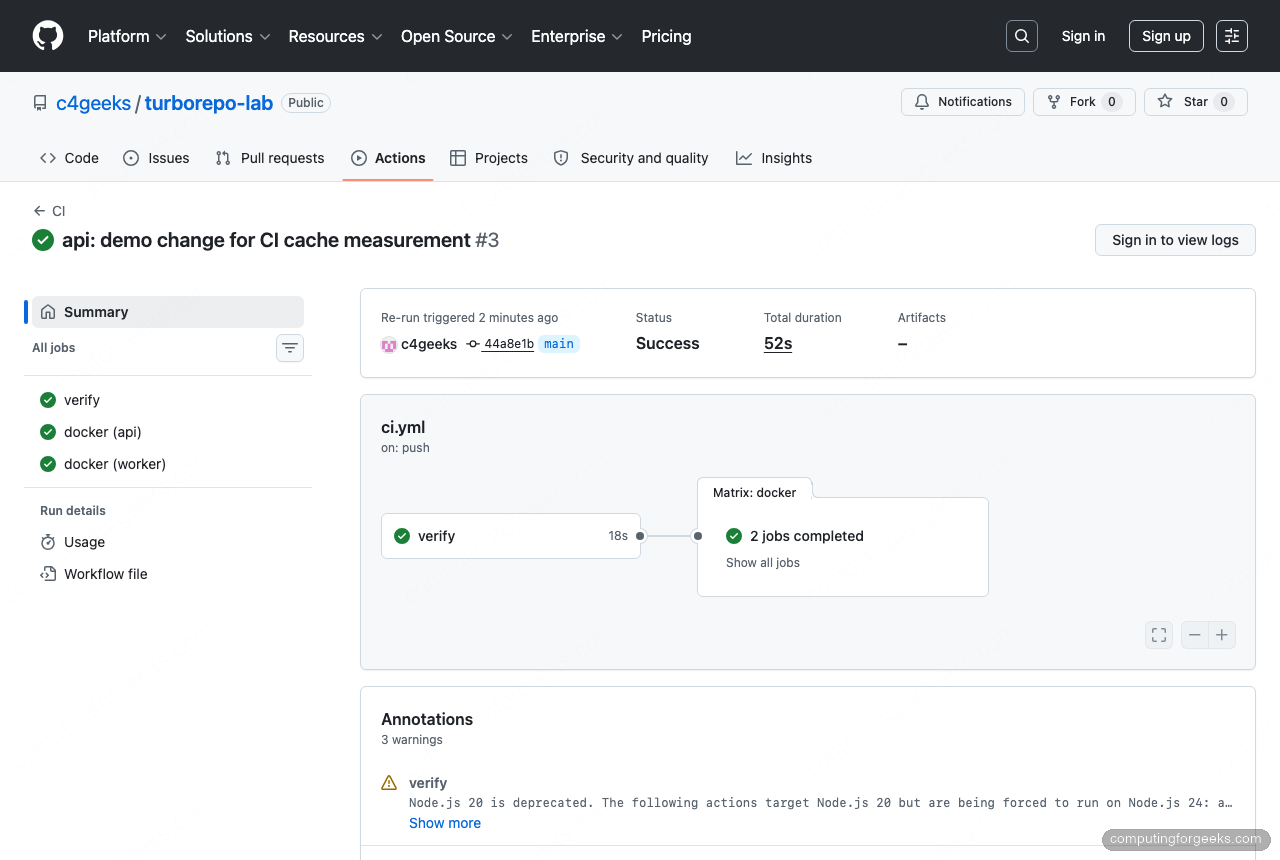
The docker matrix jobs took 18 to 26 seconds each on the hosted runners. On a repo this size the verify job is dominated by setup (checkout, pnpm, install), so the turbo savings look small in the job total; the point is that the turbo portion is the part that grows with your codebase, and it is the part the cache flattens. Pushing the per-app images to a registry is one more step in the matrix job; for cloud registries, keyless auth via workload identity federation beats storing long-lived credentials as secrets.
Troubleshooting real failures from this lab
Error: “ERR_PNPM_DEPLOY_NONINJECTED_WORKSPACE”
The first build of the three-stage Dockerfile failed at the deploy step with this:
[ERR_PNPM_DEPLOY_NONINJECTED_WORKSPACE] By default, starting from pnpm v10, we only deploy from workspaces that have "inject-workspace-packages=true" set

If you want to deploy without using injected dependencies, run "pnpm deploy" with the "--legacy" flag or set "force-legacy-deploy" to true
pnpm v10 changed pnpm deploy to require injected workspace dependencies by default. You have two fixes: add --legacy to the deploy command (what this guide does, and fine for a deploy that happens inside an image build), or opt into the new behavior repo-wide by setting inject-workspace-packages=true, which changes how workspace packages link during development. Pick one deliberately; the flag is the smaller change.
Error: “Cannot install with frozen-lockfile because pnpm-lock.yaml is not up to date”
The worker image build failed at pnpm install inside the builder stage, complaining about a package that had no business being there:
Scope: all 6 workspace projects
[ERR_PNPM_OUTDATED_LOCKFILE] Cannot install with "frozen-lockfile" because pnpm-lock.yaml is not up to date with <ROOT>/apps/api/package.json
The tell is “all 6 workspace projects” in a pruned workspace that should have five. We had run turbo prune on the host earlier to inspect its output, and the leftover out/ directory was not in .dockerignore yet. COPY . . carried it into the pruner stage, where it merged with the container’s own prune output: the worker’s pruned lockfile next to the api’s stale package skeleton. Add out to .dockerignore and delete the local directory, and the build goes green.
Host builds never hit the cache that docker builds share
This one looks like a broken cache and is actually working as designed. We primed the remote cache by building on the host, then ran the docker build expecting hits, and got misses with completely different task hashes. Running turbo run build --dry=json in both environments showed why: on the host, turbo hashes inputs using git, so $TURBO_DEFAULT$ means the files git knows about. Inside the build container there is no .git (and there should not be), so turbo falls back to hashing everything in each package directory, and the dry run listed dist/ output files, .turbo/turbo-build.log, even node_modules/.bin entries as hash inputs. Different input sets, different hashes, no sharing.
The practical rule: docker builds share cache with other docker builds, and CI checkouts share with CI checkouts, because clean identical contexts hash identically. Do not expect your laptop shell to prime the cache your Dockerfile reads, and do not copy .git into the build context to force it; you would trade a confusing miss for a context that invalidates on every commit.
Which CI caching strategy fits your team
Three working setups appeared in this series, and the right one depends on where your builds run and who needs the artifacts.
- GitHub Actions cache action (this article): zero infrastructure, artifacts live in the repo’s Actions cache. The fit for teams whose builds all run on GitHub-hosted runners. Its limits are GitHub’s cache limits, 10 GB per repo with eviction, and nothing outside Actions can read it, so local developers and docker builds on your own hardware get no hits.
- Self-hosted cache server (part two of this series): one Docker Compose stack, and every consumer that can reach it shares one cache: developer laptops, docker builds, and any CI system including several at once. The fit when you have mixed CI vendors, want dev machines in on the hits, or keep build artifacts inside your network. The cost is running and securing one small service.
- Vercel Remote Cache: the hosted option, free to use on all Vercel plans subject to fair-use limits, no server to run. The fit for teams already on Vercel who are comfortable with build artifacts leaving their infrastructure.
A reasonable default: start with the Actions cache action the day the repo gets CI, since it is one workflow step, and move to the self-hosted server when developers outside CI want cache hits or a second CI system shows up. Whichever you choose, the Dockerfiles do not change; the three variables at build time are the only wiring, which is exactly how a cache should behave.