A remote cache is the difference between Turborepo saving one developer’s time and saving the whole team’s. Local caching only helps the machine that ran the build. Push those artifacts to a shared store and every laptop, every CI runner, and every fresh clone restores compiled output instead of recompiling it.
Vercel operates a managed remote cache and it works well, but your build artifacts leave your network, air-gapped environments cannot reach it, and some compliance teams simply say no. The setup below gives you a self-hosted Turborepo remote cache on your own Linux server, deployed with Docker Compose: the open source ducktors/turborepo-remote-cache server for the API, MinIO for artifact storage, and Nginx with a Let’s Encrypt certificate in front. It builds on the pnpm monorepo we set up with Turborepo, and it ends with proof, not promises: a second machine that has never compiled the repo restoring every build output in 77 milliseconds. Everything here ran in July 2026 on turbo 2.10.4 and turborepo-remote-cache 2.11.2 across a three-VM Ubuntu 24.04 lab, and every output block came from those machines.
How the remote cache actually works
Turborepo hashes each task’s inputs and, on a miss, runs the task and stores the outputs as a tarball keyed by that hash. With remote caching enabled, the CLI also uploads each artifact to an HTTP API (the same /v8/artifacts endpoints Vercel runs, published as an open API specification). Authentication is a bearer token, and artifacts are grouped under a team slug. Any server that speaks that protocol works as a drop-in cache, which is exactly what the ducktors server is: a Node service that translates those API calls to a storage backend such as S3, Google Cloud Storage, Azure Blob, or a local disk. We use the S3 backend against MinIO, so artifacts live on your own hardware and the bucket can be managed with standard S3 tooling.
One clarification before the build-out, because the names trip people up: Turborepo is the monorepo task runner this guide is about. Turbopack is a bundler inside Next.js. They share a brand and nothing else.
What you need
- A Linux server for the cache (Ubuntu 24.04 here). This tier is genuinely lightweight: the cache server is a thin API layer and MinIO mostly moves bytes. The real sizing knob is disk, which grows as artifacts per build, multiplied by builds per day, multiplied by retention days. TypeScript output tarballs are kilobytes; bundler outputs and
.nextdirectories reach tens of megabytes. A team of ten doing twenty builds a day with 30-day retention typically sits under 20 GB. Our lab VM ran 2 vCPU and 4 GB RAM, a floor for following along, not a production recommendation, though production rarely needs more than 2 to 4 GB RAM for this tier. - A domain with an A record pointing at the server and port 80 reachable, so Let’s Encrypt can validate over HTTP-01. Any DNS provider works.
- A Turborepo monorepo to connect. Ours is the turborepo-lab companion repo with Node.js and pnpm already set up per the Node.js 24 install guide.
Set the shell variables
Every command in this guide references the same handful of values, so export them once and paste the rest as-is. The two secrets are generated on the spot:
export CACHE_DOMAIN="turbocache.example.com"
export ADMIN_EMAIL="[email protected]"
export TURBO_TOKEN=$(openssl rand -hex 32)
export MINIO_ROOT_PASSWORD=$(openssl rand -hex 16)
export CACHE_BUCKET="turborepo-cache"
Confirm nothing came out empty, and copy the two secrets somewhere safe. The token is what every developer and CI runner will authenticate with:
echo "Domain: ${CACHE_DOMAIN}"
echo "Token:  ${TURBO_TOKEN}"
echo "MinIO:  ${MINIO_ROOT_PASSWORD}"
The values hold for the current shell session only. If you reconnect midway, re-run the export block.
Install Docker and the Compose plugin
The stack runs as two containers plus a one-shot bucket initializer, so Docker with the Compose plugin is the only runtime dependency. On a fresh server, add Docker’s official repository and install:
sudo apt update
sudo apt install -y ca-certificates curl gnupg nginx
sudo install -m 0755 -d /etc/apt/keyrings
curl -fsSL https://download.docker.com/linux/ubuntu/gpg | sudo tee /etc/apt/keyrings/docker.asc > /dev/null
echo "deb [arch=$(dpkg --print-architecture) signed-by=/etc/apt/keyrings/docker.asc] https://download.docker.com/linux/ubuntu $(. /etc/os-release && echo $VERSION_CODENAME) stable" | sudo tee /etc/apt/sources.list.d/docker.list
sudo apt update
sudo apt install -y docker-ce docker-ce-cli containerd.io docker-compose-plugin
Nginx rides along in that install because it fronts the cache later. Verify both tools respond:
docker --version && docker compose versionOur server printed the current stable pair:
Docker version 29.6.1, build 8900f1d
Docker Compose version v5.3.1
If you want the full walkthrough with rootless mode and post-install steps, the Docker Compose install guide covers it.
Deploy MinIO and the cache server with Docker Compose
The whole stack lives in one directory. Create it, then write the environment file the containers read their secrets from:
sudo mkdir -p /opt/turbocache
sudo vim /opt/turbocache/.env
Add the following, leaving the placeholders exactly as written for now:
MINIO_ROOT_USER=turbocache-admin
MINIO_ROOT_PASSWORD=MINIO_PASSWORD_HERE
TURBO_TOKEN=TURBO_TOKEN_HERE
CACHE_BUCKET=turborepo-cache
Now substitute the real secrets from your shell variables and lock the file down, since it holds everything needed to read and poison the cache:
sudo sed -i "s/MINIO_PASSWORD_HERE/${MINIO_ROOT_PASSWORD}/; s/TURBO_TOKEN_HERE/${TURBO_TOKEN}/" /opt/turbocache/.env
sudo chmod 600 /opt/turbocache/.env
Next, the Compose file itself:
sudo vim /opt/turbocache/docker-compose.ymlPaste the full stack definition. Three services: MinIO, a one-shot mc container that creates the bucket, and the cache server pinned to the release we tested (newer tags land on the releases page):
services:
  minio:
    image: minio/minio:latest
    container_name: turbocache-minio
    command: server /data --console-address ":9001"
    environment:
      MINIO_ROOT_USER: ${MINIO_ROOT_USER}
      MINIO_ROOT_PASSWORD: ${MINIO_ROOT_PASSWORD}
    volumes:
      - minio-data:/data
    ports:
      - "127.0.0.1:9000:9000"
      - "127.0.0.1:9001:9001"
    healthcheck:
      test: ["CMD", "mc", "ready", "local"]
      interval: 10s
      timeout: 5s
      retries: 5
    restart: unless-stopped

  createbucket:
    image: minio/mc:latest
    depends_on:
      minio:
        condition: service_healthy
    environment:
      MINIO_ROOT_USER: ${MINIO_ROOT_USER}
      MINIO_ROOT_PASSWORD: ${MINIO_ROOT_PASSWORD}
      CACHE_BUCKET: ${CACHE_BUCKET}
    entrypoint: >
      /bin/sh -c "
      mc alias set local http://minio:9000 $${MINIO_ROOT_USER} $${MINIO_ROOT_PASSWORD} &&
      mc mb --ignore-existing local/$${CACHE_BUCKET} &&
      echo bucket-ready"

  turbocache:
    image: ducktors/turborepo-remote-cache:2.11.2
    container_name: turbocache-server
    depends_on:
      minio:
        condition: service_healthy
    environment:
      NODE_ENV: production
      PORT: 3000
      TURBO_TOKEN: ${TURBO_TOKEN}
      STORAGE_PROVIDER: minio
      STORAGE_PATH: ${CACHE_BUCKET}
      AWS_ACCESS_KEY_ID: ${MINIO_ROOT_USER}
      AWS_SECRET_ACCESS_KEY: ${MINIO_ROOT_PASSWORD}
      AWS_REGION: us-east-1
      S3_ENDPOINT: http://minio:9000
    ports:
      - "127.0.0.1:3000:3000"
    restart: unless-stopped

volumes:
  minio-data:
A few deliberate choices in there. Everything binds to 127.0.0.1, so nothing is reachable from outside until Nginx exposes it over TLS. The cache server talks to MinIO through the minio storage provider (the same S3 driver with path-style addressing forced on; plain s3 also works against MinIO, we tested both), with S3_ENDPOINT pointing at the internal container address and STORAGE_PATH naming the bucket. AWS_REGION is required by the S3 client even though MinIO ignores the value. The $$ doubling in the createbucket entrypoint keeps Compose from interpolating variables that the container shell should expand instead. Bring it up:
cd /opt/turbocache
sudo docker compose up -d
Give the health checks a few seconds, then confirm the two long-running services are up and the initializer did its job:
sudo docker compose ps
sudo docker compose logs createbucket | tail -2
The bucket creation logs one line and exits:
NAME                STATUS
turbocache-minio    Up 25 seconds (healthy)
turbocache-server   Up 13 seconds
createbucket-1  | Bucket created successfully `local/turborepo-cache`.
createbucket-1  | bucket-ready
The API answers locally before any TLS is involved:
curl -s -o /dev/null -w "%{http_code}\n" http://127.0.0.1:3000/v8/artifacts/statusA 200 here means the server is running and wired to storage. If you would rather run MinIO on bare metal outside Docker, the standalone MinIO install guide shows that path; the cache server only needs an S3 endpoint and credentials.
Put Nginx and Let’s Encrypt in front
Developers and CI runners connect from everywhere, so the cache gets a proper HTTPS endpoint. Write the Nginx server block:
sudo vim /etc/nginx/sites-available/turbocacheStart with plain HTTP on port 80; certbot rewrites this for TLS in a moment:
server {
    listen 80;
    server_name SITE_DOMAIN_HERE;

    client_max_body_size 200m;

    location / {
        proxy_pass http://127.0.0.1:3000;
        proxy_set_header Host $host;
        proxy_set_header X-Real-IP $remote_addr;
        proxy_set_header X-Forwarded-For $proxy_add_x_forwarded_for;
        proxy_set_header X-Forwarded-Proto $scheme;
        proxy_read_timeout 120s;
    }
}
The one line people forget is client_max_body_size. Nginx defaults to 1 MB request bodies, and cache artifacts are uploads. A next build artifact blows past 1 MB instantly, the upload dies with HTTP 413, and turbo quietly logs a warning most people never read. 200 MB is generous headroom. Substitute your domain and enable the site:
sudo sed -i "s/SITE_DOMAIN_HERE/${CACHE_DOMAIN}/" /etc/nginx/sites-available/turbocache
sudo ln -s /etc/nginx/sites-available/turbocache /etc/nginx/sites-enabled/
sudo nginx -t && sudo systemctl reload nginx
Then request the certificate. Certbot’s Nginx plugin validates over HTTP-01, rewrites the server block for port 443, and sets up the HTTP-to-HTTPS redirect in one shot:
sudo apt install -y certbot python3-certbot-nginx
sudo certbot --nginx -d "${CACHE_DOMAIN}" --non-interactive --agree-tos --redirect -m "${ADMIN_EMAIL}"
That is the whole SSL story for a server with a public address, and renewal is already scheduled by the certbot package.
Server on a private network? Use a DNS-01 challenge instead
HTTP-01 needs port 80 reachable from the internet. A cache server on a LAN or behind NAT can still get a real certificate by proving domain ownership through a DNS TXT record. Certbot has plugins for the major providers (python3-certbot-dns-cloudflare, -route53, -digitalocean, -google, -rfc2136 for self-hosted BIND); install the one matching your DNS host. Our lab cache lives on a private address, so this is the path we actually ran, with Cloudflare as the worked example:
sudo apt install -y certbot python3-certbot-dns-cloudflare
echo "dns_cloudflare_api_token = your-cloudflare-api-token" | sudo tee /etc/letsencrypt/cloudflare.ini
sudo chmod 600 /etc/letsencrypt/cloudflare.ini
sudo certbot certonly --dns-cloudflare --dns-cloudflare-credentials /etc/letsencrypt/cloudflare.ini -d "${CACHE_DOMAIN}" --non-interactive --agree-tos -m "${ADMIN_EMAIL}"
Issuance takes about half a minute while the plugin plants and cleans up the TXT record:
Successfully received certificate.
Certificate is saved at: /etc/letsencrypt/live/turbocache.example.com/fullchain.pem
Key is saved at:         /etc/letsencrypt/live/turbocache.example.com/privkey.pem
This certificate expires on 2026-10-11.
These certificates will be renewed automatically.
With certonly, certbot does not touch the Nginx config, so add the 443 listener and certificate paths to the server block yourself and reload. Substitute your provider’s plugin if you are not on Cloudflare. Either way, confirm the endpoint answers over TLS:
curl -s -o /dev/null -w "%{http_code}\n" "https://${CACHE_DOMAIN}/v8/artifacts/status"Another 200, this time through Nginx with a valid certificate. The server side is done.
Connect Turborepo to the cache
On a developer machine, three environment variables point turbo at your server instead of Vercel’s:
export TURBO_API="https://${CACHE_DOMAIN}"
export TURBO_TEAM="cfg-platform"
export TURBO_TOKEN="paste-the-token-from-the-server-setup"
TURBO_TEAM is any slug you choose; the server namespaces artifacts under it, so two projects sharing one cache server just use two slugs. The same three variables dropped into CI secrets give every runner the same cache. If you prefer a file over environment variables, .turbo/config.json in the repo root takes {"apiurl": "...", "teamslug": "...", "token": "..."}, and there is an interactive turbo login --manual that prompts for the same values, though it needs a real terminal and the token would land in a per-user config file anyway. Environment variables stay out of the repo and work identically in CI, so they win in practice.
Now run a build with a cleared local cache so everything misses, executes, and uploads:
rm -rf .turbo/cache
pnpm turbo run build
The line to look for is Remote caching enabled. Every task misses, compiles, and ships its artifact up in the background:
• turbo 2.10.4

   • Packages in scope: @repo/config, @repo/db, @repo/logger, api, worker
   • Running build in 5 packages
   • Remote caching enabled

@repo/db:build: cache miss, executing a3b784ed4572c5c2
@repo/logger:build: cache miss, executing 843374c7cfd6d5f9
api:build: cache miss, executing 4c05c84cb30f80b7
worker:build: cache miss, executing d95720b7fbaeae0c

 Tasks:    4 successful, 4 total
Cached:    0 cached, 4 total
  Time:    3.862s
Those four hashes are now objects in MinIO, one per task, filed under the team slug. List them from the server:
cd /opt/turbocache
sudo docker compose exec minio sh -c 'mc alias set local http://127.0.0.1:9000 $MINIO_ROOT_USER $MINIO_ROOT_PASSWORD > /dev/null && mc ls --recursive local/turborepo-cache/'
Each object name is a task hash straight out of the build log:
[2026-07-13 08:24:58 UTC] 2.2KiB STANDARD cfg-platform/4c05c84cb30f80b7
[2026-07-13 08:24:56 UTC] 1.7KiB STANDARD cfg-platform/843374c7cfd6d5f9
[2026-07-13 08:24:56 UTC] 2.3KiB STANDARD cfg-platform/a3b784ed4572c5c2
[2026-07-13 08:24:57 UTC] 1.0KiB STANDARD cfg-platform/d95720b7fbaeae0c
The MinIO console shows the same picture in a browser. It listens on the loopback interface only, so tunnel to it rather than exposing it (ssh -L 9001:127.0.0.1:9001 user@cache-server, then open http://localhost:9001) and sign in with the root credentials from the env file:

Inside the bucket, the artifacts sit under the team prefix, sized in kilobytes for TypeScript output:
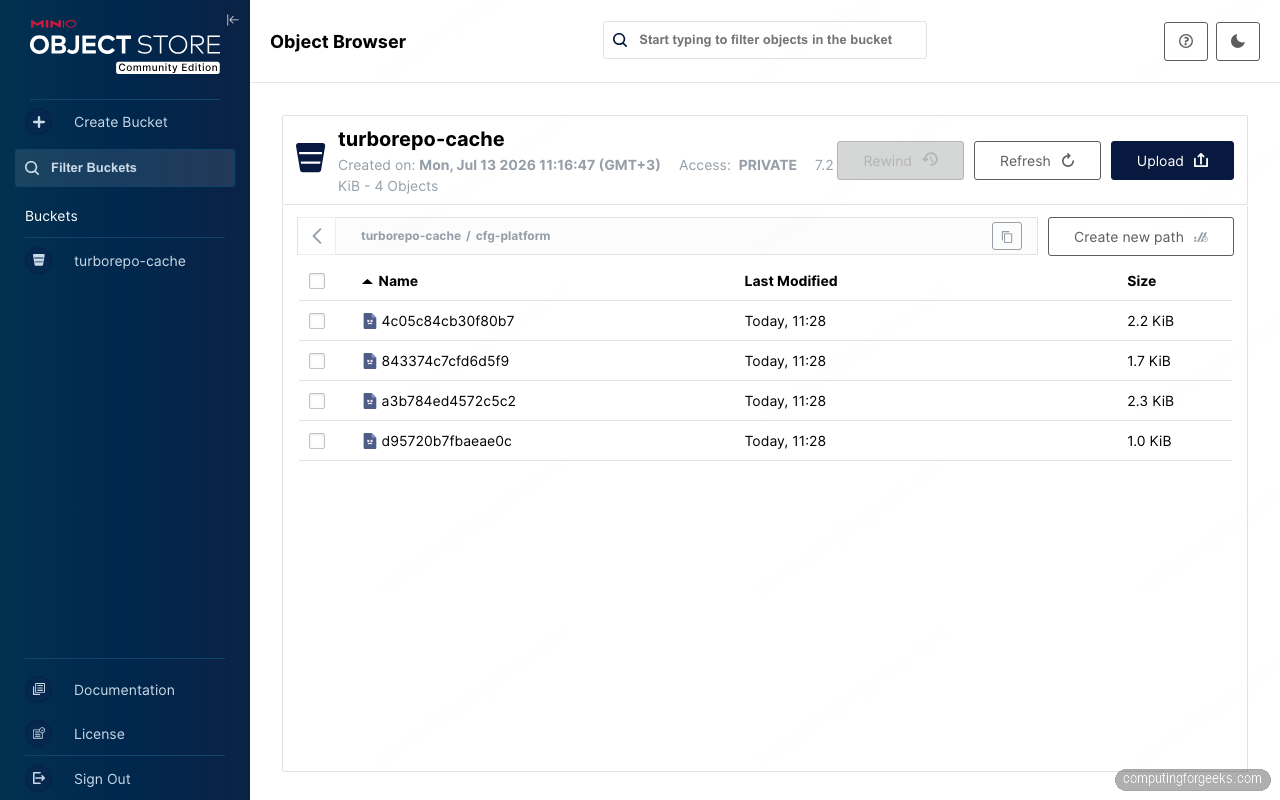
Four objects, a few kilobytes, and that is a working remote cache. What it earns you shows up on the next machine.
Prove the cross-machine cache hit
This is the entire point of the exercise, so it deserves a real test rather than a claim. We took a second machine that had never built the project, cloned the repo, installed dependencies, and confirmed there was nothing to reuse locally:
ls .turbo/cache packages/logger/distBoth paths are absent, so any cache hit can only come over the network:
ls: cannot access '.turbo/cache': No such file or directory
ls: cannot access 'packages/logger/dist': No such file or directory
Export the same three variables, run the build, and watch a machine compile nothing:
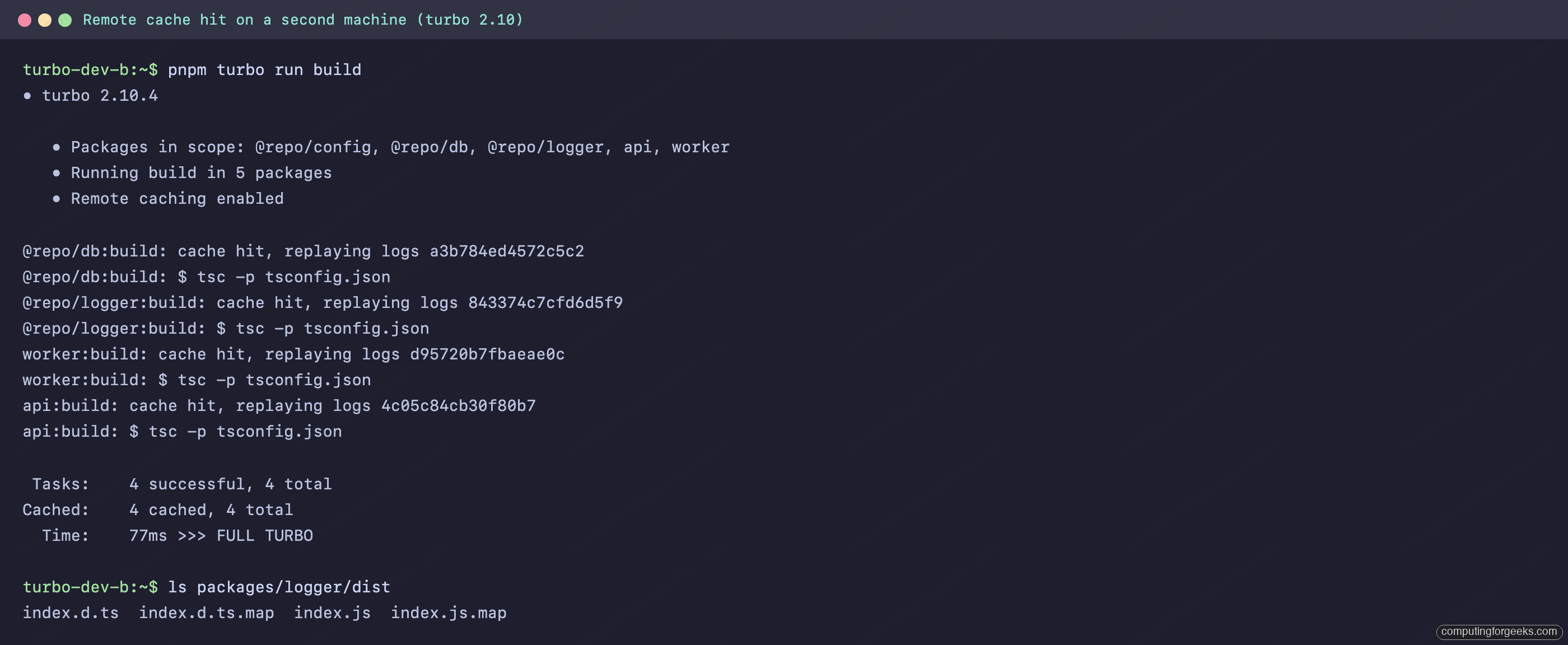
Every task downloads, unpacks, and replays its logs, and the dist/ directories appear byte for byte without tsc ever running. The wall-clock numbers from our lab put it in perspective:
| Scenario | Machine | Time |
|---|---|---|
| Cold build, all four tasks compiled | dev A | 3.862s |
| Re-run, local cache hit | dev A | 31ms, FULL TURBO |
| First-ever build, remote cache hit | dev B | 77ms, FULL TURBO |
A 77 millisecond first build on a fresh machine is the remote cache paying for itself. Scale the 3.862s cold build up to a real monorepo where cold means five or ten minutes, multiply by every developer and every CI run, and the arithmetic gets loud. On a LAN the restore latency is effectively the artifact download time; over the internet it depends on your uplink, which is still a footnote next to recompiling.
Artifact signing: test it before you trust it
Turborepo can sign artifacts with HMAC-SHA256 so a consumer rejects anything the cache returns that was not produced with the shared secret. Enabling it is two steps on every machine: a flag in turbo.json and the key in TURBO_REMOTE_CACHE_SIGNATURE_KEY, 32 bytes or longer. Shorter keys draw a deprecation warning and will be rejected in a future major version (enforceable today via futureFlags.longerSignatureKey):
{
  "remoteCache": {
    "signature": true
  }
}
We have to report what our lab actually showed, though: with this server, signing does not survive the round trip. Turbo transmits the signature in an x-artifact-tag header on upload, and turborepo-remote-cache 2.11.2 with the S3 backend accepted the header but never stored it. A curl round trip proves it, uploading a test artifact with a tag and getting it back without one:
curl -s -X PUT "https://${CACHE_DOMAIN}/v8/artifacts/deadbeef00000001?slug=cfg-platform" -H "Authorization: Bearer ${TURBO_TOKEN}" -H "x-artifact-tag: my-test-signature-tag" --data-binary "test"
curl -s -D - -o /dev/null "https://${CACHE_DOMAIN}/v8/artifacts/deadbeef00000001?slug=cfg-platform" -H "Authorization: Bearer ${TURBO_TOKEN}" | grep -i x-artifact-tag
The grep comes back empty, and no .tag objects appear in the bucket. The consequence is nasty in a quiet way: with signature: true, a consumer that cannot verify an artifact treats it as a plain cache miss. No error, no warning, just cache miss, executing on every task, forever. Worse, each machine then re-uploads artifacts signed with its own view of the key, so two machines with mismatched keys keep overwriting each other’s uploads. If your remote hits vanish the moment signing goes on, this is why. The gap is a known one, tracked upstream in issue #394 and slated for the server’s v3 release. Until a release persists the tag, leave remoteCache.signature off for this stack and lean on the security model you already have: TLS, a strong bearer token, and network placement.
Cap storage growth with a MinIO lifecycle rule
Stale artifacts have no value once their input hash stops being produced, so let MinIO expire them instead of scripting cleanups. One rule ages everything out after 30 days, and hot artifacts get re-uploaded on the next miss anyway:
cd /opt/turbocache
sudo docker compose exec minio sh -c 'mc alias set local http://127.0.0.1:9000 $MINIO_ROOT_USER $MINIO_ROOT_PASSWORD > /dev/null && mc ilm rule add --expire-days 30 local/turborepo-cache && mc ilm rule ls local/turborepo-cache'
MinIO confirms the rule and reports it as enabled:
Lifecycle configuration rule added with ID `d9aa4blu5oucfn95eaa0` to local/turborepo-cache.
│ ID                   │ STATUS  │ PREFIX │ TAGS │ DAYS TO EXPIRE │ EXPIRE DELETEMARKER │
│ d9aa4blu5oucfn95eaa0 │ Enabled │ -      │ -    │             30 │ false               │
Thirty days suits a cache whose artifacts regenerate on demand. Teams with long-lived release branches sometimes stretch to 90; going past that usually just stores tarballs nobody’s hash will ever request again.
Troubleshooting errors we actually hit
WARNING failed to contact remote cache: HTTP status client error (401 Unauthorized)
A wrong or stale token produces this on every artifact request:
WARNING failed to contact remote cache: Error making HTTP request: HTTP status client error (401 Unauthorized) for url (https://turbocache.example.com/v8/artifacts/a3b784ed4572c5c2?slug=cfg-platform)The trap is that the build still succeeds. Turbo degrades to local-only caching and keeps going, so a CI runner with a rotated-out token quietly loses all remote hits while every job stays green. The only symptom is the warning and slowly climbing build times. Fix the TURBO_TOKEN value to match the server’s env file, and if you rotate the token on the server, do it in CI secrets in the same change. Grepping CI logs for failed to contact remote cache is a cheap alert.
Signing enabled, and every build became a cache miss
Covered in the signing section above, but it earns its own error entry because nothing prints at all. Symptoms: remote hits worked, someone turned on remoteCache.signature, and now every machine logs cache miss, executing on artifacts that demonstrably exist in the bucket. Confirm with the curl round trip shown earlier; if x-artifact-tag does not come back on the GET, the server is dropping signatures and verification can never pass. Turn signing off and restore normal behavior immediately, no rebuild needed.
Security checklist before the team relies on it
A cache server is write access to code that every machine will execute without review, so treat it accordingly. Five minutes against this list covers the realistic attack surface:
- Token strength. The bearer token is the only authentication. Ours came from
openssl rand -hex 32; anything guessable hands an attacker artifact-poisoning rights. Rotate it when someone with access leaves, on the server and in CI secrets together. - TLS only. Certbot’s redirect leaves port 80 answering 301s only. Verify with
curl -sI http://your-cache-domain/, which should print aLocation:header, not cache API responses. - Nothing but Nginx exposed. The Compose file binds MinIO and the cache server to
127.0.0.1. Confirm from another machine that ports 3000, 9000, and 9001 refuse connections, and keep the MinIO console behind an SSH tunnel. - Firewall the rest. Only 22, 80, and 443 need to listen publicly. On Ubuntu that is three
ufw allowrules andufw enable. - MinIO credentials are not the turbo token. Two separate secrets, two separate blast radii. A leaked turbo token cannot delete the bucket or read MinIO’s other tenants.
- Retention is a control, not just hygiene. The 30-day lifecycle rule means a poisoned artifact, if one ever landed, also expires instead of lurking indefinitely.
With that in place, the cache is boring infrastructure in the best sense. The next article in this series takes the same monorepo into Docker: turbo prune, multi-stage images, and reusing this remote cache inside CI builds.