Grok 4.5 wrote a production Dockerfile, an OpenTofu VPC, a hardened Kubernetes deployment, a GitHub Actions release pipeline and a Bash log-rotation script. Every file was then graded by the linter a DevOps engineer would actually run against it. Seven tasks went in, including one agentic debugging loop, and the pass rate was measured, not assumed. The result is a straight read on Grok 4.5 for DevOps.
xAI released Grok 4.5 on 8 July 2026 as its flagship model for coding and agentic tool calling, priced at 2 dollars per million input tokens and 6 dollars per million output tokens (for requests under 200K context) on an OpenAI-compatible API. The benchmark numbers (64.7% on SWE Bench Pro, 83.3% on Terminal Bench 2.1) say it can code. The question for a platform team is narrower: is Grok 4.5 for DevOps work good enough to put in the loop, or does it only win slides?
Benchmarked July 2026 on grok-4.5 via the xAI API, default reasoning effort.
How the Grok 4.5 DevOps test was run
The model was called through the xAI Chat Completions endpoint (grok-4.5, default reasoning effort, no special system tuning beyond “return production-grade config”). The endpoint is OpenAI-compatible, so the call is a drop-in for anything already using the OpenAI SDK. This is the whole request:
curl -s https://api.x.ai/v1/chat/completions \
  -H "Authorization: Bearer $XAI_API_KEY" \
  -H "Content-Type: application/json" \
  -d '{"model":"grok-4.5","messages":[
        {"role":"system","content":"You are a senior DevOps engineer. Return production-grade config."},
        {"role":"user","content":"Write a production Dockerfile for a Python 3.12 FastAPI app ..."}
      ]}'
Six tasks asked for a single artifact each: a Dockerfile, an AWS network in HCL, a set of Kubernetes objects, a CI workflow, a shell script, and a one-shot diagnosis of a broken pod. A seventh task handed Grok read-only kubectl tools and asked it to debug a cluster on its own. The grading was the point. Every generated file was run through the tool a real reviewer uses: hadolint, tofu validate, kubeconform -strict, actionlint, and shellcheck. No “looks correct” verdicts.
The five text-based validators all agreed on one thing:
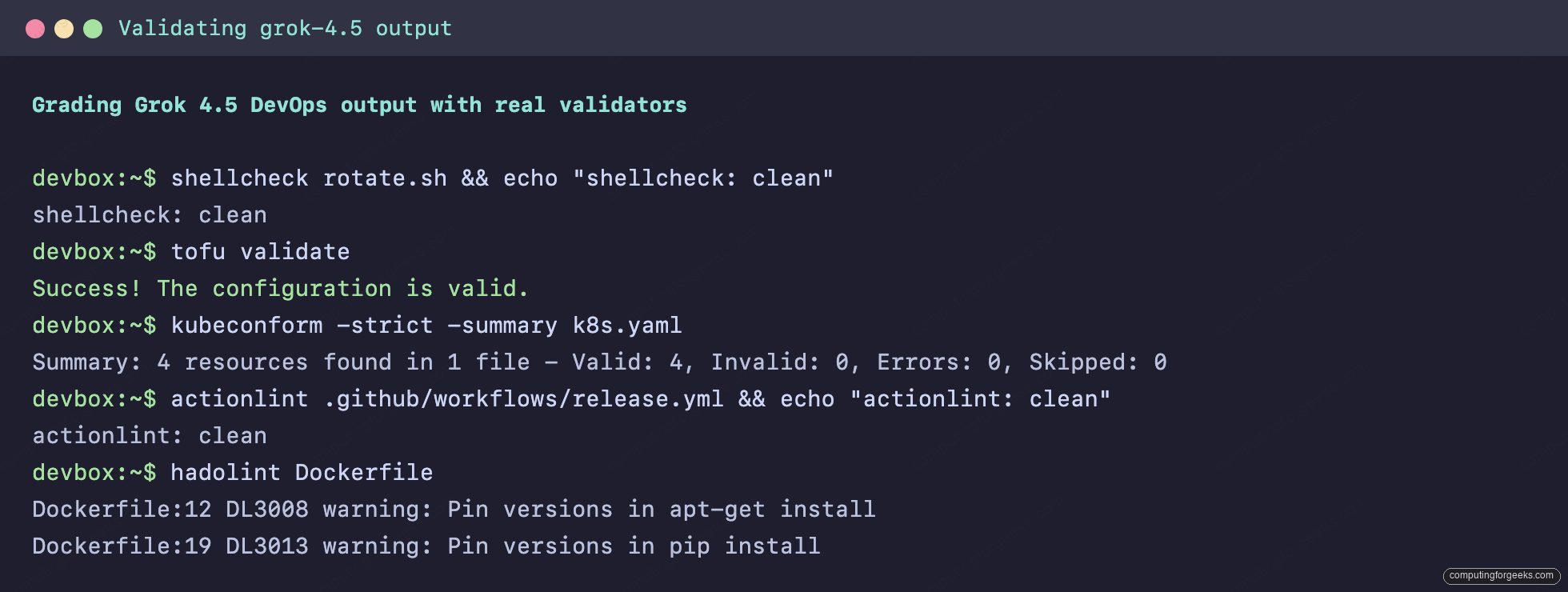
One caveat before the results: the Dockerfile was static-analyzed with hadolint, not built into an image, so its “pass” is a linter pass, not a runtime one. Everything else is executable validation against real provider and schema definitions.
Task 1: A production Dockerfile
The prompt asked for a multi-stage build, a non-root user, a slim base, a HEALTHCHECK, and uvicorn. Grok returned a build that separates a compile stage from a runtime stage and copies only the virtualenv forward:
FROM python:3.12-slim AS builder
WORKDIR /build
ENV PYTHONDONTWRITEBYTECODE=1 PYTHONUNBUFFERED=1 PIP_NO_CACHE_DIR=1
RUN apt-get update \
    && apt-get install -y --no-install-recommends build-essential \
    && rm -rf /var/lib/apt/lists/*
COPY requirements.txt .
RUN python -m venv /opt/venv
ENV PATH="/opt/venv/bin:$PATH"
RUN pip install --upgrade pip && pip install -r requirements.txt

FROM python:3.12-slim AS runtime
WORKDIR /app
ENV PATH="/opt/venv/bin:$PATH"
RUN groupadd --gid 1000 appuser \
    && useradd --uid 1000 --gid appuser --shell /usr/sbin/nologin --create-home appuser
COPY --from=builder /opt/venv /opt/venv
COPY --chown=appuser:appuser . .
USER appuser
EXPOSE 8000
HEALTHCHECK --interval=30s --timeout=5s --retries=3 \
    CMD ["python", "-c", "import urllib.request; urllib.request.urlopen('http://127.0.0.1:8000/docs', timeout=4)"]
CMD ["uvicorn", "app.main:app", "--host", "0.0.0.0", "--port", "8000"]
The Dockerfile above is shown lightly trimmed for length. hadolint, run against the full file, returned two warnings, both of the pin-your-versions family:
Dockerfile:12 DL3008 warning: Pin versions in apt-get install
Dockerfile:19 DL3013 warning: Pin versions in pip install
Those are style warnings, not errors, and both are debatable in a build that installs build-essential only in a throwaway stage. The parts that matter are correct: two stages, a real non-root user with a nologin shell, the venv carried forward, a working HEALTHCHECK, and no secrets baked in. This is the level of Dockerfile most teams write by hand. For the version-pinning nits, the Docker tooling guide covers the reproducibility argument in full.
Task 2: An AWS VPC in OpenTofu
The request was a two-AZ VPC with public and private subnets, an internet gateway, a NAT gateway with an EIP, and the route tables wiring it together. Grok pulled the availability zones from a data source rather than hardcoding them, which is the correct pattern:
data "aws_availability_zones" "available" {
  state = "available"
}

locals {
  azs                  = slice(data.aws_availability_zones.available.names, 0, 2)
  public_subnet_cidrs  = ["10.20.0.0/24", "10.20.1.0/24"]
  private_subnet_cidrs = ["10.20.10.0/24", "10.20.11.0/24"]
}

resource "aws_eip" "nat" {
  domain     = "vpc"
  depends_on = [aws_internet_gateway.app]
}

resource "aws_nat_gateway" "app" {
  allocation_id = aws_eip.nat.id
  subnet_id     = aws_subnet.public[0].id
  depends_on    = [aws_internet_gateway.app]
}
It used domain = "vpc" (the current EIP argument, not the deprecated vpc = true), added the depends_on the NAT gateway genuinely needs, and placed the NAT in a public subnet. Running it through OpenTofu with the real AWS provider schema returned a clean result:
Success! The configuration is valid.tofu fmt -check also passed with no diff, so the HCL is canonically formatted with no manual cleanup. If you want to reproduce this, the OpenTofu install steps get you a working tofu binary in a couple of minutes.
Task 3: A hardened Kubernetes deployment
This is where models usually cut corners. The prompt asked for a Deployment, Service, HorizontalPodAutoscaler and PodDisruptionBudget, with probes, resource limits, and a non-root read-only security context. Grok set the security context at both pod and container level and dropped all capabilities:
securityContext:
  runAsNonRoot: true
  runAsUser: 1000
  readOnlyRootFilesystem: true
  allowPrivilegeEscalation: false
  capabilities:
    drop:
      - ALL
It used the correct current API versions (autoscaling/v2 for the HPA, policy/v1 for the PDB), named the container port and referenced it by name in the probes and Service, and set minAvailable: 2 against three replicas. kubeconform in strict mode validated all four objects against the upstream schemas:
Summary: 4 resources found in 1 file - Valid: 4, Invalid: 0, Errors: 0, Skipped: 0Nothing was skipped, which matters: a skipped resource usually means a made-up apiVersion that no schema recognizes. All four were real. For day-to-day work against the objects it produced, keep the kubectl reference handy.
Task 4: A GitHub Actions release pipeline
The workflow needed to fire on a version tag, log in to GHCR, and build and push with layer caching. Grok reached for the maintained actions rather than hand-rolling shell, set the minimal permissions block, and wired GitHub Actions cache:
permissions:
  contents: read
  packages: write

- name: Build and push
  uses: docker/build-push-action@v6
  with:
    context: .
    push: true
    tags: ${{ steps.meta.outputs.tags }}
    cache-from: type=gha
    cache-to: type=gha,mode=max
It used docker/metadata-action to derive the tags from the git ref, which is the idiomatic approach, and set packages: write without over-granting. actionlint parsed the workflow with zero findings. The pattern lines up with what the GitHub Actions comparison recommends for tag-triggered container builds.
Task 5: A safe log-rotation script
The trap in this task is filenames with spaces. A model that reaches for for f in $(find ...) fails it. Grok used null-delimited iteration and set -euo pipefail, and kept the script to the minimum that does the job:
#!/usr/bin/env bash
set -euo pipefail
LOG_DIR="/var/log/myapp"

while IFS= read -r -d '' f; do
  printf 'Compressing: %s\n' "$f"
  gzip -- "$f"
done < <(find "$LOG_DIR" -type f -name '*.log' -mtime +14 -print0)

while IFS= read -r -d '' f; do
  printf 'Deleting: %s\n' "$f"
  rm -f -- "$f"
done < <(find "$LOG_DIR" -type f -name '*.gz' -mtime +90 -print0)
shellcheck passed it with no warnings. The absences are telling: no cron wrapper nobody asked for, no logging framework, no flags. The script does exactly what the prompt specified and handles the spaces-in-names edge case that breaks most hand-written versions. Restraint is a real property here, and it is not one every model has.
Task 6: Debugging a CrashLoopBackOff
The last generation task was a diagnosis, not a build. A pod loops with cannot open /data/config.yaml: read-only file system, the Deployment sets readOnlyRootFilesystem: true, and the app writes its config to /data at startup. The catch is the constraint: fix it without disabling the read-only root filesystem. Grok named the cause in one line and gave the minimal correct fix:
# under spec.template.spec
volumes:
  - name: data
    emptyDir: {}
# under spec.template.spec.containers[0]
volumeMounts:
  - name: data
    mountPath: /data
Mounting a writable emptyDir at /data is the right answer. It keeps the hardened read-only root and gives the app a writable path, which is exactly the pattern the Kubernetes docs recommend. The weaker answer, and the one a less careful reviewer might accept, is to flip readOnlyRootFilesystem back to false. Grok did not take the shortcut.
Agentic tool-calling: a kubectl debugging loop
The headline claim for Grok 4.5 is agentic tool calling, so the last test measured it directly. The model was given three read-only functions (kubectl_get_pods, kubectl_describe_pod, kubectl_get_secret) and one instruction: the payments deployment has zero ready pods, find out why and say how to fix it. The cluster and its tool responses were simulated, fed back turn by turn exactly as a real agent harness would. What the test measured is the model's own behavior: which tool it called, with what arguments, and when it stopped to conclude. It ran the investigation in the order an SRE would:
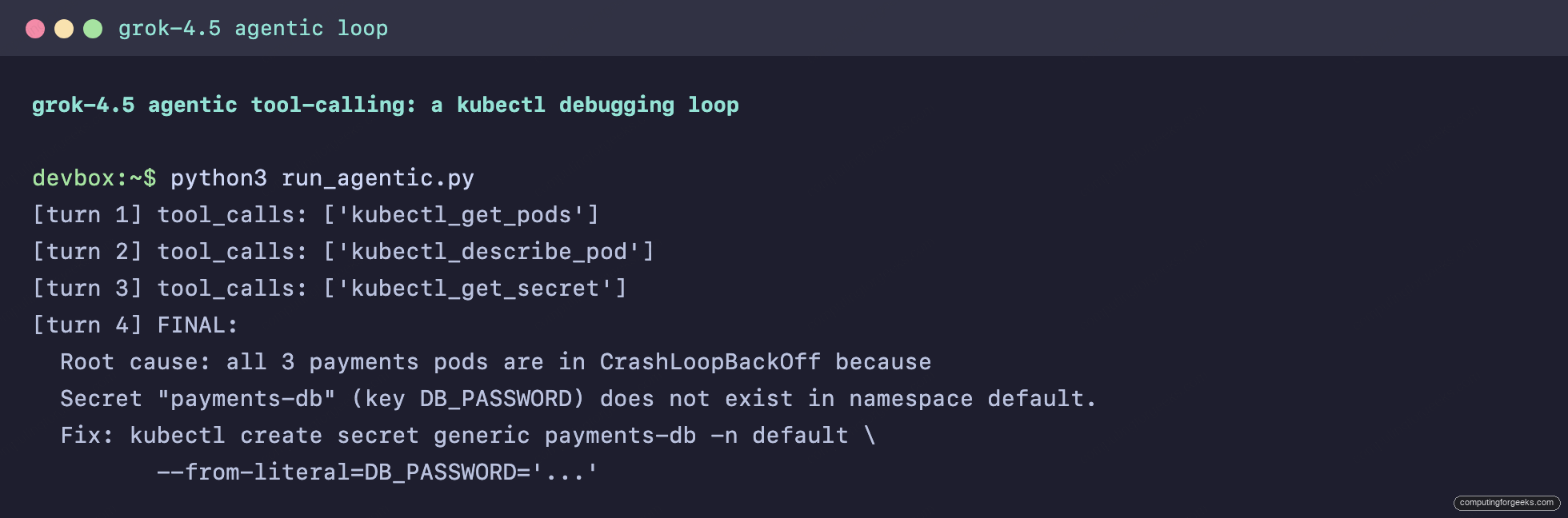
It listed the pods, saw CrashLoopBackOff, described a pod to read the events, spotted the missing-secret error, then called kubectl_get_secret to confirm the secret genuinely did not exist before committing to a conclusion. That confirmation step is the difference between a guess and a diagnosis. The final answer identified the missing payments-db Secret and its DB_PASSWORD key, and gave the exact kubectl create secret command to fix it. Three tool calls, correct arguments each time, correct root cause. For managing the clusters it would be driving, the kubectl and kubectx guide pairs well with this workflow.
Cost, latency and token efficiency
The six generation tasks cost 4.1 cents in total and finished in 70 seconds of wall-clock time combined. Per task, the numbers held in a tight band:
| Task | Latency | Billable output tokens | Cost |
|---|---|---|---|
| Dockerfile | 15.9 s | 1,292 | $0.0084 |
| OpenTofu VPC | 10.0 s | 1,044 | $0.0070 |
| Kubernetes objects | 9.6 s | 929 | $0.0063 |
| GitHub Actions | 13.2 s | 1,239 | $0.0081 |
| Bash script | 16.1 s | 1,336 | $0.0087 |
| CrashLoop diagnosis | 5.2 s | 344 | $0.0027 |
One number is worth reading carefully. On the Bash task, the visible answer was 149 tokens but the model burned 1,187 reasoning tokens getting there, and reasoning tokens bill at the output rate. A 12-line script cost most of a cent because the thinking, not the output, dominates the bill. That is the tax for the accuracy: every one of these passed its validator, and Grok resolves this class of task with far fewer output tokens than the frontier average, but the reasoning tokens are real money. Budget for them if you route high volume through it.
Where Grok 4.5 fits in a DevOps workflow
On well-specified, single-artifact tasks, Grok 4.5 held up seven times out of seven: five clean validator passes plus two correct diagnoses, and it did so without over-engineering and without taking the insecure shortcut when a constraint forbade it. The agentic loop is the stronger result: it investigated a broken cluster in the right order and confirmed its hypothesis before acting, which is exactly the behavior you want from a tool-calling agent driving read-only commands.
The honest limits: a hadolint pass is not a running container, a tofu validate is not a tofu apply, and a schema-valid manifest can still be wrong for your cluster. Grok also leaves version pinning to you, so treat every generated apt-get install and pip install as a draft. The winning pattern is not "trust the output", it is "generate, then validate in the same loop". Wire hadolint, tofu validate, kubeconform, actionlint and shellcheck into the step that consumes Grok's output, exactly as this test did, and the model earns a place in the pipeline. For comparison against the assistant most teams already run, the Claude Code reference is the natural next read, and if you are mid-migration, the Helm 3 to Helm 4 guide is the kind of task where a validator-in-the-loop assistant pays off.