Helm 3 stops receiving security patches on November 11, 2026. That date, not the feature list, is what puts Helm 4 on your roadmap. Once the patches stop, every cluster still driven by the old client is running an unmaintained release tool against workloads you care about, and most platform teams treat that as a hard deadline rather than a nice-to-have.
The good news is that the Helm 4 migration is a smaller move than a six-year major version jump suggests. Your existing releases and charts carry over untouched, there is no data migration, and the client is a single binary you can install next to the old one. The work that remains is understanding what changed beneath the CLI, chiefly the switch to server-side apply and a handful of renamed flags, so your automation does not break the first time it runs. We ran every command here on a single-node Kubernetes v1.36 cluster with Helm v3.21.3 and Helm v4.2.3 in July 2026, so the output and the flag behavior are real, not guessed.
What actually changes when you move to Helm 4
Most of Helm 4 is deliberately compatible. The parts that will affect you are concentrated in how Helm talks to the API server and how a few commands are spelled. Here is the honest summary before we touch a terminal.
| Area | Helm 3 | Helm 4 |
|---|---|---|
| Apply strategy | Client-side apply (three-way merge) | Server-side apply, default for new installs |
| Existing releases | sh.helm.release.v1.* Secrets | Read as-is, same storage format |
| Existing charts | apiVersion v1 and v2 | Install unchanged |
helm version --client | Supported | Removed |
--atomic on upgrade | Supported | Renamed to --rollback-on-failure |
--force on upgrade | Replacement strategy | Renamed to --force-replace, plus new --force-conflicts |
--no-update on repo add | Deprecated, ignored | Removed |
--wait | Boolean on or off | Strategy flag: watcher, hookOnly, or legacy |
| Plugin system | Subprocess plugins | Redesigned, adds WebAssembly plugins and signing |
The trade-off worth internalizing: nothing about your stored state forces a migration, so you can adopt Helm 4 on your own schedule. What forces a small amount of work is the CLI surface and the apply model, and both are easy to handle once you have seen them.
Before you start
Helm is a client. It carries no server component, no database, and no daemon, so sizing is a non-issue: the binary runs wherever kubectl already works, whether that is your laptop or a CI runner. What you do need is a real cluster with releases to migrate and a current kubeconfig.
- A supported Kubernetes cluster. Helm 4.2 follows an n-3 policy against the Kubernetes client it was built with, so it officially supports Kubernetes 1.33 through 1.36, and we tested against 1.36. A single-node k3s cluster or a full kubeadm cluster both work identically here.
- Your existing Helm 3 releases in place, so you can confirm they survive the move.
kubectlconfigured and pointing at the cluster. The kubectl reference is handy if you want to inspect what Helm writes.
Install Helm 4 alongside Helm 3
The safest way to migrate is to keep both clients on the box for a while. Install Helm 4 under its own name, leave the working Helm 3 binary alone, and switch the default helm symlink only once you trust the new client. Set the versions as variables first so you change one place when a newer patch lands.
export HELM3_VERSION="3.21.3" #https://github.com/helm/helm/releases
export HELM4_VERSION="4.2.3"  #https://github.com/helm/helm/releases
Download and place the Helm 3 client as helm3, so the version you have been running stays available as a fallback:
curl -sSLO "https://get.helm.sh/helm-v${HELM3_VERSION}-linux-amd64.tar.gz"
tar xzf "helm-v${HELM3_VERSION}-linux-amd64.tar.gz"
sudo install -m755 linux-amd64/helm /usr/local/bin/helm3
rm -rf linux-amd64 "helm-v${HELM3_VERSION}-linux-amd64.tar.gz"
Now pull Helm 4 and install it as helm4, then point the plain helm command at it:
curl -sSLO "https://get.helm.sh/helm-v${HELM4_VERSION}-linux-amd64.tar.gz"
tar xzf "helm-v${HELM4_VERSION}-linux-amd64.tar.gz"
sudo install -m755 linux-amd64/helm /usr/local/bin/helm4
sudo ln -sf /usr/local/bin/helm4 /usr/local/bin/helm
rm -rf linux-amd64 "helm-v${HELM4_VERSION}-linux-amd64.tar.gz"
Check both clients report the versions you expect. Notice the extra KubeClientVersion field in the Helm 4 output, which is new and reflects the Kubernetes client library it was built against:
helm3 version
helm4 version
The two clients report their builds side by side, and the new field is only present on Helm 4:

With both binaries present, you can drive real releases with Helm 4 while the old client is still one command away if something surprises you.
Confirm Helm 4 reads your existing releases
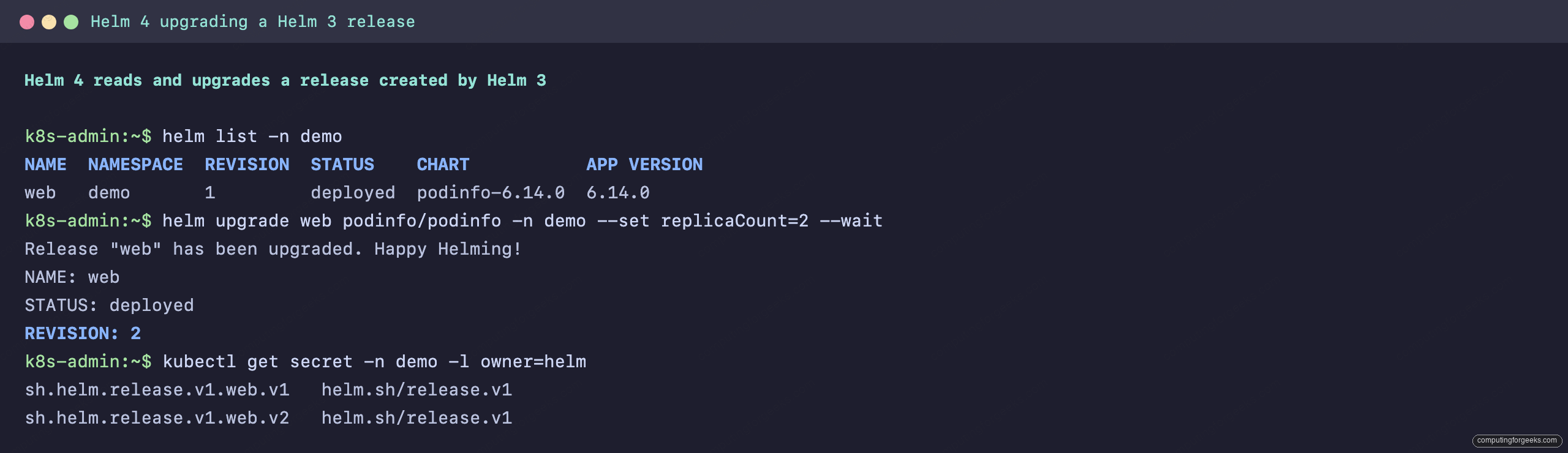
This is the step that removes most of the fear around the upgrade. Helm 4 reads the releases Helm 3 wrote, with no conversion command and no separate migration tool. Point the new client at a namespace that already has a release and list it:
helm list -n demoThe release created by Helm 3 shows up exactly as it did before, at the same revision. The upgrade below references the same chart repo you used with Helm 3, so confirm it is still registered with helm repo list before you run it. Then run a normal upgrade with the new client to prove the full lifecycle works across the version boundary:
helm upgrade web podinfo/podinfo -n demo --set replicaCount=2 --waitHelm 4 bumps the release to revision 2 and reports it deployed. The reason nothing had to be migrated is visible in the stored state. Helm keeps each revision as a Secret, and after the Helm 4 upgrade both revisions sit in the same sh.helm.release.v1 format the old client used:
kubectl get secret -n demo -l owner=helmRevision 1 came from Helm 3 and revision 2 from Helm 4, yet both use the identical storage format:
Rollback works across the boundary too. A helm rollback web 1 -n demo against that same release returns it to the Helm 3 revision and records a new history entry, so your recovery path is intact from day one. If you would rather see this visually, a Helm dashboard shows the same release history both clients read.
Server-side apply, and why your migrated releases keep the old method
The apply model is the one behavioral change that reaches into the cluster, and it carries a subtlety that catches people out. Helm 4 makes server-side apply the default for new installs. Where Helm 3 built the final manifests locally and reconciled them with a client-side three-way merge, a fresh Helm 4 install sends the objects to the API server and lets it own the merge, the same mechanism kubectl apply --server-side uses.
Migrated releases are the catch, and this is the part worth reading twice. The --server-side flag defaults to auto, which inherits the method a release used last time. A release created by Helm 3 was client-side, so Helm 4 keeps applying it client-side even after you upgrade it. You can see exactly which method a release is on with helm get metadata:
helm get metadata web -n demo | grep APPLY_METHODA release migrated from Helm 3 reports client-side apply here, while anything you install fresh with Helm 4 reports server-side apply. During a migration that is usually what you want, because the apply behavior on the workloads you already run does not change out from under you.
When you are ready to move a release onto server-side apply, opt in with the flag explicitly:
helm upgrade web podinfo/podinfo -n demo --server-side=true --waitFrom that point Kubernetes tracks which manager owns each field. The upside is fewer of the silent drift problems that came from client-side merges, because ownership is explicit. The thing to watch is conflict: if another controller or a person running kubectl apply already owns a field Helm wants, the apply reports a conflict instead of quietly overwriting it. That is safer, and the deliberate escape hatch is --force-conflicts, which tells server-side apply to take ownership anyway. Reach for it on purpose, not as a default.
The CLI flags that changed
This is where a working Helm 3 script meets Helm 4 and fails, so it is worth walking through the specific renames. The clearest signal is helm version --client, which Helm 3 accepted and Helm 4 rejects outright:
helm version --clientHelm 4 answers with Error: unknown flag: --client. The flag is gone because helm version no longer contacts the cluster the way it used to, so drop it from any script that only wanted the client version. Two more renames on helm upgrade catch people the same way, and you can confirm them straight from the help output:
helm upgrade --help | grep -E "atomic|rollback-on-failure"
helm upgrade --help | grep force
The help output shows the new names in place of the old ones:
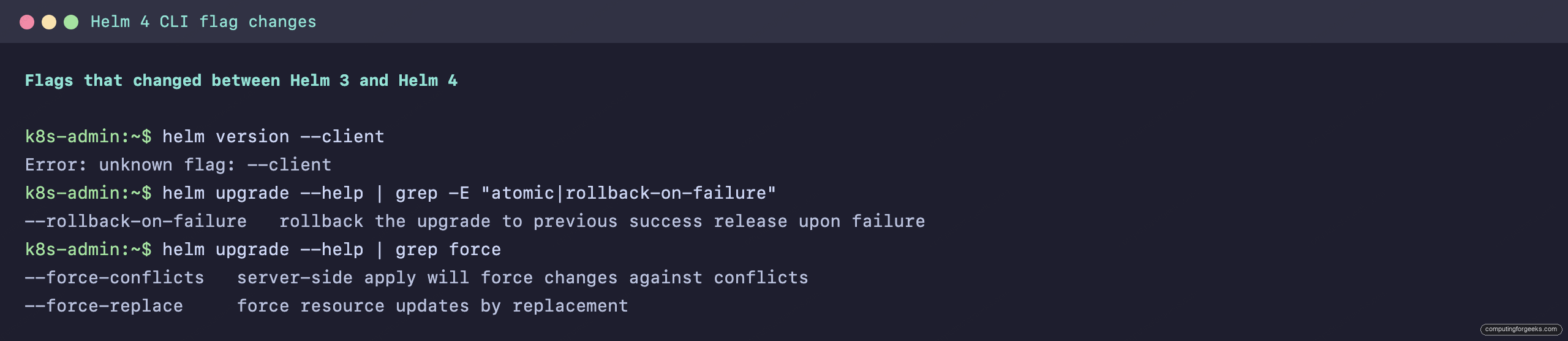
The old --atomic flag is now --rollback-on-failure, and it does the same job of undoing a failed upgrade. The old --force is now --force-replace, and it sits alongside the new --force-conflicts that belongs to the server-side apply model. One more to check on your repo commands: --no-update on helm repo add was deprecated in Helm 3 and is removed in Helm 4, so use --force-update if you need to overwrite an existing repo entry.
How the wait behavior is different
The --wait flag deserves its own note because it quietly changed shape. In Helm 3 it was a simple on or off switch. In Helm 4 it is a strategy flag that accepts a value:
helm upgrade --help | grep -A1 "wait WaitStrategy"Bare --wait now selects the watcher strategy, which tracks readiness with kstatus, the same library Flux and Argo lean on. You can also ask for hookOnly or legacy explicitly. Omitting the flag gives you hookOnly, which matches how Helm 3 behaved without --wait, so a pipeline that never waited keeps working the same. What actually changed is the meaning of the flag when you do pass it: a pipeline that used --wait to block until resources were ready still blocks, but now through kstatus rather than the old polling loop, and legacy is there if you need the previous behavior exactly.
Fix your CI and automation
The migration rarely breaks an interactive session, because a human sees the error and adjusts. It breaks pipelines, where the same command has run untouched for years. Grep your CI configuration and deploy scripts for the flags that moved before you cut over a runner to Helm 4:
grep -rnE -- "--atomic|--force |version --client|--no-update" .github/ ci/ scripts/Replace --atomic with --rollback-on-failure, --force with --force-replace, and remove version --client and --no-update. If your GitOps controller drives releases for you, the same rules apply to how it invokes Helm, though tools that manage releases with Argo CD or Flux track the Helm library on their own schedule, so upgrade the controller when it ships Helm 4 support rather than swapping its embedded client by hand.
Troubleshooting the common upgrade errors
Two errors account for most of the noise during a cutover, and both have clean fixes.
Error: unknown flag: –client. A script called helm version --client. Remove the flag. If you only wanted a machine-readable version string, helm version --short still works.
Apply failed with conflict, field is managed by another manager. Server-side apply found a field Helm 4 wants that something else already owns, often a controller or a prior kubectl apply. Decide who should own that field. If it is genuinely Helm, add --force-conflicts to the upgrade; if it is another controller, remove that field from your chart so the two stop fighting.
The plugin system also changed if you rely on custom plugins. Helm 4 redesigned it, added WebAssembly-based plugins, and introduced signing through helm plugin package and helm plugin verify. Post-renderers moved into that plugin model, and this one can bite quietly: the --post-renderer flag still exists, but in Helm 4 it takes the name of a post-renderer plugin, not the path to an executable the way Helm 3 accepted. A kustomize post-renderer you used to invoke as a script no longer runs as-is. You have to repackage it as a plugin and reference it by name. The details and the full breaking-change list are in the official Helm 4 release notes.
A safe rollout across environments
Because Helm 4 changes nothing on disk, you get to migrate at your own pace, and the sensible pace is one environment at a time. A rollout that has held up in practice looks like this. Install Helm 4 next to Helm 3 on a single CI runner, point it at your development cluster, and run a real upgrade of a low-risk release to watch server-side apply behave. Update the CI scripts for the renamed flags and let the development pipeline run on Helm 4 for a few days. Promote the same change to staging, paying attention to any field-ownership conflicts on shared resources. Only then switch production runners, and keep the helm3 binary in place until you have a full release cycle of confidence. If anything misbehaves, the old client is still there and your releases are still in a format both versions read, which is the whole reason this migration is far less dramatic than the version number implies.