K3s installs a production Kubernetes cluster in under 30 seconds. One binary, one command. Rancher built it for edge computing, IoT, and resource-constrained environments, but plenty of teams run it as their primary cluster because kubeadm feels like assembling furniture when all you need is a working table.
This guide walks through installing K3s on Ubuntu 26.04 LTS, deploying workloads with the built-in Traefik ingress controller, adding Helm chart support, configuring remote kubectl access, and setting up high availability with embedded etcd. K3s ships with containerd, CoreDNS, Traefik, a local path provisioner, and a metrics server, all bundled into a single ~70 MB binary.
Verified working: April 2026 on Ubuntu 26.04 LTS (kernel 7.0), K3s v1.34.6+k3s1
Prerequisites
Before starting, make sure you have the following:
- Ubuntu 26.04 LTS server with at least 2 GB RAM and 2 CPU cores (4 GB recommended for running workloads)
- Root or sudo access
- Tested on: Ubuntu 26.04 LTS (Resolute Raccoon), kernel 7.0.0-10-generic
- Network connectivity to download the K3s binary from GitHub releases
If you need a baseline server configuration, follow the Ubuntu 26.04 initial server setup guide first.
Install K3s on Ubuntu 26.04
The official install script handles everything: downloading the binary, creating systemd services, and starting the cluster. One command:
curl -sfL https://get.k3s.io | sh -The installer downloads the latest stable release and configures K3s as a systemd service:
[INFO]  Finding release for channel stable
[INFO]  Using v1.34.6+k3s1 as release
[INFO]  Downloading hash https://github.com/k3s-io/k3s/releases/download/v1.34.6+k3s1/sha256sum-amd64.txt
[INFO]  Downloading binary https://github.com/k3s-io/k3s/releases/download/v1.34.6+k3s1/k3s
[INFO]  Verifying binary download
[INFO]  Installing k3s to /usr/local/bin/k3s
[INFO]  Skipping installation of SELinux RPM
[INFO]  Creating /usr/local/bin/kubectl symlink to k3s
[INFO]  Creating /usr/local/bin/crictl symlink to k3s
[INFO]  Creating /usr/local/bin/ctr symlink to k3s
[INFO]  Creating killall script /usr/local/bin/k3s-killall.sh
[INFO]  Creating uninstall script /usr/local/bin/k3s-uninstall.sh
[INFO]  env: Creating environment file /etc/systemd/system/k3s.service.env
[INFO]  systemd: Creating service file /etc/systemd/system/k3s.service
[INFO]  systemd: Enabling k3s unit
[INFO]  systemd: Starting k3s
Notice that K3s creates symlinks for kubectl, crictl, and ctr automatically. No separate kubectl install needed.
Verify the K3s Installation
Confirm the service is active:
systemctl status k3sThe output should show active (running):
● k3s.service - Lightweight Kubernetes
     Loaded: loaded (/etc/systemd/system/k3s.service; enabled; preset: enabled)
     Active: active (running) since Tue 2026-04-14 09:10:54 UTC; 1min 17s ago
       Docs: https://k3s.io
   Main PID: 1955 (k3s-server)
      Tasks: 79
     Memory: 1.5G (peak: 1.5G)
        CPU: 37.500s
     CGroup: /system.slice/k3s.service
             ├─1955 "/usr/local/bin/k3s server"
             ├─1977 "containerd "
Check the installed version:
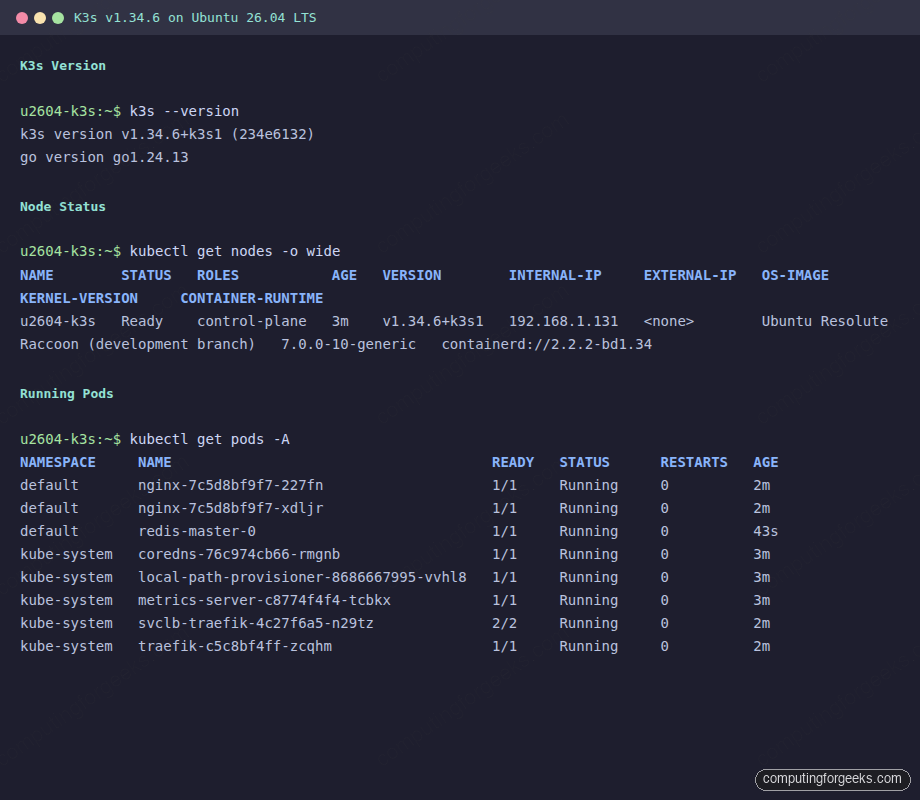
k3s --versionYou should see the K3s version along with the Go runtime:
k3s version v1.34.6+k3s1 (234e6132)
go version go1.24.13
Verify the node is ready and check the Kubernetes version reported by the API server:
kubectl get nodes -o wideThe node shows Ready status with containerd as the container runtime:
NAME        STATUS   ROLES           AGE   VERSION        INTERNAL-IP     EXTERNAL-IP   OS-IMAGE         KERNEL-VERSION     CONTAINER-RUNTIME
u2604-k3s   Ready    control-plane   3m    v1.34.6+k3s1   10.0.1.50       <none>        Ubuntu 26.04     7.0.0-10-generic   containerd://2.2.2-bd1.34
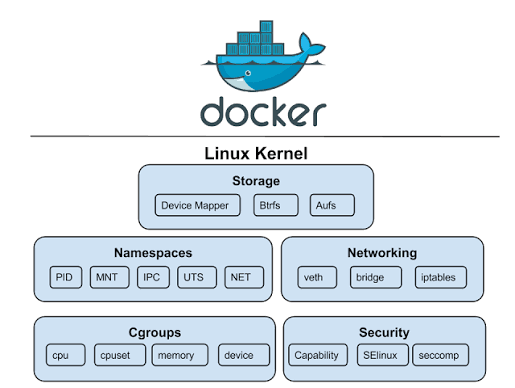
K3s bundles its own containerd runtime, so you do not need to install Docker or Docker Compose separately. The containerd instance K3s ships is independent of any system-level Docker installation.
Check System Pods
K3s deploys several essential components out of the box. List all pods across namespaces:
kubectl get pods -AAll system pods should show Running or Completed status:
NAMESPACE     NAME                                      READY   STATUS      RESTARTS   AGE
kube-system   coredns-76c974cb66-rmgnb                  1/1     Running     0          3m
kube-system   helm-install-traefik-crd-jz2hz            0/1     Completed   0          3m
kube-system   helm-install-traefik-sr6kp                0/1     Completed   1          3m
kube-system   local-path-provisioner-8686667995-vvhl8   1/1     Running     0          3m
kube-system   metrics-server-c8774f4f4-tcbkx            1/1     Running     0          3m
kube-system   svclb-traefik-4c27f6a5-n29tz              2/2     Running     0          2m
kube-system   traefik-c5c8bf4ff-zcqhm                   1/1     Running     0          2m
Here is what each component does:
- CoreDNS provides cluster DNS resolution
- Traefik acts as the default ingress controller (v3.6.10 in this release)
- metrics-server enables
kubectl topfor resource monitoring - local-path-provisioner provides dynamic PersistentVolume provisioning using host paths
- svclb-traefik is the ServiceLB (formerly Klipper) that exposes Traefik on the host network
Deploy a Sample Application
Create an nginx deployment with two replicas to verify the cluster handles workloads correctly:
kubectl create deployment nginx --image=nginx:latest --replicas=2Expose it as a ClusterIP service:
kubectl expose deployment nginx --port=80 --type=ClusterIPCheck the deployment status:
kubectl get deploymentsBoth replicas should be available:
NAME    READY   UP-TO-DATE   AVAILABLE   AGE
nginx   2/2     2            2           21s
Verify the pods are running with their cluster IPs:
kubectl get pods -o wideEach pod gets an IP from the K3s Flannel CNI (10.42.0.0/16 range by default):
NAME                     READY   STATUS    RESTARTS   AGE   IP           NODE        NOMINATED NODE   READINESS GATES
nginx-7c5d8bf9f7-227fn   1/1     Running   0          21s   10.42.0.10   u2604-k3s   <none>           <none>
nginx-7c5d8bf9f7-xdljr   1/1     Running   0          21s   10.42.0.9    u2604-k3s   <none>           <none>
Confirm the service is reachable:
kubectl get svcThe nginx service gets a cluster IP from the 10.43.0.0/16 service CIDR:
NAME         TYPE        CLUSTER-IP      EXTERNAL-IP   PORT(S)   AGE
kubernetes   ClusterIP   10.43.0.1       <none>        443/TCP   3m
nginx        ClusterIP   10.43.232.247   <none>        80/TCP    21s
Configure Traefik Ingress
K3s ships with Traefik as the default ingress controller, so there is nothing extra to install. Create an Ingress resource to route traffic to the nginx service:
kubectl apply -f - <<ENDINPUT
apiVersion: networking.k8s.io/v1
kind: Ingress
metadata:
  name: nginx-ingress
  namespace: default
spec:
  rules:
  - host: nginx.local
    http:
      paths:
      - path: /
        pathType: Prefix
        backend:
          service:
            name: nginx
            port:
              number: 80
ENDINPUT
Verify the ingress was created and assigned the node IP:
kubectl get ingressTraefik picks up the ingress immediately:
NAME            CLASS     HOSTS         ADDRESS       PORTS   AGE
nginx-ingress   traefik   nginx.local   10.0.1.50     80      14s
Test it with curl using the Host header:
curl -s -H "Host: nginx.local" http://localhost/ | head -5You should see the nginx welcome page HTML:
<!DOCTYPE html>
<html>
<head>
<title>Welcome to nginx!</title>
<style>
For production use, replace nginx.local with a real domain and add TLS termination via cert-manager or Traefik’s built-in ACME support.
Monitor Resource Usage
Since K3s includes metrics-server, kubectl top works without any additional setup. Check node resource consumption:
kubectl top nodesK3s uses minimal resources compared to a full kubeadm cluster. For purely local development and testing, Minikube is another option that runs inside a Docker container:
NAME        CPU(cores)   CPU(%)   MEMORY(bytes)   MEMORY(%)
u2604-k3s   94m          4%       861Mi           22%
Check per-pod resource usage across all namespaces:
kubectl top pods -AThe entire K3s control plane plus Traefik ingress runs under 70 MB of memory:
NAMESPACE     NAME                                      CPU(cores)   MEMORY(bytes)
default       nginx-7c5d8bf9f7-227fn                    0m           3Mi
default       nginx-7c5d8bf9f7-xdljr                    0m           3Mi
kube-system   coredns-76c974cb66-rmgnb                  2m           12Mi
kube-system   local-path-provisioner-8686667995-vvhl8   1m           7Mi
kube-system   metrics-server-c8774f4f4-tcbkx            5m           18Mi
kube-system   svclb-traefik-4c27f6a5-n29tz              0m           0Mi
kube-system   traefik-c5c8bf4ff-zcqhm                   1m           20Mi
Install Helm and Deploy Charts
K3s uses its own kubeconfig at /etc/rancher/k3s/k3s.yaml. Helm needs the KUBECONFIG environment variable set to find it. Install Helm first, then configure the environment. For more details, see the Helm 3 installation guide.
curl -fsSL https://raw.githubusercontent.com/helm/helm/main/scripts/get-helm-3 | bashHelm v3.20.2 installs to /usr/local/bin/helm:
Downloading https://get.helm.sh/helm-v3.20.2-linux-amd64.tar.gz
Verifying checksum... Done.
Preparing to install helm into /usr/local/bin
helm installed into /usr/local/bin/helm
Set the KUBECONFIG variable so Helm can talk to the K3s API server. Add this to your shell profile for persistence:
export KUBECONFIG=/etc/rancher/k3s/k3s.yaml
echo 'export KUBECONFIG=/etc/rancher/k3s/k3s.yaml' >> ~/.bashrc
Verify Helm can reach the cluster:
helm versionThe output confirms the Helm client version:
version.BuildInfo{Version:"v3.20.2", GitCommit:"8fb76d6ab555577e98e23b7500009537a471feee", GitTreeState:"clean", GoVersion:"go1.25.9"}K3s already manages Traefik via Helm internally. List the existing Helm releases:
helm list -AThe Traefik chart was deployed automatically during K3s installation:
NAME       	NAMESPACE  	REVISION	UPDATED                               	STATUS  	CHART                        	APP VERSION
traefik    	kube-system	1       	2026-04-14 09:11:40.334248311 +0000 UTC	deployed	traefik-39.0.501+up39.0.5    	v3.6.10
traefik-crd	kube-system	1       	2026-04-14 09:11:37.076963201 +0000 UTC	deployed	traefik-crd-39.0.501+up39.0.5	v3.6.10
Add a chart repository and deploy a workload. This example deploys Redis from the Bitnami repository:
helm repo add bitnami https://charts.bitnami.com/bitnami
helm repo update
Install Redis in standalone mode (suitable for single-node K3s):
helm install redis bitnami/redis --set architecture=standalone --set master.persistence.enabled=falseAfter a minute, the Redis pod should be running alongside your other workloads:
kubectl get podsOutput shows the Redis master pod alongside the nginx deployment:
NAME                     READY   STATUS    RESTARTS   AGE
nginx-7c5d8bf9f7-227fn   1/1     Running   0          2m
nginx-7c5d8bf9f7-xdljr   1/1     Running   0          2m
redis-master-0           1/1     Running   0          43s
Remove the test Redis deployment when done:
helm uninstall redisConfigure Remote kubectl Access
K3s stores its kubeconfig at /etc/rancher/k3s/k3s.yaml. To manage the cluster from your workstation, copy this file and update the server address.
On the K3s server, display the kubeconfig:
cat /etc/rancher/k3s/k3s.yamlThe file contains the cluster CA certificate, client certificate, and client key. Copy it to your local machine:
scp [email protected]:/etc/rancher/k3s/k3s.yaml ~/.kube/k3s-configEdit the file and replace 127.0.0.1 with the server’s actual IP address:
sed -i 's/127.0.0.1/10.0.1.50/g' ~/.kube/k3s-configUse it by setting the KUBECONFIG variable or merging it with your existing config:
export KUBECONFIG=~/.kube/k3s-config
kubectl get nodes
Port 6443 must be reachable from your workstation. If you run UFW on the K3s server, allow the API port:
sudo ufw allow 6443/tcpHigh Availability with Embedded etcd
By default, K3s uses SQLite as its datastore. For production clusters that need fault tolerance, K3s supports embedded etcd. This eliminates the need for an external etcd cluster while still providing HA.
To initialize a new HA cluster, start the first server with the --cluster-init flag:
curl -sfL https://get.k3s.io | K3S_TOKEN=my-shared-secret sh -s - server --cluster-initThis switches the datastore from SQLite to embedded etcd. On additional server nodes, join the existing cluster:
curl -sfL https://get.k3s.io | K3S_TOKEN=my-shared-secret sh -s - server --server https://10.0.1.50:6443You need at least three server nodes for a quorum. The K3S_TOKEN value must match across all nodes. After joining, verify all server nodes appear:
kubectl get nodesAll three nodes should show the control-plane role with Ready status. If one server goes down, the remaining two maintain quorum and the cluster continues operating.
Add Worker Nodes
K3s worker nodes (called agents) are lightweight. They run kubelet and the container runtime but no control plane components.
First, get the node token from the server:
cat /var/lib/rancher/k3s/server/node-tokenOn each worker node, run the install script with the server URL and token:
curl -sfL https://get.k3s.io | K3S_URL=https://10.0.1.50:6443 K3S_TOKEN=<node-token-here> sh -The agent joins the cluster within seconds. Verify from the server:
kubectl get nodesWorker nodes appear without the control-plane role, and the scheduler immediately starts placing pods on them.
cgroup v2 Compatibility
Ubuntu 26.04 runs cgroup v2 exclusively (unified hierarchy). K3s v1.34.x works with cgroup v2 out of the box with no additional configuration needed. You can verify the cgroup version on your system:
mount | grep cgroupOn Ubuntu 26.04, this shows the unified cgroup2 mount:
cgroup2 on /sys/fs/cgroup type cgroup2 (rw,nosuid,nodev,noexec,relatime,nsdelegate,memory_recursiveprot,memory_hugetlb_accounting)The available cgroup controllers on this kernel:
cat /sys/fs/cgroup/cgroup.controllersOutput confirms full cgroup v2 support including memory, CPU, and IO controllers:
cpuset cpu io memory hugetlb pids rdma misc dmemEarlier versions of K3s (pre-v1.25) required manual cgroup configuration on Ubuntu. That is no longer the case. The containerd runtime bundled with K3s handles cgroup v2 natively.
Uninstall K3s
K3s provides a clean uninstall script that removes the binary, systemd services, and all cluster data. On the server node:
/usr/local/bin/k3s-uninstall.shOn agent (worker) nodes, the script is slightly different:
/usr/local/bin/k3s-agent-uninstall.shThese scripts stop the service, remove iptables rules, unmount K3s-related filesystems, and delete /var/lib/rancher/k3s. The uninstall is thorough, which is one of K3s’s advantages over kubeadm where cleanup often leaves residual state.
K3s vs kubeadm vs Minikube
Choosing the right Kubernetes distribution depends on your use case. Here is how K3s compares to kubeadm and Minikube based on real testing:
| Feature | K3s | kubeadm | Minikube |
|---|---|---|---|
| Install time | ~30 seconds | 5-15 minutes | 2-5 minutes |
| Binary size | ~70 MB (single binary) | Multiple binaries + container images | ~90 MB + driver |
| Minimum RAM | 512 MB (server), 256 MB (agent) | 2 GB | 2 GB |
| Container runtime | Bundled containerd | External (containerd/CRI-O) | Bundled Docker/containerd |
| Ingress controller | Traefik (built-in) | None (install separately) | Nginx (addon) |
| Metrics server | Built-in | Install separately | Addon |
| HA support | Embedded etcd or external DB | External etcd or stacked | Not supported |
| CNI | Flannel (default) | User choice (Calico, Cilium, etc.) | Bundled |
| Best for | Edge, IoT, CI/CD, lightweight prod | Full-featured production clusters | Local development only |
| Multi-node | Yes (server + agents) | Yes | Limited |
| CNCF certified | Yes | Yes | Yes |
| Uninstall | Clean (one script) | Manual (kubeadm reset + cleanup) | minikube delete |
K3s trades some flexibility (you cannot swap the CNI or scheduler as easily) for simplicity. If you need Calico or Cilium as your CNI, or if you want to run a multi-tenant production cluster with fine-grained RBAC, kubeadm gives you that control. For everything else, K3s gets you a working cluster faster with fewer moving parts.