The IaC landscape split in 2023 when HashiCorp moved Terraform from the Mozilla Public License to the Business Source License (BSL 1.1). That decision sparked OpenTofu, a community-maintained fork under the Linux Foundation that kept the original MPL-2.0 license. Ubuntu 26.04 users now have two solid choices for infrastructure as code, and both install cleanly from APT repositories.
This guide walks through installing both Terraform and OpenTofu on Ubuntu 26.04 LTS, then covers practical IaC workflows: creating resources, managing state, using the Docker provider, and installing Terragrunt as a wrapper. If you have already completed the initial server setup, you are ready to go.
Current as of April 2026. Terraform 1.14.8, OpenTofu 1.11.6, Terragrunt 1.0.1 on Ubuntu 26.04 LTS (kernel 7.0)
Prerequisites
Before starting, make sure you have the following in place:
- Ubuntu 26.04 LTS server or desktop with root or sudo access
- Tested on: Ubuntu 26.04 LTS (Resolute Raccoon), kernel 7.0.0-10-generic
- Internet connectivity to reach HashiCorp and OpenTofu APT repositories
- Docker installed if you plan to follow the Docker provider section (install Docker on Ubuntu 26.04)
Install Terraform on Ubuntu 26.04
Terraform ships through HashiCorp’s official APT repository. As of April 2026, the repository does not yet have a release for the resolute codename, so we use the noble (24.04) packages, which work without issues on 26.04.
Install the prerequisite packages for managing the repository:
sudo apt-get update
sudo apt-get install -y gnupg software-properties-common curl
Import the HashiCorp GPG key and add the APT repository:
wget -qO- https://apt.releases.hashicorp.com/gpg | sudo gpg --dearmor -o /usr/share/keyrings/hashicorp-archive-keyring.gpg
echo "deb [signed-by=/usr/share/keyrings/hashicorp-archive-keyring.gpg] https://apt.releases.hashicorp.com noble main" | sudo tee /etc/apt/sources.list.d/hashicorp.list
Update the package index and install Terraform:
sudo apt-get update
sudo apt-get install -y terraform
Confirm the installation by checking the version:
terraform --versionThe output should show the installed version:
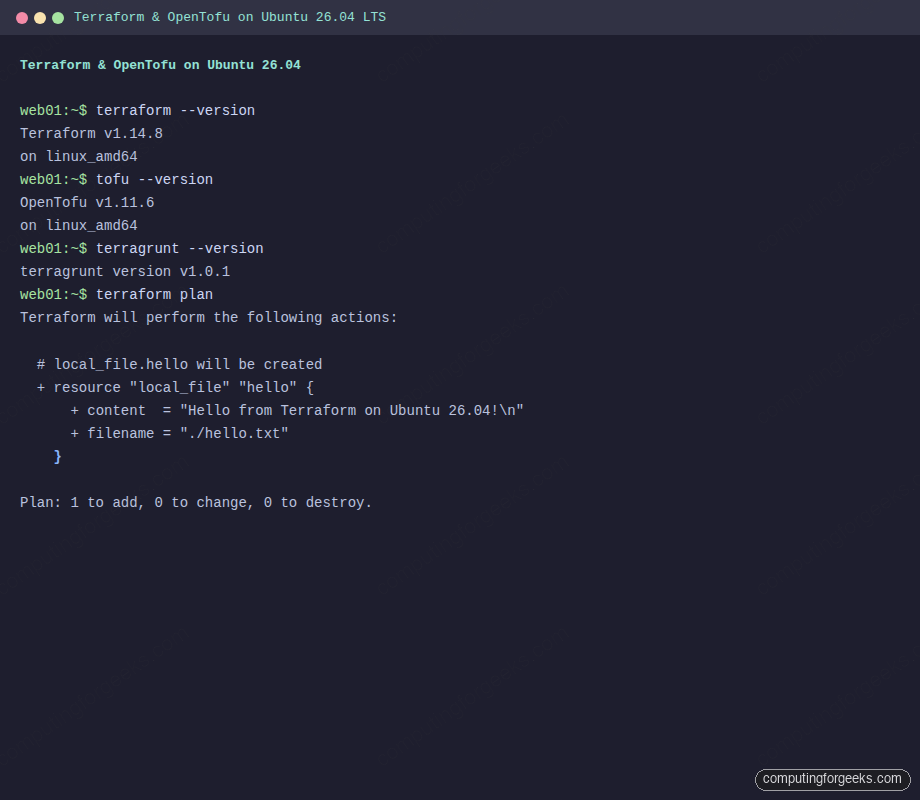
Terraform v1.14.8
on linux_amd64
Install OpenTofu on Ubuntu 26.04
OpenTofu provides a standalone installer script that handles GPG keys and repository setup automatically. This is the recommended approach from the OpenTofu project.
Download and run the official installer:
curl -fsSL https://get.opentofu.org/install-opentofu.sh -o install-opentofu.sh
chmod +x install-opentofu.sh
./install-opentofu.sh --install-method deb
The script adds the OpenTofu GPG keys, configures the APT source, and installs the tofu package. Verify the installation:
tofu --versionYou should see:
OpenTofu v1.11.6
on linux_amd64
Clean up the installer script once the install completes:
rm -f install-opentofu.shCreate Your First Terraform Configuration
The best way to verify both tools work is to create a minimal configuration. This example uses the local provider to create a file on disk, which requires no cloud credentials.
Create a project directory:
mkdir -p ~/terraform-demo && cd ~/terraform-demoCreate the configuration file:
sudo vi main.tfAdd the following HCL configuration:
terraform {
  required_providers {
    local = {
      source  = "hashicorp/local"
      version = "~> 2.5"
    }
  }
}

resource "local_file" "hello" {
  content  = "Hello from Terraform on Ubuntu 26.04!\n"
  filename = "${path.module}/hello.txt"
}

output "file_path" {
  value = local_file.hello.filename
}
This configuration declares a dependency on the local provider, creates a text file, and outputs the path. Save the file and proceed to the Terraform workflow.
Terraform Workflow: Init, Plan, Apply, Destroy
Every Terraform project follows the same lifecycle: initialize, plan, apply, and optionally destroy. Here is each step in action.
Initialize the working directory
terraform init downloads the required providers and sets up the backend:
terraform initThe output confirms the local provider was installed:
Initializing the backend...

Initializing provider plugins...
- Finding hashicorp/local versions matching "~> 2.5"...
- Installing hashicorp/local v2.8.0...
- Installed hashicorp/local v2.8.0 (signed by HashiCorp)

Terraform has been successfully initialized!
Preview changes with plan
terraform plan shows what Terraform will create, modify, or destroy without making changes:
terraform planThe plan output shows one resource to be created:
Terraform will perform the following actions:

  # local_file.hello will be created
  + resource "local_file" "hello" {
      + content              = "Hello from Terraform on Ubuntu 26.04!\n"
      + filename             = "./hello.txt"
      + id                   = (known after apply)
    }

Plan: 1 to add, 0 to change, 0 to destroy.
Apply the configuration
Run terraform apply to create the resources. The -auto-approve flag skips the confirmation prompt (useful for automation, but review the plan first in production):
terraform apply -auto-approveTerraform creates the file and outputs the path:
local_file.hello: Creating...
local_file.hello: Creation complete after 0s [id=2138eaf75c666a9671d08eaebbf8d80bb2347ad1]

Apply complete! Resources: 1 added, 0 changed, 0 destroyed.

Outputs:

file_path = "./hello.txt"
Confirm the file was created on disk:
cat hello.txtThis should print:
Hello from Terraform on Ubuntu 26.04!Tear down resources
terraform destroy removes everything Terraform manages. This is the cleanup step:
terraform destroy -auto-approveThe output confirms the resource was removed:
local_file.hello: Destroying... [id=2138eaf75c666a9671d08eaebbf8d80bb2347ad1]
local_file.hello: Destruction complete after 0s

Destroy complete! Resources: 1 destroyed.
Run the Same Example with OpenTofu
OpenTofu uses identical HCL syntax and the same provider registry. The commands are tofu instead of terraform, but the workflow is the same.
Create a separate directory and the same configuration:
mkdir -p ~/tofu-demo && cd ~/tofu-demoCopy or recreate the same main.tf file from the Terraform example above, then initialize and apply:
tofu initOpenTofu initializes successfully with the same provider:
Initializing the backend...

Initializing provider plugins...
- Finding hashicorp/local versions matching "~> 2.5"...
- Installing hashicorp/local v2.8.0...
- Installed hashicorp/local v2.8.0 (signed, key ID 0C0AF313E5FD9F80)

OpenTofu has been successfully initialized!
Apply the configuration:
tofu apply -auto-approveThe result is identical to Terraform:
local_file.hello: Creating...
local_file.hello: Creation complete after 0s [id=04f9b51113e77e6596389e94982ad585ab7b9d25]

Apply complete! Resources: 1 added, 0 changed, 0 destroyed.

Outputs:

file_path = "./hello.txt"
Clean up when done:
tofu destroy -auto-approveThis compatibility means you can switch between the tools without rewriting your configurations. The lock file format and state file format are compatible between Terraform and OpenTofu (though mixing them on the same state is not recommended).
Docker Provider Example
A more practical example is managing Docker containers with Terraform. This requires Docker installed on the system.
Create a new project directory:
mkdir -p ~/docker-demo && cd ~/docker-demoCreate the Terraform configuration:
sudo vi main.tfAdd the Docker provider configuration that pulls an Nginx image and starts a container:
terraform {
  required_providers {
    docker = {
      source  = "kreuzwerker/docker"
      version = "~> 3.0"
    }
  }
}

provider "docker" {}

resource "docker_image" "nginx" {
  name         = "nginx:alpine"
  keep_locally = false
}

resource "docker_container" "nginx" {
  image = docker_image.nginx.image_id
  name  = "terraform-nginx"

  ports {
    internal = 80
    external = 8080
  }
}

output "container_id" {
  value = docker_container.nginx.id
}

output "container_name" {
  value = docker_container.nginx.name
}
Initialize and apply:
terraform init
terraform apply -auto-approve
Terraform pulls the Nginx image and starts the container:
docker_image.nginx: Creating...
docker_image.nginx: Creation complete after 8s [id=sha256:582c496ccf79...nginx:alpine]
docker_container.nginx: Creating...
docker_container.nginx: Creation complete after 0s [id=05a2dd1f30bd...]

Apply complete! Resources: 2 added, 0 changed, 0 destroyed.

Outputs:

container_id = "05a2dd1f30bd451d4dd3768c6ce5cccea85dd17b1d2184fbfa651bc28a720da2"
container_name = "terraform-nginx"
Verify the container is running with docker ps:
docker psThe container should be listed and serving on port 8080:
CONTAINER ID   IMAGE          COMMAND                  CREATED          STATUS          PORTS                  NAMES
05a2dd1f30bd   582c496ccf79   "/docker-entrypoint.…"   17 seconds ago   Up 16 seconds   0.0.0.0:8080->80/tcp   terraform-nginx
Test that Nginx responds:
curl -s http://localhost:8080 | head -4You should see the Nginx welcome page HTML:
<!DOCTYPE html>
<html>
<head>
<title>Welcome to nginx!</title>
State Management Commands
Terraform tracks every managed resource in a state file (terraform.tfstate). These commands help you inspect and manage state.
List all resources Terraform is tracking:
terraform state listFor the Docker example, this returns:
docker_container.nginx
docker_image.nginx
Inspect a specific resource in detail:
terraform state show docker_container.nginxThis displays every attribute Terraform knows about the resource, including computed values like the container ID, entrypoint, and environment variables. The state file is the source of truth for what Terraform manages; never edit it by hand.
When done with the Docker demo, destroy the resources:
terraform destroy -auto-approveFormatting and Validation
Terraform ships with built-in formatting and validation commands that catch issues before they reach plan or apply.
Check if your HCL files follow the canonical style:
terraform fmt -checkIf the command produces no output, the files are already formatted. To auto-fix formatting, run terraform fmt without the -check flag. This rewrites files in place.
Validate the configuration syntax and internal consistency:
terraform validateA valid configuration returns:
Success! The configuration is valid.Both commands work with OpenTofu too: tofu fmt and tofu validate. Running fmt in CI pipelines catches style drift before code review. If you use Go on Ubuntu 26.04 for custom providers, these tools validate the HCL consumers as well.
Install Terragrunt
Terragrunt is a thin wrapper around Terraform (and OpenTofu) that reduces duplication across multi-environment deployments. It adds features like DRY backend configuration, dependency orchestration between modules, and before/after hooks.
Fetch the latest release and install the binary:
TGVER=$(curl -sL https://api.github.com/repos/gruntwork-io/terragrunt/releases/latest | grep tag_name | head -1 | sed 's/.*"v\([^"]*\)".*/\1/')
echo "Installing Terragrunt v${TGVER}"
sudo wget -q "https://github.com/gruntwork-io/terragrunt/releases/download/v${TGVER}/terragrunt_linux_amd64" -O /usr/local/bin/terragrunt
sudo chmod +x /usr/local/bin/terragrunt
Verify the installation:
terragrunt --versionThe output confirms the installed version:
terragrunt version v1.0.1Terragrunt works with both terraform and tofu as the underlying engine. To use OpenTofu as the backend, set terraform_binary = "tofu" in your terragrunt.hcl file or export the environment variable TERRAGRUNT_TFPATH=tofu. Configuration management tools like Ansible pair well with Terragrunt for post-provisioning configuration.
Terraform vs OpenTofu: Which One to Use
Both tools share the same codebase roots (OpenTofu forked from Terraform 1.5.7) and remain highly compatible. The decision comes down to licensing requirements and organizational preferences.
| Criteria | Terraform | OpenTofu |
|---|---|---|
| License | BSL 1.1 (Business Source License) | MPL-2.0 (Mozilla Public License) |
| Governance | HashiCorp (IBM) | Linux Foundation |
| Provider registry | registry.terraform.io | Uses the same registry, plus OpenTofu registry |
| State file format | Compatible | Compatible |
| HCL syntax | Identical | Identical (plus new features like state encryption) |
| CLI commands | terraform | tofu (drop-in replacement) |
| Unique features | Terraform Cloud, Sentinel policies | Client-side state encryption, OCI provider support |
| Commercial use | Restricted for competing products | No restrictions |
| Community | Large, established ecosystem | Growing, 20k+ GitHub stars |
| Enterprise support | HashiCorp/IBM | Multiple vendors (Spacelift, env0, Scalr) |
If your organization builds a product that competes with HashiCorp offerings, the BSL license restricts you from using Terraform. OpenTofu has no such restrictions. For most internal infrastructure teams, both tools work equally well. OpenTofu’s client-side state encryption is a genuine advantage if you store state in S3 or GCS and want encryption at the application layer rather than relying solely on server-side encryption.
One practical consideration: if you already have Terraform Cloud or Terraform Enterprise in your stack, switching to OpenTofu means giving up those managed services. If you are starting fresh or self-managing state backends, OpenTofu gives you the same capabilities without license concerns.