You don’t hear much about Azure Linux outside of Azure itself, which is a little unfair, because the 4.0 beta turns out to be one of the leanest, quickest-booting server distributions you can spin up right now. It is Microsoft’s own Linux, the same family that runs the nodes behind Azure Kubernetes Service, and 4.0 is the first release that feels genuinely comfortable to boot on your own hardware for a proper look.
This Azure Linux 4.0 review comes out of a few days of running the beta on a Proxmox virtual machine: how small the base system really is, what the package manager and repositories give you, how well it runs containers, and what its security defaults look like on a fresh install. If you are deciding whether it is worth your weekend, the short answer and the longer reasoning are both below.
What Azure Linux 4.0 actually is
Azure Linux started life as CBL-Mariner, Microsoft’s internal Linux for building and running pieces of its cloud. If you ever poked at those early Mariner builds, 4.0 is where that project grew up and got a friendlier name. It is an RPM-based distribution, built this time on a Fedora 43 snapshot, so it reports ID_LIKE=fedora and behaves like a close Fedora cousin in almost every way that matters.
The part worth being clear about up front: the 4.0 release is a preview, which Microsoft limits to evaluation and testing for now, not production, and not even on Azure yet. The stable Azure Linux line is supported only when it runs on Azure in the first place, so on a Proxmox VM like the one used for this review you are firmly in evaluation territory. That is not a knock on the quality, it just sets expectations. This is a cloud and container host first, and a general-purpose distro a distant second. If you want to try it yourself, our step-by-step install guide walks through the whole installer.
First impressions: a small, quick base
The thing you notice immediately is how little there is. A fresh install lands at 271 packages. Not 2,710, not a trimmed-down 800, just 271. At idle the system sits around 430 MB of RAM used out of the 3.8 GB the VM had, and it reaches a login prompt in about eleven seconds from power-on, most of which is firmware and initrd rather than the system itself.
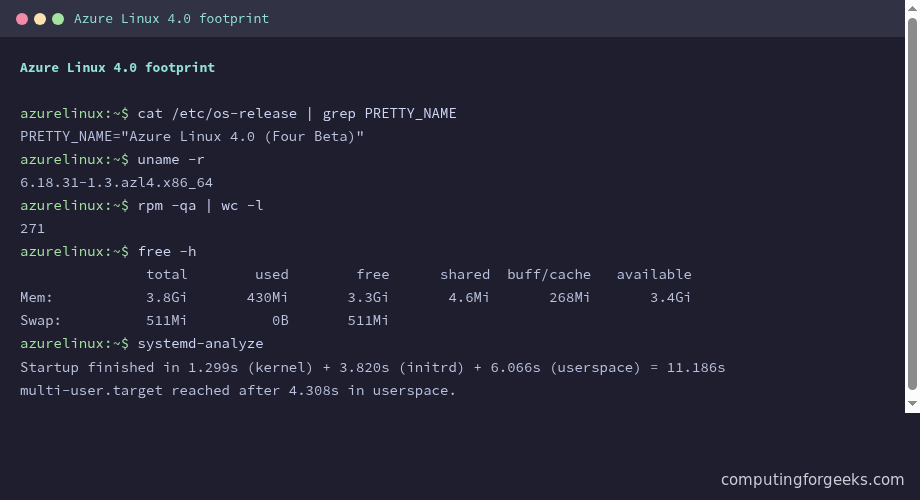
That smallness is a deliberate design choice rather than an accident of a young distro. The underlying pieces are all current: a 6.18 kernel, systemd 258, glibc 2.42, and a Python 3.14 interpreter in the base. So you get a modern, fast-moving foundation with very little stacked on top of it. For a container host or a cloud image, that is close to ideal. Fewer packages means fewer things to patch and a smaller surface for anything to go wrong.
The package story: tdnf, dnf5, and what’s in the repos
Azure Linux has historically used tdnf, a lightweight package manager Microsoft wrote for the distribution. On 4.0 that line has quietly merged: run either tdnf or dnf and you land on dnf5, the same resolver Fedora now ships. Microsoft points 4.0 users toward dnf5 and dnf going forward, so the dnf5 commands you may already know carry straight over.
Two repositories are enabled by default, a base repo and a Microsoft repo, both served from packages.microsoft.com. The question that decides whether the distro fits your work is what those repos actually hold. Count them and you get a clear picture:
dnf5 repoquery | wc -lThe total comes to a little over nine thousand packages:
9110For context, Fedora’s repositories run to tens of thousands of packages, so nine thousand is small. What matters is that the nine thousand are the right ones for a server. The core building blocks are all there at recent versions:
nginx.x86_64        2:1.28.2-2.azl4    azurelinux-base
podman.x86_64       5:5.8.0-2.azl4     azurelinux-base
golang.x86_64       1.25.8-2.azl4      azurelinux-base
ansible.noarch      11.13.0-2.azl4     azurelinux-base
mariadb.x86_64      3:10.11.16-2.azl4  azurelinux-base
valkey.x86_64       8.1.5-2.azl4       azurelinux-base
The gaps are just as telling. PostgreSQL and Redis are not in the base repos, which will stop some people cold. Redis at least has a ready stand-in, since Valkey is packaged and is a drop-in fork. Docker’s own docker-ce is absent too, but that one is expected: Microsoft leans on Podman, and Docker has always shipped from its own repository rather than a distro’s. Kubernetes itself is not packaged directly either, which is mildly ironic for a distro born to run AKS, though in practice you bootstrap that from upstream anyway.
The first update after install is uneventful in the best way. On a freshly cut beta image a handful of packages have moved on since the ISO was built, usually the release files and the bootloader, and a single tdnf -y update brings them current in well under a minute. Nothing dramatic, no broken dependencies, which is what you want from a base that is meant to disappear under your workload.
Built for containers
This is the part Azure Linux is genuinely good at, and it shows. The general-purpose VM image ships no container runtime (the AKS node image is the one that comes with containerd already baked in), but installing Podman pulls in everything it needs (about sixty small packages) in a few seconds, and from there it just works. Pulling and running a standard image off Docker Hub needs nothing special:
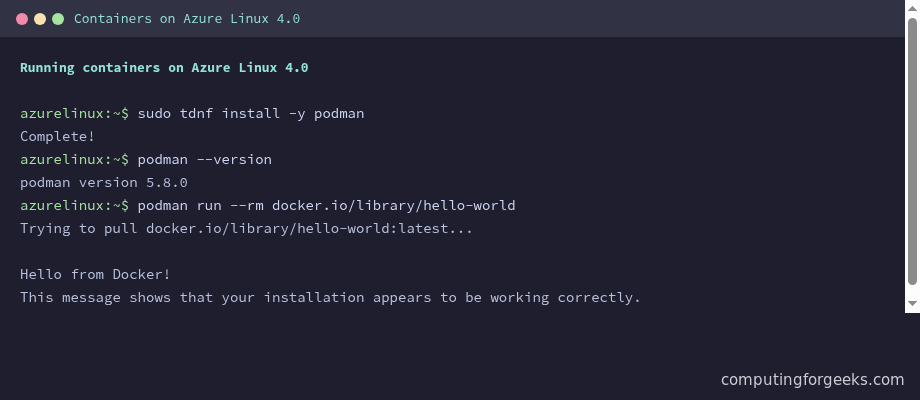
Podman here is a current 5.8 release, and containerd sits in the repos too if you want it underneath a higher-level stack. Because Podman speaks the Docker image format, the muscle memory transfers without thinking about it. Once you have containers running, the natural next step is to keep them running, and the Fedora pattern of wiring containers up as systemd services with Quadlet applies here unchanged. Rootless containers work the way you would expect on any recent Podman, so a non-root user can run workloads without extra setup. For a small, secure box whose entire job is to host a handful of containers, the experience is hard to fault.
Security defaults that ship switched on
Azure Linux makes choices a lot of distros leave to the administrator. SELinux is in enforcing mode on a fresh install, not permissive, not disabled. firewalld is active from first boot. The base is so small that there is very little installed to attack in the first place. For a distribution aimed at production cloud workloads, those are exactly the defaults you want, and it is refreshing not to have to turn them on yourself.
The flip side is that enforcing SELinux from the start means you live with SELinux from the start. If a service misbehaves in a way you cannot explain, labels are the first place to look, and that catches people who are used to distros where SELinux is off or loose. It is the right trade, but it is a real one. Anyone coming from a Fedora or RHEL background will feel at home; anyone arriving from a permissive setup has a short learning curve waiting.
How it compares to Fedora and the RHEL rebuilds
Because Azure Linux is so close to Fedora underneath, the useful comparison is against the distros you might otherwise reach for. The differences are less about quality and more about intent, which is the clearest way to see whether it fits:
| Item | Azure Linux 4.0 | Fedora | Rocky / AlmaLinux |
|---|---|---|---|
| Lineage | Fedora 43 snapshot, by Microsoft | Upstream | RHEL rebuild |
| Package manager | dnf5 (tdnf front-end) | dnf5 | dnf |
| Repo size | ~9,000 packages | Tens of thousands | Thousands plus EPEL |
| Default SELinux | Enforcing | Enforcing | Enforcing |
| Desktop | None | Yes | Optional |
| Release pace | Major releases only | About every 6 months | Long support, RHEL-tracked |
| Official support | Azure only | Community | Community (10 yr on RHEL) |
| Best fit | Azure / AKS container host | Workstation and dev | Long-life servers |
Read down that table and the positioning is obvious. Azure Linux is not competing with Fedora for your laptop or with Rocky for your ten-year server. It is the lean, opinionated option for when the target is Microsoft’s cloud and the unit of deployment is a container.
Where Azure Linux 4.0 falls short
The honest list of limitations is not short, and most of it traces back to what this distro is for. Worth knowing before you commit a project to it:
- It is still a beta. The “Four Beta” label is accurate, so treat it as something that is stabilising rather than finished.
- Microsoft supports it only on Azure. Run it on Proxmox, VMware, or bare metal and you are on your own for support, even if it runs perfectly well.
- The repository is small. Nine thousand packages cover servers and containers, but PostgreSQL, Redis, and a great deal of desktop and third-party software simply are not there.
- There is no graphical environment at all. This is a server and container host, full stop, with no desktop in the base image.
- The minimal base cuts both ways. There is no
vim,git,wget, orhtopuntil you install them, so your first ten minutes are spent assembling your own toolkit. - The community is tiny next to Rocky, AlmaLinux, or Ubuntu. Outside of Azure documentation, you will not find much when you search for an error message.
None of these are bugs. They are the cost of a distribution that is laser-focused on one job. But if your job is not that job, they add up fast.
Who should run Azure Linux 4.0
After a few days with it, the verdict sorts cleanly into two piles. Run Azure Linux 4.0 if you already deploy on Azure or AKS and want your test boxes to match production, if you want a minimal container host that is secure by default and boots in seconds, or if you like the Fedora world but want something leaner and slower to churn. In those cases it is a genuine pleasure: small, fast, modern, and sensibly configured.
Skip it, at least for now, if you need it in production anywhere other than Azure, if your stack leans on PostgreSQL, Redis, or anything outside that nine-thousand-package repo, or if you want a desktop, a big community, and a deep back catalogue of guides to lean on. For those, a mainstream distro is still the right call, and our notes on what to do after a fresh Fedora install or how to set up firewalld will serve you better there.
Taken on its own terms, Azure Linux 4.0 is a tidy, well-judged beta that does one thing and does it well. It is not trying to be your daily driver, and you should not ask it to be. As a lean, secure container host for the Microsoft cloud, it is already worth an afternoon in a VM, and it is a clear signal of where Microsoft wants its Linux to go.