firewalld is the default firewall on Fedora, Server and Workstation alike. It abstracts nftables (and iptables on older releases) behind a zone model that maps cleanly onto the way real networks work: one interface or source belongs to one zone, and each zone has its own list of allowed services, ports, rich rules, and forwarding policy. Once you understand zones, services, and rich rules, every other firewalld setting is a footnote.
This guide walks the practical firewalld workflow on Fedora: confirming the service is running, picking the right default zone, opening services and ports, writing rich rules for source filtering and rate limiting, and using the firewall-config GUI for a faster visual audit. Every command was executed on a real Fedora install; the output you see in the screenshots is what your terminal will show.
Tested May 2026 on Fedora 44 (kernel 7.0.9-202.fc44, firewalld 2.4.0, nftables 1.1.4). Package availability and firewall-cmd syntax parity verified on Fedora 43 (firewalld 2.3.2) and Fedora 42 (firewalld 2.3.2).
Confirm firewalld is running
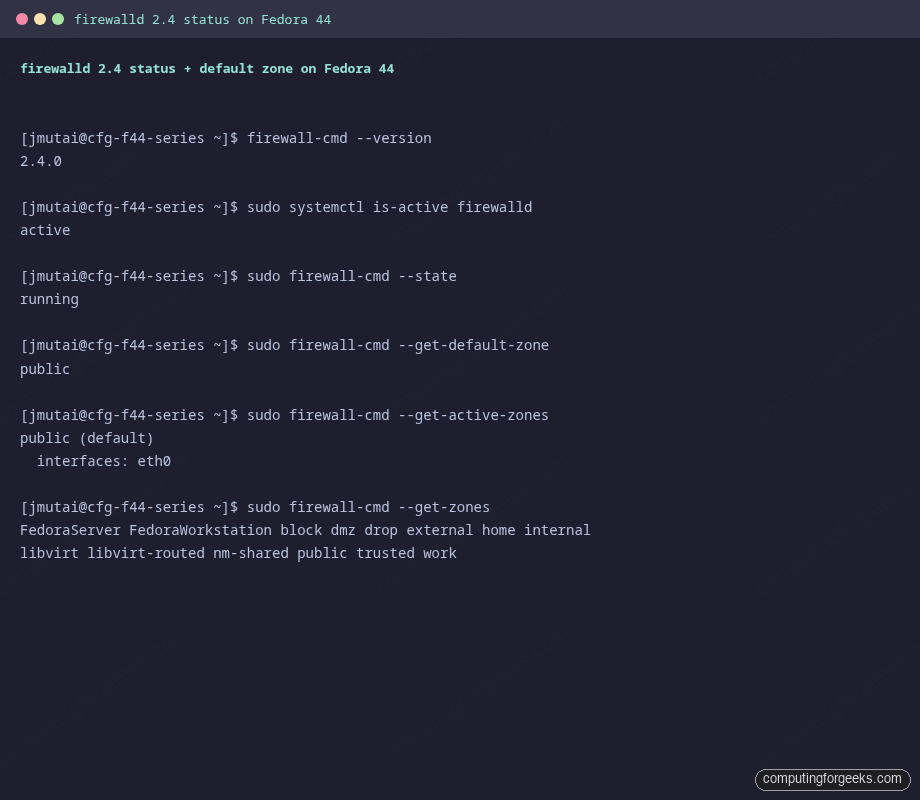
Fedora installs and enables firewalld by default. Verify in one shot:
firewall-cmd --version
sudo systemctl is-active firewalld
sudo firewall-cmd --state
The output of the commands is shown above.
If the service is masked or missing, install and enable it:
sudo dnf install -y firewalld
sudo systemctl unmask firewalld
sudo systemctl enable --now firewalld
If you previously ran iptables-services or nftables.service directly, disable them. firewalld is the single source of truth on Fedora and conflicts with manually loaded rules.
Zones: the firewalld model in one paragraph
A zone is a named profile that defines what the firewall does with traffic arriving on an interface or from a source address. Recent Fedora releases ship fifteen built-in zones. The ones you actually use:
- public: default on most Fedora systems. Allows ssh, dhcpv6-client, mdns. Everything else is dropped.
- FedoraServer: default on Fedora Server. Same as public minus mdns, plus cockpit.
- FedoraWorkstation: default on Fedora Workstation. Adds samba-client and KDE Connect range to public.
- trusted: allows everything. Useful for a private VLAN, dangerous on a real interface.
- drop: drops every inbound packet without a reply. Use during incident response.
- block: rejects inbound (sends ICMP unreachable) instead of dropping silently.
- internal, home, work: pre-defined “less restrictive than public” profiles for LAN-trusted contexts.
- dmz: only inbound SSH is allowed; suitable for an exposed bastion.
- external: masquerading is on. Use this on the outbound interface of a router.
- libvirt and libvirt-routed: managed automatically by libvirt for the default virtual network.
- nm-shared: created automatically by NetworkManager when sharing a connection.
Get the current state with three commands:
sudo firewall-cmd --get-default-zone
sudo firewall-cmd --get-active-zones
sudo firewall-cmd --get-zones
On a fresh Workstation install you will see public as the default with eth0 (or whatever NIC name NetworkManager assigned) bound to it. To change the default zone for unbound interfaces:
sudo firewall-cmd --set-default-zone=FedoraWorkstationTo bind a specific interface to a different zone permanently:
sudo firewall-cmd --permanent --zone=internal --change-interface=eth1
sudo firewall-cmd --reload
Open services and ports
A firewalld service is a named bundle of ports and protocols. List the services your distro ships with:
sudo firewall-cmd --get-services | tr ' ' '\n' | head -20Recent Fedora releases ship definitions for nearly 200 services. Use them whenever they exist: they survive port changes upstream and the names are self-documenting in audits. To open HTTP, HTTPS, and Cockpit in the default zone:
sudo firewall-cmd --permanent --add-service=http
sudo firewall-cmd --permanent --add-service=https
sudo firewall-cmd --permanent --add-service=cockpit
sudo firewall-cmd --reload
sudo firewall-cmd --list-services
The output of the commands is shown above.
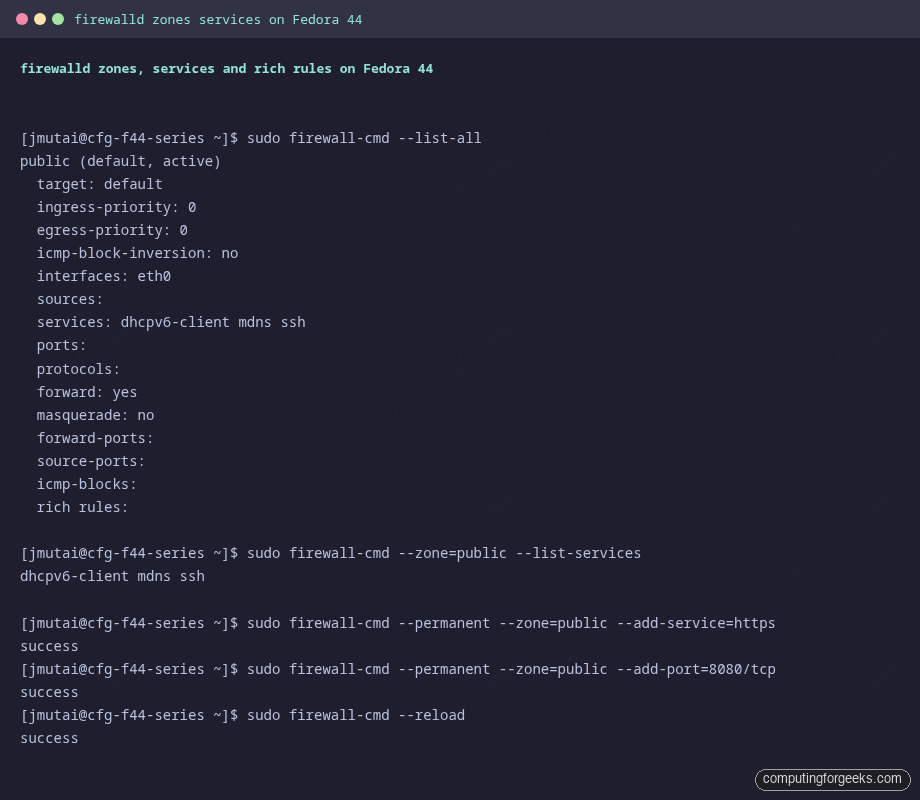
For a service that does not have a definition (custom app on port 8080, etc.) add the raw port:
sudo firewall-cmd --permanent --add-port=8080/tcp
sudo firewall-cmd --permanent --add-port=51820/udp
sudo firewall-cmd --reload
The golden rule: every persistent change uses --permanent and is followed by --reload. Without --permanent the rule is only in the runtime config and disappears on the next restart. The two configurations are intentional: it lets you experiment without writing changes to disk.
Define a custom service
If you frequently open the same set of ports across machines, write a service file once. Save the following as /etc/firewalld/services/myapp.xml:
<?xml version="1.0" encoding="utf-8"?>
<service>
  <short>myapp</short>
  <description>Custom app on tcp/8080 and udp/8081</description>
  <port protocol="tcp" port="8080"/>
  <port protocol="udp" port="8081"/>
</service>
Then reload and use it like any built-in service:
sudo firewall-cmd --reload
sudo firewall-cmd --permanent --add-service=myapp
sudo firewall-cmd --reload
Rich rules: source filtering, rate limits, and logging
Rich rules are firewalld’s expressive layer. They can combine source address, destination, service or port, action, log, and audit, in one rule. The pattern looks dense at first but reads cleanly once you parse it.
Restrict SSH to one subnet, and rate-limit-and-log every other SSH attempt:
sudo firewall-cmd --permanent --zone=public --add-rich-rule=\
'rule family="ipv4" source address="192.168.1.0/24" service name="ssh" accept'

sudo firewall-cmd --permanent --zone=public --add-rich-rule=\
'rule family="ipv4" service name="ssh" log prefix="ssh-deny" level="warning" limit value="10/m" drop'

sudo firewall-cmd --reload
sudo firewall-cmd --zone=public --list-rich-rules
The output of the commands is shown above.
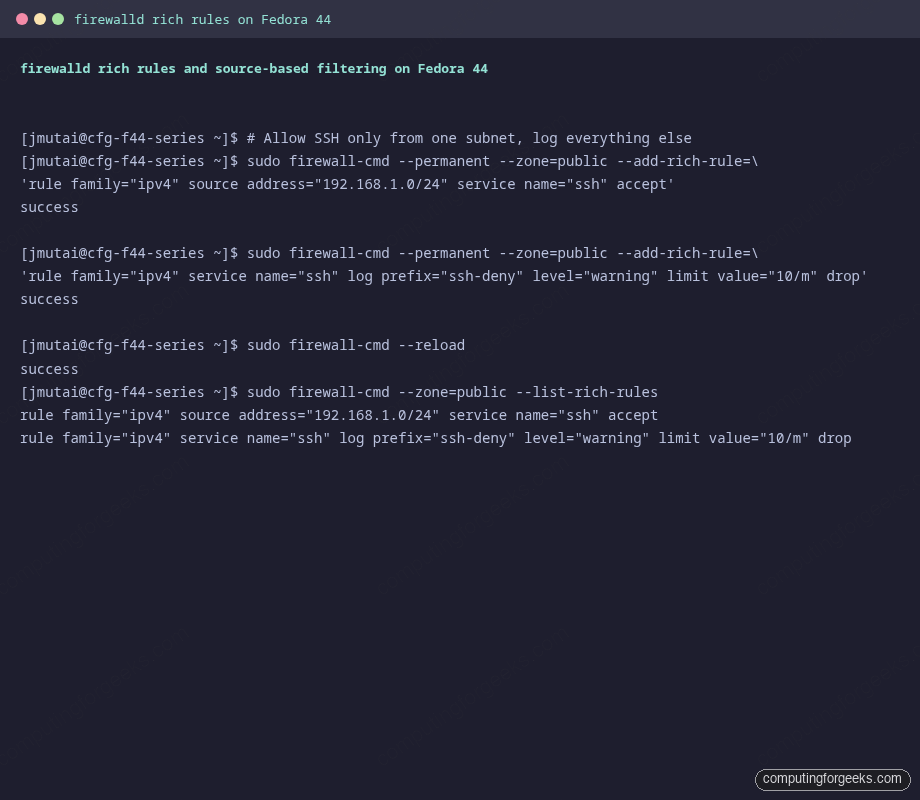
The log entries land in /var/log/messages on Fedora, with the prefix you set, so a quick sudo journalctl -k -g ssh-deny shows attempted breakins.
Block an entire country code by combining a CIDR list with rich rules. For example, drop everything from a specific malicious /24:
sudo firewall-cmd --permanent --zone=public --add-rich-rule=\
'rule family="ipv4" source address="203.0.113.0/24" drop'
sudo firewall-cmd --reload
For larger sets, IP sets via --new-ipset are dramatically faster than dozens of rich rules. Modern firewalld on Fedora supports both nftables-native and legacy ipset back ends.
firewall-config: the GUI for visual audits
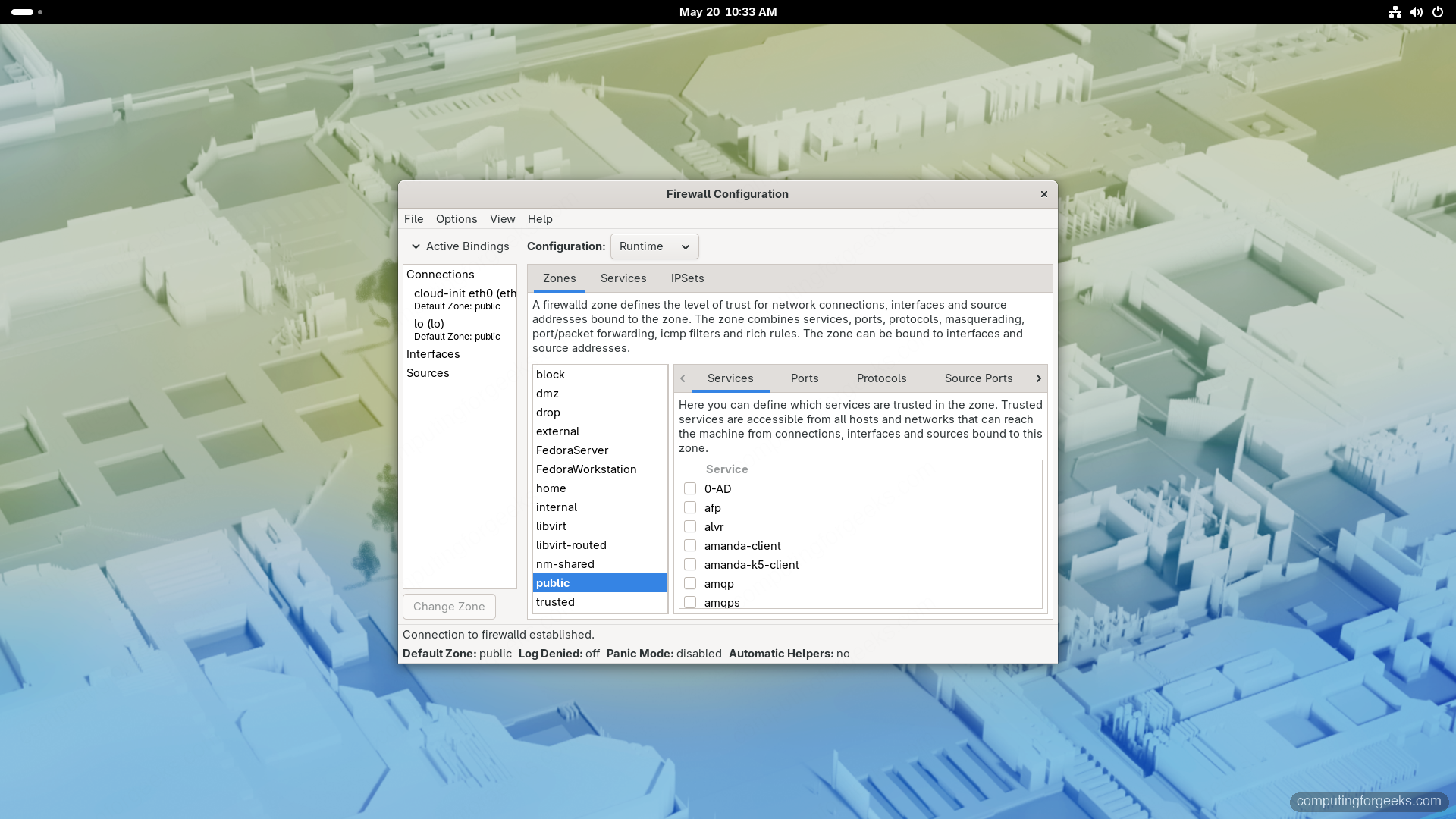
firewall-config is the desktop counterpart to firewall-cmd. It shows every zone, every service binding, and every rich rule in one window, and is by far the fastest way to review a complicated configuration. Install it on a Workstation:
sudo dnf install -y firewall-config
firewall-config
The header tabs separate Runtime from Permanent. Switch to Permanent first, edit, then Options: Reload Firewalld to apply. Otherwise your changes only land in runtime and disappear on next restart, mirroring the CLI semantics.
Use the GUI for two things in particular:
- Rich rule visualization. Each rich rule renders as a row with source, service, action, log columns. Far easier than parsing the XML by hand.
- Service definitions. The Services tab lists every service Fedora ships and lets you edit ports without writing XML.
Common Fedora hardening patterns
Three short recipes that cover most servers:
Web server on a public network
Run the commands below.
sudo firewall-cmd --permanent --set-default-zone=FedoraServer
sudo firewall-cmd --permanent --zone=FedoraServer --add-service=http
sudo firewall-cmd --permanent --zone=FedoraServer --add-service=https
sudo firewall-cmd --permanent --zone=FedoraServer --remove-service=cockpit
sudo firewall-cmd --reload
Internal app server (only management subnet allowed)
Run the commands below.
sudo firewall-cmd --permanent --new-zone=mgmt
sudo firewall-cmd --permanent --zone=mgmt --add-source=10.10.0.0/24
sudo firewall-cmd --permanent --zone=mgmt --add-service=ssh
sudo firewall-cmd --permanent --zone=mgmt --add-service=cockpit
sudo firewall-cmd --permanent --set-default-zone=drop
sudo firewall-cmd --reload
Anything from outside 10.10.0.0/24 hits the default drop zone and gets silently dropped.
Linux gateway with masquerading
Run the commands below.
sudo firewall-cmd --permanent --zone=external --change-interface=eth0
sudo firewall-cmd --permanent --zone=internal --change-interface=eth1
sudo firewall-cmd --permanent --zone=external --add-masquerade
sudo firewall-cmd --reload
The external zone has masquerading enabled by default in its template, so a separate --add-masquerade only matters when you want to enable it on a non-external zone.
Panic mode and emergencies
If you suspect a compromise and want to immediately stop accepting any traffic:
sudo firewall-cmd --panic-on
sudo firewall-cmd --query-panic
sudo firewall-cmd --panic-off
Panic mode drops every packet in and out of the host (including DNS) until you turn it off. If you panic-on over SSH you will lose your session, so use it only from the console or from another machine that already has an established connection.
Inspect the underlying nftables
firewalld is a high-level layer over nftables. If you want to see what the kernel actually has loaded:
sudo nft list ruleset | head -50
sudo nft list table inet firewalld | head -30
That is the source of truth. Never edit those rules directly: firewalld will overwrite them on the next reload. Use this view to verify that your high-level firewall-cmd changes resulted in the rules you expected, and to debug “I added a rule but the port is still closed” situations.
Where to go next
This guide is part of the Fedora 44 Workstation series. The post-install checklist chains firewalld together with SELinux, fail2ban, and DNS over TLS for a hardened baseline. For non-Fedora hosts the same patterns translate one to one to Rocky Linux 10 and AlmaLinux 10: see Configure Firewalld on Rocky Linux 10 / AlmaLinux 10 / RHEL 10 for the RHEL family equivalents.