Proxmox VE gives you six storage types, and the one you pick decides three things you cannot easily change later: whether you get snapshots, whether you get thin provisioning, and whether the storage is shared across nodes so VMs can live migrate. There is no single best choice. A single homelab node wants something different from a three node cluster that needs high availability.
This guide ranks the real options against those three axes, with each backend set up and exercised on a live host so the verdicts come from behavior, not the manual. Every command and the snapshot results below were run on Proxmox VE 9.2 with a ZFS mirror, an NFS export, and an iSCSI target wired in.
Current as of June 2026.
The three questions that decide everything
Before the options, fix the vocabulary, because the whole decision turns on these three properties:
- Shared or local. Shared storage is reachable from every node, so a VM can live migrate between hosts without copying its disk. Local storage lives on one node only. High availability needs shared storage (or ZFS replication as a near substitute).
- Snapshots. A snapshot freezes a VM disk so you can roll back after a bad upgrade. Some backends support them, some do not, and that gap is the single most common surprise for new Proxmox admins.
- Thin or thick. Thin provisioning allocates blocks only as the guest writes them, so a 100 GB disk that holds 4 GB consumes 4 GB. Thick reserves the full size up front.
Here is the set of backends running side by side on the test host. pvesm status lists each one with its type and live capacity:
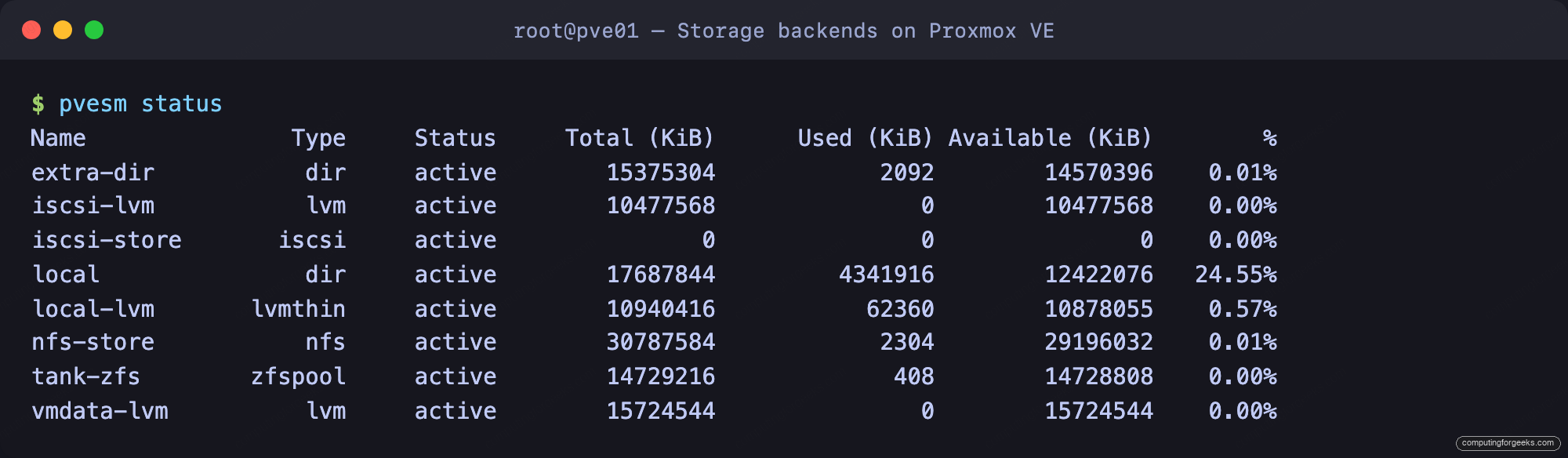
The same storages appear under Datacenter then Storage in the web UI, where the Shared column tells you at a glance which ones can back a live migration:
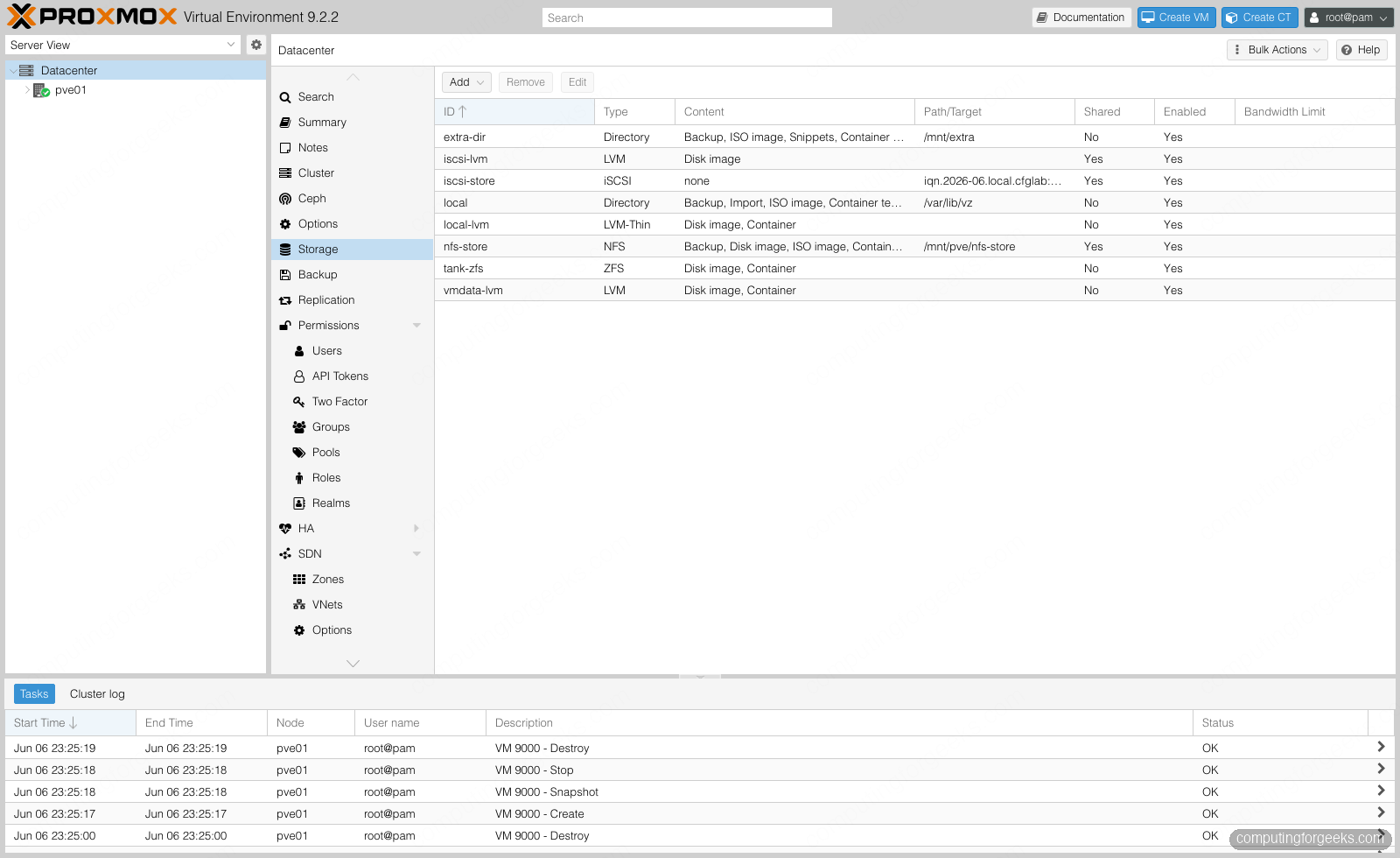
With the full set in view, here is each backend in turn, from the local default that every install ships with to the distributed option you build a cluster around.
1. LVM-Thin (the local default)
Every standard install ends up with local-lvm, an LVM thin pool carved from the boot disk. It stores VM disk images and LXC container volumes as thin logical volumes, and it supports snapshots. For a single node this is the sensible default and you rarely need to touch it.
Where it wins: it is already there, it is thin, and it does snapshots without any extra setup. Where it falls short: it is strictly local, so it cannot back live migration or HA, and an LVM thin pool that fills up will hard-stop the guests writing to it, so it needs monitoring. Adding a thin pool on a spare disk takes two commands:
pvcreate /dev/sdf
vgcreate vmstore /dev/sdf
lvcreate -l 90%FREE -T vmstore/thinpool
pvesm add lvmthin extra-thin --vgname vmstore --thinpool thinpool --content images,rootdir
For most single hosts, LVM-Thin for guest disks plus the directory storage for ISOs and backups is all the storage design you need. Whichever backend you choose, the drive underneath sets its endurance and safety; see the best SSDs and NVMe drives for a server or homelab.
2. ZFS (local, with snapshots and redundancy)
ZFS is the standout for a single node that needs to survive a disk failure. It combines a volume manager, software RAID, checksums, compression, and instant snapshots in one stack, and Proxmox integrates it natively as the zfspool type. Build a mirror from two disks, using stable /dev/disk/by-id paths so a reboot that renames sdb to sdc cannot confuse the pool:
zpool create -f -o ashift=12 tank mirror \
  /dev/disk/by-id/scsi-0QEMU_QEMU_HARDDISK_drive-scsi1 \
  /dev/disk/by-id/scsi-0QEMU_QEMU_HARDDISK_drive-scsi2
pvesm add zfspool tank-zfs --pool tank --content images,rootdir
Confirm the pool came up healthy and mirrored:
zpool status tankThe status shows both disks online under a single mirror vdev:
  pool: tank
 state: ONLINE
config:

	NAME                                      STATE     READ WRITE CKSUM
	tank                                      ONLINE       0     0     0
	  mirror-0                                ONLINE       0     0     0
	    scsi-0QEMU_QEMU_HARDDISK_drive-scsi1  ONLINE       0     0     0
	    scsi-0QEMU_QEMU_HARDDISK_drive-scsi2  ONLINE       0     0     0

errors: No known data errors
Where it wins: redundancy, checksums that catch silent corruption, free thin snapshots, and ZFS replication, which ships incremental snapshots to another node on a schedule and gets you most of the way to HA without true shared storage. Where it falls short: ZFS is local to one node, it is memory hungry because the ARC cache wants RAM, and it does not love hardware RAID controllers, so it expects to see raw disks. For a serious single host or a replication pair, ZFS is the pick.
3. Directory (files on any filesystem)
A directory storage is just a path on an existing filesystem where Proxmox writes files: qcow2 disk images, ISO uploads, container templates, backups, and snippets. It is the most flexible content type because it holds everything, and when the disk images are qcow2 it supports snapshots and thin growth through the image format rather than the storage layer. Format a spare disk, mount it, and register it:
mkfs.ext4 /dev/sde
mkdir -p /mnt/extra
echo "UUID=$(blkid -s UUID -o value /dev/sde) /mnt/extra ext4 defaults 0 2" >> /etc/fstab
mount /mnt/extra
pvesm add dir extra-dir --path /mnt/extra --content backup,iso,vztmpl,snippets
Where it wins: it stores every content type, it is dead simple, and it is the natural home for ISOs, VM templates, and local backups. Where it falls short: it is local unless the path happens to sit on a shared filesystem, and qcow2 on top of a filesystem is slower than raw LVM or ZFS volumes for write-heavy guests. Use it alongside a block backend, not instead of one.
4. NFS (the easy shared storage)
NFS is the fastest route to shared storage and therefore to live migration. Point every node at the same NFS export and a VM can move between hosts without copying its disk, because all the hosts already see the same files. Proxmox mounts the export and stores qcow2 images on it, so you also keep snapshots. Adding it is one command once the server exports a path:
pvesm add nfs nfs-store --server 192.168.1.198 --export /data/nfs \
  --content images,iso,vztmpl,backup
Confirm the host can see the export before trusting it:
showmount -e 192.168.1.198Where it wins: shared across every node with almost no effort, holds all content types including backups for a shared Proxmox Backup Server staging area, and supports snapshots through qcow2. Where it falls short: it is a single file server, so its performance and availability cap the whole cluster, and a busy NFS box should sit on its own network. Put that traffic on a dedicated storage network rather than sharing the management link. For small clusters that want live migration without a storage project, NFS is the pragmatic answer.
5. iSCSI with LVM (shared block)
When you want shared storage that behaves like a raw disk rather than a file share, the Proxmox pattern is iSCSI plus LVM. The host logs into an iSCSI target, the exported LUN appears as a block device, and you build an LVM volume group on top of it. Because LVM coordinates allocation across nodes, the result is shared block storage that several hosts can use at once. Discover and attach the target first:
pvesm add iscsi iscsi-store --portal 192.168.1.198 \
  --target iqn.2026-06.local.cfglab:storage0 --content none
iscsiadm -m session
An active session confirms the host is logged in and the LUN is present as a new block device:
tcp: [1] 192.168.1.198:3260,1 iqn.2026-06.local.cfglab:storage0 (non-flash)The LUN now shows up in lsblk as a local block device. Build an LVM group on it, then read its Proxmox volume ID, which you need for the next step:
pvcreate /dev/sdf
vgcreate iscsivg /dev/sdf
pvesm list iscsi-store
Register the group as shared storage, passing that volume ID as the --base so Proxmox logs into the target before it activates the volumes. Your LUN ID will differ, so copy it from the pvesm list output:
pvesm add lvm iscsi-lvm --vgname iscsivg \
  --base iscsi-store:0.0.0.scsi-3600140580e16cbf0a2541e39e6cd1279 --content images --shared 1
Where it wins: real shared block storage with good performance on existing SAN hardware, and it migrates VMs live. Where it falls short: thick only, and no snapshots, because plain LVM volumes have no snapshot support for running guests. That last point is not theory, it is the next section.
Snapshots are where backends quietly differ
Snapshot support is a property of the storage type, not a global Proxmox feature, and it is the detail that catches people after they have committed. The cleanest way to see it is to put the same VM disk on each backend and ask for a snapshot. ZFS and LVM-Thin take it; thick LVM, including LVM over iSCSI, refuses with a blunt error:
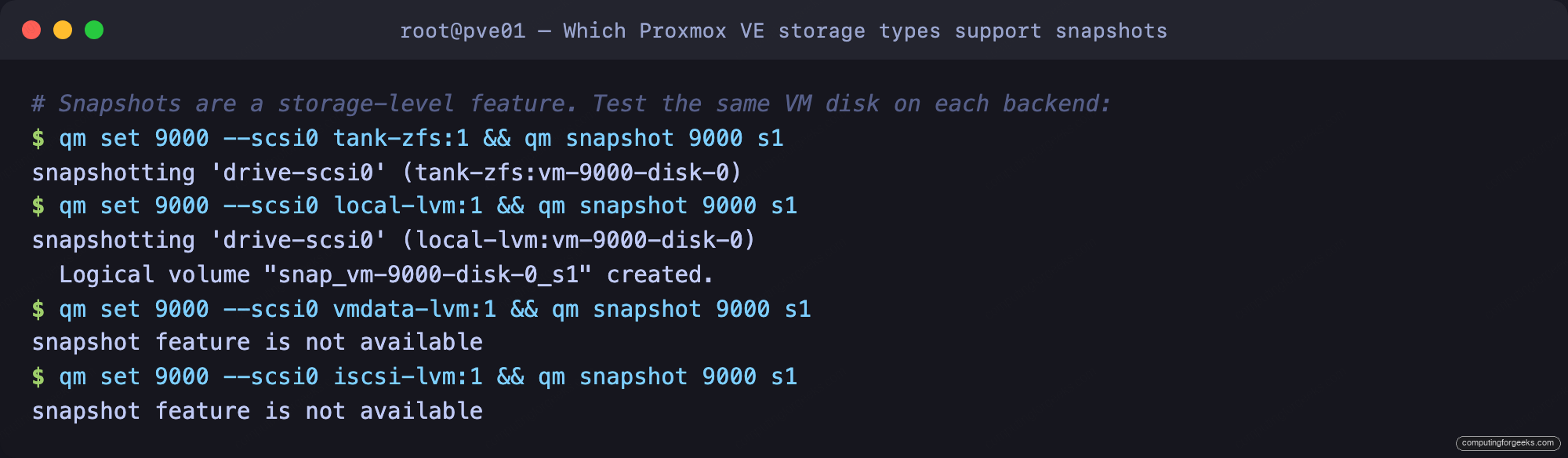
The message snapshot feature is not available is exactly what you get when a VM has any disk on thick LVM or raw iSCSI. Directory and NFS storages sidestep this by storing qcow2, where the snapshot lives inside the image file. So if rollback matters and you are on shared storage, choose NFS with qcow2 or Ceph, not iSCSI with LVM.
6. Ceph (distributed and hyperconverged)
Ceph is the answer when you want shared storage with no single server to fail, built from the same nodes that run the VMs. Each node contributes disks as OSDs, Ceph replicates objects across them, and the result is shared block storage (RBD) that survives a whole node going down. It supports snapshots and thin provisioning, and it is the storage layer behind most serious Proxmox HA clusters.
The honest caveat: Ceph is not a single node backend. It needs at least three nodes to form quorum and replicate safely, plus a fast dedicated network, so it is out of scope for a one box test and gets its own hands-on build in the Ceph cluster guide. Where it wins: no single point of failure, scales by adding nodes, and integrates directly into the Proxmox UI. Where it falls short: it wants three or more nodes, real network bandwidth, and more operational care than a file share. Reach for it when you are building hyperconverged HA, not when you have one server.
Which Proxmox storage type to pick
The full matrix lines up the six backends against the three properties that matter, plus what each one is genuinely best at:
| Backend | Shared | Snapshots | Thin | Stores | Best for |
|---|---|---|---|---|---|
| LVM-Thin | No | Yes | Yes | Disks, containers | Single node default |
| ZFS | No (replication) | Yes | Yes | Disks, containers | Local redundancy + snapshots |
| Directory (qcow2) | No | Yes | Yes | Everything | ISOs, backups, templates |
| NFS (qcow2) | Yes | Yes | Yes | Everything | Easy shared storage + migration |
| iSCSI + LVM | Yes | No | No | Disk images | Shared block on a SAN |
| Ceph (RBD) | Yes | Yes | Yes | Disks, containers | Hyperconverged HA (3+ nodes) |
If you run one node, use LVM-Thin for guest disks, add ZFS when you want a mirror and snapshots, and keep a directory storage for ISOs and backups. If you run a small cluster and want live migration without building a storage platform, NFS with qcow2 is the path of least resistance and keeps snapshots. If you already own a SAN, iSCSI with LVM gives you shared block storage, just accept that snapshots move to your backup layer. And if you are building for high availability from the start, plan for Ceph across three or more nodes from day one rather than retrofitting it later. Whichever backend you land on, the drive underneath it decides how it behaves under load, so it is worth knowing whether NVMe or SATA (and power-loss protection) fits your datastore. Match the backend to the cluster you actually have, on top of a clean Proxmox VE install, and the storage layer stops being the thing that surprises you.