The ArgoCD CLI is the workhorse you reach for once the web UI gets in your way. Anything you can click, you can script faster, and a lot of the deeper operations (admin token rotation, project RBAC tweaks, repo creds, sync-window edits) are CLI-only or CLI-first. This guide walks through every realistic install path on Linux, macOS, and Windows, plus the container and air-gapped patterns CI runners actually use.
Tested May 2026 on Ubuntu 24.04.4 LTS (kernel 6.8) and macOS 26.3.1 (Apple Silicon), with ArgoCD CLI v3.3.9 against an ArgoCD server v3.3.9 on k3s v1.35.4
If you have not stood up the server yet, the companion guides cover that end of the stack: install ArgoCD on a Kubernetes cluster for the in-cluster path, or install ArgoCD on Ubuntu for an Ubuntu-host setup. The argocd CLI command reference is the pillar this install guide feeds into.
Pick the right install method
Pick by OS first, then by how often you upgrade. Homebrew is the easiest happy path on macOS and Linux but lags upstream by 1-2 days; the GitHub binary is always the latest.
| Environment | Best method | Trade-off |
|---|---|---|
| macOS (Intel/Apple Silicon) | Homebrew (brew install argocd) | Auto-updates with brew upgrade; depends on the homebrew-core formula refresh. |
| Ubuntu / Debian / RHEL / Rocky / Fedora | curl from GitHub releases | Always latest; no apt/dnf repo exists. |
| Arch / Manjaro | AUR (argocd-bin) | Tracks GitHub releases via the community packager. |
| Windows | scoop / chocolatey / direct download | scoop is the cleanest; PATH config matters. |
| CI / GitHub Actions | Container image quay.io/argoproj/argocd | Pin a tag, no install step. |
| Air-gapped server | Tarball + checksum from GitHub releases | Verify the SHA-256 before chmod. |
| Kubernetes Job | One-shot Pod with the same image | Useful for cluster bootstrap automation. |
Whatever method you pick, the binary is one self-contained Go executable. No runtime, no daemon, no dependencies.
Step 1: Set reusable shell variables
Every Linux command in this guide pulls the version into ${ARGOCD_VERSION} so you change one block and paste the rest as-is. Detect the latest tag from the GitHub API:
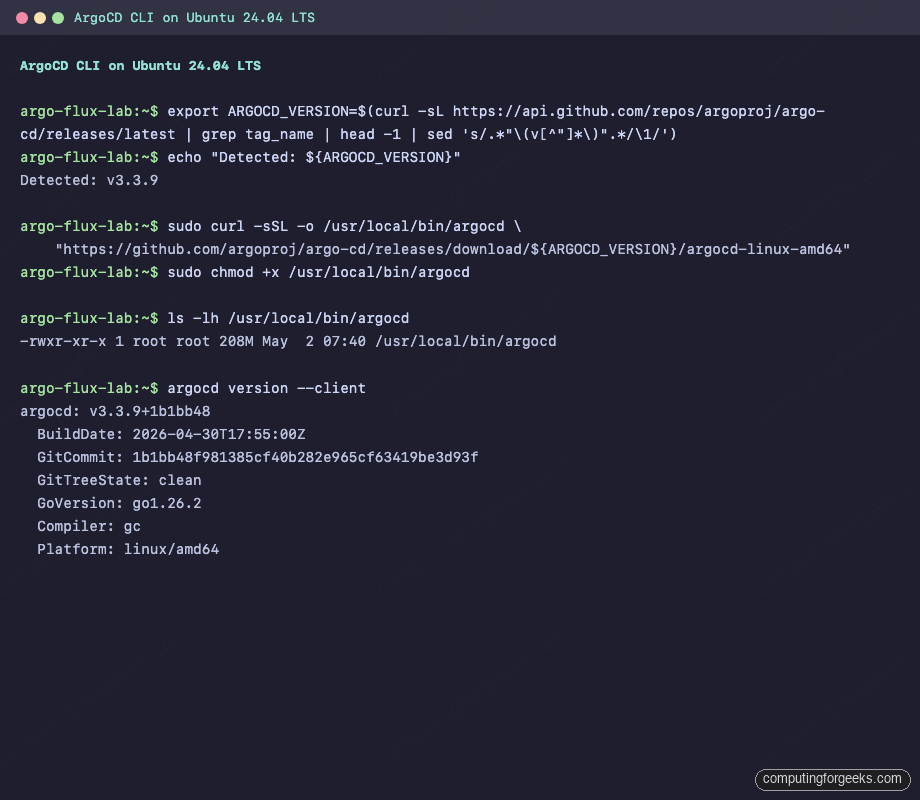
export ARGOCD_VERSION=$(curl -sL https://api.github.com/repos/argoproj/argo-cd/releases/latest \
  | grep tag_name | head -1 | sed 's/.*"\(v[^"]*\)".*/\1/') #https://github.com/argoproj/argo-cd/releases
echo "Detected: ${ARGOCD_VERSION}"
The variable holds only for the current shell session. Re-export it after you reconnect, or pin a specific release for repeatable installs (handy when an article reader follows along weeks later):
export ARGOCD_VERSION="v3.3.9" #https://github.com/argoproj/argo-cd/releasesThat covers the version handling. The rest of this guide assumes ${ARGOCD_VERSION} is set in whichever shell you are pasting commands into.
Install ArgoCD CLI on Linux
There is no official apt or dnf repo. Every distro path lands on the same statically-linked binary that ships with each GitHub release. The fast lane:
sudo curl -sSL -o /usr/local/bin/argocd \
  "https://github.com/argoproj/argo-cd/releases/download/${ARGOCD_VERSION}/argocd-linux-amd64"
sudo chmod +x /usr/local/bin/argocd
For ARM64 hosts (Raspberry Pi, AWS Graviton, Ampere), swap the suffix:
sudo curl -sSL -o /usr/local/bin/argocd \
  "https://github.com/argoproj/argo-cd/releases/download/${ARGOCD_VERSION}/argocd-linux-arm64"
sudo chmod +x /usr/local/bin/argocd
Confirm it landed and prints a version:
argocd version --clientYou should see the same tag you exported, plus build metadata and the platform string:
argocd: v3.3.9+1b1bb48
  BuildDate: 2026-04-30T17:55:00Z
  GitCommit: 1b1bb48f981385cf40b282e965cf63419be3d93f
  GitTreeState: clean
  GoVersion: go1.26.2
  Compiler: gc
  Platform: linux/amd64
Here is the same install captured live on Ubuntu 24.04 LTS:
That same flow is the right answer on the RHEL family too, with one extra wrinkle around SELinux on non-default install paths.
RHEL, Rocky, AlmaLinux, Fedora
The same curl line works. Argo Project does not publish an RPM repo, so do not waste time hunting one. SELinux in enforcing mode does not block /usr/local/bin/argocd because the file inherits the default bin_t context once you touch it under that path. If you put the binary in a non-standard location, set the context manually:
sudo semanage fcontext -a -t bin_t "/opt/argocd/argocd"
sudo restorecon -v /opt/argocd/argocd
Skip that pair if your binary lives under /usr/local/bin; the default policy already covers it.
Arch and Manjaro (AUR)
The community-maintained argocd-bin package wraps the same upstream tarball. With yay:
yay -S argocd-bin
argocd version --client
Pacman itself has no argocd package in the official repos.
Homebrew on Linux
If you already run Linuxbrew, the same formula that ships on macOS works on Linux. One command, zero curl:
brew install argocd
argocd version --client
Linuxbrew lags upstream by a day or two; if you need the latest tag the hour it ships, stick with the GitHub curl path.
Install ArgoCD CLI on macOS
Homebrew is the only realistic option on a Mac. The formula covers both Intel and Apple Silicon bottles, and the symlink lands in /opt/homebrew/bin on M-series chips or /usr/local/bin on Intel.
brew install argocdConfirm the binary was installed and check where it lives:
which argocd
brew info argocd
argocd version --client
The output on Apple Silicon shows the bottle was poured under the homebrew Cellar:
==> argocd: stable 3.3.9 (bottled)
GitOps Continuous Delivery for Kubernetes
https://argoproj.github.io/cd/
Installed (on request)
/opt/homebrew/Cellar/argocd/3.3.9 (10 files, 243.9MB) *
  Poured from bottle using the formulae.brew.sh API
From: https://github.com/Homebrew/homebrew-core/blob/HEAD/Formula/a/argocd.rb
License: Apache-2.0
The which output points at the Cellar symlink:
/opt/homebrew/bin/argocd
lrwxr-xr-x@    - jkmutai 30 Apr 16:41  /opt/homebrew/bin/argocd -> ../Cellar/argocd/3.3.9/bin/argocd
Live capture of the same install on Apple Silicon, including the version verification at the end:
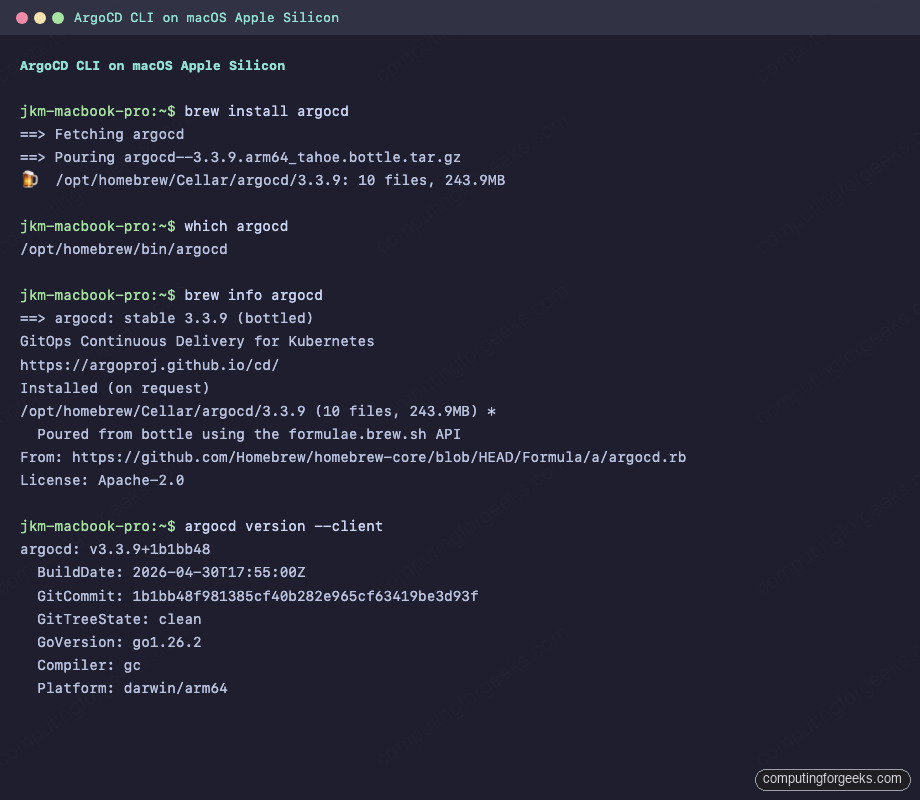
That happy path covers most Mac developers. The corporate-locked-down case needs a different approach.
Manual download for macOS
If brew is unavailable (locked-down corporate mac, no admin), grab the darwin binary from the same GitHub releases page used on Linux:
export ARGOCD_VERSION="v3.3.9" #https://github.com/argoproj/argo-cd/releases
curl -sSL -o /tmp/argocd \
  "https://github.com/argoproj/argo-cd/releases/download/${ARGOCD_VERSION}/argocd-darwin-arm64"
sudo install -m 755 /tmp/argocd /usr/local/bin/argocd
Swap arm64 for amd64 on Intel Macs. macOS Gatekeeper will quarantine an unsigned download; clear the attribute once before running:
sudo xattr -d com.apple.quarantine /usr/local/bin/argocd 2>/dev/null || trueThat removes the quarantine flag so Gatekeeper stops intercepting every invocation. With macOS sorted, on to Windows.
Install ArgoCD CLI on Windows
Three reasonable paths: scoop, chocolatey, or a direct download from GitHub. None of these were tested in our lab; the steps below come from the official Argo Project docs and the package manifests upstream.
Scoop (recommended)
Scoop installs into the user profile, no admin rights required. From PowerShell:
scoop install argocd
argocd version --client
scoop manifests track the GitHub release within hours, so this stays close to upstream.
Chocolatey
Chocolatey installs system-wide and needs an elevated PowerShell:
choco install argocd-cli
argocd version --client
Note the package name on chocolatey is argocd-cli, not argocd.
Direct download via Invoke-WebRequest
Pull the windows-amd64 binary straight from GitHub releases and drop it into a folder on your PATH:
$ARGOCD_VERSION = "v3.3.9"
$Url = "https://github.com/argoproj/argo-cd/releases/download/$ARGOCD_VERSION/argocd-windows-amd64.exe"
Invoke-WebRequest -Uri $Url -OutFile "$Env:USERPROFILE\bin\argocd.exe"
Add %USERPROFILE%\bin to your user PATH if it is not already there. After a fresh terminal:
argocd version --clientWindows Defender and corporate antivirus tools sometimes flag unsigned Go binaries. The official release is signed by Argo Project, but if SmartScreen blocks the first run, click “More info” then “Run anyway”. For a fully silent CI install on Windows, the scoop path is friendlier than handling SmartScreen prompts.
Run ArgoCD CLI from a container image
Argo Project publishes the same binary inside the quay.io/argoproj/argocd image used by the controller pods. That image doubles as a portable CLI for CI runners and ad-hoc shells. Run it with the docker socket and your local kubeconfig mounted:
docker run --rm -it \
  -v ${HOME}/.kube:/home/argocd/.kube \
  -v ${HOME}/.config/argocd:/home/argocd/.config/argocd \
  --user $(id -u):$(id -g) \
  quay.io/argoproj/argocd:v3.3.9 argocd version --client
For GitHub Actions, the same image runs as a job container so you skip the install step entirely:
jobs:
  sync:
    runs-on: ubuntu-latest
    container:
      image: quay.io/argoproj/argocd:v3.3.9
    steps:
      - run: argocd app sync myapp --auth-token "${{ secrets.ARGOCD_TOKEN }}"
Pin the tag explicitly. Floating tags like :latest drift the moment Argo ships a release, which is the wrong moment to discover a flag changed semantics.
Run ArgoCD CLI as a one-shot Kubernetes Job
When automating cluster bootstrap, sometimes the easiest place to run argocd is inside the cluster itself, with in-cluster service-account access. A simple Job pattern:
apiVersion: batch/v1
kind: Job
metadata:
  name: argocd-bootstrap-app
  namespace: argocd
spec:
  template:
    spec:
      restartPolicy: Never
      serviceAccountName: argocd-application-controller
      containers:
        - name: argocd
          image: quay.io/argoproj/argocd:v3.3.9
          command: ["sh","-c"]
          args:
            - |
              argocd login argocd-server.argocd.svc.cluster.local \
                --username admin --password "$ADMIN_PASSWORD" --insecure
              argocd app create guestbook \
                --repo https://github.com/argoproj/argocd-example-apps \
                --path guestbook --dest-namespace default \
                --dest-server https://kubernetes.default.svc
          env:
            - name: ADMIN_PASSWORD
              valueFrom:
                secretKeyRef:
                  name: argocd-initial-admin-secret
                  key: password
This pattern is useful in fresh clusters where you want App-of-Apps configured during install rather than as a manual post-step.
Air-gapped install with checksum verification
For hardened or offline environments, the install becomes: download the binary AND its checksum from a host that can reach GitHub, transfer both to the target, then verify before installing. Each release page ships a cli_checksums.txt with SHA-256 sums for every platform.
From the host with internet access:
export ARGOCD_VERSION="v3.3.9" #https://github.com/argoproj/argo-cd/releases
curl -sSL -O "https://github.com/argoproj/argo-cd/releases/download/${ARGOCD_VERSION}/argocd-linux-amd64"
curl -sSL -O "https://github.com/argoproj/argo-cd/releases/download/${ARGOCD_VERSION}/cli_checksums.txt"
Transfer both files to the air-gapped host (USB, internal artifact store, scp via jump host). On the target:
grep "argocd-linux-amd64" cli_checksums.txt | sha256sum -c -You should see one line confirming the binary matches:
argocd-linux-amd64: OKOnly after the OK, install:
sudo install -m 755 argocd-linux-amd64 /usr/local/bin/argocdSkip the verification step at your peril. Anyone with write access to the artifact path can drop a swapped binary that runs as root the moment you chmod it.
Enable shell completion
The CLI ships its own completion generator for bash, zsh, and fish. None of them are wired up by default; this is the single quality-of-life upgrade nobody bothers with until they need it. For bash:
argocd completion bash | sudo tee /etc/bash_completion.d/argocd > /dev/nullThe first lines of the generated completion confirm the format:
# bash completion for argocd                               -*- shell-script -*-

__argocd_debug()
{
    if [[ -n ${BASH_COMP_DEBUG_FILE:-} ]]; then
For zsh, drop it under your $fpath:
argocd completion zsh > "${fpath[1]}/_argocd"For fish, the path is ~/.config/fish/completions/:
argocd completion fish > ~/.config/fish/completions/argocd.fishOpen a new shell and tab-complete argocd app sy<TAB> to confirm. Worth the 10 seconds.
Verify the install and check version skew with the server
The CLI is forward and backward compatible across one minor version. Larger gaps work for most commands but can surface odd behaviour on newer Application or AppSet fields. Always sanity-check both halves with the full argocd version (no flag), which prints CLI and server side by side once you have logged in:
argocd versionFrom a real session where the Mac CLI was a single point release behind the server (login + a fresh session against the lab cluster):
argocd: v3.3.8+7ae7d2c.dirty
  BuildDate: 2026-04-21T20:19:34Z
  GitCommit: 7ae7d2cc723f5408b080a31263e705198af08613
  GitTreeState: dirty
  GitTag: v3.3.8
  GoVersion: go1.26.2
  Compiler: gc
  Platform: darwin/arm64
argocd-server: v3.3.9
  BuildDate: 2026-04-30T17:30:23Z
  GitCommit: 1b1bb48f981385cf40b282e965cf63419be3d93f
  GitTreeState: clean
  GitTag: v3.3.9
  GoVersion: go1.25.5
  Compiler: gc
  Platform: linux/amd64
  Kustomize Version: v5.8.1 2026-02-09T16:15:27Z
  Helm Version: v3.19.4+g7cfb6e4
  Kubectl Version: v0.34.0
  Jsonnet Version: v0.21.0
That output is healthy: a one-patch skew between CLI and server is fine. If the gap widens to a full minor version (CLI on 3.2.x, server on 3.3.x), upgrade the CLI before debugging anything weird.
Upgrade or pin a different version
Homebrew users get upgrades for free:
brew upgrade argocdFor the curl-installed binary on Linux, re-run the download with a fresh ${ARGOCD_VERSION}. To pin a specific release for upgrade or rollback testing, set the variable explicitly:
export ARGOCD_NEW="v3.3.8" #https://github.com/argoproj/argo-cd/releases
sudo curl -sSL -o /usr/local/bin/argocd \
  "https://github.com/argoproj/argo-cd/releases/download/${ARGOCD_NEW}/argocd-linux-amd64"
sudo chmod +x /usr/local/bin/argocd
argocd version --client
The binary self-replaces, no service to restart, no in-flight commands to drain. Configuration in ~/.config/argocd/config is preserved across upgrades.
Uninstall
The CLI keeps its state in two places: the binary itself and your config under ~/.config/argocd/. Removing both:
brew uninstall argocd                  # macOS / Linuxbrew
sudo rm -f /usr/local/bin/argocd       # curl install
rm -rf ~/.config/argocd                # contexts and saved tokens
Skip the second line if you plan to reinstall on the same machine; reusing the contexts saves a fresh argocd login round-trip.
Troubleshooting installation
The install itself rarely fails. The first argocd invocation often does, and the failure mode tells you which step to revisit.
argocd: command not found
The shell did not find the binary on PATH. On Linux, confirm the install path is on PATH and the file is executable:
echo $PATH | tr ':' '\n' | grep -E '/usr/local/bin|/opt/homebrew/bin'
ls -l /usr/local/bin/argocd
On macOS Apple Silicon, the brew prefix is /opt/homebrew, not /usr/local. If you opened the shell before installing brew, the brew shellenv was never sourced. Fix it once:
echo 'eval "$(/opt/homebrew/bin/brew shellenv)"' >> ~/.zshrc
source ~/.zshrc
New shells will pick up the brew prefix automatically after that.
Permission denied when running argocd
You forgot the chmod +x. Re-add it:
sudo chmod +x /usr/local/bin/argocdIf chmod itself errors with read-only filesystem, you are likely on a system with /usr mounted read-only (some immutable distros, Talos, Bottlerocket). Install under /opt or ~/bin instead.
SELinux blocks an unconventional install path
Default /usr/local/bin/argocd works without SELinux changes on Rocky 10, AlmaLinux 10, and Fedora. If you placed the binary under /opt/argocd/ or anywhere outside the standard bin paths, restore the right context so SELinux lets it execute:
sudo semanage fcontext -a -t bin_t "/opt/argocd/argocd"
sudo restorecon -v /opt/argocd/argocd
ausearch -m avc -ts recent | tail
The ausearch tail confirms whether any AVC denials were logged after your most recent run. Empty output means SELinux was happy.
Windows: SmartScreen blocks first run
Modern Windows pops a “Windows protected your PC” dialog the first time it sees an unsigned binary downloaded outside a known package manager. The Argo Project release IS signed, but corporate antivirus and Defender heuristics still bark. Click “More info” then “Run anyway”. A cleaner long-term fix is to install via scoop, which whitelists the binary as part of its manifest install.
Version mismatch between CLI and server
If commands fail with cryptic gRPC or unmarshalling errors after a server upgrade, the CLI is too old. Run argocd version and compare. Upgrade the CLI to within one minor of the server and try again. The pattern in the upgrade section above is the path of least surprise.
brew install hangs on Apple Silicon
If brew install argocd hangs at the bottle pour step, the CDN edge near you is slow rather than the formula being broken. Confirm with another package, then either retry or switch to the manual download path under “Manual download for macOS” above. Pinned VPN endpoints are a common cause; turn the VPN off long enough to pull the bottle, then turn it back on.
Where to point the new CLI
With the binary installed and version verified, the next step is logging the CLI into your ArgoCD server: argocd login <server> --username admin --password "$PASSWORD" using the bootstrap admin password from argocd admin initial-password. Full session walkthrough, context switching across multiple clusters, and token-based service account auth are covered in the argocd CLI command reference. For a managed control-plane setup, the ArgoCD on EKS guide and ArgoCD on GKE guide show how the CLI talks to a public LoadBalancer endpoint instead of a NodePort. If you are weighing your GitOps engine choice up front, the Flux vs ArgoCD comparison covers the architectural trade-offs that the CLI then operationalises.