Most ArgoCD users learn the CLI from snippets. The official command reference is dry, the popular cheat sheets miss recent 3.x additions, and tutorials usually focus on one workflow each. This guide pulls the whole surface together: every top-level command, real terminal outputs from a tested cluster, decision tables that tell you when CLI beats UI, and the 3.x features that have landed since most existing guides were written.
What you get out of this article: a working mental model of the argocd binary, copy-paste recipes for the application lifecycle, repo and cluster management, ApplicationSets, account tokens, output formats for jq pipelines, shell completion, the new CLI plugin system, and admin commands. Each section has output captured on a real Kubernetes cluster running ArgoCD 3.3.x against a CLI 3.3.8 client.
Verified working: May 2026 on Kubernetes 1.35 with ArgoCD server 3.3.9 and CLI 3.3.8, tested across Linux, macOS Apple Silicon, and Windows 11.
When to use the ArgoCD CLI vs the UI vs the API
The CLI, the web UI, and the gRPC/REST API all hit the same backend. Picking the right interface saves time and keeps audit trails clean.
| Task | Best interface | Why |
|---|---|---|
| One-off sync, diff, rollback during an incident | CLI | Faster than clicking; keeps shell history as audit log |
| Visual exploration of resources, sync waves, hooks | UI | Tree view shows hierarchy that app get -o tree only hints at |
| CI/CD pipelines and automation | CLI | Idempotent, scriptable, exit codes for failure detection |
| Bulk operations across 50+ apps | CLI with --selector or --project | UI has no batch operation; CLI takes label and project filters |
| Drift detection and PR diff comments | CLI in CI | Native exit codes (0/1/2) make scripting clean |
| Realtime troubleshooting (events, logs) | UI | Streaming view with filters and resource graph |
| Programmatic integration into custom tooling | API | gRPC and REST are versioned; CLI output formats can shift |
A working pattern that scales: use the UI to explore and triage, use the CLI to act, and use the API only when wrapping ArgoCD inside another tool.
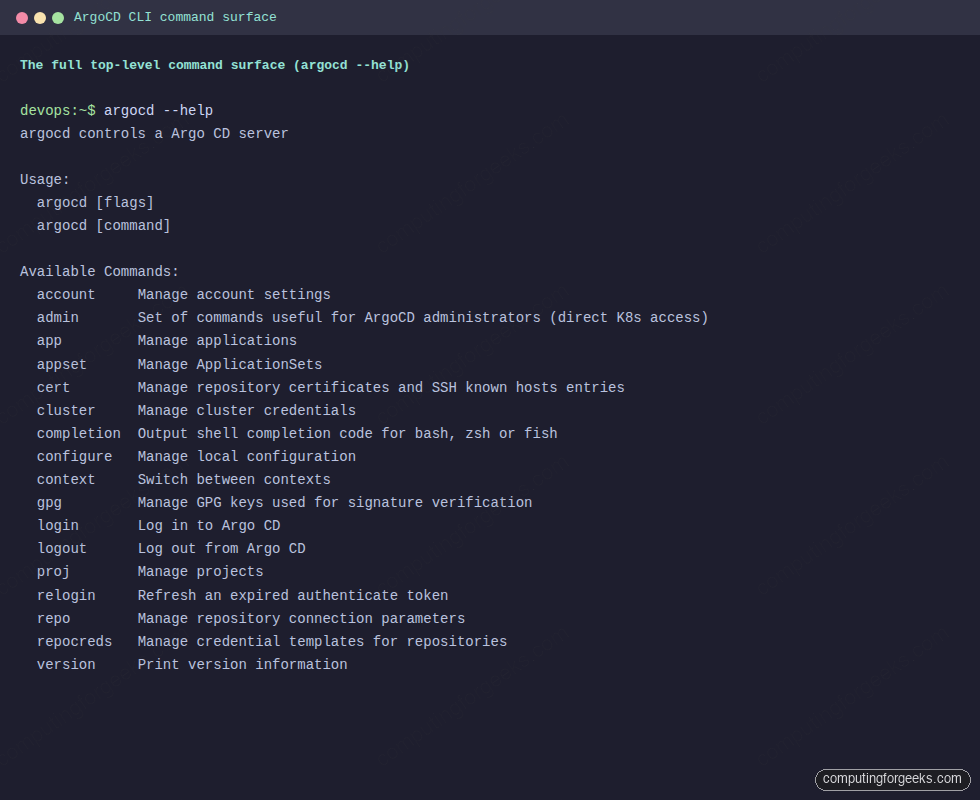
The 17 top-level commands at a glance
Run argocd --help against any 3.x server and you get the same map. Treat this table as the page-jump for the rest of the guide.
| Command | Purpose | Auth required |
|---|---|---|
account | Manage account settings, tokens, password | Yes (server) |
admin | Direct-cluster commands (export/import, RBAC validation, dashboard) | kubectl access (not server) |
app | Manage applications (24 subcommands cover the full lifecycle) | Yes (server) |
appset | Manage ApplicationSets (list, create, get, delete, generate) | Yes (server) |
cert | Manage repo TLS certificates and SSH known hosts | Yes (server) |
cluster | Register and manage external Kubernetes clusters | Yes (server) plus kubectl on the target cluster |
completion | Emit shell completion for bash, zsh, fish | No |
configure | Manage local CLI configuration | No |
context | Switch between server contexts | No |
gpg | Manage GPG keys for commit signature verification | Yes (server) |
login | Log in to an ArgoCD server (password, SSO, JWT, K8s API) | n/a |
logout | End a session | n/a |
proj | Manage AppProjects (RBAC and tenancy boundaries) | Yes (server) |
relogin | Refresh the current session token | n/a |
repo | Manage repository connections (Git, Helm, OCI) | Yes (server) |
repocreds | Manage credential templates (one set of creds for many repos) | Yes (server) |
version | Print client and server versions, plus tooling | Server is optional (use --client) |
ArgoCD 3.1 added a kubectl-style plugin system on top of these. Any executable in your PATH that begins with argocd- shows up as a custom subcommand. The plugin section later covers limits and a working example.
Quick install verification
If argocd is already on your PATH, jump to the next section. Otherwise the fastest path on each platform looks like this. Detect the latest release tag and install the binary in one block:
export ARGOCD_VERSION=$(curl -s https://api.github.com/repos/argoproj/argo-cd/releases/latest \
  | grep tag_name | head -1 | sed 's/.*"\(v[^"]*\)".*/\1/') #https://github.com/argoproj/argo-cd/releases
ARCH=$(uname -m | sed 's/x86_64/amd64/;s/aarch64/arm64/')
curl -sSL -o argocd \
  "https://github.com/argoproj/argo-cd/releases/download/${ARGOCD_VERSION}/argocd-linux-${ARCH}"
sudo install -m 555 argocd /usr/local/bin/argocd
rm argocd
On macOS Apple Silicon, the cleanest install is Homebrew because brew installs land outside the quarantine flag, so Gatekeeper does not pop a “damaged app” dialog:
brew install argocd
argocd version --client
On Windows, Scoop or Chocolatey both work. With Scoop the steps are scoop install argocd followed by argocd version --client in a fresh terminal so PATH propagates. Once any of these complete, confirm the install with the version check:
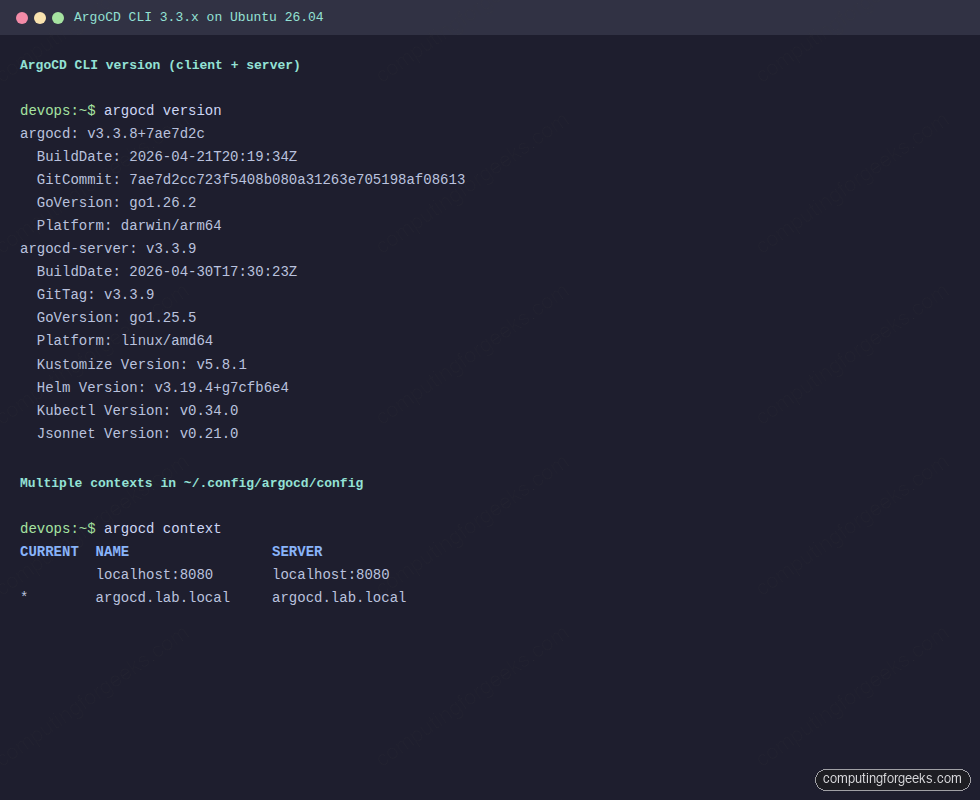
Notice the client (3.3.8) is one patch behind the server (3.3.9). That is fine. The skew rule is simple: client major plus minor must match the server. A client one patch behind a server is the most common live state because you upgrade clusters faster than developer laptops.
Authentication and contexts
Every command except version --client and completion needs an authenticated session. ArgoCD supports four login modes: username and password, SSO (OIDC, SAML), bearer JWT tokens for service accounts, and direct Kubernetes API server access for in-cluster scripts.
The first login on a fresh install starts with the auto-generated admin password:
kubectl -n argocd get secret argocd-initial-admin-secret \
  -o jsonpath='{.data.password}' | base64 -d
echo
argocd login argocd.lab.local --username admin \
  --password 'paste-the-decoded-secret-here' --insecure --grpc-web
The output confirms the session is stored:
'admin:login' logged in successfully
Context 'argocd.lab.local' updated
The --insecure flag skips certificate verification because the demo cluster uses a self-signed cert. The --grpc-web flag matters when ArgoCD sits behind an ingress that only speaks HTTP/1.1 (AWS ALB, most Nginx ingresses without TLS passthrough). Once set during login it persists in ~/.config/argocd/config, so future commands inherit it without repeating the flag.
Right after the first login, rotate the admin password. The CLI ships a helper:
argocd account update-password \
  --account admin \
  --current-password 'paste-the-old-secret-here' \
  --new-password 'paste-a-strong-passphrase-here'
Working against multiple ArgoCD servers? argocd context manages them. Each argocd login appends an entry; switching is one command. The current context shows the asterisk:
argocd contextTwo contexts are registered, the second is active:
CURRENT  NAME              SERVER
         localhost:8080    localhost:8080
*        argocd.lab.local  argocd.lab.local
Switch with argocd context localhost:8080 and remove with argocd context localhost:8080 --delete. The whole config sits in one YAML file at ~/.config/argocd/config, which means you can sync it across workstations the same way you sync ~/.kube/config. Override the location with --config /path/to/file or the ARGOCD_CONFIG_DIR environment variable.
For automation, generate a JWT bearer token instead of passing a password. First grant the local account API key capability, then mint a scoped token with an explicit expiry:
kubectl -n argocd patch configmap argocd-cm --type merge \
  -p '{"data":{"accounts.ci-bot":"apiKey"}}'
argocd account generate-token \
  --account ci-bot \
  --expires-in 30d \
  --id ci-bot-2026-05
Decoding the token shows what ArgoCD signs into the JWT payload:
{
    "iss": "argocd",
    "sub": "ci-bot:apiKey",
    "exp": 1780180806,
    "nbf": 1777588806,
    "iat": 1777588806,
    "jti": "pillar-demo"
}
The jti matches the --id you passed, the exp is the Unix timestamp when the token stops working, and sub tracks which account it belongs to. Always set --expires-in explicitly. The default is no expiry, which is an audit risk on long-lived tokens.
Existing tokens for an account are visible via argocd account get:
argocd account get --account ci-botThe output lists capabilities and active tokens with issue and expiry timestamps:
Name:               ci-bot
Enabled:            true
Capabilities:       apiKey

Tokens:
ID           ISSUED AT                  EXPIRING AT
pillar-demo  2026-05-01T01:40:06+03:00  2026-05-31T01:40:06+03:00
Use the token in CI by exporting ARGOCD_AUTH_TOKEN, or by passing --auth-token on every command. SSO setups (Dex, Keycloak, GitHub OIDC) follow a similar shape but with argocd login --sso; that flow needs full coverage of group-claim mapping and is the subject of a dedicated guide in this series.
The application lifecycle from the CLI
This is where most reader time goes. We will walk one Application from creation to rollback using the canonical Guestbook example. Set a few variables to keep the rest of the section clean:
export APP=guestbook
export REPO=https://github.com/argoproj/argocd-example-apps.git
export DEST=https://kubernetes.default.svc
Creating an Application
The app create command supports plain manifests, Kustomize directories, Helm charts from Git, Helm charts from OCI registries (added in 3.1), and multi-source applications. The simplest form points at a Git path and lets ArgoCD auto-detect:
argocd app create ${APP} \
  --repo ${REPO} \
  --path guestbook \
  --dest-namespace default \
  --dest-server ${DEST} \
  --revision HEAD
The expected confirmation:
application 'guestbook' createdFor a Helm chart pulled directly from a Bitnami OCI repo, the syntax shifts to --helm-chart and --revision:
argocd app create helm-nginx \
  --repo https://charts.bitnami.com/bitnami \
  --helm-chart nginx --revision 21.0.4 \
  --dest-namespace web --dest-server ${DEST} \
  --helm-set service.type=ClusterIP
For a directory of plain manifests in a subfolder, add --directory-recurse. For Kustomize, ArgoCD auto-detects kustomization.yaml and applies it. For multi-source apps (since 2.6) repeat --source blocks; this is how a single Application can pull manifests from one repo and Helm values from another.
Listing and inspecting Applications
After creation, the new app shows up immediately:
argocd app listThe fresh Application appears in the list with its current state:
NAME              CLUSTER                         NAMESPACE  PROJECT  STATUS     HEALTH   SYNCPOLICY  CONDITIONS  REPO                                                 PATH       TARGET
argocd/guestbook  https://kubernetes.default.svc  default    default  OutOfSync  Missing  Manual      <none>      https://github.com/argoproj/argocd-example-apps.git  guestbook  HEAD
The status is OutOfSync because the resources have not been applied yet, and the health is Missing for the same reason. Drill into the resources with argocd app get:
argocd app get ${APP}The detailed view shows source, sync window, sync status, health, and the resource breakdown:
Name:               argocd/guestbook
Project:            default
Server:             https://kubernetes.default.svc
Namespace:          default
URL:                https://argocd.lab.local/applications/guestbook
Source:
- Repo:             https://github.com/argoproj/argocd-example-apps.git
  Target:           HEAD
  Path:             guestbook
SyncWindow:         Sync Allowed
Sync Policy:        Manual
Sync Status:        OutOfSync from HEAD (723b86e)
Health Status:      Missing

GROUP  KIND        NAMESPACE  NAME          STATUS     HEALTH   HOOK  MESSAGE
       Service     default    guestbook-ui  OutOfSync  Missing
apps   Deployment  default    guestbook-ui  OutOfSync  Missing
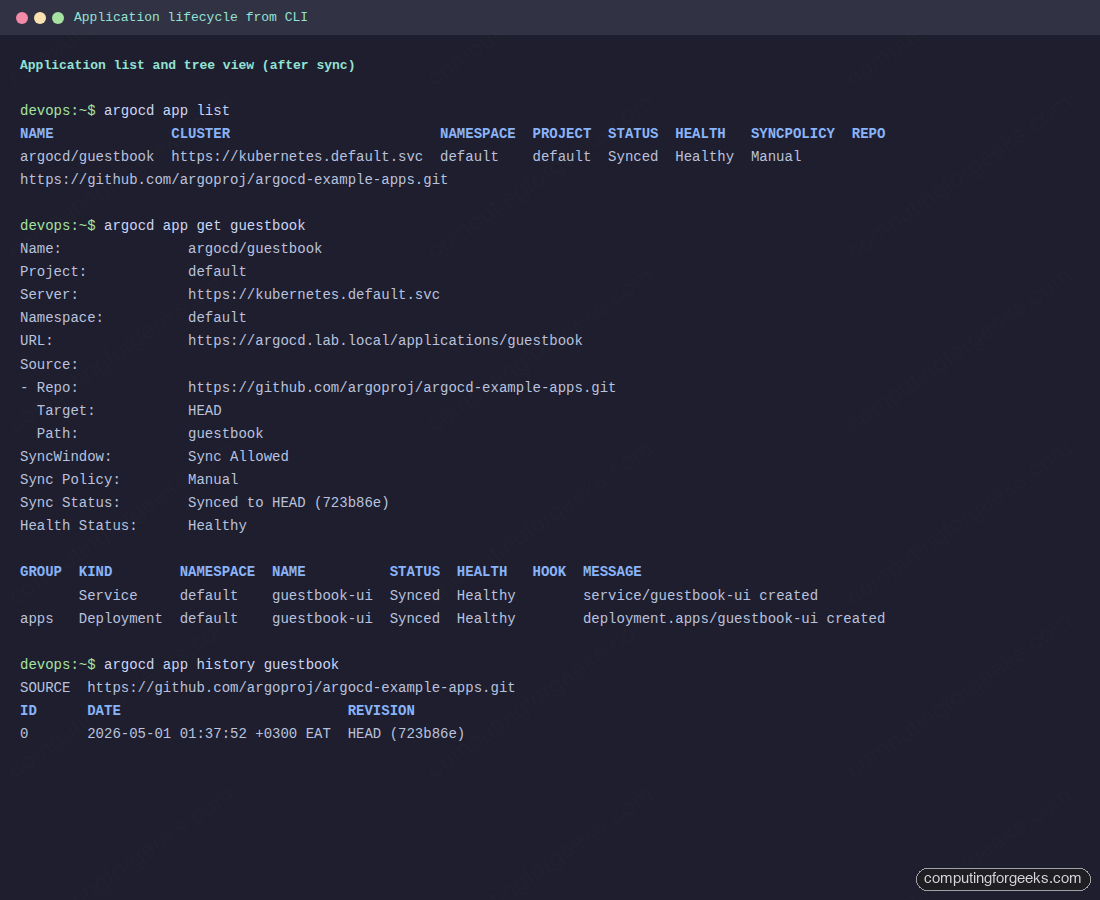
The get command takes -o tree, -o yaml, -o json, and -o wide. Tree output is the most readable for hierarchies; JSON is what you pipe into jq for scripting. The same OutOfSync app shown after a successful sync looks like this:
Diffing target vs live
Before applying, see exactly what will change with argocd app diff. Without arguments it compares the desired state (Git) to the live state (cluster). With --revision it compares to a specific commit, branch, or tag without applying:
argocd app diff ${APP}
echo "exit code: $?"
The output prints unified diffs for each resource, grouped by kind. Greater-than markers indicate additions, lower-than would indicate removals:
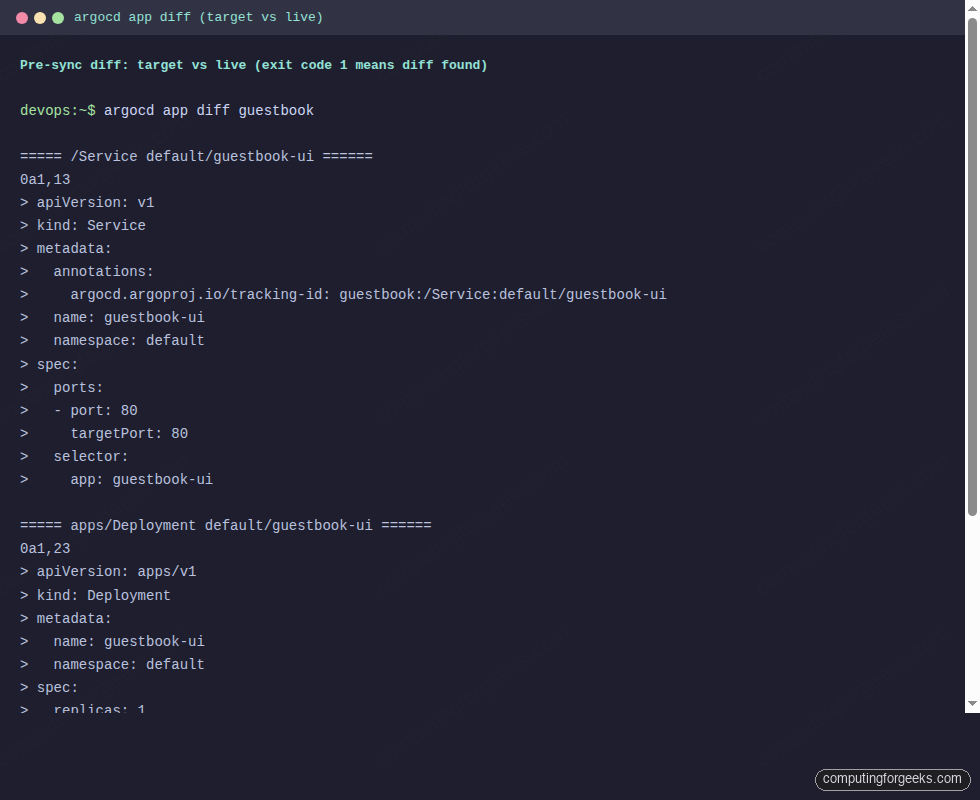
Pay attention to the exit code. argocd app diff follows three-state semantics: 0 means no diff, 1 means a diff was found, and 2 means an error (auth, network, missing app). This is the foundation of CI workflows that gate merges on a clean diff. To suppress the non-zero exit when a diff is expected (a PR review pipeline), pass --exit-code=false.
Syncing and waiting
The verb that actually changes the cluster is argocd app sync. Default behavior applies the diff, blocks until the operation completes, then exits. The output shows each resource transitioning from OutOfSync to Synced:
argocd app sync ${APP}Watch the resources flip from OutOfSync/Missing to Synced/Healthy as the controller applies them:
2026-05-01T01:37:52+03:00            Service     default          guestbook-ui  OutOfSync  Missing              service/guestbook-ui created
2026-05-01T01:37:52+03:00   apps  Deployment     default          guestbook-ui  OutOfSync  Missing              deployment.apps/guestbook-ui created
2026-05-01T01:37:52+03:00            Service     default          guestbook-ui    Synced  Healthy              service/guestbook-ui created

Sync Status:        Synced to HEAD (723b86e)
Health Status:      Progressing

Operation:          Sync
Sync Revision:      723b86e01bea11dcf72316cb172868fcbf05d69e
Phase:              Succeeded
Start:              2026-05-01 01:37:52 +0300 EAT
Finished:           2026-05-01 01:37:52 +0300 EAT
Duration:           0s
Message:            successfully synced (all tasks run)
Sync without health is half a deploy. The companion command argocd app wait blocks until the application reaches a target state, with --health, --sync, --suspended, --degraded, and --timeout flags. Default behavior waits for both Synced and Healthy:
argocd app wait ${APP} --health --timeout 300Health states follow a strict priority order: Healthy beats Suspended beats Progressing beats Missing beats Degraded beats Unknown. A CI job that runs sync then wait is the most common automated deploy primitive in ArgoCD ecosystems. The full flag matrix for app sync (over thirty flags including --prune, --force, --server-side, --apply-out-of-sync-only, --retry-limit, sync waves, and the five hook types) is the topic of a dedicated guide in this series; the table here covers the ones you reach for daily.
| Flag | What it does | When to use |
|---|---|---|
--prune | Delete resources that exist in the cluster but not in Git | Cleanup syncs after removing manifests from a repo |
--force | Recreate resources instead of using kubectl apply | Resolve immutable field errors (selector changes, etc.) |
--dry-run | Print what would change, do not apply | Production safety check before a real sync |
--server-side | Use Server-Side Apply (proper field ownership) | HPA-managed replicas, large manifests, cross-controller conflicts |
--async | Fire and exit; do not wait for the operation | CI fan-out across many apps |
--apply-out-of-sync-only | Skip resources already in sync | Large apps where most resources are unchanged |
--revision X | One-time override of the target revision | Rollback by syncing to an older commit, or testing a branch |
--selector key=value | Sync only matching resources | Surgical syncs during incidents |
History and rollback
Every successful sync writes an entry to the application history. Read it back with argocd app history:
argocd app history ${APP}Each row is a deployment with a numeric ID, a timestamp, and the Git revision:
SOURCE  https://github.com/argoproj/argocd-example-apps.git
ID      DATE                           REVISION
0       2026-05-01 01:37:52 +0300 EAT  HEAD (723b86e)
To roll back, pass the history ID. The rollback updates the cluster to that revision but does not change the Application’s targetRevision:
argocd app rollback ${APP} 0Omit the ID and ArgoCD rolls back one revision. Add --prune if the older revision had fewer resources than the current one. After a rollback, run argocd app diff against your Git revision to see whether the live state has drifted from what Git wants. The next push to targetRevision will move the live state forward again unless you also revert the Git change.
Deleting an Application
Deleting an Application by default cascades to its resources. ArgoCD adds a finalizer when --cascade=true (the default), waits for the controller to clean child resources, then removes the Application object. To leave the cluster resources behind and only remove the Application record, pass --cascade=false:
argocd app delete ${APP} --cascade=true --yesIf a delete hangs, the cause is almost always a stuck finalizer on a resource the cluster cannot reap. Inspect the Application with argocd app get and look at the conditions. The escape hatch is argocd app patch to remove the finalizer manually, but only after you understand why ArgoCD is unable to reap.
Repositories, clusters, and projects
Three command groups manage ArgoCD’s connection inventory: repo for Git, Helm, and OCI sources, cluster for the Kubernetes targets ArgoCD deploys into, and proj for the AppProject objects that define RBAC and tenancy boundaries.
Adding repositories
Public Git repos do not need credentials, but registering them makes them visible in the UI and lets you scope per-repo settings:
argocd repo add https://github.com/argoproj/argocd-example-appsConfirmation that ArgoCD now tracks the repo:
Repository 'https://github.com/argoproj/argocd-example-apps' addedFor a private GitHub repo, supply a personal access token. For a private GitLab project, the username is typically gitlab+deploy-token-NNN and the password is the deploy token value:
argocd repo add https://github.com/myorg/private-repo.git \
  --username my-bot --password 'paste-your-github-pat-here'

argocd repo add https://gitlab.example.com/team/app.git \
  --username gitlab+deploy-token-42 \
  --password 'deploy-token-secret'
SSH-based repositories take a private key path. The --insecure-ignore-host-key flag skips known-hosts validation and is only safe in trusted environments:
argocd repo add [email protected]:myorg/private-repo.git \
  --ssh-private-key-path ~/.ssh/argocd_ed25519 \
  --insecure-ignore-host-key
Listing shows status and credential type:
argocd repo listThe status column shows whether ArgoCD reached the repo successfully on its last poll:
TYPE  NAME  REPO                                             INSECURE  OCI    LFS    CREDS  STATUS      MESSAGE  PROJECT
git         https://github.com/argoproj/argocd-example-apps  false     false  false  false  Successful
For organisations with many repos under the same provider, register a credential template once via argocd repocreds add with a wildcard URL prefix, and individual repos under that prefix inherit the credentials automatically.
Registering external clusters
By default, ArgoCD deploys into the cluster it runs in (https://kubernetes.default.svc). To deploy into other clusters, register them with argocd cluster add. The command reads from your kubeconfig and creates an argocd-manager ServiceAccount in the target cluster’s kube-system namespace, binds it to cluster-admin, and stores the resulting token in ArgoCD:
argocd cluster add staging-eks --kubeconfig ~/.kube/configFor least-privilege setups, supply a pre-created service account with scoped permissions and pass --service-account my-argocd-sa --system-namespace my-namespace. Since ArgoCD 2.4, on Kubernetes 1.24+, the command creates a non-expiring ServiceAccount token Secret rather than relying on the legacy auto-mounted token.
List clusters and watch the connection state:
argocd cluster listA fresh install lists only the in-cluster target until at least one Application points elsewhere:
SERVER                          NAME        VERSION  STATUS   MESSAGE
https://kubernetes.default.svc  in-cluster           Unknown  Cluster has no applications and is not being monitored.
The cluster shows up as Unknown until it has an Application targeting it. After the first sync, the version and message fields populate. argocd cluster rotate-auth rotates the credential without re-running add, useful when an SA token leaks and you need to invalidate without disturbing applications.
Projects as RBAC and tenancy boundaries
An AppProject is the RBAC boundary in ArgoCD. Each Application belongs to exactly one project. Projects whitelist source repos, destination clusters, destination namespaces, and resource kinds. Mismatches produce the famous “app is not permitted” error which originates entirely from project misconfig.
argocd proj create platform \
  --description "Platform team apps" \
  --src https://github.com/myorg/platform-apps \
  --dest https://kubernetes.default.svc,platform \
  --allow-cluster-resource '*/Namespace'
Inspect a project with argocd proj get NAME; tighten constraints with argocd proj add-source, argocd proj add-destination, and argocd proj add-namespace-resource. The default project (default) accepts any source and any destination, which is fine for a single-team lab but unsafe in shared environments.
ApplicationSets via the CLI
An ApplicationSet generates many Applications from a single template plus a generator (Git folders, cluster list, matrix combinations, lists, and so on). The CLI surface is small: list, get, create, delete, and generate:
argocd appset list
argocd appset create my-appset.yaml --upsert
argocd appset get production
argocd appset generate my-appset.yaml --dry-run
Two flags carry most of the weight. --upsert makes create idempotent: if the ApplicationSet already exists it is updated rather than failing. --dry-run on generate shows the list of Applications the controller would produce without touching the cluster, which is invaluable for reviewing template changes before a merge. For a deeper look at multi-cluster generators and rollout strategies, the ArgoCD ApplicationSet multi-cluster guide on this site walks through Git, Cluster, and Matrix generators end-to-end.
Certificates, GPG, and configuration
Three less-frequented command groups handle trust and local CLI state. argocd cert manages TLS certificates and SSH known hosts that ArgoCD trusts when fetching from repositories. Self-signed Git servers and internal SSH hosts are the common reasons to use it:
argocd cert add-tls git.internal.lan --from /etc/ssl/certs/internal-ca.pem
argocd cert add-ssh --batch git.internal.lan ssh-rsa AAAA...
argocd cert list
argocd gpg manages GPG keys for signature verification on commits. If a project requires signed commits, ArgoCD will refuse to sync revisions whose commit signatures cannot be verified against keys in this store:
argocd gpg add --from gpg-pubkey.asc
argocd gpg list
argocd configure covers local CLI configuration that does not need server input, currently the prompts-enabled flag and a few logging defaults. argocd version --output yaml prints client and server versions in machine-readable form, useful in a CI step that fails the build when the skew widens too far.
Output formats and shell completion
Most read-only commands (app list, app get, cluster list, repo list) accept -o json, -o yaml, or -o wide. The app get command also supports -o tree, which prints the resource hierarchy in a way that works well with copy-paste into a chat. JSON output is the input most automation needs:
argocd app list -o json | jq -r '.[] | select(.status.sync.status=="OutOfSync") | .metadata.name'
argocd app get guestbook -o json | jq -r '.status.resources[] | "\(.kind)/\(.name): \(.status)"'
Two practical caveats. First, output-format support is not uniform across every command (the project tracks this in the upstream issue tracker). When a command does not list json in its -o options, fall back to the underlying API. Second, some commands intermix progress lines with structured output. Strip the prefix lines with jq -R or save to a file and re-parse if your pipeline breaks.
Shell completion is a quick quality-of-life win:
# bash
argocd completion bash | sudo tee /etc/bash_completion.d/argocd > /dev/null

# zsh
argocd completion zsh > "${fpath[1]}/_argocd"

# fish
argocd completion fish > ~/.config/fish/completions/argocd.fish
Once loaded, completion offers app names, cluster names, repo URLs, project names, and flags as you type. Type argocd app sy then Tab and the shell completes sync; type argocd app sync <TAB> and you get the list of registered Applications.
CLI plugins (ArgoCD 3.1+)
Since 3.1, the argocd binary follows the same plugin pattern as kubectl. Any executable in your PATH whose name starts with argocd- becomes available as a custom subcommand. Build a tiny one to see the discovery in action:
cat << 'PLUGIN' | sudo tee /usr/local/bin/argocd-hello > /dev/null
#!/usr/bin/env bash
echo "argocd-hello plugin running"
echo "argv: $*"
PLUGIN
sudo chmod +x /usr/local/bin/argocd-hello

argocd hello world from cli
The plugin script runs and receives its arguments cleanly:
argocd-hello plugin running
argv: world from cli
Two limits matter. Plugins cannot override existing top-level commands; argocd-version would never run because the built-in version wins. Plugins also cannot add subcommands under existing groups; an argocd-cluster plugin would be ignored because the built-in cluster already owns that namespace. Use plugins for net-new top-level commands like argocd-drift-report, argocd-cost, or argocd-promote wrappers around existing CI flows.
Account management and tokens
Account management lives under argocd account. The most-used commands in production:
argocd account list
argocd account get --account ci-bot
argocd account get-user-info
argocd account update-password
argocd account generate-token --account ci-bot --expires-in 30d --id ci-2026-05
argocd account delete-token --account ci-bot --id ci-2026-04
argocd account bcrypt --password 'NewPassword123'
The diagnostic command in this group is argocd account get-user-info. It returns the identity ArgoCD recognises for your current session, including any group claims an SSO provider asserted. When sync fails with “permission denied”, this is the first thing to check; the second is whether the groups it lists match the policy in argocd-rbac-cm.
argocd account get-user-infoThe result mirrors what ArgoCD will use for RBAC decisions on every subsequent call:
Logged In: true
Username: admin
Issuer: argocd
Groups:
argocd account bcrypt is the helper for setting an admin password declaratively. Pipe the bcrypt hash into the argocd-secret Kubernetes Secret as admin.password and ArgoCD picks it up on the next pod restart, no update-password call needed. This pattern is how GitOps installs of ArgoCD itself manage the bootstrap admin without storing plain passwords in Git.
Admin commands and the cluster-side surface
Everything under argocd admin bypasses the API server and talks to Kubernetes directly using your kubeconfig. This is the survival kit when the API server is broken, when you need a backup, or when you want to validate RBAC offline.
argocd admin initial-password               # bootstrap admin password
argocd admin dashboard --port 8080          # local UI without ingress
argocd admin export > backup.yaml           # full state backup
argocd admin import - < backup.yaml         # restore
argocd admin settings validate --load-cluster-settings
argocd admin settings rbac validate --policy-file policy.csv
argocd admin settings rbac can ROLE ACTION RESOURCE [SUB] --namespace argocd
The standout is argocd admin settings rbac can. It simulates an RBAC decision without making the real API call, which is the fastest way to debug "who can do what" questions:
argocd admin settings rbac can role:readonly get applications --namespace argocd
argocd admin settings rbac can role:readonly create applications --namespace argocd
argocd admin settings rbac can role:admin sync applications 'default/guestbook' --namespace argocd
Three answers, one per query, in order: read-only can read but not create, admin can sync the named app:
Yes
No
Yes
Backups via argocd admin export capture Applications, AppProjects, repos, clusters, accounts, RBAC, and settings into one YAML stream. Practical pattern: cron-redirect the output into a Git repo and let history serve as a recovery point. For a tested disaster recovery walkthrough using export and import, see the existing Kubernetes etcd backup and restore guide for the underlying state plane and pair it with argocd admin export for the ArgoCD layer.
Troubleshooting quick lookup
Most CLI errors fall into four buckets. The exact-string heading patterns below are the literal Go errors you see; pattern-match the prefix to find the right fix.
| Error prefix | Root cause | Fix |
|---|---|---|
dial tcp ... no such host | DNS not resolving | Check /etc/hosts, VPN, or use IP |
dial tcp ...: connect: connection refused | Server pod down or port-forward gone | kubectl get pods -n argocd, restart port-forward |
x509: certificate signed by unknown authority | Self-signed TLS | --insecure for lab, install CA for production |
Failed to invoke grpc call. Use flag --grpc-web | Ingress (ALB, Nginx) breaks HTTP/2 to backend | argocd login --grpc-web persists the flag |
rpc error: code = Unauthenticated | Token expired | argocd relogin |
rpc error: code = PermissionDenied desc = permission denied | RBAC policy denies the verb | argocd account get-user-info, then argocd admin settings rbac can |
app is not permitted in project | AppProject whitelist mismatch | argocd proj get NAME, then add-source or add-destination |
error: ImmutableFieldError | Spec field that K8s refuses to mutate (e.g. selector) | argocd app sync --force |
OutOfSync but UI shows match | Default fields managed by other controllers (HPA replicas) | Add ignoreDifferences to the Application spec, or argocd app get --hard-refresh |
pod logs forbidden | 3.0+ enforces logs RBAC by default | Add an explicit logs, get, * policy in argocd-rbac-cm |
Two structural changes since the early 2.x cheat sheets are worth flagging. ArgoCD 3.0 made logs RBAC enforced by default, so users who could read logs in 2.x suddenly cannot in 3.0 unless you grant the new policy. ArgoCD 3.1 added OCI registries as a first-class source type for Helm charts, which means commands like argocd app create --repo oci://... work without bypass tooling. Both changes are documented in the upstream release notes and worth scanning before upgrades.
A working session: end-to-end recipe
Pulling the pieces together, here is a clean session that takes a fresh ArgoCD install through first login, an app create-sync-rollback cycle, and a token issued for CI. Use this as a smoke test against any cluster:
export ARGOCD_SERVER=argocd.lab.local
export APP=guestbook

# 1. Log in
PASS=$(kubectl -n argocd get secret argocd-initial-admin-secret \
  -o jsonpath='{.data.password}' | base64 -d)
argocd login ${ARGOCD_SERVER} --username admin \
  --password "${PASS}" --insecure --grpc-web

# 2. Confirm versions match
argocd version

# 3. Create and sync an app
argocd app create ${APP} \
  --repo https://github.com/argoproj/argocd-example-apps.git \
  --path guestbook \
  --dest-namespace default \
  --dest-server https://kubernetes.default.svc
argocd app sync ${APP}
argocd app wait ${APP} --health --timeout 300

# 4. Verify
argocd app list
argocd app get ${APP} -o tree

# 5. Rollback drill (no-op when there is one revision)
argocd app history ${APP}
argocd app rollback ${APP} 0

# 6. Issue a CI token (account must already have apiKey capability)
argocd account generate-token \
  --account ci-bot \
  --expires-in 30d \
  --id "ci-$(date +%Y-%m)"
This is enough to validate any new ArgoCD install. The same six steps work against EKS, GKE, on-prem K3s, and OpenShift. For platform-specific install paths, the Install ArgoCD on Kubernetes guide covers the upstream manifest path, the ArgoCD on EKS guide handles AWS specifics including IAM and gRPC-Web on ALB, and the ArgoCD on GKE guide covers the GCP path. For Ubuntu-native installs, the Install ArgoCD on Ubuntu 26.04 LTS guide walks through the local cluster setup.
Where to go from here
This guide covers the breadth of the CLI surface; depth lives in dedicated articles in this series. The argocd app sync command alone has thirty-plus flags, five hook types (PreSync, Sync, PostSync, SyncFail, and the new PreDelete added in 3.3), and a sync-wave system that turns ordered manifest application into a first-class concept. Authentication has four modes; the SSO and JWT flows have their own gotchas around group claims and token rotation. The argocd admin family has its own walkthrough including a tested disaster recovery drill. Troubleshooting beyond the quick-lookup table covers gRPC-Web routing through ALB and Nginx, RBAC simulations, and server-log correlation. CI/CD automation with GitHub Actions, GitLab CI, and Jenkins each have their own integration patterns.
For ApplicationSets in production, the ArgoCD ApplicationSet multi-cluster guide walks through Git, Cluster, and Matrix generators against real clusters, including sync waves for ordered rollout and notification hooks for drift alerts. If you are weighing ArgoCD against the alternative GitOps controller, the Flux CD vs ArgoCD comparison covers operator-centric vs API-centric flows, RBAC differences, and Helm integration on both sides. Forgot the admin password during testing? The ArgoCD admin password reset guide covers every reset path.
Bookmark this page as your CLI reference. Pair it with the official command documentation at argo-cd.readthedocs.io for flag-level details and the argoproj/argo-cd releases page to track which 3.x patch your team is on. Keep the CLI close, automate the boring parts, and let ArgoCD do the rest.