Two GitOps controllers dominate the Kubernetes ecosystem, and they take very different paths to the same outcome. Flux CD reconciles your cluster from a Git repo via a small set of CLI-driven controllers and almost no UI. ArgoCD reconciles from the same kind of Git repo and gives you a full web app with a topology graph that operators love at 2 AM.
This guide installs both on the same Kubernetes 1.34 cluster, points each one at the same GitHub repo, and runs through the parts that actually matter on day two: multi-cluster fan-out, Helm reconciliation, encrypted secrets with SOPS, drift detection, and what happens when a sync fails. By the end you will have a clear answer to “Flux or ArgoCD” backed by behaviour you saw on a real cluster, not marketing pages.
Tested April 2026 on Kubernetes 1.34.7 (kubeadm) with Flux 2.8.6 and ArgoCD 3.3.8, on Ubuntu 24.04 LTS workers running Cilium 1.19.3 and MetalLB 0.15.3.
What Flux CD and ArgoCD have in common
Both projects are CNCF graduated. Both treat Git as the source of truth, run in-cluster controllers that pull from Git, and reconcile every minute or so. Both prune resources you delete from Git, send notifications when reconciliation fails, and integrate with Helm and Kustomize. Both run in production at companies the size of Mercedes-Benz, Adobe, and Babylon Health, both have decent CLIs, and both produce the same end result: cluster state matches the Git commit you point them at.
The differences are where teams trip up. Flux is operator-centric and CLI-first. ArgoCD is application-centric and UI-first. Pick the one whose default workflow matches how your team operates, then layer the other features on as needed.
Architecture side-by-side
Flux ships as four core controllers in the flux-system namespace: source-controller fetches Git and Helm artifacts, kustomize-controller applies Kustomize overlays, helm-controller reconciles HelmReleases, and notification-controller sends events to Slack, Teams, GitHub status checks, and webhooks. Each controller watches its own custom resource type. There is no UI shipped with Flux core, on purpose. Weave GitOps and Capacitor are third-party dashboards that you can add later.
ArgoCD ships as a bigger bundle in the argocd namespace: argocd-server serves the UI and gRPC API, argocd-repo-server talks to Git and renders manifests, argocd-application-controller diffs cluster state against rendered manifests, argocd-applicationset-controller generates Applications from templates, argocd-notifications-controller handles alerts, and a Redis instance backs short-term state. The UI is the centre of gravity, and your team will spend time there.
| Concern | Flux CD | ArgoCD |
|---|---|---|
| Primary interface | CLI (flux) and Kubernetes CRs | Web UI, plus argocd CLI |
| Source CRD | GitRepository, HelmRepository, OCIRepository, Bucket | Repository (Secret) plus Application |
| Apply CRD | Kustomization, HelmRelease | Application, ApplicationSet |
| Multi-tenancy | Kubernetes RBAC + per-tenant Kustomization impersonation | AppProjects + SSO group mapping |
| Multi-cluster model | One Flux per cluster, all reading the same Git repo | One ArgoCD that registers many remote clusters |
| Secrets management | SOPS, sealed-secrets, External Secrets Operator | External Secrets Operator, Vault plugin, sealed-secrets |
| Bootstrap command | flux bootstrap github | kubectl apply -f install.yaml or Helm chart |
| Default sync interval | 1 minute | 3 minutes (manual or webhook can shorten) |
| Image automation | Built in (image-reflector + image-automation) | Argo Image Updater (separate project) |
| Progressive delivery | Flagger | Argo Rollouts |
The structural difference is the multi-cluster model. With Flux, every cluster bootstraps its own controller set against a Git path that belongs to that cluster. With ArgoCD, you stand up one control plane and register additional clusters as Cluster Secrets. Both work; pick based on whether you want a single management plane (ArgoCD) or fully autonomous per-cluster reconciliation (Flux).
Step 1: Set reusable shell variables
Every command in this guide reuses the same handful of values. Export them once at the top of your SSH session and the rest of the guide pastes as-is:
export GH_OWNER="your-github-org"
export GH_REPO="k8s-gitops-demo"
export K8S_CP_IP="10.0.1.85"
export ARGOCD_LB_IP="10.0.1.202"
export GITHUB_TOKEN="ghp_replace_with_a_real_pat_with_repo_scope"
Swap the GitHub owner for your own org or user, and pick a free IP from your MetalLB pool for ArgoCD. Confirm the variables look right before moving on:
echo "Owner: ${GH_OWNER}/${GH_REPO}"
echo "Cluster CP: ${K8S_CP_IP}"
echo "ArgoCD LB:  ${ARGOCD_LB_IP}"
Step 2: Prepare the test cluster
This guide assumes a working Kubernetes cluster with a LoadBalancer that can hand out IPs to ArgoCD. Any kubeadm, k3s, RKE2, or managed cluster works. The exact lab here is a 4-node kubeadm 1.34 cluster with Cilium as the CNI and MetalLB providing LoadBalancer IPs in the 10.0.1.200-230 range.
If you are starting from scratch, the install Kubernetes on Ubuntu with kubeadm guide spins up the same cluster shape used here, and the MetalLB on Kubernetes guide covers the LoadBalancer side. For an HA control plane, see the kubeadm HA cluster guide.
Confirm the cluster is healthy before installing either GitOps controller:
kubectl get nodes -o wideAll four nodes should be Ready on Kubernetes 1.34.7:
NAME       STATUS   ROLES           AGE   VERSION
k8s-cp01   Ready    control-plane   2h    v1.34.7
k8s-w01    Ready    <none>          2h    v1.34.7
k8s-w02    Ready    <none>          2h    v1.34.7
k8s-w03    Ready    <none>          2h    v1.34.7
Step 3: Install the Flux CLI and bootstrap the cluster
Flux ships an install script that downloads the matching CLI for your OS and architecture. Run it on the workstation you use to manage the cluster, or on the control plane node:
curl -s https://fluxcd.io/install.sh | sudo bash
flux version --client
You should see the latest stable Flux release:
flux: v2.8.6Run a pre-flight check against the cluster to confirm Flux can install:
flux check --preThe bootstrap command does three things in one shot: it creates (or reuses) a GitHub repo, commits the Flux controller manifests under your cluster path, and installs those manifests into the cluster. The deploy key it generates lives in the cluster as a Secret and gives Flux read-write access to that one repo.
flux bootstrap github \
  --owner=${GH_OWNER} \
  --repository=${GH_REPO} \
  --branch=main \
  --path=clusters/k8s-prod \
  --personal=false \
  --read-write-key=true
Watch the output. Flux clones the repo, commits flux-system manifests, pushes, applies them, and waits for each controller to come up:
► generating component manifests
✔ generated component manifests
✔ committed component manifests to "main"
► installing components in "flux-system" namespace
✔ installed components
✔ reconciled components
► generating source secret
✔ public key: ecdsa-sha2-nistp384 AAAAE2VjZHNhLXNoYTItbmlzdHAzODQ...
✔ configured deploy key for "https://github.com/${GH_OWNER}/${GH_REPO}"
✔ Kustomization reconciled successfully
► confirming components are healthy
✔ helm-controller: deployment ready
✔ kustomize-controller: deployment ready
✔ notification-controller: deployment ready
✔ source-controller: deployment ready
✔ all components are healthy
Verify Flux is watching its own configuration:
flux get sources git -A
flux get kustomizations -A
Both the source and the Kustomization should show READY True with the latest commit hash:
NAMESPACE   NAME        REVISION            SUSPENDED  READY  MESSAGE
flux-system flux-system main@sha1:9926061f  False      True   stored artifact for revision 'main@sha1:9926061f'

NAMESPACE   NAME        REVISION            SUSPENDED  READY  MESSAGE
flux-system flux-system main@sha1:9926061f  False      True   Applied revision: main@sha1:9926061f
Step 4: Add a real workload to the Flux-managed repo
Bootstrap only installs Flux itself. Real GitOps starts when you add an app the controller can reconcile. Clone the repo Flux just created and add a podinfo Kustomize app:
git clone https://github.com/${GH_OWNER}/${GH_REPO}.git
cd ${GH_REPO}
mkdir -p apps/podinfo
Add three small manifests for a stateless deployment:
cat > apps/podinfo/namespace.yaml <<'YAML'
apiVersion: v1
kind: Namespace
metadata:
  name: podinfo
YAML

cat > apps/podinfo/deployment.yaml <<'YAML'
apiVersion: apps/v1
kind: Deployment
metadata:
  name: podinfo
  namespace: podinfo
spec:
  replicas: 2
  selector:
    matchLabels:
      app: podinfo
  template:
    metadata:
      labels:
        app: podinfo
    spec:
      containers:
        - name: podinfo
          image: ghcr.io/stefanprodan/podinfo:6.7.1
          ports:
            - containerPort: 9898
          readinessProbe:
            httpGet:
              path: /readyz
              port: 9898
YAML

cat > apps/podinfo/service.yaml <<'YAML'
apiVersion: v1
kind: Service
metadata:
  name: podinfo
  namespace: podinfo
spec:
  selector:
    app: podinfo
  ports:
    - port: 80
      targetPort: 9898
YAML

cat > apps/podinfo/kustomization.yaml <<'YAML'
apiVersion: kustomize.config.k8s.io/v1beta1
kind: Kustomization
resources:
  - namespace.yaml
  - deployment.yaml
  - service.yaml
YAML
Now the cluster-level Kustomization that tells Flux to apply the app. This file lives under your cluster path and is itself part of the same Git repo:
cat > clusters/k8s-prod/podinfo.yaml <<'YAML'
apiVersion: kustomize.toolkit.fluxcd.io/v1
kind: Kustomization
metadata:
  name: podinfo
  namespace: flux-system
spec:
  interval: 1m
  path: ./apps/podinfo
  prune: true
  sourceRef:
    kind: GitRepository
    name: flux-system
  targetNamespace: podinfo
YAML

git add . && git commit -m "Add podinfo app for Flux"
git push
Flux reconciles every minute. To trigger immediately:
flux reconcile source git flux-system
flux get kustomizations
Both Kustomizations are READY True at the new commit:
NAME         REVISION            SUSPENDED  READY  MESSAGE
flux-system  main@sha1:32b4cde9  False      True   Applied revision: main@sha1:32b4cde9
podinfo      main@sha1:32b4cde9  False      True   Applied revision: main@sha1:32b4cde9
Confirm the pods are running in the target namespace:
kubectl get pods -n podinfoNAME READY STATUS RESTARTS AGE
podinfo-566cd6d4d6-qw782 1/1 Running 0 26s
podinfo-566cd6d4d6-sfvwc 1/1 Running 0 26sStep 5: Install ArgoCD on the same cluster
The whole point of this comparison is running both controllers side-by-side on the same cluster. They do not conflict; each owns its own namespace and watches its own custom resources. The detailed install lives in the ArgoCD on Kubernetes guide; here is the short version with the ArgoCD service exposed via MetalLB:
kubectl create namespace argocd
helm repo add argo https://argoproj.github.io/argo-helm
helm repo update
helm install argocd argo/argo-cd --namespace argocd \
  --set server.service.type=LoadBalancer \
  --set server.service.loadBalancerIP=${ARGOCD_LB_IP} \
  --set "configs.params.server\.insecure=true"
The server.insecure=true flag terminates TLS at MetalLB; in production you would pair ArgoCD with the MetalLB + NGINX Ingress + cert-manager combo instead. Wait for the rollout and grab the initial admin password:
kubectl -n argocd rollout status deploy argocd-server
kubectl -n argocd get secret argocd-initial-admin-secret \
  -o jsonpath="{.data.password}" | base64 -d
Open http://${ARGOCD_LB_IP}/ in a browser and log in as admin with that password. The Applications view is empty until you register the first app.
Step 6: Add a workload managed by ArgoCD
To keep the demo honest, ArgoCD gets its own app in its own path: apps/whoami. Same Git repo, same Kustomize style, different controller. Add the manifests:
mkdir -p apps/whoami
cat > apps/whoami/namespace.yaml <<'YAML'
apiVersion: v1
kind: Namespace
metadata:
  name: whoami
YAML

cat > apps/whoami/deployment.yaml <<'YAML'
apiVersion: apps/v1
kind: Deployment
metadata:
  name: whoami
  namespace: whoami
spec:
  replicas: 2
  selector:
    matchLabels:
      app: whoami
  template:
    metadata:
      labels:
        app: whoami
    spec:
      containers:
        - name: whoami
          image: traefik/whoami:v1.10.4
          ports:
            - containerPort: 80
YAML

cat > apps/whoami/service.yaml <<'YAML'
apiVersion: v1
kind: Service
metadata:
  name: whoami
  namespace: whoami
spec:
  selector:
    app: whoami
  ports:
    - port: 80
      targetPort: 80
YAML

cat > apps/whoami/kustomization.yaml <<'YAML'
apiVersion: kustomize.config.k8s.io/v1beta1
kind: Kustomization
resources:
  - namespace.yaml
  - deployment.yaml
  - service.yaml
YAML

git add . && git commit -m "Add whoami app for ArgoCD"
git push
Log into ArgoCD via the CLI from the same shell:
ARGO_PASS=$(kubectl -n argocd get secret argocd-initial-admin-secret \
  -o jsonpath="{.data.password}" | base64 -d)
argocd login ${ARGOCD_LB_IP} \
  --username admin --password "${ARGO_PASS}" --insecure --grpc-web
Create the Application pointing at the same Git repo, but at a different path:
argocd app create whoami \
  --repo https://github.com/${GH_OWNER}/${GH_REPO}.git \
  --path apps/whoami \
  --dest-server https://kubernetes.default.svc \
  --sync-policy automated --auto-prune --self-heal
ArgoCD picks up the change immediately because the policy is automated. Confirm:
argocd app listNAME CLUSTER NAMESPACE PROJECT STATUS HEALTH SYNCPOLICY PATH
argocd/whoami https://kubernetes.default.svc default Synced Healthy Auto-Prune apps/whoamiAnd the running pods:
kubectl get pods -n whoamiNAME READY STATUS RESTARTS AGE
whoami-cc8b9d6f7-92j5j 1/1 Running 0 14s
whoami-cc8b9d6f7-9m5wj 1/1 Running 0 14sThe Applications dashboard now shows the whoami card with Healthy and Synced badges, last sync timestamp, and a one-click resync button:
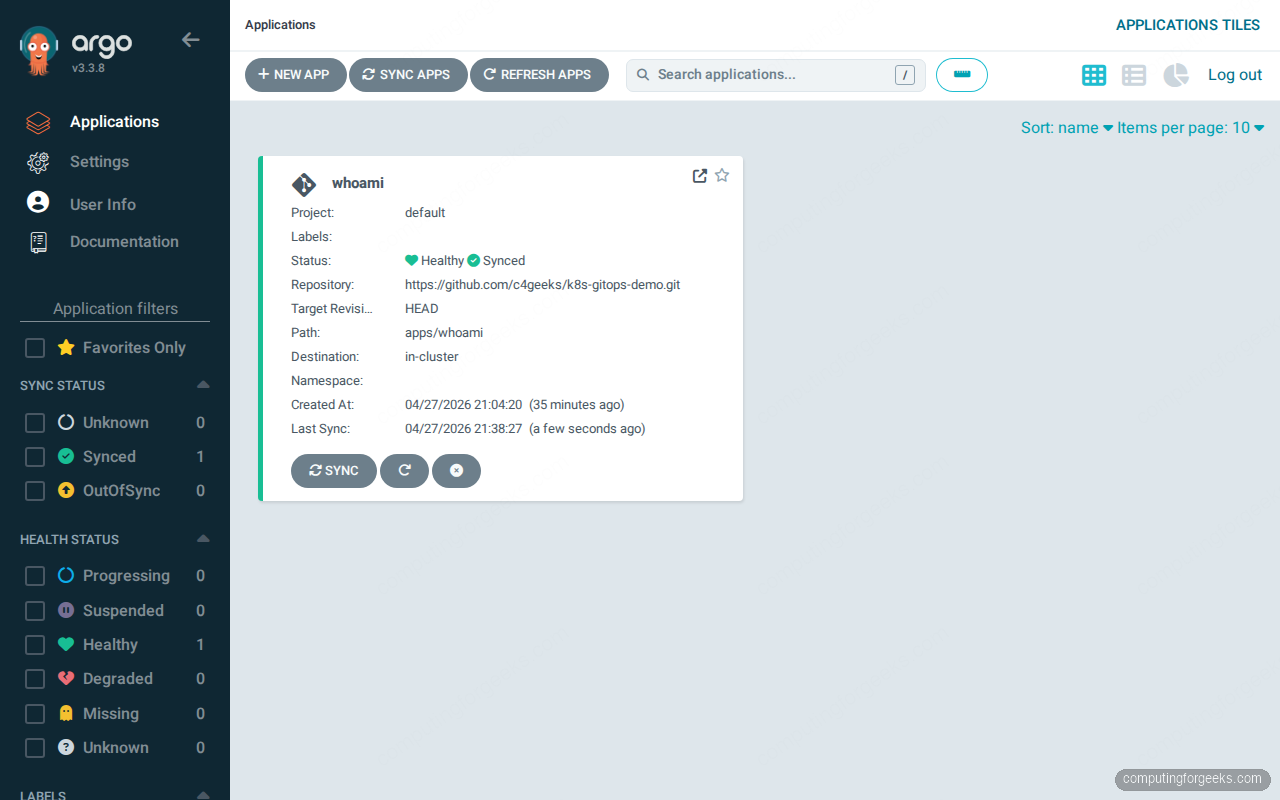
Click the whoami card and ArgoCD draws the full topology: Application → Namespace → Service → Deployment → ReplicaSet → Pods, with sync history on the right and resource health badges on every node:
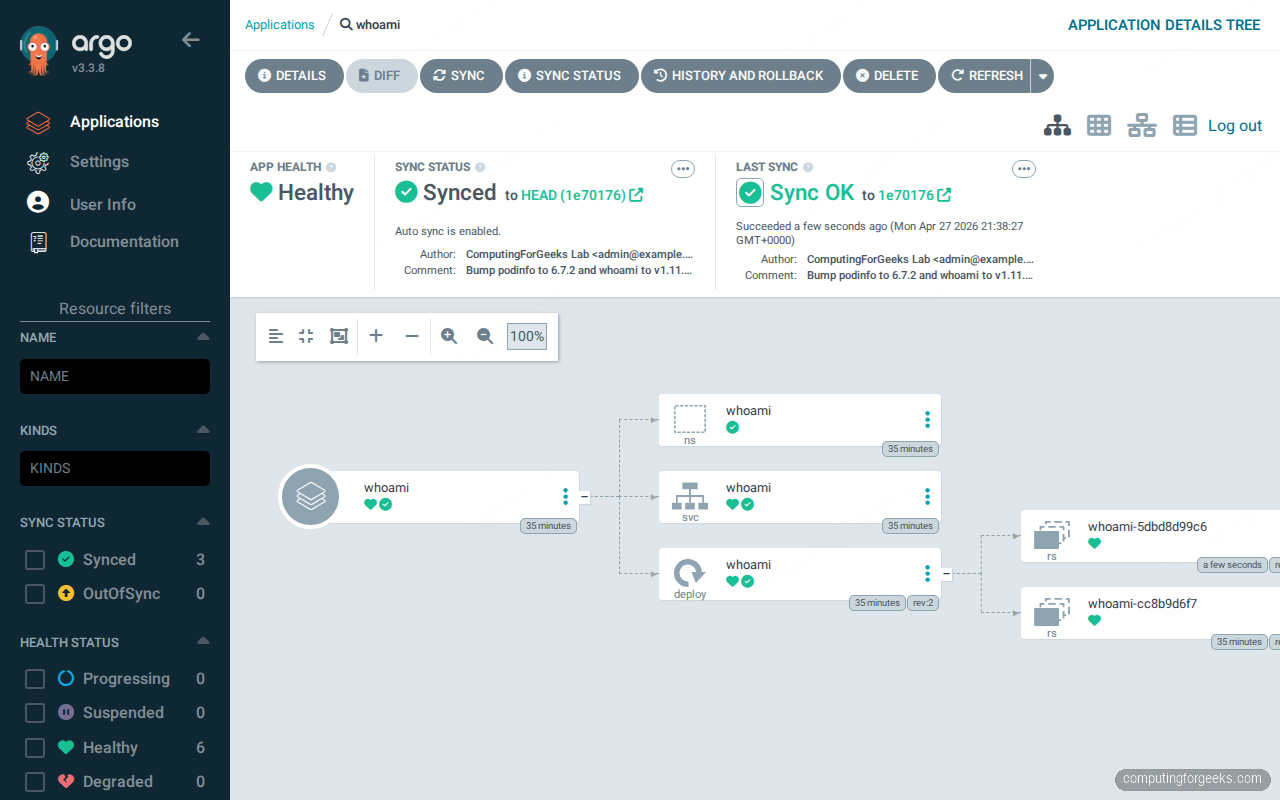
This visualization is the single biggest reason teams pick ArgoCD. Flux has no native equivalent in core; the closest match is Weave GitOps or Capacitor as add-on dashboards.
The CLI translation table
If you know the flux CLI, the argocd CLI is the same operations expressed against Applications instead of Kustomizations. The mapping below covers the daily-driver commands:
| What you want | Flux command | ArgoCD command |
|---|---|---|
| List managed apps | flux get kustomizations -A | argocd app list |
| Detail of one app | flux get kustomization podinfo | argocd app get whoami |
| Force a sync now | flux reconcile kustomization podinfo --with-source | argocd app sync whoami |
| Pause reconciliation | flux suspend kustomization podinfo | argocd app set whoami --sync-policy none |
| Resume reconciliation | flux resume kustomization podinfo | argocd app set whoami --sync-policy automated |
| Show diff vs Git | flux diff kustomization podinfo --path ./apps/podinfo | argocd app diff whoami |
| Delete the app | flux delete kustomization podinfo | argocd app delete whoami |
| Tail controller logs | flux logs --follow --level=info | kubectl logs -n argocd -l app.kubernetes.io/name=argocd-application-controller -f |
| Show source health | flux get sources git -A | argocd repo list |
The pattern: Flux verbs operate on resource types, ArgoCD verbs operate on Application names. Both styles work, both have first-class kubectl equivalents, and both have --watch flags for tailing reconciliation.
Reconciliation timing in practice
On the same cluster, with the same Git repo and the same kind of small Kustomize app, here is what a forced sync actually costs end-to-end:
$ time flux reconcile kustomization podinfo --with-source
► annotating GitRepository flux-system in flux-system namespace
✔ GitRepository annotated
◎ waiting for GitRepository reconciliation
✔ fetched revision main@sha1:346271abc1fbe714204a371c8160185ba5e8ef9d
► annotating Kustomization podinfo in flux-system namespace
✔ Kustomization annotated
◎ waiting for Kustomization reconciliation
✔ applied revision main@sha1:346271abc1fbe714204a371c8160185ba5e8ef9d

real    0m6.112s
user    0m0.067s
sys     0m0.033s
$ time argocd app sync whoami | tail -8
GROUP KIND NAMESPACE NAME STATUS HEALTH HOOK MESSAGE
Namespace whoami Synced namespace/whoami unchanged
Service whoami whoami Synced Healthy service/whoami unchanged
apps Deployment whoami whoami Synced Healthy deployment.apps/whoami unchanged
real 0m2.931s
user 0m0.102s
sys 0m0.036sArgoCD is faster on the wire because the application controller already has cached state in Redis and the diff is computed in the API server. Flux is slower because the CLI annotates the source first, then waits for source-controller to fetch from GitHub, then waits for kustomize-controller to apply. The 6-second figure is honest end-to-end including the round trip to GitHub. In day-to-day use both feel instant; the difference matters when you have hundreds of Applications all syncing on the same webhook.
Helm: HelmRelease vs Application sourceType=Helm
Both controllers reconcile Helm charts, with very different ergonomics. Flux uses two CRDs: a HelmRepository source and a HelmRelease that pins chart, version, and values. ArgoCD just reuses Application with source.helm blocks.
The Flux HelmRelease for, say, ingress-nginx looks like this:
apiVersion: source.toolkit.fluxcd.io/v1
kind: HelmRepository
metadata:
  name: ingress-nginx
  namespace: flux-system
spec:
  interval: 5m
  url: https://kubernetes.github.io/ingress-nginx
---
apiVersion: helm.toolkit.fluxcd.io/v2
kind: HelmRelease
metadata:
  name: ingress-nginx
  namespace: flux-system
spec:
  interval: 10m
  chart:
    spec:
      chart: ingress-nginx
      version: 4.15.x
      sourceRef:
        kind: HelmRepository
        name: ingress-nginx
  targetNamespace: ingress-nginx
  install:
    createNamespace: true
  values:
    controller:
      service:
        loadBalancerIP: 10.0.1.200
The same release as an ArgoCD Application:
apiVersion: argoproj.io/v1alpha1
kind: Application
metadata:
  name: ingress-nginx
  namespace: argocd
spec:
  project: default
  source:
    repoURL: https://kubernetes.github.io/ingress-nginx
    chart: ingress-nginx
    targetRevision: 4.15.x
    helm:
      values: |
        controller:
          service:
            loadBalancerIP: 10.0.1.200
  destination:
    server: https://kubernetes.default.svc
    namespace: ingress-nginx
  syncPolicy:
    automated:
      prune: true
      selfHeal: true
    syncOptions:
      - CreateNamespace=true
Two design notes that matter on day two. Flux’s split between source and release means you can register a HelmRepository once and reference it from many HelmReleases without re-fetching. ArgoCD treats each Application as fully self-contained, which is simpler to reason about but pulls the same chart for every Application. Flux also supports OCI Helm registries via OCIRepository with no extra controller; ArgoCD added native OCI support in 2.7 and it has been stable since.
Multi-cluster: the real differentiator
This is where the architectures diverge most. ArgoCD’s mental model is one control plane, many target clusters. Flux’s model is one Flux per cluster, all reading the same Git repo. Both work; they suit different teams.
Flux multi-cluster: bootstrap each cluster against its own path
To add a second cluster (a single-node k3s in this lab) to the same Git repo, change kubectl context and bootstrap a different path:
export KUBECONFIG=~/.kube/k3s-edge.yaml
flux bootstrap github \
  --owner=${GH_OWNER} \
  --repository=${GH_REPO} \
  --branch=main \
  --path=clusters/k3s-edge \
  --personal=false \
  --read-write-key=true
Flux on the second cluster gets its own deploy key for the same repo and watches a different folder. Add a Kustomization under clusters/k3s-edge/ that references the same apps/podinfo path but with a patch that drops replicas to 1 (k3s is smaller):
cat > clusters/k3s-edge/podinfo.yaml <<'YAML'
apiVersion: kustomize.toolkit.fluxcd.io/v1
kind: Kustomization
metadata:
  name: podinfo
  namespace: flux-system
spec:
  interval: 1m
  path: ./apps/podinfo
  prune: true
  sourceRef:
    kind: GitRepository
    name: flux-system
  targetNamespace: podinfo
  patches:
    - patch: |
        - op: replace
          path: /spec/replicas
          value: 1
      target:
        kind: Deployment
        name: podinfo
YAML

git add . && git commit -m "Deploy podinfo to k3s-edge with replicas=1"
git push
One minute later, podinfo is running on both clusters with cluster-specific replica counts driven entirely from Git. Verify by switching contexts:
export KUBECONFIG=~/.kube/k8s-prod.yaml
kubectl get deploy podinfo -n podinfo
export KUBECONFIG=~/.kube/k3s-edge.yaml
kubectl get deploy podinfo -n podinfo
NAME READY UP-TO-DATE AVAILABLE AGE
podinfo 2/2 2 2 4m
NAME READY UP-TO-DATE AVAILABLE AGE
podinfo 1/1 1 1 1m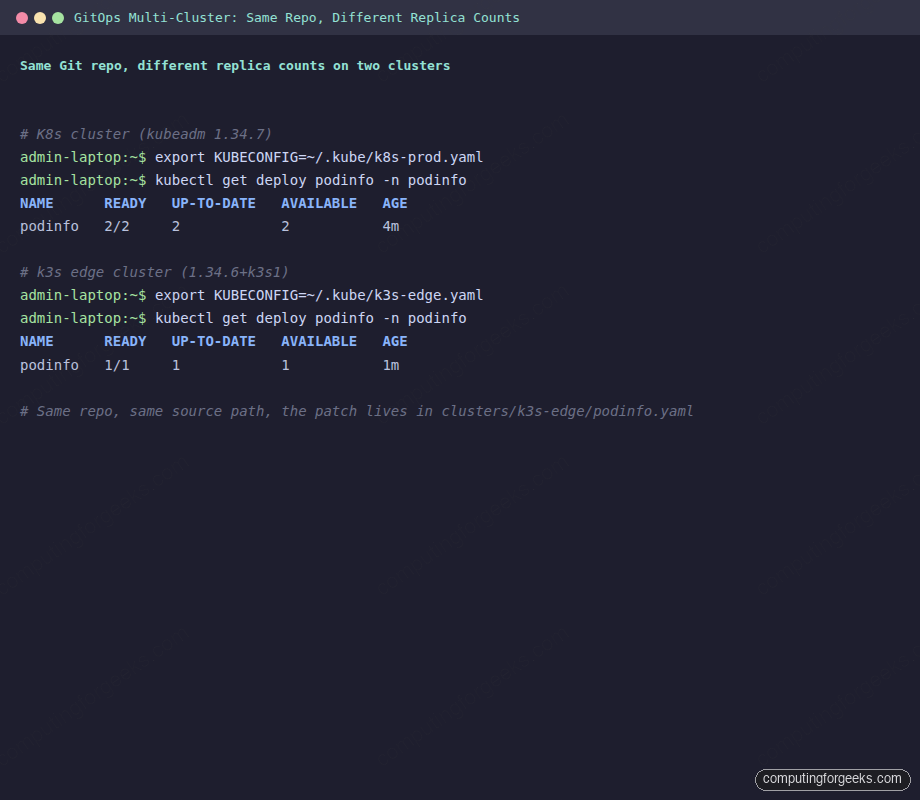
That is the strongest argument for Flux: clusters are autonomous, the management plane scales with the number of clusters automatically (one Flux per cluster), and there is no single ArgoCD instance that becomes a blast-radius problem if it goes down.
ArgoCD multi-cluster: one control plane, many registered clusters
ArgoCD takes the opposite approach. You add the second cluster’s kubeconfig to ArgoCD itself, then Applications target the new cluster by name. The full pattern is covered in the ArgoCD ApplicationSet for multi-cluster guide; the short version:
kubectl config use-context k3s-edge
argocd cluster add k3s-edge --name k3s-edge --in-cluster=false
Then a generator-based ApplicationSet creates the same Application on every registered cluster. The single ArgoCD UI now shows apps grouped by cluster, which is handy for small fleets but expensive on bandwidth and noisy when you cross about 50 clusters.
Encrypting secrets with SOPS in Flux
Both controllers integrate with SOPS, sealed-secrets, and External Secrets. Flux has the most native SOPS path: kustomize-controller can decrypt SOPS-encrypted manifests inline at apply time. Generate an age key on a workstation:
age-keygen -o age.key
PUBKEY=$(grep "public key" age.key | sed 's/.*: //')
echo "Public key: ${PUBKEY}"
Push the private key into the cluster as a Secret only Flux can read:
kubectl create secret generic sops-age \
  --namespace=flux-system \
  --from-file=age.agekey=age.key
Tell Flux to use the key for decryption by editing the cluster Kustomization:
spec:
  decryption:
    provider: sops
    secretRef:
      name: sops-age
Encrypt a Secret manifest with the public key and commit it to Git:
sops --age=${PUBKEY} \
  --encrypted-regex '^(data|stringData)$' \
  -i apps/podinfo/db-credentials.yaml
Anyone reading the repo sees encrypted blobs; only the cluster with the matching age key can decrypt. ArgoCD does not have native SOPS support, so you either run the External Secrets Operator alongside or use the Vault plugin. That extra moving piece is one reason teams that prioritize secrets-in-Git pick Flux.
Notifications: Slack on reconciliation failure
Flux’s notification-controller handles alerts as Kubernetes resources. A Provider (Slack webhook) plus an Alert (event filter) gets you a Slack ping for every failed Kustomization:
cat <<'YAML' | kubectl apply -f -
apiVersion: notification.toolkit.fluxcd.io/v1beta3
kind: Provider
metadata:
  name: slack
  namespace: flux-system
spec:
  type: slack
  channel: gitops-alerts
  address: https://hooks.slack.com/services/your/slack/webhook
---
apiVersion: notification.toolkit.fluxcd.io/v1beta3
kind: Alert
metadata:
  name: on-failure
  namespace: flux-system
spec:
  providerRef:
    name: slack
  eventSeverity: error
  eventSources:
    - kind: Kustomization
      name: '*'
    - kind: HelmRelease
      name: '*'
YAML
ArgoCD’s argocd-notifications-controller uses templated triggers in a ConfigMap:
kubectl apply -n argocd -f - <<'YAML'
apiVersion: v1
kind: ConfigMap
metadata:
  name: argocd-notifications-cm
data:
  service.slack: |
    token: $slack-token
  trigger.on-sync-failed: |
    - when: app.status.operationState.phase in ['Error', 'Failed']
      send: [app-sync-failed]
  template.app-sync-failed: |
    message: "App {{.app.metadata.name}} sync failed: {{.app.status.operationState.message}}"
YAML
Both work, both rate-limit, both let you scope alerts per app. Flux’s design feels more native to Kubernetes (CRDs all the way down). ArgoCD’s ConfigMap approach is more familiar to teams that already use Argo Workflows or Argo Events.
Drift detection and self-healing
Both controllers detect drift (manual kubectl edit on a managed resource) and revert it on the next reconciliation. ArgoCD calls this selfHeal: true on the Application; Flux calls it prune: true combined with the default reconciliation interval. Test it:
kubectl scale deploy/podinfo -n podinfo --replicas=5
kubectl get deploy/podinfo -n podinfo
Within one minute Flux reverts back to 2 replicas because that is what Git says. Same test with kubectl scale deploy/whoami -n whoami --replicas=5 proves ArgoCD does the same. The difference is visibility: ArgoCD shows the OutOfSync state in the UI between drift and reversion, while Flux just logs the reconciliation event. For investigators, ArgoCD’s UI shines here. For production discipline, Flux’s silent revert is preferable.
RBAC and multi-tenancy
Flux multi-tenancy uses Kubernetes RBAC end-to-end. Each tenant gets a Namespace, a ServiceAccount, and a Kustomization that uses spec.serviceAccountName to impersonate the tenant SA when applying manifests. The cluster admin trusts kube-apiserver to enforce who can do what; Flux just inherits that.
ArgoCD adds its own AppProject CRD that maps SSO groups to source repo allowlists, destination cluster/namespace pairs, and resource kind blacklists. It is a powerful layer on top of Kubernetes RBAC and most teams need it because argocd-server talks to kube-apiserver as a single privileged ServiceAccount, not as the human user. The Kubernetes RBAC guide covers the underlying ServiceAccount model that both controllers build on.
Troubleshooting reconciliation failures
The first place to look when a sync fails is the controller’s events. Flux exposes them via the CLI:
flux events --watch --for Kustomization/podinfoFor ArgoCD, the same view lives in argocd app history and the controller logs:
argocd app history whoami
kubectl logs -n argocd \
  -l app.kubernetes.io/name=argocd-application-controller \
  --tail=200
Common failure modes worth knowing:
- Flux:
error: failed to apply: timed out waiting for the condition. The CRDs in your manifest need a CRD that has not been installed yet. Add adependsOnin the Kustomization that points at the CRD-installing Kustomization, or usespec.healthCheckson the parent. - Flux:
Source artifact not found. Most often the GitRepository is suspended or the deploy key has been rotated out of GitHub. Checkflux get sources git -Afor the READY column. - ArgoCD:
ComparisonError: rpc error: code = Unknown desc = Manifest generation error. Theargocd-repo-servercannot render the chart or kustomize. Inspect withargocd app manifests whoamiand check the repo-server pod logs. - ArgoCD: stuck in
Progressing. A health check is failing on a downstream resource. Open the topology graph in the UI and follow the red badges to the offending resource.
When to pick Flux, when to pick ArgoCD
The decision boils down to two axes: how many clusters and how UI-driven your team is. After running both side-by-side, the practical decision tree is short:
- Pick Flux when: you have many clusters (>10), strong CLI culture, want secrets in Git via SOPS, prefer Kubernetes-native CRDs over a separate UI auth layer, run on-prem or air-gapped where bringing in another web UI is friction, or your team is already comfortable with
kubectlas the primary interface. - Pick ArgoCD when: you have a small fleet (1-10 clusters), want the topology graph for on-call visibility, want SSO with SAML or OIDC built in, have a developer audience that wants self-service “redeploy” buttons, or your team is migrating from a Spinnaker/Jenkins UI culture.
- Use both when: you have a platform team running Flux for infra (CRDs, ingress, monitoring) and an app team using ArgoCD for product workloads. They coexist on the same cluster with no conflicts as long as they own different paths in Git.
The wrong reason to pick either is “we already have it.” Both projects have stable APIs, both are CNCF graduated, and migrating between them is a one-week task once you understand the source-and-apply model. Pick the one whose default workflow saves your team the most context switches.
Once you have a controller in place, the next layer is policy enforcement on what gets deployed. The ArgoCD with MetalLB and NGINX Ingress guide covers production exposure, the ArgoCD on EKS and ArgoCD on GKE guides cover managed Kubernetes, and the Gateway API migration guide explains how the new ingress standard interacts with both controllers.