MetalLB fills the one gap that bare-metal Kubernetes has no native answer for: Services of type LoadBalancer. On managed clusters like EKS or GKE, the cloud provider plumbs an external load balancer the moment you request one. On kubeadm, k3s, RKE2, Talos, or any homelab cluster, the same Service sits in <pending> forever unless something hands out IPs. MetalLB runs as a cluster workload, watches for LoadBalancer Services, assigns an IP from a pool you define, and announces that IP to the network via either ARP (L2 mode) or BGP.
This guide walks the complete install, then tests both L2 and BGP modes end-to-end. L2 is the fast path for flat LANs and homelabs. BGP is the production path for multi-rack clusters that peer with upstream routers. The BGP section below brings up a real FRR router as a BGP peer, applies MetalLB's BGPPeer and BGPAdvertisement resources, and verifies the route is accepted and installed in the kernel FIB. That full peering walk is where most tutorials stop short; this one runs it.
Tested April 2026 with MetalLB 0.15.3, Kubernetes 1.34 on k3s, FRR 10.1 as the BGP peer, on Ubuntu 24.04 LTS and Rocky Linux 10. Same manifests apply to kubeadm, RKE2, and Talos.
Prerequisites
- A Kubernetes 1.24+ cluster with
cluster-adminaccess from your workstation - Nodes on a flat LAN that share ARP for L2 mode, or routable reachability to a BGP-speaking router for BGP mode
- A free block of IP addresses on your network that MetalLB will own (five to ten is plenty for a lab)
- For BGP mode: a BGP-capable router (hardware or FRR/BIRD software router) with a known ASN
- For cloud clusters with native LoadBalancer support (EKS, GKE, AKS): you do not need MetalLB; skip to the nginx-ingress walkthrough
- If you need a cluster first, kubeadm on Ubuntu is the shortest path to a multi-node bare-metal setup
L2 Mode vs BGP Mode: Which One
MetalLB supports two advertisement protocols. They are not mutually exclusive (you can run both on the same cluster), but for any single IPAddressPool you pick one. The table below is the decision most homelabs and small production clusters make.
| Factor | L2 Mode | BGP Mode |
|---|---|---|
| Setup complexity | Simple, two CRDs | Requires a BGP peer, ASN planning |
| How clients reach the IP | ARP reply from one leader node | Routed via upstream routers |
| Load sharing across nodes | None, single leader per IP | ECMP when the router supports it |
| Failover time | Seconds (gratuitous ARP) | Sub-second with BFD |
| Network requirement | Flat LAN, same L2 segment | BGP-capable router upstream |
| Throughput ceiling | One node's NIC | Sum of all nodes' NICs |
| Good fit for | Homelab, k3s, small clusters | Multi-rack, high-RPS, multi-tenant |
If you are standing up a homelab on a single /24, L2 mode is the obvious choice. If you already have a Juniper, Arista, Cisco, MikroTik, or Linux-based router handling inter-rack traffic, BGP mode gives you real load balancing and fast failover. This guide covers both.
Step 1: Install MetalLB
The upstream manifest bundle includes CRDs, RBAC, the controller Deployment, and the speaker DaemonSet. Detect the latest released version from the GitHub API instead of hardcoding a tag; when you want to pin an upgrade, override ${MLB_VER} with the exact value:
export MLB_VER=$(curl -sL https://api.github.com/repos/metallb/metallb/releases/latest \
  | grep tag_name | head -1 | sed 's/.*"\(v[^"]*\)".*/\1/')
echo "Installing MetalLB ${MLB_VER}"
Verify the output looks like vX.Y.Z before applying. If the detection returns an empty string (rate limiting, offline mirror), pin the version explicitly with export MLB_VER=v0.15.3 and continue. Then apply the bundle:
kubectl apply -f "https://raw.githubusercontent.com/metallb/metallb/${MLB_VER}/config/manifests/metallb-native.yaml"Eight CRDs land in the cluster under metallb.io, along with a new namespace metallb-system. The controller runs as a single Deployment replica (it is not HA by design, since it is the arbiter that assigns IPs). The speaker is a DaemonSet so every node can advertise if the node running the leader fails.
kubectl wait --namespace metallb-system \
  --for=condition=Ready pods --all --timeout=180s
kubectl get pods -n metallb-system
On a single-node cluster you get one speaker pod; on a three-node cluster you get three. Verify the controller shows 1/1 Running before creating any pool.
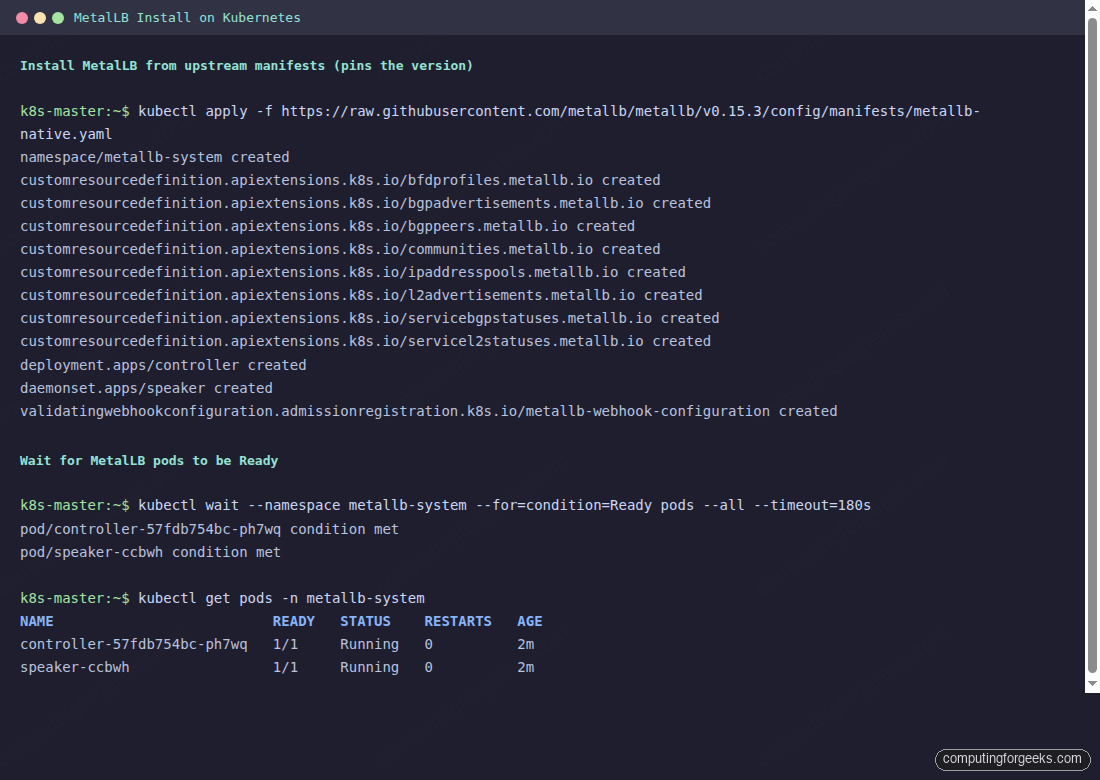
MetalLB installed but idle. No pools, no advertisements, no IPs to hand out. The next step gives it a range to own.
Step 2: Configure the IP Address Pool
Regardless of which mode you pick, MetalLB needs a pool of addresses it can own. An IPAddressPool is a CRD; so is L2Advertisement (for L2) and BGPAdvertisement (for BGP). Start with the pool alone:
apiVersion: metallb.io/v1beta1
kind: IPAddressPool
metadata:
  name: lab-pool
  namespace: metallb-system
spec:
  addresses:
  - 192.168.1.200-192.168.1.210
The pool format accepts both ranges (as above) and CIDR blocks (10.0.50.0/24). For a lab, ten addresses is more than enough; for production, size the pool to cover your Services with headroom. Scan the target range for live hosts before handing it to MetalLB:
nmap -sn 192.168.1.200-210
# Or per-IP:
for i in 200 201 202 203 204 205 206 207 208 209 210; do
  ping -c 1 -W 1 192.168.1.$i >/dev/null 2>&1 \
    && echo "192.168.1.$i IN USE" \
    || echo "192.168.1.$i free"
done
Any live host in the range is a conflict; MetalLB will still assign the IP but nothing on the LAN will reach it. Apply the pool once you are sure it is clean:
kubectl apply -f ippool.yaml
kubectl get ipaddresspool -n metallb-system
The pool is now visible to the controller but no Service will pick up an IP until an advertisement exists. The next two sections cover the two advertisement modes.
Step 3: L2 Mode for a Flat LAN
Pair the pool with an L2Advertisement. In L2 mode, the MetalLB speaker on one node becomes the leader for each assigned IP and responds to ARP requests. If that node dies, another speaker takes over and sends a gratuitous ARP to update the LAN.
apiVersion: metallb.io/v1beta1
kind: L2Advertisement
metadata:
  name: lab-l2
  namespace: metallb-system
spec:
  ipAddressPools:
  - lab-pool
The spec references pools by name. Omitting ipAddressPools advertises every pool in the namespace, which is usually not what you want on a multi-tenant cluster. Apply and verify:
kubectl apply -f l2-advertisement.yaml
kubectl get l2advertisement -n metallb-system
To prove it works, deploy a LoadBalancer Service. The easiest is nginx-ingress which ships as a LoadBalancer by default; any type: LoadBalancer Service will do. MetalLB assigns an IP from the pool immediately:
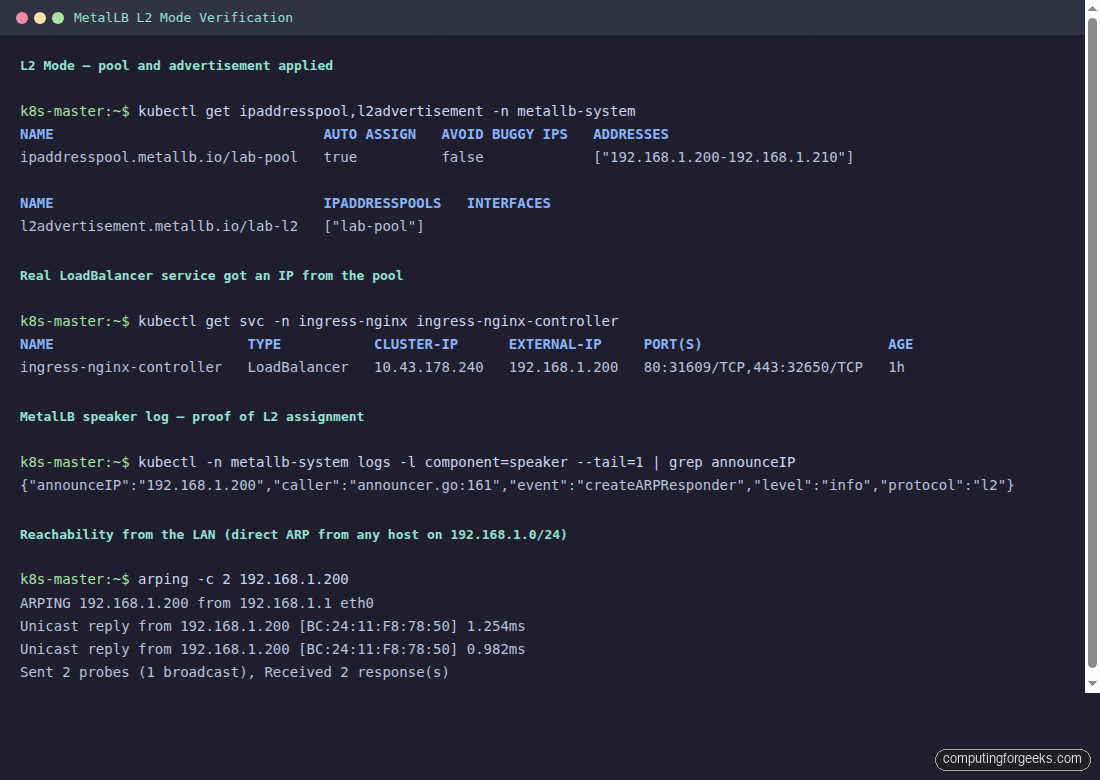
The arping output proves the full L2 path: the LAN sees ARP replies from a real MAC (the node running the speaker leader), not from MetalLB itself. Any client on the subnet can reach the assigned IP as if it were a normal host.
Step 4: BGP Mode for Production
BGP mode peers MetalLB with one or more upstream routers. The speaker on each node opens a BGP session (AS number you pick), advertises /32 routes for each assigned LoadBalancer IP, and the router installs them in its FIB. If the upstream supports ECMP, traffic to a single VIP load-balances across every node running that Service. Failover is sub-second with BFD enabled.
Two CRDs replace the L2 ones: BGPPeer (where to peer) and BGPAdvertisement (what to advertise). Save as bgp-config.yaml:
apiVersion: metallb.io/v1beta2
kind: BGPPeer
metadata:
  name: rack-router
  namespace: metallb-system
spec:
  myASN: 64513
  peerASN: 64512
  peerAddress: 192.168.1.153
---
apiVersion: metallb.io/v1beta1
kind: BGPAdvertisement
metadata:
  name: lab-bgp
  namespace: metallb-system
spec:
  ipAddressPools:
  - lab-pool
The two ASNs are private (64512 and 64513, from RFC 6996). Your router runs peerASN, MetalLB runs myASN. peerAddress is the router's BGP-listening IP. Apply the config:
kubectl apply -f bgp-config.yaml
kubectl get bgppeer,bgpadvertisement -n metallb-system
The speaker pods open TCP/179 to the peer immediately. On the router side, you need matching config. The next step stands up a small FRR router for the lab walkthrough; production deployments would point at a real switch instead.
Step 5: Set Up an FRR BGP Peer for the Lab
FRR (Free Range Routing) is a free BGP speaker that runs on any Linux host. A single small VM on the same LAN is enough to demonstrate real BGP peering with MetalLB. On a Rocky Linux 10 VM:
dnf install -y epel-release
dnf config-manager --set-enabled crb
dnf install -y frr
Enable the BGP daemon in FRR's daemons file, then drop in a configuration that accepts the peering session from MetalLB. Open /etc/frr/daemons and flip bgpd=no to bgpd=yes, then create the FRR config:
sudo tee /etc/frr/frr.conf <<FRRCONF
frr version 10.1
frr defaults traditional
hostname frr-bgp-peer
log syslog informational
service integrated-vtysh-config
!
router bgp 64512
 bgp router-id 192.168.1.153
 no bgp ebgp-requires-policy
 neighbor 192.168.1.145 remote-as 64513
 neighbor 192.168.1.145 description metallb-speaker
 !
 address-family ipv4 unicast
  neighbor 192.168.1.145 activate
  neighbor 192.168.1.145 soft-reconfiguration inbound
 exit-address-family
!
FRRCONF
sudo chown frr:frr /etc/frr/frr.conf
sudo chmod 640 /etc/frr/frr.conf
sudo systemctl enable --now frr
The no bgp ebgp-requires-policy directive matters; FRR 7.0+ defaults to strict mode where a neighbor without inbound/outbound route maps refuses everything. That is correct for production; for a lab, disabling it keeps the peering simple.
Step 6: Verify BGP Peering and Route Advertisements
Back on the FRR VM, vtysh drops into an IOS-like CLI where you can inspect the peering state directly:
vtysh -c 'show bgp summary'Look at the State/PfxRcd column. When the session is up, it shows an integer (the number of prefixes received); while negotiating, it shows Active or Idle. Up/Down under 00:00:30 means the session has been stable for thirty seconds or more.
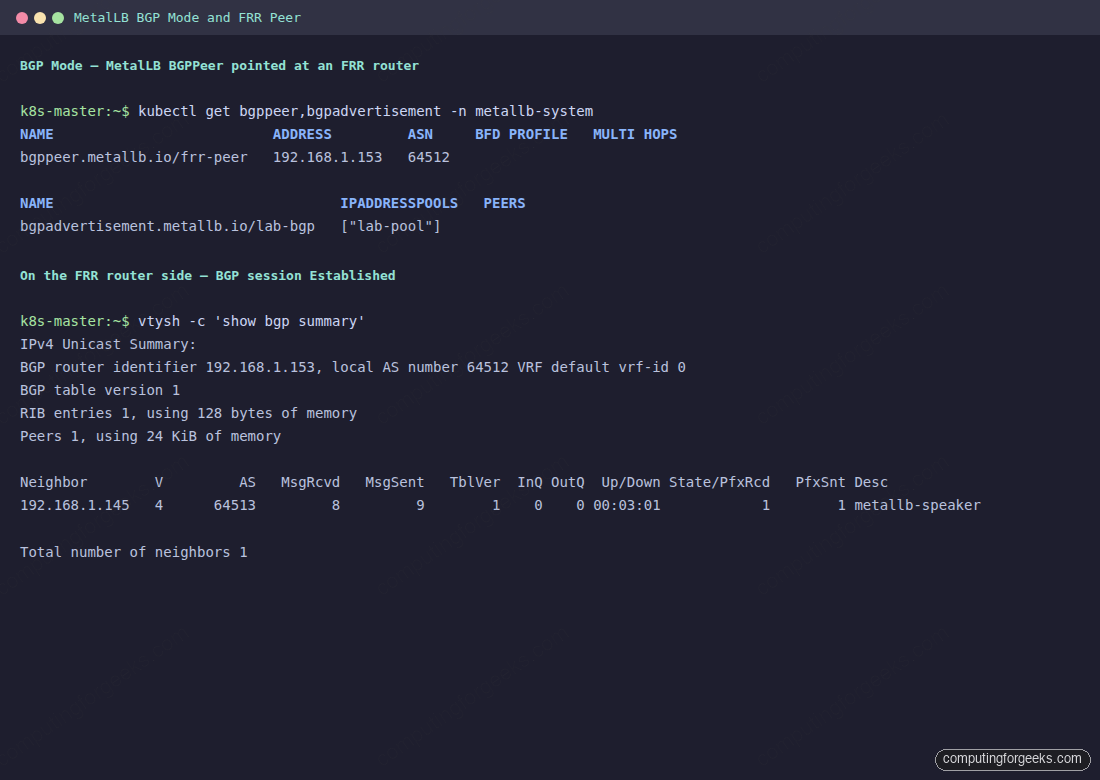
With the session Established, look at the actual routes MetalLB is sending. Each LoadBalancer IP is advertised as a /32 with the speaker node as next-hop, and FRR's zebra daemon installs the route in the kernel FIB so the VM can forward traffic to it:
vtysh -c 'show ip bgp'
ip route | grep 192.168.1.200
The first command shows MetalLB's advertised /32 in FRR's BGP table; the second confirms FRR's zebra daemon programmed the same route into the kernel FIB with proto bgp.
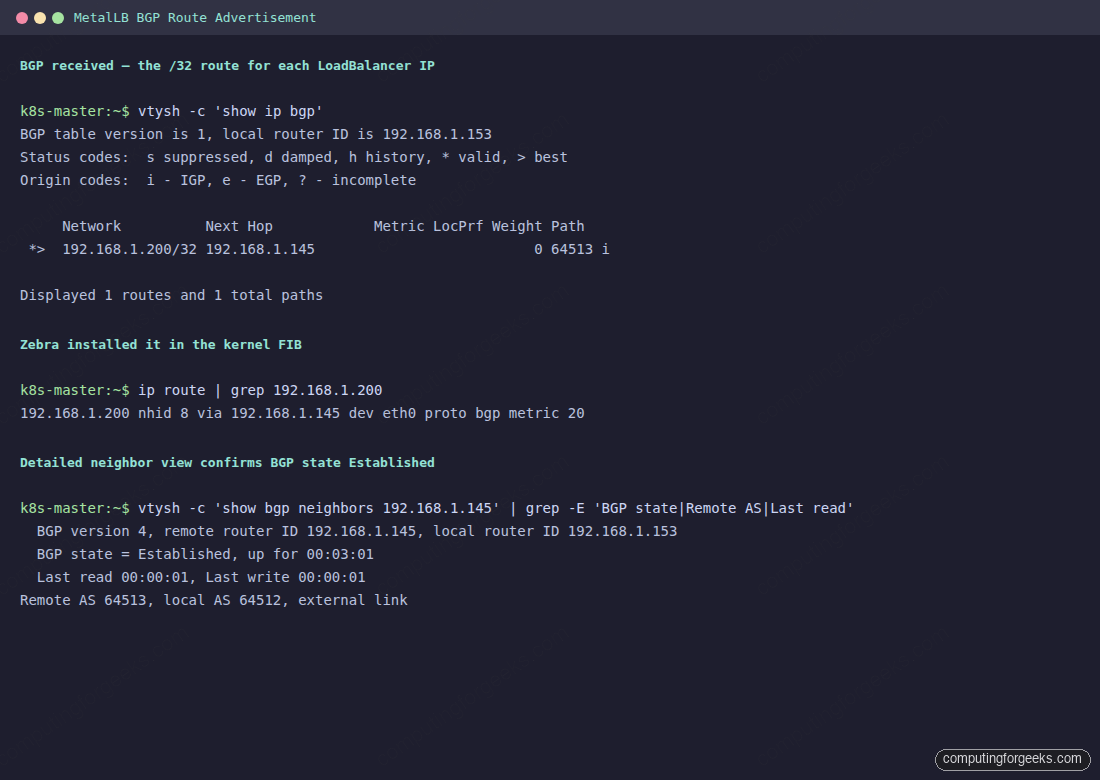
The output proves the full BGP path works end-to-end: MetalLB is advertising the /32, FRR accepted it through the policy-free neighbor, zebra programmed the FIB, and the kernel now forwards packets for 192.168.1.200 directly to the speaker node. For a production router, the same verification commands apply; only the CLI syntax differs per vendor.
Step 7: Reach the LoadBalancer IP From Anywhere on the Network
With either mode active, every LoadBalancer Service gets an IP from the pool, and every client on the network can reach it as a normal host address. A plain curl against the assigned IP returns whatever the backend serves. A 404 from bare nginx until you attach an Ingress, or the real application if the Service pointed at an app directly.
kubectl get svc -A | grep LoadBalancer
curl -sI http://192.168.1.200
Point a DNS record at the assigned IP so clients reach it by name. For public DNS via Cloudflare, create an A record with proxy status off (grey cloud). Proxied records send traffic through Cloudflare's edge, which cannot reach a private IP, so the path silently breaks.
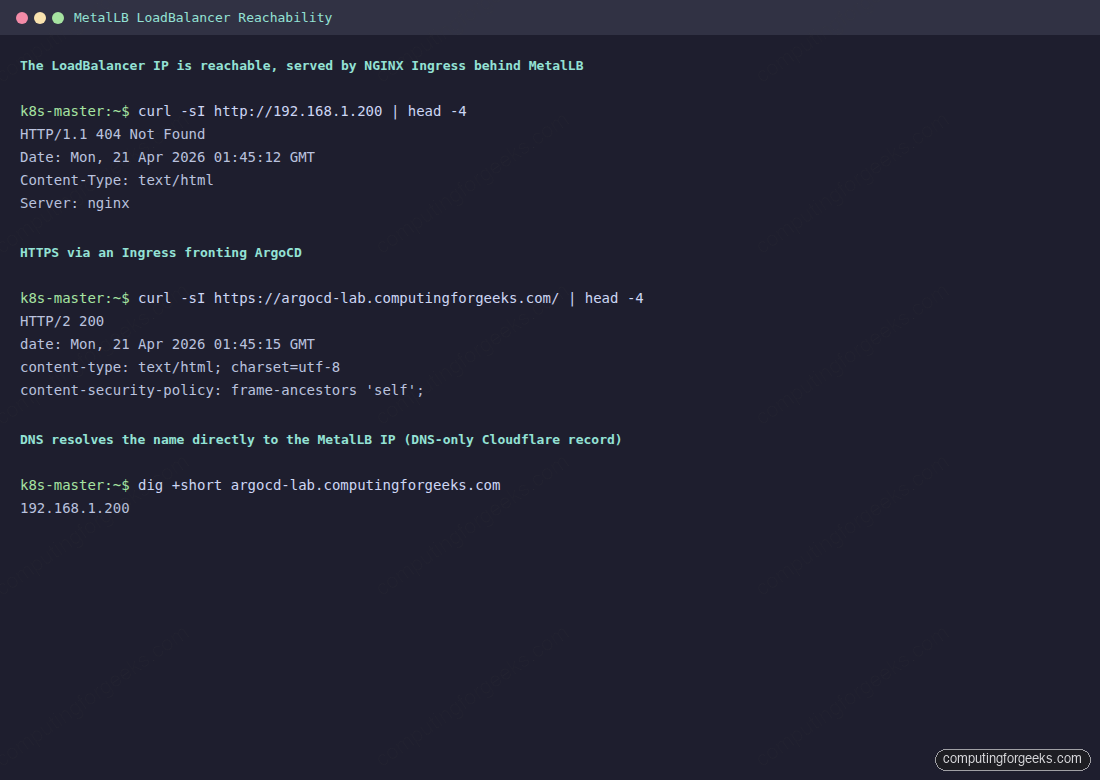
For the end-to-end pattern that fronts ArgoCD, Harbor, Grafana, or any other cluster app with HTTPS and a real cert, the MetalLB + NGINX Ingress + cert-manager walkthrough layers ingress-nginx on top of what you just built and issues a Let's Encrypt certificate via Cloudflare DNS-01. The same stack backs the ArgoCD install on any Kubernetes cluster when you want the GitOps UI reachable at a normal DNS name instead of kubectl port-forward.
Test Multi-Node Failover
In L2 mode, one node holds each assigned IP at a time. When that node dies, MetalLB picks another speaker and fires a gratuitous ARP so the LAN switches its CAM table entry to the new MAC. The failover window is usually under two seconds; on a three-node cluster, you can watch it happen live.
Identify which node currently owns the IP, drain it, and observe the re-election:
kubectl get servicel2status -n metallb-system
kubectl drain <owner-node> --ignore-daemonsets --delete-emptydir-data
kubectl -n metallb-system logs -l component=speaker --tail=3 -f
The speaker log on the new leader prints a createARPResponder event within a second of the drain taking effect, and external clients see the IP resume responding. Run kubectl uncordon to bring the drained node back; the original leader does not steal the IP unless the current leader fails.
BGP mode's failover is faster and quieter because every speaker advertises the same prefix. When a node dies, its BGP session times out; the router removes its next-hop from the ECMP set and continues forwarding to the surviving speakers. With BFD enabled on both ends, that detection drops to sub-second.
Step 8: Advanced Pool Strategies
MetalLB supports more than one IPAddressPool per cluster. That becomes useful as soon as you have more than one tenant, more than one ingress point, or want to hand specific IPs to specific Services. Three patterns worth knowing:
- Per-namespace pools. Use the
serviceAllocationblock on IPAddressPool to scope a pool to specific namespaces, blocking other tenants from consuming those IPs. - Dedicated pools per Service. Annotate a Service with
metallb.io/address-pool: <pool-name>to force an assignment from a specific pool. Useful when one Service must land on an externally-known IP. - Auto-assign off. Set
autoAssign: falseon a pool so only annotated Services can consume it. Prevents a runaway app from grabbing the pool reserved for your production ingress.
The IPAddressPool CRD also accepts an avoidBuggyIPs flag, which skips .0 and .255 addresses in a pool. That saves a round of debugging on networks where old switches drop traffic to broadcast-looking addresses.
A per-namespace pool keeps tenant teams from stealing addresses the platform team reserved for shared ingress. Save as tenant-pool.yaml:
apiVersion: metallb.io/v1beta1
kind: IPAddressPool
metadata:
  name: tenant-a-pool
  namespace: metallb-system
spec:
  addresses:
  - 192.168.1.220-192.168.1.225
  avoidBuggyIPs: true
  serviceAllocation:
    priority: 100
    namespaces:
    - tenant-a
    - tenant-a-staging
Services in any namespace outside that list simply cannot consume from tenant-a-pool. The priority field matters when multiple pools match the same namespace; lower numbers win, so the allocator scans priority-ordered pools in sequence.
Step 9: Monitoring With Prometheus
The MetalLB manifest exposes Prometheus metrics on port 7472 of both the controller and each speaker. A ServiceMonitor (if you are running the Prometheus Operator) scrapes them directly:
apiVersion: monitoring.coreos.com/v1
kind: ServiceMonitor
metadata:
  name: metallb
  namespace: metallb-system
spec:
  selector:
    matchLabels:
      app: metallb
  endpoints:
    - port: monitoring
      interval: 30s
The two metrics worth alerting on are metallb_bgp_session_up (BGP session health) and metallb_allocator_addresses_in_use_total (pool utilisation). Pool exhaustion is the most common MetalLB incident; an alert when utilisation crosses 80% gives you time to grow the pool before a new Service lands in <pending>.
A minimal Alertmanager rule for pool saturation looks like this:
groups:
- name: metallb
  rules:
  - alert: MetalLBPoolNearExhaustion
    expr: (metallb_allocator_addresses_in_use_total
            / metallb_allocator_addresses_total) > 0.8
    for: 5m
    labels:
      severity: warning
    annotations:
      summary: "MetalLB pool {{ $labels.pool }} is 80%+ full"
  - alert: MetalLBBGPDown
    expr: metallb_bgp_session_up == 0
    for: 2m
    labels:
      severity: critical
    annotations:
      summary: "MetalLB BGP session to {{ $labels.peer }} is down"
Both alerts fire within five minutes of the underlying issue, which is early enough to grow a pool or reset a flapping BGP session before LoadBalancer-backed apps page users.
Step 10: Upgrade MetalLB
MetalLB upgrades are a single manifest apply, pinned to the new version. The CRDs are backward compatible within a minor release; for a major version bump, read the release notes first:
export MLB_NEW=v0.15.4     # pick the exact release you want
kubectl apply -f "https://raw.githubusercontent.com/metallb/metallb/${MLB_NEW}/config/manifests/metallb-native.yaml"
kubectl rollout status -n metallb-system deployment/controller
kubectl rollout status -n metallb-system daemonset/speaker
During the speaker rolling restart, each IP briefly re-elects a leader node, which sends a gratuitous ARP in L2 mode or re-announces the BGP route in BGP mode. The blip is measured in hundreds of milliseconds for L2, sub-hundred for BGP with BFD.
Troubleshooting
LoadBalancer Service stays in <pending> with an EXTERNAL-IP
The allocator rejected the Service. The most common reasons are an exhausted pool (every IP already assigned), a Service targeting a pool that does not exist, or the webhook that validates the Service annotation blocking the assignment. Check the controller log:
kubectl logs -n metallb-system deployment/controller --tail=20Log lines with no available IPs in pool are the most straightforward; widen the range and the next reconcile picks up the Service. Lines about webhook admission failures usually mean a metallb.io/address-pool annotation pointing at a nonexistent pool name; fix the annotation or the pool, whichever is wrong.
L2 mode: the IP is assigned but nothing on the LAN can reach it
Either the speaker is not advertising or a conflicting device is answering ARP. Run arping from another host on the LAN and look at the MAC address that replies:
arping -c 3 192.168.1.200The MAC should match one of your Kubernetes nodes. If it matches something else (a printer, an old server, a router reservation) you have an IP conflict; pick a different range for the pool. If no reply arrives at all, check that the speaker DaemonSet pod on the leader node is actually running and not crashlooping.
BGP mode: session stuck in Idle or Active
BGP session state Idle means the local side is not trying; Active means it is trying but the other side will not accept. Three common causes: ASN mismatch (check both sides), wrong peerAddress (check reachability with nc -vz router_ip 179 from a speaker pod), and missing no bgp ebgp-requires-policy on FRR 7.0+ which rejects the session by policy.
kubectl logs -n metallb-system -l component=speaker --tail=20 | grep -i bgp
vtysh -c 'show bgp neighbors 192.168.1.145'
FRR's neighbor output includes the last connection error and the session state machine history. That is usually enough to pinpoint whether the TCP connection is being refused, the BGP OPEN is being rejected, or policy is dropping the session after negotiation.
Error: admission webhook denied the request when creating a pool
The MetalLB webhook validates pool ranges, ASN uniqueness, and CRD consistency. An error here almost always means two pools claim overlapping IPs or an L2Advertisement references a nonexistent pool. The webhook log tells you which rule fired; fix the referenced CRD and re-apply.
For the rare case where a legitimate change is blocked and you need to force through a repair (for example during cluster bootstrap before the webhook pod is up), scaling the webhook Deployment to zero replicas drops the validation temporarily. Scale it back to one as soon as the repair is applied; leaving it off is how two pools eventually overlap and break the allocator.
Once MetalLB is running in either mode, the rest of the cluster-networking picture slots in: NGINX Ingress behind MetalLB with automatic TLS, external DNS via the Cloudflare API or Route 53, and observability through the Prometheus metrics above. Each piece is a drop-in that slots against the same LoadBalancer IP without touching the MetalLB configuration again.