Flux makes the gap between “I pushed to Git” and “the cluster matches” feel boring, which is exactly what you want from a GitOps controller. The piece that makes that loop work is the Kustomization custom resource, and most reader confusion starts with the fact that it shares its name with a plain kustomization.yaml file but does something quite different.
This guide walks through the Flux Kustomization end to end on a real cluster: what it actually is, how it reconciles a directory in Git into your cluster, how to trace a running Deployment back to its commit, and the Day-2 commands you will reach for the most (flux suspend, flux resume, flux reconcile --with-source, flux trace, flux logs). Every command and every output below was captured against a live k3s cluster syncing the public lab repo at github.com/c4geeks/fluxcd-lab.
Tested May 2026 with Flux v2.8.6 on k3s v1.35.4, Ubuntu 24.04.4 LTS. Source repo: github.com/c4geeks/fluxcd-lab.
Flux Kustomization vs plain kustomization.yaml
The naming is genuinely unfortunate. Two different things, same word.
A plain kustomization.yaml is a Kustomize spec file. It lives in a directory in Git, lists the manifests under that directory (deployment, service, configmap), and optionally layers patches and namespace overrides on top. It is just YAML on disk. kubectl apply -k ./apps/podinfo reads that file, builds the resulting manifests, and applies them once.
A Flux Kustomization is a Kubernetes custom resource (kustomizations.kustomize.toolkit.fluxcd.io/v1). It points at a directory inside a GitRepository (or OCIRepository, or Bucket), runs the same Kustomize build internally, then applies the result to the cluster on a loop and prunes anything that disappears from Git. It is the controller-driven, continuously-reconciled version of kubectl apply -k.
Same Kustomize engine. Different scope. The plain file is the input; the Flux CR is the reconciler that pulls the input from Git and keeps the cluster matched.
The reconciliation flow
Every Flux Kustomization participates in a three-stage chain:
GitRepository  ──fetch──▶  Artifact (tarball)  ──build──▶  Kustomization  ──apply──▶  Cluster resources
   (source-controller)         (in-cluster cache)          (kustomize-controller)        (Deployments, Services, ...)
The source-controller polls the Git repo on its own interval and stores the latest revision as an in-cluster tarball artifact. The kustomize-controller watches Flux Kustomization CRs, picks up the matching artifact, runs kustomize build, then applies the result with server-side apply. If spec.prune: true is set, anything previously applied that is no longer in the build output gets garbage-collected.
Two intervals, two controllers, two checkpoints. The flux trace output later in this guide walks the same chain in reverse, from Deployment back to GitRepository.
Anatomy of a Flux Kustomization manifest
Here is the podinfo Kustomization the lab cluster is currently reconciling. Five spec fields do most of the work:
apiVersion: kustomize.toolkit.fluxcd.io/v1
kind: Kustomization
metadata:
  name: podinfo
  namespace: flux-system
spec:
  interval: 2m0s
  path: ./apps/podinfo
  prune: true
  sourceRef:
    kind: GitRepository
    name: flux-system
  targetNamespace: podinfo
Each field earns its place. interval is how often the kustomize-controller re-applies even when Git has not changed (drift correction). path is the directory inside the source repo whose kustomization.yaml gets built. prune: true is what makes deleting a file in Git also delete the resource in the cluster. sourceRef tells the controller which GitRepository to pull from. targetNamespace overrides the namespace on every applied resource, so the same manifests can be re-deployed into a different namespace without rewriting them.
Optional fields that show up later in the article: healthChecks for waiting on Deployment readiness, dependsOn for ordering, postBuild.substitute for variable substitution, and timeout / retryInterval for retry control.
Source repo layout
Flux is opinionated about one thing: a single Git repo holds both the cluster’s bootstrap manifests and the application manifests. The c4geeks/fluxcd-lab repo follows the conventional layout:
fluxcd-lab/
├── clusters/
│   └── lab/
│       ├── flux-system/                # written by `flux bootstrap`
│       │   ├── gotk-components.yaml
│       │   ├── gotk-sync.yaml
│       │   └── kustomization.yaml
│       └── podinfo-kustomization.yaml  # the Flux Kustomization CR
└── apps/
    └── podinfo/                        # the actual app manifests
        ├── namespace.yaml
        ├── deployment.yaml
        ├── service.yaml
        └── kustomization.yaml          # the plain Kustomize file
Two Kustomize files appear in the tree and they are doing different jobs. The one under clusters/lab/ is what the source-controller picks up first; it lists the bootstrap components plus any per-cluster Flux Kustomization CRs. The one under apps/podinfo/ is the input the podinfo Flux Kustomization will build when it reconciles.
If you have not bootstrapped Flux yet, the companion Flux vs ArgoCD comparison covers when to pick each tool, and the Capacitor UI guide shows the read-only dashboard for inspecting reconciliations. Teams migrating off the deprecated Weave product should read the Weave GitOps to Flux migration walkthrough first.
Step 1: Set reusable shell variables
Every command in this guide uses shell variables so you change one block and paste the rest as-is. Export them at the top of your SSH session:
export FLUX_NS="flux-system"
export APP_NAME="podinfo"
export APP_NS="podinfo"
export APP_PATH="./apps/podinfo"
export GIT_REPO="flux-system"
Confirm the cluster has Flux installed and ready before continuing:
flux check
kubectl get pods -n "${FLUX_NS}"
You should see four controllers running (helm, kustomize, notification, source) and all checks passed at the bottom of flux check. If anything is missing, walk through the Flux bootstrap with GitHub guide first; the rest of this guide assumes a healthy flux-system namespace.
Step 2: Generate a Kustomization with flux create
The flux create kustomization command generates a valid CR without you hand-typing the API group and field paths. The --export flag prints the YAML to stdout instead of applying it, which is exactly what you want for GitOps (commit the YAML, let Flux apply it).
flux create kustomization "${APP_NAME}" \
    --target-namespace="${APP_NS}" \
    --source=GitRepository/"${GIT_REPO}" \
    --path="${APP_PATH}" \
    --prune=true \
    --interval=2m \
    --export
The output is the same five-field manifest from the anatomy section earlier:
apiVersion: kustomize.toolkit.fluxcd.io/v1
kind: Kustomization
metadata:
  name: podinfo
  namespace: flux-system
spec:
  interval: 2m0s
  path: ./apps/podinfo
  prune: true
  sourceRef:
    kind: GitRepository
    name: flux-system
  targetNamespace: podinfo
The screenshot below shows the same export plus the cluster state right after the new Kustomization reconciled for the first time:
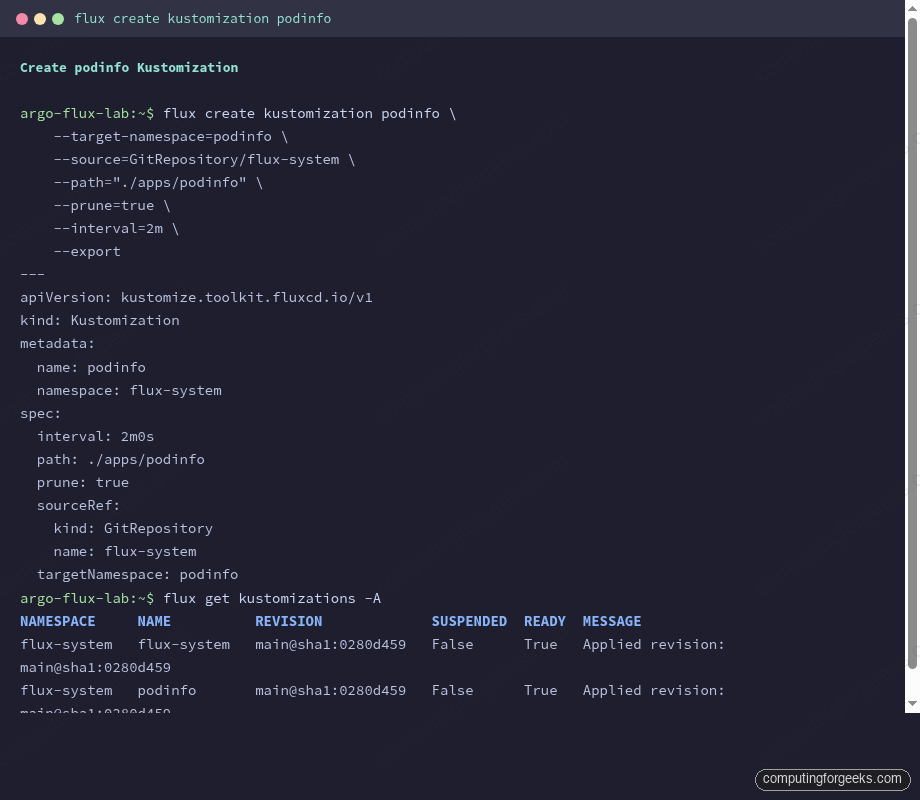
With the YAML in hand, the GitOps workflow is the same one you would follow for any other manifest: commit the file to the cluster’s bootstrap directory, push, and let Flux take it from there.
Step 3: Apply via GitOps and watch it reconcile
Save the generated YAML into the bootstrap directory of the lab repo, commit, and push. The source-controller picks up the new commit on its own interval, but a quick flux reconcile kicks the loop manually so you do not wait for the next poll.
git add clusters/lab/podinfo-kustomization.yaml
git commit -m "Add podinfo Kustomization"
git push
flux reconcile source git "${GIT_REPO}"
The reconcile annotates the GitRepository, the source-controller fetches the latest revision, and the new artifact is cached in-cluster:
► annotating GitRepository flux-system in flux-system namespace
✔ GitRepository annotated
◎ waiting for GitRepository reconciliation
✔ fetched revision main@sha1:0280d459feaccc405f2fe343ef699d5eac69ff67
Once the source artifact is fresh, the kustomize-controller picks up the new podinfo Kustomization CR (which is now part of the bootstrap build) and applies it. Check both Kustomizations:
flux get kustomizations -ABoth should report READY=True with the same revision SHA:
NAMESPACE     NAME          REVISION             SUSPENDED  READY  MESSAGE
flux-system   flux-system   main@sha1:0280d459   False      True   Applied revision: main@sha1:0280d459
flux-system   podinfo       main@sha1:0280d459   False      True   Applied revision: main@sha1:0280d459
And the actual podinfo workload should be coming up in its target namespace:
kubectl get pods -n "${APP_NS}"The first time round you may catch the pods mid-pull:
NAME                       READY   STATUS              RESTARTS   AGE
podinfo-5b5db8696b-tbqc5   0/1     ContainerCreating   0          21s
podinfo-5b5db8696b-xn7t9   0/1     ContainerCreating   0          21s
Re-running the same kubectl get pods a few seconds later flips both to Running. The reconcile loop runs again every 2 minutes and re-applies the same manifests, which is what catches manual drift (someone scaled the Deployment down with kubectl) and corrects it back to the Git definition.
Step 4: Force a full reconcile with –with-source
The most useful Day-2 reconcile flag is --with-source on a Kustomization. It tells Flux to refresh the underlying GitRepository first, then re-run the Kustomization against the new artifact. Without it, you only re-apply whatever is already cached in the cluster.
flux reconcile kustomization "${FLUX_NS}" --with-sourceThe chain runs end to end and you can watch each annotation in turn:
► annotating GitRepository flux-system in flux-system namespace
✔ GitRepository annotated
◎ waiting for GitRepository reconciliation
✔ fetched revision main@sha1:0280d459feaccc405f2fe343ef699d5eac69ff67
► annotating Kustomization flux-system in flux-system namespace
✔ Kustomization annotated
◎ waiting for Kustomization reconciliation
✔ applied revision main@sha1:0280d459feaccc405f2fe343ef699d5eac69ff67
Use --with-source any time the symptom is “I pushed to Git but Flux still shows the old revision.” Without the flag, you are only kicking the apply step, which will keep applying the stale artifact until the source-controller’s own interval expires.
Step 5: Trace a resource back to its source
The reverse chain is what flux trace is for. Given a resource in the cluster, it walks back through the Kustomization that applied it, to the GitRepository that fed the Kustomization, and reports the commit SHA of the artifact that produced it.
The correct invocation passes the Kubernetes resource kind and name, not the Flux CR. To trace the running podinfo Deployment:
flux trace --namespace "${APP_NS}" deployment "${APP_NAME}"Three sections come back, one per chain link:
Object:          Deployment/podinfo
Namespace:       podinfo
Status:          Managed by Flux
---
Kustomization:   podinfo
Namespace:       flux-system
Target:          podinfo
Path:            ./apps/podinfo
Revision:        main@sha1:0280d459feaccc405f2fe343ef699d5eac69ff67
Status:          Last reconciled at 2026-05-02 07:48:26 +0000 UTC
Message:         Applied revision: main@sha1:0280d459feaccc405f2fe343ef699d5eac69ff67
---
GitRepository:   flux-system
Namespace:       flux-system
URL:             ssh://[email protected]/c4geeks/fluxcd-lab
Branch:          main
Revision:        main@sha1:0280d459feaccc405f2fe343ef699d5eac69ff67
Status:          Last reconciled at 2026-05-02 07:48:31 +0000 UTC
Message:         stored artifact for revision 'main@sha1:0280d459feaccc405f2fe343ef699d5eac69ff67'
The matching SHAs across the Kustomization and GitRepository sections confirm there is no drift. If a Deployment’s trace shows a Kustomization revision that lags the GitRepository, the source has caught up but the Kustomization has not re-applied yet (rare under default 2m intervals, common right after a manual flux reconcile source git ... --no-wait race).
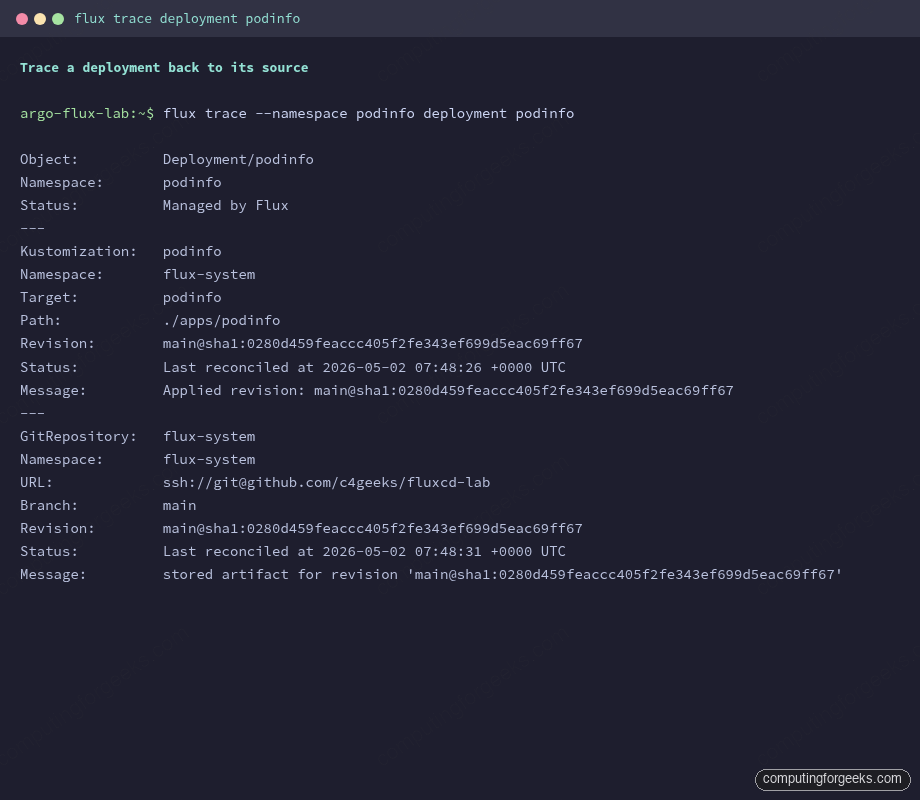
Trace is the first command to run when an audit asks “where did this resource come from?” because the answer chains all the way back to a SHA in a public Git repo, with no guesswork.
Step 6: Suspend, observe, then resume
Suspending a Kustomization is the safe way to stop reconciliation without deleting the CR. The controller leaves all applied resources in the cluster and stops re-applying. This is what you reach for during a maintenance window, an investigation, or a hot-patch you intend to roll back later. ArgoCD users will recognise it as the rough equivalent of argocd app suspend; the ArgoCD CLI reference covers the equivalent flow on that side.
flux suspend kustomization "${APP_NAME}"Two arrows of feedback:
► suspending kustomization podinfo in flux-system namespace
✔ kustomization suspended
Confirm the SUSPENDED column flips to True on the listing:
flux get kustomizations -AThe podinfo row should now show True in the SUSPENDED column while READY stays True (the resources it last applied are still healthy):
NAMESPACE     NAME          REVISION             SUSPENDED  READY  MESSAGE
flux-system   flux-system   main@sha1:0280d459   False      True   Applied revision: main@sha1:0280d459
flux-system   podinfo       main@sha1:0280d459   True       True   Applied revision: main@sha1:0280d459
While suspended, any commit you push that touches ./apps/podinfo is detected by the source-controller (the GitRepository keeps reconciling) but the kustomize-controller declines to apply it. The Kustomization log makes this explicit:
flux logs --kind=Kustomization --name="${APP_NAME}"The third line in the captured tail is the one to look for. It is the controller telling you it saw a tick of its loop and chose not to act:
2026-05-02T07:48:26.706Z info Kustomization/podinfo.flux-system - server-side apply completed
2026-05-02T07:48:26.723Z info Kustomization/podinfo.flux-system - Reconciliation finished in 89.6483ms, next run in 2m0s
2026-05-02T07:49:15.935Z info Kustomization/podinfo.flux-system - Reconciliation is suspended for this object
2026-05-02T07:49:18.121Z info Kustomization/podinfo.flux-system - server-side apply completed
2026-05-02T07:49:18.134Z info Kustomization/podinfo.flux-system - Reconciliation finished in 73.5578ms, next run in 2m0s
Resuming triggers an immediate reconcile and prints the applied revision:
flux resume kustomization "${APP_NAME}"The CLI blocks until the post-resume reconcile finishes and prints the SHA it landed on, so you know straight away that the cluster matches Git again:
► resuming kustomization podinfo in flux-system namespace
✔ kustomization resumed
◎ waiting for Kustomization reconciliation
✔ Kustomization podinfo reconciliation completed
✔ applied revision main@sha1:0280d459feaccc405f2fe343ef699d5eac69ff67
The full suspend / verify / resume sequence in one place looks like this:
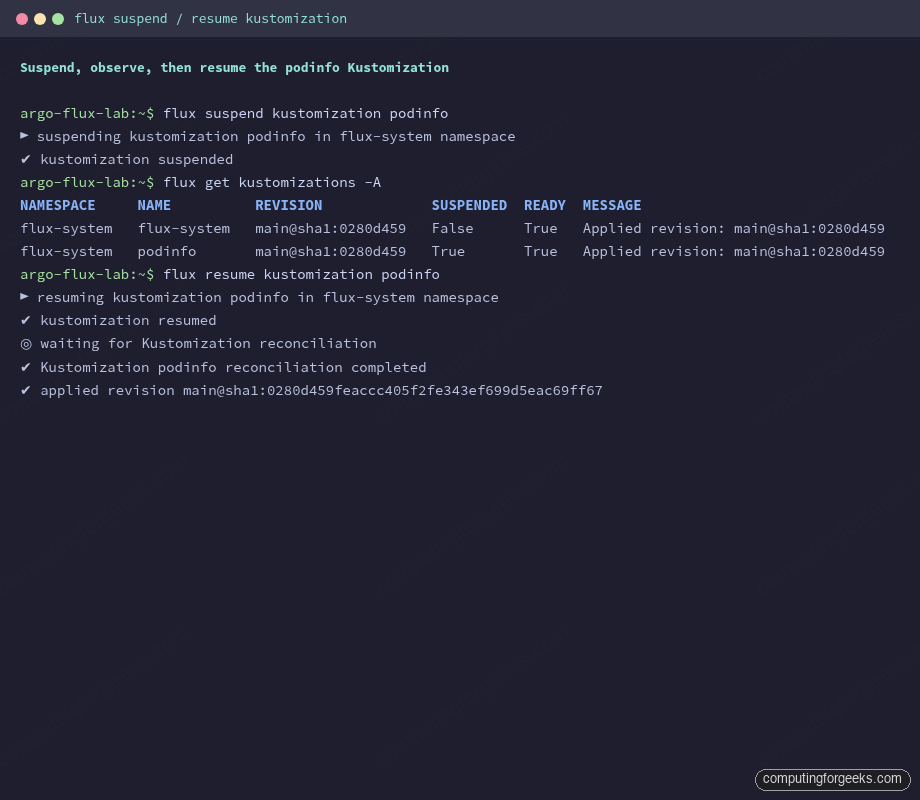
Always pair a suspend with a written reason somewhere visible (commit message, ticket comment, internal channel). A suspended Kustomization is invisible from the cluster’s behaviour but actively prevents Git from being the source of truth, which is the whole reason you adopted Flux in the first place.
Health checks: wait for Deployments to be Available
By default, a Flux Kustomization reports READY=True as soon as server-side apply succeeds. The applied resources may still be coming up. spec.healthChecks tells the controller which resources must reach a healthy state before the Kustomization itself is considered ready, and spec.timeout bounds how long it waits.
spec:
  interval: 2m0s
  path: ./apps/podinfo
  prune: true
  sourceRef:
    kind: GitRepository
    name: flux-system
  targetNamespace: podinfo
  timeout: 3m
  healthChecks:
    - apiVersion: apps/v1
      kind: Deployment
      name: podinfo
      namespace: podinfo
The kustomize-controller now blocks until the podinfo Deployment reports Available=True. The CLI accepts the same wait via flux reconcile kustomization podinfo --health-check-timeout=3m. Use this on anything downstream cares about (admission webhooks, CRDs, controllers) so a dependent Kustomization does not race ahead of an actually-not-ready resource.
Dependencies with dependsOn
When one Kustomization must apply before another (Namespaces before workloads, CRDs before custom resources, Helm controller before HelmReleases), spec.dependsOn chains them in order. The dependent Kustomization waits until all referenced ones report READY=True before it tries to apply. The same ordering problem in multi-cluster Flux topologies is what makes dependsOn the most-touched optional field once you grow past one cluster.
apiVersion: kustomize.toolkit.fluxcd.io/v1
kind: Kustomization
metadata:
  name: podinfo
  namespace: flux-system
spec:
  interval: 2m0s
  path: ./apps/podinfo
  prune: true
  sourceRef:
    kind: GitRepository
    name: flux-system
  dependsOn:
    - name: namespaces
    - name: cert-manager
      namespace: flux-system
The order is enforced on every reconcile, not just the first one. If cert-manager goes NotReady later because its CRDs were deleted, podinfo stops reconciling until the dependency recovers. This is desirable: it stops cascade failures from being papered over.
Pruning: deleting from Git deletes from the cluster
With spec.prune: true on the Kustomization, removing a resource from the Git build output also removes it from the cluster on the next apply. The controller emits an event so the action is auditable. The flux events stream from the lab cluster captured exactly this:
flux events --for Kustomization/"${APP_NAME}"The two events to watch are Progressing (lists every resource the controller created or updated) and GarbageCollectionSucceeded (counts what got pruned):
LAST SEEN  TYPE    REASON                      OBJECT                     MESSAGE
5m45s      Normal  NewArtifact                 GitRepository/flux-system  stored artifact for commit 'Add Flux sync manifests'
24s        Normal  Progressing                 Kustomization/podinfo      Namespace/podinfo created
                                                                          Service/podinfo/podinfo created
                                                                          Deployment/podinfo/podinfo created
24s        Normal  ReconciliationSucceeded     Kustomization/podinfo      Reconciliation finished in 89.6483ms, next run in 2m0s
17s        Normal  GarbageCollectionSucceeded  GitRepository/flux-system  garbage collected 1 artifacts
Without prune: true, deleting a resource from Git is a one-way drift: the cluster keeps the orphan forever. Prune everywhere unless you have a specific reason not to (cluster-shared resources owned by another tool, for example).
Variable substitution with postBuild.substituteFrom
Sometimes the same Kustomize directory needs different values per environment (cluster name, region, ingress hostname). Flux exposes spec.postBuild.substitute for inline values and postBuild.substituteFrom for pulling values from ConfigMaps and Secrets after the Kustomize build runs.
spec:
  interval: 2m0s
  path: ./apps/podinfo
  prune: true
  sourceRef:
    kind: GitRepository
    name: flux-system
  targetNamespace: podinfo
  postBuild:
    substitute:
      cluster_env: "lab"
    substituteFrom:
      - kind: ConfigMap
        name: cluster-vars
      - kind: Secret
        name: cluster-secrets
Inside the Kustomize manifests, reference variables with ${cluster_env} or ${ingress_host:-podinfo.example.com} (with default). The kustomize-controller runs envsubst-style replacement after the build, so the same ./apps/podinfo directory becomes the substrate for as many cluster-specific Kustomizations as you want, each with its own postBuild block.
If a referenced variable is missing and has no default, the Kustomization fails reconciliation with variable not set and stays NotReady until you add the value to the ConfigMap. Treat the cluster-vars ConfigMap as part of the bootstrap, not a per-app concern.
Troubleshooting matrix
The exact error strings below are the ones the Flux controllers actually emit. Searching for them is how most readers land on a guide like this, so each appears verbatim.
Reconciliation is suspended for this object
Not an error. The kustomize-controller logs this at info level whenever it skips a reconciliation pass on a suspended Kustomization. If you are surprised by it, someone (perhaps you) ran flux suspend kustomization <name>. Confirm with flux get kustomizations -A and look at the SUSPENDED column. Resume with flux resume kustomization <name> when the maintenance window ends.
kustomizations.kustomize.toolkit.fluxcd.io “kustomization” not found
This bites everyone the first time. flux trace takes a Kubernetes resource kind and name (Deployment, Service, ConfigMap, etc.), not the Flux CR. Running flux trace kustomization podinfo tells Flux to look up a Kubernetes resource called kustomization of kind kustomizations.kustomize.toolkit.fluxcd.io, which does not exist; the kind itself is the literal string. The correct invocation traces a real cluster resource:
flux trace --namespace podinfo deployment podinfoTo inspect the Flux Kustomization CR itself, use flux get kustomizations or kubectl get kustomization podinfo -n flux-system -o yaml.
metadata.finalizers: “finalizers.fluxcd.io”…prefer a domain-qualified finalizer name
This is a deprecation warning, not an error, emitted by the kustomize-controller against the Kubernetes API server. It complains that finalizers.fluxcd.io should be path-qualified (e.g. kustomize.fluxcd.io/finalizer) to avoid collisions with other writers. Reconciliation continues normally; the Flux team is tracking the rename. Nothing for you to do beyond noting the message in flux logs output.
Applied revision: main@sha1:… stuck on an old commit
Symptom: you pushed a fix to Git, the GitHub UI shows the new commit, but flux get kustomizations is still reporting yesterday’s SHA. The kustomize-controller is happily re-applying the cached artifact because the source-controller has not pulled the new commit yet.
Force the source refresh first, then the Kustomization apply:
flux reconcile source git "${GIT_REPO}"
flux reconcile kustomization "${APP_NAME}" --with-source
The --with-source flag combines both steps. If the SHA still does not advance, the GitRepository itself is failing: check flux get sources git -A for an error in the MESSAGE column. Common causes are revoked deploy keys, branch protection that rejected a force push, or a network policy blocking the source-controller egress.
Kustomization stuck Progressing with no resources applied
If a Kustomization sits at Progressing for longer than its spec.timeout (default 5m), the kustomize-controller marks it NotReady. The most common causes are a healthChecks entry pointing at a Deployment that never reaches Available, or a dependsOn reference whose target is itself NotReady.
Check the events for the Kustomization to see exactly which step is hanging:
flux events --for Kustomization/"${APP_NAME}"
flux logs --kind=Kustomization --name="${APP_NAME}" --tail=20
If a referenced dependency does not exist at all (typo in the name, wrong namespace), the controller logs dependency not ready and never progresses. Fix the reference and the next reconcile will pick it up.