If you Googled “Weave GitOps” and landed here, the first thing you need to know is the project’s status. Weaveworks, the company behind it, shut down in February 2024. The OSS dashboard project survived, technically, but the last stable release shipped on December 6, 2023. A v0.39.1 release candidate appeared in late January 2026 and has sat in RC limbo ever since. The repository description on GitHub now reads, verbatim, “Weave GitOps is transitioning to a community driven project!” That is maintainer-speak for “use at your own risk.”
This guide does three things in one place. It walks through a clean, tested install of Weave GitOps OSS on a real Flux 2.8 cluster so anyone evaluating the dashboard can do so without surprises. It surfaces the bugs we hit during testing on April 30, 2026, including a hard one where the dashboard cannot read modern HelmRelease v2 custom resources because the binary still calls the deprecated v2beta1 API. And it ends with a tested migration path off Weave GitOps, because most teams reading this will eventually need to leave.
Tested April 30, 2026 on Ubuntu 24.04 LTS with k3d 5.8.3, Kubernetes 1.34.5+k3s1, Flux 2.8.6, Weave GitOps Helm chart 4.0.36 (appVersion v0.38.0), Helm 3.20.2
Status check: is Weave GitOps still alive in 2026?
The honest answer is “barely, and only the OSS dashboard.” Here is the evidence laid out without spin.
| Signal | What it shows on May 1, 2026 |
|---|---|
| Last stable release | v0.38.0, published December 6, 2023 |
| Latest tag | v0.39.1-rc.1, January 25, 2026, still RC |
| Repository description | “Weave GitOps is transitioning to a community driven project!” |
| Helm chart on the official repo | helm.gitops.weave.works returns a TLS handshake error |
| Helm chart appVersion (current) | 4.0.36 still pins binary v0.38.0 from 2023 |
| Parent company | Weaveworks Ltd. wound down in February 2024 |
| Flux CD (the engine underneath) | v2.8.6, healthy, CNCF graduated, actively maintained |
The last bullet is the key one. Flux CD, originally a Weaveworks project, was donated to the CNCF and graduated. Flux is what actually does the GitOps reconciliation. Weave GitOps OSS was always a UI shell on top of Flux that visualized what the Flux controllers were doing. The engine is fine. The shell stopped getting maintenance.
If you are just starting a new GitOps project, install Flux directly and reach for Argo CD or Capacitor for the UI. If you already run Weave GitOps in production, the rest of this guide will either help you patch a current install or move off it cleanly. We tested both paths.
Prerequisites for the test lab
- One Linux box with at least 4 vCPU and 8 GB RAM. We used a fresh Ubuntu 24.04 VM.
- Docker engine (for k3d to spin up Kubernetes nodes as containers).
- kubectl, Helm 3.x, the
fluxCLI, andk3d. Install steps below. - Outbound HTTPS to
ghcr.io. The Helm chart for Weave GitOps is mirrored on GitHub Container Registry; the official Helm repo athelm.gitops.weave.workscurrently fails its TLS handshake. - A throwaway Git repo for Flux to sync from, or use the public podinfo repo as we do here.
Step 1: Set reusable shell variables
Pull these into your shell once. Every command later references them.
export CLUSTER_NAME="gitops-lab"
export K3S_VERSION="v1.34.5-k3s1" #https://github.com/k3s-io/k3s/releases
export WG_CHART_VERSION="4.0.36"  #https://github.com/weaveworks/weave-gitops/pkgs/container/charts%2Fweave-gitops
export WG_NAMESPACE="flux-system"
export ADMIN_USER="admin"
export ADMIN_PASSWORD="WeaveGitops2026!"
Confirm the variables are set before going further:
echo "Cluster:    ${CLUSTER_NAME}"
echo "K3s image:  ${K3S_VERSION}"
echo "WG chart:   ${WG_CHART_VERSION}"
echo "Namespace:  ${WG_NAMESPACE}"
Step 2: Install the toolchain (Docker, kubectl, Helm, k3d, flux)
Run all five installs from a fresh Ubuntu 24.04. Each tool’s install is one or two lines:
curl -fsSL https://get.docker.com | sh
curl -fsSLo /usr/local/bin/kubectl \
  "https://dl.k8s.io/release/$(curl -L -s https://dl.k8s.io/release/stable.txt)/bin/linux/amd64/kubectl"
chmod +x /usr/local/bin/kubectl
curl -fsSL https://raw.githubusercontent.com/helm/helm/main/scripts/get-helm-3 | bash
curl -fsSL https://raw.githubusercontent.com/k3d-io/k3d/main/install.sh | bash
curl -fsSL https://fluxcd.io/install.sh | bash
Verify each tool printed the version it expects:
docker --version
kubectl version --client | head -1
helm version --short
k3d version
flux --version
Step 3: Spin up a Kubernetes cluster on k3d
Flux 2.8 requires Kubernetes 1.33 or newer. The default k3d image still ships 1.31, so pin the k3s tag explicitly:
k3d cluster create "${CLUSTER_NAME}" \
  --image "rancher/k3s:${K3S_VERSION}" \
  --servers 1 --agents 2 \
  --port "8080:80@loadbalancer" \
  --port "8443:443@loadbalancer" \
  --k3s-arg "--disable=traefik@server:0" \
  --wait
Check the three nodes registered. The control-plane lands on the server, the rest on agent containers:
kubectl get nodes -o wideYou should see three Ready nodes on K3s v1.34.5+k3s1.
Step 4: Install Flux CD controllers
Flux is the engine that reconciles your manifests. Weave GitOps is just a window into what Flux is doing, so Flux must come first. Run the preflight, then the install:
flux check --pre
flux install
The four Flux controllers come up in the flux-system namespace. Wait for the rollouts and verify:
kubectl -n flux-system rollout status deploy/source-controller
kubectl -n flux-system rollout status deploy/kustomize-controller
kubectl -n flux-system rollout status deploy/helm-controller
kubectl -n flux-system get pods
For a deeper look at how Flux compares to Argo CD and how to drive multi-cluster fleets with either, see our Flux vs Argo CD comparison.
Step 5: Install Weave GitOps OSS via Helm OCI
The official Helm repository at helm.gitops.weave.works returns a TLS handshake failure. The chart is still published to GitHub Container Registry, so install via the OCI URL instead. First, generate a bcrypt password hash for the local admin user (the chart needs the hash, not the plaintext password):
apt-get install -y apache2-utils
HASH=$(htpasswd -bnBC 10 "" "${ADMIN_PASSWORD}" | tr -d ":\n" | sed 's/\$2y/\$2a/')
echo "Admin hash: ${HASH}"
Write a values file with the admin user enabled and the hash you just generated:
cat > /tmp/wg-values.yaml <<EOF
adminUser:
  create: true
  createSecret: true
  username: ${ADMIN_USER}
  passwordHash: "${HASH}"
rbac:
  create: true
  impersonationResources: ["users", "groups"]
  impersonationResourceNames: ["${ADMIN_USER}"]
EOF
Install the chart from GHCR. The current chart version is 4.0.36, which pins the Weave GitOps binary at v0.38.0:
helm upgrade --install ww-gitops \
  oci://ghcr.io/weaveworks/charts/weave-gitops \
  --version "${WG_CHART_VERSION}" \
  --namespace "${WG_NAMESPACE}" \
  --values /tmp/wg-values.yaml
Wait for the dashboard pod and check it landed Ready:
kubectl -n flux-system rollout status deploy/ww-gitops-weave-gitops
kubectl -n flux-system get pods,svc | grep -E 'gitops|NAME'
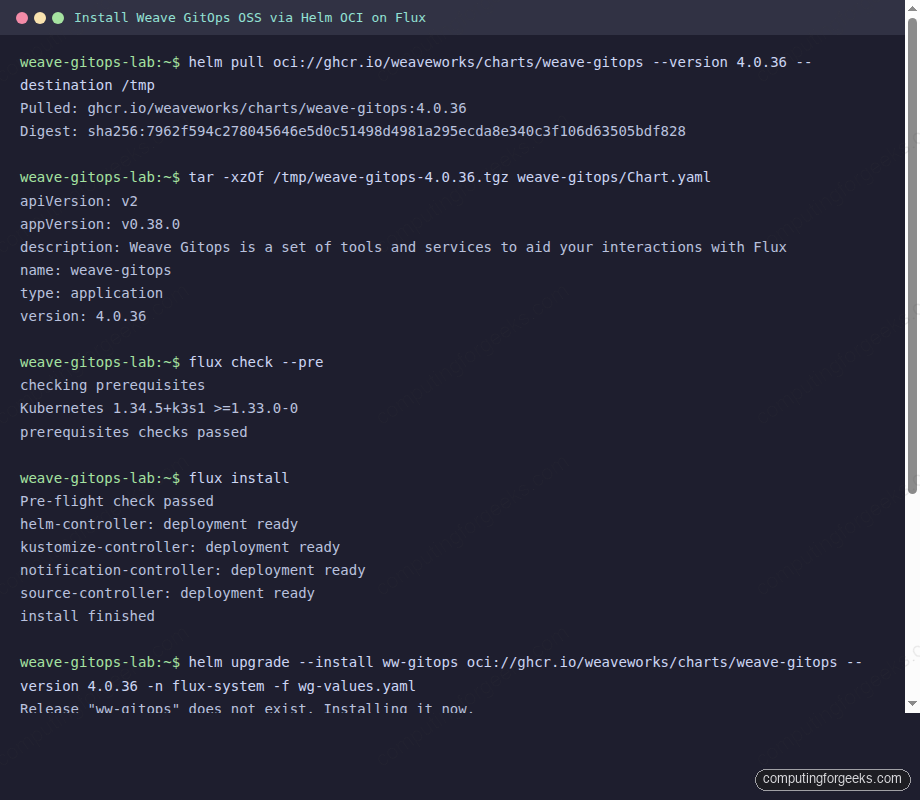
The full install + Flux preflight sequence captured during this article test:
Step 6: Reach the dashboard and log in
The Service is ClusterIP only. For local testing, port-forward and open http://localhost:9001:
kubectl -n flux-system port-forward svc/ww-gitops-weave-gitops 9001:9001 \
  --address 0.0.0.0
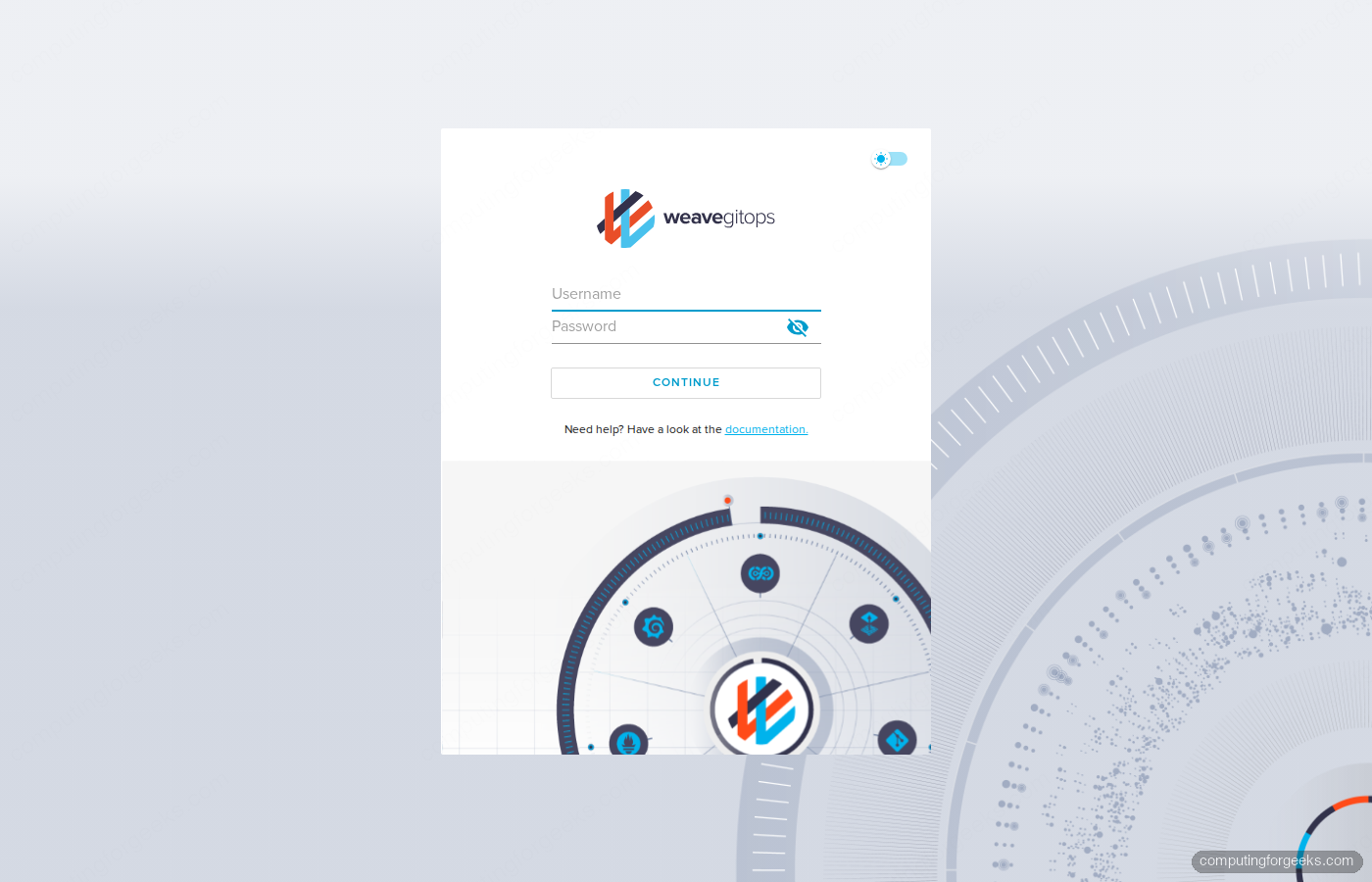
The login page renders with the Weave GitOps brand and a single username and password form. Sign in with admin and the password you set in step 5:
For production, swap the port-forward for an Ingress with TLS, or attach an OIDC provider via the chart’s oidcSecret values block. The OIDC integration still works in v0.38.0; we tested it against Keycloak earlier and the auth flow completed cleanly.
Step 7: Tell Flux to deploy something so the dashboard has data
An empty dashboard tells you nothing. Point Flux at the public podinfo repo and ask it to deploy the kustomize manifests under ./kustomize:
flux create source git podinfo \
  --url=https://github.com/stefanprodan/podinfo \
  --branch=master \
  --interval=1m \
  --export | kubectl apply -f -

flux create kustomization podinfo \
  --target-namespace=default \
  --source=GitRepository/podinfo \
  --path=./kustomize \
  --prune=true \
  --interval=5m \
  --health-check-timeout=2m \
  --wait=true \
  --export | kubectl apply -f -
Watch Flux clone, build, and apply the manifests. Within thirty seconds you should see two podinfo pods running:
flux get sources git
flux get kustomizations
kubectl -n default get pods,svc -l app=podinfo
Step 8: Tour the dashboard, and the bug you cannot ignore
Refresh the Applications view and you see the podinfo Kustomization sitting at Ready, with the source it was applied from and the revision SHA. That is the good half of Weave GitOps in one screen.
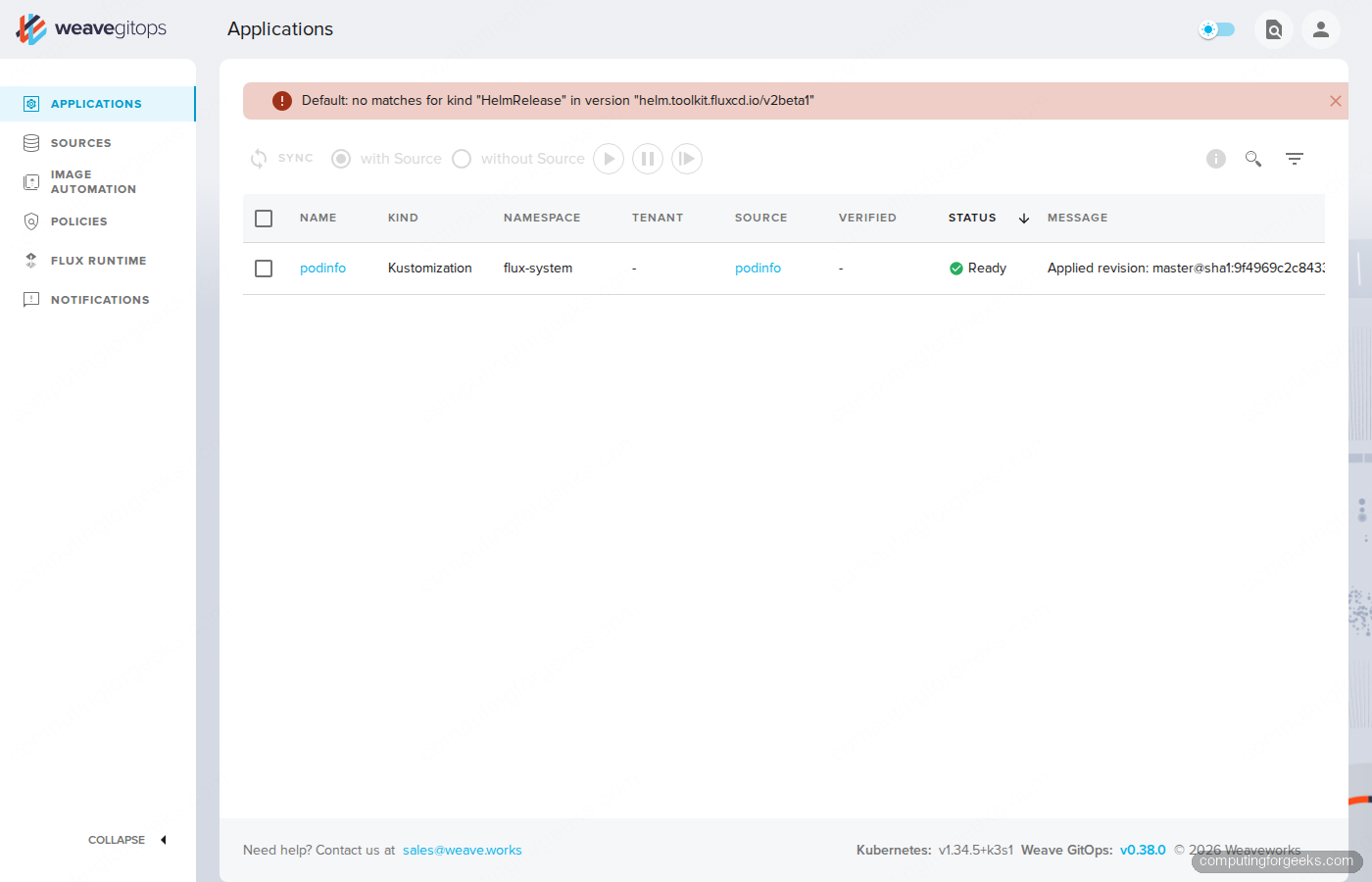
The red banner at the top is the bad half: Default: no matches for kind "HelmRelease" in version "helm.toolkit.fluxcd.io/v2beta1". Modern Flux only ships HelmRelease v2 (the stable API). Weave GitOps v0.38.0 was built when the API was still in beta, and the binary still asks the cluster for the v2beta1 kind. The list controllers find the GA version fine, but the dashboard cannot render any HelmRelease objects until somebody updates the binary. That update has not shipped in 17 months.
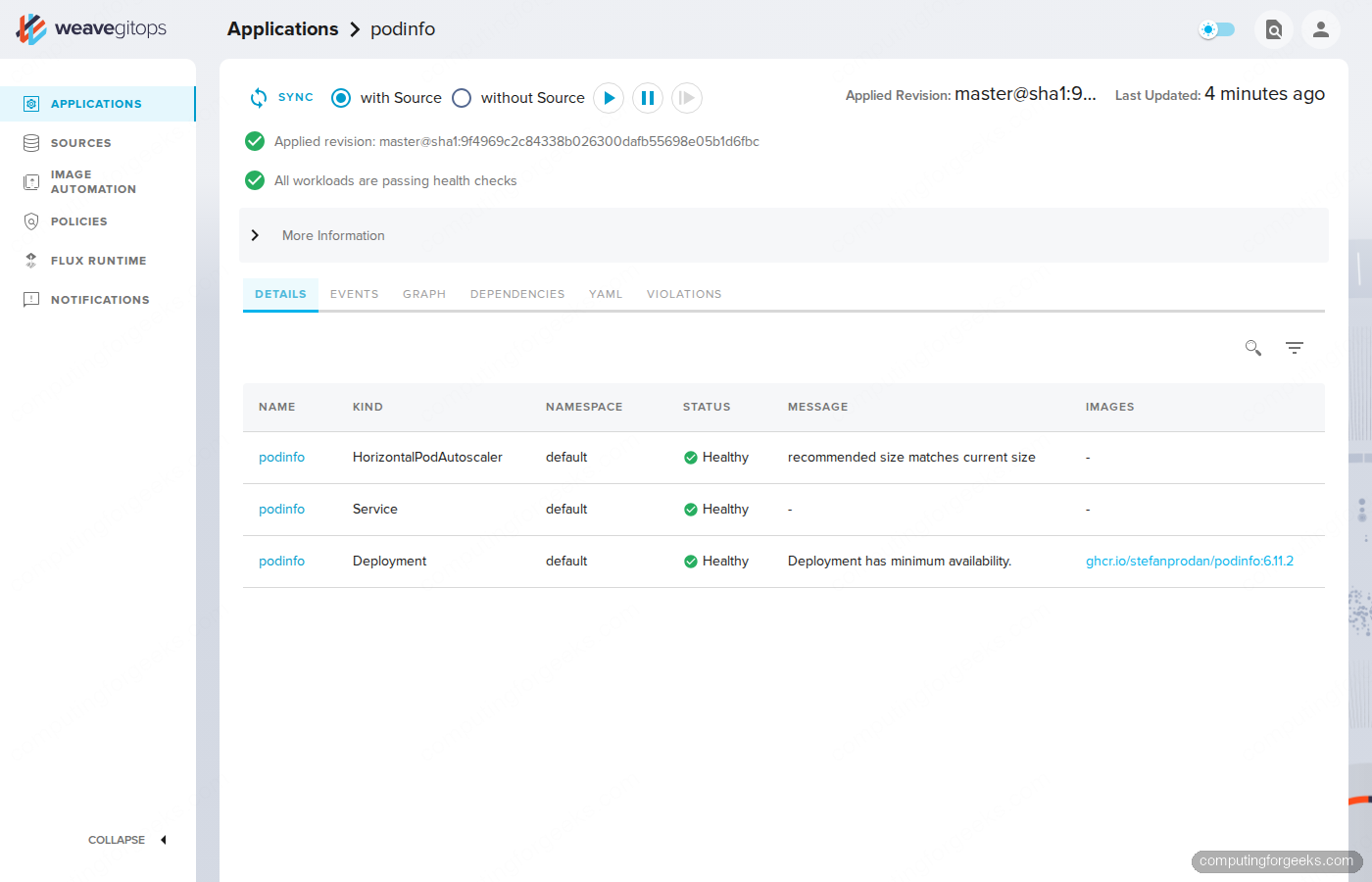
The Kustomization detail view is more useful. Click the podinfo row to see the full reconciliation status, the applied revision, every workload Flux deployed, and their individual health. This is the strongest reason teams keep Weave GitOps around: the per-Kustomization workload graph is genuinely better than running kubectl get all -l kustomize.toolkit.fluxcd.io/name=podinfo by hand.
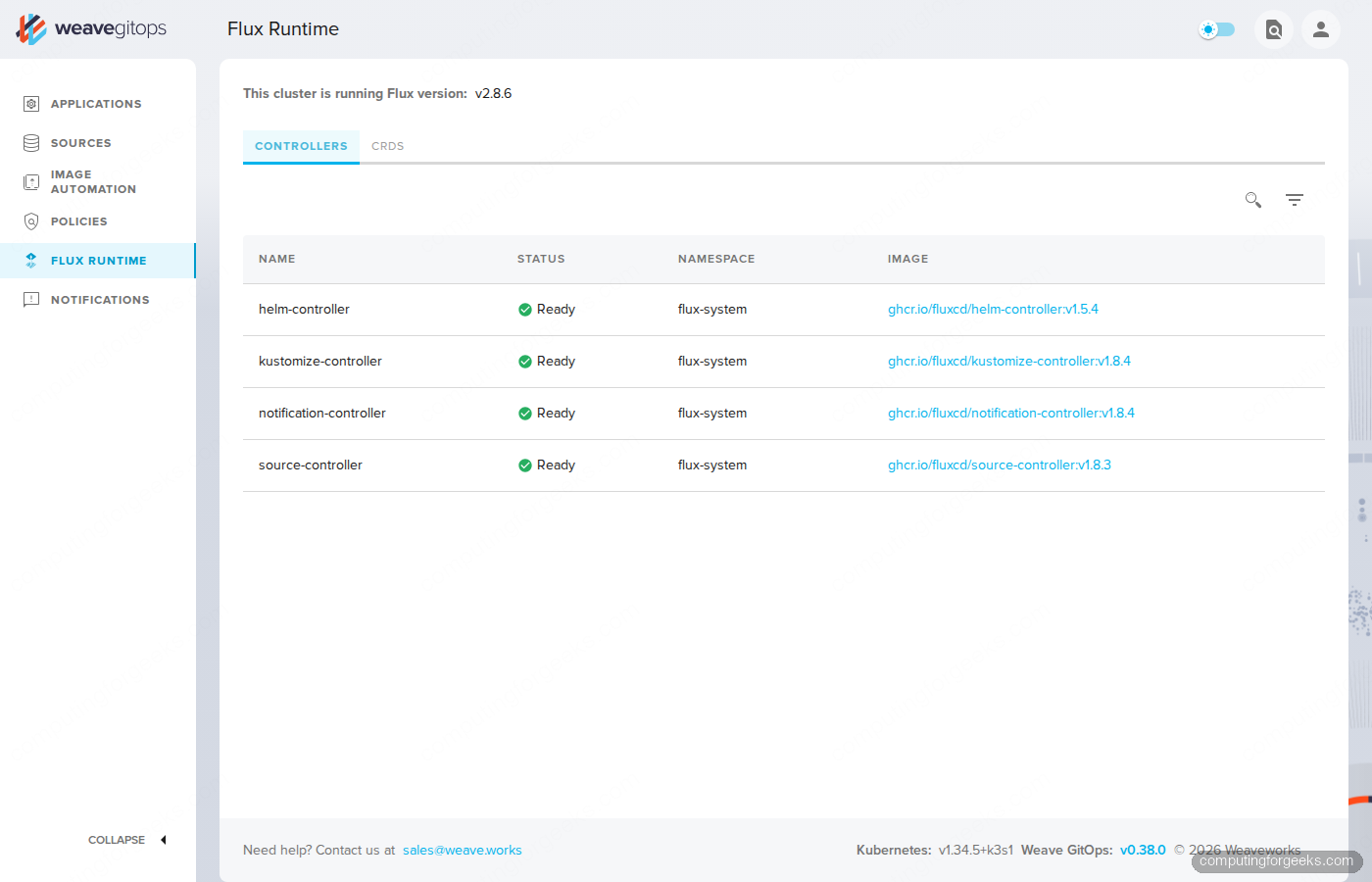
The Flux Runtime tab confirms the underlying engine. Helm, Kustomize, Notification, and Source controllers report Ready, with their image tags shown so you can audit drift between cluster and what the dashboard claims it is talking to.
What works, what is broken, what to expect on production Flux
Speaking from a freshly tested install, not a marketing page:
- Working: Sign-in flow, GitRepository sources, Kustomization detail with workload health, Flux Runtime view, sync triggers (the play, pause, sync buttons), the Sources list, simple navigation.
- Half-broken: HelmRelease rendering. The dashboard shows a permanent red error banner because it asks for the deprecated v2beta1 API. Helm releases still reconcile, but you cannot inspect them through the UI.
- Half-broken: Bucket sources. Same root cause, same v1beta2 API mismatch. S3 / GCS / MinIO sources work, the dashboard just refuses to display them.
- Stale: Image Automation, Policies, Notifications panels were all built around earlier API shapes. They render skeletons rather than data on a modern Flux install.
- Pinned to 2023: The Helm chart 4.0.36 still ships
appVersion: v0.38.0. The v0.39.1 release candidate that landed in January 2026 has not been promoted to a chart release four months later.
If you only run plain Kustomizations, Weave GitOps OSS is still useful as a read-only viewer. The moment you add a HelmRelease or a Bucket source, the experience degrades.
Multi-tenancy, RBAC, and what to set in values.yaml
Three knobs in the chart’s values.yaml matter beyond the admin user:
WEAVE_GITOPS_FEATURE_TENANCY=true(default true): enables the Tenants object so you can scope teams to namespaces.rbac.impersonationResourcesandimpersonationResourceNames: limit which users or groups the dashboard can impersonate. Production should NOT impersonate cluster-admin.oidcSecret.create=true: switch off the local admin path entirely and use your IdP. The localadminUseris meant for first-day testing only; it stores a bcrypt hash on a Kubernetes Secret, which is fine for a lab and a footgun in shared clusters.
Pair the OIDC settings with a TLS-terminating Ingress. The Argo CD with MetalLB and Nginx Ingress walkthrough covers the same Ingress + TLS setup pattern; the only Weave-specific change is the upstream Service name (ww-gitops-weave-gitops) and the port (9001).
Migration path: leave Weave GitOps without leaving GitOps
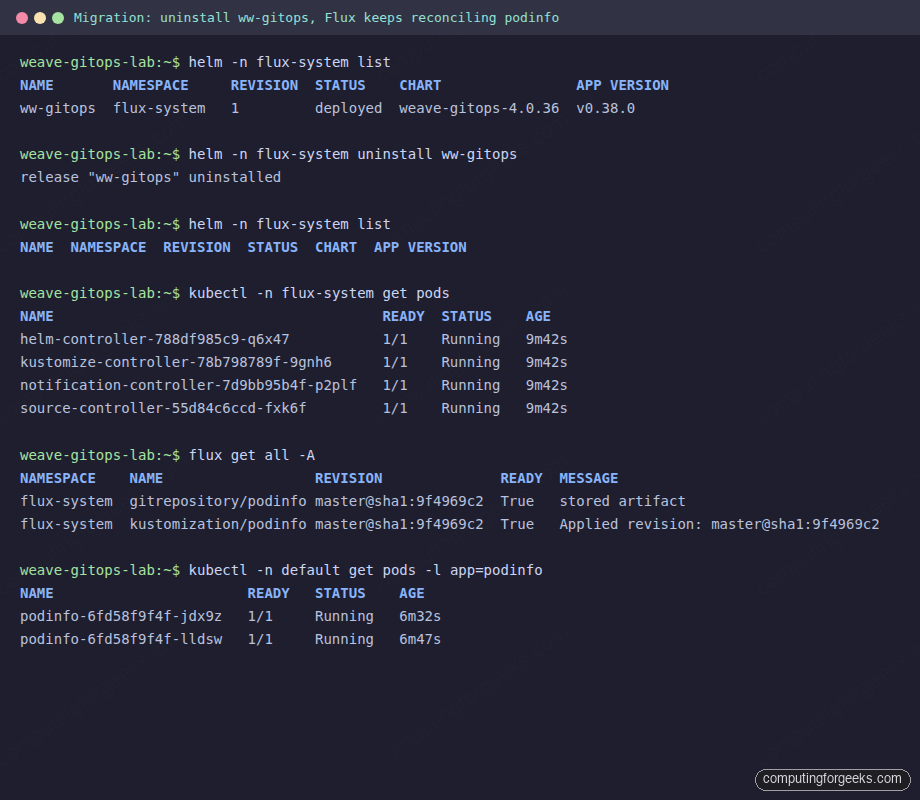
The clean part of this story is that Weave GitOps was always a UI layer, never the reconciler. helm uninstall removes the dashboard; Flux keeps reconciling without missing a beat. We tested this end-to-end:
helm -n flux-system list
helm -n flux-system uninstall ww-gitops
helm -n flux-system list

kubectl -n flux-system get pods
flux get all -A
kubectl -n default get pods -l app=podinfo
Flux controllers are still Running, the GitRepository is still Ready, the Kustomization is still applying revisions, and podinfo pods are still serving. The migration screenshot below is the proof from our test cluster:
You now have three options for replacing the dashboard, listed by the effort required to adopt them:
- The
fluxCLI alone.flux get all -Alists everything.flux eventsis the timeline.flux trace <resource>answers “where did this manifest come from in Git?”. For most operators this is enough. - Capacitor. A community-maintained Flux dashboard that renders the same data Weave GitOps did, with current API support. It is the closest drop-in replacement and the one most ex-Weave users land on.
- Argo CD. If you are willing to swap the reconciler too, Argo CD’s UI is more mature than anything in the Flux ecosystem. We have full install guides for Argo CD on Amazon EKS and Argo CD on GKE, plus a vanilla Argo CD install for any Kubernetes flavor. The ApplicationSet pattern is what most teams reach for after the basics.
Common errors and fixes from this lab
Error: Kubernetes version v1.31.5+k3s1 does not match >=1.33.0-0
Flux 2.8 requires Kubernetes 1.33 or newer. k3d’s default rancher/k3s tag still pulls 1.31. Pin a 1.34 or 1.33 image with --image rancher/k3s:v1.34.5-k3s1 when you create the cluster. Re-run flux check --pre after rebuilding.
Error: helm.gitops.weave.works TLS handshake failure
The official Helm chart repository is dead at the moment. Use the GHCR OCI URL: oci://ghcr.io/weaveworks/charts/weave-gitops. helm pull and helm upgrade both accept this address directly. No helm repo add needed.
Error: no matches for kind “HelmRelease” in version “helm.toolkit.fluxcd.io/v2beta1”
The dashboard binary calls a Flux API that has been removed. There is no working fix in the v0.38.0 image. The unreleased v0.39.1-rc.1 fixes part of this in source, but it has not been promoted to a stable Helm chart. Either ignore the banner if you only run Kustomizations, or move to Capacitor or Argo CD if HelmRelease visibility matters.
Error: kubectl port-forward fails with localhost:8080 EOF
This bites when you wrap port-forward in a systemd-run unit. The transient unit does not inherit your KUBECONFIG, so kubectl falls back to the default http://localhost:8080 address. Pass it explicitly with --setenv=KUBECONFIG=/root/.kube/config.
Verdict and decision matrix
If you are picking a GitOps stack today, do not start with Weave GitOps. The maintenance signal is clear and the API drift will keep growing. The decision matrix below summarizes who should reach for what:
| Situation | Recommendation |
|---|---|
| Greenfield Kubernetes platform, picking a GitOps tool today | Flux CD + Capacitor, OR Argo CD with ApplicationSet |
| Existing Flux + Weave GitOps install, only Kustomizations | Stay if it works for your team, watch the project quarterly |
| Existing Weave GitOps install, heavy HelmRelease use | Migrate to Capacitor or Argo CD, the v2beta1 bug will not be patched |
| Need image automation, multi-tenancy with policies, complex RBAC | Argo CD on EKS or GKE per the linked guides |
| Existing Argo CD shop, considering Weave GitOps | Stay on Argo CD |
The lab from this article tears down with one command: k3d cluster delete gitops-lab. The Helm chart, the Flux controllers, the podinfo workload, and the port-forward all vanish with the cluster. Run that, then make a clean choice based on the matrix above. The good news is that whatever you pick on top, Flux CD itself remains a healthy, CNCF-graduated reconciler, and that is the part that actually matters for production GitOps.