Linux kernel 7.1 is the mainline release Linus Torvalds tagged on June 14, 2026, and its headline change is a four-year rewrite of how Linux reads and writes NTFS. That alone would make this a release worth reading about, but 7.1 also flips Intel FRED on by default, speeds up Intel Arc and older AMD Radeon graphics, and finally retires i486 along with roughly 140,000 lines of legacy code. It is a feature release rather than a long-term-support one, so the interesting question is less “is it stable” and more “what actually changed, and does any of it matter for the machine in front of you”.
This guide walks the notable additions in Linux kernel 7.1 in order of how much they affect real systems: the new NTFS driver, the FRED switch, graphics and accelerator work, the big legacy-code removal, a Landlock security addition, and the quieter core-kernel changes. Everything here was checked against the 7.1 source tree and the mainline release notes in June 2026.
Linux kernel 7.1 at a glance
The merge window pulled in 12,996 non-merge changesets from 2,011 developers, 342 of whom were sending their first patch to the kernel. The release sits on top of the 7.0 series (the latest stable point release at the time was 7.0.12), and the next series, 7.2, opens its merge window immediately, with a stable 7.2 expected around late August 2026.
| Item | Detail |
|---|---|
| Released | June 14, 2026 (mainline) |
| Maintainer | Linus Torvalds |
| Changesets | 12,996 non-merge |
| Contributors | 2,011 developers (342 first-time) |
| Legacy code removed | over 140,000 lines |
| Support model | Stable series (not LTS); LTS remains 6.18 and 6.12 |
| Next release | Linux 7.2, expected late August 2026 |
A new NTFS driver, four years in the making
The biggest single change in 7.1 is a brand-new in-kernel NTFS filesystem, often called NTFSplus and enabled through the NTFS_FS build option. Linus called it the “NTFS resurrection”, and the name fits: it is a clean implementation that took about four years to land, complete with full write support, a conversion to the kernel’s iomap layer, delayed allocation, and folio integration. A new userspace toolset, ntfsprogs-plus, ships alongside it for formatting and checking volumes.
What’s actually happening here is a performance and correctness story. Writing to NTFS from Linux has historically meant either the user-space ntfs-3g driver (correct but slow, because it runs through FUSE) or the in-kernel NTFS3 driver that arrived in 5.15 (faster, but with a thin maintenance bench). The new driver moves NTFS onto the same modern I/O machinery the kernel uses for its native filesystems, so large writes batch properly instead of trickling block by block. For anyone who dual-boots Windows and Linux and shares a data partition between them, this is the change that will be felt day to day.
The older NTFS3 driver is still present in 7.1, so nothing breaks on upgrade. The two coexist while the new driver proves itself, and most distributions will pick the default for you. If you want to confirm which driver mounted a volume, mount and dmesg will tell you after the partition is attached.
Intel FRED is now on by default
FRED stands for Flexible Return and Event Delivery, and in 7.1 it switches from opt-in to opt-out on hardware that supports it. Earlier kernels needed a fred=on boot parameter; now the kernel enables it automatically unless you turn it off. The delay was deliberate, holding the default back until shipping silicon could be tested thoroughly.
The mechanism here is a redesign of how the CPU hands control to the kernel on interrupts, exceptions, and system calls. The legacy x86 path for these transitions carries decades of accumulated complexity, and FRED replaces it with a cleaner, faster model. This matters because the cost shows up on every entry into the kernel, so workloads that cross the user-kernel boundary constantly benefit the most. On Intel Core Ultra Series 3 “Panther Lake” chips, I/O-heavy work like databases, networking services, and audio processing should see the clearest gains.
Faster graphics and accelerator offload
Graphics work in 7.1 is spread across both major open drivers. Intel’s Arc “Battlemage” cards, including the consumer B580 and the Arc Pro B-series, get real performance improvements. On the AMD side, the driver adds support for SMU 15.0.8 and DCN 4.2 display hardware, and there is continued attention to older Radeon GPUs rather than only the newest parts.
Beyond the GPU, Intel’s QuickAssist (QAT) accelerators gain Zstd compression offload: Gen4 and Gen5 parts get basic Zstd support, while Gen6 can handle native Zstd compression and decompression. For storage and networking boxes that lean on hardware compression, that moves a CPU-bound task onto dedicated silicon.
Retiring i486 and cutting 140,000 lines of legacy code
Linux 7.1 begins retiring the Intel i486 by dropping its build options, the M486, M486SX, and ELAN sub-architecture choices, with the remaining code scheduled to come out carefully over later cycles. That is one piece of a much larger cleanup, which across the release totals more than 140,000 lines. The key insight is that this is maintenance debt, not capability: code for hardware nobody runs anymore still has to compile, still has to be tested, and still gets in the way of changes to the parts people do use.
The removals reach well past the CPU. PCMCIA host-controller drivers are gone, along with the ATM networking stack, the ax25 amateur-radio stack, ISDN, the Bluetooth CMTP profile, and the CAIF subsystem. On other architectures, RISC-V drops its execute-in-place support for lack of users and a maintainer. None of this affects a modern 64-bit desktop, server, or even most current 32-bit ARM boards; it is the long tail of hardware that has aged out of the kernel.
Landlock gains control over UNIX sockets
On the security side, Landlock adds a new access right that governs connecting to pathname-based UNIX domain sockets. Landlock lets an unprivileged process voluntarily sandbox itself, declaring up front what it is allowed to touch, and until now its rules covered files and a handful of network operations but not these local sockets. This matters because pathname UNIX sockets are how a lot of local services talk to each other (think a database socket or a container runtime), so a sandboxed process can now be told exactly which of them it may reach.
The NFS server also picks up cryptographically signed file handles, which protect against clients guessing handle values to reach files they were never given, a small but meaningful hardening of network file serving.
Core kernel and memory management
Several changes land deeper in the kernel where they rarely make headlines but quietly improve behavior:
- The extensible scheduler class (sched_ext) gains the start of sub-scheduler support, a step toward running a custom CPU scheduler per control group rather than one policy for the whole system.
- The swap subsystem continues a modernization that removes the old swap map, aiming for lower memory use and better performance under pressure.
- DAMON, the kernel’s data-access monitor, can now apply multiple tuning algorithms for proactive memory management.
- Tracing gains “remote ring buffers”, which make it possible to pull trace data out of virtual machines and other external sources.
- A long-standing leak where dying control groups pinned memory indefinitely is fixed, so folios no longer keep a dead cgroup alive.
New hardware and architecture support
For all the code it removed, 7.1 still enables plenty of new silicon. Twelve new SoCs join the tree, including Qualcomm’s Glymur, Mahua, Eliza, and IPQ5210, Rockchip’s RV1103B, and Arm’s Zena and Corstone-1000-A320. Laptop and handheld users get useful fixes too: the Steam Deck OLED has working audio, and Apple Silicon Macs gain battery-level reporting.
Other architectures see targeted work as well. LoongArch gains high-memory support so 32-bit machines can address more RAM, Alpha picks up seccomp(), and on the virtualization side KVM adds the Arm vGIC version 5 interrupt controller plus early anonymous-memory isolation for protected guests.
Should you move to Linux 7.1?
For most people the honest answer is “when your distribution ships it”. Rolling releases like Arch and fast-moving distributions like Fedora will pick up 7.1 quickly, while Ubuntu 26.04 currently ships the 7.0 series and Debian stable will stay on its packaged kernel. Production servers should usually stay on a long-term-support kernel (6.18 or 6.12) unless a specific 7.1 feature or a newer-hardware driver is the reason to move.
If you do want it sooner, you have two routes. The simpler one is installing a prebuilt mainline kernel package for your distribution, covered in the guides for installing a newer kernel on Ubuntu, on Debian, and on Rocky Linux and AlmaLinux. The other is to compile it yourself from the kernel.org source, which is the only way to get a fully custom configuration. Either way, you can confirm what you are running afterward by checking the kernel version from the command line.
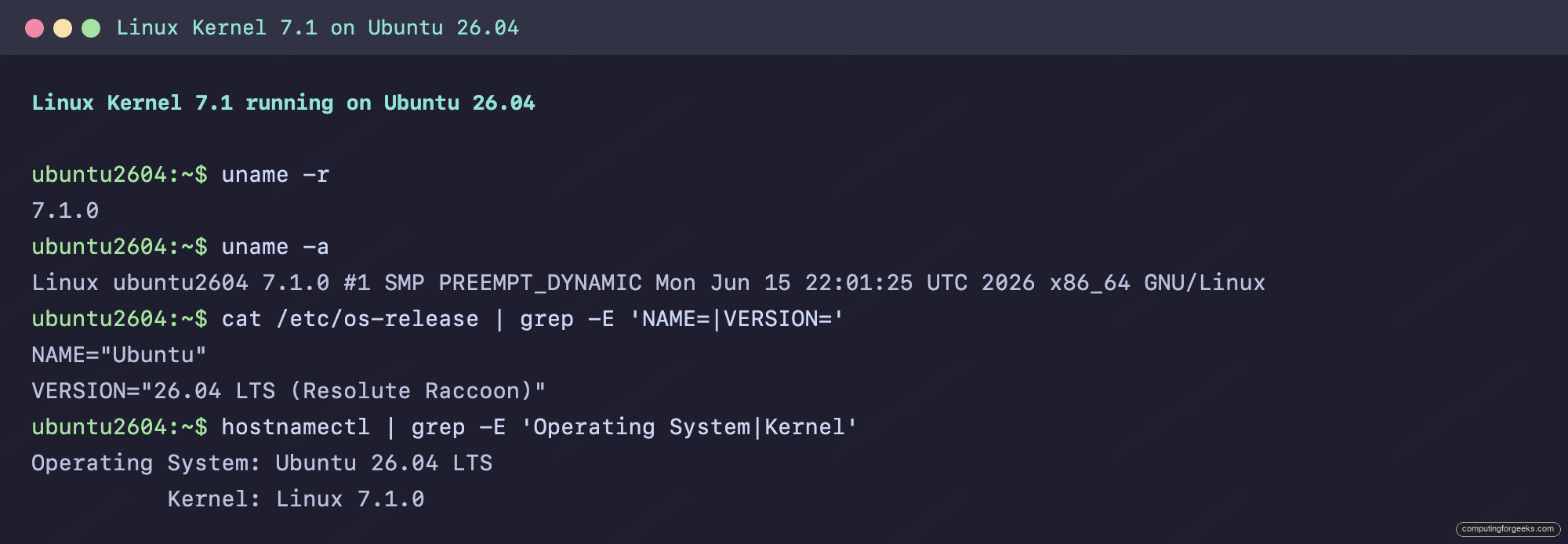
For reference, here is Linux 7.1 built from source and booted on an Ubuntu 26.04 test machine, with uname -r reporting the new version:
Common misconceptions about Linux 7.1
A few things about this release are easy to misread, so it helps to clear them up.
The version jump is not a big-bang rewrite. Linux switched from 6.x to 7.0 because the minor number got uncomfortably large, the same reason 4.x became 5.0 and 5.x became 6.0. There is no architectural break between 6.x and 7.x; the numbering is cosmetic.
The new NTFS driver does not delete NTFS3. Both drivers ship in 7.1. The new one is the future, but the existing NTFS3 code is still there, so an upgrade will not strand a mounted Windows partition.
Retiring i486 does not affect 64-bit systems. It targets a 1989-era 32-bit x86 CPU family and its sub-architecture, starting with the build options in this release. If you are on any 64-bit machine, or even a reasonably modern 32-bit ARM board, none of it applies to you.
7.1 is not a long-term-support kernel. It is a normal stable series that will get point releases for a while and then hand off. If you need years of maintenance on one version, stay on 6.18 or 6.12.