Qdrant exposes the same operations through two protocols. REST lives on port 6333 and is what every browser, every curl one-liner, and every monitoring dashboard speaks. gRPC lives on port 6334 and is what production services reach for when latency budgets are tight. Both share the same storage, the same query semantics, and the same auth model. The question is which one to use where and how to wire them up correctly. If you are running Python on the client side, a recent Python install on Ubuntu is the only base requirement; the SDK pulls everything else.
This guide walks the full surface area on a real Qdrant 1.18.1 cluster with API key auth enabled. Every command was executed against a live node, every latency number is a real measurement, and every gotcha came up during testing. By the end you will have working REST examples with curl, a Python async client, a native Python gRPC stub, and a Go client running against the same data.
Tested May 2026 on Ubuntu 24.04.4 LTS with Qdrant 1.18.1, qdrant-client 1.18.0, Go 1.22.2, grpcio 1.80.
When to pick REST vs gRPC
The two protocols are not interchangeable in performance characteristics. REST goes over HTTP/1.1 with JSON bodies. Every request opens (or reuses) a TCP+TLS connection, serializes JSON, and parses JSON on the way back. gRPC rides HTTP/2 with binary protobuf payloads, multiplexes many calls on one connection, and avoids JSON entirely.
| Concern | REST | gRPC |
|---|---|---|
| Wire format | JSON over HTTP/1.1 | protobuf over HTTP/2 |
| Default port | 6333 | 6334 |
| Connection cost | One per request unless pooled | Multiplexed on one stream |
| Browser-friendly | Yes (Web UI uses REST) | No (needs gRPC-Web proxy) |
| Tooling | curl, Postman, any HTTP lib | Generated stubs only |
| Latency (single read) | Higher (JSON + new HTTP/1.1 RTT) | Lower (binary + warm stream) |
| Throughput (concurrent) | Good with HTTP/1.1 keep-alive | Excellent (single stream, many calls) |
Use REST for ad-hoc exploration, dashboards, debugging from a shell, and any service that needs to be language-agnostic. Use gRPC for ingestion services that push millions of points, latency-sensitive inference paths, and Go or Rust callers that prefer typed clients over JSON wrangling.
Cluster setup with API key auth
The test cluster runs Qdrant 1.18.1 in Docker on a single Ubuntu 24.04 host, listening on both ports with an API key enforced. Replicate this on your own box before running the examples:
mkdir -p /opt/qdrant/storage /opt/qdrant/snapshots
sudo chown -R 1000:1000 /opt/qdrant

sudo docker run -d --name qdrant --restart=always \
  -p 6333:6333 -p 6334:6334 \
  -e QDRANT__SERVICE__API_KEY=mySecretApiKey-2026 \
  -v /opt/qdrant/storage:/qdrant/storage \
  -v /opt/qdrant/snapshots:/qdrant/snapshots \
  qdrant/qdrant:v1.18.1
Once the container is up, prove that the API key is actually enforced. A request without the header gets rejected, the same request with it goes through:
curl -o /dev/null -w "HTTP=%{http_code}\n" \
    http://localhost:6333/collections
# HTTP=401

curl -o /dev/null -w "HTTP=%{http_code}\n" \
    -H "api-key: mySecretApiKey-2026" \
    http://localhost:6333/collections
# HTTP=200
The same key authorizes both protocols. On REST the key travels in the api-key HTTP header. On gRPC it travels in metadata under the same key name. There is no separate password file or token issuer.
Collections: create, list, get, delete via REST
Pin the values that repeat across every command into shell variables. Change them in one place and paste the rest as-is:
export API="http://localhost:6333"
export KEY="mySecretApiKey-2026"
export H_AUTH="-H api-key: ${KEY}"
export H_JSON="-H Content-Type: application/json"
Create a collection with a single 384-dim Cosine vector:
curl -sS -X PUT "${API}/collections/docs" \
  -H "api-key: ${KEY}" -H "Content-Type: application/json" \
  -d '{"vectors": {"size": 384, "distance": "Cosine"}}' | jq
The response confirms the create with an operation status. The wall time is measured by the server, not the client:
{
  "result": true,
  "status": "ok",
  "time": 0.267212598
}
List collections, then inspect the new one. Notice that get_collection returns the full config including shard count and on-disk-payload flag, which are useful when you inherit a cluster you did not build:
curl -sS -H "api-key: ${KEY}" "${API}/collections" | jq
curl -sS -H "api-key: ${KEY}" "${API}/collections/docs" \
  | jq '{status:.result.status, points_count:.result.points_count, config:.result.config.params}'
The detail call answers three questions at once: is the collection healthy (status), how big is it (points_count), and what does its config say (vector size, distance, shard count). Use this in monitoring scripts.
Points: upsert, batch, retrieve, delete via REST
Upsert sends one or more points in a single request. Pass wait=true when you need synchronous indexing, omit it when you are streaming bulk loads. Each point carries an id, a vector, and an optional payload:
curl -sS -X PUT "${API}/collections/docs/points?wait=true" \
  -H "api-key: ${KEY}" -H "Content-Type: application/json" \
  -d '{
    "points": [
      {"id": 1, "vector": [0.13, 0.84, ... 384 floats ...],
       "payload": {"title": "Intro to vectors", "category": "basics", "price": 0}},
      {"id": 2, "vector": [...],
       "payload": {"title": "HNSW deep dive", "category": "index", "price": 29}},
      {"id": 3, "vector": [...],
       "payload": {"title": "Filter cookbook", "category": "filters", "price": 19}}
    ]
  }' | jq
Qdrant returns an operation id you can use to poll asynchronous status. With wait=true the response only comes back after indexing is committed:
{
  "result": {"operation_id": 1, "status": "completed"},
  "status": "ok",
  "time": 0.019022392
}
One real ceiling worth knowing: the REST endpoint rejects payloads larger than 32 MiB. A 5,000-point batch of 384-dim float vectors plus a payload comes out to roughly 37 MB of JSON and fails with JSON payload (37314329 bytes) is larger than allowed (limit: 33554432 bytes). Batch in groups of 1,000 instead, which is well under the limit and gives you backpressure to apply.
Retrieve specific points by id, then count exact totals:
curl -sS -X POST "${API}/collections/docs/points" \
  -H "api-key: ${KEY}" -H "Content-Type: application/json" \
  -d '{"ids": [1, 2, 3], "with_payload": true, "with_vector": false}' | jq

curl -sS -X POST "${API}/collections/docs/points/count" \
  -H "api-key: ${KEY}" -H "Content-Type: application/json" \
  -d '{"exact": true}' | jq
Delete by filter is one of the operations that surprise newcomers. Instead of building an id list yourself, hand Qdrant a payload filter and let the server enumerate the matches. The example below drops every point with price under 20:
curl -sS -X POST "${API}/collections/docs/points/delete?wait=true" \
  -H "api-key: ${KEY}" -H "Content-Type: application/json" \
  -d '{"filter": {"must": [{"key": "price", "range": {"lt": 20}}]}}' | jq
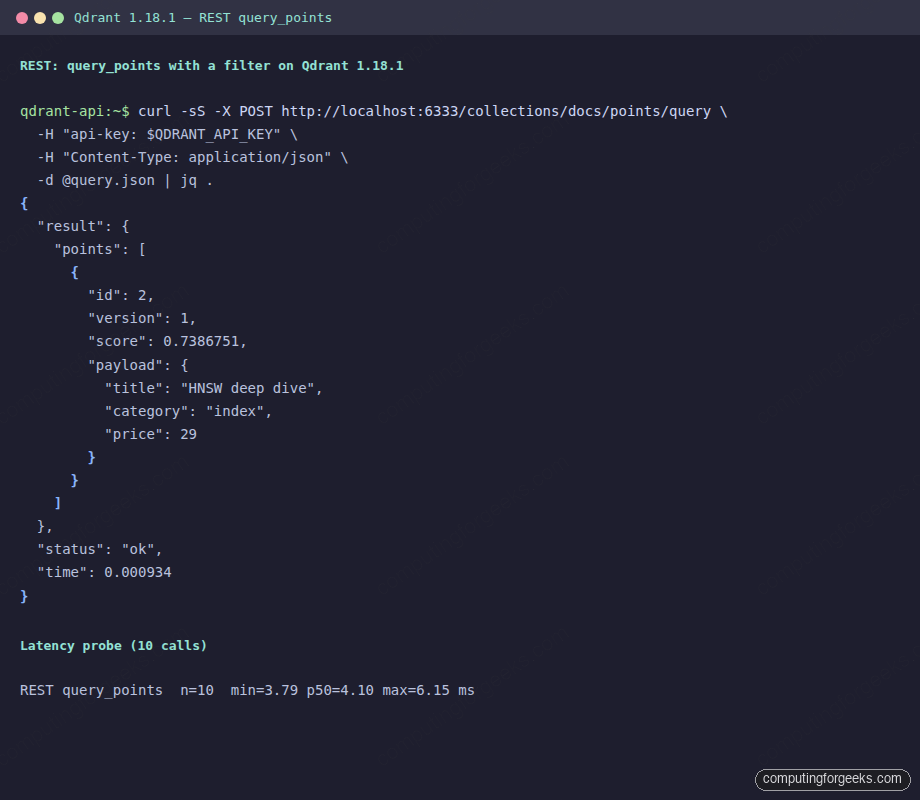
A real query call from the same shell, with payload-only response shape and a 10-call latency probe, looks like this on the terminal:
Search with query_points (the modern API)
The query_points endpoint replaces the older /search endpoint. It accepts a vector, a filter, a limit, and optional payload/vector inclusion flags. The response wraps results inside .result.points[], not directly in .result[], which is the first jq path mistake to catch:
curl -sS -X POST "${API}/collections/docs/points/query" \
  -H "api-key: ${KEY}" -H "Content-Type: application/json" \
  -d '{
    "query": [... 384 floats ...],
    "limit": 3,
    "with_payload": true,
    "filter": {"must": [{"key": "category", "match": {"value": "index"}}]}
  }' | jq '.result.points[] | {id, score, payload}'
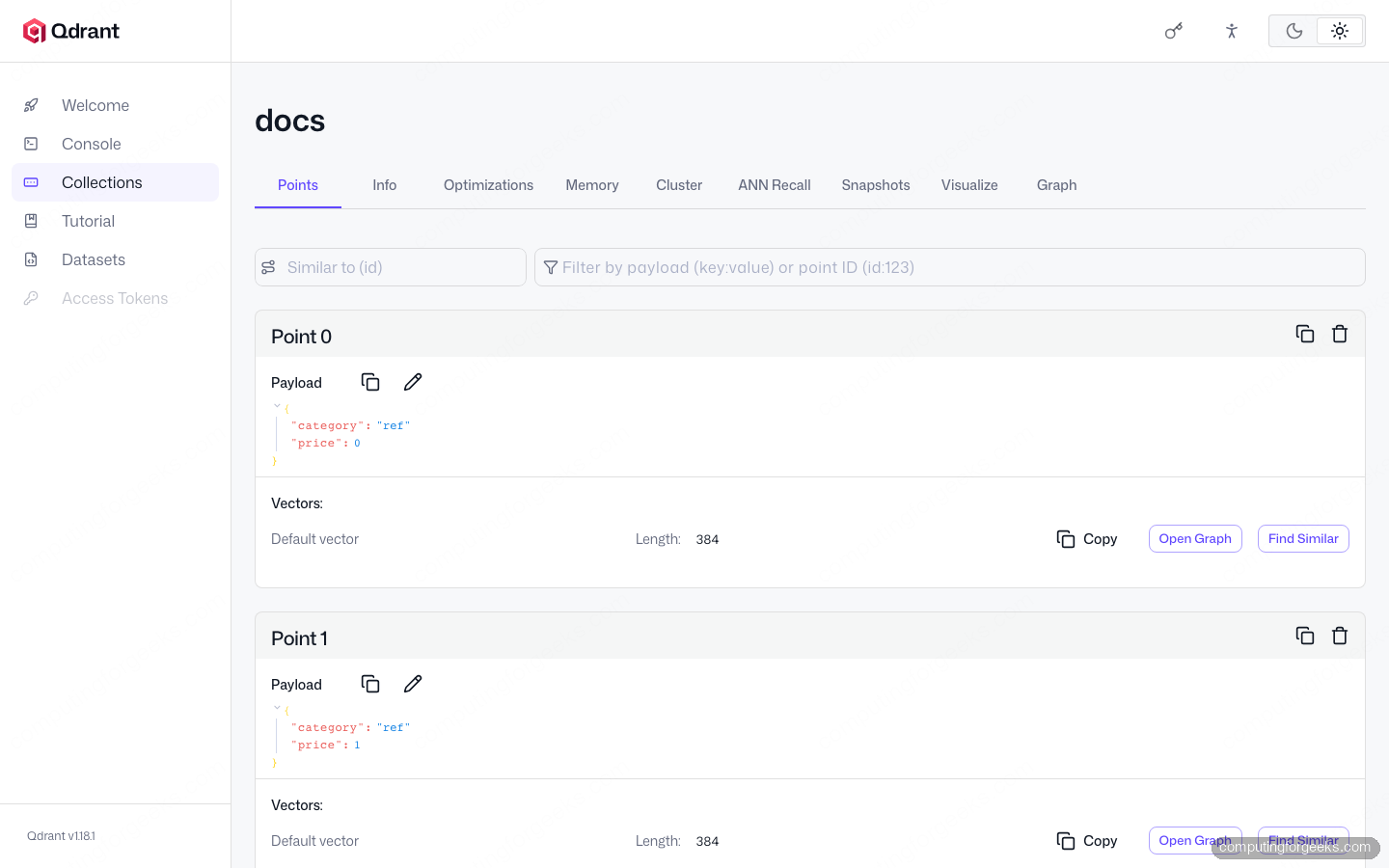
The Qdrant Web UI Console reaches the same endpoint with the same body. Open http://<host>:6333/dashboard/#/console, enter the API key when prompted, paste the request and hit RUN. The Console is the fastest way to debug a filter that returns zero results without leaving the browser:
The other read endpoint is scroll, which paginates through a collection without a vector. Use it when you need to dump points, run a backfill, or sample for testing. limit caps the page size, and the response includes a next_page_offset you pass back to keep going:
curl -sS -X POST "${API}/collections/docs/points/scroll" \
  -H "api-key: ${KEY}" -H "Content-Type: application/json" \
  -d '{"limit": 10, "with_payload": true, "with_vector": false}' | jq
Snapshots and cluster status via REST
Trigger a snapshot of one collection, then list existing snapshots. The name is generated by the server and includes a timestamp, so save it from the create response if you intend to download it later:
SNAP=$(curl -sS -X POST "${API}/collections/docs/snapshots" \
  -H "api-key: ${KEY}" | jq -r '.result.name')
echo "snapshot=$SNAP"

curl -sS -H "api-key: ${KEY}" "${API}/collections/docs/snapshots" | jq
The cluster endpoint reports whether distributed mode is on. A single-node deployment returns "status": "disabled" which is normal and not an error. For a multi-node setup it returns peer ids and consensus state:
curl -sS -H "api-key: ${KEY}" "${API}/cluster" | jq
{
  "result": {"status": "disabled"},
  "status": "ok",
  "time": 0.000002499
}
Python async REST client with real timing
For application code the Python client wraps both protocols. The async variant (AsyncQdrantClient) speaks REST over HTTPX, gives you proper async/await semantics, and lets asyncio.gather fan out concurrent calls. Install it with the gRPC extras so you can switch protocols by flag:
python3 -m venv venv && source venv/bin/activate
pip install "qdrant-client>=1.18.0"
Below is the benchmark used to produce the timing numbers in this guide. It seeds a collection with 5,000 random points (in 1,000-point batches to stay under the 32 MiB JSON cap), then times 100 sequential query_points calls over REST async and 100 over gRPC sync against the same data:
import asyncio, random, statistics, time
from qdrant_client import AsyncQdrantClient, QdrantClient, models

API_KEY = "mySecretApiKey-2026"
random.seed(7)
QUERY = [round(random.random(), 4) for _ in range(384)]

async def bench_rest_async():
    c = AsyncQdrantClient(url="http://localhost:6333", api_key=API_KEY)
    times = []
    for _ in range(100):
        t0 = time.perf_counter()
        await c.query_points(collection_name="docs", query=QUERY, limit=5)
        times.append((time.perf_counter() - t0) * 1000)
    await c.close()
    return times

def bench_grpc_sync():
    c = QdrantClient(host="localhost", grpc_port=6334,
                     prefer_grpc=True, https=False, api_key=API_KEY)
    times = []
    for _ in range(100):
        t0 = time.perf_counter()
        c.query_points(collection_name="docs", query=QUERY, limit=5)
        times.append((time.perf_counter() - t0) * 1000)
    c.close()
    return times
The https=False flag is mandatory whenever you talk gRPC to a Qdrant that has TLS disabled. The client otherwise defaults to https when an api_key is set, which produces a TLS handshake error against a plain HTTP/2 listener (Tls handshake failed: SSL_ERROR_SSL: WRONG_VERSION_NUMBER). This is the second gotcha worth knowing.
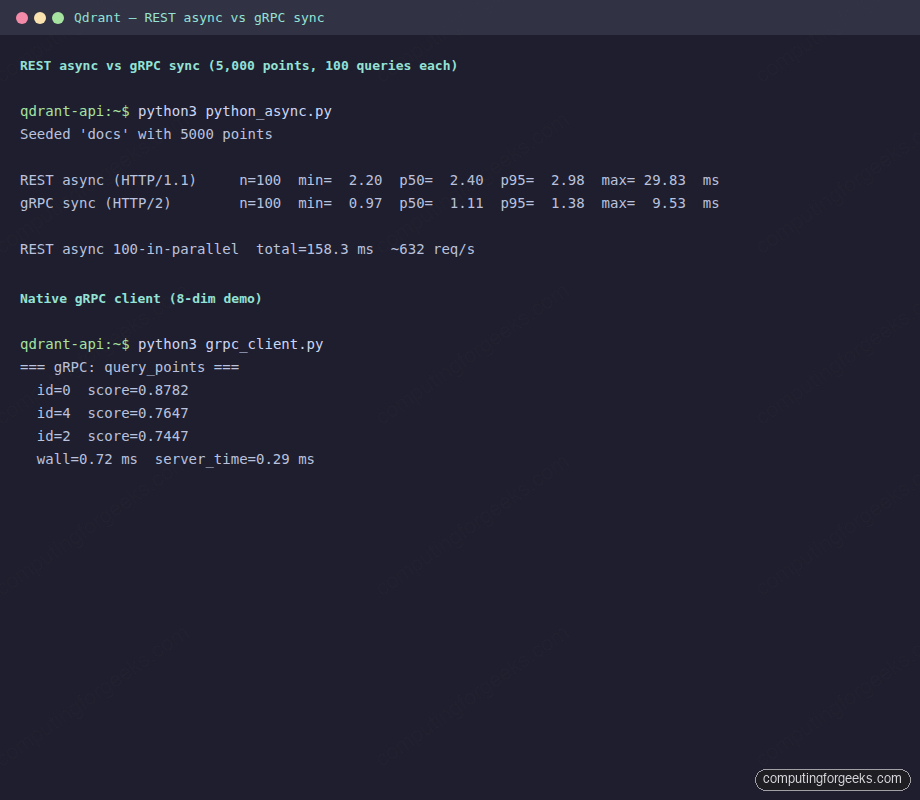
Run the benchmark and the timing speaks for itself. gRPC is roughly 2x faster on a single read at the p50, and the gap widens at p95:
Seeded 'docs' with 5000 points

REST async (HTTP/1.1)     n=100  min=  2.20  p50=  2.40  p95=  2.98  max= 29.83  ms
gRPC sync (HTTP/2)        n=100  min=  0.97  p50=  1.11  p95=  1.38  max=  9.53  ms

REST async 100-in-parallel  total=158.3 ms  ~632 req/s
Two takeaways. First, for a single read REST is fine: 2.4 ms at the median is invisible to a human and acceptable for almost any web request. Second, with HTTP/1.1 keep-alive and async fan-out, REST still delivers 632 req/s of pure search throughput from one Python process, which is enough for most production read paths.
Native Python gRPC client (no wrapper)
For low-level work the qdrant-client package ships the generated protobuf stubs. Importing them directly bypasses the high-level wrapper and gives you raw RPC calls. You need this when you want full control over channel options, deadlines, or when you are integrating into an existing gRPC service mesh:
import grpc
from qdrant_client.grpc import (
    CollectionsStub, ListCollectionsRequest, CreateCollection,
    DeleteCollection, VectorsConfig, VectorParams, Distance,
    PointsStub, UpsertPoints, PointStruct, PointId, Vectors, Vector,
    QueryPoints, Query, VectorInput, DenseVector, Value,
)

API_KEY = "mySecretApiKey-2026"
META = [("api-key", API_KEY)]

channel = grpc.insecure_channel("localhost:6334")
collections = CollectionsStub(channel)
points = PointsStub(channel)

collections.Create(
    CreateCollection(
        collection_name="grpc_demo",
        vectors_config=VectorsConfig(
            params=VectorParams(size=8, distance=Distance.Cosine),
        ),
    ),
    metadata=META,
)
The query call uses the same nested-message structure protobuf demands. Note VectorInput(dense=DenseVector(data=q_vec)): a dense vector wraps in DenseVector, not plain Vector. Mixing them up produces TypeError: Parameter to initialize message field must be dict or instance of same class: expected DenseVector got Vector which is the third real gotcha you only meet at runtime:
q_vec = [0.33, 0.95, 0.04, 0.41, 0.55, 0.82, 0.16, 0.71]
qr = points.Query(
    QueryPoints(
        collection_name="grpc_demo",
        query=Query(nearest=VectorInput(dense=DenseVector(data=q_vec))),
        limit=3,
    ),
    metadata=META,
)
for r in qr.result:
    print(f"  id={r.id.num}  score={r.score:.4f}")
print(f"server_time={qr.time*1000:.2f} ms")
Real output from the cluster shows the server reporting a 0.29 ms processing time and the client measuring 0.72 ms of wall time. The gap is the gRPC layer doing its work over loopback. On a real network the gap widens but the ratio of REST to gRPC stays roughly the same.
Go gRPC client with the official SDK
The Go client wraps the same generated stubs with a tighter ergonomic surface. Initialize a module and pull the SDK:
mkdir qdrant-go && cd qdrant-go
go mod init qdrant-go-demo
go get github.com/qdrant/go-client/qdrant@latest
The full client below creates a collection, upserts 5 points with mixed payload types (string + float), then queries with payload included. The UseTLS: false field is the Go-side equivalent of Python’s https=False:
package main

import (
    "context"
    "fmt"
    "math/rand"
    "time"

    "github.com/qdrant/go-client/qdrant"
)

func main() {
    ctx, cancel := context.WithTimeout(context.Background(), 15*time.Second)
    defer cancel()

    client, _ := qdrant.NewClient(&qdrant.Config{
        Host: "localhost", Port: 6334,
        APIKey: "mySecretApiKey-2026", UseTLS: false,
    })
    defer client.Close()

    _ = client.DeleteCollection(ctx, "go_demo")
    client.CreateCollection(ctx, &qdrant.CreateCollection{
        CollectionName: "go_demo",
        VectorsConfig: qdrant.NewVectorsConfig(&qdrant.VectorParams{
            Size: 8, Distance: qdrant.Distance_Cosine,
        }),
    })

    rng := rand.New(rand.NewSource(42))
    pts := make([]*qdrant.PointStruct, 5)
    for i := range pts {
        v := make([]float32, 8)
        for j := range v { v[j] = rng.Float32() }
        pts[i] = &qdrant.PointStruct{
            Id:      qdrant.NewIDNum(uint64(i)),
            Vectors: qdrant.NewVectors(v...),
            Payload: qdrant.NewValueMap(map[string]any{
                "category": fmt.Sprintf("c%d", i%3),
                "price":    float64(i) * 9.99,
            }),
        }
    }
    wait := true
    client.Upsert(ctx, &qdrant.UpsertPoints{
        CollectionName: "go_demo", Points: pts, Wait: &wait,
    })

    qVec := []float32{0.61, 0.12, 0.95, 0.37, 0.55, 0.07, 0.82, 0.23}
    t0 := time.Now()
    res, _ := client.Query(ctx, &qdrant.QueryPoints{
        CollectionName: "go_demo",
        Query:          qdrant.NewQuery(qVec...),
        Limit:          qdrant.PtrOf(uint64(3)),
        WithPayload:    qdrant.NewWithPayload(true),
    })
    for _, r := range res {
        fmt.Printf("  id=%v score=%.4f payload=%v\n",
            r.GetId().GetNum(), r.GetScore(), r.GetPayload())
    }
    fmt.Printf("wall=%.2f ms\n", float64(time.Since(t0).Microseconds())/1000.0)
}
Run it with go run main.go. The output captures real query results from the cluster with each point’s id, score, and payload, plus the wall-clock latency for the call:
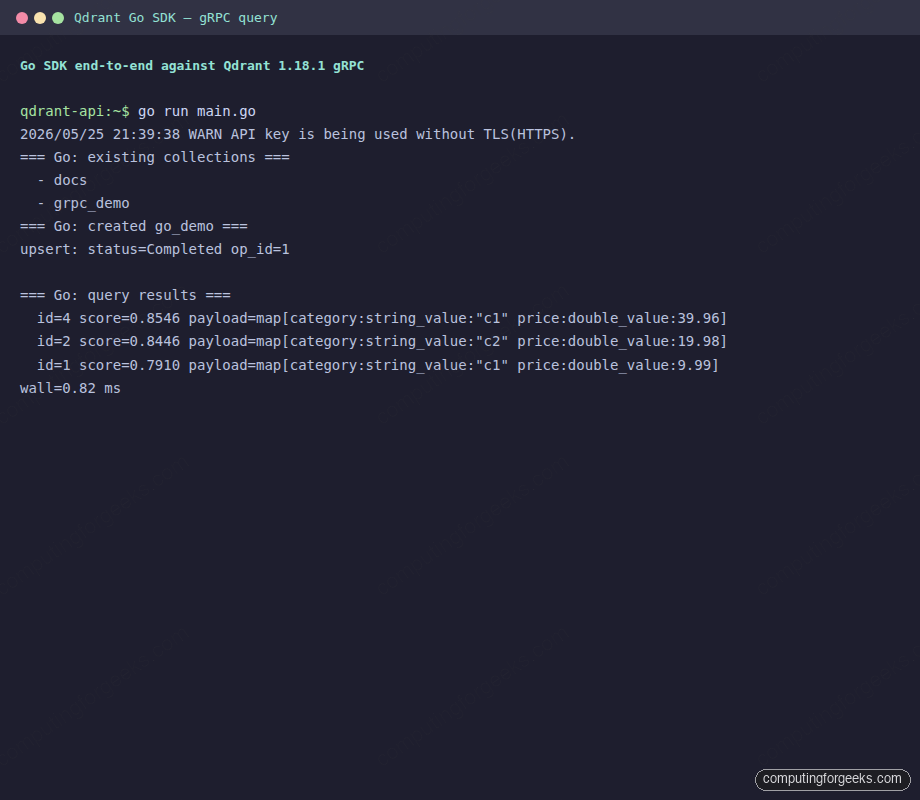
The Go SDK warns at startup if API key is used over a non-TLS channel. That warning is informational only on a localhost-bound test cluster, but it is a real concern in production. Always pair API key auth with TLS in any environment outside your laptop.
Retry pattern and backpressure
Network calls fail. The pattern that holds up in production is a short retry loop with exponential backoff plus jitter, scoped only to transient classes of error. Client errors (4xx) must never retry: they are bugs in your request, and hammering Qdrant with the same broken payload only fills logs.
import random, time
from qdrant_client import QdrantClient
from qdrant_client.http.exceptions import ResponseHandlingException, UnexpectedResponse

def with_retry(fn, *, attempts=5, base_delay=0.1, max_delay=5.0):
    transient = (ResponseHandlingException, ConnectionError)
    for i in range(attempts):
        try:
            return fn()
        except UnexpectedResponse as exc:
            if exc.status_code < 500:
                raise   # 4xx are client errors, do not retry
            if i == attempts - 1:
                raise
        except transient:
            if i == attempts - 1:
                raise
        sleep = min(max_delay, base_delay * (2 ** i))
        sleep += random.uniform(0, sleep * 0.25)  # jitter
        time.sleep(sleep)
The wrapper covers the realistic failure modes: Qdrant returning a 503 during a planned restart, a transient connection reset under load, or a TCP RST from a Kubernetes pod eviction. It avoids the trap of retrying a 404 (the collection genuinely does not exist) or a 400 (the body is malformed).
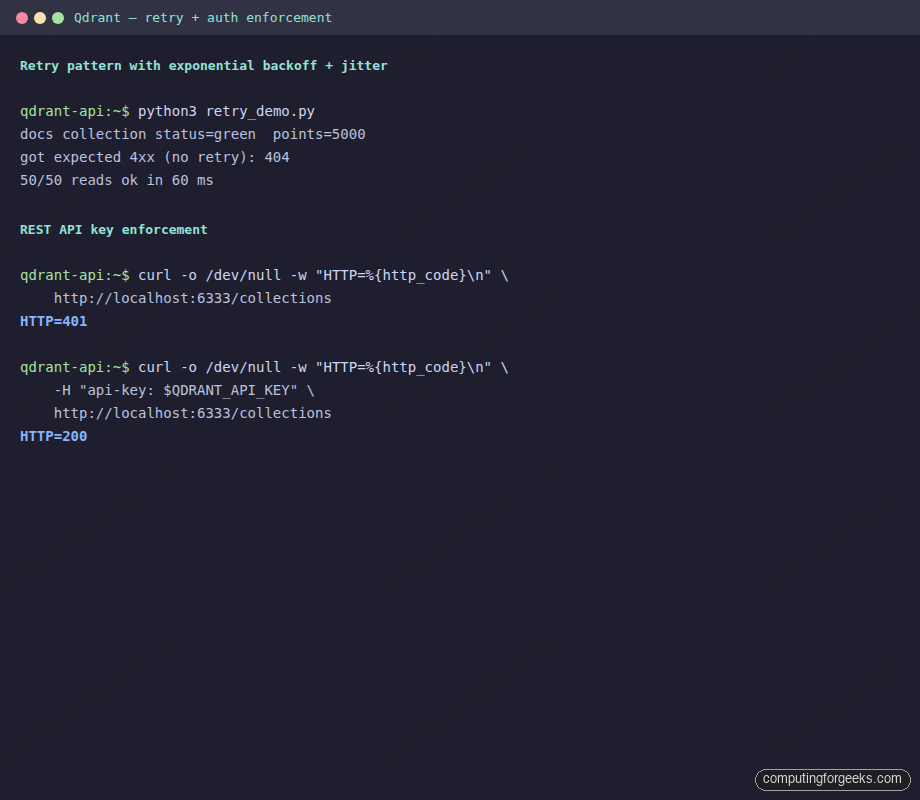
For rate limiting Qdrant itself does not implement per-key quotas. You either front it with an L7 proxy (Envoy, Nginx limit_req) when you need quota enforcement, or you implement client-side concurrency caps. The simplest cap is an asyncio.Semaphore sized to roughly twice your cluster’s CPU count, which keeps queue depth bounded without underutilizing the nodes.
Gotchas worth remembering
Five real traps showed up during testing. Each one cost time to diagnose and none of them are obvious from the docs:
- 32 MiB REST payload cap. Bulk upserts over JSON hit this around 5,000 points of 384-dim vectors. Batch in groups of 1,000 or switch to gRPC for large ingestion runs. The error message is precise (
JSON payload (37314329 bytes) is larger than allowed) but the limit is not visible in any documentation header. - gRPC client defaults to TLS when an api_key is set. The Python client raises a TLS handshake error against a plain HTTP/2 listener unless you pass
https=False. The Go SDK has the matchingUseTLS: falsefield. Both warn that auth-without-TLS is insecure, which is true on a production link and ignorable on localhost. VectorInputneedsDenseVector, notVector. When you use the native gRPC stubs fromqdrant_client.grpc, queries takeVectorInput(dense=DenseVector(data=...)). The bareVectortype is for upsert points. The error surfaces only at runtime as a protobuf type mismatch.query_pointswraps results inside.result.points[]. jq filters that worked on the older/searchendpoint break here. The older endpoint nested results directly under.result. The new one adds apointswrapper to leave room for grouped or fused result sets in future calls.- The Web UI Console uses a
/dashboard/baseURL. Requests typed into the Console route through a proxy that prepends/dashboard/, so a curl request that works from the shell will 404 when pasted verbatim into the Console. The Console quietly rewrites the path for you when you skip the leading slash on the verb line. Both behaviors are correct, just opposite, which catches everyone the first time.
Choosing between protocols, one decision at a time
Most teams end up using both. REST handles operational work (curl from runbooks, dashboards, browser-based debugging). gRPC handles the read path of latency-sensitive services. Three concrete rules of thumb that hold up:
- If the caller is a browser or a shell script, REST. Always.
- If the caller is a Go or Rust service whose hot path includes a Qdrant lookup, gRPC. The 2x latency saving compounds across a request fan-out.
- If the caller is a Python or Node.js service, default to REST and only switch to gRPC if profiling shows Qdrant in the top three sources of tail latency. The maintenance cost of generated stubs and channel management is real, and a 1 ms saving in the median rarely justifies it.
The protocols share storage, security, and semantics. The choice is purely about wire-format ergonomics versus tail latency, and every Qdrant cluster you ever touch will let you pick per-caller without code changes to the server. For an end-to-end example that ties REST queries into an Ollama LLM, see our self-hosted RAG walkthrough, which uses the same payload shapes against pgvector and translates one-for-one to Qdrant.