Qdrant is the open source vector database that powers semantic search and RAG retrieval for a growing share of self hosted AI stacks. If you are new to dense retrieval as an idea, the vector search vs traditional search explainer covers the why. Rocky Linux 10 and AlmaLinux 10 are the two RHEL 10 rebuilds most teams reach for when they want a stable, SELinux enforcing host. This guide installs Qdrant on either distribution two ways: Docker CE for the canonical path, and rootless Podman for teams that prefer the daemonless, RHEL native container engine.
We tested every command in this guide on a freshly cloned Rocky Linux 10.1 cloud image with SELinux in enforcing mode throughout. The same steps apply to AlmaLinux 10 because both share the RHEL 10 package ecosystem. We hit two genuine Rocky 10 gotchas while writing this and we cover both: a kernel module mismatch that stops Docker from starting on a fresh cloud image, and the user namespace plus SELinux double label that rootless Podman requires for bind mounts. Companion code lives at c4geeks/qdrant/install-rocky, and the canonical reference for any flag in this article is the official Qdrant documentation.
Before you begin
You will need the following:
- A Rocky Linux 10 or AlmaLinux 10 host with at least 2 GB of RAM and a couple of GB of disk for the storage volume.
- A non root user with
sudorights. Cloud images ship with therockyuser already inwheel. - Network access to
github.com(Qdrant releases),download.docker.com(Docker CE repo), and your distro mirrors. - Two free TCP ports:
6333for the REST API and Web UI,6334for gRPC. - SELinux left in enforcing mode. The whole point of using Rocky or Alma is to keep it that way.
Refresh the package index and install a couple of helpers we will use throughout:
sudo dnf -y install dnf-plugins-core curl jqMethod 1: Install Qdrant with Docker CE
Docker CE is the path most teams take because the upstream Qdrant image is what you would run in any other environment. It also happens to be officially supported on RHEL 10, which means Rocky and Alma work without any workaround.
Step 1: Add the Docker CE repo and install
Pull in the official Docker repo for RHEL and install the engine plus the Compose plugin:
sudo dnf config-manager --add-repo \
  https://download.docker.com/linux/rhel/docker-ce.repo
sudo dnf -y install docker-ce docker-ce-cli containerd.io \
  docker-buildx-plugin docker-compose-plugin
docker --version
You should see Docker 29.x installed along with a kernel-modules-extra-matched-* package. Note the version of that package because the next step depends on it:
Step 2: Fix the kernel mismatch before starting Docker
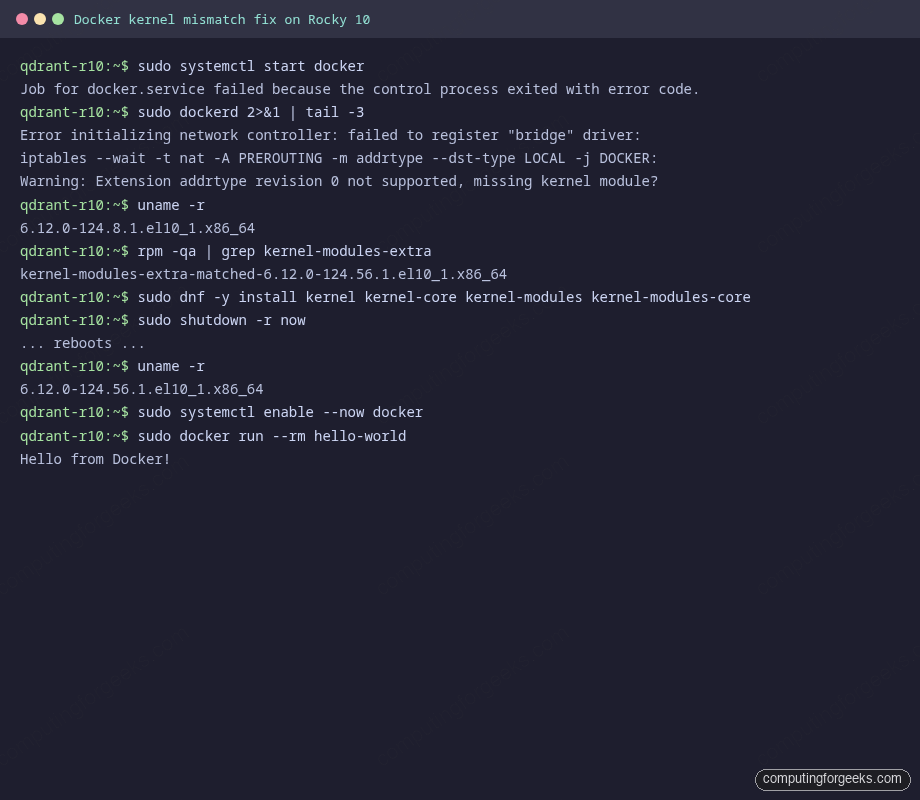
Rocky 10 and Alma 10 cloud images ship with an older kernel than the one Docker’s kernel-modules-extra-matched package expects. If you try to start the daemon right after install, you will see this:
sudo dockerd 2>&1 | tail -3
# Error initializing network controller: failed to register "bridge" driver:
# iptables --wait -t nat -A PREROUTING -m addrtype --dst-type LOCAL -j DOCKER:
# Warning: Extension addrtype revision 0 not supported, missing kernel module?
The fix is to install the kernel that matches the modules package, then reboot:
uname -r
# 6.12.0-124.8.1.el10_1.x86_64  (old kernel still running)

rpm -qa | grep kernel-modules-extra
# kernel-modules-extra-matched-6.12.0-124.56.1.el10_1.x86_64  (newer modules)

sudo dnf -y install kernel kernel-core kernel-modules kernel-modules-core
sudo shutdown -r now
After the reboot, confirm you are on the new kernel and bring up Docker for real:
uname -r
# 6.12.0-124.56.1.el10_1.x86_64

sudo systemctl enable --now docker
sudo docker run --rm hello-world
The full kernel mismatch and recovery looks like this in one terminal session:
Skip this step on a fresh install and you will lose an hour chasing the daemon logs. Almost no Qdrant on Rocky tutorial covers it because they were written before the matched modules package landed.
Step 3: Run Qdrant with the correct SELinux mount label
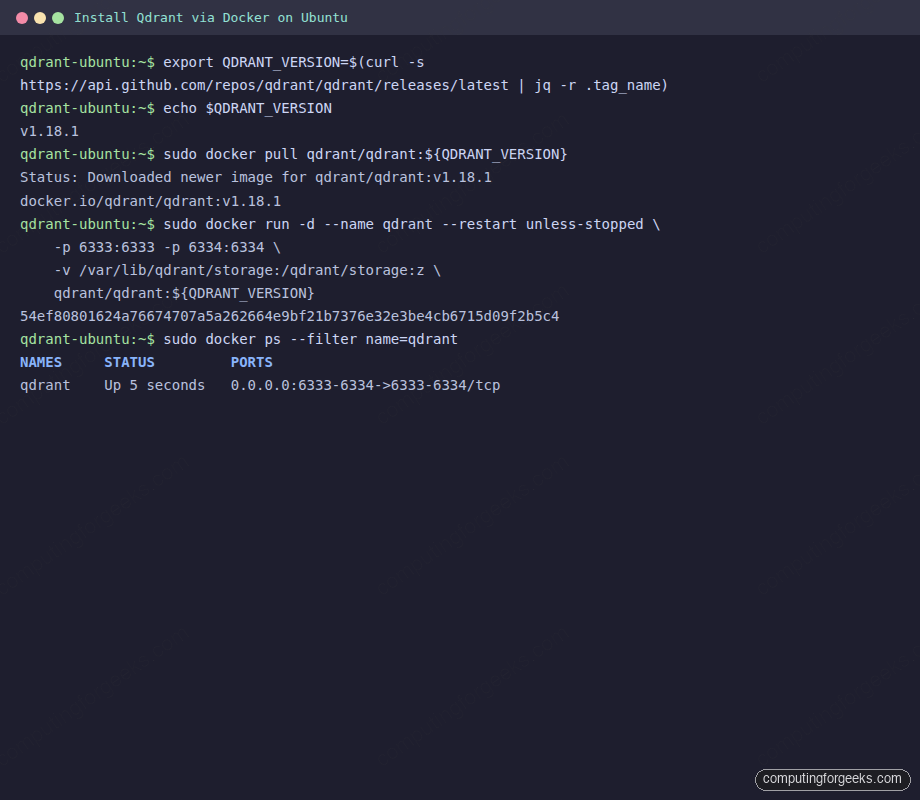
Detect the latest Qdrant release into a shell variable, create the storage directory, and start the container. The :z flag at the end of the volume mount is the SELinux relabel directive. It tells Docker to relabel the host directory so the container can read and write to it under enforcing mode:
export QDRANT_VERSION=$(curl -s https://api.github.com/repos/qdrant/qdrant/releases/latest | jq -r .tag_name)
echo $QDRANT_VERSION  # v1.18.1 at the time of writing

sudo mkdir -p /var/lib/qdrant/storage

sudo docker run -d \
  --name qdrant \
  --restart unless-stopped \
  -p 6333:6333 -p 6334:6334 \
  -v /var/lib/qdrant/storage:/qdrant/storage:z \
  qdrant/qdrant:${QDRANT_VERSION}  # https://github.com/qdrant/qdrant/releases
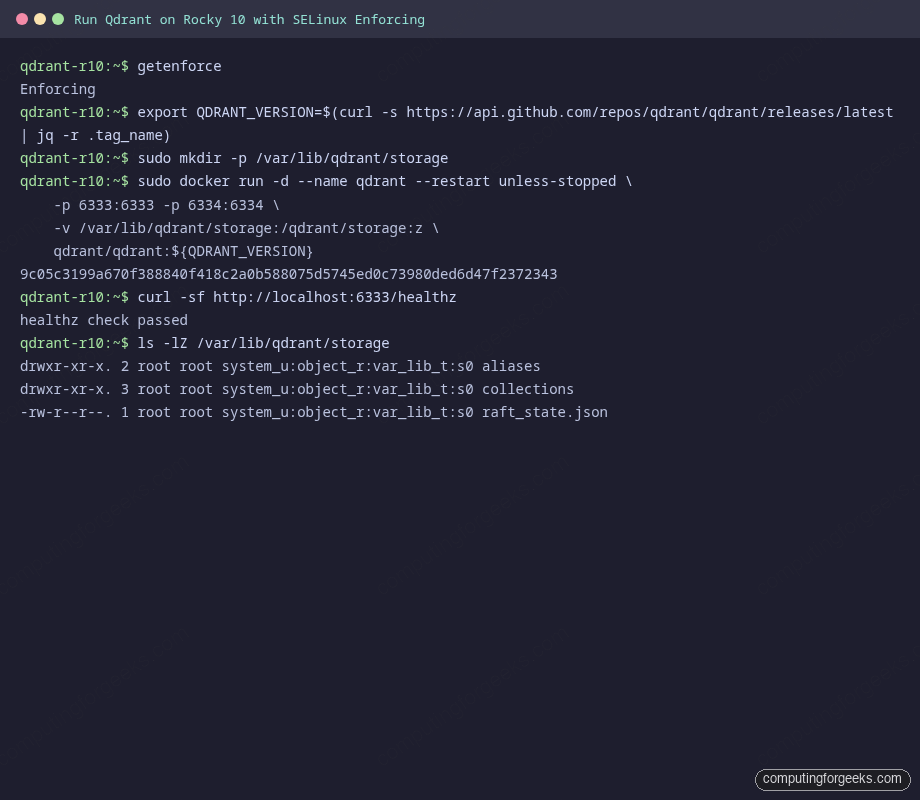
Verify the container is up, the health endpoint responds, and the storage directory ended up with the right SELinux context after the relabel:
getenforce                                  # Enforcing
curl -sf http://localhost:6333/healthz       # healthz check passed
ls -lZ /var/lib/qdrant/storage               # system_u:object_r:var_lib_t:s0
That terminal session, end to end:
One nuance worth knowing about: Docker CE on Rocky runs container processes under the spc_t (super privileged container) SELinux type, which is effectively unconfined for bind mounts. Files written by the container land with var_lib_t labels after the :z relabel, but the process itself is not blocked by SELinux from reaching most paths. That changes the moment you switch to Podman, which is the next section.
Method 2: Rootless Podman (RHEL native)
Podman is the daemonless container engine that ships in the Rocky and Alma base repos. Rootless Podman runs containers under your unprivileged user, with full SELinux confinement under the container_t type. That confinement is the point. It also catches a class of bind mount mistakes that Docker silently allows. For a Podman primer on Rocky and AlmaLinux, our install Podman and Buildah on Rocky 10 guide covers the basics.
Step 1: Install Podman
Podman is one dnf install away on Rocky 10. The base repo ships Podman 5.6.0 at the time of writing:
sudo dnf -y install podman
podman --version
# podman version 5.6.0
Step 2: The first rootless run will fail (and that is useful)
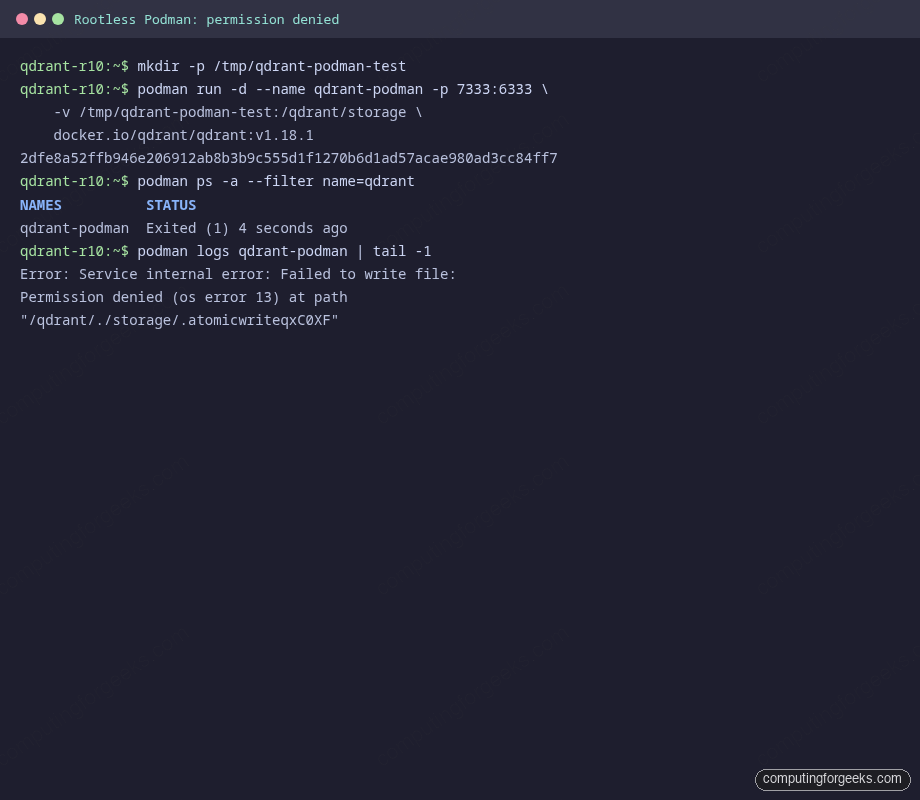
Podman enforces fully qualified image names, so use docker.io/qdrant/qdrant:<tag> not the short form. Start a rootless container with a plain bind mount and watch it fail in a very specific way:
mkdir -p /tmp/qdrant-podman-test
podman run -d --name qdrant-podman \
  -p 7333:6333 \
  -v /tmp/qdrant-podman-test:/qdrant/storage \
  docker.io/qdrant/qdrant:v1.18.1

podman ps -a --filter name=qdrant
# qdrant-podman   Exited (1) 4 seconds ago

podman logs qdrant-podman | tail -1
# Error: Service internal error: Failed to write file:
# Permission denied (os error 13) at path "/qdrant/./storage/..."
The container exits because the Qdrant process inside runs as a non root UID that does not match the host directory owner. Rootless Podman remaps user IDs through a sub UID range, so the container’s UID 1000 does not equal the host’s UID 1000:
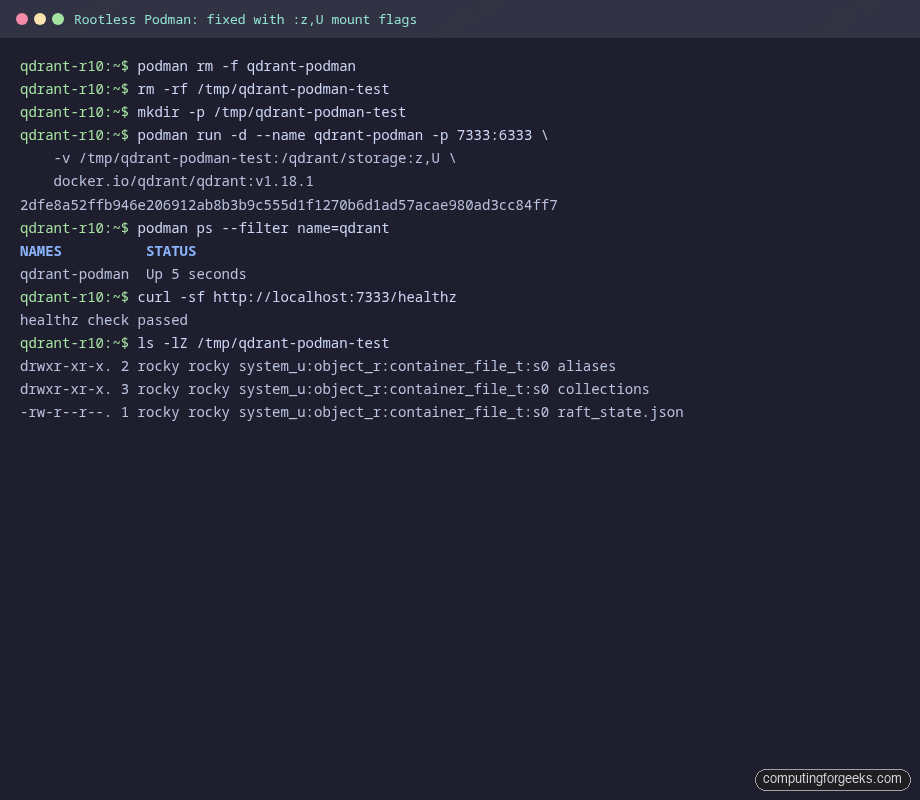
Step 3: Fix it with the :z,U mount flags
Two flags fix this. :z relabels the directory for SELinux (same as Docker), and :U chowns the directory to the user namespace UID Podman maps inside the container. Use them together for any rootless bind mount:
podman rm -f qdrant-podman
rm -rf /tmp/qdrant-podman-test
mkdir -p /tmp/qdrant-podman-test

podman run -d --name qdrant-podman \
  -p 7333:6333 \
  -v /tmp/qdrant-podman-test:/qdrant/storage:z,U \
  docker.io/qdrant/qdrant:v1.18.1

curl -sf http://localhost:7333/healthz
# healthz check passed

ls -lZ /tmp/qdrant-podman-test
# system_u:object_r:container_file_t:s0  (correct SELinux label)
# rocky rocky                            (correct UID after :U chown)
The before and after looks like this in one terminal:
For a real systemd managed rootless setup, generate a Quadlet unit at ~/.config/containers/systemd/qdrant.container and let the user systemd instance handle restarts and logging. The companion repo has a working Quadlet template.
Open the firewall (without breaking Docker)
The Rocky 10 cloud image does not ship firewalld by default. If your security policy requires it, install and configure it now. The default zone is public, which is what you want for a bastion or VPS deployment:
sudo dnf -y install firewalld
sudo systemctl enable --now firewalld
firewall-cmd --get-default-zone     # public

sudo firewall-cmd --permanent --add-port=6333/tcp
sudo firewall-cmd --permanent --add-port=6334/tcp
sudo firewall-cmd --reload
sudo firewall-cmd --list-ports
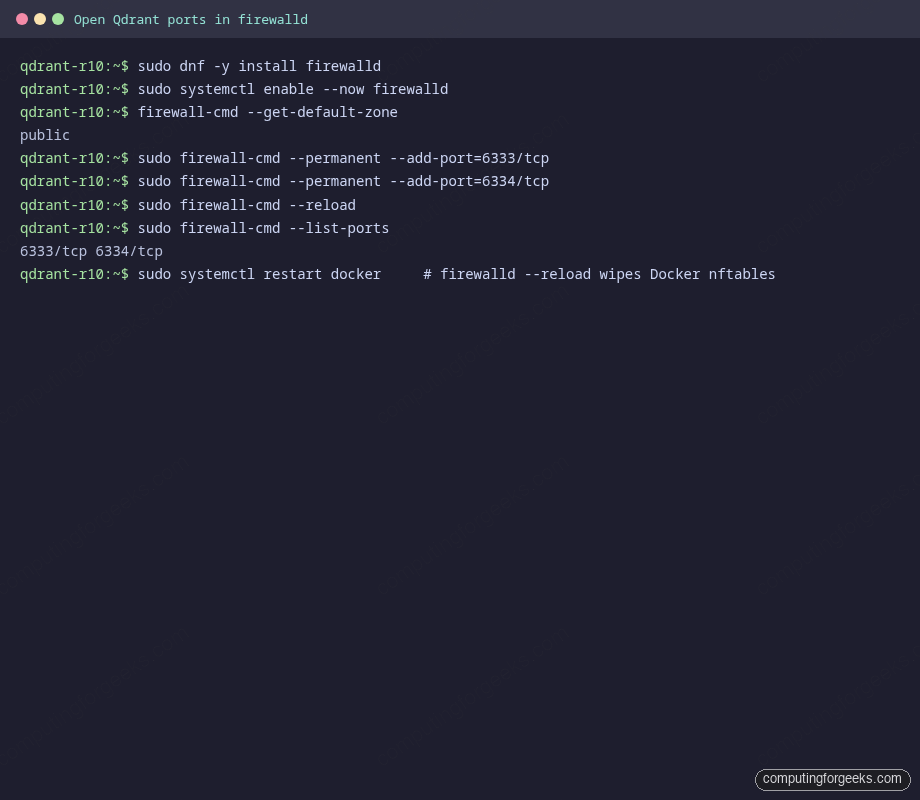
One Rocky specific gotcha: firewall-cmd --reload wipes the nftables tables Docker created when its daemon started, which makes containers unreachable until Docker re-adds them. Restart Docker after the reload so it rebuilds its rules:
sudo systemctl restart docker
curl -sf http://localhost:6333/healthz
The full firewalld setup looks like this:
If you only need Qdrant reachable from a trusted subnet, scope the rule with --source:
sudo firewall-cmd --permanent --remove-port=6333/tcp
sudo firewall-cmd --permanent --add-rich-rule=\
  'rule family="ipv4" source address="10.0.0.0/8" port port="6333" protocol="tcp" accept'
sudo firewall-cmd --reload
sudo systemctl restart docker
Sanity check: a first collection and search
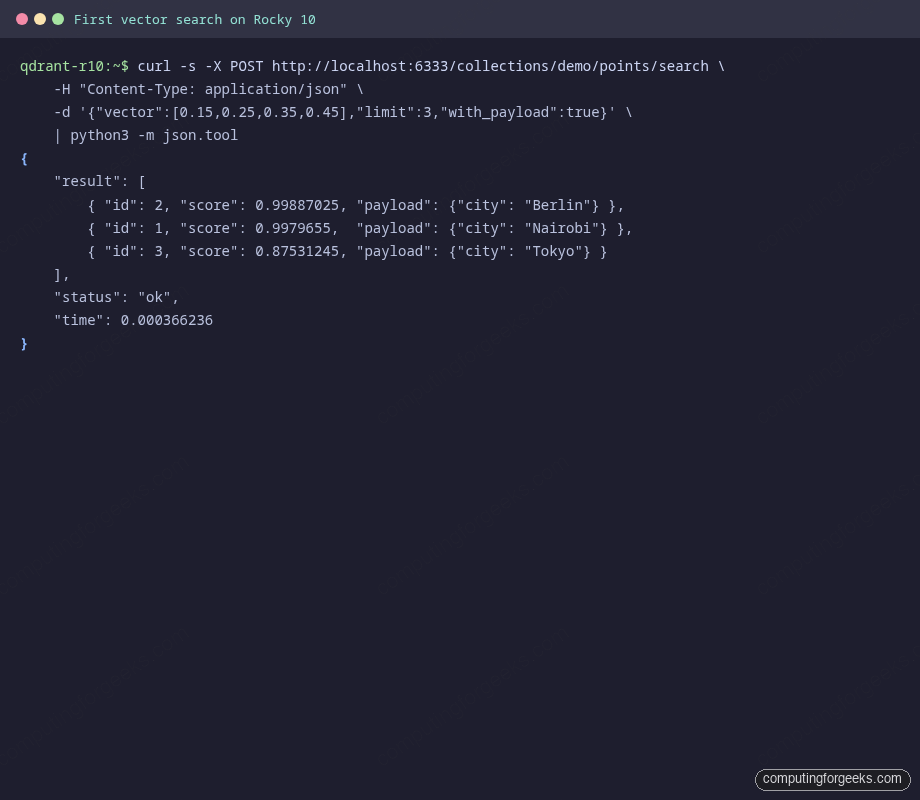
End to end verification matters more than any single command. Create a small demo collection, upsert three points with payload, then run a similarity query and confirm the right neighbour comes back first:
curl -s -X PUT http://localhost:6333/collections/demo \
  -H "Content-Type: application/json" \
  -d '{"vectors":{"size":4,"distance":"Cosine"}}' | jq .

curl -s -X PUT http://localhost:6333/collections/demo/points \
  -H "Content-Type: application/json" \
  -d '{
    "points": [
      {"id":1, "vector":[0.1,0.2,0.3,0.4], "payload":{"city":"Nairobi"}},
      {"id":2, "vector":[0.2,0.3,0.4,0.5], "payload":{"city":"Berlin"}},
      {"id":3, "vector":[0.9,0.8,0.7,0.6], "payload":{"city":"Tokyo"}}
    ]
  }' | jq .

curl -s -X POST http://localhost:6333/collections/demo/points/search \
  -H "Content-Type: application/json" \
  -d '{"vector":[0.15,0.25,0.35,0.45],"limit":3,"with_payload":true}' \
  | jq .
Berlin and Nairobi rank close because their vectors are near the query, Tokyo trails because its vector points the other way. If you see the same ordering, ingest, index, and query all work end to end on your host:
Open the Web UI
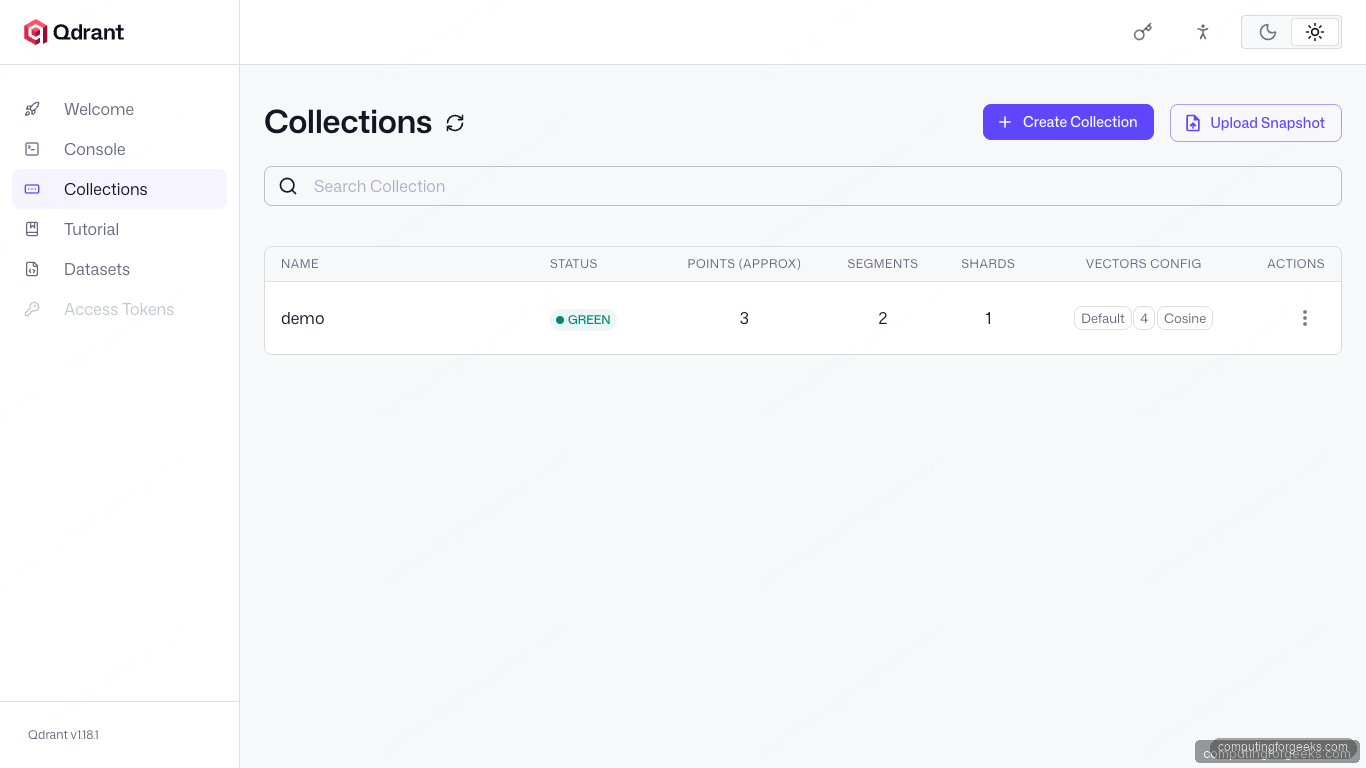
Qdrant ships a browser based UI at /dashboard. Hit http://<server-ip>:6333/dashboard and the Collections panel will list the demo collection you just created:
Upgrade Qdrant
Upgrades are a tag swap. The storage volume survives the recreate, so collections and snapshots persist:
export QDRANT_VERSION=$(curl -s https://api.github.com/repos/qdrant/qdrant/releases/latest | jq -r .tag_name)
sudo docker pull qdrant/qdrant:${QDRANT_VERSION}  # https://github.com/qdrant/qdrant/releases
sudo docker stop qdrant && sudo docker rm qdrant
sudo docker run -d --name qdrant --restart unless-stopped \
  -p 6333:6333 -p 6334:6334 \
  -v /var/lib/qdrant/storage:/qdrant/storage:z \
  qdrant/qdrant:${QDRANT_VERSION}
For rootless Podman, the equivalent is podman pull followed by recreating the container with the same :z,U flags.
Troubleshooting
Error: addrtype revision 0 not supported
This is the kernel mismatch covered in Step 2 above. Install kernel kernel-core kernel-modules kernel-modules-core, reboot, then start Docker.
Error: short-name resolution enforced but cannot prompt without a TTY
Podman is asking you to use the fully qualified image name. Replace qdrant/qdrant:tag with docker.io/qdrant/qdrant:tag.
Container reachable on localhost but not from another host
Check firewalld first with firewall-cmd --list-ports. If you just ran firewall-cmd --reload, also restart Docker so it re injects its bridge rules into nftables.
Where to next
You now have Qdrant running on Rocky or Alma 10 with SELinux still enforcing, a sanity collection on disk, and a working Web UI. The next stops in this series are secure Qdrant with API key, TLS, and Nginx for any host reachable beyond your local network, the Qdrant Web UI tour for a click by click walkthrough of the dashboard, and the 3 node Qdrant distributed cluster guide once you outgrow a single host. For the broader vector database decision, our install pgvector on PostgreSQL walkthrough sets up the Postgres native alternative, and the self hosted RAG with Ollama pipeline drops Qdrant in as the vector store with minimal changes.