PHP 8.5 ships in the Ubuntu 26.04 default repositories, so there is no PPA or third-party repo to set up. This release brings the pipe operator (|>), the clone() with properties syntax, #[\NoDiscard] for safer APIs, array_first() / array_last(), and a built-in URI parsing extension. If you are building on Ubuntu 26.04 LTS, you get all of this out of the box.
This guide walks through installing PHP 8.5 with common extensions, configuring PHP-FPM with Nginx, tuning php.ini for production workloads, installing Composer, and optimizing OPcache and JIT. Everything was tested on a fresh Ubuntu 26.04 minimal server.
Current as of April 2026. PHP 8.5.4 on Ubuntu 26.04 LTS (Resolute Raccoon)
Prerequisites
You need a running Ubuntu 26.04 server with root or sudo access. If you have not done the basics yet (hostname, firewall, updates), follow the Ubuntu 26.04 initial server setup guide first.
- Ubuntu 26.04 LTS (Resolute Raccoon), minimal or server install
- Root or a sudo user
- Tested on: PHP 8.5.4, Nginx 1.28.3, Composer 2.9.5
Install PHP 8.5 and Extensions
Update the package index and install PHP 8.5 along with the extensions most web applications need:
sudo apt updateInstall PHP 8.5 with FPM, CLI, and common extensions in a single command:
sudo apt install -y php8.5 php8.5-fpm php8.5-mysql php8.5-cli php8.5-curl \
  php8.5-gd php8.5-mbstring php8.5-xml php8.5-zip php8.5-intl \
  php8.5-bcmath php8.5-soap php8.5-redis php8.5-imagick
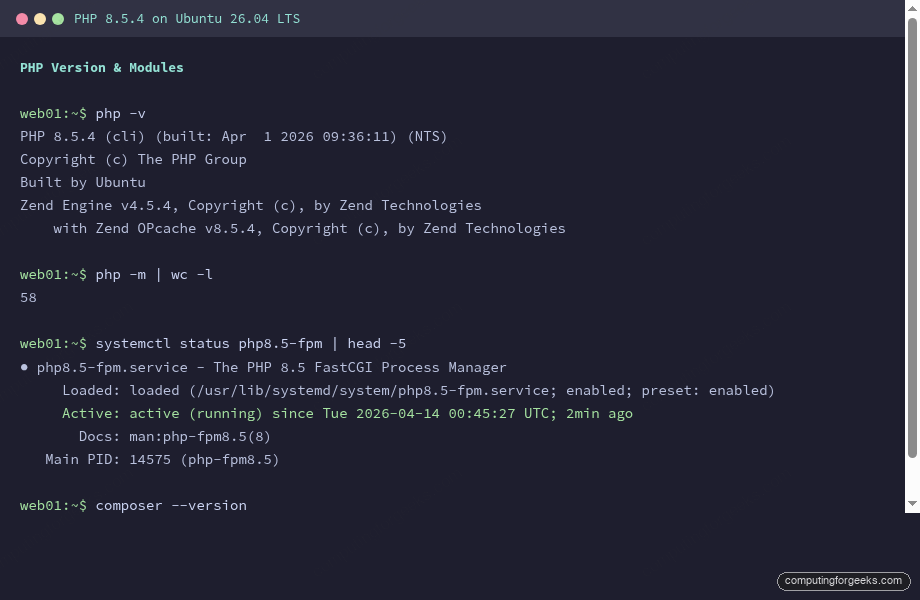
Confirm the installed version:
php -vYou should see PHP 8.5.4 with OPcache bundled:
PHP 8.5.4 (cli) (built: Apr  1 2026 09:36:11) (NTS)
Copyright (c) The PHP Group
Built by Ubuntu
Zend Engine v4.5.4, Copyright (c), by Zend Technologies
    with Zend OPcache v8.5.4, Copyright (c), by Zend Technologies
List all loaded modules to verify the extensions are active:
php -mThe output should include bcmath, curl, gd, imagick, intl, mbstring, mysqli, redis, soap, xml, zip, and others. A full install loads 56 modules:
[PHP Modules]
bcmath
calendar
Core
ctype
curl
date
dom
exif
FFI
fileinfo
filter
ftp
gd
gettext
hash
iconv
igbinary
imagick
intl
json
lexbor
libxml
mbstring
mysqli
mysqlnd
openssl
pcntl
pcre
PDO
pdo_mysql
Phar
posix
random
readline
redis
Reflection
session
shmop
SimpleXML
soap
sockets
sodium
SPL
standard
sysvmsg
sysvsem
sysvshm
tokenizer
uri
xml
xmlreader
xmlwriter
xsl
Zend OPcache
zip
zlib

[Zend Modules]
Zend OPcache
Notice the new uri module, which is a built-in extension in PHP 8.5 for RFC 3986 compliant URL parsing. The lexbor module is also new, providing fast HTML5 parsing support.
Verify PHP-FPM Service
PHP-FPM starts automatically after installation. Check its status:
systemctl status php8.5-fpmThe service should show active (running):
● php8.5-fpm.service - The PHP 8.5 FastCGI Process Manager
     Loaded: loaded (/usr/lib/systemd/system/php8.5-fpm.service; enabled; preset: enabled)
     Active: active (running) since Tue 2026-04-14 00:45:27 UTC; 2min ago
       Docs: man:php-fpm8.5(8)
   Main PID: 14575 (php-fpm8.5)
     Status: "Processes active: 0, idle: 2, Requests: 0, slow: 0, Traffic: 0.00req/sec"
      Tasks: 3 (limit: 3522)
     Memory: 13.5M (peak: 15.5M)
        CPU: 96ms
     CGroup: /system.slice/php8.5-fpm.service
             ├─14575 "php-fpm: master process (/etc/php/8.5/fpm/php-fpm.conf)"
             ├─14576 "php-fpm: pool www"
             └─14577 "php-fpm: pool www"
The default pool (www) listens on a Unix socket at /run/php/php8.5-fpm.sock. This is what Nginx will connect to.
Configure php.ini for Production
The default php.ini values are conservative. For most web applications (WordPress, Laravel, Drupal), you will want higher limits. Open the FPM php.ini:
sudo vi /etc/php/8.5/fpm/php.iniFind and update these directives:
upload_max_filesize = 64M
post_max_size = 64M
max_execution_time = 300
memory_limit = 256M
date.timezone = UTC
max_input_vars = 5000
Adjust date.timezone to match your server location (e.g., America/New_York, Europe/London). The max_input_vars bump is needed by applications with large forms or complex admin panels like WooCommerce.
Restart PHP-FPM to apply the changes:
sudo systemctl restart php8.5-fpmConfigure the PHP-FPM Pool
The pool configuration controls how many PHP worker processes run and how they are managed. Open the default pool config:
sudo vi /etc/php/8.5/fpm/pool.d/www.confThe default pm = dynamic mode works well for most servers. Adjust the worker counts based on your available RAM (each PHP-FPM worker uses roughly 30 to 50 MB):
pm = dynamic
pm.max_children = 25
pm.start_servers = 5
pm.min_spare_servers = 3
pm.max_spare_servers = 10
For a 2 GB RAM server, pm.max_children = 25 is a reasonable ceiling. On a 1 GB server, drop it to 10 or 15. Too many children and the OOM killer will start terminating processes.
While you are in www.conf, enable the FPM status page for monitoring. Uncomment or add:
pm.status_path = /fpm-statusRestart PHP-FPM after editing the pool:
sudo systemctl restart php8.5-fpmInstall and Configure Nginx
Install Nginx from the Ubuntu repositories:
sudo apt install -y nginxIf you need a full LEMP or LAMP stack with MariaDB/MySQL and SSL, see the dedicated LEMP stack on Ubuntu 26.04 or LAMP stack on Ubuntu 26.04 guides. For Nginx with Let’s Encrypt SSL, the Nginx SSL guide for Ubuntu 26.04 covers the full setup.
Edit the default Nginx server block to pass PHP requests to the FPM socket:
sudo vi /etc/nginx/sites-available/defaultReplace the contents with:
server {
    listen 80 default_server;
    listen [::]:80 default_server;

    root /var/www/html;
    index index.php index.html index.htm;

    server_name _;

    location / {
        try_files $uri $uri/ =404;
    }

    location ~ \.php$ {
        include snippets/fastcgi-php.conf;
        fastcgi_pass unix:/run/php/php8.5-fpm.sock;
        fastcgi_param SCRIPT_FILENAME $document_root$fastcgi_script_name;
        include fastcgi_params;
    }

    location ~ /\.ht {
        deny all;
    }

    location = /fpm-status {
        access_log off;
        allow 127.0.0.1;
        deny all;
        include snippets/fastcgi-php.conf;
        fastcgi_pass unix:/run/php/php8.5-fpm.sock;
        fastcgi_param SCRIPT_FILENAME $document_root$fastcgi_script_name;
        include fastcgi_params;
    }
}
The /fpm-status location block restricts access to localhost only. You can use it for monitoring with tools like Zabbix or Prometheus exporters.
Test the Nginx configuration and restart both services:
sudo nginx -tThe syntax check should pass cleanly:
nginx: the configuration file /etc/nginx/nginx.conf syntax is ok
nginx: configuration file /etc/nginx/nginx.conf test is successful
Restart Nginx to load the new configuration:
sudo systemctl restart nginxTest PHP with a phpinfo() Page
Create a test PHP file in the web root:
echo "<?php phpinfo(); ?>" | sudo tee /var/www/html/info.phpOpen http://10.0.1.50/info.php in a browser (replace with your server IP). You should see the full PHP information page showing version 8.5.4, loaded extensions, and all configuration values.
Remove the file after testing. Leaving phpinfo() exposed on a production server leaks internal configuration details:
sudo rm /var/www/html/info.phpCheck the PHP-FPM Status Page
Since the status endpoint is restricted to localhost in the Nginx config, query it from the server itself:
curl -s http://127.0.0.1/fpm-statusThis returns the pool process manager stats:
pool:                 www
process manager:      dynamic
start time:           14/Apr/2026:00:46:27 +0000
start since:          120
accepted conn:        3
listen queue:         0
max listen queue:     0
listen queue len:     0
idle processes:       5
active processes:     1
total processes:      6
max active processes: 1
max children reached: 0
If max children reached is greater than 0, your pm.max_children value is too low for your traffic. The listen queue should stay at 0 under normal load; a growing queue means requests are waiting for an available worker.
Install Composer
Composer is the standard dependency manager for PHP projects. Download and install it globally:
curl -sS https://getcomposer.org/installer | php -- --install-dir=/usr/local/bin --filename=composerVerify it installed correctly:
composer --versionThe output confirms Composer 2.9.5 running on PHP 8.5.4:
Composer version 2.9.5 2026-01-29 11:40:53
PHP version 8.5.4 (/usr/bin/php8.5)
When running Composer on a production server, avoid running it as root. Create a dedicated deploy user and use composer install --no-dev to skip development dependencies.
New PHP 8.5 Features Worth Knowing
PHP 8.5 introduces several features that change how you write code. Here are the most impactful ones, with examples you can run directly on your new install. For the full list, see the official PHP 8.5 release page.
Pipe Operator (|>)
The pipe operator chains function calls left to right. Instead of nesting functions or creating temporary variables, you pass the result of one function directly into the next:
php -r '
$title = " PHP 8.5 Released ";
$slug = $title
    |> trim(...)
    |> (fn($str) => str_replace(" ", "-", $str))
    |> (fn($str) => str_replace(".", "", $str))
    |> strtolower(...);
echo $slug . PHP_EOL;
'
This outputs php-85-released. The pipe operator makes data transformation pipelines far more readable than the equivalent nested calls.
Clone With Properties
You can now modify properties during cloning, which simplifies the “wither” pattern for readonly classes:
php -r '
readonly class Color {
    public function __construct(
        public int $red,
        public int $green,
        public int $blue,
        public int $alpha = 255,
    ) {}
}
$c = new Color(255, 128, 0);
$transparent = clone($c, ["alpha" => 100]);
echo "Alpha: " . $transparent->alpha . PHP_EOL;
'
Previously, modifying a readonly property during clone required verbose workarounds. The second argument to clone() accepts an associative array of property overrides.
array_first() and array_last()
Two convenience functions that replace common patterns with reset() and end():
php -r '
$events = ["deploy", "test", "build"];
echo "First: " . array_first($events) . PHP_EOL;
echo "Last: " . array_last($events) . PHP_EOL;
'
Unlike reset() and end(), these functions do not modify the array’s internal pointer.
#[\NoDiscard] Attribute
Mark functions whose return values should not be silently ignored. This catches bugs where callers forget to use the result:
php -r '
#[\NoDiscard("Check the return value")]
function validate(string $input): bool {
    return strlen($input) > 0;
}
validate("test");
'
This emits a warning because the return value of validate() was discarded. It is particularly useful for library authors who want to enforce correct usage of validation and builder methods.
Performance Tuning
PHP-FPM with OPcache and JIT enabled can handle significantly more requests per second than the default configuration. These settings belong in production.
OPcache Configuration
OPcache is enabled by default in PHP 8.5, but its settings are conservative. Open the PHP-FPM php.ini:
sudo vi /etc/php/8.5/fpm/php.iniFind the [opcache] section and set these values. Uncomment lines that start with a semicolon:
opcache.enable=1
opcache.memory_consumption=128
opcache.interned_strings_buffer=16
opcache.max_accelerated_files=10000
opcache.revalidate_freq=60
opcache.validate_timestamps=1
opcache.save_comments=1
opcache.enable_file_override=1
Setting opcache.revalidate_freq=60 means PHP checks file modification times every 60 seconds instead of every 2 seconds. On a production server where deployments are infrequent, this reduces filesystem stat calls. If you deploy frequently, set it to 0 or use opcache_reset() in your deploy script.
JIT Compiler
The JIT (Just-In-Time) compiler converts PHP opcodes to native machine code at runtime. It benefits CPU-bound workloads (image processing, PDF generation, scientific calculations) more than typical I/O-bound web requests, but it does not hurt and provides a measurable improvement on complex applications.
Add these settings below the OPcache block in the same file:
opcache.jit=on
opcache.jit_buffer_size=64M
The opcache.jit=on setting enables tracing JIT, which is the recommended mode for web applications. The buffer size of 64M is enough for most projects; increase it if you run a very large codebase.
PHP-FPM Pool Tuning
The process manager mode and worker counts depend on your traffic pattern and available memory:
- dynamic (default): Workers scale between
pm.min_spare_serversandpm.max_spare_servers. Good for most workloads. - static: All workers start at boot and stay running. Lower latency under steady traffic, but wastes RAM during idle periods. Set
pm.max_childrento the total number of workers you want. - ondemand: Workers spawn only when needed and die after
pm.process_idle_timeout. Best for low-traffic servers or shared hosting where memory is tight.
A quick formula for pm.max_children: divide available RAM (after OS and database overhead) by the average memory per PHP worker. Check real memory usage with:
ps -C php-fpm8.5 -o rss= | awk '{ sum += $1 } END { printf "Avg worker: %.0f MB\n", sum/NR/1024 }'After making any OPcache, JIT, or pool changes, restart PHP-FPM:
sudo systemctl restart php8.5-fpmVerify OPcache and JIT are active by checking the output of php -i:
php -i | grep -E "opcache.enable |opcache.jit "On a properly configured system you should see both enabled. The PHP 8.5 on Ubuntu 24.04/22.04 guide covers the same tuning if you are running an older LTS release alongside 26.04.