Clicking through the Grafana data source form once is fine. Doing it on a fresh Grafana every time you rebuild a monitoring host, or across ten of them, is how configuration drifts and mistakes creep in. The form is also the wrong place to keep an InfluxDB token or a database password. The fix is to describe the data sources once in code and let Ansible apply them, the same way every time.
This guide provisions two Grafana data sources with the community.grafana collection: a Prometheus backend and an InfluxDB backend. It authenticates with a Grafana service account token instead of the admin password, keeps the list of sources in a single vars file, and proves the run is idempotent. The last section shows the file-based alternative for readers who provision from Git.
Tested in June 2026 against Grafana 13 on Ubuntu 24.04, driven from an Ansible control node.
Prerequisites
- A running Grafana instance you can reach over HTTP. If you do not have one, follow the Grafana install guide first.
- A control node with Ansible installed (ansible-core 2.16 or newer).
- The backends you want to connect: a Prometheus server and an InfluxDB instance in this example. Point them at your own URLs.
- Network access from the control node to the Grafana API on port 3000.
Install the Grafana collection
The grafana_datasource module lives in the community.grafana collection, not in ansible-core. Pull it from Galaxy:
ansible-galaxy collection install community.grafanaThe apt ansible package ships an older bundled copy, so confirm which version is active before you rely on it:
ansible-galaxy collection list | grep grafanaThe collection and its version print on a single line. Anything in the 2.x line works against Grafana 13:
community.grafana 2.3.0Create a Grafana service account token
Grafana retired API keys in favour of service accounts in January 2025. A service account token is the right credential for automation: it carries a fixed role, it is not tied to a user that might get deleted, and you can revoke it without touching anyone’s login. Do not hand the playbook the admin password.
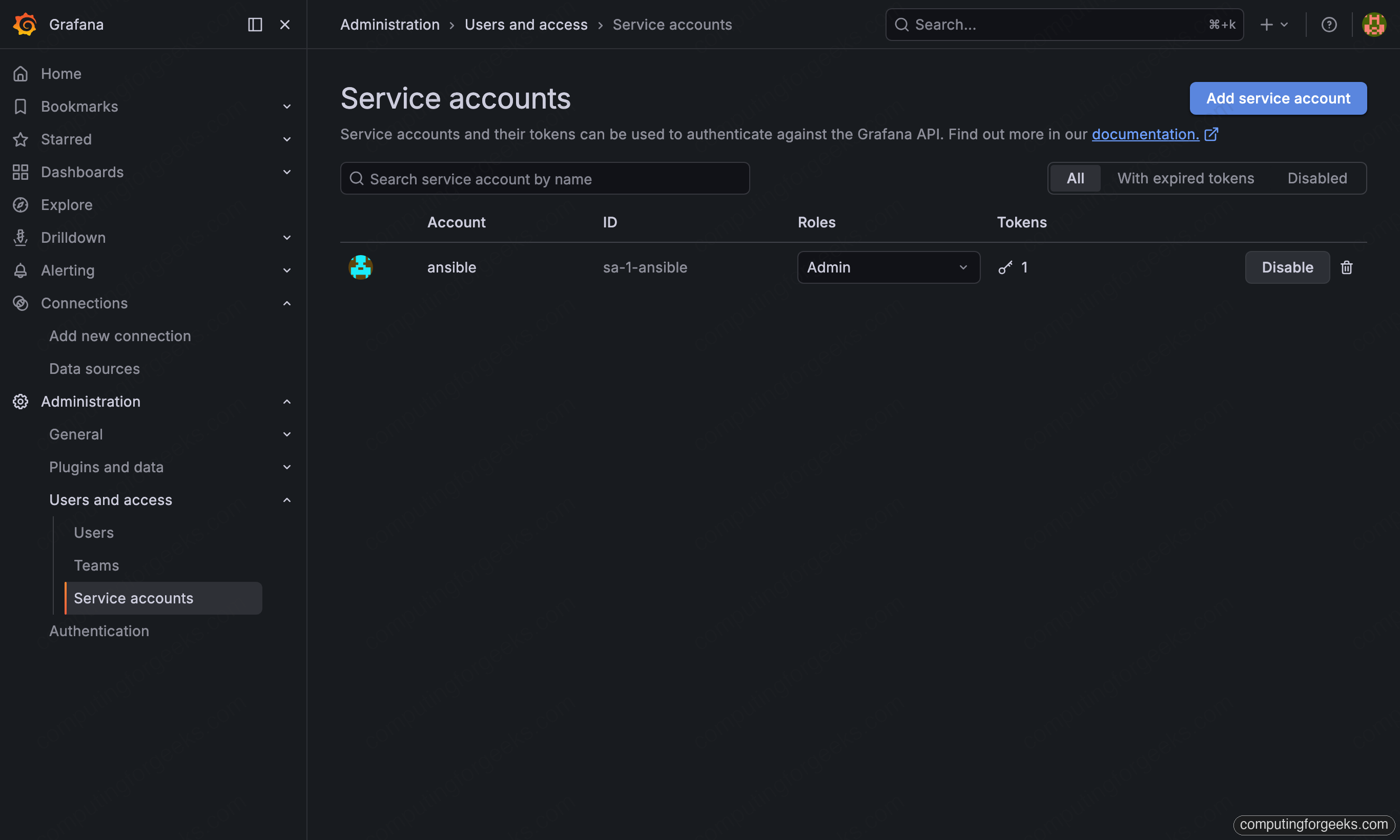
In the Grafana UI, open Administration, then Users and access, then Service accounts. Create an account named ansible with the Admin role, then add a token under it. Copy the token value once; Grafana never shows it again.
If you would rather not click, the same thing over the API returns the token as JSON:
curl -s -X POST http://admin:YOUR_ADMIN_PASSWORD@localhost:3000/api/serviceaccounts \
  -H "Content-Type: application/json" \
  -d '{"name":"ansible","role":"Admin"}'
Take the id from the response and mint a token against it:
curl -s -X POST http://admin:YOUR_ADMIN_PASSWORD@localhost:3000/api/serviceaccounts/2/tokens \
  -H "Content-Type: application/json" \
  -d '{"name":"ansible-token"}'
The key field in the reply is your token. It starts with glsa_. That is the only value the playbook needs to authenticate.
Define the Grafana data sources
Keep the moving parts in one place. Create group_vars/all.yml with the Grafana URL, the token, and a list of data sources. The list is the only thing you edit when you add a backend later:
---
grafana_url: "http://192.168.10.10:3000"
grafana_token: "{{ vault_grafana_token }}"

grafana_datasources:
  - name: Prometheus
    ds_type: prometheus
    ds_url: "http://192.168.10.10:9090"
    is_default: true

  - name: InfluxDB
    ds_type: influxdb
    ds_url: "http://192.168.10.10:8086"
    additional_json_data:
      version: Flux
      organization: computingforgeeks
      defaultBucket: metrics
      httpMode: POST
    additional_secure_json_data:
      token: "{{ vault_influx_token }}"
A few fields earn an explanation. ds_type is the backend kind Grafana understands (prometheus, influxdb, loki, and so on). ds_url is where that backend listens, not where Grafana listens. access: proxy is the default and the right choice: Grafana proxies queries server-side, so browsers never hit the backend directly. The InfluxDB entry uses additional_json_data for the Flux settings and additional_secure_json_data for the token, which Grafana stores write-only.
Both vault_grafana_token and vault_influx_token belong in an encrypted file, never in plain text. Generate them with Ansible Vault and load that file at run time. A token in a Git history is a token you have to rotate.
Write the role and playbook
One task does the work. Because the module is an API client, it runs on the control node and talks to Grafana over HTTP, so the inventory only needs localhost. Put this in inventory/hosts.ini:
[control]
localhost ansible_connection=local
Wrap the logic in a small role so it stays reusable. Create roles/grafana_datasources/tasks/main.yml:
---
- name: Add or update Grafana data sources
  community.grafana.grafana_datasource:
    name: "{{ item.name }}"
    grafana_url: "{{ grafana_url }}"
    grafana_api_key: "{{ grafana_token }}"
    ds_type: "{{ item.ds_type }}"
    ds_url: "{{ item.ds_url }}"
    access: "{{ item.access | default('proxy') }}"
    is_default: "{{ item.is_default | default(false) }}"
    additional_json_data: "{{ item.additional_json_data | default(omit) }}"
    additional_secure_json_data: "{{ item.additional_secure_json_data | default(omit) }}"
    state: present
  loop: "{{ grafana_datasources }}"
  loop_control:
    label: "{{ item.name }}"
The grafana_api_key parameter takes the service account token despite its legacy name. The default(omit) filters drop the InfluxDB-only fields for the Prometheus entry, so one task handles both backends. Now the playbook, grafana-datasources.yml:
---
- name: Provision Grafana data sources
  hosts: control
  gather_facts: false
  roles:
    - grafana_datasources
Run the playbook
Load the encrypted vars at run time and apply. With the token file vaulted, pass --ask-vault-pass:
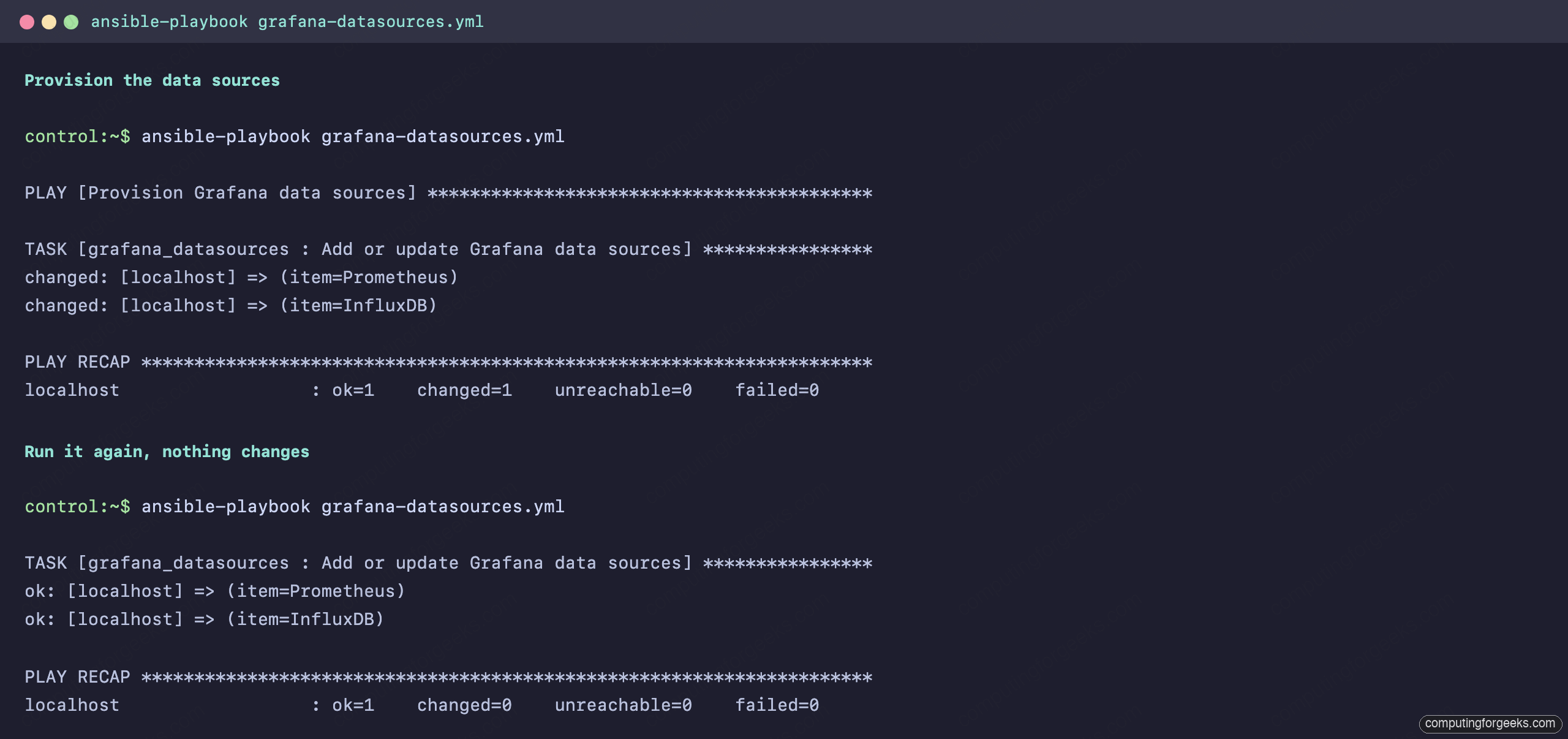
ansible-playbook grafana-datasources.yml --ask-vault-passBoth data sources register in one pass. The recap shows two changed items:
PLAY [Provision Grafana data sources] ******************************************

TASK [grafana_datasources : Add or update Grafana data sources] ****************
changed: [localhost] => (item=Prometheus)
changed: [localhost] => (item=InfluxDB)

PLAY RECAP *********************************************************************
localhost                  : ok=1    changed=1    unreachable=0    failed=0
Confirm it is idempotent
The module is idempotent, which is the whole point of using it over a one-off curl. Run the same playbook again and nothing changes, because Grafana already matches the desired state:
TASK [grafana_datasources : Add or update Grafana data sources] ****************
ok: [localhost] => (item=Prometheus)
ok: [localhost] => (item=InfluxDB)

PLAY RECAP *********************************************************************
localhost                  : ok=1    changed=0    unreachable=0    failed=0
That changed=0 is what lets you run this on a schedule or in CI without churning the data sources on every pass. The terminal below shows both runs back to back, the create followed by the no-op:
Verify in Grafana
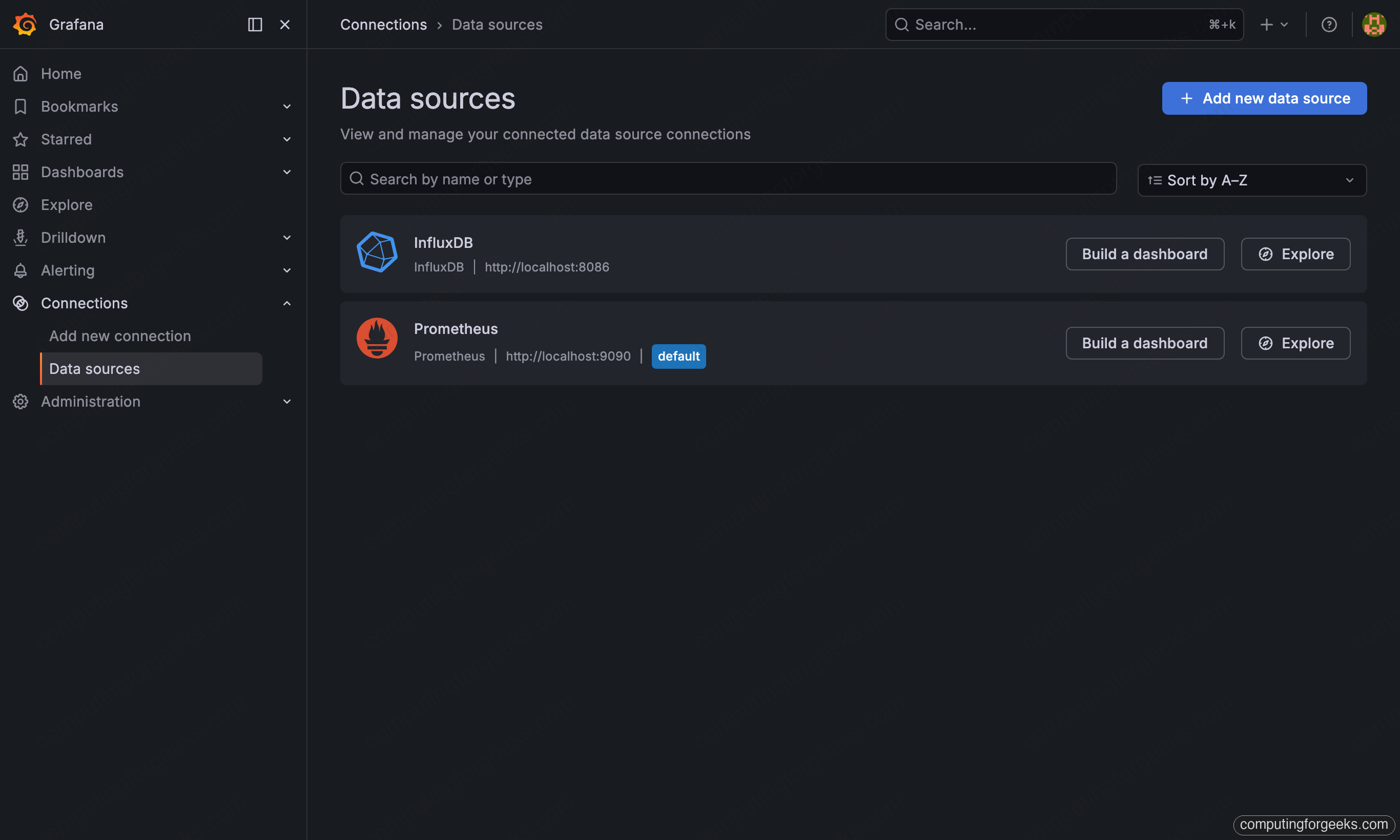
Open Connections, then Data sources. Both entries are there, with Prometheus marked as the default. They are editable in the UI because they came in over the API, not from a provisioning file:
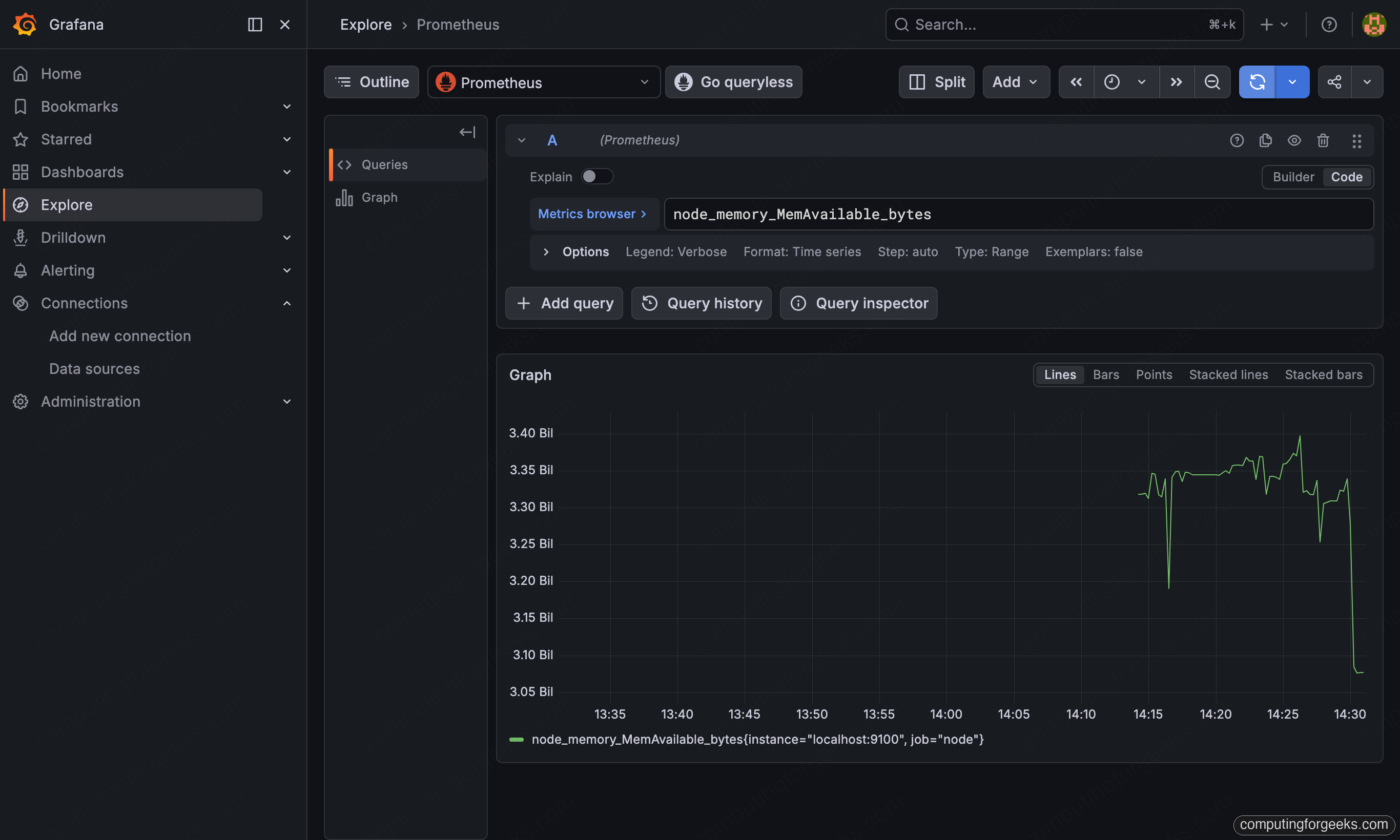
A data source that registers is not the same as a data source that works. Open Explore, pick Prometheus, and run a query such as node_memory_MemAvailable_bytes. A graph with real points means the proxy connection, the URL, and the credentials are all correct:
Rotate a token or password
Here is the one behaviour that catches people out. Grafana stores tokens and passwords as secure data and never returns them, so the module cannot tell whether the secret changed. By default it leaves secure fields alone on an update. Change the InfluxDB token in your vault, re-run, and the data source keeps the old one.
To force the new secret through, set enforce_secure_data: true on that data source:
- name: InfluxDB
  ds_type: influxdb
  ds_url: "http://192.168.10.10:8086"
  enforce_secure_data: true
  additional_secure_json_data:
    token: "{{ vault_influx_token }}"
The trade-off is that the task then reports changed on every run, because it re-sends the secret each time and cannot prove it was already correct. Turn it on while rotating a credential, and leave it off the rest of the time so the idempotent run stays honest.
Remove a data source
Decommissioning is the mirror image. Set state: absent and the module deletes the data source by name:
- name: Remove the InfluxDB data source
  community.grafana.grafana_datasource:
    name: InfluxDB
    grafana_url: "{{ grafana_url }}"
    grafana_api_key: "{{ grafana_token }}"
    ds_type: influxdb
    ds_url: "http://192.168.10.10:8086"
    state: absent
One caveat worth knowing: a data source that was created by a provisioning file cannot be deleted this way. Grafana marks it read-only and the API refuses. That distinction matters when you choose between the two methods below.
Provision data sources from files instead
The module talks to a live Grafana over its API. The other way is to template Grafana’s own provisioning files and let Grafana load them on start. Pick the one that fits how you operate:
| Approach | Best when | Editable in UI |
|---|---|---|
| grafana_datasource module | Grafana is already running and you manage it from a control node | Yes |
| File provisioning | Grafana config lives in Git and ships with the host build | No, read-only |
For the file approach, add the Grafana host to a [grafana] group and template a YAML file into its provisioning directory. The Jinja2 template at templates/datasources.yaml.j2 loops over the same kind of list:
apiVersion: 1
datasources:
{% for ds in grafana_file_datasources %}
  - name: {{ ds.name }}
    type: {{ ds.type }}
    access: proxy
    url: {{ ds.url }}
    isDefault: {{ ds.isDefault | default(false) | lower }}
{% endfor %}
The playbook drops the rendered file in place and restarts Grafana through a handler, so the restart only fires when the file actually changed:
---
- name: Provision Grafana data sources from files
  hosts: grafana
  become: true
  vars:
    grafana_file_datasources:
      - name: Prometheus
        type: prometheus
        url: "http://localhost:9090"
        isDefault: true
  tasks:
    - name: Template the data source provisioning file
      ansible.builtin.template:
        src: templates/datasources.yaml.j2
        dest: /etc/grafana/provisioning/datasources/datasources.yaml
        owner: root
        group: grafana
        mode: "0640"
      notify: Restart Grafana

  handlers:
    - name: Restart Grafana
      ansible.builtin.service:
        name: grafana-server
        state: restarted
After the restart, the file-provisioned sources show up in the same Data sources list, but with a lock icon and no edit button. That read-only behaviour is the deciding factor: file provisioning is stricter and Git-friendly, the module is more flexible for a Grafana you operate by hand. Either way, the data sources are code now, not a form someone has to remember to fill in. The companion playbooks for this guide, including a worked Ansible Vault setup, sit alongside the rest of the Ansible integration guides.