Before you wire up a single hook, the question worth settling is what you actually want them for. A prompt in your CLAUDE.md asking Claude to run the linter after edits is a suggestion the model can forget. A hook that runs the linter after every edit is a guarantee, because Claude Code runs it, not the model. That difference is the whole point of hooks: they turn “please remember to” into deterministic behavior that fires on its own, every time, whether the model cooperates or not.
This guide covers the full Claude Code hooks system: the roughly thirty lifecycle events you can attach to, the exact settings.json shape, how matchers and the if filter decide when a hook runs, the exit-code and JSON contracts a hook uses to allow or block an action, the five handler types, and a hook we built and ran that blocks rm -rf even with permissions turned off. Everything here was run on Claude Code 2.1.177 in June 2026, so the commands and the block you will see further down are real.
What a Claude Code hook is, and why it is a guarantee
A hook is a command, HTTP call, or agent that Claude Code triggers at a defined point in its lifecycle. When that point arrives, Claude Code feeds the hook a JSON description of what is happening on standard input, runs it, and reads the result. Three powers come out of that simple loop. A hook can observe what Claude is about to do or has already done, it can inject extra context into the conversation, and on the events that support it, it can block the action outright.
The architectural detail that matters: hooks are enforced by Claude Code itself, not by the model. Permission rules and prompts shape what Claude tries to do, but a hook decides what is allowed to actually happen. In practice this means a hook is the right tool whenever you need a hard boundary, like keeping secrets out of reach or stopping a destructive command, rather than a soft nudge you hope the model honors.
The events you can hook into
This is where most write-ups are out of date. A guide that tells you there are eight or twelve hook events is describing Claude Code as it stood in mid-2025. The current set is roughly thirty events and still growing, with recent additions like MessageDisplay (which can transform assistant text as it is shown) and the terminalSequence output for desktop notifications both landing in the 2.1.x line. You do not need all of them, but knowing the full surface is what lets you pick the right one instead of forcing everything through PostToolUse.
Grouped by what they watch, the events break down like this:
| Category | Events | What they fire on |
|---|---|---|
| Tool lifecycle | PreToolUse, PostToolUse, PostToolUseFailure, PostToolBatch, PermissionRequest, PermissionDenied | Before, after, or around a tool call and its permission decision |
| Prompt and turn | UserPromptSubmit, UserPromptExpansion, Stop, StopFailure, MessageDisplay, Notification | When you submit a prompt, when Claude finishes, when text is shown |
| Session | SessionStart, SessionEnd, Setup, InstructionsLoaded, ConfigChange, CwdChanged, FileChanged | Session start and end, config and file changes, CLAUDE.md loads |
| Subagents and tasks | SubagentStart, SubagentStop, TaskCreated, TaskCompleted, TeammateIdle | When a subagent or task starts, finishes, or a teammate goes idle |
| Compaction and worktrees | PreCompact, PostCompact, WorktreeCreate, WorktreeRemove | Around context compaction and git worktree isolation |
| MCP elicitation | Elicitation, ElicitationResult | When an MCP server asks the user for input mid-tool-call |
In day-to-day use, a handful carries almost all the weight: PreToolUse and PostToolUse for acting around tool calls, UserPromptSubmit for shaping what reaches the model, SessionStart for loading context, and Stop for end-of-turn work. The rest of the catalog is there for the day you need it. The subagent events pair naturally with custom agents, and the elicitation events only matter once you are running MCP servers that prompt for input.
Your first hook in settings.json
Hooks live in your settings files, and Claude Code reads three of them in order: ~/.claude/settings.json for your personal hooks across every project, .claude/settings.json in a repo for hooks the whole team shares, and .claude/settings.local.json for project hooks you keep out of version control. They sit alongside the rest of your project Claude Code config. Open the shared project file:
vim .claude/settings.jsonThe structure nests three levels deep: the hooks key, then the event name, then an array of matcher groups, each holding the actual hooks to run. A minimal example that echoes a line every time Claude edits or writes a file:
{
  "hooks": {
    "PostToolUse": [
      {
        "matcher": "Edit|Write",
        "hooks": [
          {
            "type": "command",
            "command": "echo \"Claude touched a file at $(date)\" >> ~/claude-edits.log"
          }
        ]
      }
    ]
  }
}
One operational note that saves confusion: edits to a hook in your settings files are picked up automatically by Claude Code’s file watcher, so a change usually takes effect without restarting the session. The /hooks menu is a read-only view of what is currently wired up, handy for confirming a hook registered, but you make changes by editing the JSON, not from that menu. If you ever need to switch every hook off at once, set "disableAllHooks": true in settings rather than deleting them.
Matching the right events
The matcher field decides which occurrences of an event a hook group responds to, and how it is read depends entirely on the characters inside it. A value of *, an empty string, or an omitted matcher fires on every occurrence. A value containing only letters, digits, underscores, and the pipe is treated as an exact string or a pipe-separated list of exact strings, so Bash matches only the Bash tool and Edit|Write matches either one. Anything with another character in it becomes a JavaScript regular expression.
That last rule is the source of a real gotcha with MCP tools. MCP tool names follow the pattern mcp__<server>__<tool>, and to match every tool from one server you have to append .*, because a bare mcp__memory contains only letters and underscores and is therefore compared as an exact string that matches nothing:
"matcher": "mcp__memory__.*"For finer control on tool events, there is a second filter. The if field takes permission-rule syntax and runs the hook only when the tool call matches, so you can scope a hook to a narrow case without writing the matching logic yourself:
"if": "Bash(git push *)"The catch worth remembering is that if is only evaluated on the tool events, namely PreToolUse, PostToolUse, PostToolUseFailure, PermissionRequest, and PermissionDenied. Put it on any other event and the hook never runs.
What your hook receives, and how it answers
Every hook gets a JSON object on standard input. The common fields are present on every event: session_id, transcript_path, cwd, permission_mode, and hook_event_name. Tool events add the ones you usually care about, tool_name and tool_input; events firing in a tool-use context also carry effort (an object whose level field holds the active effort), and hooks firing inside a subagent carry agent_id and agent_type. A PreToolUse payload for a Bash call looks like this:
{
  "session_id": "abc123",
  "cwd": "/home/user/my-project",
  "permission_mode": "default",
  "hook_event_name": "PreToolUse",
  "tool_name": "Bash",
  "tool_input": { "command": "rm -rf /tmp/build" }
}
The hook answers in one of two ways, and the simplest is the exit code. Exit 0 means success, and Claude Code parses standard out for any JSON instructions. Exit 2 is the blocking signal: Claude Code discards stdout and feeds your stderr text back to the model as the reason the action was stopped. Every other exit code is treated as a non-blocking error, the action proceeds, and a notice shows in the transcript. The trap that catches people is that exit 1, the conventional Unix failure code, does not block. If a hook is meant to enforce a policy, it has to exit 2.
There is one more useful behavior tied to standard out. For most events stdout only goes to the debug log, but for UserPromptSubmit, UserPromptExpansion, and SessionStart it is added straight into the context as something Claude can read and act on. That is the mechanism behind context-injection hooks, where a script prints the current ticket number or git branch and Claude picks it up without you typing it.
Telling Claude exactly what to do
Exit codes are blunt. For precise control, a hook exits 0 and prints JSON, and this is the layer most guides skip. A set of universal fields works on any event: continue to halt all processing (with stopReason as the message shown when it does), systemMessage to surface a warning to the user, suppressOutput to hide the hook’s stdout, and terminalSequence to emit a desktop notification or set the window title.
Beyond those, the decision shape differs by event, which is the nuance worth getting right. Most events that can steer Claude use a top-level decision, for example UserPromptSubmit, PostToolUse, and Stop:
{ "decision": "block", "reason": "Commit message is missing a ticket reference." }PreToolUse is the exception and the one you will reach for most, because it carries a real permission decision rather than a yes or no. It returns a hookSpecificOutput with a permissionDecision of allow, deny, ask, or defer:
{
  "hookSpecificOutput": {
    "hookEventName": "PreToolUse",
    "permissionDecision": "deny",
    "permissionDecisionReason": "Destructive command blocked by hook"
  }
}
The difference matters in practice. allow skips the normal permission prompt entirely, ask forces one, and deny stops the call with your reason handed to the model. We would reach for the JSON form over a bare exit 2 whenever the reason needs to be specific enough for Claude to act on, and for the cheap “block anything that looks like X” guards, exit 2 with a stderr message is less code.
Five kinds of hook handler
The type field is not limited to shell commands, though that is where almost everyone starts. There are five handler types, and the two that older guides miss are exactly the ones that open up the interesting designs:
| Type | What it does | Reach for it when |
|---|---|---|
command | Runs a shell command with the event JSON on stdin | The default, for scripts and CLI tools |
http | POSTs the event JSON to a URL | Centralized logging or a policy service |
mcp_tool | Calls a tool on a connected MCP server | You already run an MCP server that can act |
prompt | Sends a single-turn prompt to a model for a verdict | The check needs judgment, not a regex |
agent | Spawns a subagent with tools like Read and Grep | The check needs to investigate the codebase |
The prompt and agent handlers are the genuinely new design space. A prompt hook on UserPromptSubmit can have a cheap model judge whether a request looks risky before the main model ever sees it, and an agent hook can actually go read files to make its decision. Most production setups still lean on command, because a shell script is predictable and free, but the option to escalate to a model is there when the rule cannot be expressed as a pattern.
A hook that blocks a destructive command
Theory settles into place once a hook stops something real. Here is a PreToolUse hook scoped to the Bash tool, wired into .claude/settings.json and pointed at a small script. The script reads the proposed command off stdin and exits 2 if it spots a recursive force-delete:
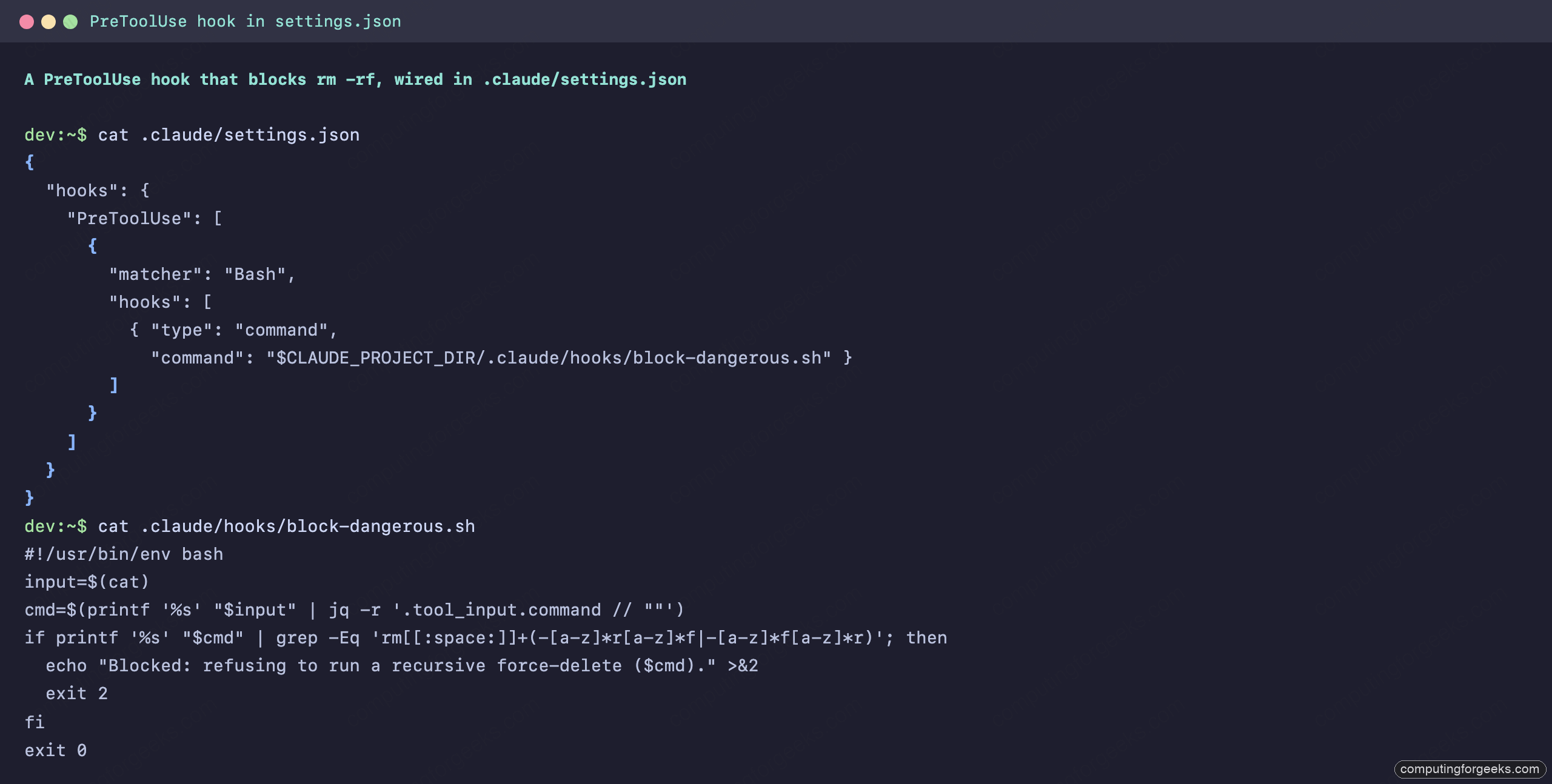
To make the point unmissable, we ran Claude with --dangerously-skip-permissions, which turns off the permission system entirely, then asked it to delete a directory with rm -rf. With permissions off, the hook is the only thing standing in the way. It held: the command was blocked, the stderr reason went back to the model, and the build directory was still there afterward.
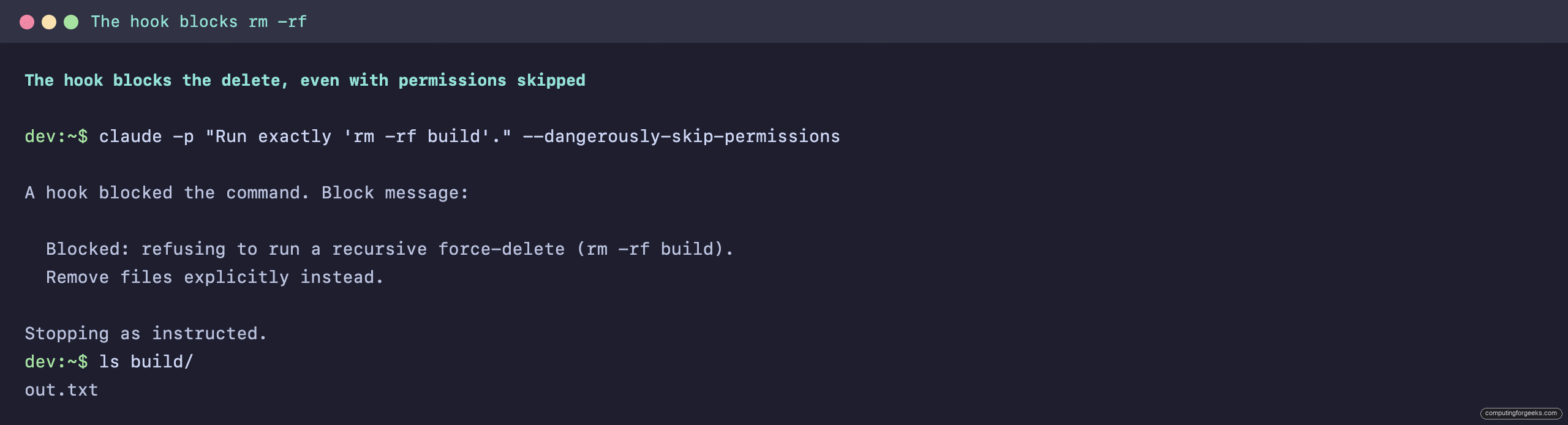
One honest lesson came out of testing that is worth more than the success itself. On an earlier run, the hook blocked rm -rf build, and Claude deleted the file explicitly and then ran rmdir, a path the regex did not catch. The takeaway shapes how you write these: scope a guard to the behavior you fear, not to one spelling of one command, and treat hooks as a layer alongside the permission system rather than a replacement for it. A hook that only knows rm -rf is a speed bump, not a wall.
More patterns worth wiring in
The same machinery covers most of what teams actually automate. Auto-formatting on edit is the canonical PostToolUse hook, matched to the file-editing tools so a formatter runs the moment Claude changes code:
{
  "hooks": {
    "PostToolUse": [
      {
        "matcher": "Edit|Write",
        "hooks": [
          { "type": "command", "command": "$CLAUDE_PROJECT_DIR/.claude/hooks/format-changed.sh" }
        ]
      }
    ]
  }
}
Context injection is the UserPromptSubmit pattern, where a script prints something useful and Claude reads it because stdout on that event becomes context. A script that echoes the current git branch and open ticket, for instance, means you stop pasting that detail into every prompt. And for ambient awareness, a Notification hook that emits a terminalSequence fires a desktop alert when Claude needs your attention, so a long run does not sit waiting silently while you have switched windows.
How we run hooks in production
We lean on this system hard for our own publishing pipeline, and the shape is worth sharing because it is the pattern most worth copying. Every article on this site goes through a publish step, and a PreToolUse hook on the Bash tool inspects that command before it runs. If the command is a publish and the article has not passed its checks, missing meta, an unverified review, a too-short body, the hook exits 2 and the publish never happens. The operator sees exactly why and fixes it.
The trade-off we made there is the one to think through for any enforcement hook. A deterministic gate is stricter than trusting whoever is at the keyboard, and that strictness is the entire value: it means a rule cannot be skipped on a tired afternoon. The cost is that the gate has to be correct, because a buggy hook blocks legitimate work as reliably as it blocks mistakes. We keep ours narrow and loud, each one checking a single condition and printing a precise reason, which is the same discipline that keeps a subagent or a CI check maintainable. For teams already running Claude Code in their CI and infrastructure workflows, hooks are the local equivalent of a pre-commit gate.
Ready-made hooks from the community
You do not have to write everything yourself. A few collections are worth raiding for working scripts (star counts approximate, as of June 2026):
disler/claude-code-hooks-mastery(~4K) is the canonical teaching repo, with a standalone script per event and a logging hook for every one. It is the best place to see the full surface in action, though it ships without a clear license, so read before you reuse.carlrannaberg/claudekit(~700, MIT) is a production toolkit of typecheck, lint, and test-on-change hooks plus a git checkpoint on stop.nizos/tdd-guard(~2K, MIT) enforces test-driven development by blocking implementation before a failing test exists.hesreallyhim/awesome-claude-code(~46K) is the umbrella list and the hub to track the rest of the ecosystem.
Treat anything you copy the way you would treat any script that runs with your privileges, because that is exactly what a hook is.
Running hooks safely in production
That last point is the one to close on, because it is where hooks differ from the rest of your Claude Code config. A hook is arbitrary code that Claude Code executes automatically with your full permissions, so the security posture has to match. A short checklist keeps it honest: read every hook before you trust it, and be especially careful with project hooks from a repo you cloned. Reference scripts through $CLAUDE_PROJECT_DIR rather than absolute paths so they stay portable. Remember that a personal ~/.claude/settings.json hook follows you into every project, including ones you did not write. Give long-running hooks a sensible timeout so a hung script does not stall the session. And keep the exit-code contract in muscle memory, since an enforcement hook that exits 1 instead of 2 looks like it is working while quietly letting everything through.
Get those habits right and hooks become the most reliable part of your setup, the layer that does not depend on the model remembering anything. Pin the events table next to your Claude Code cheat sheet, start with one PostToolUse formatter and one PreToolUse guard, and grow the set as you find the seams in your own workflow where a guarantee beats a suggestion.