You ask Claude Code to add a feature, and halfway through it spends a thousand tokens grepping the codebase, then dumps the results into the same conversation you are trying to keep clean. A subagent solves exactly that. It does the messy side work in its own context window and hands back only the summary, so your main thread stays focused on the actual task.
This is the complete guide to Claude Code subagents: what they are (and the thing most write-ups get wrong about parallelism), the full frontmatter schema field by field, how Claude decides to delegate, foreground versus background, chaining a reviewer into a fixer, and the community libraries worth stealing from. Every command and the agent that catches a real SQL injection further down was run on a live install.
Ran all of this on Claude Code 2.1.177 in June 2026; the delegation output below is the real thing, not a mock-up.
What Claude Code subagents actually are (and are not)
A subagent is a specialized assistant with its own system prompt, its own tool access, and its own permissions. When Claude hits a task that matches the subagent’s description, it hands that task off. The subagent works in a separate context window and returns only its result, which is the whole point: the search results, logs, and file dumps never touch your main conversation.
Here is the part competitors get wrong. A regular subagent runs inside a single session and blocks the main thread until it finishes. It is not, by itself, parallelism. Claude Code has three distinct things and they are easy to conflate:
| Feature | What it is | Runs in parallel? |
|---|---|---|
| Subagents | Specialized workers inside one session, context-isolated | No by default (blocking), unless marked background |
| Background agents | Many independent sessions you launch and monitor from one place | Yes |
| Agent teams | Separate sessions that talk to each other | Yes, and they coordinate |
This guide is about the first one. A single subagent can be told to run in the background (more on that below), but the mental model to start with is a focused helper that takes a side quest off your hands and reports back. The benefits stack up fast: context stays lean, you can lock a reviewer down to read-only tools, and you can route a cheap task to Haiku instead of burning Opus on it.
1. Create your first subagent
The fastest way in is the built-in manager. Inside a session, run:
/agentsThat opens a tabbed interface. The Library tab lists every subagent available to you (built-in, user, project, and plugin) and lets you create, edit, or delete one. The Running tab shows live and recently finished subagents so you can open or stop them. Pick Create new agent, choose Personal to save it under ~/.claude/agents/ so it follows you across projects, or Project to drop it in the repo’s .claude directory next to your other config. Then let Claude generate the first draft from a plain-English description. You select the tools, the model, a color, and whether it keeps memory, then save. It is usable immediately, no restart.
The manager is the recommended path, but a subagent is just a Markdown file, and once you have seen the shape you will often write them by hand. Create the file directly:
mkdir -p .claude/agents
vim .claude/agents/code-reviewer.md
The official starting point is this minimal reviewer. YAML frontmatter on top, the system prompt as the Markdown body:
---
name: code-reviewer
description: Reviews code for quality and best practices
tools: Read, Glob, Grep
model: sonnet
---

You are a code reviewer. When invoked, analyze the code and provide
specific, actionable feedback on quality, security, and best practices.
One gotcha that trips people up: subagents are loaded at session start. Edit a file on disk and you have to restart the session to pick up the change. Agents created or edited through /agents take effect right away. That asymmetry catches everyone once.
2. The agent file, field by field
Only name and description are required. Everything else is optional, and this is the full set, which no other guide lists completely and correctly:
| Field | What it does |
|---|---|
name | Required. Lowercase-and-hyphens identifier. Identity comes from this, not the filename. |
description | Required. When Claude should delegate here. This is the most important field you write. |
tools | Allowlist of tools. Omit it and the subagent inherits every tool the main thread has. |
disallowedTools | Denylist. Applied before tools resolves, so a tool named in both is removed. |
model | sonnet, opus, haiku, fable, a full model ID, or inherit. Defaults to inherit. |
permissionMode | default, acceptEdits, auto, dontAsk, bypassPermissions, or plan. |
maxTurns | Cap on agentic turns before the subagent stops. |
skills | Skills to preload into context at startup (full content injected, not just the name). |
mcpServers | MCP servers exposed to this subagent only. See the MCP setup guide for the server side. |
hooks | Lifecycle hooks scoped to this subagent. |
memory | user, project, or local. Persists learnings across sessions. |
background | true to always run this one concurrently. Default false. |
effort | low, medium, high, xhigh, or max (model dependent). Overrides the session. |
isolation | Set to worktree to run in a throwaway git worktree, an isolated copy of the repo. |
color | A named color (red, blue, green, yellow, purple, orange, pink, cyan) for the task list and transcript. |
initialPrompt | Auto-submitted as the first turn when the agent runs as the main session via --agent or the agent setting. |
A few of these carry real weight. The body of the file becomes the system prompt verbatim, and the subagent gets only that prompt plus basic environment details like the working directory, not Claude Code’s full system prompt. The tools field is your security lever: omit it for a builder that needs everything, restrict it hard for a reviewer that should never write. And model is your cost lever, since routing a grep-heavy explorer to Haiku instead of Opus is free money.
Two scope notes. Project agents in .claude/agents/ outrank personal ones in ~/.claude/agents/ when names collide, with managed and CLI-flag definitions above both and plugin agents below. And if two files in the same scope declare the same name, Claude Code keeps one and silently drops the other, so keep names unique across the whole tree. Plugin-supplied subagents also ignore hooks, mcpServers, and permissionMode for security reasons.
3. Watch it work on a real bug
Theory is cheap. Here is a deliberately ugly payment.py with a SQL injection and a quadratic loop hiding in it, and the read-only reviewer from above sitting in .claude/agents/:
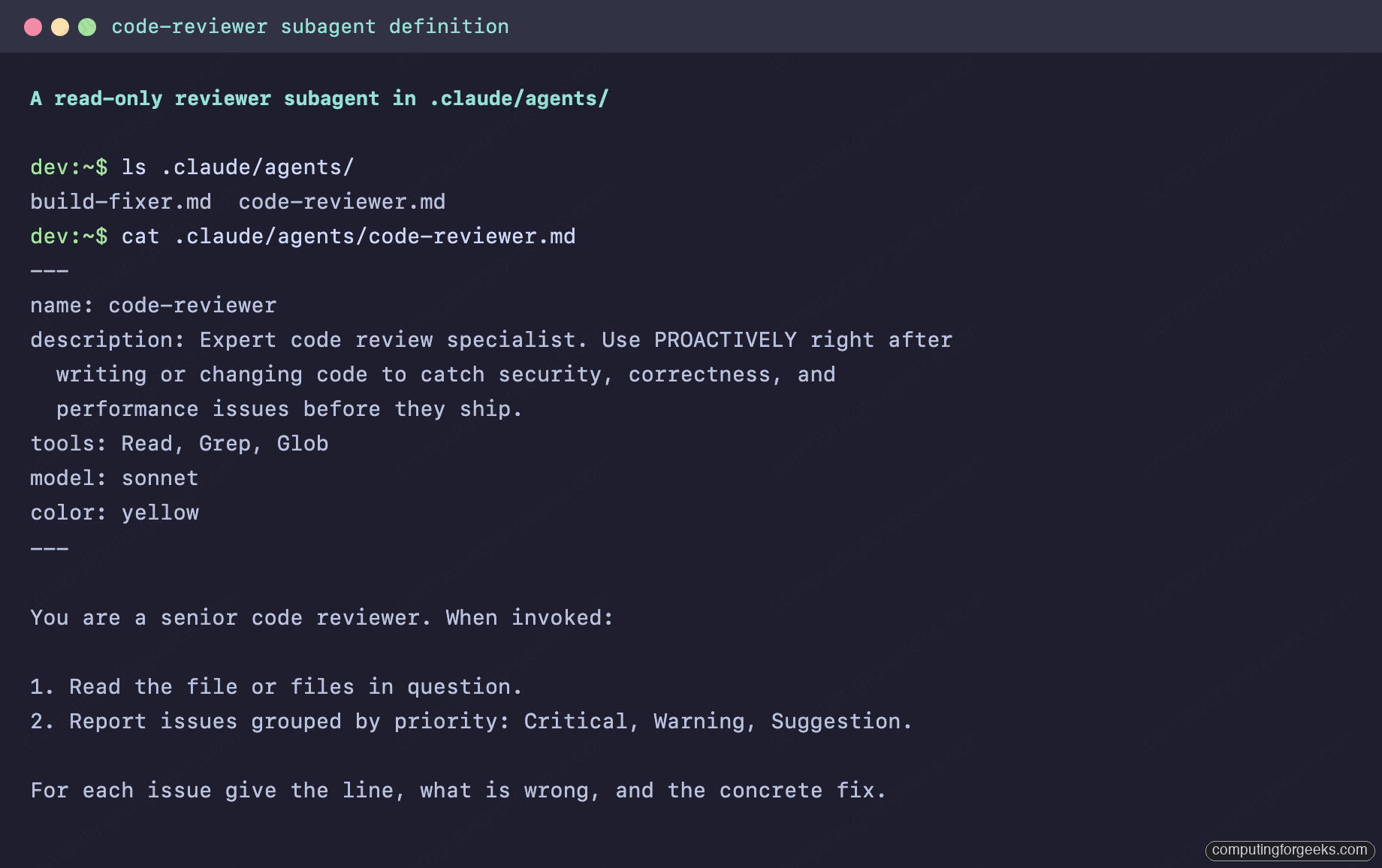
Ask Claude to use it by name and it delegates, the subagent reads the file with its three read-only tools, and the findings come back into the main thread:
claude -p "Use the code-reviewer subagent to review payment.py"The reviewer flagged the string-formatted query on line 6 as a SQL injection and the nested loop as an O(n^2) pass that should be a single sum, each with the exact fix. None of that touched the main conversation as raw file content; it arrived as a clean report:
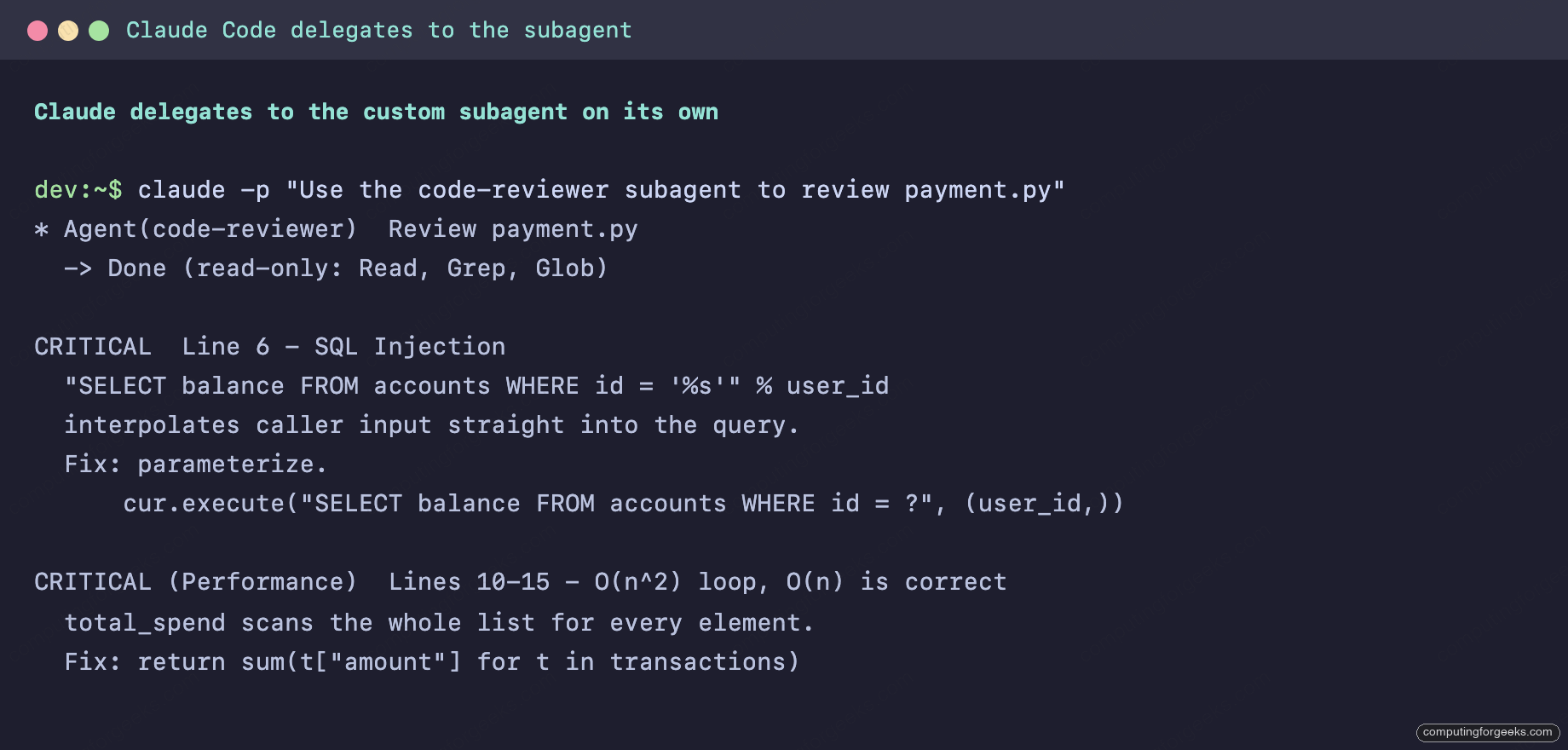
That is the entire value proposition in one screenshot. A focused agent, scoped to read-only tools, did the review in its own window and returned a tight summary.
4. How Claude decides to delegate
Automatic delegation runs off the description field. Claude reads what you wrote there, matches it against the task at hand, and hands off when they line up. So the description is not documentation, it is the trigger. Write it as the condition for use, and the near-universal convention in the popular agent libraries is to add a nudge like Use PROACTIVELY or use immediately after writing code to push Claude toward delegating without being asked.
When you want a specific subagent to run and refuse to leave it to chance, there are three explicit routes:
- Name it in the prompt: “Use the code-reviewer subagent to check this PR.” Natural and reliable.
- @-mention it: type
@and pick from the typeahead, or write@agent-code-reviewerby hand (plugin agents use their scoped name, like@agent-my-plugin:code-reviewer). The mention controls which subagent runs, not the prompt it gets. - Run the whole session as that agent:
claude --agent code-reviewerstarts a session where the main thread itself takes on the subagent’s prompt, tools, and model.
To make one agent the default for a project, set it in .claude/settings.json:
{
  "agent": "code-reviewer"
}
The --agent flag wins if both are present.
5. Foreground or background
A subagent runs one of two ways. Foreground blocks the main conversation until it is done, and any permission prompt it raises is passed through to you. Background runs concurrently while you keep working, but it runs with the permissions already granted in the session and auto-denies anything that would otherwise prompt. If a background agent needs to ask you something, that one tool call fails and the agent carries on without it.
Claude picks the mode based on the task, but you are not locked out of the decision. Ask it to “run this in the background,” or press Ctrl+B to background a task that is already running. Set background: true in frontmatter to make a particular agent always concurrent. The gotcha here is the auto-deny: a background reviewer that hits a tool needing approval just skips it silently, so if a background run comes back thin, rerun it in the foreground where you can approve the prompts.
6. Chain a reviewer into a fixer
One agent is useful. The pattern that changes how you work is chaining focused agents, and the textbook version is a read-only reviewer feeding a fixer that can edit. It is the kind of split that earns its keep on day-to-day DevOps work, where you want findings and fixes kept honest and separate. Keep them split on purpose: the reviewer never gets write tools, so it cannot “helpfully” rewrite things mid-review, and the fixer does one named change at a time.
vim .claude/agents/build-fixer.mdGive the fixer the editing tools the reviewer was denied:
---
name: build-fixer
description: Applies a specific, already-identified fix to source files. Use after a reviewer has named the exact change to make.
tools: Read, Edit, Bash
model: sonnet
color: green
---

You apply one well-defined code change at a time. Make the minimal edit,
then confirm it with a quick check. Never refactor beyond the request.
Then you drive the handoff in one sentence: “Use the code-reviewer subagent to find the issues in payment.py, then use the build-fixer subagent to apply the SQL injection fix.” Each runs in its own context, so the reviewer’s bulky output never crowds the fixer’s window.
For heavier orchestration, an agent running as the main thread (via claude --agent) can spawn other subagents, and you can fence which ones it is allowed to spawn with the Agent() allowlist inside its tools field:
tools: Agent(worker, researcher), Read, BashThat coordinator can spawn only worker and researcher. A bare Agent with no parentheses allows any subagent, and omitting Agent entirely means it can spawn none. This is how you build a constrained team without handing one agent the keys to spawn anything.
7. The built-in subagents you already have
Before you write a single file, Claude Code ships three primary subagents it delegates to automatically (plus a couple of niche helper agents you rarely call directly):
- Explore searches and understands a codebase without changing anything, at a thoroughness level Claude picks (quick, medium, or very thorough). It is the read-only researcher.
- Plan handles research while you are in plan mode, keeping exploration output in a separate window so the main conversation stays read-only.
- general-purpose takes tasks that need both exploration and modification, multi-step reasoning, or several dependent steps.
Explore and Plan deliberately skip your CLAUDE.md and the repo’s git status to stay fast and cheap; every other agent loads both. You rarely invoke these by name, but knowing they exist explains a lot of what Claude already does on its own.
8. Steal from the community
You do not have to write every agent from scratch. The ecosystem around .claude/agents/ is large and active, and a few collections are worth raiding (star counts approximate, as of June 2026):
| Repo | Stars | What you get |
|---|---|---|
wshobson/agents | ~37K | The heavyweight, ~190 agents, MIT. Now structured as a plugin marketplace. |
VoltAgent/awesome-claude-code-subagents | ~22K | The best-organized pure collection, 150+ agents across 10 categories, MIT. |
davila7/claude-code-templates | ~28K | A CLI installer (npx), pulls in agents, commands, hooks, MCP, MIT. |
hesreallyhim/awesome-claude-code | ~46K | The umbrella awesome-list and discovery hub for the whole ecosystem. |
anthropics/claude-plugins-official | ~30K | Anthropic’s own plugin directory, Apache-2.0, the place to find vetted agents. |
A word of caution while you browse: obra/superpowers shows enormous star numbers and people will point you at it for agents, but it is a skills framework, not a subagent collection, so do not expect .claude/agents/ files there. When you copy an agent in, drop it into .claude/agents/ for the project or ~/.claude/agents/ for everywhere, then check its tools line before trusting it. A reviewer you grabbed off GitHub that quietly carries Edit and Bash is not the read-only reviewer you think it is.
Best practices and the gotchas that bite
After building a fair few of these, the rules that actually matter are short. Give each subagent one job; a “do everything” agent delegates badly because its description matches everything and nothing. Prefer an allowlist on tools over a denylist, so a new tool added later does not silently land in a reviewer’s hands. Route by cost, sending cheap mechanical work to Haiku and saving the expensive models for genuine reasoning. And write the description as the trigger condition, because a vague one is why your agent never gets picked.
The gotchas, collected in one place so you do not learn them the hard way: a file edited on disk needs a session restart, while /agents edits are live; duplicate names in one scope get silently dropped; background agents auto-deny prompts, so a thin result means rerun in the foreground; and plugin agents ignore hooks, mcpServers, and permissionMode. Get those four into muscle memory and subagents stop surprising you. Pin this next to the Claude Code cheat sheet, wire the token-reduction tricks alongside it, and a session that used to drown in its own search output now stays clean while specialized agents grind through the side work in the background.