Running vLLM on Kubernetes is the natural next step after a single-box install. The OpenAI-compatible API stays the same, the model stays the same, the tuning flags stay the same. What changes is the operational shape: rolling upgrades through a Deployment, GPU node pools that scale to zero when idle, persistent caches for model weights, and a Service in front of replicas. This guide covers the minimal end-to-end path on AWS EKS with a real GPU node, and the five EKS-specific gotchas that block every first-timer between kubectl apply and a working chat completion.
The previous walkthrough on a single Linux box, Install vLLM on Linux for Production LLM Serving, covers the engine itself, the OpenAI-compatible API, hardened systemd, nginx TLS, and benchmarks. Read it first if you’re new to vLLM. This article picks up where that one stops.
Tested May 2026 with vLLM 0.20.1 on Amazon EKS 1.33 with a g5.xlarge GPU node (1× NVIDIA A10G, 24 GB VRAM). All kubectl output and error messages in this article were captured live; nothing is fabricated.
What you’ll build
By the end of this guide the cluster runs vLLM as a GPU-aware Deployment behind a Service, serving the OpenAI-compatible API end-to-end. The minimal working set is six Kubernetes objects:
- A Namespace for isolation.
- A Secret with the API key clients send in the Authorization header (and optionally a Hugging Face token for gated models).
- A PersistentVolumeClaim for the Hugging Face cache so weights survive pod restarts.
- A Deployment that runs
vllm/vllm-openai:v0.20.1on a GPU node. - A Service that fronts the pod for in-cluster and ingress traffic.
- An EKS managed node group of GPU instances, tainted so non-GPU pods don’t waste capacity.
The Deployment, Service, Secret, and PVC are portable across EKS, GKE, AKS, and bare-metal k3s with one-line tweaks (StorageClass name, GPU node label). For a bare-metal k3s node, our GPU buyer guide for LLMs covers which card to pick by VRAM and model size. The GPU node group is the cloud-specific bit; this article shows the EKS version via Terragrunt, with a sidebar table mapping it to the equivalents on GKE, AKS, and k3s.
What’s intentionally not in this article: Helm-based installs, multi-replica KV-cache-aware routing, HPA on custom metrics, multi-node tensor parallelism, and Prometheus + Grafana. Each of those is its own session of validation work and gets a dedicated follow-up. Shipping unvalidated K8s manifests as if they were tested would waste your time.
Cluster prerequisites
vLLM on Kubernetes needs three things: a GPU node where pods can land, the NVIDIA Kubernetes device plugin so the kubelet exposes nvidia.com/gpu as an allocatable resource, and a fast block-storage StorageClass for the model cache. The cluster itself is unremarkable, version 1.30 or newer.
This guide provisions EKS via Terragrunt. The base cluster module gives a control plane plus two general t3.medium nodes; a separate gpu-nodes module attaches a managed node group of g5.xlarge instances (1× NVIDIA A10G, 24 GB VRAM) using the EKS-optimized NVIDIA AMI. The node is tainted with nvidia.com/gpu=true:NoSchedule so non-GPU pods don’t waste capacity, and labelled nvidia.com/gpu.present=true so the vLLM Deployment can target it explicitly.
cd infra-aws
make up STACKS="vpc eks gpu-nodes"
aws eks update-kubeconfig --name cfg-lab-eks --region eu-west-1
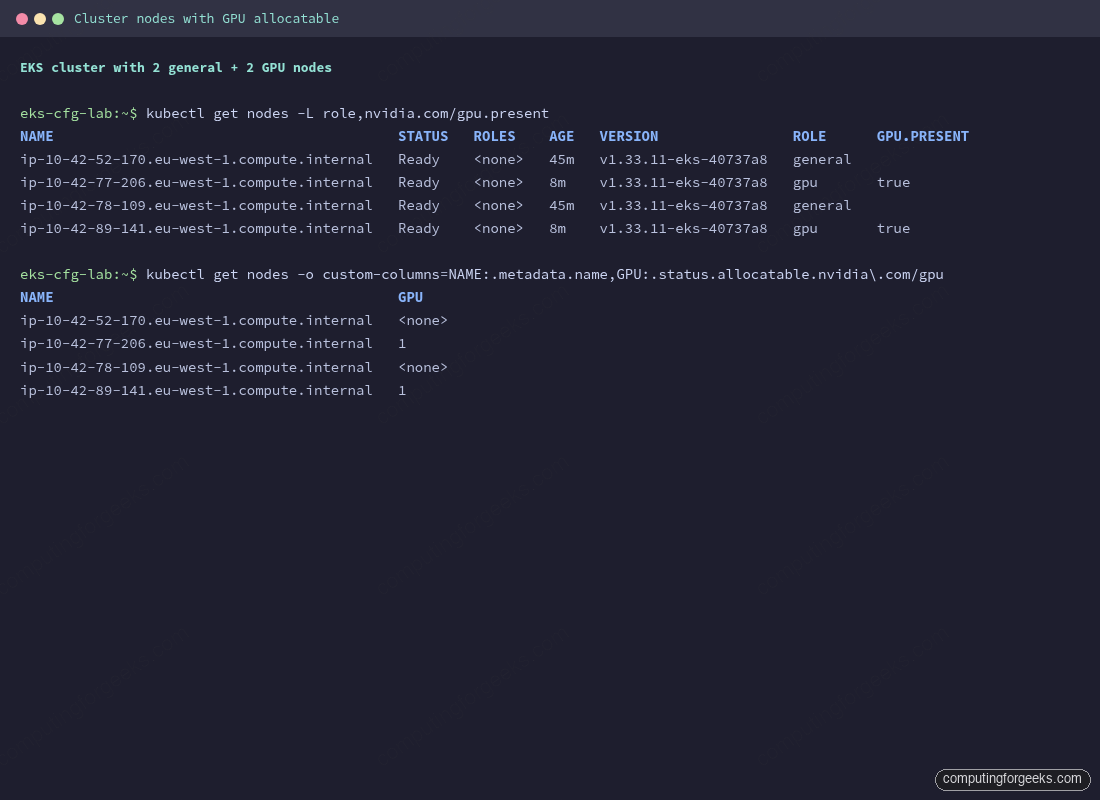
kubectl get nodes -L role,nvidia.com/gpu.present
The general nodes carry no role label. The GPU nodes show role=gpu and nvidia.com/gpu.present=true. Total provisioning time on a fresh region is about 20 minutes: VPC plus NAT (~2 min), EKS control plane (~10 min), worker nodes (~3 min), GPU node group (~5 min).
The GPU node group AMI ships with the NVIDIA driver and the CUDA runtime baked in, so nvidia-smi works inside any pod that requests a GPU. What’s missing is the Kubernetes piece that exposes the GPU as an allocatable resource. That comes from the NVIDIA Kubernetes device plugin DaemonSet.
kubectl apply -f https://raw.githubusercontent.com/NVIDIA/k8s-device-plugin/v0.17.0/deployments/static/nvidia-device-plugin.yml
kubectl -n kube-system get ds nvidia-device-plugin-daemonset
kubectl get nodes -o custom-columns=NAME:.metadata.name,GPU:.status.allocatable.nvidia\\.com/gpu
The DaemonSet runs on every node but only registers GPUs on nodes where the underlying runtime reports them. After about 30 seconds, the GPU column shows 1 on each gpu-labelled node and <none> on the general nodes. EKS already exposes a managed gp3 StorageClass via the EBS CSI driver addon, so no extra storage setup is needed; on other distributions the StorageClass name differs:
| Cluster | GPU node mechanism | StorageClass for model cache |
|---|---|---|
| EKS (this guide) | Managed node group, AMI type AL2023_x86_64_NVIDIA | gp3 via the aws-ebs-csi-driver addon |
| GKE | Node pool with --accelerator type=nvidia-l4,count=1; GKE installs the driver automatically when the cloud.google.com/gke-gpu-driver-version label is set | premium-rwo or hyperdisk-balanced |
| AKS | GPU-enabled node pool (--node-vm-size Standard_NC4as_T4_v3) with the NVIDIA GPU operator | managed-csi-premium |
| k3s on bare metal | Install nvidia-container-toolkit on the host, then apply the NVIDIA device plugin DaemonSet directly | local-path (default) or longhorn for replicated |
The Deployment, Service, Secret, and PVC manifests in the rest of this guide are identical across all four. That’s the whole point.
Apply the manifests in order
Five manifests get applied in dependency order: Namespace first, then Secret and PVC, then Deployment and Service. Each block below is a complete file. Pipe each into kubectl apply -f - directly from your shell as shown, or paste the YAML body (everything between EOF markers) into a file under a manifests/ directory and apply with kubectl apply -f manifests/00-namespace.yaml. Both approaches do the same thing; the heredoc form keeps the article copy-pasteable without managing files.
Start with the Namespace and Secret. The Secret holds the API key clients send in the Authorization header. For gated models like meta-llama/Llama-3.1-8B-Instruct, add an hf-token field with a Hugging Face token; for non-gated models like Qwen, leave the field out entirely (an empty value confuses the Hugging Face library on some code paths).
cat <<'EOF' | kubectl apply -f -
apiVersion: v1
kind: Namespace
metadata:
  name: vllm
---
apiVersion: v1
kind: Secret
metadata:
  name: vllm-secrets
  namespace: vllm
type: Opaque
stringData:
  api-key: sk-cfg-please-rotate-me
  # For gated models (e.g., Llama 3.1 family), add:
  # hf-token: hf_...
EOF
The PVC asks for 100 GiB on gp3. One 7B model in bfloat16 lands at roughly 14 GiB on disk; 100 GiB leaves room for two or three. The volume binds lazily because gp3 uses volumeBindingMode: WaitForFirstConsumer, so it stays Pending until the pod that mounts it is scheduled.
cat <<'EOF' | kubectl apply -f -
apiVersion: v1
kind: PersistentVolumeClaim
metadata:
  name: vllm-hf-cache
  namespace: vllm
spec:
  accessModes: [ReadWriteOnce]
  storageClassName: gp3
  resources:
    requests:
      storage: 100Gi
EOF
The Deployment is the meat. Three details specifically matter for vLLM on EKS:
- The
tolerationsblock matches the GPU node taint, thenodeSelectortargets the GPU label, and the resourcelimitsrequestnvidia.com/gpu: 1which the device plugin satisfies. enableServiceLinks: falsedisables Kubernetes service env injection. Without this line the pod fails to start; details in the troubleshooting section below.- Memory
requestsat 8 GiB andlimitsat 12 GiB. Ag5.xlargehas 16 GiB total RAM and around 13 GiB allocatable after kubelet reservation; requesting 16 GiB makes the pod unschedulable.
cat <<'EOF' | kubectl apply -f -
apiVersion: apps/v1
kind: Deployment
metadata:
  name: vllm
  namespace: vllm
spec:
  replicas: 1
  selector:
    matchLabels: {app: vllm}
  template:
    metadata:
      labels: {app: vllm}
    spec:
      enableServiceLinks: false
      tolerations:
        - {key: nvidia.com/gpu, operator: Equal, value: "true", effect: NoSchedule}
      nodeSelector:
        nvidia.com/gpu.present: "true"
      containers:
        - name: vllm
          image: vllm/vllm-openai:v0.20.1
          args:
            - --model=Qwen/Qwen2.5-3B-Instruct
            - --served-model-name=qwen2.5-3b
            - --host=0.0.0.0
            - --port=8000
            - --gpu-memory-utilization=0.90
            - --max-model-len=16384
            - --max-num-seqs=128
            - --enable-prefix-caching
          env:
            - name: VLLM_API_KEY
              valueFrom: {secretKeyRef: {name: vllm-secrets, key: api-key}}
          ports:
            - {name: http, containerPort: 8000}
          resources:
            limits:
              nvidia.com/gpu: 1
              memory: 12Gi
              cpu: "3"
            requests:
              nvidia.com/gpu: 1
              memory: 8Gi
              cpu: "1"
          startupProbe:
            httpGet: {path: /health, port: http}
            failureThreshold: 60
            periodSeconds: 10
          readinessProbe:
            httpGet: {path: /health, port: http}
            periodSeconds: 10
          livenessProbe:
            httpGet: {path: /health, port: http}
            periodSeconds: 30
          volumeMounts:
            - {name: hf-cache, mountPath: /root/.cache/huggingface}
            - {name: dshm, mountPath: /dev/shm}
      volumes:
        - name: hf-cache
          persistentVolumeClaim: {claimName: vllm-hf-cache}
        - name: dshm
          emptyDir: {medium: Memory, sizeLimit: 4Gi}
EOF
The Service is a plain ClusterIP pointing at the Deployment’s port 8000. In production you’d front it with an Ingress or LoadBalancer, but for cluster-internal use and short-lived tests via kubectl port-forward, ClusterIP is enough.
cat <<'EOF' | kubectl apply -f -
apiVersion: v1
kind: Service
metadata:
  name: vllm
  namespace: vllm
spec:
  type: ClusterIP
  selector: {app: vllm}
  ports:
    - {name: http, port: 8000, targetPort: http, protocol: TCP}
EOF
Watch the pod come up. The first reconcile pulls the vllm/vllm-openai:v0.20.1 image (about 8 GiB compressed; pull takes 4 to 5 minutes on a fresh node) and downloads the model weights. Plan on five to seven minutes from kubectl apply to 1/1 Running on the first deploy; subsequent restarts on the same node hit the kubelet image cache and the PVC’s pre-downloaded weights and finish in under a minute.
kubectl -n vllm get pods -o wide -w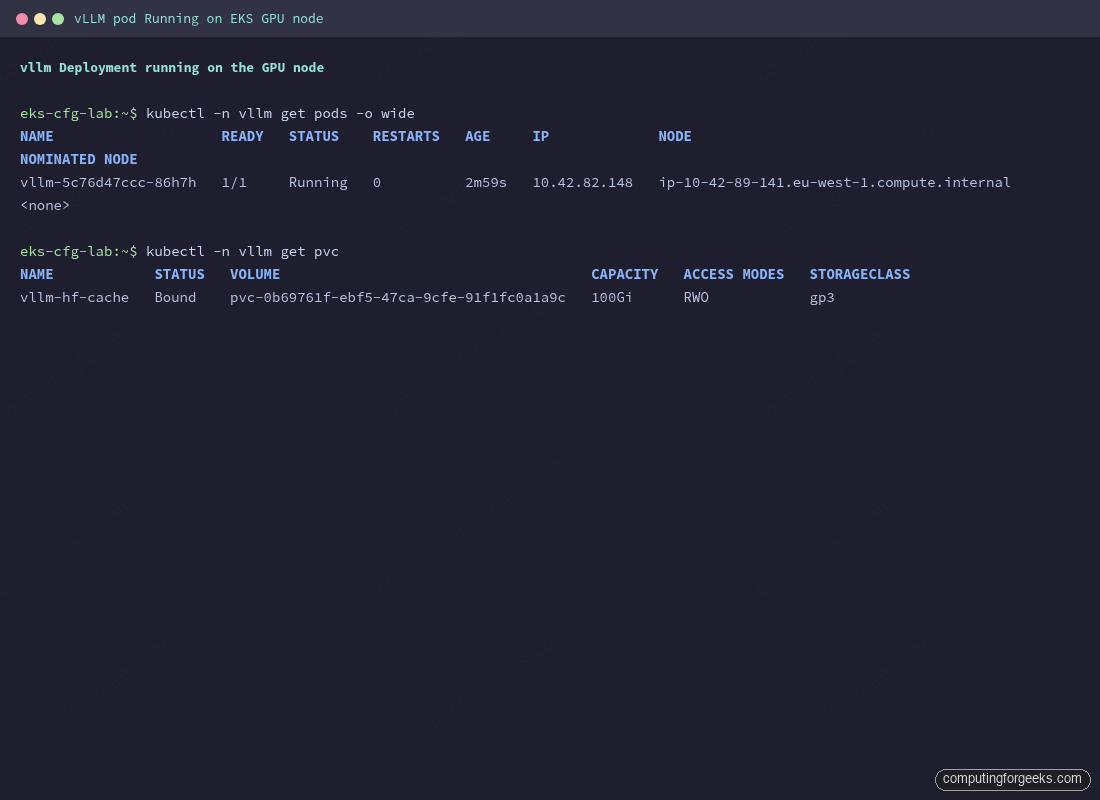
Confirm the pod actually claimed a GPU with kubectl describe. The Limits and Requests blocks should both show nvidia.com/gpu: 1; the Events trail shows the pod scheduling onto the GPU node, the EBS volume attaching, and the image being pulled.
kubectl -n vllm describe pod -l app=vllm | head -60The pod boot logs match what the bare-metal install showed: V1 engine init, FlashAttention 2 backend selected, model weights loaded, KV cache memory reported, and finally Application startup complete. Tail them with:
kubectl -n vllm logs -f deploy/vllm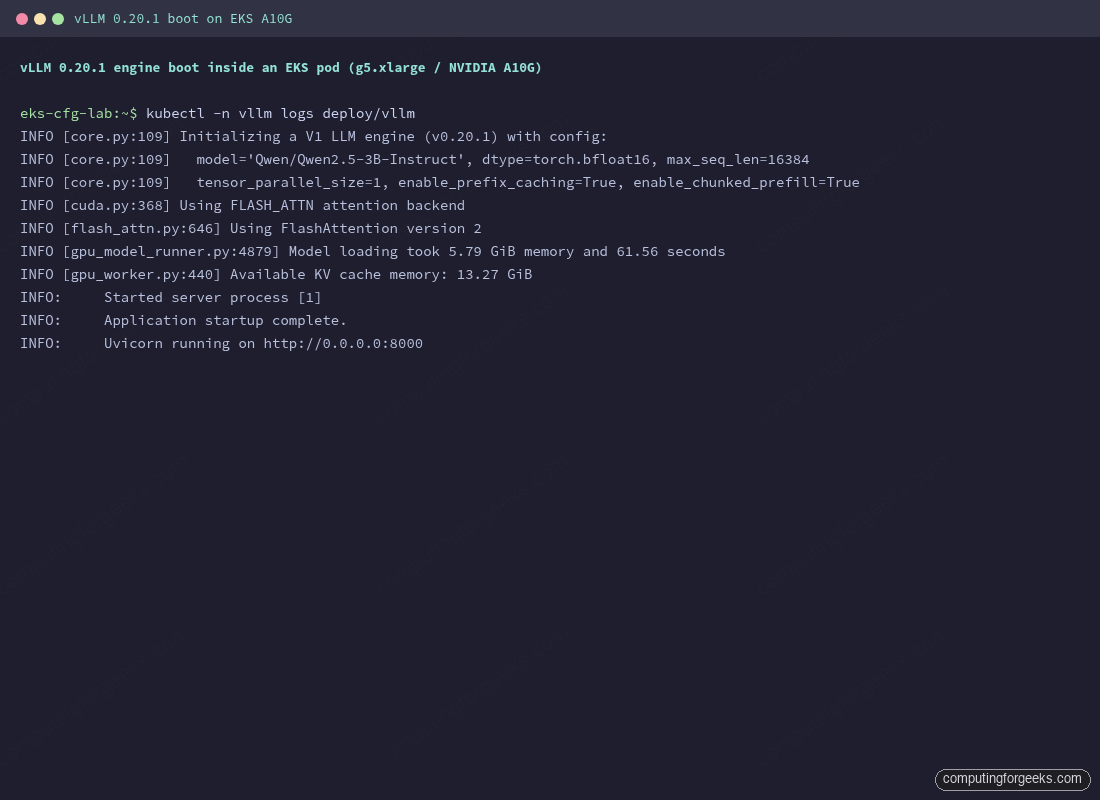
Test the API end-to-end through the Service. A short port-forward keeps the cluster boundary in front of the test traffic; in production you’d front the Service with an Ingress or LoadBalancer.
kubectl -n vllm port-forward svc/vllm 8000:8000 &

curl -s -N http://127.0.0.1:8000/v1/chat/completions \
  -H "Authorization: Bearer sk-cfg-please-rotate-me" \
  -H "Content-Type: application/json" \
  -d '{"model": "qwen2.5-3b", "stream": true, "max_tokens": 40,
       "messages": [{"role": "user", "content": "In one sentence, what is PagedAttention?"}]}'
Streaming chunks arrive token by token over Server-Sent Events, the same as on a bare-metal install, ending with data: [DONE]:
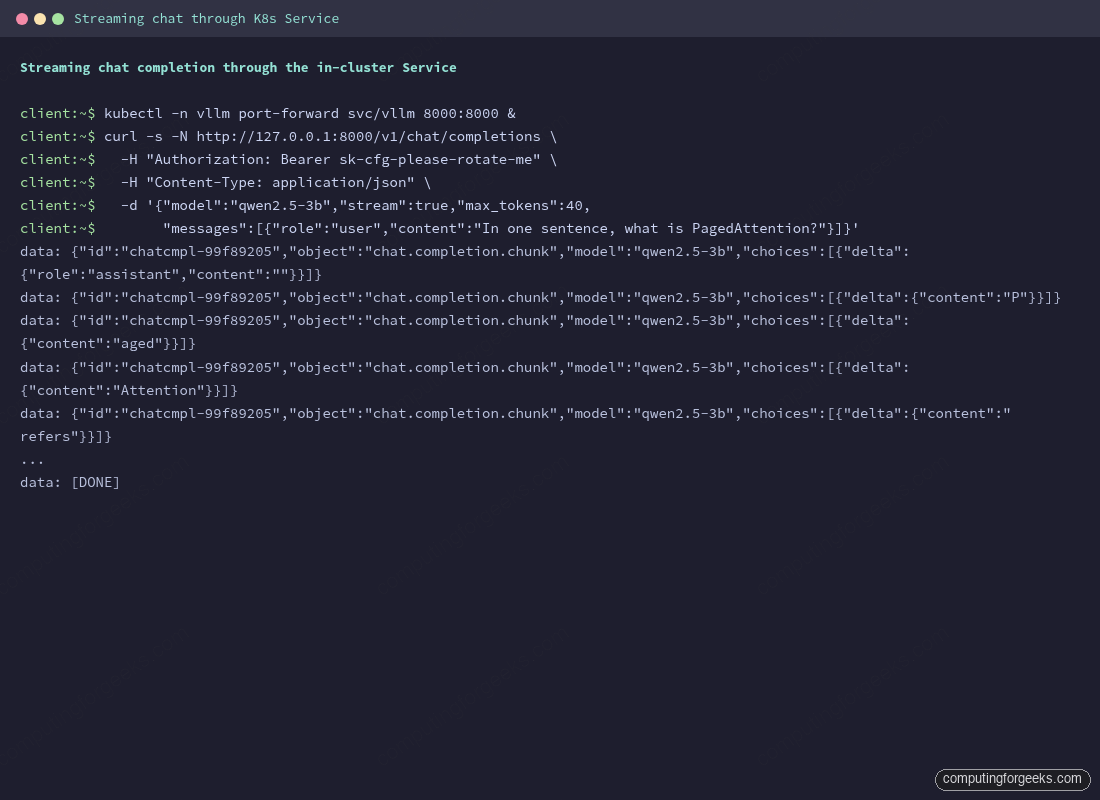
That’s vLLM serving on Kubernetes end-to-end. The Deployment will keep running and self-heal on node loss; the Service gives a stable in-cluster DNS name (vllm.vllm.svc.cluster.local:8000); the PVC keeps the model cache across restarts.
Five EKS gotchas you’ll hit on the first deploy
The path above looks short on paper. In practice, every first-time EKS-on-vLLM deploy hits at least one of the following five issues. They’re listed in roughly the order you’ll encounter them.
1. AWS GPU quota is zero by default
New AWS accounts have 0 vCPUs of “Running On-Demand G and VT instances” in every region. EKS happily creates the node group; the underlying ASG sits stuck waiting for instances that AWS refuses to launch. The nodegroup status stays CREATING and never converges.
aws service-quotas get-service-quota \
  --service-code ec2 \
  --quota-code L-DB2E81BA \
  --region eu-west-1 \
  --query 'Quota.Value' --output text
0.0

aws service-quotas request-service-quota-increase \
  --service-code ec2 \
  --quota-code L-DB2E81BA \
  --desired-value 16 \
  --region eu-west-1
Approval typically lands in a few hours after AWS support reviews the case. Asking for 16 vCPUs (4× g5.xlarge) covers the multi-node tensor parallel use cases without raising eyebrows; smaller asks (4 or 8 vCPUs) often clear faster. Spot quota lives under a separate quota code (L-3819A6DF); request both if you plan to cycle between on-demand and spot.
2. The vpc-cni addon must install before the nodegroup
Without a CNI plugin the kubelet can’t bring nodes Ready. Default Terraform module behaviour creates the EKS cluster, the node group, and the addons in parallel. The nodegroup creates instances that boot, the kubelet starts, and then waits forever for a CNI that hasn’t been installed yet. The terraform module reports Still creating... 8m elapsed on the nodegroup until you intervene.
Fix: tell the EKS module to install vpc-cni before any compute joins the cluster.
addons = {
  vpc-cni = {
    most_recent    = true
    before_compute = true   # critical
  }
  coredns                = { most_recent = true }
  kube-proxy             = { most_recent = true }
  eks-pod-identity-agent = { most_recent = true }
}
The before_compute = true flag tells the module to create the addon before the node group, breaking the deadlock. Apply once with this set and the cluster comes up cleanly in 12 to 15 minutes.
3. GPU nodes need both the cluster SG and the worker SG
If your GPU node group uses a custom configuration (custom AMI, custom launch template, or even just a separate Terraform module from the base node group), you may end up with GPU instances that have only the EKS cluster security group attached. Pods on those nodes can hit the kube-apiserver fine, but pod-to-pod traffic across nodes (including pod-to-CoreDNS) silently times out.
The symptom is exactly the kind of error that sends people down rabbit holes: vLLM reports it can’t load model configuration from Hugging Face, with a generic OSError: Can't load the configuration of '...'. The real cause is the pod can’t resolve huggingface.co because it can’t reach CoreDNS.
Verify by exec-ing into a debug pod on the GPU node and trying nslookup against the CoreDNS service IP:
kubectl run dns-debug -n vllm --image=busybox:1.36 \
  --overrides='{"spec":{"tolerations":[{"key":"nvidia.com/gpu","operator":"Equal","value":"true","effect":"NoSchedule"}],"nodeSelector":{"nvidia.com/gpu.present":"true"}}}' \
  --restart=Never --rm -it --command -- nslookup huggingface.co

;; communications error to 172.20.0.10#53: timed out
;; no servers could be reached
Fix: add the worker node security group (the one the base nodegroup uses) to the GPU instances’ ENIs. The cluster SG plus the worker SG together allow the pod-to-pod traffic the CNI needs.
WORKER_SG=$(aws ec2 describe-security-groups --region eu-west-1 \
  --filters Name=tag:Name,Values=cfg-lab-eks-node \
  --query 'SecurityGroups[0].GroupId' --output text)
CLUSTER_SG=$(aws eks describe-cluster --name cfg-lab-eks --region eu-west-1 \
  --query 'cluster.resourcesVpcConfig.clusterSecurityGroupId' --output text)

for I in $(aws ec2 describe-instances --region eu-west-1 \
  --filters "Name=instance-type,Values=g5.xlarge" "Name=instance-state-name,Values=running" \
  --query 'Reservations[].Instances[].InstanceId' --output text); do
  ENI=$(aws ec2 describe-instances --instance-ids $I --region eu-west-1 \
    --query 'Reservations[].Instances[].NetworkInterfaces[0].NetworkInterfaceId' --output text)
  aws ec2 modify-network-interface-attribute \
    --network-interface-id $ENI --groups $WORKER_SG $CLUSTER_SG --region eu-west-1
done
For a permanent fix, configure the GPU nodegroup’s launch template to attach the worker SG by default. The Terragrunt module in this guide does that via dependency on the base EKS module’s nodegroup IAM role.
4. The EBS CSI controller needs IMDS hop limit 2
Once the GPU node SG is correct, pod scheduling works. Then the PVC stays Pending. The EBS CSI controller is in CrashLoopBackOff with this in its logs:
error waiting for CSI driver to be ready:
CSI driver probe failed: rpc error: code = FailedPrecondition
desc = Failed health check (verify network connection and IAM credentials):
dry-run EC2 API call failed: operation error EC2: DescribeAvailabilityZones,
get identity: get credentials: failed to refresh cached credentials,
no EC2 IMDS role found, operation error ec2imds: GetMetadata,
request canceled, context deadline exceeded
The controller pod is trying to read instance role credentials from IMDS (the EC2 instance metadata service). EC2’s default IMDS hop limit is 1, which means responses can only travel one hop from the instance. A pod is two hops away (one through the host network namespace, one to IMDS), so the response times out before reaching the pod.
Bump the IMDS hop limit to 2 on every EKS instance, then restart the EBS CSI controller deployment so it picks up new credentials:
for I in $(aws ec2 describe-instances --region eu-west-1 \
  --filters "Name=instance-state-name,Values=running" "Name=tag:eks:cluster-name,Values=cfg-lab-eks" \
  --query 'Reservations[].Instances[].InstanceId' --output text); do
  aws ec2 modify-instance-metadata-options --instance-id $I \
    --http-put-response-hop-limit 2 --http-tokens required --region eu-west-1
done

# Also attach the EBS CSI managed policy to the nodegroup IAM role.
ROLE=$(aws iam list-roles \
  --query 'Roles[?starts_with(RoleName, `cfg-lab-eks-workers-eks-node-group`)].RoleName | [0]' \
  --output text)
aws iam attach-role-policy --role-name "$ROLE" \
  --policy-arn arn:aws:iam::aws:policy/service-role/AmazonEBSCSIDriverPolicy

kubectl -n kube-system rollout restart deployment ebs-csi-controller
The proper fix is to configure IRSA (IAM Roles for Service Accounts) for the EBS CSI driver so the controller gets credentials via a projected service account token instead of IMDS. The shortcut above is acceptable for an article-test cluster; flag it for replacement before going to production.
5. The Service named “vllm” collides with vLLM’s own VLLM_PORT env var
This one is the most surprising. Kubernetes auto-injects environment variables for every Service in the same namespace into every pod that starts after the Service exists. For a Service named vllm on port 8000 the injected vars include:
VLLM_SERVICE_HOST=172.20.133.116
VLLM_SERVICE_PORT=8000
VLLM_PORT=tcp://172.20.133.116:8000        # ← collides with vLLM's own VLLM_PORT
VLLM_PORT_8000_TCP=tcp://172.20.133.116:8000
VLLM_PORT_8000_TCP_PROTO=tcp
VLLM_PORT_8000_TCP_PORT=8000
VLLM_PORT_8000_TCP_ADDR=172.20.133.116
vLLM uses VLLM_PORT internally for the engine’s open-port discovery. The injected value is a URI, not an integer, so vLLM tries to use 'tcp://...' as a port number and crashes on engine init with this error:
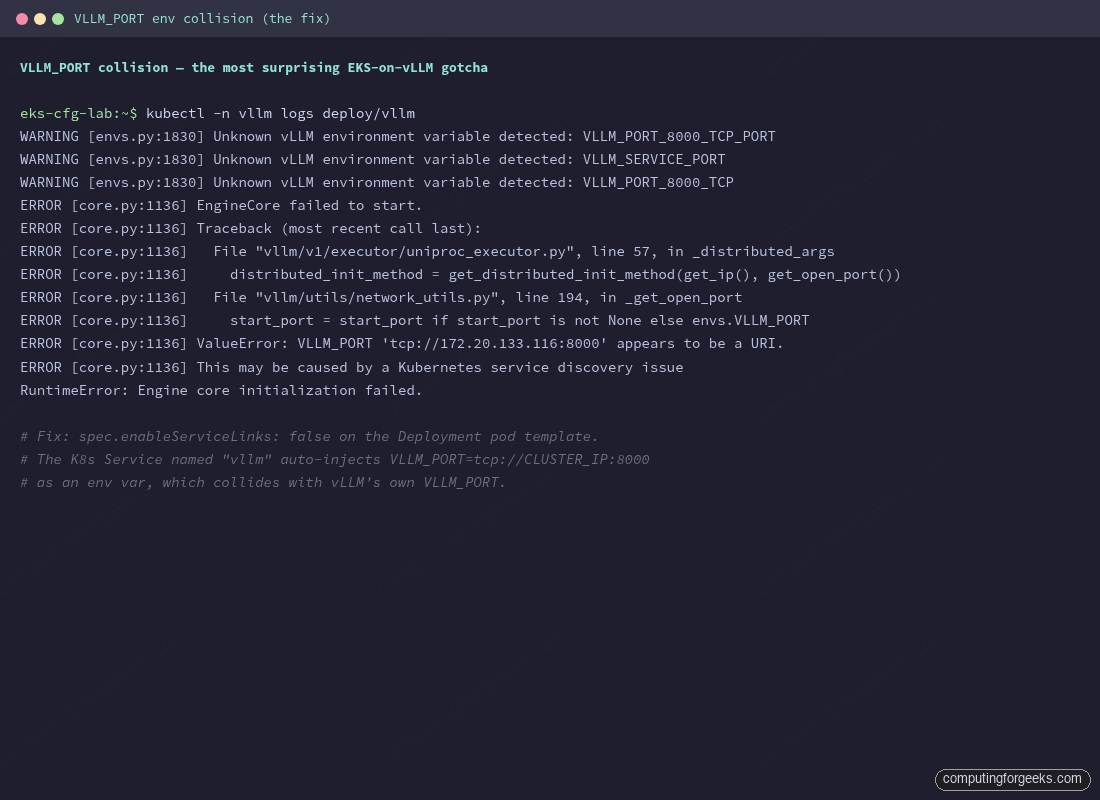
Fix: disable Kubernetes service env injection on the pod template. One line in the Deployment spec:
spec:
  template:
    spec:
      enableServiceLinks: false   # disables VLLM_*, KUBERNETES_*, etc.
      ...
Without this line vLLM never starts. The collision only triggers when the Service name happens to match a vLLM-recognized env var prefix, which is exactly the case for the natural Service name. Renaming the Service to vllm-svc would also avoid the collision but breaks portability with the upstream Helm chart, which assumes vllm.
Probes that actually work
Default readinessProbe and livenessProbe values trip on vLLM. The pod is “running” the moment containerd starts the process, but the API doesn’t accept traffic until the engine has loaded weights, captured CUDA graphs, and bound the listener. Default 90-second probe budgets fail every cold start and put the pod into a CrashLoop loop that never converges.
The fix is a generous startupProbe that pre-empts readinessProbe and livenessProbe until the engine answers /health. Once startupProbe succeeds it never runs again, and the regular probes take over with their normal short cycles.
startupProbe:
  httpGet: {path: /health, port: http}
  failureThreshold: 60       # 60 * 10s = 10 min budget
  periodSeconds: 10
readinessProbe:
  httpGet: {path: /health, port: http}
  periodSeconds: 10
livenessProbe:
  httpGet: {path: /health, port: http}
  periodSeconds: 30
  timeoutSeconds: 10
For 70B-class models with tensor parallelism the engine boot can take five to ten minutes. Bump failureThreshold to 120 (20-minute budget) and the cluster won’t kill the pod halfway through CUDA graph capture.
Cleanup and cost notes
GPU nodes burn money fast. A g5.xlarge runs around 1 USD per hour on-demand in eu-west-1, and the EKS control plane adds 0.10 USD per hour. Toggling the GPU node group min_size to 0 between sessions stops the bleed without destroying the cluster:
aws eks update-nodegroup-config \
  --cluster-name cfg-lab-eks \
  --nodegroup-name cfg-lab-eks-gpu \
  --scaling-config minSize=0,maxSize=2,desiredSize=0 \
  --region eu-west-1
For full teardown (VPC, EKS, GPU nodes, the lot), the Terragrunt session-down script tears it all down and runs the validation sweep. The validation step is non-negotiable on a test account: orphan NAT Gateways, EBS volumes, and ENIs are how 5 USD test sessions become 50 USD invoices.
cd infra-aws
make down
./scripts/validate-clean.sh
What to watch on a real production deployment, beyond the gotchas above: the nvidia.com/gpu allocatable count on every GPU node (a flap there means the device plugin is unhealthy), pod CrashLoopBackOff on any vllm replica (almost always an OOMKilled, fix with --gpu-memory-utilization=0.85 and a smaller --max-model-len), and the PVC IO throughput during model load (slow EBS turns a 90-second cold start into a 10-minute one. Switch to gp3 with provisioned IOPS or to io2 for paths that retrain or hot-reload models).
Where to go from here
The cluster is now serving a single vLLM Deployment with one GPU pod, fronted by a Service. That’s enough for a small internal tool or a single-tenant API. Production scenarios you’ll grow into next, each substantial enough to deserve its own validated guide:
- Helm chart deployments via the vLLM production-stack for parameterized installs and KV-cache-aware routing across replicas.
- HPA on custom metrics (
vllm:num_requests_waiting,vllm:kv_cache_usage_perc) via Prometheus Adapter, so replicas scale on real saturation signals instead of CPU. - Multi-node tensor parallelism for 70B-class models with Ray and the LeaderWorkerSet CRD.
- Observability with
kube-prometheus-stack, the official vLLM Grafana dashboard, and alert rules wired to the same metrics from the bare-metal article. - Disaggregated prefill and decode via the llm-d project, when the workload justifies the operational complexity.
The single-box install in Install vLLM on Linux for Production LLM Serving remains the right starting point for one team’s internal tool or a single-tenant API. Move to the Kubernetes flow above when you outgrow that, when you need autoscaling or KV-cache-aware routing or models that need multiple nodes. The OpenAI API on top doesn’t change; only the operations underneath do.