Podman 6.0 deletes more than it adds. The 6.0 series rips out roughly a decade of legacy plumbing: the CNI network stack, the iptables firewall backend, the slirp4netns rootless network layer, cgroups v1, and the old BoltDB state database are all gone. On a current host the change is a non event, because the modern replacements have been the defaults since the 5.x series. On an old host the upgrade needs one preparation step, or Podman 6.0 stops on first run and asks you to migrate the container database before it starts.
This is the full Podman 6.0 breaking changes list: what was removed, who each removal actually affects, and the upgrade order that avoids data loss. Every claim below was checked against two real systems, the shipping defaults on Podman 5.8 and Podman 6.0 itself pulled from Fedora Rawhide.
Tested July 2026 on Podman 6.0.1 (Fedora Rawhide) and Podman 5.8.2 (Fedora 44).
What Podman 6.0 removes
Podman 6.0 shipped upstream on June 24, 2026, and it is the largest cleanup since the 4.0 rewrite. Six subsystems that carried backward-compatibility weight are gone, each replaced by the newer implementation that has been the default for one or more releases already.
| Removed in 6.0 | Now the only option | Who this affects |
|---|---|---|
| CNI networking | Netavark | Hosts with hand written /etc/cni/net.d configs |
| iptables firewall backend | nftables (via Netavark 2.0) | Hosts pinned to the iptables driver |
| slirp4netns rootless stack | Pasta | Rootless setups referencing slirp4netns options |
| cgroups v1 | cgroups v2 (required) | Old hosts still booting the v1 hierarchy |
| BoltDB state database | SQLite | Installs older than the 5.x SQLite switch |
| Intel Mac and Windows 10 machines | Apple Silicon and Windows 11 | Developers on old podman machine hosts |
Two smaller behavior changes ride along with the removals. podman volume prune now removes only anonymous volumes unless you pass --all, so a bare prune no longer deletes named volumes. And the release closes CVE-2026-57231, where a malformed Env entry in an image could leak host environment variables into a container. Both are reasons to read the changelog before a blind upgrade, not after.
Step 1: Check whether your system is already 6.0 ready
Most systems are ready and do not know it. The four things Podman 6.0 requires (cgroups v2, the Netavark network backend, the SQLite database backend, and Pasta for rootless networking) have all been defaults since the 5.x series. One command reports every one of them at once:
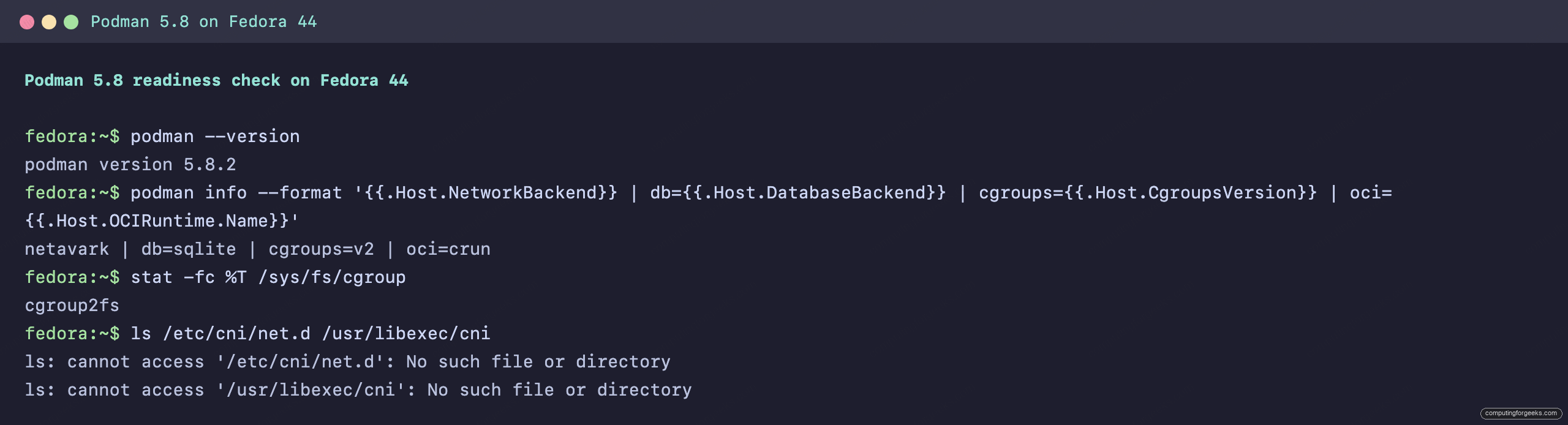
podman info --format '{{.Host.NetworkBackend}} | db={{.Host.DatabaseBackend}} | cgroups={{.Host.CgroupsVersion}} | oci={{.Host.OCIRuntime.Name}}'On a stock Fedora 44 box running Podman 5.8, all four already match what 6.0 mandates:
netavark | db=sqlite | cgroups=v2 | oci=crunHere is that readiness check on the Fedora 44 test host, where Podman 5.8 already reports every value 6.0 expects:
The rootless network mode is the one value the format string above does not surface. Start a container and inspect it, and the backend shows directly:
podman run -d --name web -p 8080:80 docker.io/library/nginx:alpine
podman inspect web --format 'netmode={{.HostConfig.NetworkMode}}'
Pasta, not slirp4netns, handles the rootless port forward:
netmode=pastaThe last thing to confirm is that no CNI leftovers are on disk. If these paths do not exist, there is nothing to migrate:
ls /etc/cni/net.d /usr/libexec/cniOn a system that never used CNI, both are absent:
ls: cannot access '/etc/cni/net.d': No such file or directory
ls: cannot access '/usr/libexec/cni': No such file or directory
A host that returns netavark, sqlite, v2, and pasta with no CNI directory will upgrade to 6.0 with nothing to change. The commands from the standard Podman container workflow keep working unchanged. The rest of this guide is for the hosts that answer differently.
Step 2: The breaking changes that actually bite
Three of the six removals can stop a container from starting or, in one case, block Podman from starting until you migrate its database. These are the ones to audit before touching the package.
CNI networking is gone
Podman 6.0 loads only Netavark. Any network defined through a CNI JSON file in /etc/cni/net.d is invisible to it. The iptables firewall driver is removed in the same release, independently of the CNI change, so Netavark drives nftables directly. Netavark has been the default backend since Podman 4.0, so a host installed in the last two years is already on it. The exception is a host that was explicitly pinned with network_backend = "cni" in containers.conf, or one carrying networks created years ago. Convert those to Netavark on the running 5.x system, verify connectivity, then upgrade.
cgroups v1 will not run Podman 6.0
Podman 6.0 refuses to start on a cgroups v1 host. Every current distribution boots the unified v2 hierarchy by default, so this only bites machines that were manually reverted with systemd.unified_cgroup_hierarchy=0 or that never left the RHEL 7 era. Check the mount type before upgrading:
stat -fc %T /sys/fs/cgroupA ready host reports the v2 filesystem:
cgroup2fsAny other answer means the host boots v1, and it must move to v2 before Podman 6.0 will run at all.
BoltDB databases must be migrated to SQLite
SQLite is the only state backend in 6.0. Podman kept container, image, and volume state in a BoltDB file for years, made SQLite the default for new installs during the 4.x and 5.0 series, then added an automatic BoltDB to SQLite migration in the 5.8 release. A host that still holds a BoltDB database is the one that needs care, but 6.0 neither reads it silently nor throws it away. It migrates the database to SQLite automatically on the next reboot, and if a migration is still pending it refuses to start with a clear error telling you to reboot or run the conversion by hand with podman system migrate --migrate-db. The old BoltDB file is left in place, so a failed migration loses nothing. Step 3 does the conversion ahead of the version jump so 6.0 never has to prompt for it.
Intel Mac and Windows 10 machines are dropped
On the desktop side, podman machine no longer supports Intel Macs or Windows 10, and the default machine provider on macOS is now libkrun. Developers on Apple Silicon and Windows 11 are unaffected. Anyone still on an Intel MacBook stays on the Podman 5.x line until the hardware changes.
Step 3: The safe upgrade path from Podman 5.x
The safest path stops at 5.8 on the way to 6.0. It is not strictly required, because Podman 6.0 will migrate a BoltDB database itself, but doing that migration on a known-good 5.8 install first keeps it out of the version jump. The order below keeps the upgrade boring.
First, read the version you are on:
podman --versionIf it prints anything below 5.8, upgrade to the latest 5.8 release first, then reboot. The BoltDB to SQLite migration runs during that reboot, not at the moment the package installs, so checking right after the upgrade command still shows the old backend. Once the host is back up, confirm the database backend now reads sqlite:
podman info --format '{{.Host.DatabaseBackend}}'If it still reads boltdb, the reboot migration did not run; convert it explicitly with podman system migrate --migrate-db. With the backend on SQLite, run the plain migration helper once, which reconciles user-namespace and configuration state without touching the database:
podman system migrateWith the database on SQLite and the migration clean, upgrade to 6.0 through the normal package manager for your distribution. After the upgrade, confirm both the Podman version and that the companion tools moved to their 6.0-era releases:
podman --version
buildah --version
skopeo --version
rpm -q netavark aardvark-dns
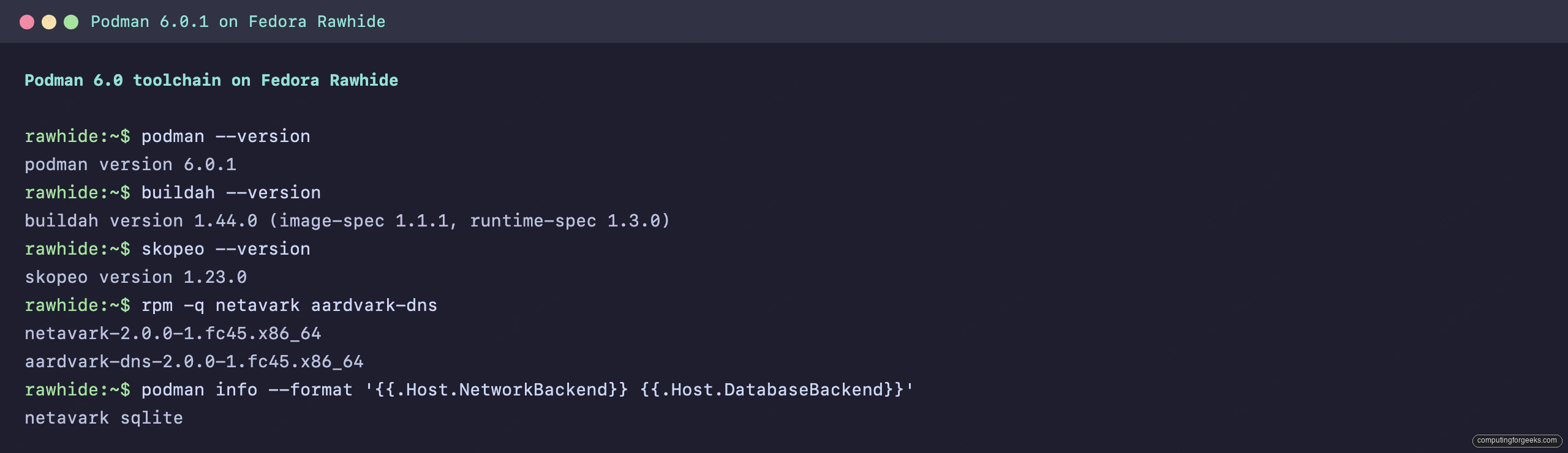
On Podman 6.0 the versions line up with the dependencies the release requires:
podman version 6.0.1
buildah version 1.44.0 (image-spec 1.1.1, runtime-spec 1.3.0)
skopeo version 1.23.0
netavark-2.0.0-1.fc45.x86_64
aardvark-dns-2.0.0-1.fc45.x86_64
The same versions on the Podman 6.0 test system confirm the whole toolchain moved together:
Those minimums are not optional. Podman 6.0 expects the matching major releases of every helper, and a package manager upgrade pulls them together:
| Component | Minimum for Podman 6.0 |
|---|---|
| Buildah | 1.44.0 |
| Skopeo | 1.23.0 |
| Netavark | 2.0.0 |
| Aardvark DNS | 2.0.0 |
One post-upgrade habit to unlearn: podman volume prune without arguments now spares named volumes. The help text spells out the new default and the flag that restores the old behavior:
podman volume prune --helpThe relevant line is the one describing --all:
-a, --all Remove all unused volumes, both anonymous and namedScripts that relied on a bare prune to clear named volumes need --all added, or they will quietly leave data behind. If you drive Podman from systemd, the same upgrade applies cleanly to containers running as systemd services and to Quadlet units, which are now the recommended way to manage long-lived containers.
When Podman 6.0 reaches your distro
The upstream release and the distribution packages are not the same clock, and in July 2026 most systems are still a version or two behind. Upstream Podman is on the 6.0 line, and Fedora Rawhide already ships 6.0.1. Stable Fedora 44, on the other hand, is still on the 5.8 series, and the official quay.io/podman/stable container image tracks the same 5.8 release. Fedora 45 is the first stable distribution that will carry 6.0 by default; enterprise and long-term-support distributions follow later on their own cadence, which means Fedora, Ubuntu, and Rocky and AlmaLinux installs will land on 6.0 at different times through late 2026 and into 2027.
That staggering is the useful part of the news. There is time to run the readiness check from Step 1 on every host, confirm each already sits on Netavark, SQLite, cgroups v2, and Pasta, and fix the handful that do not while they are still on a version that can read their old state. Do that now and the day your distribution ships 6.0 the upgrade is a single package command with nothing left to migrate. The full list of changes lives in the upstream release notes, worth a read for any host that still runs CNI networks or a database older than the 5.x SQLite switch.