

The first time SELinux blocks something on a fresh Fedora install, the temptation is to run setenforce 0 and move on. Don’t. That trades a five-minute policy fix for an unconfined system, and walks away from the most effective Linux exploit-mitigation layer the kernel ships with. The real skill is learning to read the audit log, identify what was actually denied, and apply the narrowest possible policy adjustment to allow it. Four tools do almost all of the work: ausearch and sealert to read denials, semanage port for non-standard ports, setsebool for behaviour toggles, and semanage fcontext plus restorecon for custom paths.
This guide is the survival manual we wish was bundled into every Fedora install. It walks the mental model first (contexts, type enforcement, domain transitions), then the four fix paths with real audit.log output from a hands-on test box, then ten server and desktop scenarios that cover almost every denial you will hit in practice: Nginx on a non-standard port and custom webroot, PostgreSQL with an alternate data directory, Podman bind-mounts, SSH on a different port, Samba on a user home, custom systemd services, Flatpak sandbox blocks, browsers reading external drives. Every command was executed on a real Fedora install and the outputs are captured, not invented.
Tested May 2026 on Fedora 44 (kernel 7.0.8-200.fc44) with selinux-policy-targeted 44.1, policycoreutils 3.10, audit 4.1.4, setroubleshoot-server 3.3.36, libselinux 3.10. Verified on Fedora 43 and Fedora 42 clones; every command in this guide works unchanged across the three releases. The mental model and toolset apply identically to RHEL 10, Rocky Linux 10, and AlmaLinux 10.
How SELinux actually works (in five minutes)
SELinux is a kernel module that enforces a Mandatory Access Control (MAC) layer on top of normal Unix permissions. Where Unix asks “is this UID allowed to read this file?”, SELinux asks a second question: “is the domain this process is running in allowed to read a file with this type label, in this MCS category?”. The DAC check is the lock on your front door. The MAC check is the alarm system that fires even when the front door is open, because someone stole the key.
The default Fedora policy is targeted. It confines the system services that talk to the network or run as root (httpd, sshd, NetworkManager, postgresql, dovecot, podman, systemd-resolved) and leaves interactive user sessions running in unconfined_t. That choice is deliberate: it gives you most of the security benefit without making the desktop unusable. If you want every login session confined, the Fedora hardening guide covers the staff_u and user_u roles, the harder configuration that RHEL ships for regulated environments.
Anatomy of an SELinux context
Every process, every file, every port carries a label that looks like this:
system_u:system_r:httpd_t:s0
   |        |        |     |
   |        |        |     +-- MCS / MLS sensitivity (s0 = no constraint)
   |        |        +-------- type (the most important field)
   |        +----------------- role
   +-------------------------- SELinux user (NOT the Unix user)
For targeted policy, only the type field is enforced. Read a context as “everything before :s0 describes what kind of thing this is”. A process labelled httpd_t is the Nginx or Apache daemon. A file labelled httpd_sys_content_t is content that the webserver is allowed to read. A port labelled http_port_t is a TCP port that webservers are allowed to bind to. The policy is a giant table of allow rules between these types, and the kernel checks every syscall against it.
Look at the labels on a few real objects to make this concrete:
ls -Z /usr/sbin/sshd /etc/shadow /var/log/audit
id -Z
The output makes the policy intent obvious. The sshd binary is sshd_exec_t so systemd transitions to sshd_t when it runs. The shadow file is shadow_t so only a handful of utilities can touch it. The audit log directory is auditd_log_t so only auditd writes there:
system_u:object_r:sshd_exec_t:s0 /usr/sbin/sshd
system_u:object_r:shadow_t:s0 /etc/shadow
system_u:object_r:auditd_log_t:s0 /var/log/audit
unconfined_u:unconfined_r:unconfined_t:s0-s0:c0.c1023
Your interactive shell is unconfined_t with the full MCS range c0.c1023, which is why you can read almost anything without policy fighting you. The constraint kicks in for the daemons.
Domain transitions: how a binary becomes a daemon
When systemd runs /usr/sbin/sshd, the policy ships a type_transition rule that says “an init_t process executing an sshd_exec_t file transitions to sshd_t”. The new sshd process starts life in the locked-down sshd_t domain even though systemd ran it. The same mechanism turns nginx into httpd_t, postgresql into postgresql_t, podman into container_runtime_t, and so on. When you write a custom systemd service, your binary inherits init_t unless you label the executable with a known service type, which is one of the gotchas covered in the server scenarios below.
Confirm SELinux is enforcing
Every Fedora install ships with SELinux enforcing the targeted policy. Confirm with the two status commands; they should agree:
getenforce
sestatus
id -Z
On a default Fedora box you see Enforcing, the longer sestatus dump that reports the policy name and version, and the context for your shell:
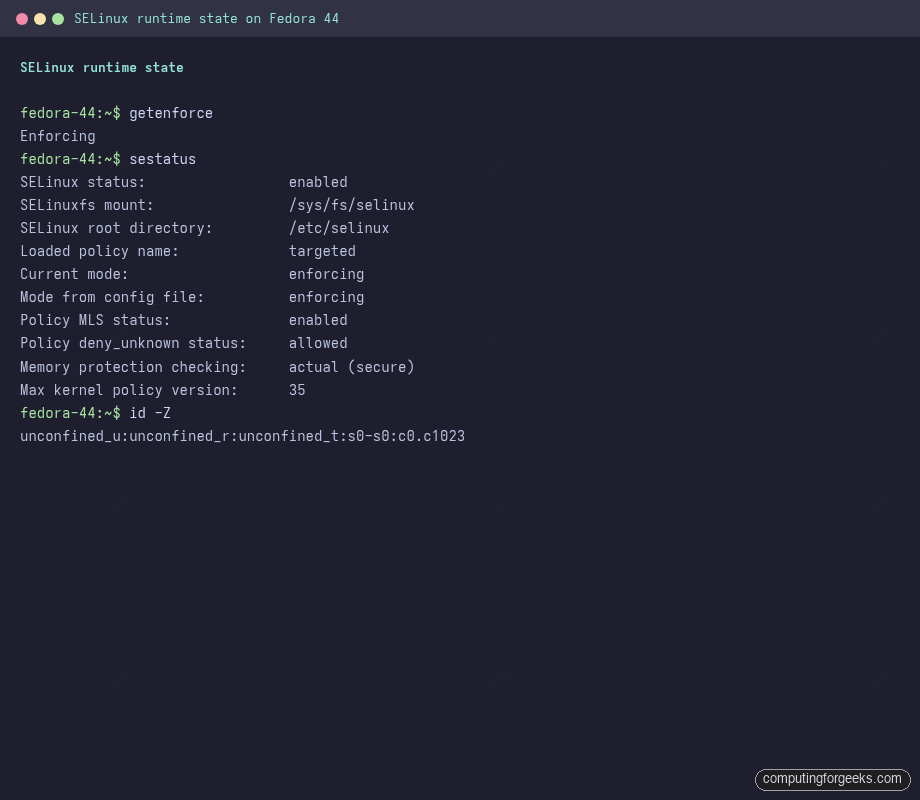
The Max kernel policy version: 35 line indicates Fedora is running the modern policy format. Older Fedora releases on the same series of policy versions show identical enforcing posture; the syntax of every command below is identical. If getenforce returns Disabled, someone has flipped the kernel boot to bypass SELinux entirely (selinux=0 on the kernel command line or an entry in /etc/selinux/config). That state requires a full filesystem relabel to recover from, which is why the post-install setup guide covers the boot-state checks worth running on every fresh Fedora install.
Install the troubleshooting toolset
The default install ships policycoreutils (the setenforce, restorecon, semodule binaries) but not the higher-level diagnostic tools you actually need. Pull them in one transaction:
sudo dnf5 install -y policycoreutils-python-utils setools-console setroubleshoot-serverThat gives you three categories of tools. semanage and semodule are the policy-management CLIs. sesearch, seinfo, matchpathcon are the query tools for inspecting the loaded policy. sealert plus the setroubleshoot-server daemon are the plain-English denial explainers that watch the audit log and write human-readable summaries to the journal as denials happen. The DNF5 cheatsheet covers the broader package-manager flags worth knowing for any troubleshooting session.
Audit log fundamentals
SELinux denials end up in three places, and knowing which to read in which situation saves a lot of time. The kernel writes Access Vector Cache (AVC) entries to /var/log/audit/audit.log. The setroubleshootd daemon watches that file and writes plain-English summaries to the journal via journalctl. sealert reads the raw log on demand and prints structured suggestions. journalctl -u nginx shows the service-level error but rarely the denial itself, which is the single most common reason an SELinux problem looks like a generic Permission denied at first.
Reading denials with ausearch
One real gotcha worth memorising before you spend an hour debugging: ausearch -m AVC --start recent often returns <no matches> on a fresh denial because the search relies on auditd’s internal cursor, which can lag the on-disk file. Read the file directly with -if and the matches appear immediately:
sudo ausearch -i -if /var/log/audit/audit.log -m AVC --start recentThe -i flag interprets numeric IDs (UIDs, syscall numbers, timestamps) into human-readable text. -if tells ausearch to read the file rather than the daemon’s cursor. Use this form whenever ausearch -m AVC seems to silently miss denials you know happened.
Anatomy of an AVC entry
A single AVC denial captured during the nginx test in the next section looks like this:
type=AVC msg=audit(05/23/2026 17:06:14.179:446) : avc:  denied  { name_bind }
  for  pid=8458 comm=nginx src=8888
  scontext=system_u:system_r:httpd_t:s0
  tcontext=system_u:object_r:unreserved_port_t:s0
  tclass=tcp_socket permissive=0
Read it field by field. The denied keyword says the kernel blocked the operation. The braced operation { name_bind } is the access vector that was checked. scontext is the source domain (the process trying to do the thing): nginx running in httpd_t. tcontext is the target context (the thing being accessed): a TCP port labelled unreserved_port_t. tclass is the object class (port, file, dir, socket). permissive=0 confirms the system was enforcing when the block fired. Once you can read this without thinking, every fix path follows from the fields.
sealert and setroubleshootd
For each AVC, setroubleshootd runs a set of plugins that suggest specific fixes scored by confidence. The output is what most people actually use to debug because it tells you the exact command to run:
sudo sealert -a /var/log/audit/audit.log | head -20The bind_ports plugin scores 92.2 confidence and tells you semanage port -a -t http_port_t -p tcp 8888 is the right move. The lower-confidence catchall plugin suggests an audit2allow module as a last resort:
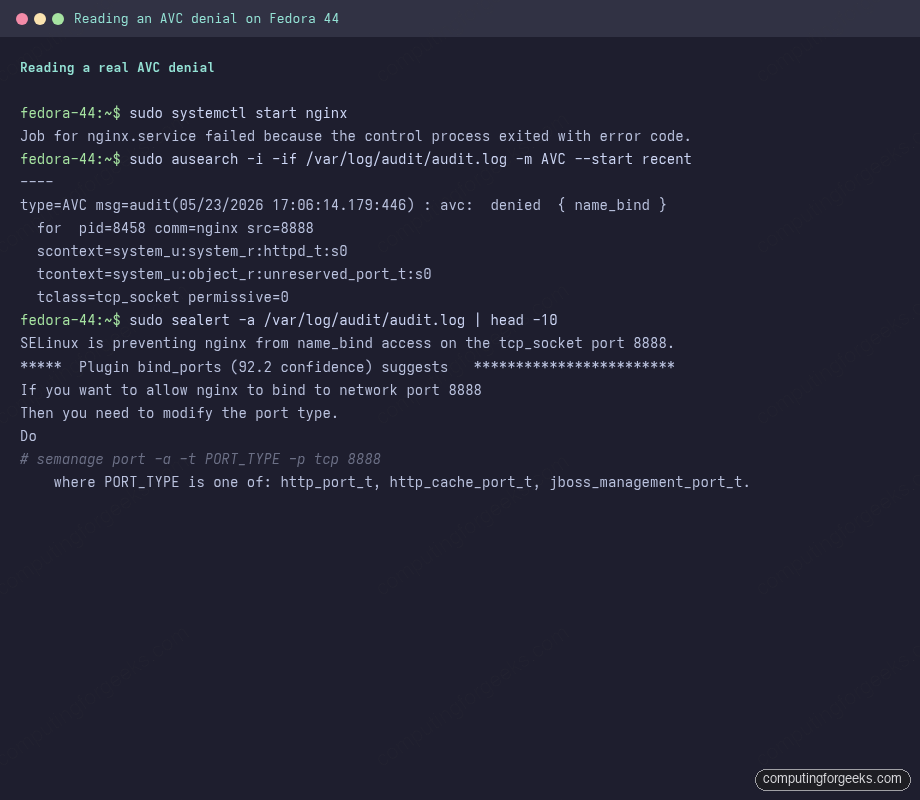
For interactive debugging the sealert command is the right entry point; for automation, parsing audit.log directly with ausearch -i -if is faster and avoids the daemon-cursor lag covered above.
The dontaudit cache
SELinux silently suppresses a long list of low-noise denials via “dontaudit” rules to keep the log readable. When you are chasing a chain of denials where the first denial triggers a downstream one that the policy normally hides, disable dontaudit temporarily, reproduce, then re-enable:
sudo semodule -DB
# reproduce the workflow that triggers the denial
sudo ausearch -i -if /var/log/audit/audit.log -m AVC --start recent
sudo semodule -B
Always re-enable when you are done. The dontaudit rules exist because keeping them logged would drown out the denials that actually matter.
Trigger a real denial: nginx on a non-standard port and custom webroot
The fastest way to internalise SELinux troubleshooting is to break something on purpose, watch the denial land, then walk through the fix paths. Install nginx and switch it to a non-standard port plus a non-default webroot:
sudo dnf5 install -y nginx
sudo mkdir -p /srv/web/myapp
echo "<h1>Hello SELinux</h1>" | sudo tee /srv/web/myapp/index.html
Edit the main config and set the listen port to 8888, the root to the new directory:
sudo vi /etc/nginx/nginx.confInside the default server {} block, set:
listen       8888;
listen       [::]:8888;
root         /srv/web/myapp;
Start the service. Both denials fire (the port bind first, then the file read after the port fix lands):
sudo systemctl start nginxThe service exits with code 1, the journal shows bind() to 0.0.0.0:8888 failed (13: Permission denied), and the audit log holds the AVC. sealert -a /var/log/audit/audit.log spells out exactly what to do. The next three sections cover the three production fix paths in order of how often you reach for them.
Fix path 1: setsebool for behaviour toggles
Booleans are the first thing to try because they are pre-shipped, well-named, and reversible with a single command. The policy ships hundreds of toggles for behaviours the security team considered risky enough to default off but useful enough to expose: outbound network connects from web daemons, NFS-mounted home directories, mod_userdir, SFTP chroot writes, and so on. The Nginx-as-reverse-proxy case is the most common one in production. Enumerate the relevant booleans first:
sudo getsebool -a | grep ^httpd_canOutput is the set of toggles that govern outbound httpd connections. Each is a one-line on/off switch, persisted in policy:
httpd_can_check_spam --> off
httpd_can_connect_ftp --> off
httpd_can_connect_ldap --> off
httpd_can_network_connect --> off
httpd_can_network_connect_cobbler --> off
httpd_can_network_connect_db --> off
httpd_can_network_memcache --> off
httpd_can_network_redis --> off
httpd_can_sendmail --> off
Flip the right one on. The -P flag writes the change to disk so it survives reboot; without it the setting lasts only until the next boot:
sudo setsebool -P httpd_can_network_connect on
sudo getsebool httpd_can_network_connect
For the human-readable name of every boolean, list with semanage instead of getsebool; it pulls the description string from the policy:
sudo semanage boolean -l | grep httpd_can_networkThe 366 booleans on a stock Fedora cover most of the real-world denials you will hit. The categories worth knowing by name are httpd_* for web servers, container_* for podman and docker, samba_* for file sharing, ftpd_* for FTP, virt_* for libvirt, git_* for Gitolite and friends, and selinuxuser_* for desktop sessions:
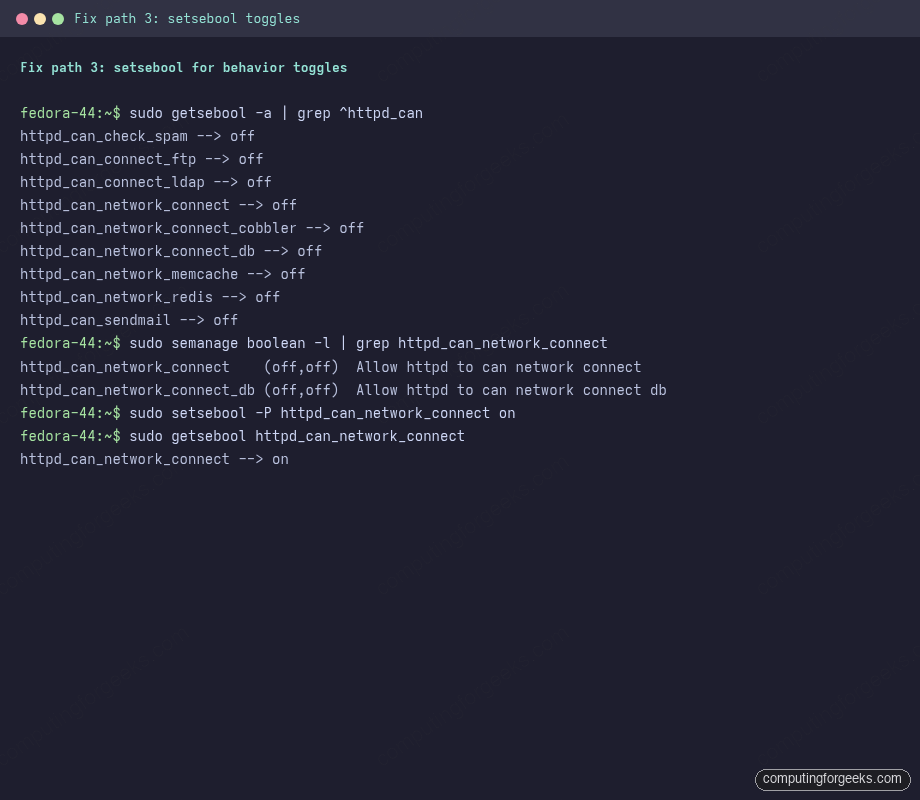
The general rule when reading a fresh denial: identify the source domain from the AVC (httpd_t, ssh_t, postgresql_t) and grep for booleans whose name starts with that domain’s prefix. If a boolean fits the behaviour, flip it; you are done.
Fix path 2: semanage port for non-standard ports
When the denial is name_bind on a port the daemon’s domain is not allowed to bind, the fix is to teach the policy that the port belongs to the daemon’s port type. Before changing anything, see what ports the policy already allows for that type:
sudo semanage port -l | grep ^http_port_tStock Fedora ships 80, 81, 443, 488, 8008, 8009, 8443, 9000 in http_port_t for TCP. Add 8888:
sudo semanage port -a -t http_port_t -p tcp 8888
sudo semanage port -l | grep ^http_port_t
The list now includes 8888 at the front. Restart nginx; the bind succeeds and the service stays active. curl -sI http://localhost:8888/ returns either 200 if the webroot is labelled correctly or 403 if the file context still needs the second fix:
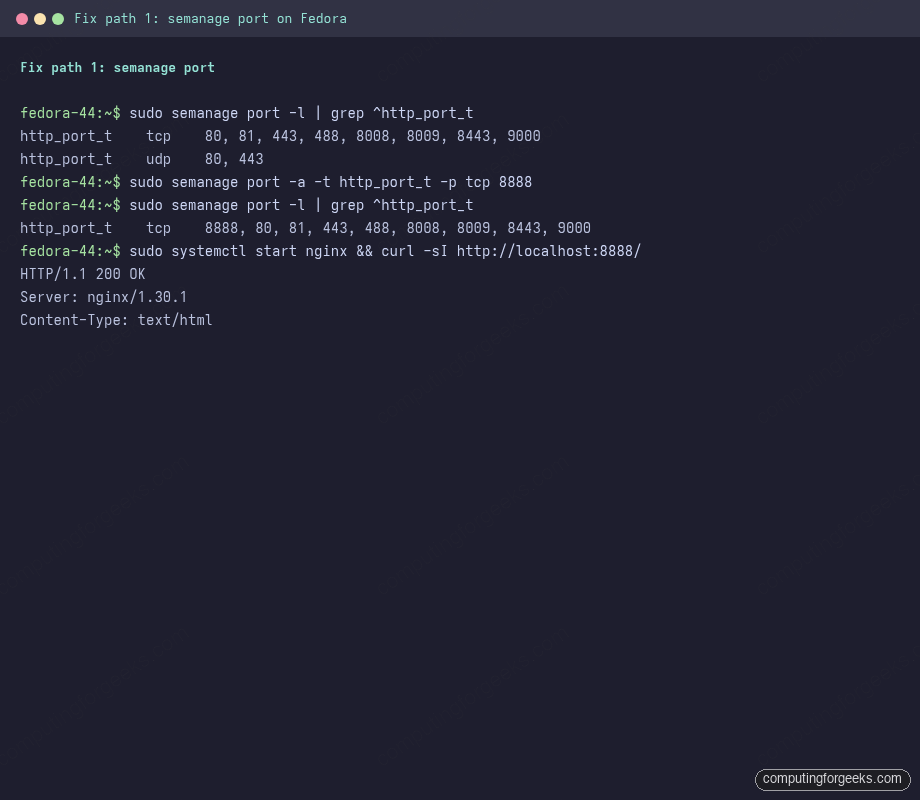
The change is written into the local policy module store, survives reboot, and survives package upgrades. To remove the rule later, swap -a for -d:
sudo semanage port -d -t http_port_t -p tcp 8888A common variation is moving an existing port type rather than adding to it. For SSH on a non-standard port, the ssh_port_t set starts at 22 and you cannot -a a port to a type that already declares it elsewhere; you have to -m (modify) the set. The SSH non-standard-port scenario later in this guide walks the full sequence.
Fix path 3: semanage fcontext and restorecon for custom paths
Files inherit the SELinux label of the directory you create them in. Put the webroot under /srv/web/myapp instead of the policy-default /usr/share/nginx/html, and the files get labelled var_t, which httpd_t is not allowed to read. The fix is two commands: tell the policy what the label should be for that path, then apply it.
Confirm the wrong label first with ls -laZ, then ask the policy what label the path should have with matchpathcon:
ls -laZ /srv/web/myapp/
sudo matchpathcon /srv/web/myapp/index.html /usr/share/nginx/html/index.html
matchpathcon compares against the loaded fcontext rules and tells you the difference. The policy-default webroot returns httpd_sys_content_t; the custom path returns the generic var_t because no rule covers it. Add the rule, then apply it to the existing files:
sudo semanage fcontext -a -t httpd_sys_content_t "/srv/web/myapp(/.*)?"
sudo restorecon -Rv /srv/web/myapp
The regex (/.*)? on the fcontext rule means “this directory and everything under it, optionally”. The restorecon -Rv walks the tree and applies the rule, printing each file it relabels:
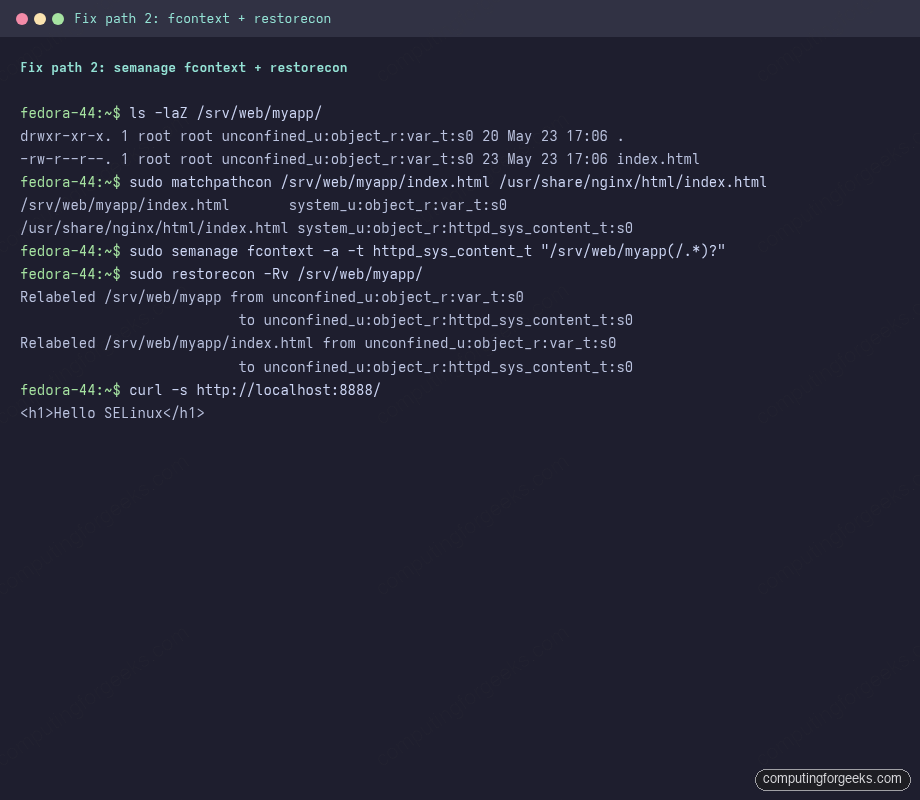
Files you create later under /srv/web/myapp get the right label automatically because the rule sits in the policy database, not the filesystem metadata. To inspect existing local rules, use -C for “custom” (rules added on top of the default policy):
sudo semanage fcontext -l -C
sudo semanage boolean -l -C
sudo semanage port -l -C
The custom view is invaluable when you inherit a server with months of accumulated policy tweaks and you want to know what is different from a fresh install.
chcon vs restorecon: pick the right one
Two commands change file labels and they have very different semantics. chcon sets a label on a single file directly, ignoring the policy database. restorecon reads the policy database and applies the rule that matches the path. A label set with chcon survives until something runs restorecon on the file, at which point it reverts to the database value. A label set via semanage fcontext + restorecon is permanent because it lives in the database.
sudo touch /tmp/testfile
ls -Z /tmp/testfile
sudo chcon -t etc_t /tmp/testfile
ls -Z /tmp/testfile
sudo restorecon -v /tmp/testfile
ls -Z /tmp/testfile
The first ls -Z shows user_tmp_t, chcon rewrites it to etc_t, and restorecon resets it to user_tmp_t using the rule for /tmp. Always reach for semanage fcontext + restorecon for anything that should persist. The only legitimate use of chcon is a one-off relabel during interactive debugging, never something you check into a config-management repo.
Server scenarios you will actually hit
The nginx walk-through above is the canonical example but it is one of many. The scenarios below are the ones we have hit on real production builds, each with the AVC pattern and the fix in the same paragraph so you can map a real denial back to the right command.
Nginx or Apache as reverse proxy to an upstream service
The denial pattern: httpd_t tries to open a TCP socket to http_port_t or postgresql_port_t on a different host, blocked by name_connect. The fix is a boolean, not a port or path change:
sudo setsebool -P httpd_can_network_connect on
# If the upstream is a database specifically:
sudo setsebool -P httpd_can_network_connect_db on
# For Memcached / Redis specifically:
sudo setsebool -P httpd_can_network_memcache on
sudo setsebool -P httpd_can_network_redis on
The narrow booleans are preferable to the broad httpd_can_network_connect when you know exactly which upstream you talk to, because the rest of the egress stays blocked.
PostgreSQL with a non-default data directory
The denial pattern: postgresql_t tries to open or write files labelled default_t or var_t at the new data path. The fix is the same fcontext pattern as nginx but with the postgresql label type:
export PG_DATA=/srv/pgdata
sudo semanage fcontext -a -t postgresql_db_t "${PG_DATA}(/.*)?"
sudo restorecon -Rv "${PG_DATA}"
sudo systemctl restart postgresql
The postgresql_db_t type is the one the policy expects under /var/lib/pgsql/data; mirroring it on the custom path is what lets the daemon read and write. If you also moved the unix socket to a non-default directory, you need postgresql_var_run_t on the socket directory; if you put the WAL on a separate filesystem, postgresql_db_t on that path too.
MariaDB or MySQL on a non-default port
The denial pattern: mysqld_t bind on unreserved_port_t blocked. The fix is a port add into mysqld_port_t:
sudo semanage port -l | grep ^mysqld_port_t
sudo semanage port -a -t mysqld_port_t -p tcp 3307
The same pattern applies for any daemon: read the AVC, look up the matching port type, add to it. The port-type names follow a convention (http_port_t, ssh_port_t, postgresql_port_t, mysqld_port_t, postfix_smtpd_port_t), so if you can name the service you can usually guess the type.
SSH on a non-standard port
The denial pattern: sshd_t bind on a port outside ssh_port_t. SSH is special because port 22 is already in the type by default and the policy refuses to add a second SSH port without confirming the move. The clean sequence:
sudo semanage port -l | grep ^ssh_port_t
# ssh_port_t  tcp  22

# Add the new port. -a is the right verb here even though 22 is also in
# the type; the modifier is on the set, not the type.
sudo semanage port -a -t ssh_port_t -p tcp 2222

# Confirm
sudo semanage port -l | grep ^ssh_port_t
# ssh_port_t  tcp  2222, 22
Pair the SELinux change with the firewalld update (firewall-cmd --add-port=2222/tcp --permanent) and the matching Port 2222 entry in /etc/ssh/sshd_config; sshd binds and survives a reboot. The firewalld walkthrough covers the network policy layer that sits in front of the SELinux layer.
Custom systemd service running an interpreted script
The denial pattern: a systemd unit launches /opt/myapp/serve.py, the process inherits init_t (because /opt/myapp/serve.py is labelled usr_t with no type-transition rule), and any later operation that init_t is not allowed gets blocked. The first fix to try is moving the script under /usr/local/bin so it picks up bin_t and behaves like a normal binary. If the script has to live elsewhere, declare the path as bin_t:
sudo semanage fcontext -a -t bin_t "/opt/myapp/serve\.py"
sudo restorecon -v /opt/myapp/serve.py
sudo systemctl restart myapp
For services that need a custom domain (not running as init_t), you write a policy module that declares the type and the transition; the audit2allow path later in this guide covers the minimum boilerplate.
Samba sharing user home directories
The denial pattern: smbd_t tries to read user_home_t files and is blocked because home directories are not normally Samba-exposed. The boolean covers it:
sudo setsebool -P samba_enable_home_dirs on
# If the share also writes (not just reads), also:
sudo setsebool -P use_samba_home_dirs on
Same pattern for Apache mod_userdir: httpd_enable_homedirs is the matching toggle.
NFS-mounted home directories or web content
The denial pattern: any daemon trying to read or write on an NFS mount gets blocked because the policy treats NFS-mounted files as nfs_t regardless of what the actual label “should” be (NFS does not transport labels by default). The fix is the boolean that authorises the daemon’s type for NFS:
sudo setsebool -P httpd_use_nfs on
sudo setsebool -P virt_use_nfs on
sudo setsebool -P use_nfs_home_dirs on
For label-aware NFS (NFSv4.2 with seclabel mount option), you can transport real labels across the wire; that is the configuration to reach for when you run a heterogeneous Fedora and RHEL fleet sharing home directories.
Mail: Postfix submission, Dovecot deliver_t
The denial pattern usually comes from a non-default mail spool location. Postfix runs as postfix_master_t with helper domains for each pipeline stage; Dovecot’s deliver agent is dovecot_deliver_t. If the spool moves from /var/mail, the matching fcontext add is:
sudo semanage fcontext -a -t mail_spool_t "/srv/mail(/.*)?"
sudo restorecon -Rv /srv/mail
For Postfix listening on submission ports outside the default set, smtp_port_t covers the standard SMTP, submission, and submissions ports; only non-standard ports need a port add.
Cockpit on a custom port
The denial pattern: cockpit bind on a port outside websm_port_t. Cockpit is the management dashboard Fedora ships on port 9090 by default. Move it and SELinux blocks the bind until the port is registered:
sudo semanage port -a -t websm_port_t -p tcp 9091Cockpit also runs spawn-on-demand for SSH terminals, so any non-default SSH port has to be in ssh_port_t (covered above) for the in-browser terminal to work end-to-end.
Container scenarios: SELinux + Podman
Containers add a second layer to the type model: the entire container runs in container_t and the host filesystem objects it can touch are labelled container_file_t with an MCS category pair unique to that container instance. The MCS categories are what isolate one container from another even when they run as the same Unix UID. If you have Podman with Quadlet running, every container gets its own MCS pair automatically and the daemons never see each other’s filesystems.
The :Z / :z bind-mount labels
The most common Podman SELinux problem is a bind-mount from the host that the container cannot read. The mount works fine at the Linux level (the kernel mounted the directory) but SELinux blocks the access because the source directory is labelled user_home_t and container_t is not allowed to read it. Podman has two suffix flags that fix this at mount time:
# Lowercase :z = shared label (relabel as container_file_t with no MCS)
podman run -d -p 9001:80 -v ~/html:/usr/share/nginx/html:z nginx:alpine

# Uppercase :Z = exclusive label (relabel with this container's MCS pair)
podman run -d -p 9002:80 -v ~/html:/usr/share/nginx/html:Z nginx:alpine
Use :Z when only one container should access the directory (almost always the right choice). Use :z when several containers share a directory. Both relabel the host directory permanently, so do not point them at /etc or anywhere else with system-owned labels:
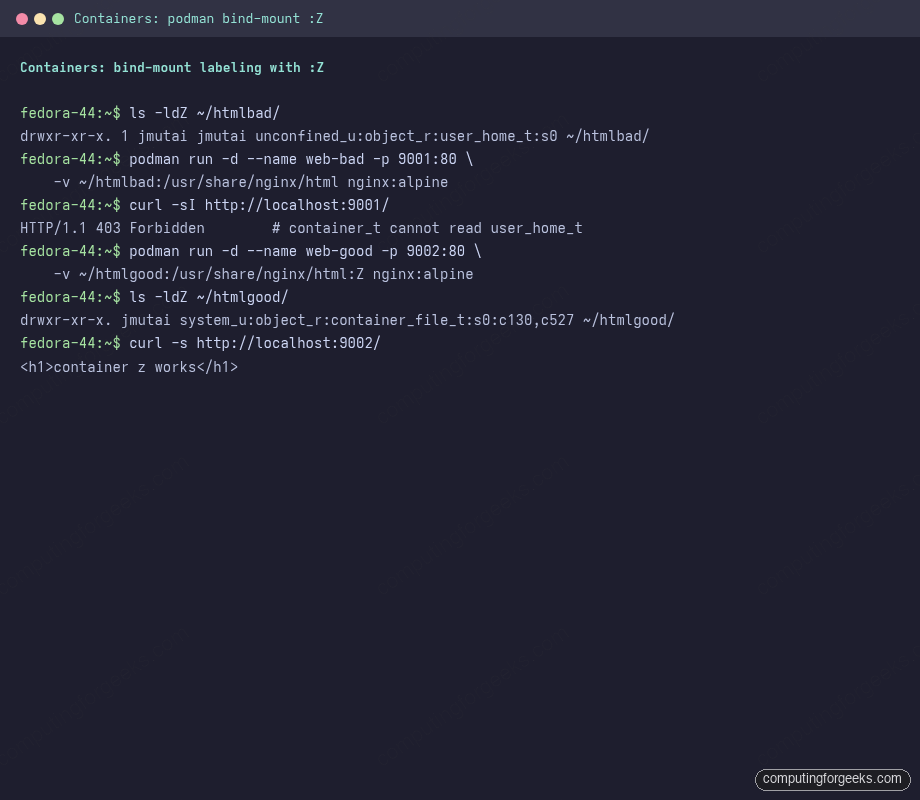
The label after :Z includes the per-container MCS pair (c130,c527 in the example). Two different containers each get their own pair from a 524,288-entry namespace, so even if both bind-mount the same parent directory, one container’s :Z mount cannot read the other’s data.
Container booleans worth knowing
The container subsystem ships a dozen booleans, most of which you never touch. Enumerate them once so you know what is there, then keep the short list of the ones that actually matter in production:
sudo getsebool -a | grep ^container_The toggles most likely to matter in production:
| Boolean | When to flip on |
|---|---|
container_use_cgroup | Containers need cgroup access (resource limits, systemd-in-container) |
container_manage_cgroup | Containers create cgroups (systemd as PID 1 inside) |
container_connect_any | Container processes need to connect to any TCP port on host |
virt_sandbox_use_all_caps | Sandboxed containers needing the full capability set |
For a privileged container that genuinely needs to bypass the SELinux model (almost always wrong, but useful for kernel debugging containers), pass --security-opt label=disable on the podman run command line. The container then runs as spc_t (Super Privileged Container) and the type-enforcement check is skipped for that one container only, the rest of the system stays enforcing.
Rootless Podman and user namespaces
Rootless containers add a third layer: the user namespace maps the container’s root UID to an unprivileged UID on the host. SELinux still applies at the kernel level. If a rootless container tries to write to ~/data with a :Z mount, the relabel writes a system-level label on a file your user owns; if you later delete the container, the directory keeps the container_file_t label until restorecon resets it. The cleanup command worth memorising:
sudo restorecon -Rv ~/dataThe Distrobox and Toolbox setup shows how SELinux contexts get re-mapped inside those container managers, which lean on the same bind-mount semantics shown here.
Desktop scenarios
Workstation users hit SELinux less often than server admins because the targeted policy leaves interactive sessions unconfined. The denials you will see fall into three categories: confined services your desktop talks to (NetworkManager, polkit, GDM), Flatpak sandboxes, and applications that try to read non-default paths (USB drives, network mounts, mounted ISOs).
Flatpak applications hitting the sandbox
Flatpak apps run under their own sandbox (Bubblewrap) on top of SELinux. When a Flatpak app needs to read a host file it does not have a portal for, the denial shows in the audit log as spc_t reading the host path. The pattern: the file should be accessible via a portal (Documents, Camera, Network), and the right answer is granting the portal permission, not loosening SELinux:
# Grant home directory read access to a Flatpak app
flatpak override --user --filesystem=home com.example.App

# Grant network access (already default for most apps)
flatpak override --user --share=network com.example.App
For Flatpak apps that need to talk to a host daemon (Steam to talk to Joystick, a media player to talk to GPU), the right knob is on the Flatpak side, not the SELinux side. flatseal on Flathub gives you a GUI for the same overrides.
Firefox or Chrome reading from a USB drive
The denial pattern: the browser tries to read a file under /run/media/${USER} labelled removable_t. The boolean exists:
sudo setsebool -P mozilla_read_content onThe flag covers Mozilla-derived browsers (Firefox, Thunderbird) reading external mounts, which is more often a concern in kiosk or shared-workstation setups than on a personal laptop.
VS Code or other editors writing under home
The desktop session is unconfined_t, so VS Code under your Unix UID is unconstrained at the SELinux level. The only time you see a denial is when the editor’s language server spawns a child process that is confined (for example, python_t for a development server), and the child tries to read files outside user_home_t. The fix is on the language server’s domain, not the editor.
Steam, Lutris, and games installing to non-default paths
Putting the Steam library on a second drive with a custom mount point gets the directory labelled fs_t or default_t, and games crash when they try to write save files there. Declare the mount point as user_home_t if it is genuinely user data:
sudo semanage fcontext -a -t user_home_t "/mnt/games(/.*)?"
sudo restorecon -Rv /mnt/games
For Steam Proton, this also covers the per-game prefix data under /mnt/games/steamapps/compatdata.
GNOME extensions and custom application launchers
GNOME extensions installed via extensions.gnome.org live under ~/.local/share/gnome-shell/extensions and inherit gnome_home_t. Extensions that spawn subprocesses (clipboard managers, network indicators) sometimes hit denials when the subprocess needs to read a system file the extension does not normally touch. The right fix here is almost always a bug report against the extension; a one-off chcon is fine while you debug but should never become a permanent workaround.
Last resort: audit2allow for custom policy modules
For the rare denial where no boolean exists, no port type fits, and no fcontext rule applies, generate a custom policy module from the audit log. This is the last resort because it writes a new rule rather than reusing an existing one, and a hand-written rule is the kind of thing that goes wrong silently when the policy updates and the rule no longer applies cleanly.
cd /tmp
sudo ausearch -if /var/log/audit/audit.log -m AVC --start recent | \
  sudo audit2allow -M cfg-demo

ls -la cfg-demo*
audit2allow -M cfg-demo emits both a human-readable source file (cfg-demo.te) and a compiled policy module (cfg-demo.pp). Always read the .te file before installing the module so you know what you are granting:
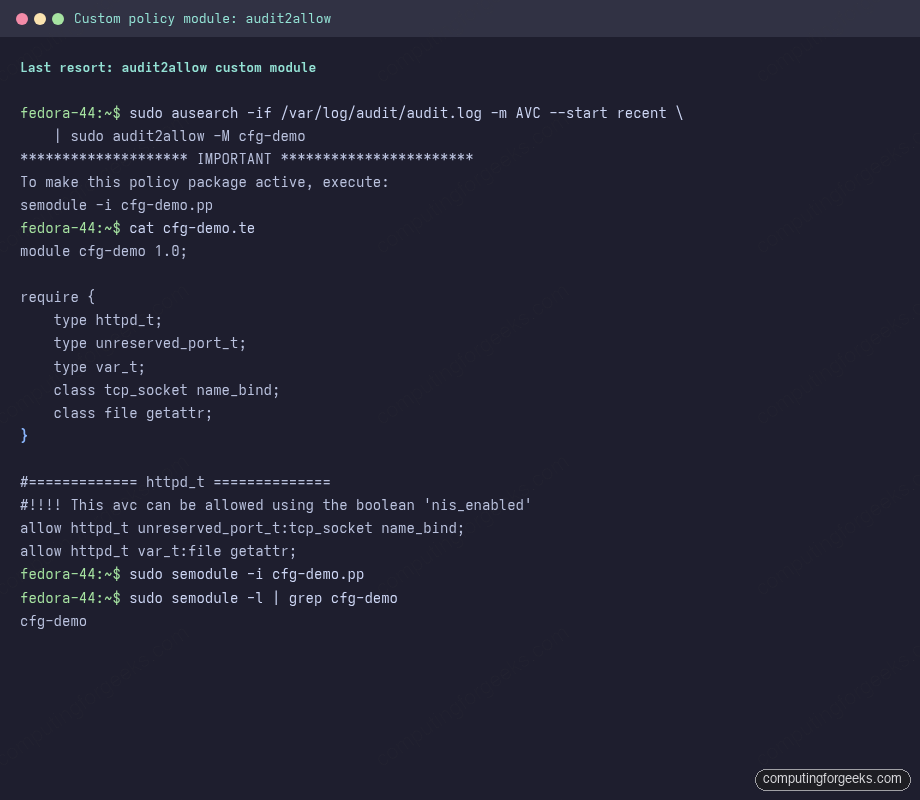
If the rules look too broad (“allow process X to do everything to type Y”), edit the .te file to remove the over-broad permissions, then re-compile with checkmodule and semodule_package. When the rules look right, install:
sudo semodule -i cfg-demo.pp
sudo semodule -l | grep cfg-demo
The module is now loaded and persists across reboots. To remove it later:
sudo semodule -r cfg-demoRead the comment #!!!! This avc can be allowed using the boolean 'X' in the generated .te file before you install. audit2allow includes those hints when it detects an existing boolean that would solve the same problem; that boolean is almost always the better fix.
Permissive mode is for diagnostics, not for fixing
The wrong move when a complex application hits a chain of denials is setenforce 0, which puts the entire system in permissive mode and removes confinement from every confined service at once. The right move is per-domain permissive, which logs denials without blocking them for one domain while every other service stays enforcing:
sudo semanage permissive -a httpd_t
# reproduce the workflow, collect every denial from the run:
sudo ausearch -i -if /var/log/audit/audit.log -m AVC --start recent
# fix each denial properly, then remove the per-domain permissive:
sudo semanage permissive -d httpd_t
The semodule -l | grep permissive command lists the per-domain permissive modules that are currently loaded; clean this list at the end of every debugging session so you do not leave services unconfined by accident.
Policy queries with sesearch and seinfo
When the AVC names types you do not recognise, the setools-console queries answer “what does this type let you do?” and “what types can do this?” The two commands worth knowing:
# Who can write to /etc/shadow?
sudo sesearch -A -t shadow_t -c file -p write

# What can httpd_t do to httpd_sys_content_t?
sudo sesearch -A -s httpd_t -t httpd_sys_content_t -c file

# What domain transitions exist out of init_t?
sudo sesearch -T -s init_t | head

# Describe a single type
sudo seinfo --type=sshd_t -x
The shadow query returns the short list of system utilities that legitimately rewrite passwords: passwd_t, useradd_t, groupadd_t, updpwd_t, sysadm_passwd_t. The httpd query shows that httpd_t can read httpd_sys_content_t files by default, and can write them only when both httpd_unified and httpd_enable_cgi booleans are on. The init_t transitions list is several thousand entries long because almost every service comes through systemd; piping to head or grepping for the service name you care about is the only way to read it.
Confining users with semanage login
Targeted policy leaves interactive logins as unconfined_u by default, but you can move a user into one of the confined SELinux user roles. The four built-in roles worth knowing:
| SELinux user | Confinement level |
|---|---|
unconfined_u | No confinement (default for all interactive logins) |
staff_u | Can sudo and su, otherwise confined; the right choice for admins on a hardened box |
user_u | No sudo, no su, no setuid binaries; the right choice for shared shell accounts |
sysadm_u | Confined administrator; sudo works but admin tools are constrained |
Map a Unix user to one of those roles:
sudo semanage login -a -s staff_u jmutai
sudo semanage login -l
The new mapping kicks in on the next login because pam_selinux assigns the SELinux context at session start. Verify with a fresh SSH session: id -Z shows the new context, and attempting an operation outside the role (for example, switching to root directly without going through sudo) gets blocked by the policy regardless of the Unix permission check passing.
MCS categories: per-process and per-container isolation
The trailing s0-s0:c0.c1023 on contexts is the MCS (Multi-Category Security) component. For targeted policy, it is what isolates instances of the same domain from each other. Two containers both running as container_t on the same UID still cannot read each other’s filesystems because each got assigned a different MCS pair (c130,c527 vs c812,c901) at startup, and the type-enforcement rules require category-set intersection for access.
You will not write MCS rules by hand. The cases where MCS matters are:
- Container isolation (handled by podman automatically via
:Z) - Multi-tenant servers where each tenant gets a category range (handled by the application via
setexecconor LSMs above SELinux) - Per-user session isolation in confined SELinux user roles (handled by
pam_selinux)
If ls -Z shows a single file with a category range that does not match its parent directory, it almost always means a container relabelled it via :Z and never relabelled back. restorecon -Rv on the directory resets it.
Cheat sheet: the booleans worth memorising
The booleans below show up in real Fedora and RHEL builds often enough to be worth knowing by name without grepping each time:
| Boolean | When to flip on |
|---|---|
httpd_can_network_connect | Nginx or Apache as reverse proxy to any upstream |
httpd_can_network_connect_db | Web app connects to a database on a different host |
httpd_can_network_memcache | Web app talks to Memcached or Redis on the same or different host |
httpd_unified | Apache CGI scripts read and write the same content files |
httpd_enable_homedirs | Serving from ~user/public_html style paths |
httpd_use_nfs | Webroot is on an NFS mount |
samba_enable_home_dirs | Sharing user home directories via Samba |
use_samba_home_dirs | Writing to Samba-mounted home directories |
nis_enabled | Anything needing outbound name-service lookups (LDAP, AD, NIS) |
ssh_chroot_rw_homedirs | SFTP chroot jails writing to home directories |
container_use_cgroup | Containers needing cgroup access (resource limits) |
container_manage_cgroup | Containers running systemd as PID 1 |
virt_use_nfs | Libvirt VMs with disks on NFS storage |
virt_sandbox_use_all_caps | Sandboxed containers needing the full capability set |
mozilla_read_content | Firefox or Thunderbird reading USB or external mounts |
selinuxuser_use_ssh_chroot | Confined users running OpenSSH chroot helpers |
Each is already on the system; you only have to flip it. The -P flag persists the change across reboots; without it the setting only lasts until the next boot.
Troubleshoot common SELinux gotchas
Error: “SELinux is preventing /usr/sbin/X from Y access on Z”
The classic sealert summary. Re-run sudo sealert -a /var/log/audit/audit.log for the full raw AVC, identify the source domain, target type, and operation, then apply whichever fix path maps to the operation. name_bind needs semanage port, file reads or writes need semanage fcontext plus restorecon, and outbound network connects usually need a boolean. If the source path in the alert is a custom binary you wrote, the right fix is almost always to label the binary with bin_t so systemd’s type-transition rules kick in on the next start.
Error: “Permission denied” on a freshly-extracted tarball
Files extracted from a tarball with tar -x keep whatever SELinux labels the tarball’s creator set, or default to user_tmp_t if none were stored. If you extracted into a directory the policy expects to contain web content or database files, restorecon resets to the correct label:
sudo restorecon -Rv /path/to/extracted/filesIf the path is one the policy already knows about (a standard webroot, a Postgres data directory), restorecon uses the existing rule; you do not need a new fcontext entry first. For tarballs that explicitly stored SELinux labels (a backup of /etc with tar --xattrs), restorecon still wins because the policy-derived label is the authoritative answer.
Error: AVC denials disappear from ausearch but reappear in journalctl
Two causes. The first is the dontaudit cache covered earlier; semodule -DB exposes the suppressed denials. The second is that ausearch -m AVC on a tail-following auditd may lag the on-disk log; ausearch -i -if /var/log/audit/audit.log -m AVC --start recent reads the file directly and resolves that mismatch. If both ausearch forms agree but journalctl still shows entries, those journal entries are the setroubleshootd plain-English summaries from earlier denials still in the journal ring buffer, not new denials.
Error: “Failed to load SELinux policy” at boot
The policy database got corrupted, usually after a power loss during a setsebool -P or semodule transaction. Boot with enforcing=0 on the kernel command line (press e at the GRUB menu, append to the linux line, F10 to boot), then trigger a relabel and reboot:
sudo touch /.autorelabel
sudo reboot
The autorelabel pass runs in early boot and takes one to five minutes on a typical install. Do not interrupt it. After the system comes back up, getenforce should read Enforcing and the boot error should be gone. If the relabel itself reports errors on specific files, those are paths the policy database does not have a rule for; matchpathcon on each will tell you whether the rule is missing or the file is genuinely an orphan.
Error: “execute access on file labelled X”
The denial that catches people deploying compiled binaries to non-default paths. The binary is labelled with the directory’s type (usr_t, var_t) and the calling domain is allowed to execute bin_t but not the actual label. The fix is to label the binary correctly:
sudo semanage fcontext -a -t bin_t "/opt/myapp/myapp"
sudo restorecon -v /opt/myapp/myapp
For a directory containing many binaries, use the same regex pattern as for web content: "/opt/myapp/bin(/.*)?".
Error: “Cannot get default context for user”
The SELinux login mapping points at a role that does not exist (typo, deleted custom role) or pam_selinux cannot read its config. Check the mapping and the config:
sudo semanage login -l
sudo cat /etc/selinux/targeted/contexts/users/* | head
The fix is usually semanage login -d <user> to remove the broken mapping (falls back to __default__) followed by semanage login -a -s staff_u <user> to restore the intended one. If the broken mapping is on __default__ itself, every login is broken; recover by booting permissive (enforcing=0) and undoing the bad mapping from there.
Maintenance and audit habits worth keeping
A box left to drift accumulates local policy modules, custom port assignments, and fcontext rules that nobody remembers adding. Two commands worth running periodically to keep that inventory visible:
sudo semodule -l | wc -l
sudo semanage boolean -l -C
sudo semanage fcontext -l -C
sudo semanage port -l -C
sudo semanage permissive -l
The -C flag on each semanage subcommand restricts the output to local additions, so the noise from the 430-odd policy modules and 366 booleans does not drown out what you actually changed. A few permanent permissive domains is fine for a known carve-out; the list should ideally be empty on a production box, with every workaround landed as a proper policy module or, better, as a boolean flip that closes the workaround entirely.
Backing up the local policy state before a major change is straightforward because everything lives under /etc/selinux and /var/lib/selinux; a tar of those two paths is a usable point-in-time snapshot. The Btrfs snapshot workflow covers the filesystem-level rollback that pairs naturally with this kind of policy work, because a snapshot taken before a semodule -i gives you a one-command revert path if the new module breaks something subtle.
With the toolset and the mental model in place, the urge to disable SELinux disappears. A five-minute semanage command replaces the “set to permissive forever” workaround, the system stays confined, and the next exploit that breaks loose on a Fedora box hits a wall instead of a wide-open root shell. Pair this guide with the firewalld walkthrough for the network policy layer above, the Podman Quadlet setup for the rootless container model that builds on the MCS categories above, and the DNF5 cheatsheet for the package-manager commands every policy fix assumes you have.