A clean Fedora install is already half a developer workstation. The toolchain group (GCC, Make, Git, kernel headers) is one DNF transaction away, Python ships current, and the language runtimes you need for the four most common stacks are all in the default repositories with no extra mirrors to chase. The other half is knowing which path to take for each language so you do not end up with three competing toolchain installs fighting over PATH a month from now.
This guide walks through setting up a complete Python, Node.js, Go, and Rust development environment on Fedora 44, including the DNF-packaged path for each, the upstream toolchain installer where it matters (rustup, nvm, pyenv), and a sanity-check build in every language. The same commands work on Fedora 43 and Fedora 42 with the version numbers shifted accordingly. Tooling beyond the runtimes (VS Code, Distrobox, version managers) gets a quick pointer to the dedicated guides so this article stays a focused setup walkthrough.
Tested May 2026 on Fedora 44 (kernel 7.0.8-200.fc44) with Python 3.14.4, Node.js 22.22.2, Go 1.26.3, Rust 1.95.0, GCC 16.1.1. Same commands verified on Fedora 43 and Fedora 42 clones.
What ships by default on Fedora 44
Before installing anything, see what is already there. Fedora 44 ships Python and the core build tools by default; the language runtimes for Node, Go, and Rust are the ones you add. Quick inventory:
cat /etc/fedora-release
python3 --version
gcc --version | head -1
make --version | head -1
git --version
rpm -q nodejs golang rust cargo 2>&1 | head -5
On a fresh F44 Workstation the runtimes report installed; the four language packages are “not installed”. That is the starting point. The next sections each add one runtime, verify it with a one-line program, and show the version-manager alternative where the packaged version is too old for your workflow.
Install the GCC toolchain group
Most projects need a C compiler, headers, and the basics to build native extensions (Python wheels with C code, Node native modules, Go cgo, Rust crates that link to C). Install the whole group in one command instead of cherry-picking packages:
sudo dnf5 group install -y "Development Tools"
sudo dnf5 install -y kernel-devel kernel-headers
The kernel-devel + kernel-headers pair pulls in matching kernel-source artifacts. You only need these when building DKMS modules, VirtualBox guest additions, or NVIDIA akmod packages; skip them for a pure userland dev box. Sanity check the compiler stack:
gcc --version | head -1
make --version | head -1
git --version
On Fedora 44 you should see gcc (GCC) 16.1.1, GNU Make 4.4.1, and git version 2.54.0 or newer. The compiler bump to GCC 16 across the F44 cycle is the biggest single change for native-extension builds; if you have wheels or modules pinned to GCC 14 you may need to rebuild them. A complete toolchain inventory after the next two install steps looks like this on a fresh F44 box:
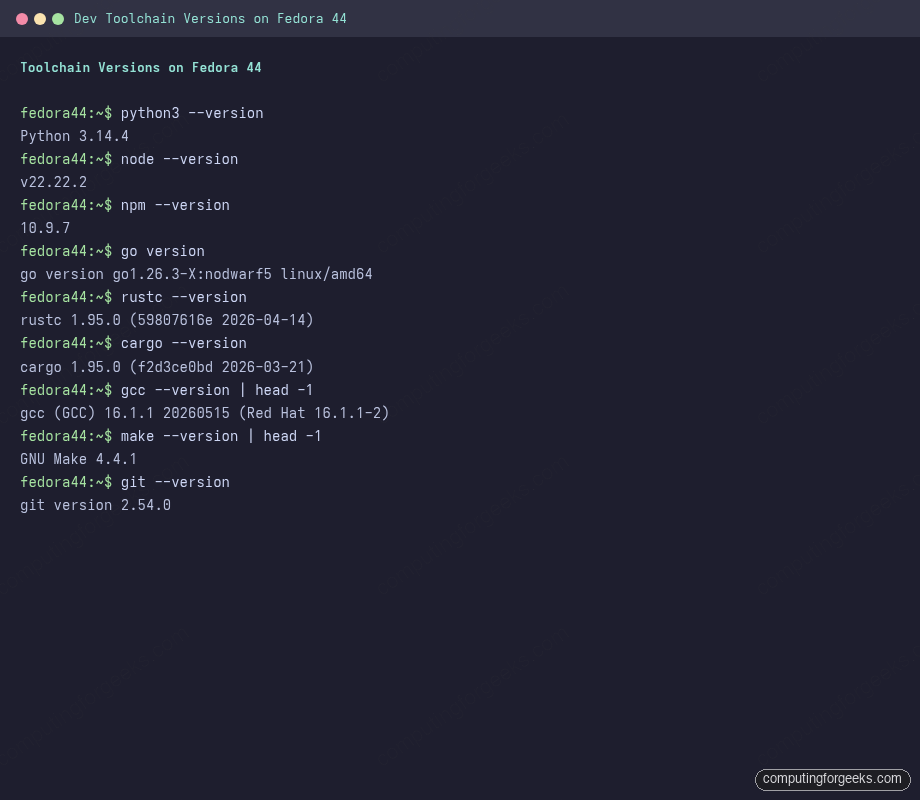
Those are the four runtimes plus the supporting tools you reach for daily: GCC and Make for native builds, Git for everything that touches version control. The DNF-shipped versions track upstream LTS/stable cycles within a few weeks of release.
Set up Python with pip and venv
Python 3.14 is the system interpreter on Fedora 44. The split is the same as on F43 and earlier: python3 ships, but pip and venv require their own packages. Install both:
sudo dnf5 install -y python3-pip python3-virtualenv
python3 -m pip --version
python3 -m venv --help | head -1
Verify the install with a tiny script that reports back the interpreter version and parses the OS-release file (platform.freedesktop_os_release() is available on Python 3.10 and newer). Create the workspace and the script file:
mkdir -p ~/dev-test
vi ~/dev-test/hello.py
Paste this content into the editor and save:
import platform
release = platform.freedesktop_os_release()
print(f"Hello from Python {platform.python_version()} on Fedora {release['VERSION_ID']}")
Run it:
python3 ~/dev-test/hello.pyThe expected output is Hello from Python 3.14.4 on Fedora 44. Per-project isolation goes through venv, which avoids the “did I install this for the system or for the project” trap that sudo pip install creates:
python3 -m venv ~/dev-test/myproj-venv
source ~/dev-test/myproj-venv/bin/activate
pip install requests
python -c "import requests; print(requests.__version__)"
deactivate
When you need multiple Python minor versions side by side (3.12 for one project, 3.14 for another), pyenv is the standard tool. It compiles each interpreter from source on first install, so install the build deps first: sudo dnf5 install -y zlib-devel bzip2-devel readline-devel sqlite-devel openssl-devel xz-devel libffi-devel, then curl https://pyenv.run | bash. The system python3 stays at 3.14; pyenv shims override per-project.
Install Node.js and npm
Fedora 44 ships Node.js 22 LTS by default. The DNF path is one command and covers most needs:
sudo dnf5 install -y nodejs npm
node --version
npm --version
The expected versions on F44 are v22.22.2 for Node and 10.9.7 for npm. The dedicated Node.js install guide covers NodeSource (for newer Current branches) and side-by-side major versions. For one-project-needs-Node-20-and-another-needs-Node-24 setups, fnm is the fast modern alternative to nvm:
curl -fsSL https://fnm.vercel.app/install | bash
exec $SHELL
fnm install 24
fnm install 22
fnm default 22
fnm list
Quick verification with a script that reports both the runtime and platform info. Create ~/dev-test/hello.js:
console.log(`Hello from Node.js ${process.version} on ${process.platform}/${process.arch}`);Run it with the Node binary:
node ~/dev-test/hello.jsOutput: Hello from Node.js v22.22.2 on linux/x64.
Install Go (Golang)
Fedora 44 ships Go 1.26 in the default repos. For most workflows this is fresher than upstream’s go.dev binary releases anyway, and dnf-updated alongside the rest of the system:
sudo dnf5 install -y golang
go version
go env GOPATH GOMODCACHE
F44 reports go version go1.26.3-X:nodwarf5 linux/amd64; GOPATH defaults to ~/go, GOMODCACHE to ~/go/pkg/mod. The X:nodwarf5 tag is Fedora’s downstream build flag (DWARF 5 disabled in default builds for older tooling compatibility). Create ~/dev-test/hello.go with the standard runtime-info pattern:
package main

import (
    "fmt"
    "runtime"
)

func main() {
    fmt.Printf("Hello from Go %s on %s/%s\n", runtime.Version(), runtime.GOOS, runtime.GOARCH)
}
Build and run with the standard go run invocation:
go run ~/dev-test/hello.goThe output reads Hello from Go go1.26.3-X:nodwarf5 on linux/amd64. For a real project, initialize a module first: mkdir myproj && cd myproj && go mod init github.com/you/myproj. If you need to track a specific Go minor (say 1.24 for a legacy project), go install golang.org/dl/go1.24.5@latest followed by go1.24.5 download installs that version side by side; the per-version binaries live in ~/go/bin/. The full Go install guide covers binary tarball installs and per-version directory layouts.
Install Rust via rustup (recommended) or DNF
Rust is the one language where the upstream toolchain installer beats the distro package in every practical scenario. The DNF-packaged rust works for casual builds, but it ships one version at a time, lags upstream stable by 2-4 weeks, and offers no clean path to nightly. Use rustup for any real Rust work; reach for the DNF package only when you cannot install a userland toolchain (locked-down CI, air-gapped boxes).
The rustup path is one command, no root needed, lives entirely under ~/.cargo and ~/.rustup:
curl --proto '=https' --tlsv1.2 -sSf https://sh.rustup.rs | sh -s -- -y --default-toolchain stable --profile minimal
source "$HOME/.cargo/env"
rustup --version
rustup show
rustc --version
cargo --version
After the install, rustc --version reports the upstream stable (1.95.0 at the time of writing), and cargo lands in ~/.cargo/bin/. The rustup-managed install shows up clearly in its own status command:
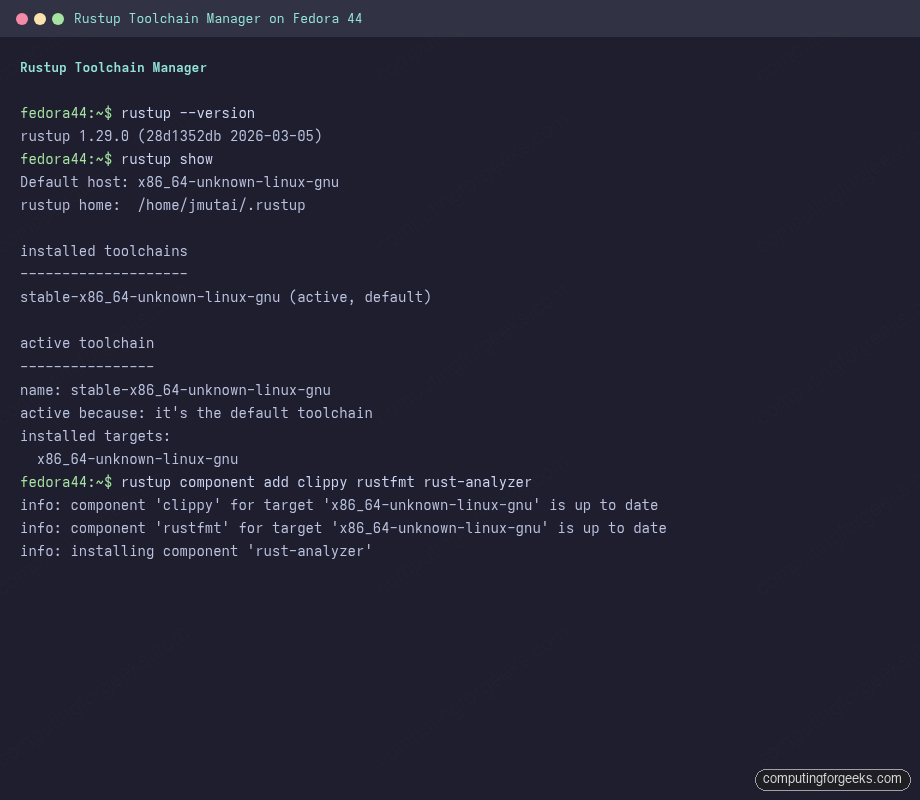
Switch toolchains as needed:
rustup toolchain install nightly
rustup default stable
rustup override set nightly       # in a project dir, override per-project
rustup component add clippy rustfmt rust-analyzer
rustup update
The DNF path is the fallback. It installs into /usr/bin, updates with the rest of the system, and pins to whichever Rust version Fedora is currently shipping:
sudo dnf5 install -y rust cargo rust-src clippy rustfmt
rustc --version
cargo --version
The two paths coexist. If both are installed, rustup wins because ~/.cargo/bin is earlier in PATH than /usr/bin. To force the system rust temporarily, run /usr/bin/cargo directly. A first project sanity check:
cd ~/dev-test
cargo new --quiet hello-rust
cd hello-rust
cargo run --release --quiet
Cargo creates the project skeleton, compiles, and runs Hello, world! in one shot. Subsequent builds reuse the compiled deps; only your code rebuilds. End-to-end, the four-language sanity test on Fedora 44 produces:
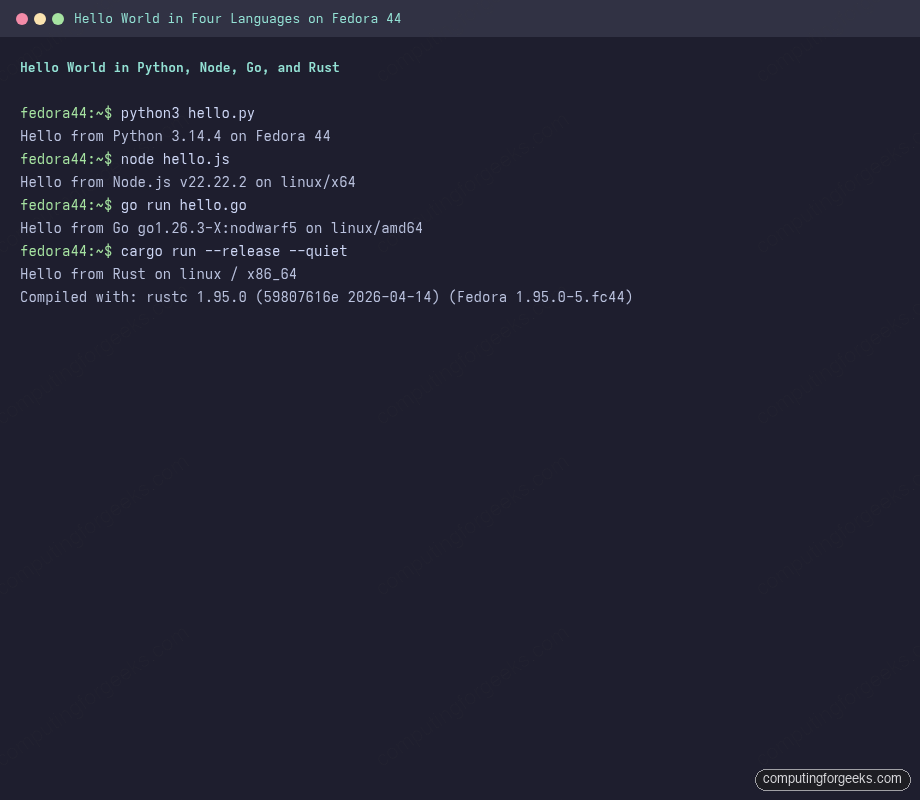
Each language reports its own version and the host platform, which is the quickest way to confirm the toolchain you just installed is the one actually running your code.
Editor and project tools
The dev environment is the runtimes; the daily-driver editor is a separate decision. VS Code is the most common choice on Fedora and works cleanly via Microsoft’s RPM repo (covered in the VS Code install guide). Other strong picks: NeoVim via sudo dnf5 install -y neovim, Helix via sudo dnf5 install -y helix, JetBrains Toolbox via the official Flatpak. Whichever you pick, install the matching language-server packs:
sudo dnf5 install -y python3-lsp-server gopls
# Rust LSP comes from rustup:
rustup component add rust-analyzer
# Node/TypeScript LSP installs with VS Code or via:
npm install -g typescript typescript-language-server
Git is already installed. The minimum setup for committing under your own identity:
git config --global user.name "Your Name"
git config --global user.email "[email protected]"
git config --global init.defaultBranch main
git config --global pull.rebase true
For GitHub specifically, generate an SSH key (ssh-keygen -t ed25519 -C "[email protected]"), add ~/.ssh/id_ed25519.pub to your GitHub account, then test with ssh -T [email protected]. Avoid HTTPS + token unless you also configure a credential helper, otherwise every push prompts.
Container-based dev environments
For projects that need a wildly different distro base than Fedora (Ubuntu, Debian, Arch), or for testing your code against a Python 3.12 / Node 18 / older Go combination without polluting the host, container-based dev environments are the cleanest answer. Two F44-native options:
- Distrobox wraps Podman containers in a way that makes them feel like terminal sessions on the host.
distrobox create --name ubuntu-dev --image ubuntu:26.04drops you into an Ubuntu shell with your home directory mounted. See the Distrobox and Toolbox setup guide. - Toolbox is Fedora’s own implementation, optimized for Fedora-based images.
toolbox create -d fedora -r 43spins up an F43 environment with the same home mount.
VS Code’s Dev Containers extension reads .devcontainer.json and starts the container for you, which is useful when sharing dev environments with a team. The container image carries the runtime; your editor talks to it over a socket.
DNF5, package search, and keeping the toolchain current
Day to day, you will update the toolchain alongside the rest of the system: sudo dnf5 upgrade. To bump just the dev runtimes: sudo dnf5 upgrade nodejs golang python3 rust cargo. The DNF5 cheatsheet covers groups, history rollback, and the speed tweaks that matter for fast dev cycles.
Finding additional dev tooling is a search away: dnf5 search lsp-server, dnf5 search devel, dnf5 list available "python3-*". The package layout follows the Fedora convention: runtime packages have no suffix (python3, nodejs); their headers and build artifacts use -devel (python3-devel for embedding Python in C); language-specific extras use python3- or nodejs- prefix.
Troubleshoot common dev environment errors
Error: “fatal error: Python.h: No such file or directory” (pip install)
A pip package is trying to build a C extension and cannot find the Python headers. Install python3-devel:
sudo dnf5 install -y python3-develSome packages also need gcc and make, which the Development Tools group already provides.
Error: “linker `cc` not found” (cargo build)
Cargo cannot find a C compiler to link the final binary. Install GCC and binutils (Development Tools handles both):
sudo dnf5 group install -y "Development Tools"After the group install, cargo build picks up cc from /usr/bin/cc via the GCC symlink and the link step succeeds.
Error: “node: /lib64/libstdc++.so.6: version `GLIBCXX_X.Y.Z’ not found”
Mixing a Node binary built against a newer glibc/libstdc++ than F44 ships. This happens when you download Node from nodejs.org and run it on Fedora. Fix by either using the DNF-packaged nodejs or installing via fnm/nvm, which downloads the correct prebuilt for your glibc.
Error: “go: cannot find GOROOT directory”
Your shell has a stale GOROOT environment variable from a previous tarball install. Unset it (unset GOROOT) and remove the export line from ~/.bashrc / ~/.zshrc. The DNF-packaged go figures out GOROOT itself.
Annotated dev environment shell config
One pass on ~/.bashrc (or ~/.zshrc) collects the per-language PATH additions and avoids the slow shell-startup-time problem that bloated dev configs create. Append:
# Rust (rustup)
[ -f "$HOME/.cargo/env" ] && . "$HOME/.cargo/env"

# Go
export GOPATH="$HOME/go"
export PATH="$PATH:$GOPATH/bin"

# Node (fnm, if installed)
[ -d "$HOME/.local/share/fnm" ] && eval "$(fnm env --use-on-cd)"

# Python user site
export PATH="$PATH:$HOME/.local/bin"
The conditional [ -f ... ] && guards mean missing toolchains do not slow shell startup or emit “file not found” noise. Reopen the terminal or exec $SHELL to pick up the changes.
With the toolchain in place, the next steps in this F44 series cover the things you build on top of this foundation: container-based deploys with Distrobox and Toolbox, package management deep-dive with the DNF5 cheatsheet, and OS-level hardening for the dev box itself via the firewalld setup guide.