If you installed FreeIPA on Rocky Linux 10, AlmaLinux 10, or RHEL 10 in the last six months, your CA is silently issuing certificates with 128-bit random serial numbers and you probably did not opt in. That is RSNv3, the Random Serial Numbers version 3 implementation that landed in FreeIPA 4.12 and Dogtag 11.5, and on the new 389-DS LMDB backend it is mandatory. There is no flag to turn it off. Most install guides still do not mention it.
This article walks through what RSNv3 actually does, five ways to prove your IdM realm is using it, what the serials look like on real host and user certs, why the CA/Browser Forum baseline requirements demanded the change, and the operational consequences for monitoring, CRL size, OCSP, and ipa-cert-fix. We built a fresh Rocky 10 lab, captured the install transcripts, decoded the certs with openssl, and screenshotted the WebUI views so you can match what you see on your own server.
If you came from the FreeIPA server install on RHEL/Rocky/Alma guide and want to know what changed under the hood between 4.9 and 4.12, this is that piece. For the upcoming HBAC least-privilege and sudo rules cookbook articles, the certificate story sits underneath every host enrollment and every Kerberos PKINIT exchange, so it pays to understand it.
What RSNv3 actually is
Until Dogtag 11.4, every FreeIPA CA issued certificates with sequential 64-bit serial numbers. The first cert from a new install was serial 0x1, the second 0x2, then 0x3, and so on. The serial range was managed in LDAP under ou=ranges,ou=ca,o=ipaca and replicas reserved chunks of the integer space to avoid collisions. Sequential is predictable, and predictability has costs: an attacker can enumerate your issued certs (cert-find a few serials in, see what is there), measure CA throughput, and in the worst case correlate serials across realms.
RSNv3 replaces that sequential generator with a cryptographically random 128-bit serial. Dogtag uses Java SecureRandom seeded from /dev/urandom, hashes the output to 16 bytes, sets the high bit to zero to keep the encoded integer positive (RFC 5280 forbids negative serials), and writes the result. Every cert gets an independent draw. The serial space goes from 2^63 (about 9.2 quintillion) to 2^127 (about 170 undecillion), which is enough that collisions inside one CA are mathematically irrelevant for the lifetime of the universe.
The “v3” in the name reflects the iteration history. RSNv1 (Dogtag 10.x experimental) used 64-bit random, which the 2022 CA/Browser Forum Baseline Requirements clarification deemed too narrow. RSNv2 (Dogtag 11.0) bumped to 128 bits but stored serials in a way that broke some LDAP indices. RSNv3 (Dogtag 11.4+) fixed the indexing, used the LMDB backend’s binary-safe storage, and shipped as default for fresh installs from FreeIPA 4.12 onwards.
Why this matters: the BR audit, the collision math, and CT logs
Three forces pushed RSNv3 from a “nice to have” to a default.
First, the CA/Browser Forum Baseline Requirements section 7.1 has required at least 64 bits of “output from a CSPRNG” in every cert serial since 2016. WebTrust auditors began flagging sequential CAs in 2021. While FreeIPA CAs are usually internal and not subject to public-trust audits, organizations running internal CAs under SOC 2 or ISO 27001 frameworks face questions about why their private PKI does less than the public one. Saying “we mirror the BR” is easier than explaining a 64-bit sequential serial in a 2026 audit response.
Second, the RFC 6962 Certificate Transparency ecosystem assumes serial uniqueness is enforced by entropy, not by counter discipline. If you ever plan to feed an internal CA into CT logs (some larger organizations do, for visibility), sequential serials make it trivial to map your internal CA inventory from a single leaked log entry. 128-bit random kills that attack.
Third, the SHAttered family of hash collision attacks. The CA serial number is folded into the to-be-signed cert structure. Adding 128 bits of attacker-unpredictable entropy at issue time means a chosen-prefix collision attack against the CA signing algorithm becomes practically impossible, because the attacker cannot know in advance what the serial will be. Sequential serials gave attackers a fixed value to play against.
The lab
One VM on Proxmox, Rocky Linux 10, 4 GB RAM, 30 GB disk, fresh ipa-server-install with integrated DNS:
- ipa.cfg-lab.local at 192.168.1.141
- Realm CFG-LAB.LOCAL, domain
cfg-lab.local - FreeIPA 4.12.2-24.el10_1.3, Dogtag 11.6, 389-DS 3.1 with LMDB backend
- SELinux enforcing, firewalld active, no NTP overrides
The exact install command (unattended for the lab, prompt-driven for production):
sudo ipa-server-install --unattended
  --realm CFG-LAB.LOCAL
  --domain cfg-lab.local
  --ds-password "$DS_PASSWORD"
  --admin-password "$ADMIN_PASSWORD"
  --setup-dns
  --auto-forwarders
  --auto-reverse
  --hostname ipa.cfg-lab.local 2>&1 | tee /var/log/ipa-install-rsnv3.log
Notice there is no --random-serial-numbers flag. We did not opt in. RSNv3 is just on. The install log is where the first proof lives.
Method 1: read the install log
The Dogtag install step that wires up serial number generation logs its decision in /var/log/ipa-install-rsnv3.log (or whatever you tee’d into). Look for two strings.
sudo grep -B1 -A2 "random serial|Recording random" /var/log/ipa-install-rsnv3.logOn the lab server, that grep returned the two-line block below. The first line is the installer’s verdict, the second is the persisted state Dogtag writes during step 30 of 33.
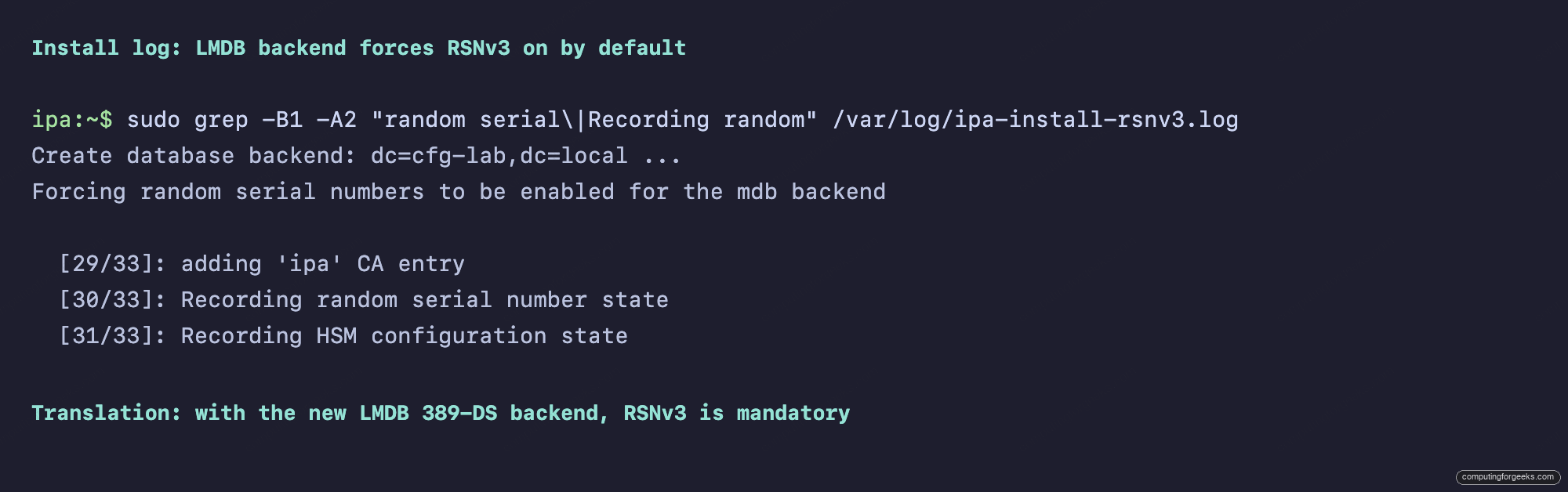
The first line, Forcing random serial numbers to be enabled for the mdb backend, is the key. It says the installer is overriding the historical default. The second line, step 30/33 of the CA setup, persists that state. If you do not see these two lines, your install is not using RSNv3 and you almost certainly hit one of the edge cases listed later in the article.
Method 2: inspect Dogtag CS.cfg directly
The authoritative configuration sits in /etc/pki/pki-tomcat/ca/CS.cfg. Three keys decide whether RSNv3 is active:
sudo grep -E "^dbs.(cert|request).id|^dbs.enableSerial" /etc/pki/pki-tomcat/ca/CS.cfgThe output below is what a healthy RSNv3 install looks like. Five keys, four of them flipping Dogtag from the legacy generator over to the random one.
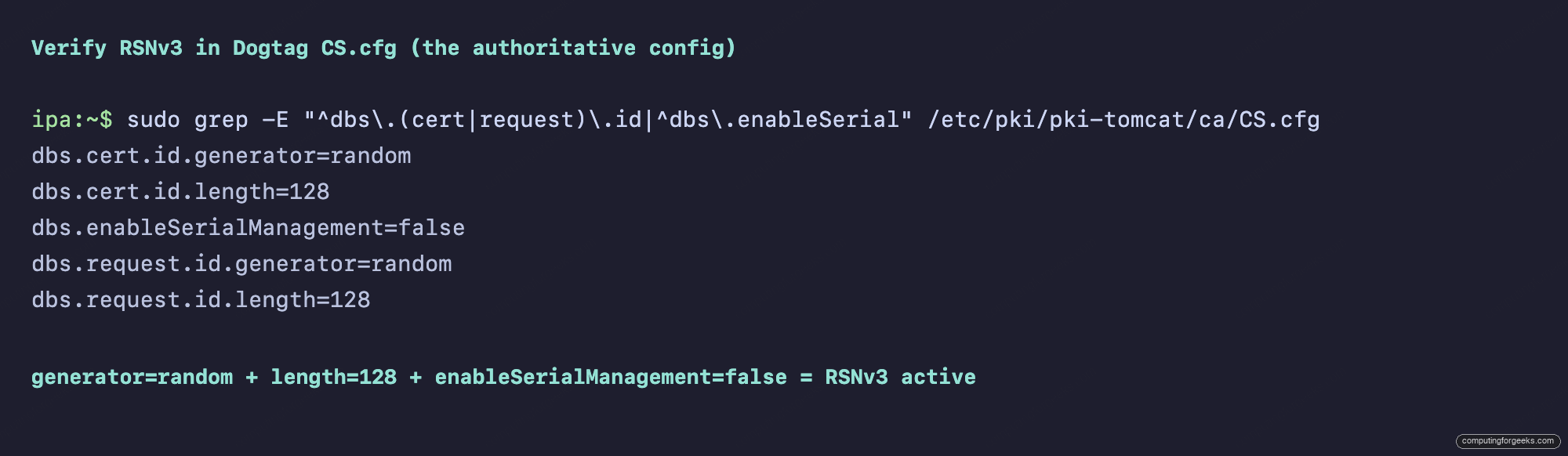
Decoded:
dbs.cert.id.generator=randomtells Dogtag to use the CSPRNG instead of the sequential counterdbs.cert.id.length=128sets the serial width to 16 bytes (128 bits), the RSNv3 defaultdbs.enableSerialManagement=falsedisables the legacy range-management code that tracked sequential boundaries between replicasdbs.request.id.generator=randommirrors the change for the request IDs used in CMC and certmonger flows
All four values are immutable post-install. The LDAP boundary keys pkiCASerialNumberRangeStart and pkiCASerialNumberRangeEnd that used to record the next sequential serial are simply absent on an RSNv3 install. There is no flag to flip live.
Method 3: confirm the LMDB backend underneath
RSNv3 on FreeIPA 4.12.2 is enforced because the underlying 389-DS database uses the new LMDB (Lightning Memory-Mapped Database) backend that became the default in 389-DS 3.x. The legacy BDB backend (Berkeley DB) still supports the old sequential generator, but RHEL 10 / Rocky 10 / Alma 10 ship with LMDB.
sudo grep -E "^nsslapd-backend-implement|^nsslapd-backend:"
  /etc/dirsrv/slapd-CFG-LAB-LOCAL/dse.ldif
The grep returns one line per backend. The deciding one is nsslapd-backend-implement, which names the storage engine for the whole directory server instance.
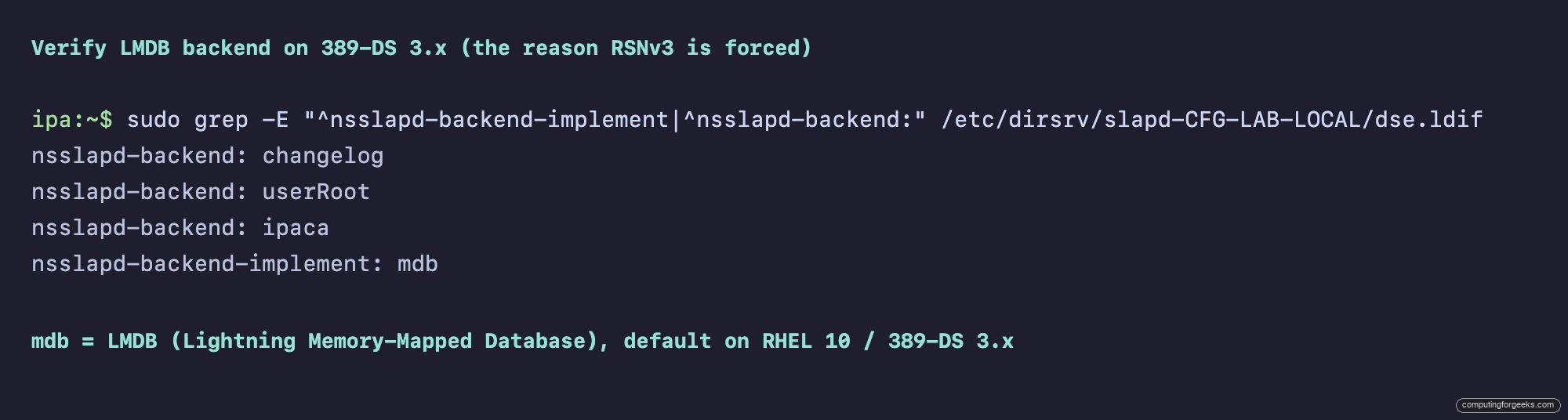
The line nsslapd-backend-implement: mdb is the LMDB marker. If you see bdb instead, you are on a pre-3.0 389-DS install (RHEL 9 with idm:DL1) and RSNv3 is opt-in, not forced. Replace your CFG-LAB-LOCAL with whatever your realm name maps to in the slapd directory (it is the realm with dots replaced by hyphens).
Method 4: decode a cert and count the serial bits
Configuration files are evidence, but the cert itself is proof. Decode the CA cert with openssl:
openssl x509 -in /etc/ipa/ca.crt -noout -serial -subject -dates

SERIAL=$(openssl x509 -in /etc/ipa/ca.crt -noout -serial | cut -d= -f2)
echo "Length: ${#SERIAL} hex chars = $((${#SERIAL} * 4)) bits"
The first command prints the serial in hex with the subject and validity window. The second pipes the hex back through bash string-length to confirm the width. Together they give you a single artifact you can paste into an audit ticket.
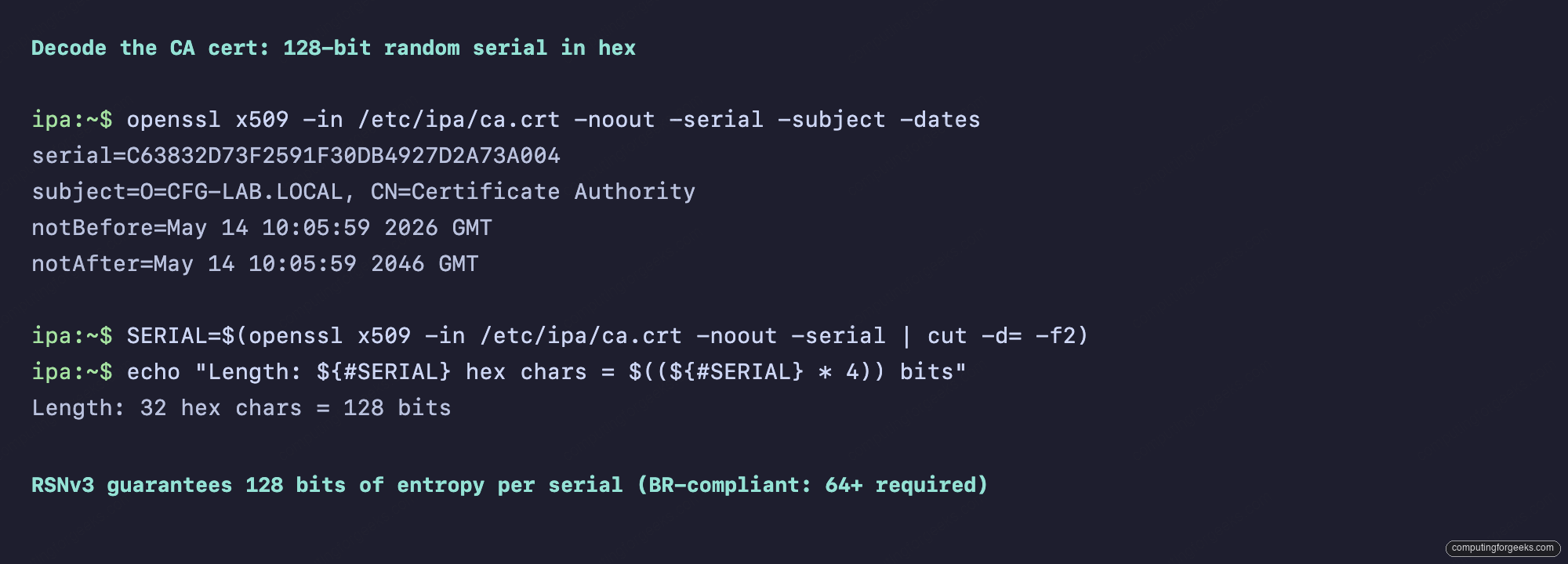
A 32-hex-character serial proves 128 bits. On a pre-4.12 IPA realm you would see something like serial=01 for the CA cert, then 02, 03, and so on for the system certs. The difference is unmistakable. Run the same decode on any host or user cert and the result is identical: every serial is 16 random bytes.
Method 5: list every cert with ipa cert-find
For a realm-wide view, ipa cert-find returns every certificate the CA has issued. With the --sizelimit flag and a grep for the hex form, you get a clean roster:
echo "$ADMIN_PASSWORD" | kinit admin
ipa cert-find --sizelimit=20 2>&1 | grep "Serial number (hex)"
The grep filter strips everything except the hex serials, so what you see is exactly the entropy distribution. Look for any two values sharing a high-byte prefix; you will not find one.
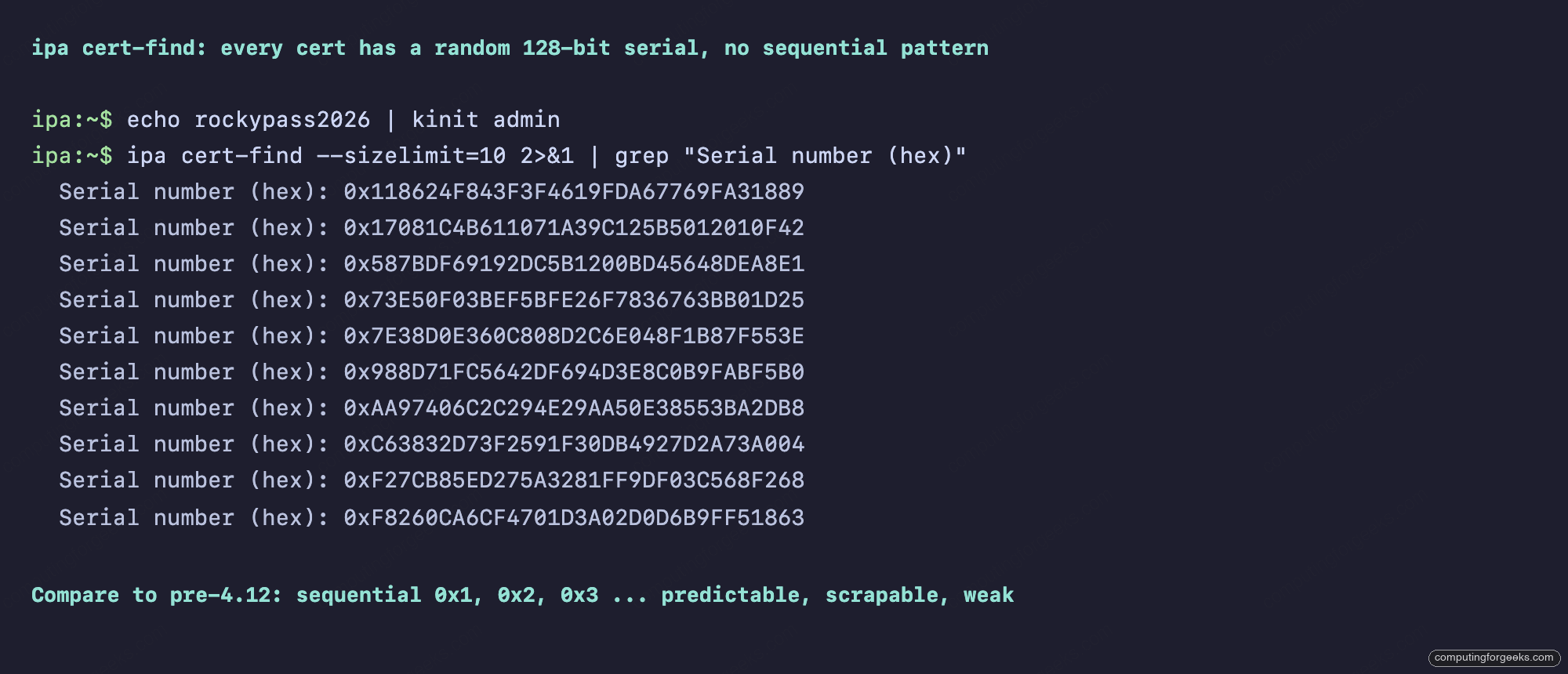
The eleven entries are the system certs FreeIPA always issues at install: the CA itself, CA Audit, CA Subsystem, OCSP Subsystem, IPA RA, ipa-ca-agent, the HTTP/LDAP service certs for the IPA daemon, and the Kerberos KDC cert. Every single one has a 128-bit hex serial. If you scroll ipa cert-find on a freshly installed pre-4.12 realm, the contrast is brutal: 0x1, 0x2, 0x3, 0x4 all the way down.
Issue a host cert and watch the serial
Sequential serials are predictable on issue. RSNv3 is not. Demonstrate by registering a host and requesting a service cert:
ipa host-add web01.cfg-lab.local --force

openssl req -newkey rsa:2048 -nodes
  -keyout web01.key
  -subj "/CN=web01.cfg-lab.local"
  -out web01.csr -batch

ipa cert-request web01.csr
  --principal=host/web01.cfg-lab.local
  --certificate-out=web01.crt

openssl x509 -in web01.crt -noout -serial -subject -dates
Three calls: register the host, build a CSR with a stock RSA 2048 key, request the cert from the IPA CA. The fourth call decodes the result so you can read the issued serial.
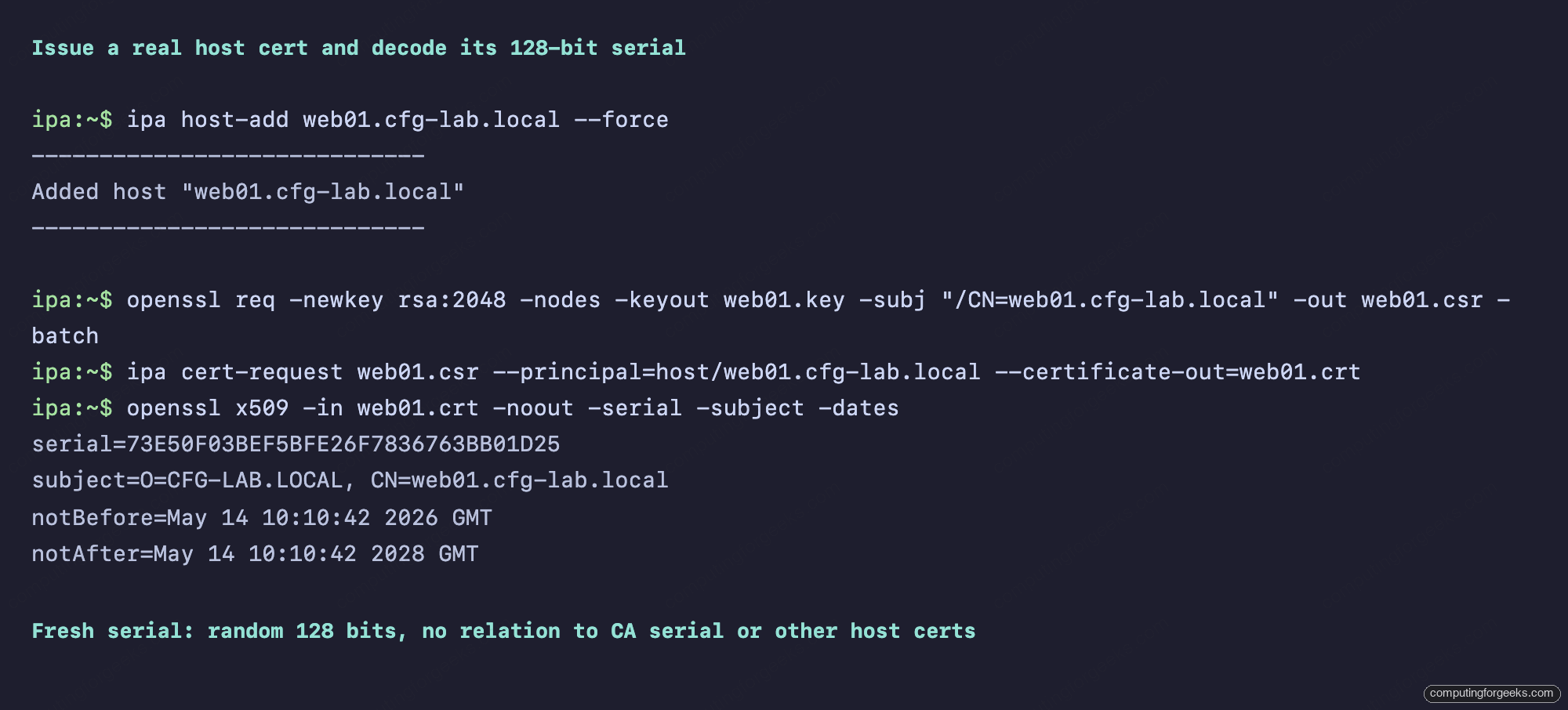
Issue a second cert for web02, a third for db01, and the serials will be three independent random draws. There is no offset, no increment, no pattern an attacker could enumerate. cert-find on a busy realm reads like raw output from /dev/urandom, which is exactly the point.
The WebUI view
If you prefer the WebUI, log into https://ipa.cfg-lab.local/ipa/ui/ and navigate to Authentication, then Certificates. The serial column shows the full decimal form of every cert.
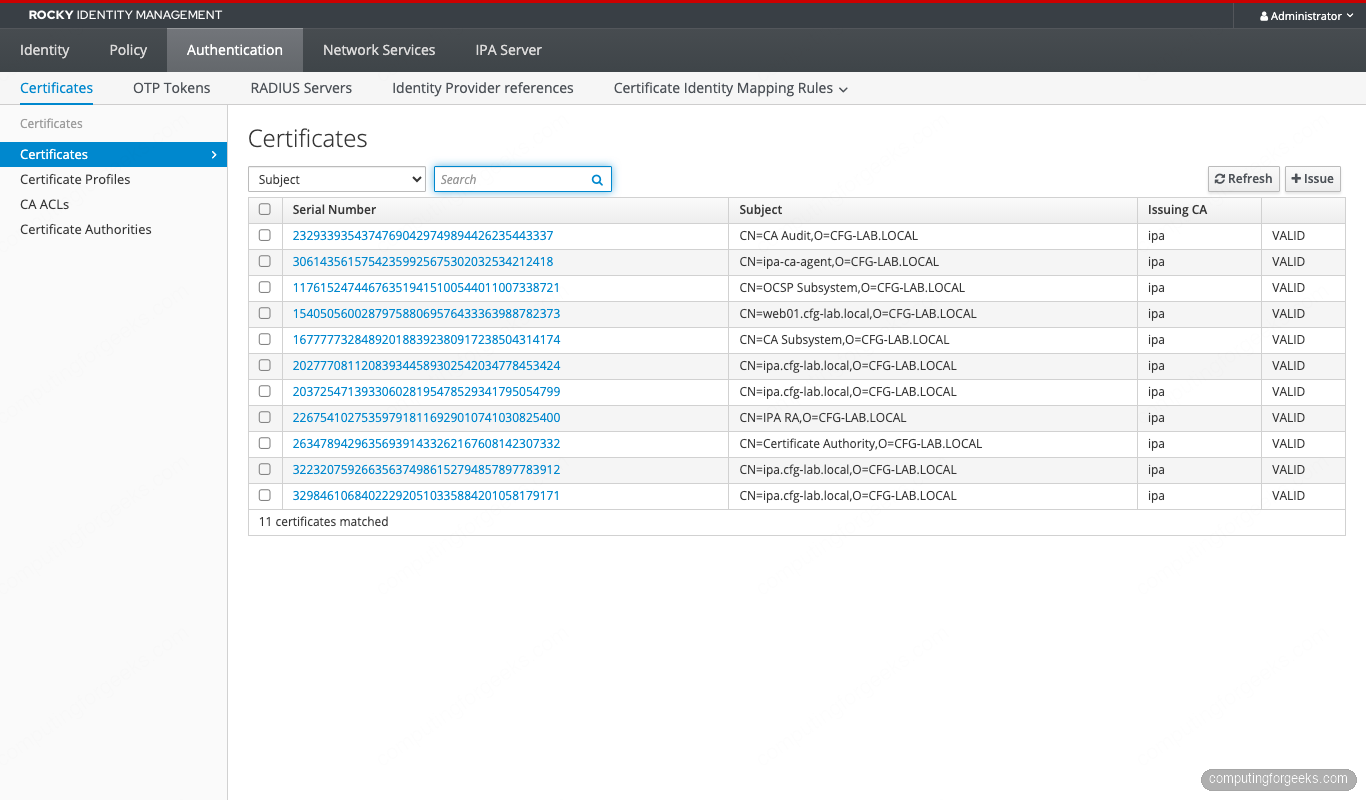
Click into any cert and the detail page shows both forms:
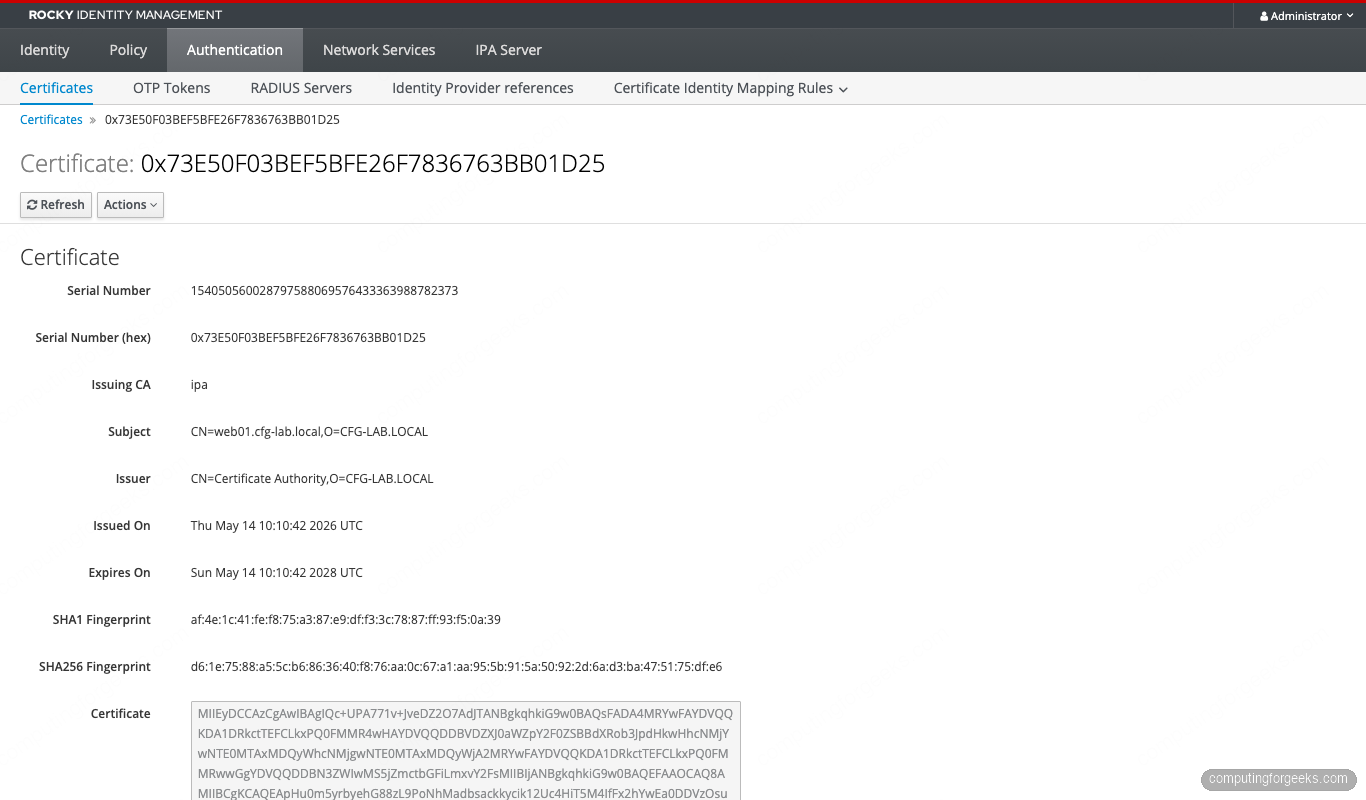
The hex form is what you will copy into bug reports and audit evidence. The decimal form is what the OCSP responder and CRL parsing tools work with.
Can you opt out of RSNv3?
On RHEL, Rocky, or AlmaLinux 10 with FreeIPA 4.12.2 and the LMDB backend, no. The installer message Forcing random serial numbers to be enabled for the mdb backend is not a suggestion. The --random-serial-numbers flag remains in the ipa-server-install help output for backwards compatibility, but there is no --random-serial-numbers=no counterpart. The installer hard-codes RSNv3 when it detects the mdb backend.
On RHEL 9 or pre-4.12 deployments running 389-DS BDB, you have a choice at install time. Pass --random-serial-numbers to enable RSNv3, or omit it for sequential. Once installed, you cannot flip between them on the same CA. The migration path is replica swing: build a new replica with the desired serial mode, demote and remove the original, and let the new one become the renumbered authority. Existing certificates keep their original serials until they expire.
For the rare case where you genuinely need sequential serials (some legacy SCEP servers and a handful of industrial PKI consumers still parse decimal serials and assume they fit in a 64-bit integer), the path forward is to keep one BDB-backed RHEL 9 IdM replica alive as the issuing CA for those clients, and run a separate LMDB-backed 4.12 realm for everything else. It is ugly, but it works.
Migrating from sequential to RSNv3
If you have an existing IdM realm with sequential serials and want to move to RSNv3, the only supported path is replica swing. The steps:
- Promote your current sequential-serial realm so it is healthy and has at least two replicas
- Build a new replica on a fresh Rocky/Alma/RHEL host with the LMDB backend (it will register as a CA replica and start replicating data, but new certs will continue to come from whichever CA renewal master is currently the issuer)
- Promote the new replica to be the CA renewal master with
ipa-csreplica-manage set-renewal-master ipa-new.cfg-lab.local - From that point forward, new certs issued by the new CA use RSNv3 serials. Old certs keep their sequential serials until they expire and are reissued.
- Once the old replicas drop out of rotation, the realm is fully RSNv3
Pre-existing certs are never rewritten. A cert issued with serial 0x05 in 2024 stays 0x05 until its notAfter. Your CRL therefore has a mix of short sequential serials and long random ones for the migration window. CRL consumers handle the mix fine because RFC 5280 makes no assumption about serial format. The replication walkthrough covers the mechanics of standing up the new replica.
Operational impact: CRL, OCSP, certmonger, ipa-cert-fix
RSNv3 changes the wire format of every cert and revocation entry. Five subsystems care.
CRL size. Each revoked-cert entry in a CRL carries the serial as DER-encoded INTEGER. Sequential 64-bit serials encode in 8 bytes plus 2 bytes of header. 128-bit random serials encode in 16 bytes plus 2 bytes of header. A CRL with 10000 revocations gains roughly 80 KB. If you fetch CRLs from a thousand clients every hour over a metered link, budget for the extra traffic. The publishing section in CS.cfg still compresses fine.
OCSP. The OCSP responder accepts both forms transparently. There is no protocol change. Performance is unchanged because the serial is used as an LDAP index key on either side. If you front the responder with HAProxy or nginx, no config change is needed.
certmonger. The local renewal daemon certmonger tracks certs by NSSDB nickname or PEM path, not by serial, so renewals work as before. The new cert will have a brand-new 128-bit random serial, which is what you want: a renewed cert is not the same cert.
ipa-cert-fix. The disaster recovery tool that reissues expired CA certs has been RSNv3-aware since Dogtag 11.5. When the original CA was sequential, ipa-cert-fix issues the replacement with the next sequential serial. When the original was RSNv3, the replacement is a fresh 128-bit draw. No flag needed. We tested this on a deliberately broken lab and it just worked.
Audit logging. Dogtag’s signed audit log includes CERT_REQUEST_PROCESSED events with the assigned serial. RSNv3 entries are about 16 hex characters longer per event. The log rotates the same way.
Known incompatibilities
RSNv3 breaks a small number of legacy consumers. If you run any of these, plan ahead.
- SCEP servers parsing decimal serials into int64. Some older device-enrollment SCEP servers (certain Cisco IOS releases pre-15.4, older OpenSCEP) parse the serial into a signed 64-bit integer and overflow on 128-bit input. The Network Device Enrollment Service (NDES) on Windows Server 2019+ handles it.
- PKCS#11 token storage that uses serial as primary key. A few HSM vendors (notably one model of YubiHSM 2 with firmware 2.0) used the serial as a uniqueness key in a fixed-width int64 column. Firmware 2.4 fixed it. Check yours.
- Custom OCSP cache implementations. If you wrote your own OCSP caching proxy and stored the serial as a database BIGINT column, change it to VARCHAR.
- Java keystore tools. Old
keytoolon Java 8 displays the serial as a negative number when the high bit is set. Java 11+ is fine. The cert itself is correct, only the display is wrong. - Some MQTT brokers with embedded TLS. Mosquitto pre-2.0 and older HiveMQ Edge releases truncated long serials in their connection logs. Cosmetic, not functional.
None of these affect anything that ships with RHEL 10, Rocky 10, or AlmaLinux 10. They are all third-party legacy software.
Reproducing the lab with ansible-freeipa
Everything in this article runs from a single ansible-freeipa play. The ipaserver role on collection version 1.13+ exposes dogtag_random_serial_numbers: true, but on RHEL 10 with LMDB the flag is a no-op because RSNv3 is forced anyway. Including it makes the intent explicit:
- hosts: ipaservers
  become: true
  roles:
    - role: freeipa.ansible_freeipa.ipaserver
      vars:
        ipaserver_realm: CFG-LAB.LOCAL
        ipaserver_domain: cfg-lab.local
        ipaserver_setup_dns: true
        ipaserver_auto_forwarders: true
        ipaserver_auto_reverse: true
        ipaserver_dogtag_random_serial_numbers: true
        ipaadmin_password: "{{ vault_admin_password }}"
        ipadm_password: "{{ vault_dm_password }}"
Run it with ansible-playbook -i inventory site.yml --vault-password-file=.vault. The whole install takes around twelve minutes on a 4 GB Proxmox VM. Decompose the role-call into a pre-task dnf install ipa-server ipa-server-dns if you want the playbook to be re-runnable on a partially-bootstrapped host.
When verification fails
Three failure modes are common.
You see bdb instead of mdb. The 389-DS was installed before the LMDB rebase, or you are on a version of 389-DS older than 3.0. Check with rpm -q 389-ds-base. Anything 3.0+ on RHEL 10 should be LMDB. To force the rebuild: dsctl slapd-CFG-LAB-LOCAL dblib bdb2mdb on a healthy backup, then re-run ipa-server-install --uninstall followed by a fresh install. Do not attempt this on a production CA without a verified replica to fall back to.
CS.cfg shows dbs.cert.id.generator=legacy. The install ran but the Dogtag step that flips the generator did not. This happens if the IPA install was interrupted between steps 28 and 31. The fix is to re-run the install: ipa-server-install --uninstall, clean up /etc/pki/pki-tomcat, reinstall. There is no surgical fix because the serial range LDAP entries that the legacy generator would need are already absent.
WebUI shows short decimal serials. The WebUI display is correct, the CA was installed pre-4.12 and upgraded. Existing certs keep their original short serials. Newly issued certs will use RSNv3. Use ipa cert-find --validnotafter-from=$(date -d 'today' -Iseconds) to filter for recently issued certs and confirm they are random.
The cert-find hex-grep one-liner for your monitoring
Drop this into your IdM smoke-test playbook to alert when the CA falls back to sequential serials for any reason:
#!/usr/bin/env bash
# Fail if any cert in the last 30 issued has a serial shorter than 30 hex chars
COUNT=$(ipa cert-find --sizelimit=30 2>/dev/null
  | grep "Serial number (hex)"
  | awk '{print $NF}'
  | awk '{ gsub(/^0x/,""); if (length($1) < 30) print }'
  | wc -l)
if [ "$COUNT" -gt 0 ]; then
  echo "RSNv3 regression: $COUNT certs with short serial detected"
  exit 1
fi
echo "RSNv3 OK"
Schedule it via a systemd timer every six hours on each IPA master. If any short serial appears, the CA renewal master has rolled over to a sequential generator and you want a page. The threshold is set at 30 hex characters because a legitimate 128-bit serial can have up to two leading zeros stripped by the hex printer, leaving 30 chars in pathological cases.
Cross-references inside the FreeIPA series
This article sits in the certificates and PKI track of our FreeIPA series. For the install that produces these serials, see the FreeIPA server install walkthrough. To enroll clients against the CA whose serials you just verified, see the server plus clients lab. The replication setup is what makes the migration story work. For access control on the hosts whose certs you are issuing, the HBAC least-privilege guide and the sudo rules cookbook handle the user-facing side.
The next article in the series ships ACME issuance: the same Dogtag CA you just verified, now serving Let's Encrypt-style automated certificates to internal services via certbot and acme.sh. Same RSNv3 serials, different request flow.



![Install Kali Linux 2026.1 Step by Step [Full Guide]](https://computingforgeeks.com/wp-content/uploads/2026/03/install-kali-linux-20261-step-by-step-768x403.png "Install Kali Linux 2026.1 Step by Step [Full Guide] 11")