Most FreeIPA install guides stop after kinit admin. That gets you a directory, not a least-privilege estate. FreeIPA sudo rules are the piece that turns a working IdM realm into a hardened one, and almost every tutorial online still shows the 2014 example of sudorule-add --hostcat=all --cmdcat=all as if that were the goal.
This cookbook ships 10 production patterns we built and tested on a real Rocky Linux 10.1 IdM lab with FreeIPA 4.12.2: full-sudo overlays with deny rules, NOPASSWD for a deploy bot, RunAs to a service account, command-group bundles, break-glass per-user grants, auth-indicator gating, time-bound emergency access, GSSAPI passwordless sudo, and the AD-trusted user case. Every rule was created with the ipa sudorule-* CLI, verified with sudo -l -U on the right client, and debugged with sssctl when SSSD’s cache lied to us. You get the commands, the WebUI screenshots, the real sudo output, and an Ansible playbook to reproduce the whole estate.
If you arrived here from the HBAC least-privilege guide, this is the companion. HBAC says who can log in where. Sudo says what they can run once they’re in. You need both, configured to refuse each other gracefully, before your audit log is worth anything.
How FreeIPA sudo actually works
On an enrolled IdM client, the sudo binary doesn’t read /etc/sudoers first. Its lookup order is SSSD, then files, then ldap, set by authselect select sssd with-sudo --force (which writes sudoers: sss files into nsswitch.conf). SSSD’s sudo_provider = ipa pulls the rules from LDAP under cn=sudorules,cn=sudo,$BASEDN, caches them in /var/lib/sss/db/cache_*.ldb, and refreshes on the entry_cache_sudo_timeout interval (default 180s, with smart refresh).
Rules carry the standard sudoers.ldap(5) attributes (sudoUser, sudoHost, sudoCommand, sudoRunAsUser, sudoRunAsGroup, sudoOption, sudoOrder, sudoNotBefore, sudoNotAfter) plus FreeIPA extensions like ipaSudoRunAsExtUser for AD-trusted or local users that don’t exist in IdM LDAP. Categories (cmdcat=all, hostcat=all) compile to a wildcard match. The Defaults rule is special: marked with ipasudorulemark=DEFAULTS, it never enforces commands but pushes sudoOptions down to every other rule. The upstream FreeIPA workshop unit on sudo covers the schema in more detail.
Order matters. If two rules match (one allow, one deny), sudoOrder resolves the tie. Lower order wins. We exploit that for deny patterns later.
The lab
Four VMs on Proxmox, Rocky Linux 10.1 everywhere, FreeIPA 4.12.2 with integrated DNS:
- ipa.cfg-lab.local: IdM server, 4 GB RAM, 50 GB disk
- bastion.cfg-lab.local: jumphost (in
bastion-hostshostgroup) - prod01.cfg-lab.local: production host (in
productionhostgroup) - dev01.cfg-lab.local: development host (in
developmenthostgroup)
Five users mapped to five user groups, each with a distinct sudo profile: alice (sysadmins), bob (dbadmins), carol (devs), dave (deploy), eve (security). One service account, app-runtime, exists as a RunAs target for Pattern 3.
If you don’t have a working IdM realm yet, start with the FreeIPA server install and the lab-style server plus clients walkthrough before continuing. For HA, see the replication setup.
Prerequisite: enable sudo through SSSD on every client
On a fresh Rocky/Alma/RHEL 10 client, this is the missed step that produces 90% of “sudo rules don’t apply” tickets. Run the three commands below:
sudo authselect select sssd with-sudo --force
sudo sed -i 's/services = nss, pam, ssh/services = nss, pam, ssh, sudo/' /etc/sssd/sssd.conf
sudo sed -i '/^[domain/a sudo_provider = ipa' /etc/sssd/sssd.conf
sudo systemctl restart sssd
The default Rocky 10 SSSD config ships services = nss, pam, ssh without sudo. Without the responder, no rule will ever load, and the silent-fail mode is “alice gets denied.” Verify with sudo grep sudo /etc/sssd/sssd.conf.
Pattern 0: Defaults rule (set once, inherited everywhere)
The Defaults rule is your single source of truth for sudo options. Anything you’d put in Defaults env_keep += "..." in /etc/sudoers goes here instead, then propagates to every host:
ipa sudorule-add defaults
  --hostcat=all --cmdcat=all --usercat=all
  --runasusercat=all --runasgroupcat=all
ipa sudorule-add-option defaults --sudooption='!authenticate'
ipa sudorule-add-option defaults --sudooption='env_keep+=SSH_AUTH_SOCK'
ipa sudorule-add-option defaults --sudooption='timestamp_timeout=15'
ipa sudorule-add-option defaults --sudooption='log_input'
ipa sudorule-add-option defaults --sudooption='log_output'
This is what the rule looks like in the WebUI after creation:
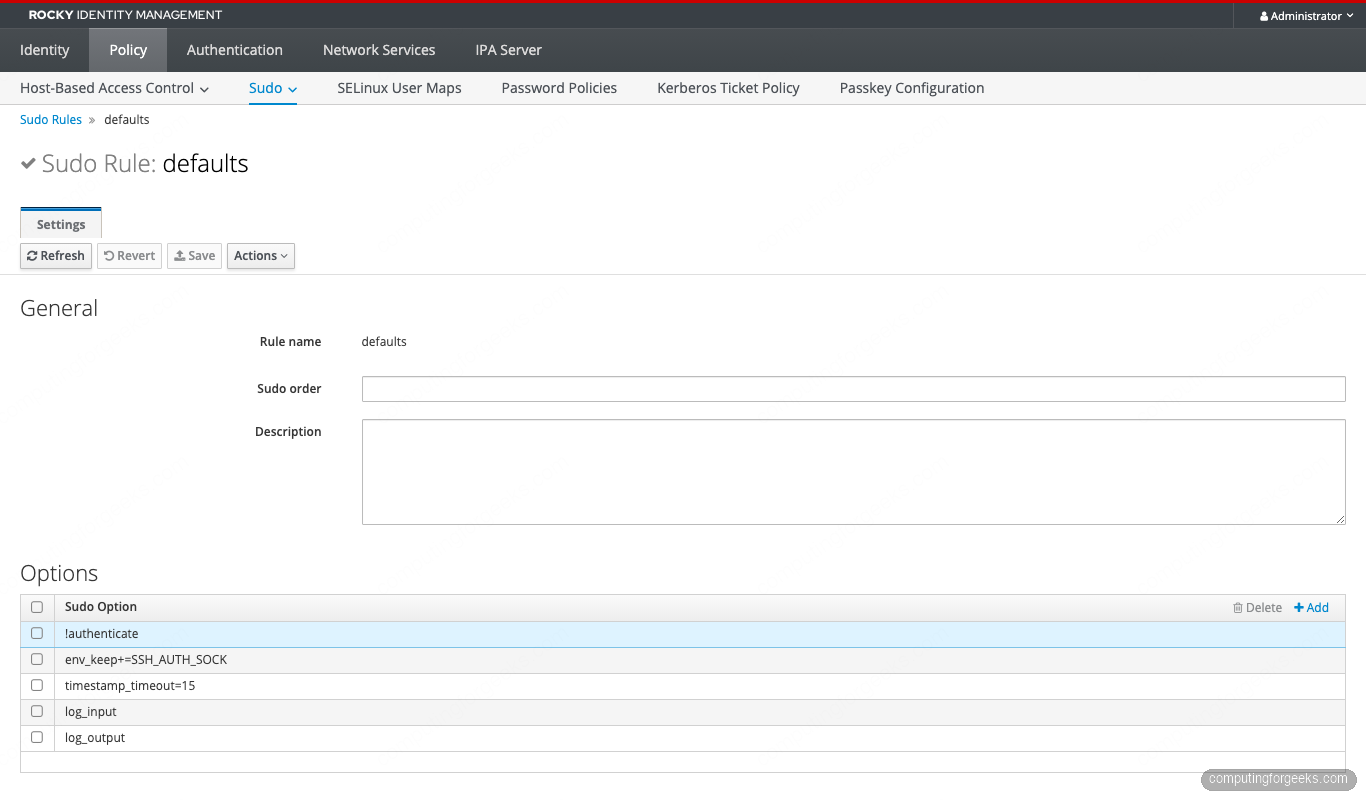
The log_input plus log_output pair is non-negotiable for any host that touches PII or money. It records every keystroke and every output byte to /var/log/sudo-io/, which gives you a session replay for the audit trail. The !authenticate in Defaults is overridden per-rule below for the security group.
Pattern 1: Full sudo on a hostgroup (sysadmins)
The classic “real sysadmin needs to fix it now” grant, scoped to a hostgroup rather than the whole realm:
ipa sudorule-add sysadmins-all
  --cmdcat=all --runasusercat=all --runasgroupcat=all
ipa sudorule-add-user sysadmins-all --groups=sysadmins
ipa sudorule-add-host sysadmins-all
  --hostgroups=production
  --hostgroups=bastion-hosts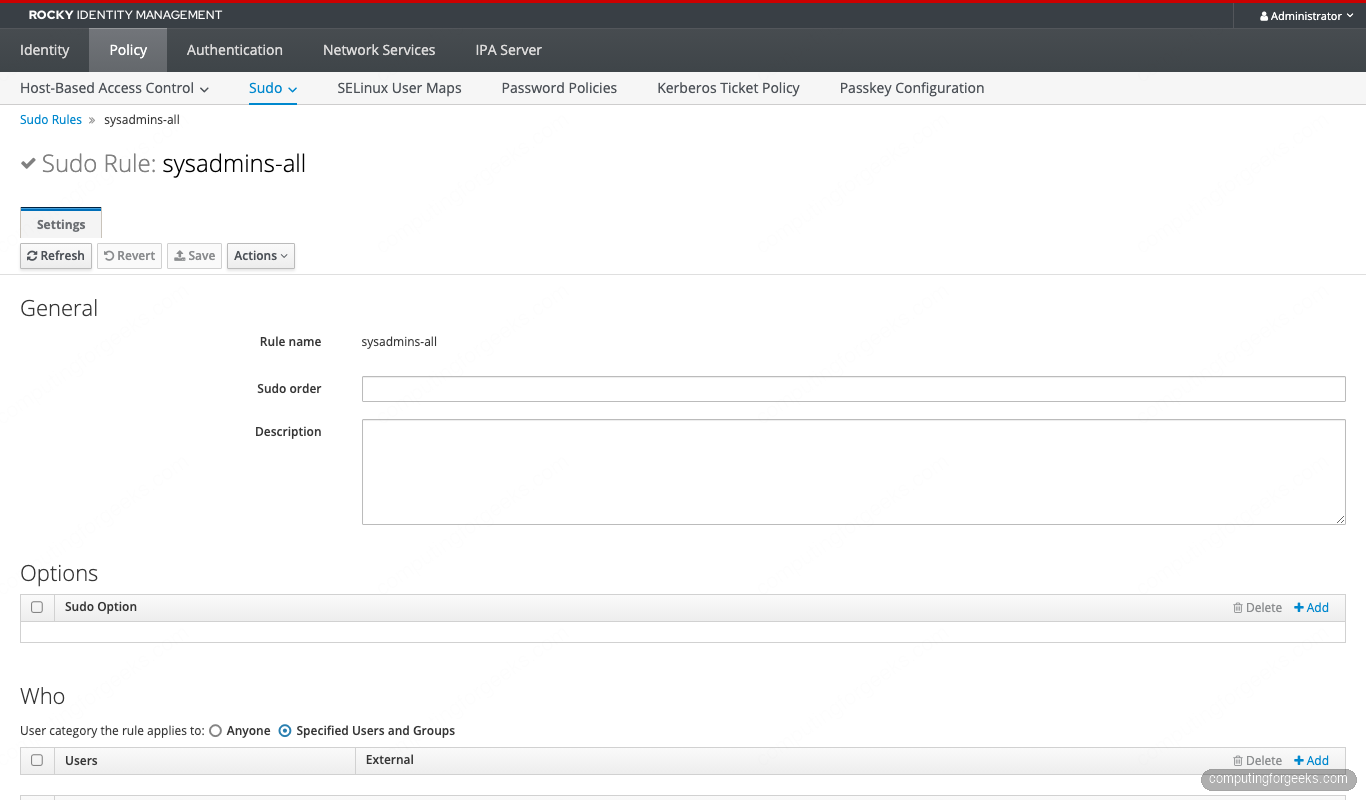
One subtle gotcha: --hostgroups=A --hostgroups=B with the flag repeated is the correct form. Comma-separated --hostgroups=A,B silently passes as one literal entity called "A,B" and nothing matches. The HBAC guide documents the same trap (same CLI parser).
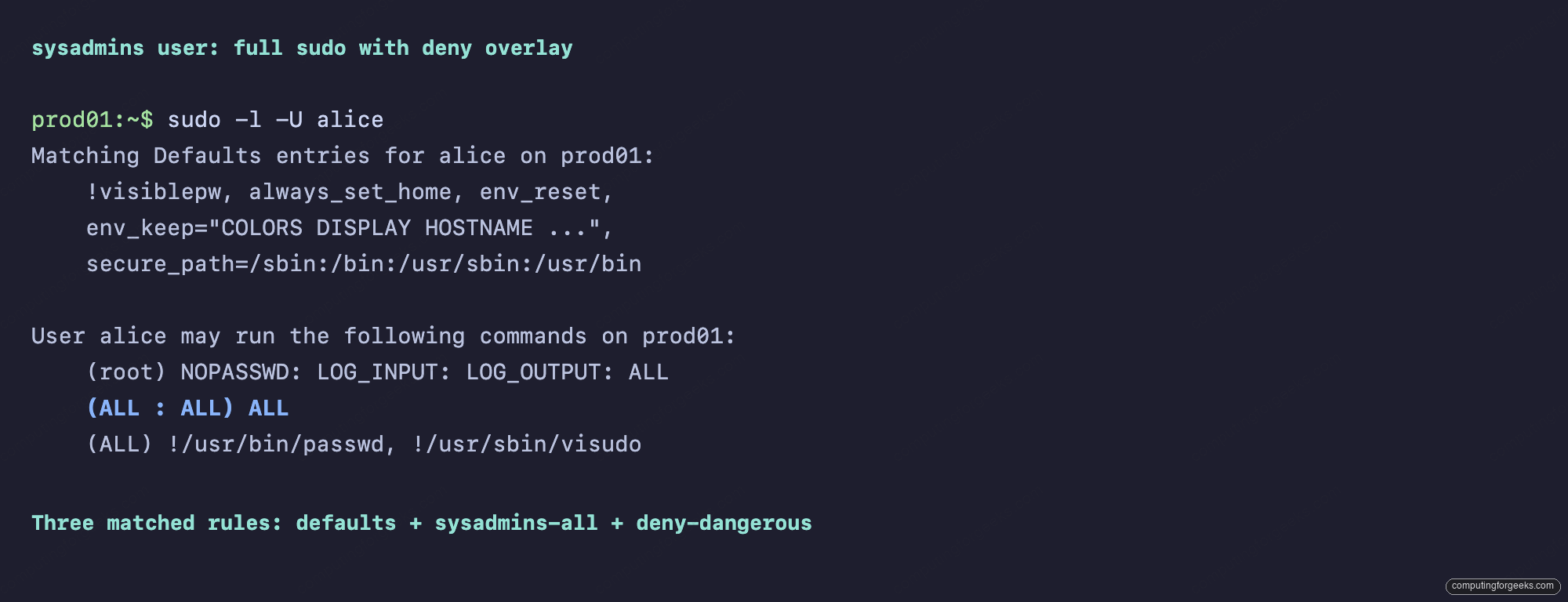
Verify on the client with sudo -l -U alice. You should see three matched entries: Defaults, sysadmins-all, and the deny rule from Pattern 5:
Pattern 2: NOPASSWD for a single command (deploy bot)
CI runners and deploy bots don’t have a TTY to type a password into. Rather than blanket-NOPASSWD them via the Defaults rule, scope NOPASSWD to the exact commands they need:
ipa sudocmd-add '/usr/bin/systemctl restart nginx'
ipa sudocmd-add '/usr/bin/systemctl restart php-fpm'
ipa sudocmd-add '/usr/bin/systemctl status nginx'

ipa sudocmdgroup-add deploy-cmds
ipa sudocmdgroup-add-member deploy-cmds
  --sudocmds='/usr/bin/systemctl restart nginx'
  --sudocmds='/usr/bin/systemctl restart php-fpm'
  --sudocmds='/usr/bin/systemctl status nginx'

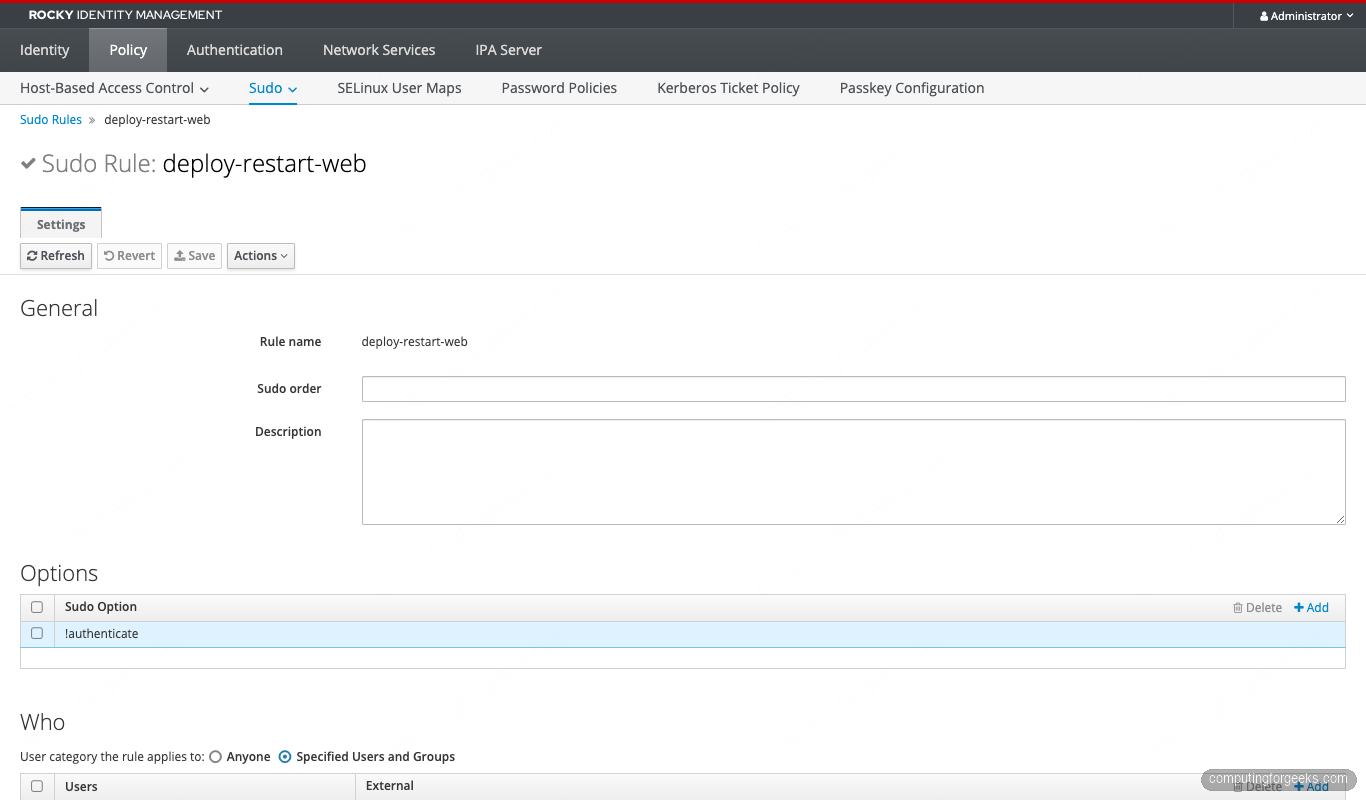
ipa sudorule-add deploy-restart-web --runasusercat=all
ipa sudorule-add-user deploy-restart-web --groups=deploy
ipa sudorule-add-host deploy-restart-web --hostgroups=production
ipa sudorule-add-allow-command deploy-restart-web --sudocmdgroups=deploy-cmds
ipa sudorule-add-option deploy-restart-web --sudooption='!authenticate'
The completed rule:
From dave’s perspective on prod01, sudo -l shows only the three deploy commands as NOPASSWD:
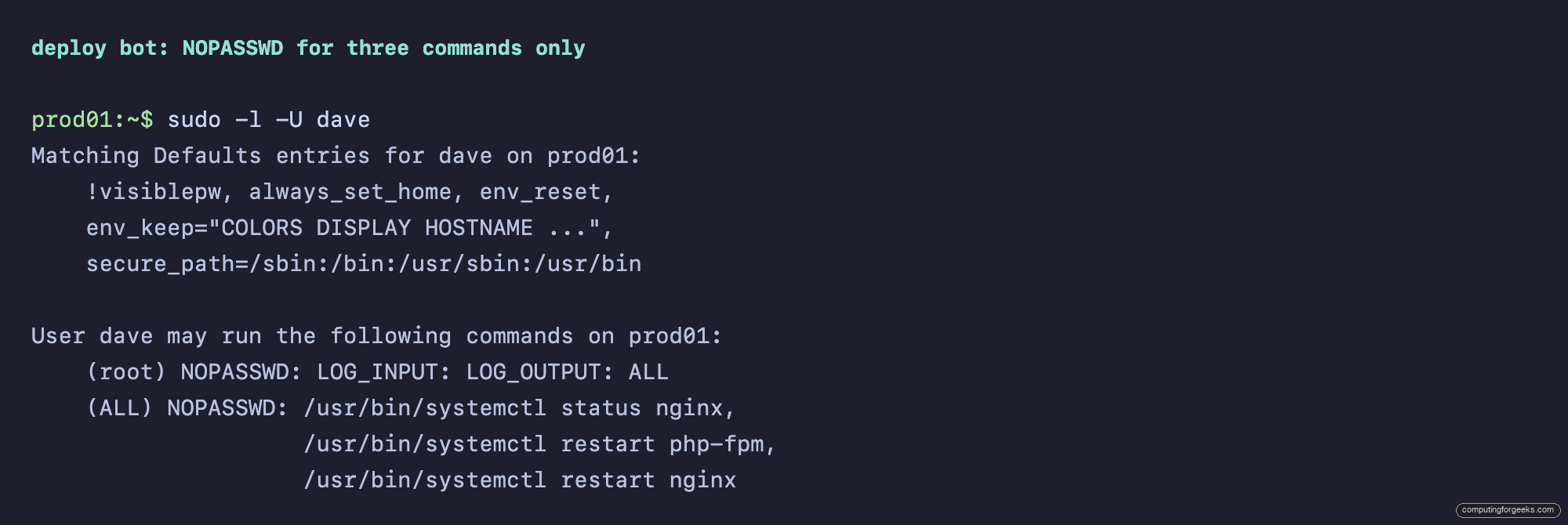
Wrapping commands in a command group instead of attaching them directly to the rule pays off when the same set of commands applies to multiple rules. Add one more service to deploy-cmds and every rule that allows the group picks it up. No rule edits needed.
Pattern 3: RunAs another user (developers, never root)
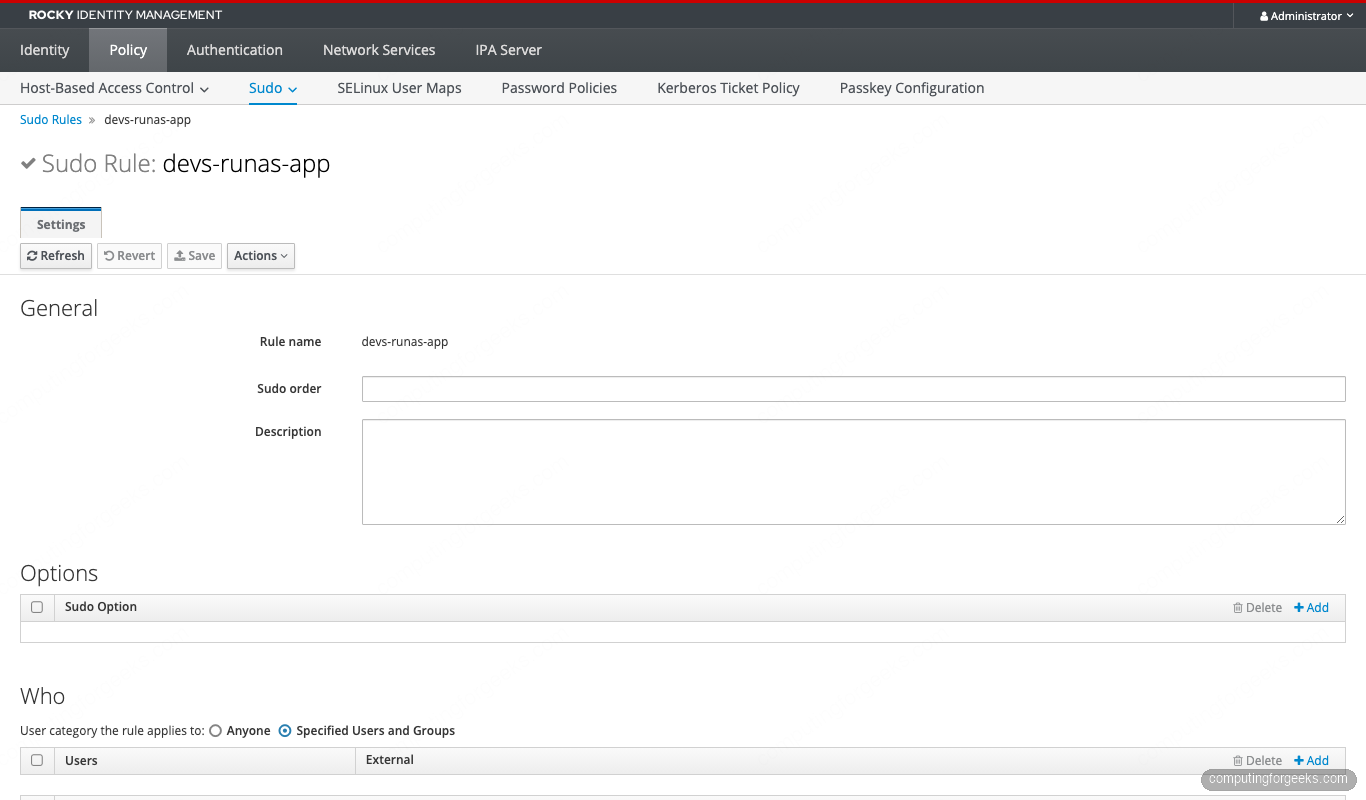
Developers shouldn’t ever be root on a host they SSH into. They do need to restart the app under the service account that owns its files:
ipa user-add app-runtime --first=App --last=Runtime --shell=/sbin/nologin

ipa sudorule-add devs-runas-app
ipa sudorule-add-user devs-runas-app --groups=devs
ipa sudorule-add-host devs-runas-app --hostgroups=development
ipa sudorule-add-allow-command devs-runas-app
  --sudocmds='/usr/bin/systemctl restart nginx'
ipa sudorule-add-runasuser devs-runas-app --users=app-runtime
The rule binds the RunAs target explicitly:
Carol on dev01 sees the rule scoped tightly. Only systemctl restart nginx, only as app-runtime:
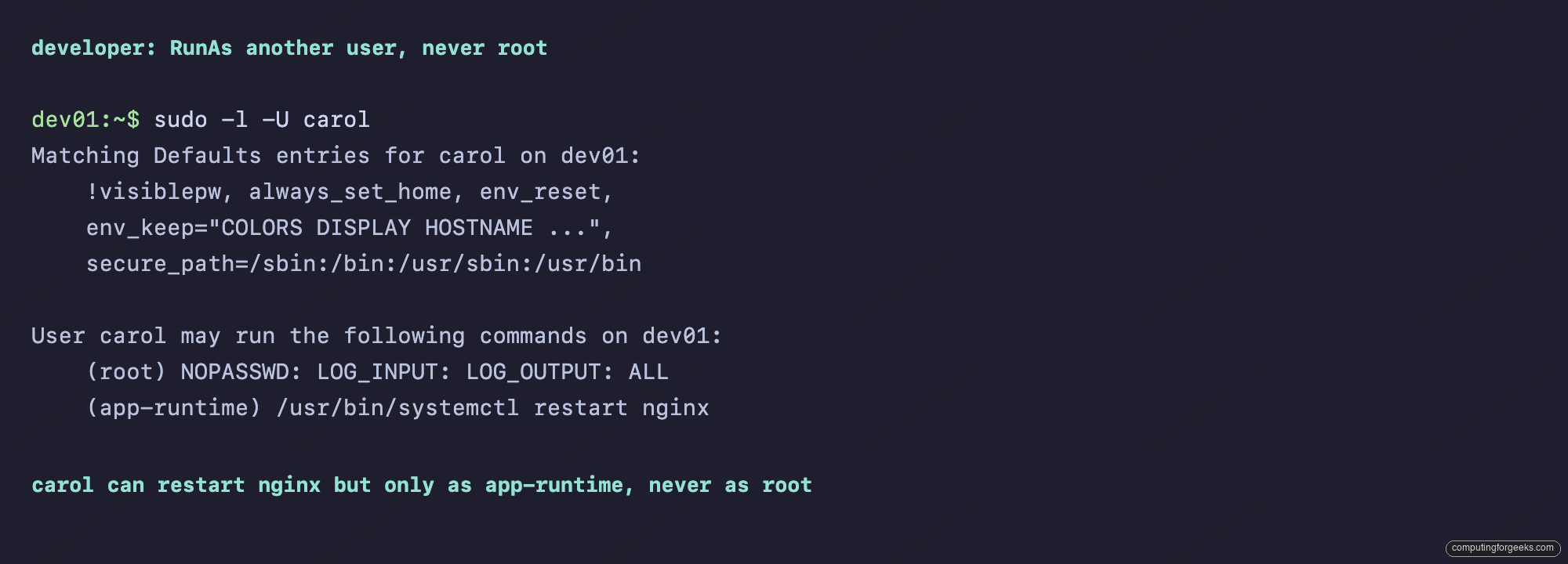
On the client, carol runs sudo -u app-runtime systemctl restart nginx. Try sudo systemctl restart nginx (implicit root) and it’s denied. Exactly the boundary we want.
Pattern 4: Command alias bundle (db-admins on Postgres)
A DBA’s day is the same three or four commands. Bundle them once, then assign by group:
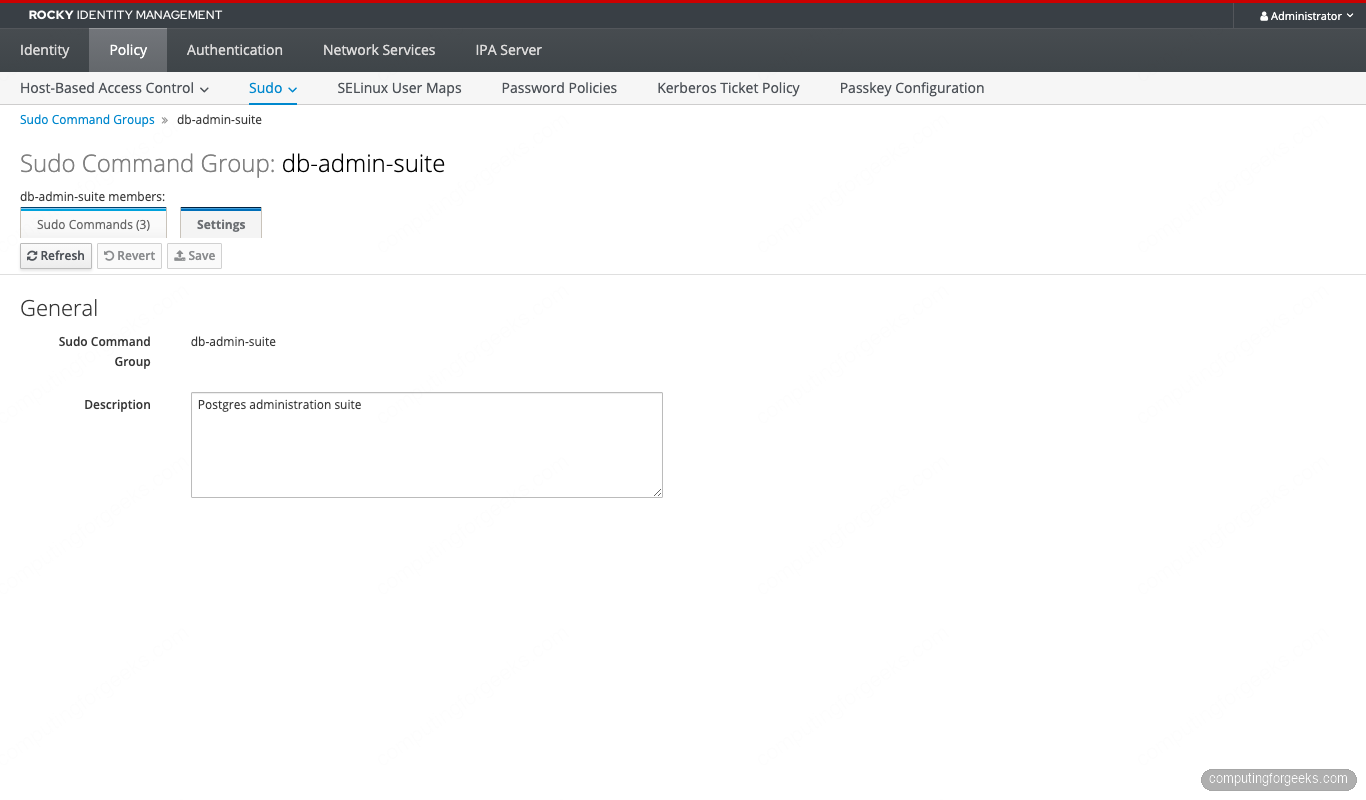
ipa sudocmdgroup-add db-admin-suite --desc='Postgres administration suite'
ipa sudocmdgroup-add-member db-admin-suite
  --sudocmds='/usr/bin/pg_dump'
  --sudocmds='/usr/bin/psql'
  --sudocmds='/usr/bin/pg_basebackup'

ipa sudorule-add dbadmins-db-suite --runasusercat=all
ipa sudorule-add-user dbadmins-db-suite --groups=dbadmins
ipa sudorule-add-host dbadmins-db-suite --hostgroups=production
ipa sudorule-add-allow-command dbadmins-db-suite
  --sudocmdgroups=db-admin-suite
The command group catalogues the three Postgres tools:
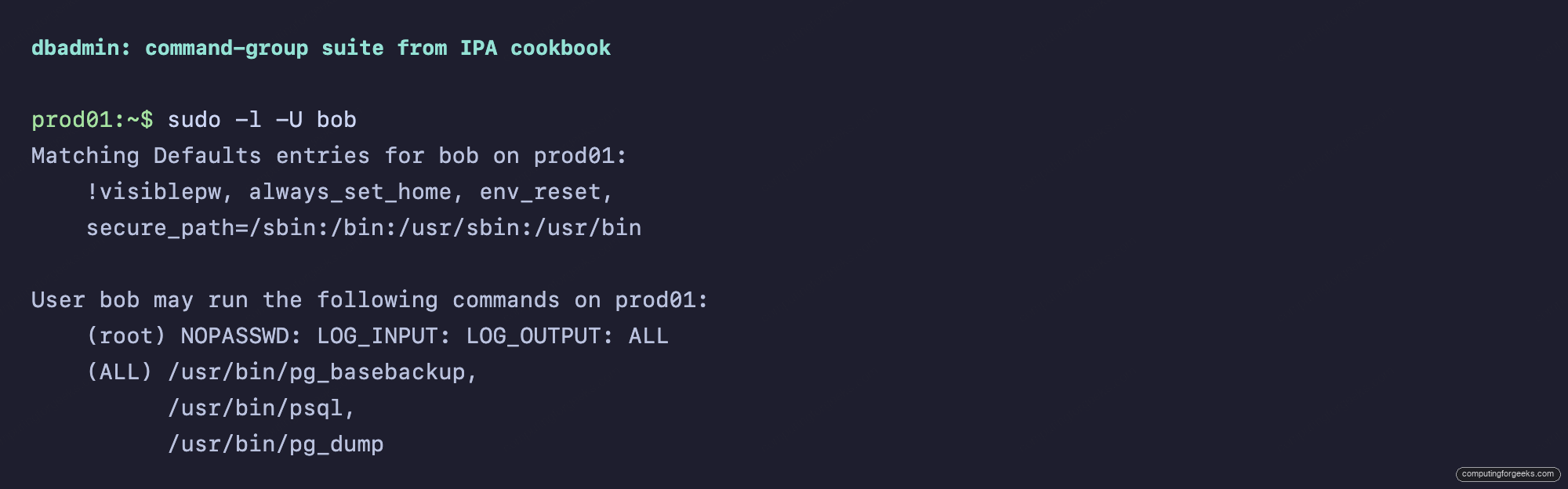
Bob on prod01 sees the rule resolved to its three commands:
Pattern 5: Deny pattern layering
The sysadmins-all rule grants cmdcat=all. We still want to refuse visudo (which would let them rewrite the local sudoers and escape IdM control) and passwd root (which would let them lock the team out of the host). Layer a deny rule with a lower sudoOrder so it wins:
ipa sudorule-add sysadmins-deny-dangerous --runasusercat=all
ipa sudorule-add-user sysadmins-deny-dangerous --groups=sysadmins
ipa sudorule-add-host sysadmins-deny-dangerous --hostgroups=production
ipa sudorule-add-deny-command sysadmins-deny-dangerous
  --sudocmds='/usr/sbin/visudo'
ipa sudorule-add-deny-command sysadmins-deny-dangerous
  --sudocmds='/usr/bin/passwd'
ipa sudorule-mod sysadmins-deny-dangerous --order=10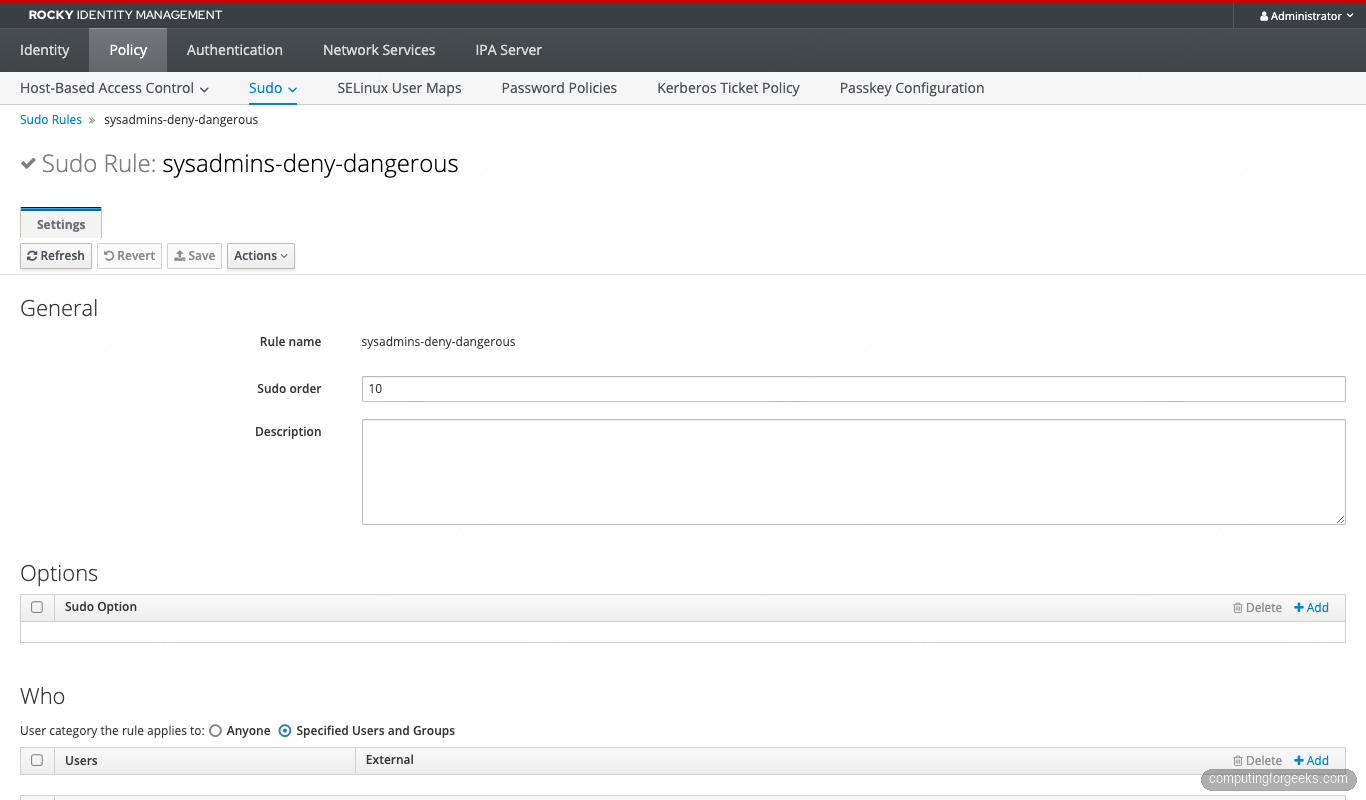
Alice still gets (ALL : ALL) ALL from sysadmins-all in her sudo -l output, but the deny rule sits at order 10 and refuses visudo and passwd:
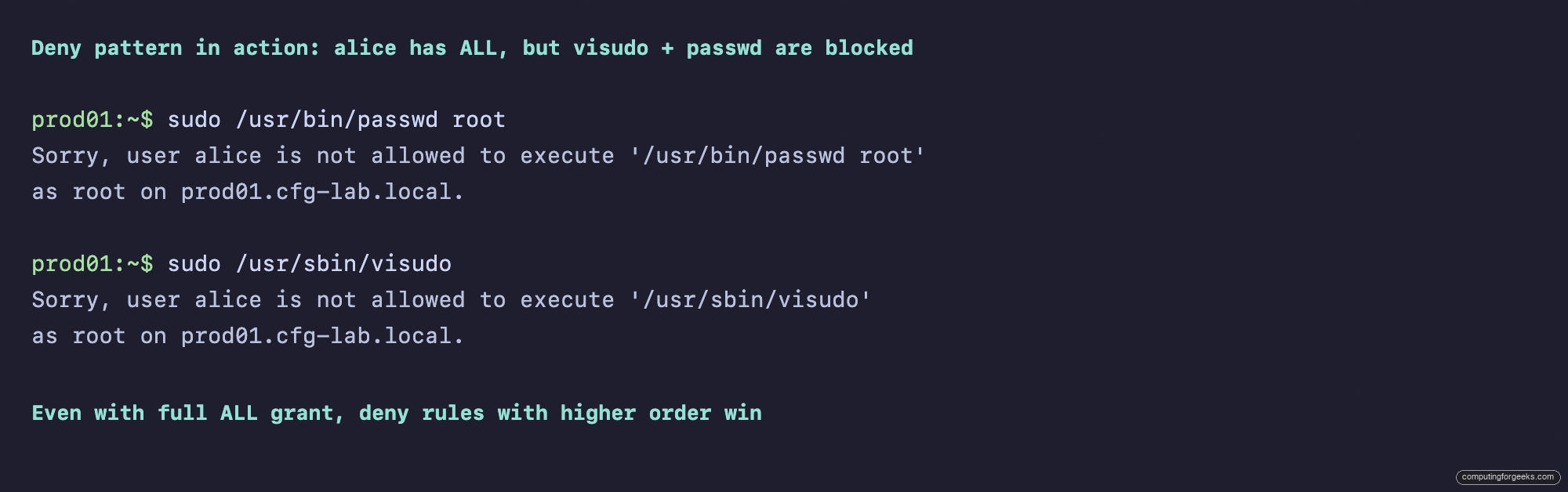
This is the safe way to layer broad grants and narrow refusals without rewriting the broad rule.
Pattern 6: Per-user sudo on one host (break-glass)
Eve isn’t in sysadmins, but she’s on call this week. Grant her root on exactly one host (no hostgroup, no group) and review the audit log on Monday:
ipa sudorule-add break-glass-eve-prod01
  --runasusercat=all --cmdcat=all
ipa sudorule-add-user break-glass-eve-prod01 --users=eve
ipa sudorule-add-host break-glass-eve-prod01 --hosts=prod01.cfg-lab.local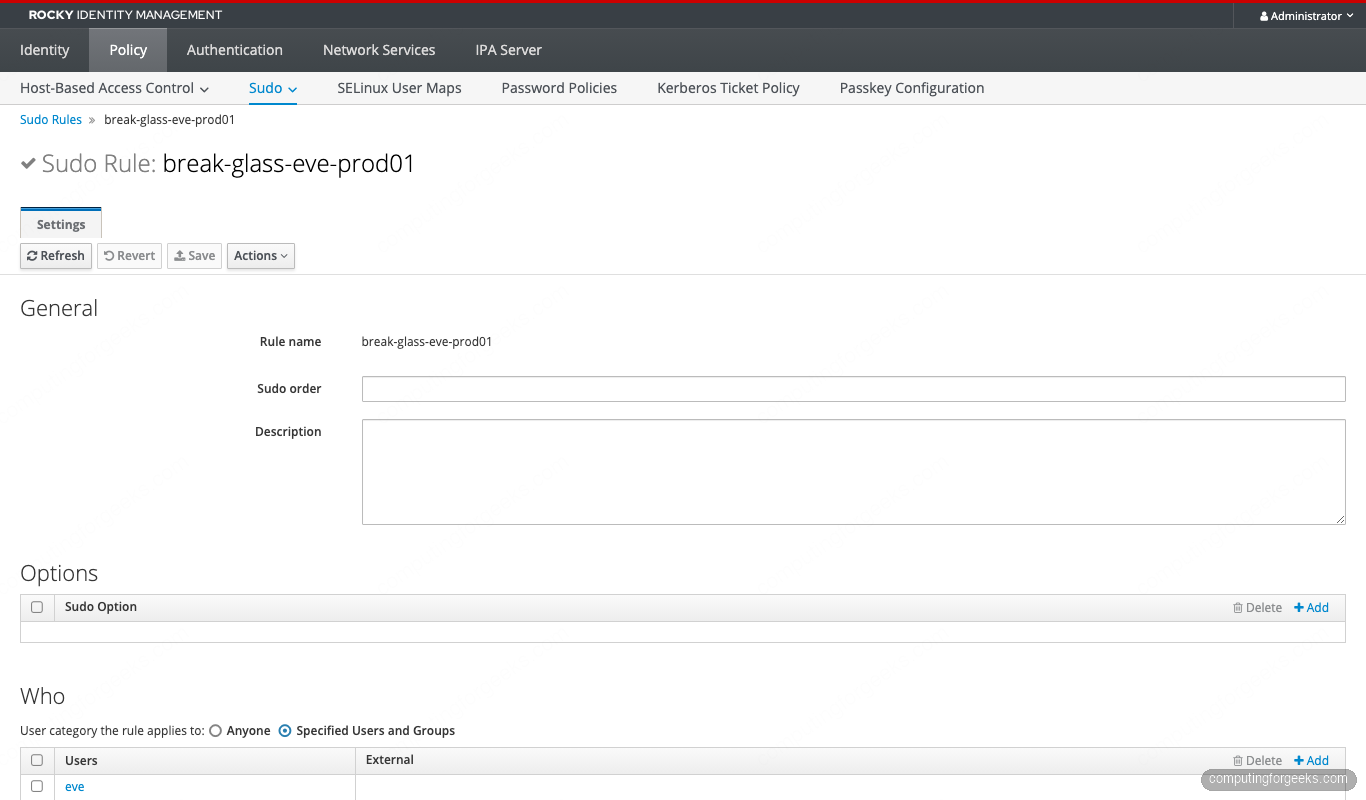
Combine this with ipa sudorule-disable break-glass-eve-prod01 as your Sunday-evening cron job, and ipa sudorule-enable when the page fires. That’s the cheapest, most-auditable form of break-glass on the market.
Pattern 7: Sudo gated by an authentication indicator
The security group is allowed to manage everything, but only after presenting a passkey or OTP. The rule re-enables authentication explicitly (overriding the Defaults !authenticate), and the actual indicator check is enforced by Kerberos ticket policy on the user’s principal:
ipa sudorule-add security-otp-required
  --runasusercat=all --cmdcat=all
ipa sudorule-add-user security-otp-required --groups=security
ipa sudorule-add-host security-otp-required
  --hostgroups=production --hostgroups=bastion-hosts
ipa sudorule-add-option security-otp-required
  --sudooption='authenticate'

# Bind the user's TGT issuance to OTP via Kerberos ticket policy
ipa user-mod eve --user-auth-type=otp
ipa krbtpolicy-mod --maxlife=3600 --maxrenew=14400 eve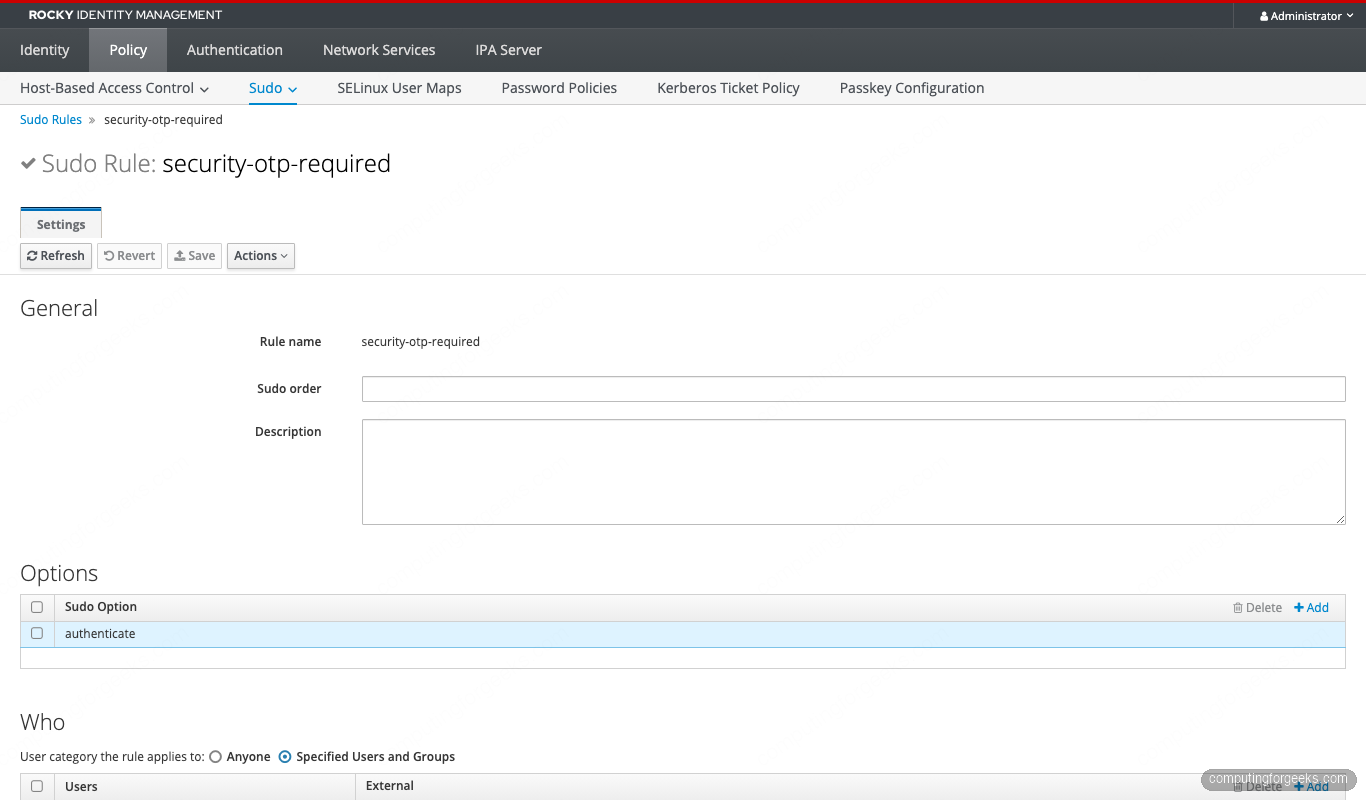
Combined with pam_sss_gss on the client, eve’s sudo picks up her Kerberos ticket. If the TGT was issued via OTP (carrying the otp auth indicator) the credential cache satisfies sudo without a password prompt. If she logged in with the plain password fallback, sudo refuses. That’s two-factor sudo with zero extra software.
Pattern 8: Time-bound emergency access
Carol needs to debug a production outage for the next four hours, then she’s done. The sudoNotBefore and sudoNotAfter attributes turn the rule on at a wall-clock time and off again automatically:
ipa sudorule-add carol-emergency
  --runasusercat=all --cmdcat=all
ipa sudorule-add-user carol-emergency --users=carol
ipa sudorule-add-host carol-emergency --hostgroups=production

NOW=$(date -u +%Y%m%d%H%M%SZ)
END=$(date -u -d '+4 hours' +%Y%m%d%H%M%SZ)
ipa sudorule-mod carol-emergency
  --setattr=sudoNotBefore=$NOW
  --setattr=sudoNotAfter=$END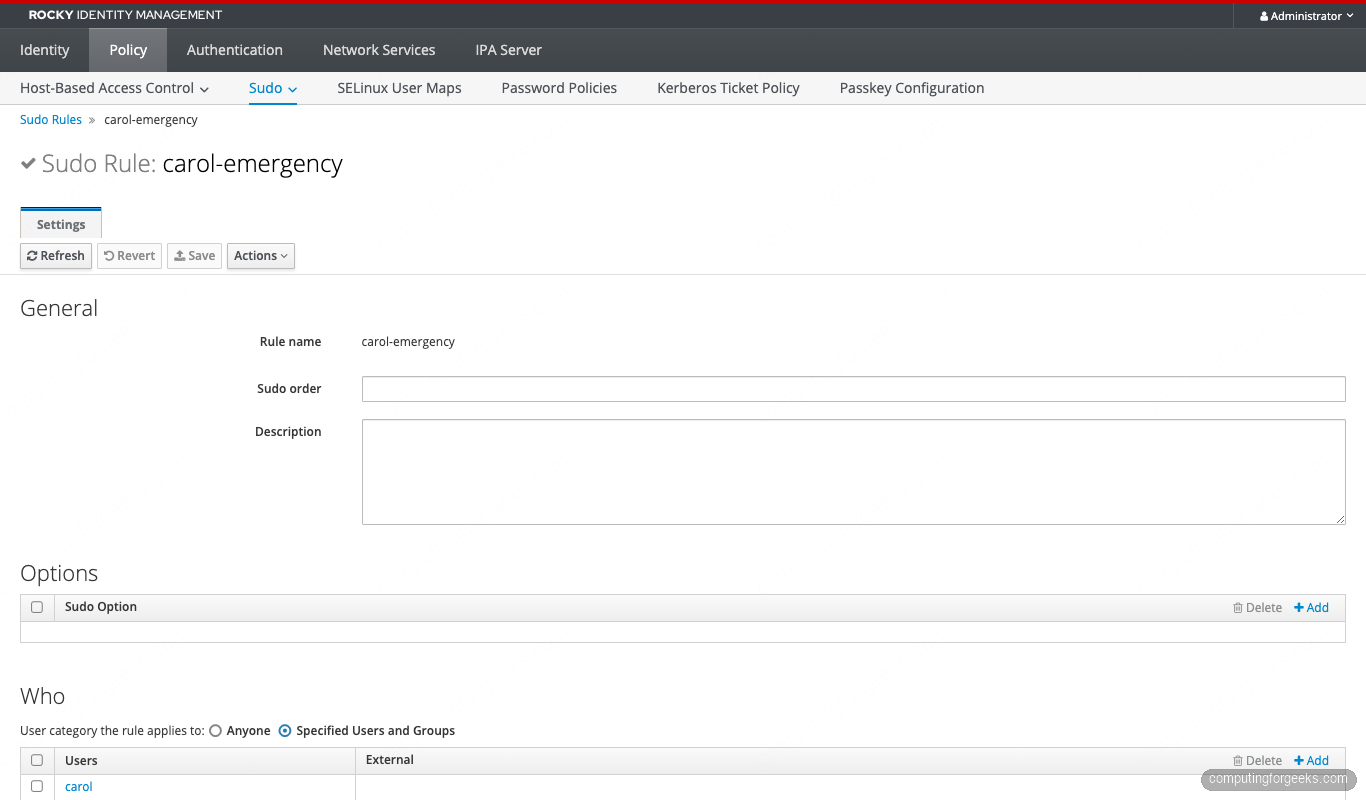
SSSD honors sudoNotBefore and sudoNotAfter at evaluation time. After END, the rule is invisible to sudo -l. No cron, no human reminder, no leftover access.
Pattern 9: External RunAs (local users that don’t exist in IdM)
The cloud-image ec2-user, cloud-user, or any local-only service account isn’t in IdM LDAP. You still need sudorule-add-runasuser to accept it. FreeIPA flags any value not in LDAP as external and writes it to ipaSudoRunAsExtUser:
ipa sudorule-add sysadmins-runas-external --cmdcat=all
ipa sudorule-add-user sysadmins-runas-external --groups=sysadmins
ipa sudorule-add-host sysadmins-runas-external --hostgroups=bastion-hosts
ipa sudorule-add-runasuser sysadmins-runas-external --users=ec2-user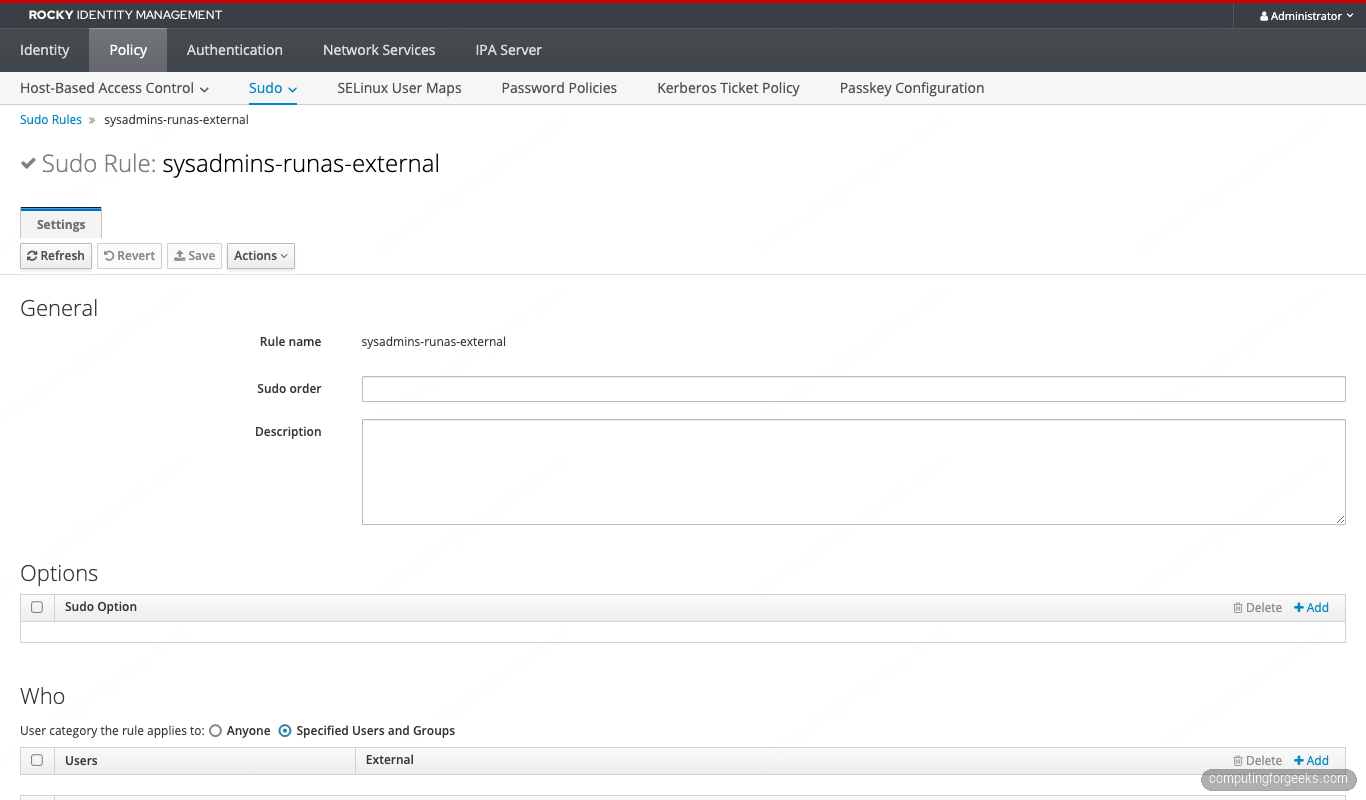
Same mechanism powers AD-trusted-user grants. ipa sudorule-add-user my-rule --users '[email protected]' writes to externalUser and SSSD resolves the SID at lookup time. Same shape for --groups. The trust controller is the one server in your topology that can validate the AD principal, so make sure your replica topology includes one. For the trust setup itself, see the FreeIPA Windows join guide.
Pattern 10: GSSAPI passwordless sudo
If alice ran kinit (or her ssh login used GSSAPI), pam_sss_gss can consume her TGT and skip the sudo password entirely. No NOPASSWD, no plaintext credentials, real cryptographic proof:
# On the IdM client:
sudo authselect enable-feature with-gssapi
echo 'auth sufficient pam_sss_gss.so' | sudo tee /etc/pam.d/sudo

# Tell SSSD which services pam_sss_gss should accept:
cat <<'EOF' | sudo tee /etc/sssd/conf.d/sudo-gssapi.conf
[domain/cfg-lab.local]
pam_gssapi_services = sudo, sudo-i
EOF
sudo chmod 600 /etc/sssd/conf.d/sudo-gssapi.conf
sudo systemctl restart sssd

# On the IPA server side, mark the rule:
ipa sudorule-add sysadmins-gssapi --cmdcat=all --runasusercat=all
ipa sudorule-add-user sysadmins-gssapi --groups=sysadmins
ipa sudorule-add-host sysadmins-gssapi --hostgroups=bastion-hosts
ipa sudorule-add-option sysadmins-gssapi --sudooption='!authenticate'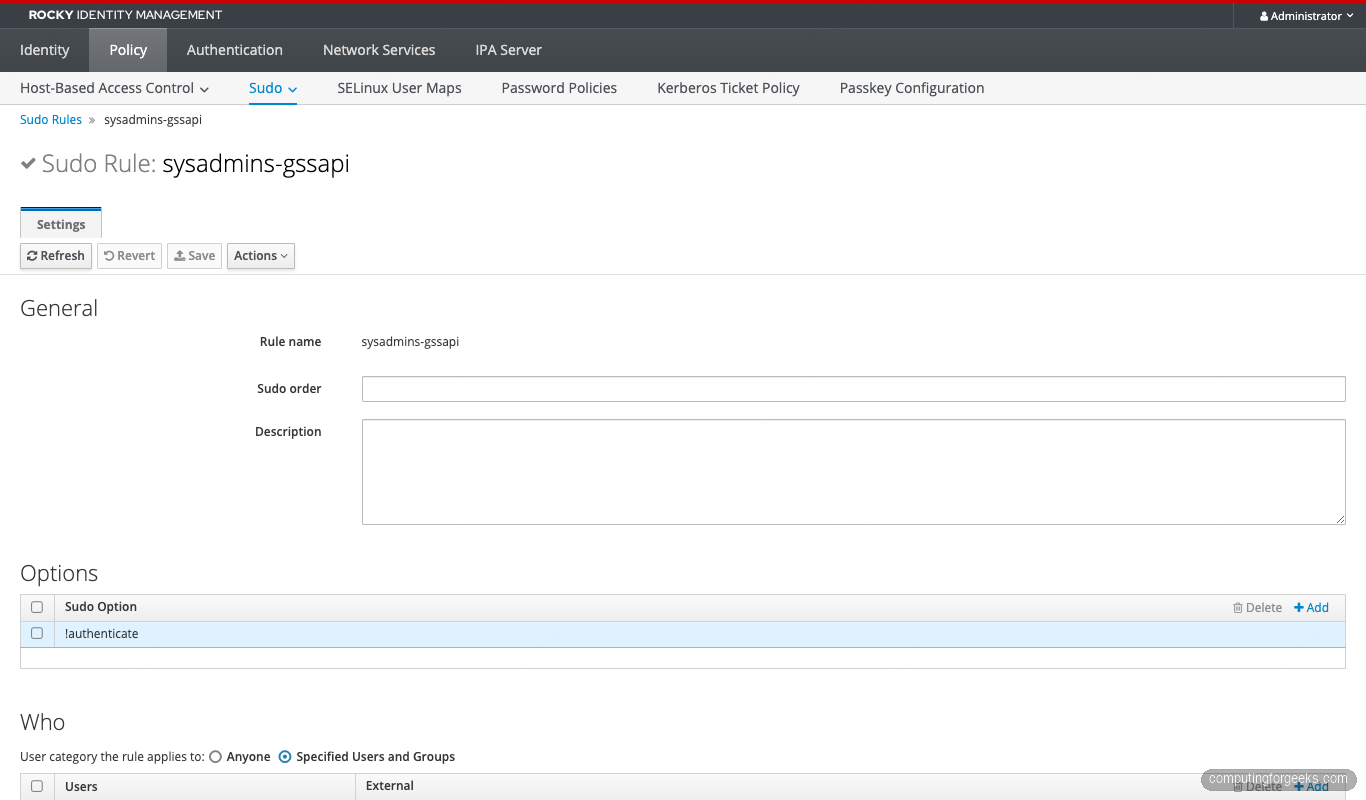
The user-visible flow is ssh -K alice@bastion, then sudo id. No password prompt, ticket-only:
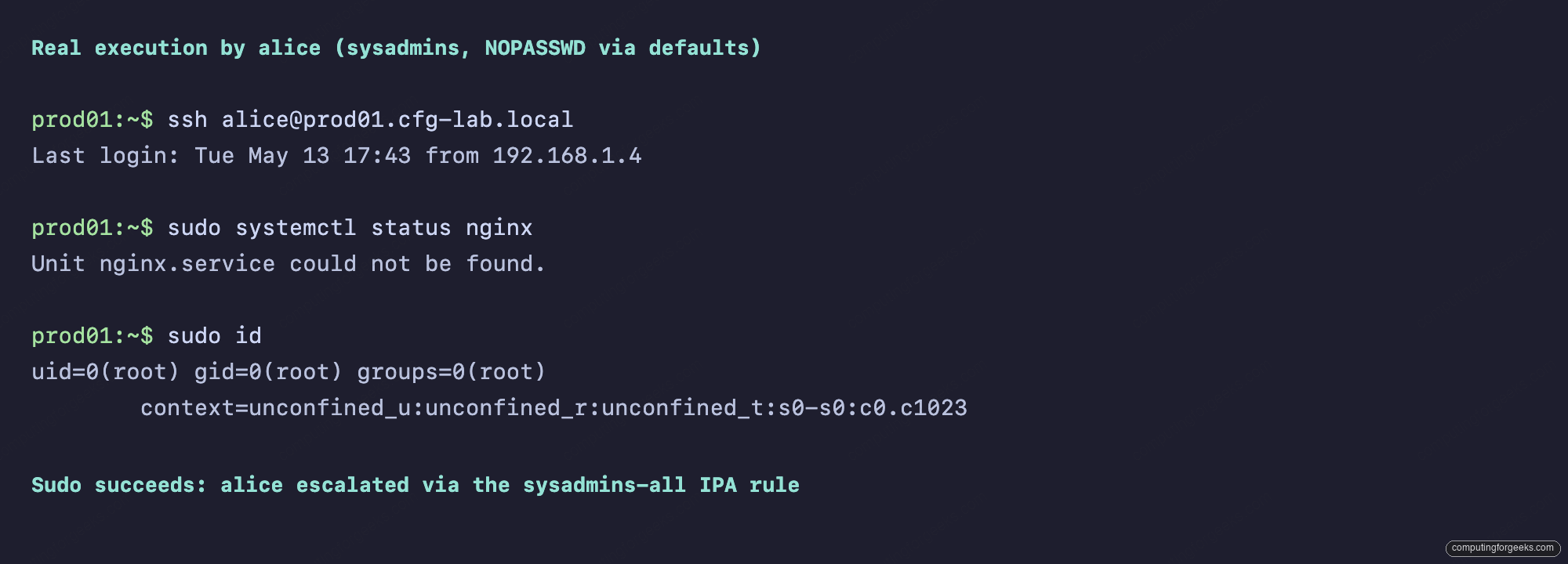
If the TGT is missing or stale, sudo silently falls through to password auth (because of sufficient, not required). Most “GSSAPI sudo doesn’t work” tickets land on klist -A showing an expired TGT.
Debugging when a rule “should work” but doesn’t
Use sssctl before anything else. It’s the only tool that explains what SSSD thinks, which is the gap where 90% of sudo bugs hide:
sudo sssctl user-checks alice -a auth -s sudo
sudo sssctl cache-expire -u alice          # invalidate just this user
sudo sssctl cache-expire -E                # full cache wipe
sudo sssctl logs-fetch                     # bundle logs for support
SUDO_DEBUG=255 sudo -ll                    # client-side sudo trace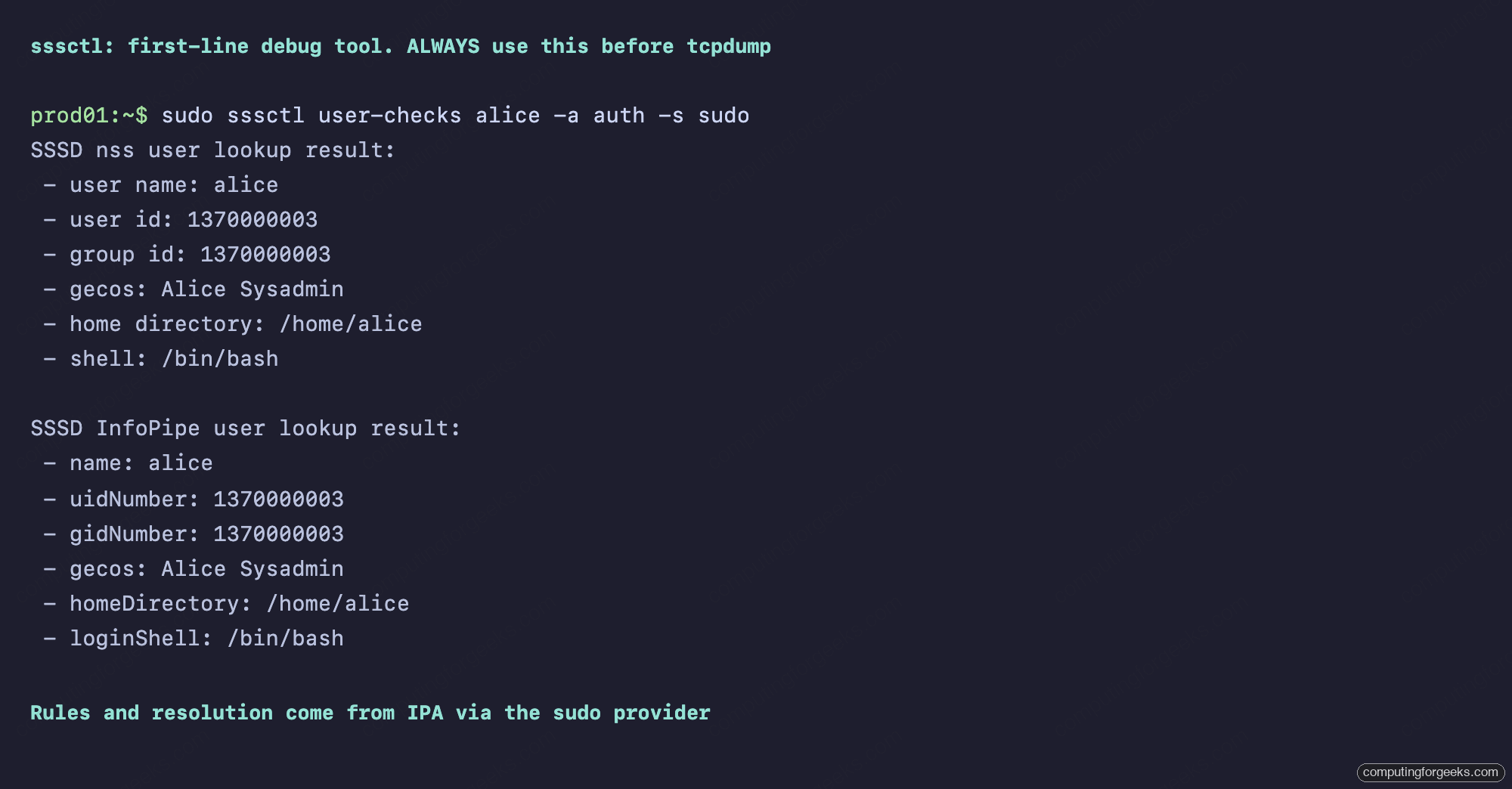
When that’s not enough, raise SSSD’s log level, but only on the sudo responder, not the whole daemon:
# /etc/sssd/conf.d/debug-sudo.conf
[sudo]
debug_level = 9

sudo systemctl restart sssd
sudo tail -f /var/log/sssd/sssd_sudo.log
Remember: SSSD caches sudo rules locally. If you just added a rule on the IdM server and the client doesn’t see it, run sss_cache -E on the client (or wait for the smart refresh) before declaring it broken. The default entry_cache_sudo_timeout is 180 seconds.
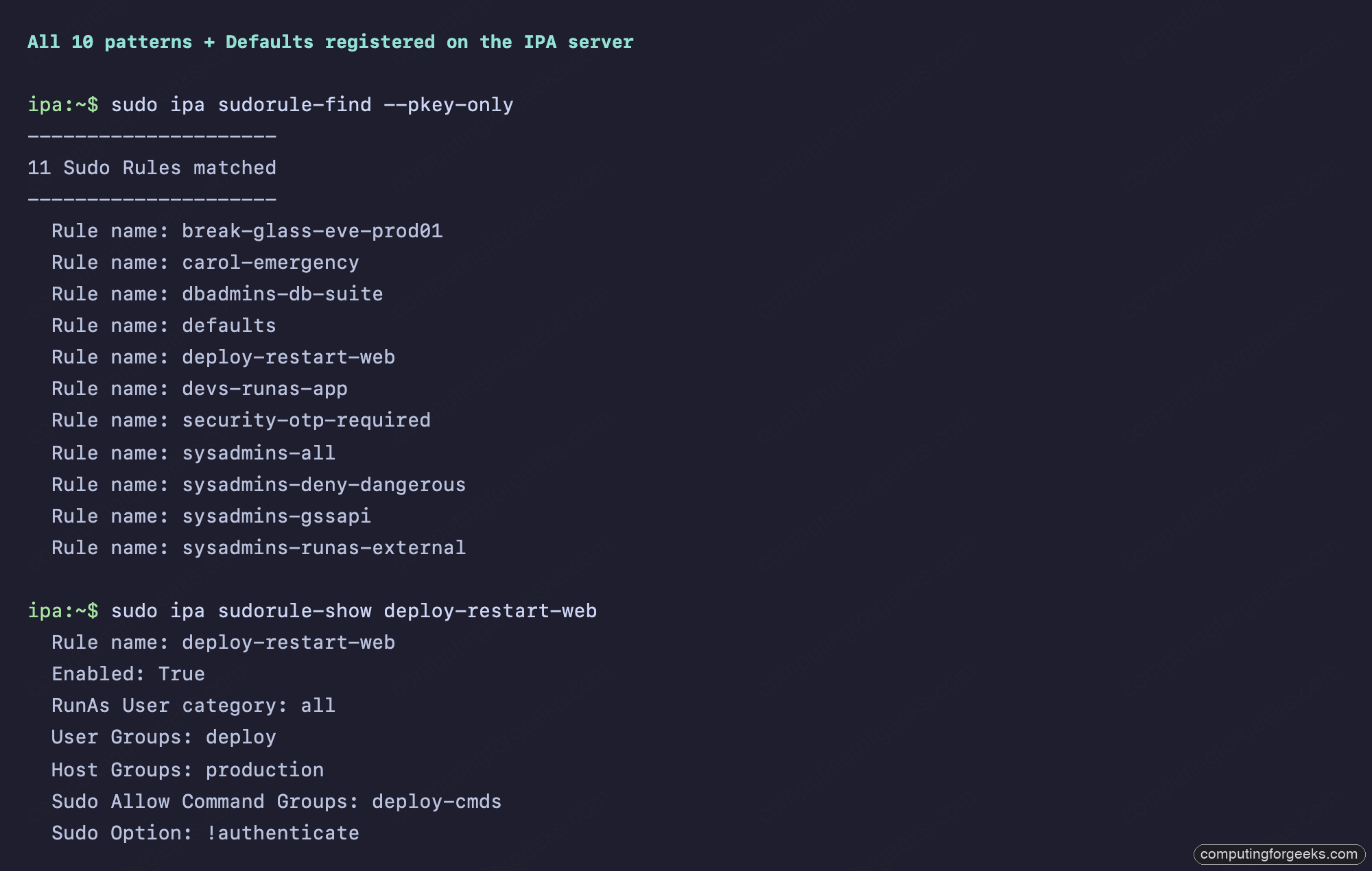
HBAC and sudo interaction
Sudo rules are evaluated after HBAC has admitted the user to the host. If alice has no HBAC rule allowing sudo as a service on prod01, every sudo command returns PAM account management error: Permission denied, even though her sudo rule is perfect. The first time you disable allow_all (which you should, per the HBAC least-privilege guide), you will hit this. The fix is one line:
ipa hbacrule-add-service sysadmins-prod
  --hbacsvcs=sshd
  --hbacsvcs=sudo
  --hbacsvcs=sudo-i
Include sudo-i if any of your users run sudo -i (login shell as root). It’s a separate PAM service stack, and HBAC checks each one independently.
Mitigating CVE-2023-22809 in IdM-managed sudo
The 2023 sudo “EDITOR escape” let any user with sudoedit append -- /etc/shadow through EDITOR=/usr/bin/vim -- /etc/shadow. The upstream fix is in sudo 1.9.12p2 and later. Rocky/Alma/RHEL 10 ships sudo 1.9.15 (patched). But if you carry over the old habit of putting unconstrained env_keep+=EDITOR in your Defaults rule, you re-open the door. Audit your Defaults rule:
ipa sudorule-show defaults | grep -E 'Sudo Option:'
# Should NOT include any of:
#   env_keep+=EDITOR
#   env_keep+=VISUAL
#   env_keep+=SUDO_EDITOR
#   !sudoedit_checkdir
If your rule must allow editors at all, prefer the explicit sudoedit command grant and the modern secure_path default. Never the EDITOR env-passthrough.
RHEL 10 pitfall: the authselect ‘local’ profile
RHEL 10 introduced a new authselect profile called local, which writes pam stacks that do not include pam_sss. If a previous admin selected it (often by accident in setup), SSSD-served sudo rules will not apply even though SSSD is running. Verify with:
sudo authselect current
# Profile ID: sssd
# Enabled features:
# - with-sudo
# - with-gssapi
sudo authselect check
If Profile ID reads local instead of sssd, run authselect select sssd with-sudo --force and restart sssd. The same trap exists for the minimal profile that some hardening guides recommend. The Red Hat IdM 10 sudo chapter covers the supported authselect features in more depth.
The complete catalog
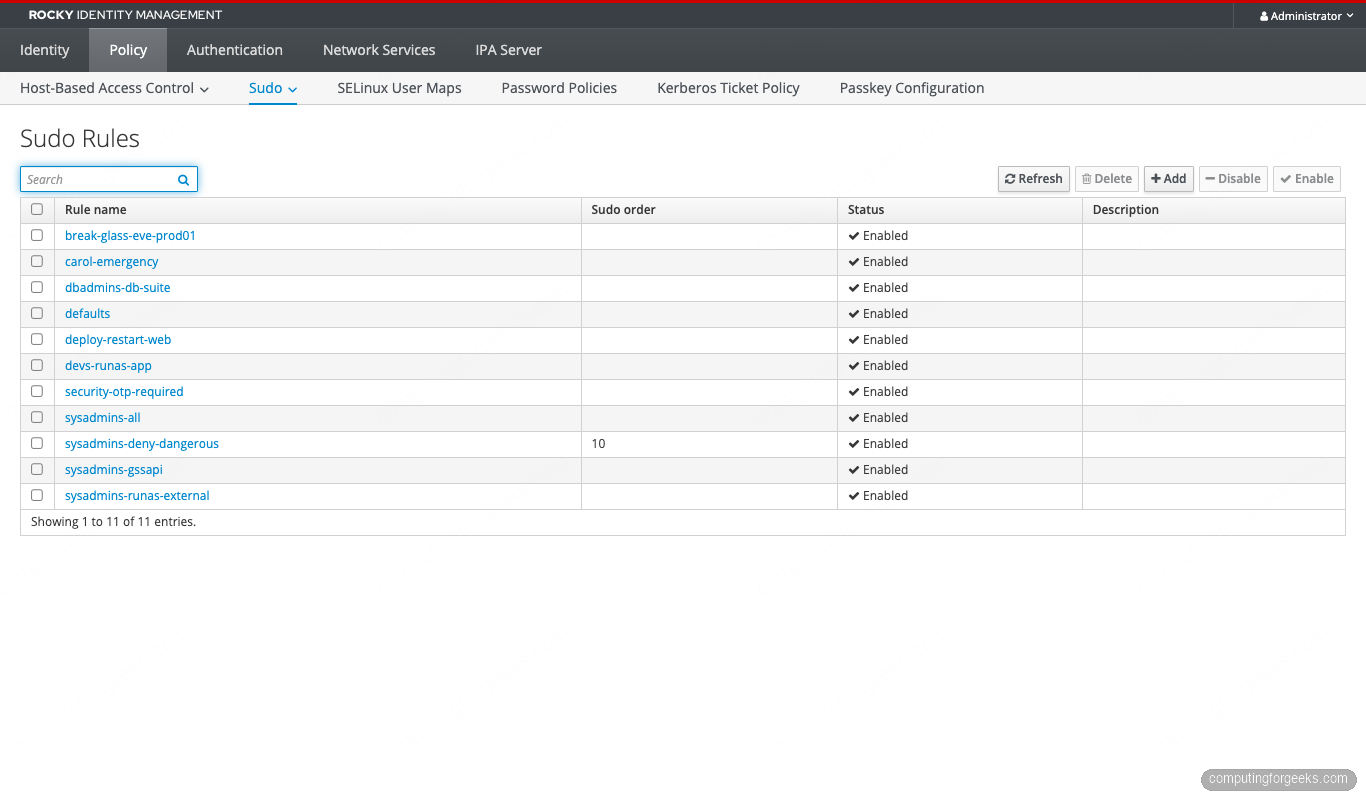
All 11 rules registered on the IPA server (Defaults plus 10 patterns):
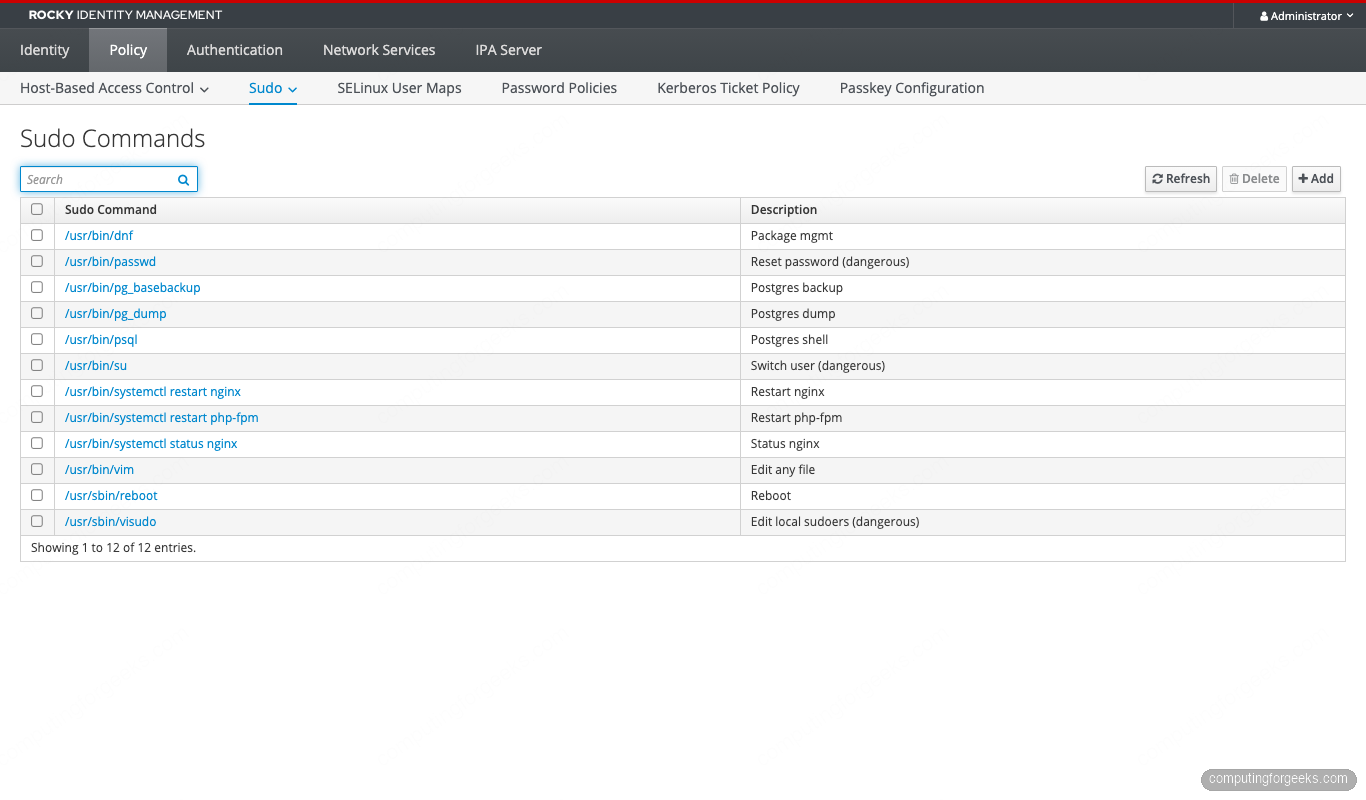
The Sudo Commands catalogue holds every command you might bind to a rule:
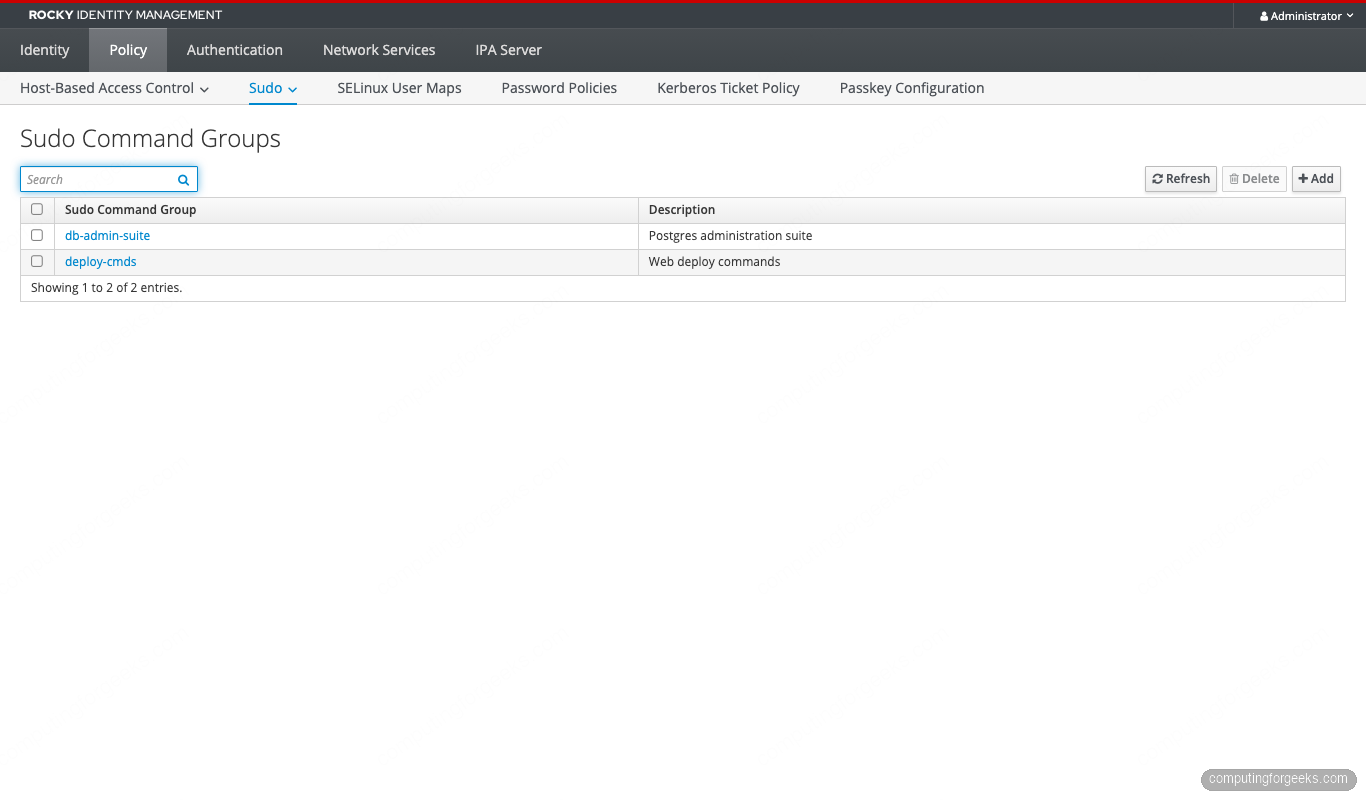
And the Sudo Command Groups bundle commands by domain (deploy, db-admin, and so on):
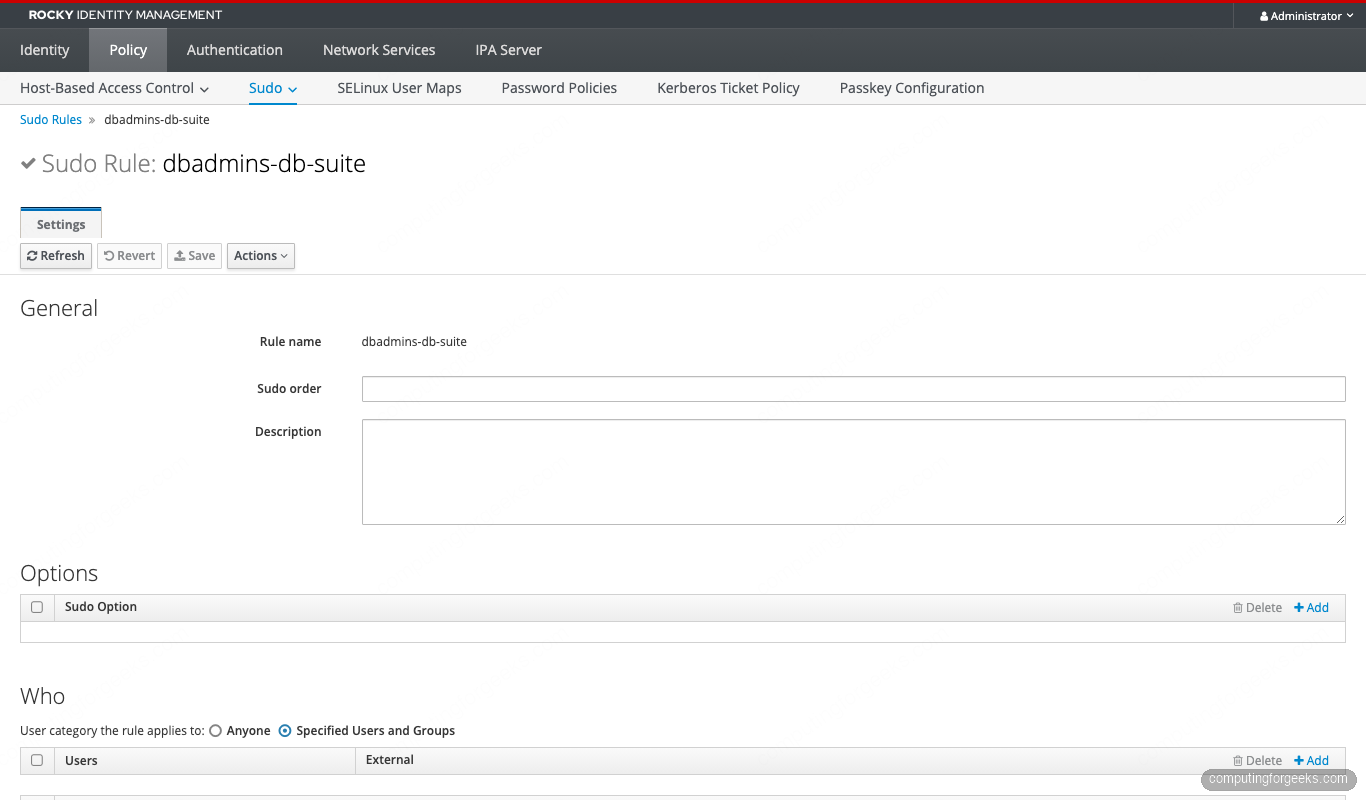
The dbadmins rule references the db-admin-suite group, so adding pg_restore to the group propagates automatically to every host where the rule applies:
Ansible reproduction (recommended for production)
Everything above runs cleanly through ansible-freeipa. Stuff this in roles/sudo/tasks/main.yml and version it. Rule drift between branches is the most insidious form of sudo escalation:
---
- name: Sudo command groups
  freeipa.ansible_freeipa.ipasudocmdgroup:
    ipaadmin_password: "{{ ipa_admin_password }}"
    name: deploy-cmds
    sudocmd:
      - /usr/bin/systemctl restart nginx
      - /usr/bin/systemctl restart php-fpm
      - /usr/bin/systemctl status nginx

- name: Sudo rule, deploy NOPASSWD
  freeipa.ansible_freeipa.ipasudorule:
    ipaadmin_password: "{{ ipa_admin_password }}"
    name: deploy-restart-web
    runasusercategory: all
    usergroup: deploy
    hostgroup: production
    cmdgroup: deploy-cmds
    sudooption:
      - "!authenticate"

- name: Sudo rule, devs RunAs app-runtime
  freeipa.ansible_freeipa.ipasudorule:
    ipaadmin_password: "{{ ipa_admin_password }}"
    name: devs-runas-app
    usergroup: devs
    hostgroup: development
    cmd:
      - /usr/bin/systemctl restart nginx
    runasuser:
      - app-runtime
The freeipa.ansible_freeipa collection is the upstream one. redhat.rhel_idm is the Red Hat-supported fork. Same namespace, same parameters since the 1.16 release. Either works.
Error message index
The exact errors we hit while building this lab, with the fix for each.
Sorry, user X is not allowed to execute ‘/path’ as root on host.
The user has some sudo grant but no rule that allows this specific command. Two common shapes: a deny rule with a lower sudoOrder won (Pattern 5 in action), or your allow rule lists a different binary path (/bin/systemctl vs /usr/bin/systemctl). Check with sudo -ll | grep -A2 'Sudoers entry' to see which rule matched.
sudo: PAM account management error: Permission denied
HBAC has not authorized the sudo service for this user-host pair. Sudo failed before evaluating any sudo rule. Fix: ipa hbacrule-add-service my-rule --hbacsvcs=sudo --hbacsvcs=sudo-i on the HBAC rule that already allowed sshd.
Job for sssd.service failed because the control process exited with error code.
SSSD config parse error. Most often a duplicate option (e.g. services = nss, pam, ssh, sudo, sudo) or a stray key in the wrong section. journalctl -xeu sssd names the offending line. Fix the syntax, then systemctl restart sssd.
Could not chdir to home directory /home/X: No such file or directory
The IPA client install ran without --mkhomedir, so oddjob-mkhomedir isn’t creating home dirs on first login. The sudo rules still work, but the shell complains. Fix on each client: sudo authselect enable-feature with-mkhomedir && sudo systemctl enable --now oddjobd.
ipa: ERROR: ‘A,B’ is not a valid hostgroup
Comma-separated values silently parse as a single literal name. Repeat the flag: --hostgroups=A --hostgroups=B. Same trap for --users, --groups, and --sudocmds.
kinit: Cannot find KDC for realm “CFG-LAB.LOCAL”
DNS isn’t resolving SRV records for the realm. Either /etc/resolv.conf doesn’t point at the IPA server, or the firewall is blocking UDP 53 to it. The IdM client install patches resolv.conf, but cloud-init can overwrite it on reboot. Make the change sticky with nmcli connection modify "System eth0" ipv4.dns 192.168.1.141.
Once these are out of the way, the 10 patterns above cover every shape of sudo grant we’ve seen in production. Build them as Ansible roles, version them in git, and run sssctl when the inevitable “but the rule looks fine” ticket lands. The next article in this series tackles FreeIPA Random Serial Numbers v3 (RSNv3), the 2024 PKI default that nobody’s blogged in English yet.



![Install Kali Linux 2026.1 Step by Step [Full Guide]](https://computingforgeeks.com/wp-content/uploads/2026/03/install-kali-linux-20261-step-by-step-768x403.png "Install Kali Linux 2026.1 Step by Step [Full Guide] 26")