

Ubuntu 26.04 LTS ships with uutils coreutils 0.8.0 as its default userland. Every time you run ls, cat, tr, sort, wc, head, or roughly 80 other utilities on a fresh 26.04 install, a Rust binary runs instead of the GNU C code you have used for three decades. Three holdouts stay on GNU: cp, mv, and rm. The symlink layout, the provider packages, the rollback path, the AppArmor gotchas, and the actual performance are all different from what older Ubuntu guides describe.
This guide covers every moving part of the Ubuntu 26.04 Rust coreutils swap: how to confirm which binaries you are running, where the carve-out sits, the real behavioral and performance differences measured against GNU 9.7 on a live VM, how to switch back to GNU in one apt command with a pin to make it stick, and how to keep both available side by side using the gnu-prefixed binaries that Canonical installs alongside uutils. All commands were executed on a fresh Ubuntu 26.04 LTS test VM.
Tested April 2026 on Ubuntu 26.04 LTS (kernel 7.0.0-10-generic) with uutils coreutils 0.8.0-0ubuntu3, gnu-coreutils 9.7-3ubuntu2, and apt 3.2.0
The Ubuntu 26.04 Rust coreutils provider model
Ubuntu does not use update-alternatives or dpkg-divert to pick between uutils and GNU. It uses a provider-package model where the essential coreutils metapackage depends on exactly one of two protected providers. That provider pulls in the actual binaries. Readers coming from the Ubuntu 26.04 LTS feature overview will recognise this as the same pattern Canonical used in 25.10 for the transition preview, now hardened for LTS.
The moving parts are:
coreutils: Essential metapackage that depends on a providercoreutils-from-uutils: Protected provider, default on 26.04, pulls inrust-coreutilscoreutils-from-gnu: Protected provider, pulls ingnu-coreutilsand repoints/usr/bin/ls,/usr/bin/cat, and the rest to the C binariesrust-coreutils: The actual Rust multicall binary at/usr/lib/cargo/bin/coreutils/coreutilsplus a symlink per toolgnu-coreutils: The GNU C binaries, always installed on 26.04. When uutils is the provider, the GNU binaries are reachable asgnucp,gnutr,gnudate,gnusha256sum, and so on
The carve-out for cp, mv, and rm is deliberate. Eight unresolved TOCTOU races in uutils versions of those three binaries were judged too data-destructive to ship in an LTS, so Canonical keeps the GNU implementations as the default on 26.04 even though the rest of the userland flipped. The plan is to reassess them for 26.10.
Confirm which coreutils you are running
Four commands together tell you exactly which binary is answering when you type ls or cp. They matter because an in-place Ubuntu 26.04 install might have been pinned to GNU during upgrade, and a fresh image might have been customised by a cloud-init script.
Check the version string first:
ls --version | head -1
cp --version | head -1
On a default 26.04 box you will see one uutils line and one GNU line, confirming the carve-out is active:
ls (uutils coreutils) 0.8.0
cp (GNU coreutils) 9.7
The version string can be fooled by PATH manipulation, so follow the symlink with readlink to see what the binary actually is:
readlink -f /usr/bin/ls
readlink -f /usr/bin/cp
The output tells the full story. ls resolves through a multicall wrapper directory, while cp resolves to a GNU binary named with a gnu prefix:
/usr/lib/cargo/bin/coreutils/ls
/usr/bin/gnucp
Finally, ask dpkg which package owns each path and which coreutils-related packages are installed:
dpkg -S /usr/bin/ls
dpkg -l | awk '/^ii +(rust-|gnu-|coreutils)/ {printf "%-30s %s\n", $2, $3}'
The ownership and the installed-package list make it obvious that both providers coexist on disk, with uutils wired in as the default:
coreutils-from-uutils: /usr/bin/ls
coreutils                      9.5-1ubuntu2+0.0.0~ubuntu25
coreutils-from-uutils          0.0.0~ubuntu25
gnu-coreutils                  9.7-3ubuntu2
rust-coreutils                 0.8.0-0ubuntu3
The terminal capture below is from the Ubuntu 26.04 test VM used throughout this guide and shows every detection command running against a stock install:
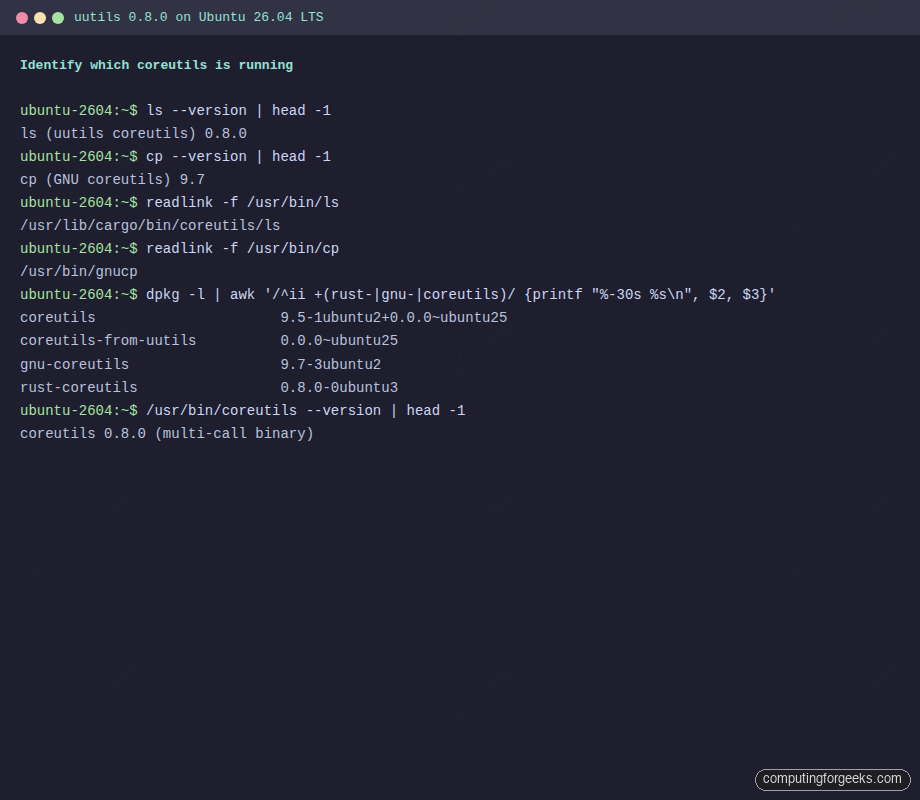
Note the multicall binary itself has its own version string: /usr/bin/coreutils --version prints coreutils 0.8.0 (multi-call binary). That single binary backs every symlinked tool in the uutils set.
What uutils 0.8.0 covers and what it leaves to GNU
uutils upstream reports 94.74% GNU test-suite parity as of 0.8.0 (630 of 665 tests passing against GNU 9.10). On Ubuntu 26.04 the coverage splits into three buckets: commands where uutils is the full default, commands where it is the default but with documented gaps, and commands where Canonical chose to keep GNU.
| Bucket | Commands | Notes |
|---|---|---|
| Full uutils default | ls, cat, head, tail, wc, cut, paste, tee, tr, mkdir, chmod, chown, ln, touch, install, du, readlink, printf, echo, seq, basename, dirname, mktemp, realpath, md5sum / sha*sum, base64, yes, sleep, fmt, nl, od, pr, tsort, fold, join, comm, shred, sync, nice, nohup, timeout, hostid, logname, pinky, users, who, whoami, id, groups, tty, stty, factor | stty was missing in the 25.10 preview (0.0.30), shipped in 0.8.0 |
| uutils default with partial coverage | dd, sort, date, stat, uname, env, df, runcon, chcon, split | Documented divergences are covered in the next section |
| GNU carve-out on 26.04 | cp, mv, rm | Unresolved TOCTOU holds; re-evaluated for 26.10 |
Tools that live in findutils rather than coreutils, like xargs, find, and locate, are unaffected by this transition. Same for rsync and tar, which statcall directly and never shell out to coreutils utilities.
Real behavioral differences between uutils 0.8.0 and GNU 9.7
Upstream parity at 94.74% is impressive, but the remaining 5% can bite in specific places. Every one of these is testable on the stock 26.04 VM by comparing the uutils binary against its gnu-prefixed counterpart.
uname -p returns “unknown”
GNU uname -p returns the processor type (often x86_64). The uutils implementation returns unknown because the field has no portable Linux source, a deliberate call by the upstream maintainers. Run both on the test VM:
uname -p
gnuuname -p
The divergence is visible immediately:
unknown
x86_64
Scripts that branch on processor type should switch to uname -m, which returns the machine hardware name (for example x86_64) and is consistent between implementations.
stat field-name capitalisation
GNU stat uses Size: with a capital S; uutils stat uses lowercase size:. The data is identical, the labels differ by one character. Parsers using a case-sensitive grep like grep '^ Size:' silently return zero matches on 26.04. Switch to grep -i or stat -c '%s' for scripts.
env -S rejects some C-style escapes
CVE-2026-35377, patched in 0.8.0, covered a crash in env -S. One remaining behavioral change is that uutils env -S is stricter than GNU about allowed escape sequences. Shebangs that rely on #!/usr/bin/env -S bash -c 'printf "\a"' style constructs can break at runtime with No such file or directory errors. The workaround is to keep complex escape sequences out of the -S string, put them in the inner command, or invoke the interpreter explicitly.
date -r works correctly in 0.8.0
In the Ubuntu 25.10 preview (0.0.30), uutils date -r file silently returned the current time instead of the file’s mtime. That broke unattended-upgrades on the preview release. In 0.8.0 the bug is fixed; the command returns the actual mtime as expected:
date -r /etc/hostname
gnudate -r /etc/hostname
Both implementations now agree on the mtime timestamp. Older advice to avoid date -r on Rust coreutils applies to 25.10 only and can be disregarded on 26.04.
sort locale collation in non-POSIX locales
Under LC_ALL=en_US.UTF-8 and similar multibyte locales, GNU and uutils sort can diverge on accented characters and ligatures. The POSIX locale is stable across both. If your pipeline depends on a specific collation order, export LC_ALL=C for the duration of the sort.
dd status=progress update cadence
GNU dd refreshes the progress line every one second regardless of block size. uutils dd ties the cadence to the block size, so a very large bs= value prints the progress less often even though the throughput is high. For interactive visibility on big transfers, use bs=1M or smaller.
Real benchmarks: uutils 0.8.0 vs GNU 9.7 on Ubuntu 26.04
Benchmarks from a fresh 26.04 VM paint a more honest picture than the release-note highlights. Some uutils commands are faster, some are slower, and most are close enough that the choice of implementation does not matter in real workloads. The benchmarks below used hyperfine with a two-run warmup, on a 7.6 MiB dictionary text file and a 100 MiB random binary file.
Install hyperfine if you want to reproduce these on your own box:
sudo apt install -y hyperfine wamericanGenerate the test payloads:
for i in 1 2 3 4 5 6 7 8; do cat /usr/share/dict/american-english; done > /tmp/big.txt
dd if=/dev/urandom of=/tmp/random-100m.bin bs=1M count=100 status=none
Benchmark sort against its GNU counterpart:
hyperfine --warmup 2 \
  -n "uutils sort" "bash -c 'sort /tmp/big.txt > /dev/null'" \
  -n "gnu sort"    "bash -c 'gnusort /tmp/big.txt > /dev/null'"
The result on the test VM. uutils sort is about 12% faster:
Benchmark 1: uutils sort
  Time (mean ± σ):     162.4 ms ±   3.7 ms    [User: 254.3 ms, System: 13.8 ms]
Benchmark 2: gnu sort
  Time (mean ± σ):     181.5 ms ±   3.6 ms    [User: 280.4 ms, System: 24.3 ms]
Summary
  uutils sort ran 1.12 ± 0.03 times faster than gnu sort
Now measure cat against GNU on a 100 MiB binary file piped to /dev/null:
hyperfine --warmup 2 \
  -n "uutils cat" "bash -c 'cat /tmp/random-100m.bin > /dev/null'" \
  -n "gnu cat"    "bash -c 'gnucat /tmp/random-100m.bin > /dev/null'"
uutils cat wins this one decisively, 2.3x faster thanks to the splice() fast path:
Benchmark 1: uutils cat
  Time (mean ± σ):      16.2 ms ±   1.3 ms    [User: 2.2 ms, System: 14.0 ms]
Benchmark 2: gnu cat
  Time (mean ± σ):      37.3 ms ±   2.1 ms    [User: 3.1 ms, System: 33.7 ms]
Summary
  uutils cat ran 2.30 ± 0.23 times faster than gnu cat
Now the other direction. Hash the 100 MiB file with both implementations of sha256sum:
hyperfine --warmup 2 \
  -n "uutils sha256sum" "bash -c 'sha256sum /tmp/random-100m.bin > /dev/null'" \
  -n "gnu sha256sum"    "bash -c 'gnusha256sum /tmp/random-100m.bin > /dev/null'"
GNU wins sha256sum by a factor of 2.3x, reflecting the fact that GNU uses hand-optimised assembly for the hash loop while the uutils version still uses the sha2 Rust crate:
Benchmark 1: uutils sha256sum
  Time (mean ± σ):     772.4 ms ±  12.1 ms    [User: 756.9 ms, System: 15.3 ms]
Benchmark 2: gnu sha256sum
  Time (mean ± σ):     332.7 ms ±   6.9 ms    [User: 318.8 ms, System: 13.7 ms]
Summary
  gnu sha256sum ran 2.32 ± 0.06 times faster than uutils sha256sum
The captured benchmark run from the test VM summarises all three comparisons in one view:
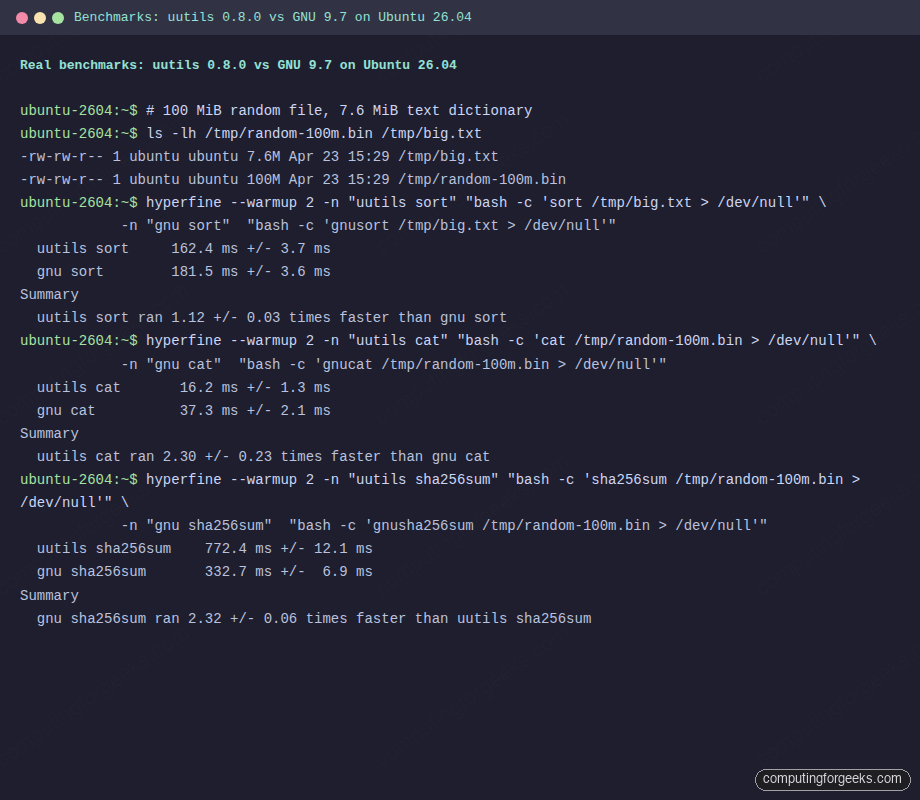
The takeaway is more interesting than a blanket “Rust is faster” claim. uutils wins on sort, cat, and large-buffer tr operations. GNU still wins on hash-heavy commands because of its hand-tuned assembly, and on the small-file fast paths because its individual binaries are around 26 KB each while the uutils multicall /usr/bin/coreutils binary is 11 MB on disk and pays a load-time cost that matters for very short-lived invocations. Calling /bin/true a million times inside a tight shell loop is measurably slower on uutils than on GNU.
Switch Ubuntu 26.04 from uutils back to GNU coreutils
If a production workload hits one of the divergences above and you need the GNU userland everywhere, Canonical supports a clean rollback without dpkg gymnastics. Install the other provider and apt swaps coreutils-from-uutils out for coreutils-from-gnu:
sudo apt update
sudo apt install coreutils-from-gnu
Verify the swap landed by re-running the detection commands. ls now reports GNU 9.7, and the binary resolves to a plain ELF rather than the multicall wrapper:
ls --version | head -1
readlink -f /usr/bin/ls
Expected output after the rollback:
ls (GNU coreutils) 9.7
/usr/bin/ls
The rollback is clean, but there is one trap. Ubuntu security updates or routine apt upgrade runs can pull coreutils-from-uutils back in if a new point release advertises itself as preferred. Pin it to a negative priority to prevent reinstall:
printf 'Package: coreutils-from-uutils\nPin: release a=*\nPin-Priority: -10\n' | sudo tee /etc/apt/preferences.d/uutils > /dev/nullConfirm apt now treats the uutils provider as blocked by checking the policy:
apt-cache policy coreutils-from-uutils | head -5The candidate line should show a negative priority, which means apt will never install this package automatically:
coreutils-from-uutils:
  Installed: (none)
  Candidate: (none)
  Version table:
     0.0.0~ubuntu25 -10
If you later decide to go back to uutils, remove the pin and reinstall:
sudo rm -f /etc/apt/preferences.d/uutils
sudo apt install coreutils-from-uutils
The swap is reversible as many times as you like with no file-system cleanup needed, because both providers install into fixed paths and the metapackage handles the symlink pointing.
build-essential refuses to install after the swap (25.10 to 26.04 upgrade trap)
One sharp edge worth flagging if you carry a GNU-only setup across a release upgrade. build-essential 12.12ubuntu2 on Ubuntu 26.04 declares a literal Depends: coreutils-from-uutils rather than the virtual coreutils-from that both providers offer. Confirm it on a 26.04 box:
apt-cache show build-essential | grep ^DependsThe output pins the uutils name in the dependency line:
Depends: libc6-dev | libc-dev, gcc (>= 4:14.2), g++ (>= 4:14.2), make, dpkg-dev (>= 1.22.11), coreutils-from-uutilsOnce you have switched to coreutils-from-gnu, a later apt install build-essential (or a 25.10 to 26.04 upgrade pulling a newer build-essential) fails because the two providers conflict via the coreutils-from virtual name. The clean workaround is a tiny stub package that declares Provides: coreutils-from-uutils without bringing rust-coreutils back in. Generate it with equivs-build:
sudo apt install -y equivs
printf 'Section: misc\nPriority: optional\nStandards-Version: 4.6.2\nPackage: coreutils-from-uutils-stub\nVersion: 1.0\nProvides: coreutils-from-uutils\nArchitecture: all\nDescription: Empty stub satisfying build-essential on coreutils-from-gnu hosts\n' > /tmp/cfu-stub.ctl
cd /tmp && equivs-build cfu-stub.ctl
sudo dpkg -i /tmp/coreutils-from-uutils-stub_1.0_all.deb
With the stub in place, apt sees the literal coreutils-from-uutils dependency satisfied and lets the toolchain install while coreutils-from-gnu stays active:
sudo apt install -y build-essential
dpkg -l build-essential rust-coreutils 2>/dev/null | grep '^ii\|no packages'
The stub is harmless to keep installed long-term. It carries no files and no scripts, and it does not declare Conflicts on either provider, so future apt operations resolve cleanly whether you stay on GNU or eventually swap back to uutils.
Keep uutils default but reach GNU for specific commands
Rolling the entire system back is often too coarse. A more surgical approach uses the fact that gnu-coreutils is already installed on 26.04 with every GNU binary accessible under a gnu prefix. You can stay on uutils as the default and reach for the GNU implementation only for the handful of commands where the divergence matters.
List the gnu-prefixed binaries that ship on 26.04:
ls /usr/bin/gnu* | head -20The result is a complete mirror of the GNU userland. A sample of what you can call:
/usr/bin/gnubase64
/usr/bin/gnucat
/usr/bin/gnucp
/usr/bin/gnudate
/usr/bin/gnumd5sum
/usr/bin/gnumv
/usr/bin/gnurm
/usr/bin/gnusha256sum
/usr/bin/gnusort
/usr/bin/gnutr
/usr/bin/gnutrue
/usr/bin/gnuuname
This gives you a clean pattern for scripts that need a specific GNU feature: call the gnu-prefixed binary directly. For example, a script that relies on uname -p returning the processor name can call gnuuname -p to sidestep the uutils divergence without switching the system default. Similarly, a checksum verifier for large archives can call gnusha256sum to benefit from the hand-tuned assembly while keeping the rest of the pipeline on uutils.
The gnu-prefixed path is stable across minor updates. Scripts written against it will survive future point releases without rework.
AppArmor profiles that reference /usr/bin/ls directly
This one bites after a fresh install and nowhere else. Because /usr/bin/ls is now a symlink into /usr/lib/cargo/bin/coreutils/ls, AppArmor profiles that allow a literal /usr/bin/ls ix rule will deny execution the first time a confined process tries to run it. Launchpad bug LP#2123870 tracks the WireGuard wg-quick case, and both os-prober and Ubuntu Pro Client hit the same pattern. Readers following the 26.04 hardening guide or writing custom profiles need to handle this explicitly.
Check /var/log/apparmor/ after a fresh boot to see whether any confined process tripped over the symlink:
sudo journalctl -b 0 -g apparmor | head -40
sudo ausearch -m avc -ts boot 2>/dev/null | head -40
If you see DENY entries referencing /usr/bin/ls or /usr/bin/cat, add the multicall binary to the profile as well. A minimal fix is a rule allowing the coreutils wrapper:
/usr/bin/coreutils mrix,
/usr/lib/cargo/bin/coreutils/* mrix,
Reload the profile with sudo apparmor_parser -r /etc/apparmor.d/usr.bin.example. Canonical is patching shipped profiles in stable updates, so on a fully patched 26.04 this applies mostly to third-party or hand-rolled profiles.
Security model: memory safety vs supply chain tradeoffs
The main reason Canonical funded this transition is memory safety. GNU coreutils ship in C, and two recent CVEs illustrate the bug class Rust rejects at compile time. CVE-2024-0684 was a heap buffer overflow in GNU split, reachable from user input. CVE-2025-5278 was a 16-year-old heap under-read in GNU sort that went undetected through dozens of distro releases. Both are the kind of memory-unsafe defect that a Rust implementation cannot introduce without explicit unsafe blocks, and the relevant unsafe blocks in uutils are limited to syscall wrappers that have been individually reviewed.
Canonical funded a Zellic audit of the uutils codebase during the 26.04 stabilisation window. The audit identified 113 issues, of which 41 received CVEs (CVE-2026-35338 through CVE-2026-35380). Almost every finding was fixed before 0.8.0 landed in 26.04. The audit report is a useful reference for any team writing threat models that include the Ubuntu userland.
The tradeoff is trust base. GNU coreutils depend on glibc and essentially nothing else. uutils depend on about 50 cargo crates, each with its own maintainer, release cadence, and supply-chain risk. Canonical vendors the Rust toolchain and pins crate versions for LTS, which narrows the exposure, but the dependency graph is larger than the GNU equivalent. Operators running an initial server setup on 26.04 inherit that graph whether they know it or not.
Binary footprint shifts as well. A GNU coreutils install ships around 50 individual ELF binaries of roughly 26 KB each. The uutils multicall binary is 11 MB on disk with per-tool symlinks into it, plus the rust-coreutils package itself reports a 16 MB installed size. On a full Ubuntu server this is noise. On a 75 MB minimal container image, it is a visible 24% bump.
When the uutils swap will be complete
The 26.04 layout is explicitly transitional. Canonical’s public plan is to re-evaluate cp, mv, and rm for 26.10. By the time the 24.04 vs 26.04 baseline comparison stops being the reference point, those three holdouts should flip to uutils too, assuming the TOCTOU work lands upstream. Until then, any script that cares about exact cp semantics can rely on GNU being in charge of those three commands on 26.04 LTS for the full LTS support window.
The upstream uutils cadence is roughly every two months (0.6.0 late-2025, 0.7.0 in March 2026, 0.8.0 in April 2026). The series feeding 26.04 point releases through the LTS cycle will stay on the 0.8.x branch by default, with Canonical patching individual fixes rather than jumping to 0.9.x mid-cycle. That means behavior you measure today will be stable for the life of 26.04 LTS on the uutils side, modulo security backports.
Reference cheatsheet for uutils on Ubuntu 26.04
The commands most operators reach for, collected. These are the ones worth pasting straight into a runbook on any 26.04 box where uutils is the default userland.
Identify which implementation is answering:
ls --version | head -1
cp --version | head -1
readlink -f /usr/bin/ls
readlink -f /usr/bin/cp
dpkg -S /usr/bin/ls
dpkg -l | grep -E '(rust-|gnu-|coreutils)'
/usr/bin/coreutils --version
Switch the whole system from uutils to GNU and pin it:
sudo apt install coreutils-from-gnu
printf 'Package: coreutils-from-uutils\nPin: release a=*\nPin-Priority: -10\n' | sudo tee /etc/apt/preferences.d/uutils > /dev/null
Revert to uutils and remove the pin:
sudo rm -f /etc/apt/preferences.d/uutils
sudo apt install coreutils-from-uutils
Reach a specific GNU binary while staying on uutils default:
gnucp -a src/ dst/
gnusha256sum large-file.iso
gnudate -d '-2 weeks' +%F
gnuuname -p
Benchmark a specific command against its GNU counterpart with hyperfine:
hyperfine --warmup 2 \
  -n "uutils CMD" "bash -c 'CMD ARGS > /dev/null'" \
  -n "gnu CMD"    "bash -c 'gnuCMD ARGS > /dev/null'"
Every one of these commands has been executed against a clean Ubuntu 26.04 LTS VM running uutils 0.8.0-0ubuntu3 and gnu-coreutils 9.7-3ubuntu2, which is exactly what a fresh install of 26.04 ships today. For readers who follow the post-install checklist for 26.04 Server, treat the rollback-and-pin block as the single action to run if a specific workload is known to be incompatible with uutils, and leave the rest of the system on the Rust default where it can take advantage of the measured wins in sort and cat.






Changing uutils to GNU coreutils on 25.10 meant that the upgrade to 26.04 didn’t pull the new version of build-essential and the OS refused to install it because it now has a hard dependency on coreutils-from-uutils.
I managed to sidestep that by making a dummy package that provides coreutils-from-uutils, but surely other things will break in the future as Canonical keeps pushing for MIT-licensed cr*pware and their specific behaviors.
Gee, thanks Canonical!
Confirmed:
build-essential 12.12ubuntu2on 26.04 has a hardDepends: coreutils-from-uutils, so removingrust-coreutilsblocks the upgrade until something provides it. The dummy-package workaround is the right call.equivs-buildwith a stub that declaresProvides: coreutils-from-uutilsgenerates one in two commands. I have added this gotcha to the article under the rollback section.