

Ubuntu 26.04 LTS (Resolute Raccoon) ships on April 23, 2026, and it is not a polite incremental bump over 24.04. It is the biggest LTS jump in nearly a decade: a kernel major-version bump, a memory-safe userland that swaps sudo and parts of coreutils for Rust rewrites, a hard cutoff on cgroup v1, and a Wayland-only GNOME session. If you run 24.04 in production, the right question is not whether 26.04 is better. It is whether you should upgrade now, wait for 26.04.1 in August, or sit tight on 24.04 until 2029.
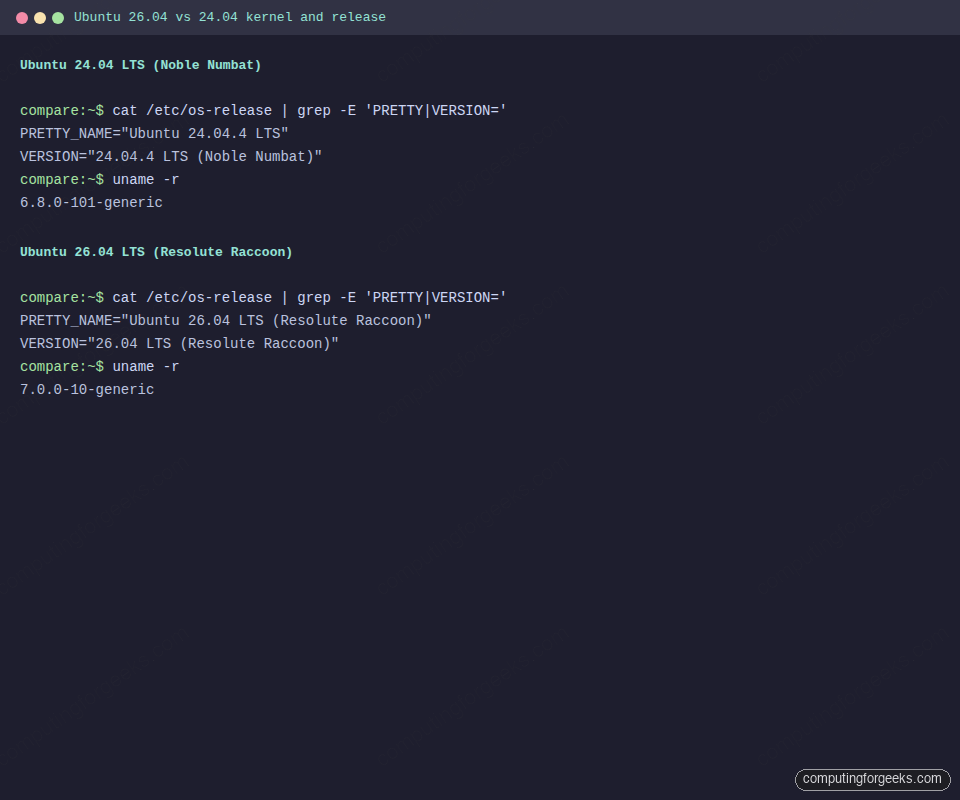
This guide compares the two releases on the dimensions that actually change behavior: kernel, toolchain, desktop stack, core defaults, package manager, server runtimes, security posture, and upgrade gotchas. Everything here was verified on a live 24.04.4 VM and a live Resolute Raccoon VM running kernel 7.0.0-10-generic. No speculation, no release-note paraphrasing.
Verified: April 2026 on Ubuntu 24.04.4 LTS (kernel 6.8.0-101, systemd 255.4, sudo 1.9.15p5, apt 2.8.3) and Ubuntu 26.04 LTS Resolute Raccoon (kernel 7.0.0-10-generic, systemd 259.5, sudo-rs 0.2.13, apt 3.1.16, OpenSSL 3.5.5, Python 3.14.3)
The 30-second answer
Here is the decision matrix for the four situations that cover 95% of readers. Details and evidence follow further down.
| Your situation | Do this | Why |
|---|---|---|
| Desktop power user on 24.04 who wants new hardware support and GNOME 50 polish | Upgrade after 26.04.1 (August 6, 2026) | Day-one LTS always has rough edges. do-release-upgrade will not offer the jump until 26.04.1 unless you pass --devel, and the first point release catches the big regressions. |
| Production server, stable workload, no compelling new feature | Stay on 24.04 until May 2029, or longer with Ubuntu Pro | 24.04 has 3+ years of standard support, 8+ with Pro, 12 with the Legacy add-on. Nothing in 26.04 forces a move. |
| Container host running Docker < 20.10, LXC with cgroup v1, or anything that pins to v1 hierarchy | Do not upgrade yet. Migrate containers to cgroup v2 first, then upgrade on your schedule | 26.04 drops cgroup v1 entirely. Systemd 259 refuses to boot in legacy or hybrid mode. This is the single most common upgrade blocker. |
| Fresh install for a new server, workstation, or lab | Go straight to 26.04 after release day | Longer support window (2031 standard, 2041 Legacy), newer toolchain, PQ-hardened OpenSSL, current kernel. No reason to install a two-year-old LTS on new hardware. |
Everything after this section is the evidence. Read the parts that match your situation.
Side-by-side: the versions that actually change
Captured from running VMs, not from release notes. The 24.04 column is 24.04.4 LTS with the latest apt-installable versions as of April 2026. The 26.04 column is the final-freeze ISO from the Resolute Raccoon development branch, which becomes the release-day image on April 23.
| Component | Ubuntu 24.04.4 LTS | Ubuntu 26.04 LTS | Practical impact |
|---|---|---|---|
| Codename | Noble Numbat | Resolute Raccoon | APT source line changes: noble → resolute |
| Linux kernel (GA) | 6.8.0 | 7.0.0 | First LTS on the 7.x line; enables Intel Nova Lake, AMD Zen 6 |
| Linux kernel (HWE) | 6.17.0 | n/a (base kernel is 7.0) | 24.04 HWE already caught up via point releases |
| systemd | 255.4 | 259.5 | cgroup v1 support removed in 259; legacy/hybrid containers cannot boot |
| GNOME | 46 | 50 | Four major versions jumped. X11 session removed from GDM |
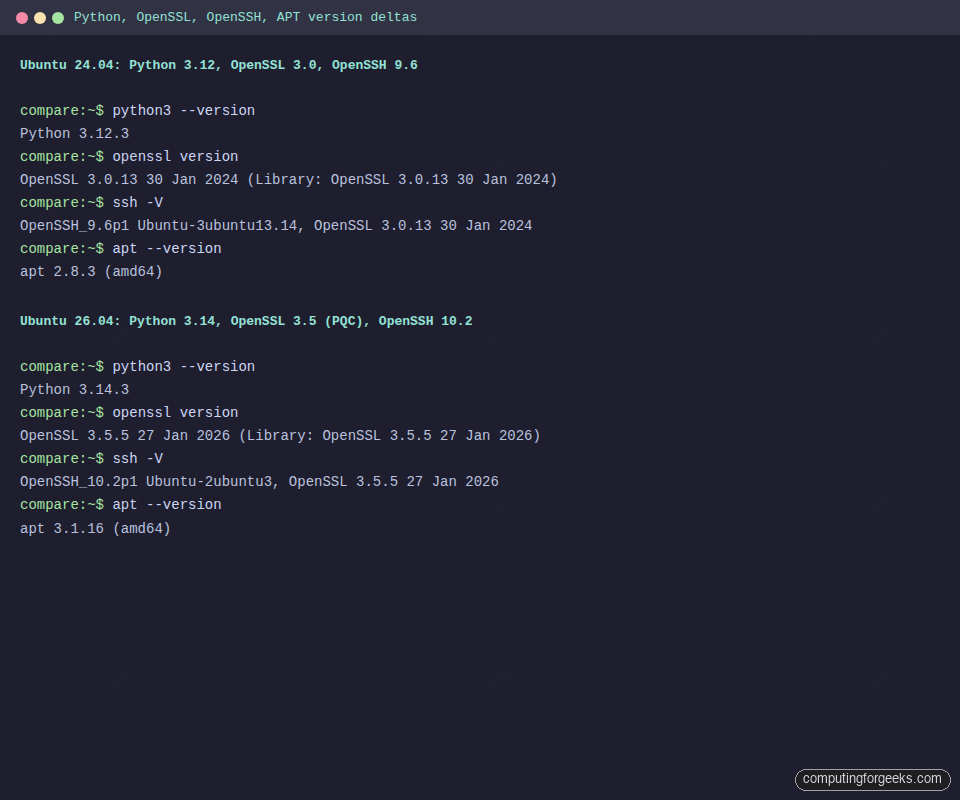
| APT | 2.8.3 | 3.1.16 | New solver, apt-key removed, deb822 sources are the default |
| sudo | GNU sudo 1.9.15p5 | sudo-rs 0.2.13 (Rust) | Memory-safe rewrite; roughly drop-in but edge cases differ |
| coreutils | GNU coreutils 9.4 | rust-coreutils 0.7.0 (uutils), GNU still installable | Around 88% behavioral parity; obscure awk/sed-adjacent flags may differ |
| initramfs generator | initramfs-tools 0.142 | dracut 110 | Custom hooks under /etc/initramfs-tools/ need to be rewritten as dracut modules |
| NTP client | systemd-timesyncd | chrony 4.8 | Upgrade path swaps the time daemon automatically |
| Python (default) | 3.12.3 | 3.14.3 | Two minor jumps. distutils fully gone, type-parameter syntax mature |
| OpenSSH | 9.6p1 | 10.2p1 | Adds ML-KEM post-quantum hybrid KEX; DSA keys removed |
| OpenSSL | 3.0.13 (Jan 2024) | 3.5.5 (Jan 2026) | 26.04 ships with post-quantum algorithms and the legacy provider for old ciphers |
| GCC | 14 | 15.2 | Same C23/C++26 progression most distros tracked through 2025 |
| glibc | 2.39 | 2.42 | Minor ABI changes; recompiling is rarely required |
| Rust (toolchain) | 1.75 | 1.93 (1.91 / 1.92 parallel) | Cargo resolver v3, edition 2024 stable |
| Go | 1.22 | 1.25 | Range-over-func stable, new testing/synctest |
| OpenJDK (default) | 21 LTS | 25 LTS | Pattern matching for switch finalized, Virtual threads mature |
| LLVM / Clang | 18 | 21 | Affects eBPF toolchains and any project using clang-tidy |
| .NET (default) | 8 | 10 | Major jump; .NET 9 was STS only |
| PHP | 8.3.6 | 8.5 | Backtick operator deprecated; non-canonical cast names removed |
| PostgreSQL | 16 | 18 | Canonical claims up to 3× improvement on mixed OLTP vs 16 |
| MySQL | 8.0 | 8.4 LTS | First LTS version of MySQL since the series was introduced |
| MariaDB | 10.11 | 11.8.6 LTS | Moved into main; full support, not universe |
| Samba | 4.20 | 4.23 | VFS modules consolidated; transitional packages removable |
| LibreOffice | 24.2 | 25.8 | Major UI and performance refresh |
| Firefox / Thunderbird | 124 / 115 | 149 / 140 “Eclipse” | Thunderbird’s biggest UI change in a decade |
| GIMP | 2.10 (if installed) | 3.0 | GTK3, non-destructive editing, multi-threaded paint |
| Default terminal | GNOME Terminal | Ptyxis (GTK4, container-aware) | Reads .container metadata; tabs can pin to specific podman/toolbx containers |
| Default PDF viewer | Evince | Papers (GTK4, Rust) | Faster cold start, HiDPI fixes |
| Default image viewer | Eye of GNOME | Loupe (GTK4, Rust) | Memory-safe, smoother pan/zoom |
| Default video player | Totem | Showtime | Caveat: NVIDIA driver 580 crashes Showtime; 595+ required |
| Minimum desktop RAM | 4 GB | 6 GB | Tight on older laptops. Ubuntu Server is still fine on 1 GB |
| ARM64 desktop ISO | Community-only | Official (Snapdragon X Elite supported) | First LTS with an official ARM64 desktop image |
| TPM-backed FDE | Experimental | General availability | Productionized, with passphrase management UI |
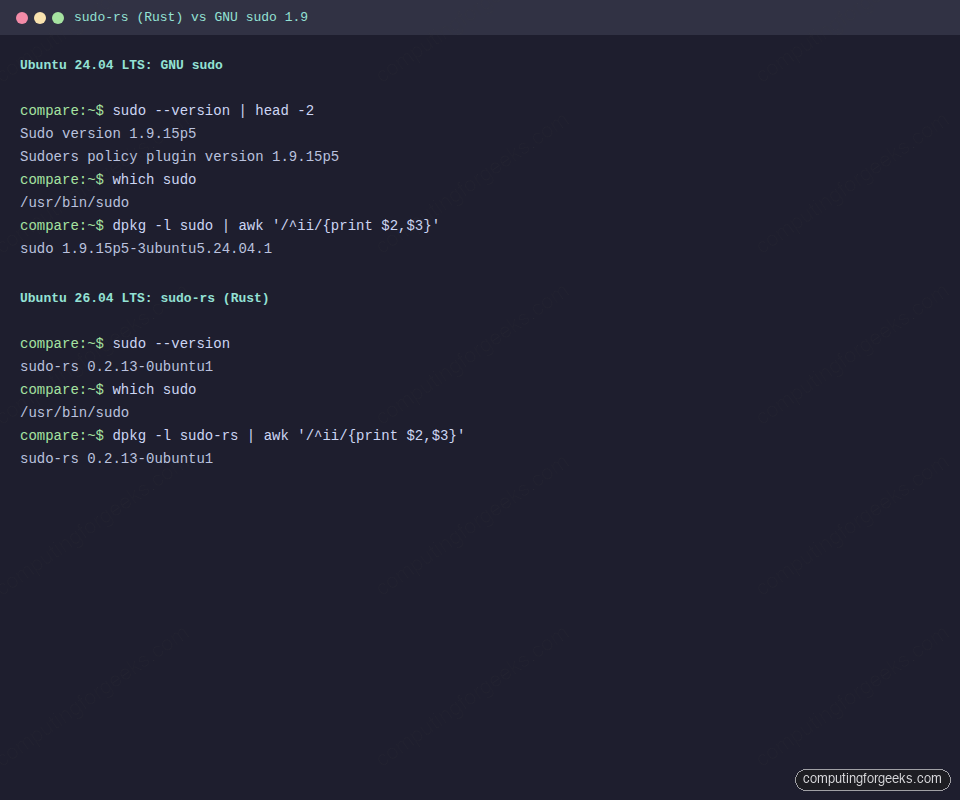
The four screenshots below show the actual output captured from each VM. Feel free to replicate with uname -r, sudo --version, systemctl --version, and apt --version on your own machines.
Support windows and the upgrade-path gate
Both releases are LTS. This is the support math, which matters more than feature parity for production decisions.
| Support tier | Ubuntu 24.04 LTS ends | Ubuntu 26.04 LTS ends |
|---|---|---|
| Standard security maintenance | May 31, 2029 (5 years) | April 2031 (5 years) |
| Ubuntu Pro / ESM | May 31, 2034 (10 years) | April 2036 (10 years) |
| Legacy add-on (Pro + extension) | May 31, 2036 (12 years) | April 2041 (15 years) |
The 26.04 Legacy window is 15 years, a three-year bump on 24.04. Canonical has not published the reason publicly, but the message is clear: Resolute Raccoon is positioned as a destination LTS, not a stopgap.
One detail catches most people off guard. Ubuntu gates the do-release-upgrade prompt for LTS-to-LTS jumps until the first point release ships. For 24.04 → 26.04, the gate opens when 26.04.1 releases on August 6, 2026. Until then, do-release-upgrade replies “No new release found” on a 24.04 box. To jump before the gate opens, pass -d / --devel, and accept that you are effectively a beta tester.
If you are still on 22.04, there is no 22.04 → 26.04 skip. The supported path is 22.04 → 24.04 → 26.04, two separate upgrades.
Kernel 6.8 versus kernel 7.0
The version bump from 6.x to 7.0 is Linus Torvalds following his “bump major when we hit X.19” convention, not a single architectural rewrite. The substantive wins over what 24.04.4 ships are still meaningful:
- Hardware enablement: Intel Nova Lake (late-2026 consumer), AMD Zen 6 / Venice server chips, better Battlemage (Arc B580/B570) support, Snapdragon X Elite graphics
- Extensible scheduling (sched_ext): pluggable BPF-backed schedulers promoted from experimental. Tools like
scx_rusty,scx_lavdnow ship usable on LTS - Kdump default: crash dumps enabled out of the box on servers
- NVIDIA driver improvements: Dynamic Boost on by default, suspend/resume finally works reliably on laptops with Optimus
For 24.04 users, this matters less than it sounds because the HWE kernel in 24.04.4 is already 6.17.0-14. Users who kept the GA kernel (6.8) stayed on 2024-vintage hardware support. Users who follow HWE are close to 7.0 already and gain only the big-ticket items from the full jump.
GNOME 46 versus GNOME 50: Wayland-only is the real story
GNOME’s four-version jump brings real polish: variable refresh rate on by default, smoother fractional scaling, a heavily improved Files app, a new parental controls panel, and Sysprof installed by default for quick desktop profiling. The headline change is that GDM no longer offers an X11 login session on Ubuntu Desktop. The entire session runs on Wayland. XWayland remains, so legacy X11 clients still work.
This is the single biggest breaking change for desktop users:
- If you rely on
xdotool,wmctrl, or global input hooks, many will silently fail. Port toydotoolor the compositor-specific equivalents - Screen recording and screen sharing in video calls now go through the PipeWire portal. Older Electron apps that shipped before 2023 may need updates
- NVIDIA users are fine. Explicit Sync landed in NVIDIA 555 and has been stable since. Drivers 580 and newer (excluding the one Showtime regression) are solid
- The memory ceiling moved. The desktop ISO now lists 6 GB as the minimum. It will boot on 4 GB, but heavy web apps and Electron stacks push into swap immediately
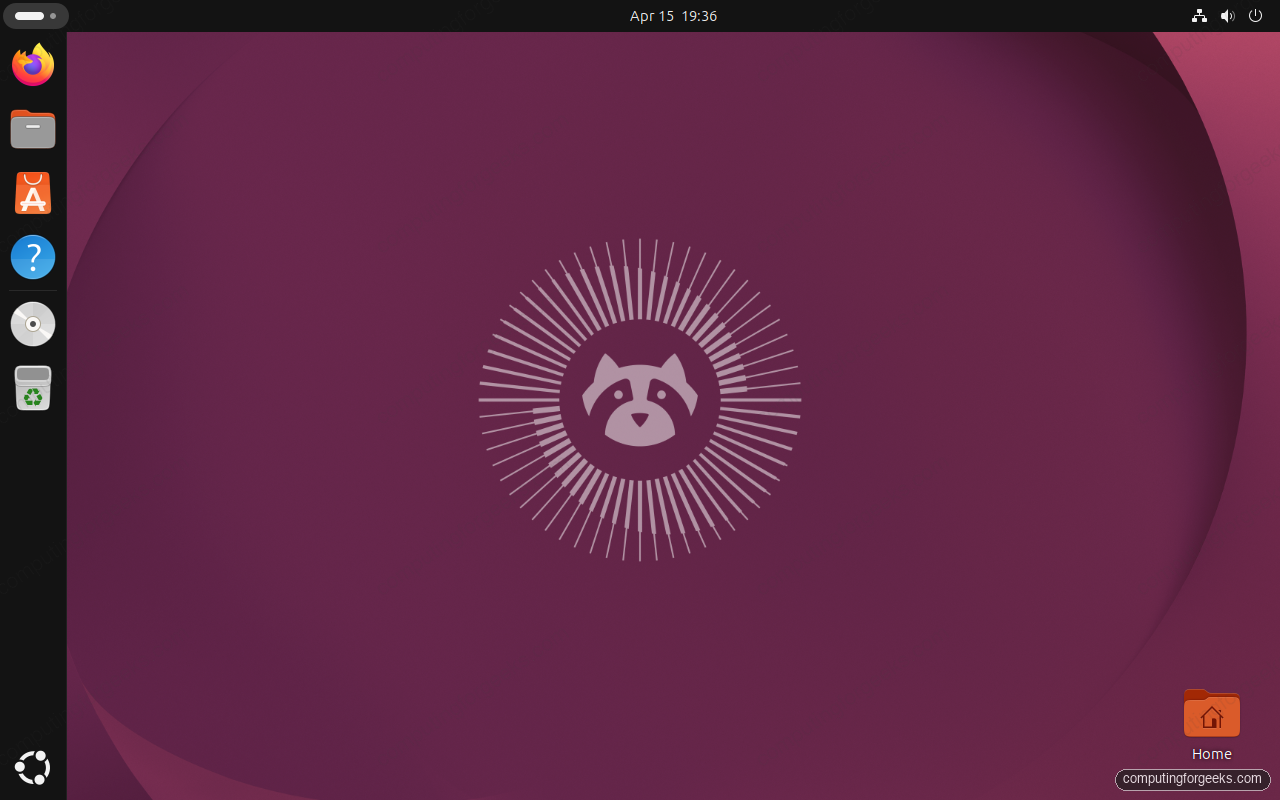
The desktop above is 26.04 on the stock GNOME 50 session. Same Ubuntu yaru theme and dock, noticeably crisper fractional scaling, and the default terminal icon in the Activities overview now launches Ptyxis instead of GNOME Terminal.
The default apps swap
A lot of GNOME’s old GTK3 apps were replaced in 26.04. The new defaults are GTK4 or Rust rewrites, and most of them are notably snappier on cold start.
| Role | 24.04 default | 26.04 default | Notes |
|---|---|---|---|
| Terminal emulator | GNOME Terminal | Ptyxis (GTK4) | Container-aware tabs, better theming; keybindings compatible with GNOME Terminal muscle memory |
| PDF viewer | Evince | Papers | Rust backend, HiDPI fixes, much faster on large PDFs |
| Image viewer | Eye of GNOME | Loupe | Smooth pan/zoom, memory-safe; raw-format support improved |
| Video player | Totem | Showtime | Known issue: crashes on NVIDIA driver 580. Use 595+ or swap for mpv |
| File manager | Files (Nautilus 46) | Files (Nautilus 50) | Same app, redesigned sidebar and path bar; network sessions persist properly |
| Document processor | LibreOffice 24.2 | LibreOffice 25.8 | UI refresh, theme support, faster Calc recalculation |
| Image editor | GIMP 2.10 (if installed) | GIMP 3.0 | Non-destructive layers, multi-threaded paint, GTK3 |
| Mail client | Thunderbird 115 (Snap) | Thunderbird 140 “Eclipse” | Ships as deb again on the minimal install; Snap available as alternative |
| Resource monitor | GNOME System Monitor | Resources | New GPU, battery, and sensor panels; faster refresh |
If you depend on an old app, everything above is still installable via apt on 26.04. Evince, Eye of GNOME, Totem, GNOME Terminal, and System Monitor all remain in the archive. They are just not the default.
The Rust userland: sudo-rs and uutils coreutils
Ubuntu 26.04 is the first LTS where Rust is not experimental, optional, or isolated to a corner. Two long-standing C binaries get swapped for Rust rewrites on fresh installs:
sudo-rsreplaces GNU sudo at/usr/bin/sudo. The original is still available assudo.wsif you need itrust-coreutils(uutils) ships in parallel with GNU coreutils. The fresh install prefers rust-coreutils for roughly 88% of the tools; the rest still come from GNU. The project tracks compatibility per command
On the 26.04 VM:
dpkg -l | grep -E 'coreutils|sudo-rs' | awk '{print $1,$2,$3}'Returns a mix of rust-coreutils, coreutils-from-uutils (the symlinks shim), gnu-coreutils (fallback), and sudo-rs. This is the full picture:
ii  coreutils-from-uutils 0.0.0~ubuntu24
ii  coreutils             9.5-1ubuntu2+0.0.0~ubuntu24
ii  gnu-coreutils         9.7-3ubuntu2
ii  rust-coreutils        0.7.0-0ubuntu1
ii  sudo-rs               0.2.13-0ubuntu1
The good news for operators: behavior is close enough that common shell scripts just work. The catch is real: if you rely on GNU-specific long-option spellings or obscure ls --format flags, you may hit a error: unexpected argument instead of the quiet compatibility you had on 24.04. For scripts that must stay portable, install gnu-coreutils and invoke the GNU versions explicitly via /usr/lib/uutils/sym/gnu-* or by forcing coreutils-from-uutils off.
For sudo, the gotcha list is shorter. sudo-rs implements the sudoers parser plus the most common flag set, but it does not implement the full plugin API that GNU sudo exposes. If your environment uses sudo_noexec.so, custom sudoers_policy plugins, or LDAP-backed sudoers via sudo_ldap, switch back by installing GNU sudo:
apt install sudo.ws
update-alternatives --set sudo /usr/bin/sudo.ws
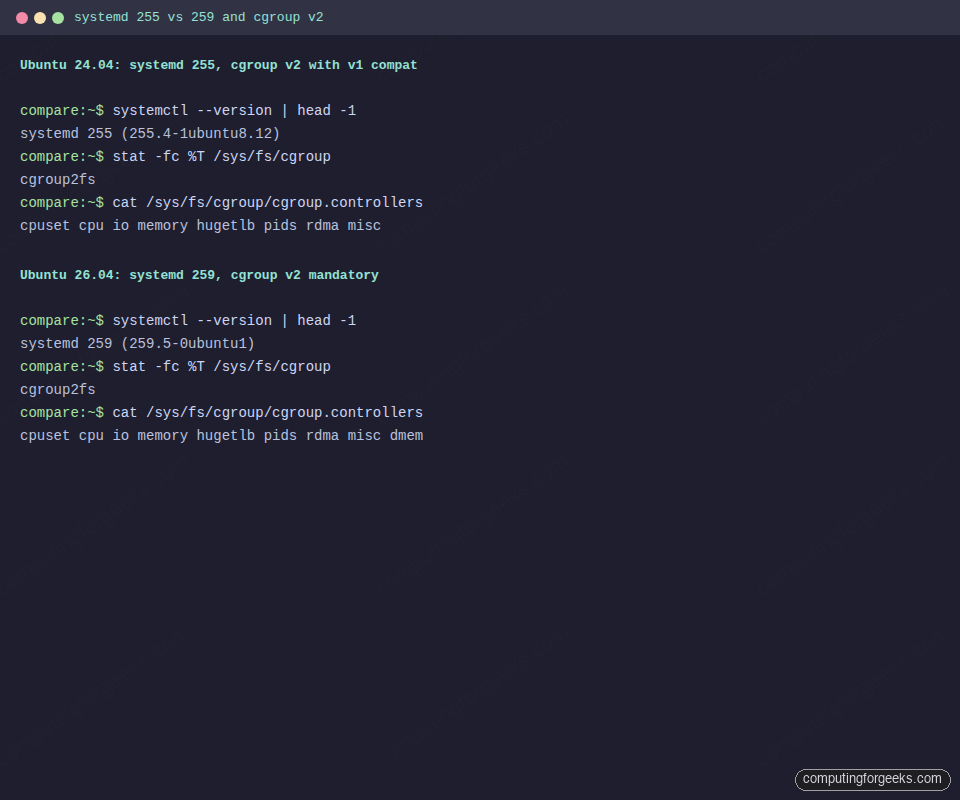
The init system and cgroup story is the other userland change that shifts behavior in places you might not expect. The terminal capture below shows both boxes side by side so the deltas are obvious before you run the commands yourself.
Dracut replaces initramfs-tools
24.04 still builds its initramfs with initramfs-tools, the Debian-lineage generator Ubuntu has used for more than a decade. 26.04 switches to dracut, the RHEL-family tool. The feature set is richer (systemd inside the initrd, network booting, better encrypted-root handling), but any custom hooks you dropped into /etc/initramfs-tools/hooks/ or scripts/ simply will not run.
If you maintain a custom initramfs (encrypted root with a non-default unlock, network-boot tweaks, special storage drivers), budget a morning to port them. Dracut’s module format is different:
ls /usr/lib/dracut/modules.d/
# Each module is a directory with a module-setup.sh and optional scripts
# Your hooks become dracut modules with a well-defined API
The 26.04 installer still creates a dracut-generated initramfs for existing systems upgraded in place, so existing encrypted root setups keep working without intervention. Custom hooks are the only real breakage.
The cgroup v1 cliff (this is the upgrade blocker)
24.04 defaults to cgroup v2 (“unified”) but keeps v1 support compiled in for compatibility. 26.04 removes v1 entirely. Systemd 259 refuses to boot if you set systemd.unified_cgroup_hierarchy=0 or systemd.legacy_systemd_cgroup_controller=1 on the kernel command line. There is no fallback.
Check your current hierarchy before upgrading:
stat -fc %T /sys/fs/cgroup
cat /proc/1/cgroup | head -3
mount | grep cgroup
If you see cgroup2fs and a single unified hierarchy, you are already on v2 and the upgrade is safe. If you see tmpfs at /sys/fs/cgroup with separate per-controller mounts, you are on v1 and 26.04 will not boot. The fix is to first move to v2 on 24.04 (remove the kernel parameter, reboot), verify your containers still work, and then upgrade to 26.04.
Who is actually on v1 in 2026? Rare, but it happens:
- Docker older than 20.10 (Docker on modern Ubuntu is already fine)
- LXC containers with
lxc.cgroup.*rules instead oflxc.cgroup2.* - Legacy Kubernetes nodes with custom
--cgroup-driver=cgroupfssetups from before 2022 - Anything pinning v1 in
/etc/default/grubfor a specific workload
If any of the above describes your fleet, treat this as the real migration. The kernel and the desktop can wait.
APT 3.1, the new solver, and apt-key
APT jumped from the 2.8 line on 24.04 to 3.1 on 26.04. The headline change is the new solver. Dependency resolution is noticeably faster on large upgrades, and the conflict-explanation output is easier to read. Two smaller changes bite in automation:
apt-keywas deprecated in 21.10 and is fully removed in 26.04. Third-party repos must use keyring files under/etc/apt/keyrings/and reference them in the sources file’sSigned-By:field. If your cloud-init or Ansible still runsapt-key add, update it before the upgrade- deb822
.sourcesfiles are the default for the main archive. The classic/etc/apt/sources.listworks, but the upgrade converts the main list to/etc/apt/sources.list.d/ubuntu.sources
Server runtimes and databases
This is the table admins care about most. All versions are what comes out of apt install on a freshly minted VM from each release.
| Stack | 24.04 | 26.04 | Why it matters |
|---|---|---|---|
| PostgreSQL | 16.x | 18.x | Canonical cites up to 3× on mixed read/write benchmarks; incremental backup, async I/O |
| MySQL | 8.0 | 8.4 LTS | Oracle’s first explicit MySQL LTS release; upgrade in place from 8.0 is supported |
| MariaDB | 10.11 (universe) | 11.8.6 LTS (main) | Canonical moved MariaDB into main with full support, not community |
| Redis / Valkey | Redis 7.0 | Valkey 9.0.3 | Canonical dropped Redis after the license change; Valkey is drop-in for the common case |
| Samba | 4.20 | 4.23 | VFS module consolidation; review vfs objects stanzas before upgrading |
| OpenSSH | 9.6p1 | 10.2p1 | ML-KEM-768×25519 hybrid KEX by default; DSA keys removed; pam_environment no longer read |
| Nginx (archive) | 1.24 | 1.26.3 | nginx.org’s own repo does not yet publish resolute packages; use the 24.04 noble repo as a temporary workaround until upstream catches up |
| Apache | 2.4.58 | 2.4.63 | TLS 1.0/1.1 disabled in the default conf per RFC 8996 |
| Docker (containerd) | containerd.io 1.7 | containerd.io 2.0 (image store default) | Fresh Docker installs now use the containerd image store; existing systems keep the classic store on upgrade |
The PostgreSQL 16 → 18 jump is not a simple apt upgrade. Run pg_upgrade with a dump and restore plan. Our Install PostgreSQL 18 on Ubuntu 26.04 guide covers the upgrade path in detail.
Security posture: what changed
- Post-quantum cryptography: OpenSSL 3.5.5 ships with ML-KEM and ML-DSA algorithms. OpenSSH 10.2p1 enables the
sntrup761x25519-sha512andmlkem768x25519-sha256hybrid KEX by default. Existing SSH sessions downgrade gracefully; new handshakes negotiate PQ hybrid when both ends support it - DSA key removal: OpenSSH 10.2 no longer accepts DSA keys. If you have ancient keys, rotate before upgrading
- TLS 1.0 and 1.1 disabled in Apache: aligns with RFC 8996 and current browser defaults
- TPM-backed FDE out of experimental: the installer exposes TPM-backed disk encryption as a supported option, with passphrase rotation from the UI. 24.04 shipped this as experimental
- AppArmor permission prompting: the Security Center app prompts users for snap permission grants (camera, microphone, location). 24.04 had the same plumbing but no UI
- SSSD now runs as non-root: the daemon drops to the
sssduser at start. Directory permissions on/var/lib/ssschange - Kerberos legacy algorithms out:
arcfour-hmac-md5anddes3-cbc-sha1removed from the default permit list inkrb5.conf
None of this individually forces an upgrade. Together they make 26.04 the correct base for any new compliance-driven deployment in 2026 and beyond.
Breaking-change cheat sheet
Everything below is a thing that worked on 24.04 and does not work (or behaves differently) on 26.04. Skim this list before running any automation against a fresh 26.04 host.
| Change | What breaks | Fix |
|---|---|---|
/media no longer holds removable mounts | Scripts that read /media/$USER/ to locate USB drives | Use /run/media/$USER/; the symlink is not created |
apt-key removed | Any cloud-init or Ansible playbook running apt-key add | Write keyrings to /etc/apt/keyrings/*.gpg and reference via Signed-By: |
| cgroup v1 removed | Docker < 20.10, LXC with v1 rules, kernel param overrides | Move to v2 on 24.04 first, verify, then upgrade |
| X11 login session removed | xdotool, some Electron apps pre-2023, screen sharing in old video-call clients | Use Wayland-native equivalents; update Electron apps to 2024+ builds |
| Postfix chroot default off | Hardening guides that assumed the chroot directory exists | Add smtpd_chroot=yes explicitly if you need it |
SSHd pam_environment disabled | Per-user env vars set via ~/.pam_environment | Move env setup to a PermitUserEnvironment-aware mechanism or shell init |
| System V init scripts deprecated | Vendor-supplied SysV scripts that predate systemd | 26.04 still accepts them; 26.10 / 28.04 will not. Port now |
| DSA SSH keys removed | Ancient keys from pre-2015 deployments | ssh-keygen fresh ed25519 keys before upgrade |
Performance: what benchmarks actually show
Phoronix ran a set of development-snapshot comparisons in February and March 2026. The headline numbers, with the understanding that final-release numbers shift slightly, are:
- AMD Strix Point with RDNA 3.5 graphics: substantial lift for 3D workloads and compute, primarily driven by Mesa 25.x and kernel 7.0 Mesa-sync improvements
- Timed Linux kernel compile: modestly faster on 26.04 with GCC 15.2 and LTO tuning, 3 to 7% on a Threadripper 7995WX
- PostgreSQL pgbench: Canonical’s up to 3× claim holds for mixed OLTP on NVMe when the upgrade is 16 → 18, since PG 18’s async I/O is doing most of the work
- Network throughput: unchanged. This stack has been mature for years
Where 24.04 still has an edge: workloads that sit on the HWE 6.17 kernel and stress already-mature subsystems. The delta is noise-level for most web, API, and database hosts. If you care about real numbers, benchmark your own workload, not someone else’s.
The upgrade path, step by step
For 24.04 users who have checked the cgroup v1 box, backed up the system, and want to move:
- Wait until August 6, 2026 for 26.04.1. Or pass
-d/--develat your own risk - Run
sudo apt update && sudo apt full-upgradeon 24.04, reboot, verify nothing is held back - Remove every PPA that does not already publish
resolutepackages (check withapt policy); re-enable after the upgrade - Run
sudo do-release-upgrade; answer the prompts about config files withNunless you know you need the new defaults - Reboot, run
sudo apt autoremove, re-enable the PPAs that now publish for 26.04 - Verify your application stack end to end: systemd unit states, database connectivity, cron jobs, user logins
For the full step-by-step walkthrough with real output from our test VM, see Upgrade Ubuntu 24.04 to Ubuntu 26.04 LTS.
Known issues still open on release
- NVIDIA 580 + Showtime crash: the default video player segfaults on NVIDIA driver 580. Upgrade to driver 595 or install
mpv - Intel iGPU regression in some GNOME apps: Arc and older Iris Xe users report frame hitching in Resources and GNOME Weather. A fix is queued for the 7.0.1 kernel update
- Nginx mainline repo gap: nginx.org does not publish
resolutepackages yet. Use the archive Nginx 1.26 or point the repo file atnobleas a workaround until upstream catches up - snap-confine conflicts on upgrade from 25.10: rare but reported. Clean up with
sudo apt install --reinstall snapdafter the upgrade finishes - EFI System Partition weirdness: some UEFI boards (notably early AM5 and B460 boards) show the installer complaining about an unrecognized ESP. Creating the ESP manually before the installer runs works around it
Recommendation, by role
Collapsing everything above into a one-line answer for common roles:
| Role | Verdict | Reasoning |
|---|---|---|
| Desktop power user with recent hardware | Upgrade after 26.04.1 (August 2026) | Real wins in GNOME 50, kernel 7.0, GIMP 3, and Thunderbird 140. Worth the wait until the first point release |
| Desktop user on pre-2019 hardware with 4 GB RAM | Stay on 24.04 | 6 GB is the new minimum; GNOME 50 will be painful on older laptops |
| Production web / database server, stable | Stay on 24.04 until 2029 | No forcing function; 24.04 is supported through May 2029 |
| Kubernetes / container host | Audit cgroup v1 first; upgrade after confirmation | v1 is the blocker; everything else is cosmetic |
| New server, no legacy | Install 26.04 on release day | Longer support, newer everything, PQ-ready SSH and TLS |
| Developer workstation | Upgrade after 26.04.1 | Python 3.14, Go 1.25, Rust 1.93, OpenJDK 25, LLVM 21 all matter for modern toolchains |
| Ubuntu MATE / Unity user | Stay on 24.04 until you pick a new flavor | MATE and Unity lost LTS status for 26.04 due to contributor shortages |
If you are on the fence, the conservative answer is almost always the right one. 24.04 is a phenomenally stable LTS, and its standard support has three years left. The only wrong move is upgrading a production host on April 23 and learning about cgroup v1 at 3 a.m.
Frequently asked questions
Is Ubuntu 26.04 stable on release day?
Stable for desktops and new server builds, yes. Stable enough to upgrade a production fleet on April 23 if you have not tested, no. The do-release-upgrade prompt is deliberately gated until the 26.04.1 point release in August 2026 precisely because every LTS ships with a short list of issues that only surface at scale. Wait until August for production upgrades.
Can I skip 24.04 and upgrade directly from 22.04 to 26.04?
No. Ubuntu’s supported upgrade path for LTS-to-LTS is one major version at a time. From 22.04, you must go to 24.04 first, then to 26.04. Running do-release-upgrade on 22.04 will offer 24.04, never 26.04 directly.
Will my Docker containers break after the upgrade?
Only if your Docker is ancient (older than 20.10) or if you have manually pinned cgroup v1 in /etc/default/grub. Docker 20.10 and newer works on cgroup v2 out of the box. Check your host with stat -fc %T /sys/fs/cgroup; if it reports cgroup2fs, Docker will survive the upgrade unchanged.
How long is 24.04 actually supported if I do not upgrade?
Standard security maintenance runs until May 31, 2029 (5 years from the April 2024 release). With an Ubuntu Pro subscription, Expanded Security Maintenance extends that to May 31, 2034 (10 years). Add the Legacy support add-on and the window reaches May 31, 2036 (12 years). There is no pressure to upgrade to 26.04 for security-update coverage.
Should I fresh install or in-place upgrade to 26.04?
Fresh install for desktops where you can afford to reconfigure, in-place upgrade for servers where the data directory is the point of the machine. The in-place path is well-tested on 24.04 → 26.04, but a fresh install rebases you on the new default apps (Ptyxis, Papers, Loupe) and avoids the apt autoremove graveyard of abandoned 24.04 dependencies.
Does 26.04 break my existing Python virtualenvs?
Yes. The default Python moved from 3.12 to 3.14, and existing venvs are pinned to the interpreter they were created against. Recreate venvs after the upgrade: rm -rf .venv && python3 -m venv .venv && source .venv/bin/activate && pip install -r requirements.txt. If you need 3.12 for a project, apt install python3.12 is still available on 26.04.
Further reading
If this comparison pushed you toward 26.04, the next three articles cover the practical steps:
- Ubuntu 26.04 LTS Features: Kernel 7.0, GNOME 50, What’s New covers each new feature in depth
- Install Ubuntu 26.04 LTS Step by Step with Screenshots walks through the full Subiquity desktop and server installer
- Upgrade Ubuntu 24.04 to Ubuntu 26.04 LTS is the hands-on upgrade path with real output from our test VM
- Initial Server Setup with Ubuntu 26.04 LTS covers what to do on a fresh 26.04 server before exposing it to the internet
- Things to Do After Installing Ubuntu 26.04 LTS Server is the post-install checklist for production hosts
For the official change log, see Canonical’s Ubuntu 26.04 LTS summary for LTS users.






