SPKI pinning is one of the few certificate-layer controls where the public-CA wildcard pattern from the rest of this series would be a liability rather than a feature. Pin against a cert that 30 services share and rotate on a Google-managed schedule, and every rotation breaks every pinned client in the fleet. Pin against a single cert you control, issued from a Private CA you control, and rotation becomes a predictable operational step rather than an outage.
This article takes the private cert from the previous article (pay.cfg-lab.computingforgeeks.com issued by CFG Lab Root CA) and walks a working Python client end-to-end: extract the SPKI hash, build a client that validates the pin on every connection, then demonstrate same-key rotation (pin holds), new-key rotation (pin breaks), and backup-pin recovery. All three scenarios are captured from real certs issued by CA Service, not simulated.
Tested April 2026 on Python 3.14 with cryptography 46, openssl 3.4, Google CA Service DevOps tier in europe-west1
Why Pinning, and What the Options Are
Three flavors of “pinning” existed historically; only one is worth using in 2026.
HPKP (HTTP Public Key Pinning). Browser-based pinning via HTTP headers. Dead. Removed from Chrome in 2018 because it was too easy to lock yourself out of your own domain with a misconfigured pin. Don’t even read the spec; it’s no longer implemented anywhere you’d want it.
Certificate pinning pins a specific cert (by DER bytes or SHA-256 of the cert). The problem is that any cert rotation: even same-key rotation: produces a new cert and invalidates the pin. Rotation churn makes this impractical for anything with a realistic rotation cadence.
SPKI pinning pins the Subject Public Key Info: effectively the public key. Rotate the cert keeping the same key: pin still valid. Rotate the cert with a new key: pin invalidates. This decoupling from cert validity is what makes SPKI pinning sane.
Every practical pinning deployment in 2026 is SPKI-based. That’s what this article implements.
When to Pin (and When Not To)
Pin only when you control both sides of the connection. Your own mobile app calling your own backend: pin. Your own CLI tool calling your own API: pin. Third-party clients calling your API: never pin, because you have no way to update those clients when you rotate keys.
Pinning is also a poor fit when the cert is issued from a public CA you don’t control. If Let’s Encrypt rotates its intermediate, any pin against an intermediate breaks. Pin only against certs you own, typically issued from your own Private CA: which is exactly the setup the previous article in this series built.
Pinning is a security-depth control, not a first line of defense. The first line is the trust chain (root CA validation). SPKI pinning adds a second check: even if the chain validates, the observed public key must match a known-good pin. This catches mis-issuance scenarios where a valid cert chain is built against a key you never approved.
Extracting the SPKI Hash
The pin is a SHA-256 hash of the cert’s SubjectPublicKeyInfo DER bytes, base64-encoded. Standard openssl pipeline:
openssl x509 -in pay.pem -pubkey -noout \
  | openssl pkey -pubin -outform DER \
  | openssl dgst -sha256 -binary \
  | openssl enc -base64
For the cert issued by the previous article, the output is a single line: T54tUdvkmrct4v2MpDvgR1wVgAuKOBaWkZQE/ydREaQ=. That’s the pin value.
Python’s cryptography library computes the same hash with matching bytes, which matters because the client validates pins using the same algorithm:
python3 -c "
import hashlib, base64
from cryptography import x509
from cryptography.hazmat.primitives.serialization import Encoding, PublicFormat
cert = x509.load_pem_x509_certificate(open('pay.pem','rb').read())
spki = cert.public_key().public_bytes(
  Encoding.DER, PublicFormat.SubjectPublicKeyInfo)
print(base64.b64encode(hashlib.sha256(spki).digest()).decode())
"
Same hash, both paths. The shell pipeline is useful in scripts; the Python equivalent is what the client code uses at connection time.
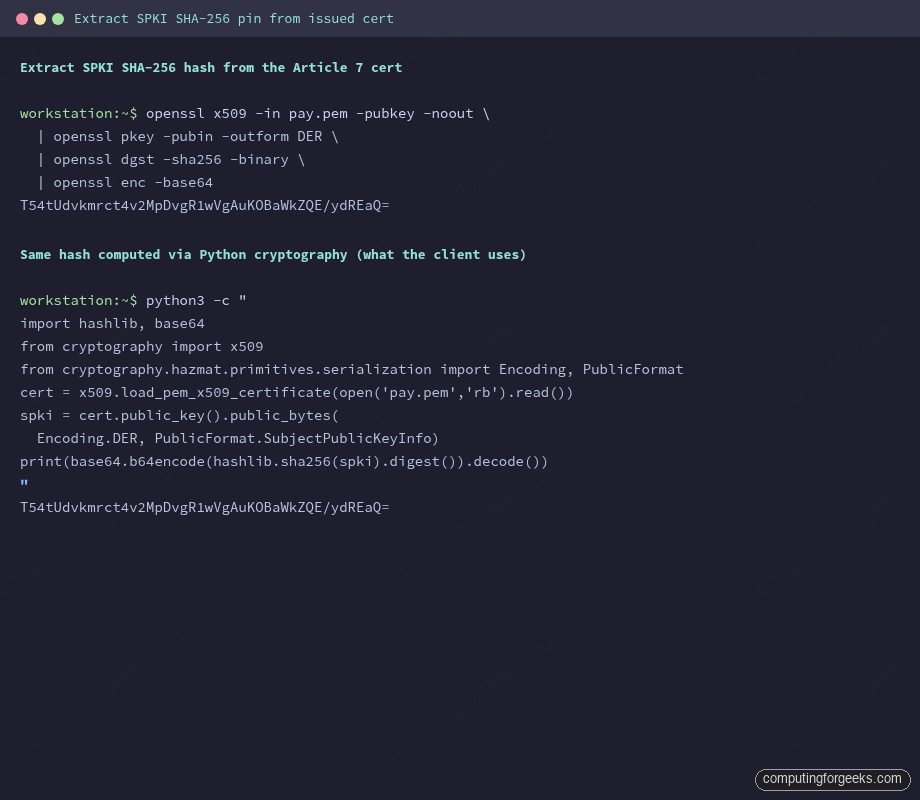
Capture the pin. Store it wherever client config lives. For a mobile app, this is usually a compile-time constant; for a backend service acting as a client, it’s a runtime config value pulled from Secret Manager or environment variables.
The Pinned Python Client
The minimum viable client validates the trust chain via the standard ssl module, then adds a post-handshake pin check on the observed public key:
import base64, hashlib, socket, ssl, sys
from cryptography import x509
from cryptography.hazmat.primitives.serialization import Encoding, PublicFormat

HOST = "pay.cfg-lab.computingforgeeks.com"
PORT = 443
ROOT_CA_PEM = "/tmp/root-ca.pem"

PINS = {
    "T54tUdvkmrct4v2MpDvgR1wVgAuKOBaWkZQE/ydREaQ=",
}

def spki_sha256_b64(cert_der: bytes) -> str:
    cert = x509.load_der_x509_certificate(cert_der)
    spki = cert.public_key().public_bytes(
        Encoding.DER, PublicFormat.SubjectPublicKeyInfo)
    return base64.b64encode(hashlib.sha256(spki).digest()).decode()

def connect_with_pin(host, port, pins):
    ctx = ssl.create_default_context(cafile=ROOT_CA_PEM)
    ctx.check_hostname = True
    ctx.verify_mode = ssl.CERT_REQUIRED

    with socket.create_connection((host, port), timeout=5) as raw:
        with ctx.wrap_socket(raw, server_hostname=host) as tls:
            peer_cert_der = tls.getpeercert(binary_form=True)
            observed_pin = spki_sha256_b64(peer_cert_der)
            if observed_pin not in pins:
                raise ssl.SSLError(
                    f"SPKI pin mismatch: observed {observed_pin!r} "
                    f"not in approved pin set")
            print(f"OK: TLS handshake + pin verified ({observed_pin})")
Three controls compose here, in order. First, the TLS context loads the Private CA root via cafile, so the trust chain check passes only for certs issued from that CA. Second, check_hostname=True enforces that the cert’s SAN matches the hostname you dialled. Third, the pin check runs after the handshake completes: the observed public key must be in the approved set.
Fail any of the three and the client refuses the connection.
Scenario 1: Happy Path
The cert served matches the pin. Standard run, no surprises:
python3 pinned_client.py
OK: TLS handshake + pin verified (T54tUdvkmrct4v2MpDvgR1wVgAuKOBaWkZQE/ydREaQ=)
This is the state you want in production 99% of the time. The remaining 1% is rotations.
Scenario 2: Same-Key Rotation (Pin Holds)
Reissue the cert from the same CSR, which uses the same keypair. Submit to the private CA, get back a fresh cert with new validity dates but the same public key:
gcloud privateca certificates create pay-cert-003 \
  --issuer-pool=cfg-lab-devops-pool --issuer-location=europe-west1 \
  --csr=pay.csr --cert-output-file=pay-rotated-samekey.pem --validity=P90D
Compute the SPKI pin on the rotated cert:
T54tUdvkmrct4v2MpDvgR1wVgAuKOBaWkZQE/ydREaQ=Identical to the pre-rotation pin. This is SPKI pinning’s value proposition: the cert is new, but because the public key is unchanged, every pinned client in the fleet continues to work without updates. Deploy the new cert to the LB, retire the old one, zero client-side changes.
Same-key rotation is the mode used for scheduled 60-90 day cert renewals. Private CA produces a new cert, the LB picks it up, clients keep humming.
Scenario 3: New-Key Rotation (Pin Breaks)
Generate a fresh keypair and a fresh CSR. Issue a new cert:
openssl genrsa -out pay-new.key 2048
openssl req -new -key pay-new.key -out pay-new.csr \
  -subj "/CN=pay.cfg-lab.computingforgeeks.com/O=ComputingForGeeks Lab"

gcloud privateca certificates create pay-cert-002 \
  --issuer-pool=cfg-lab-devops-pool --issuer-location=europe-west1 \
  --csr=pay-new.csr --cert-output-file=pay-new.pem --validity=P90D
The pin on the new cert:
yAifzUhxUoTOP7VUx+wBKat544yCmadeyJ46JFV74j8=Completely different. A client running the pre-rotation code with only the old pin configured sees:
Error: “SPKI pin mismatch: observed ‘<new-hash>’ not in approved pin set”
This is exactly the outcome pinning is designed to produce on key change. It’s also the outcome that crashes your mobile app if the rotation happens before you push a client-side update. Which leads to the only correct pattern for new-key rotations.
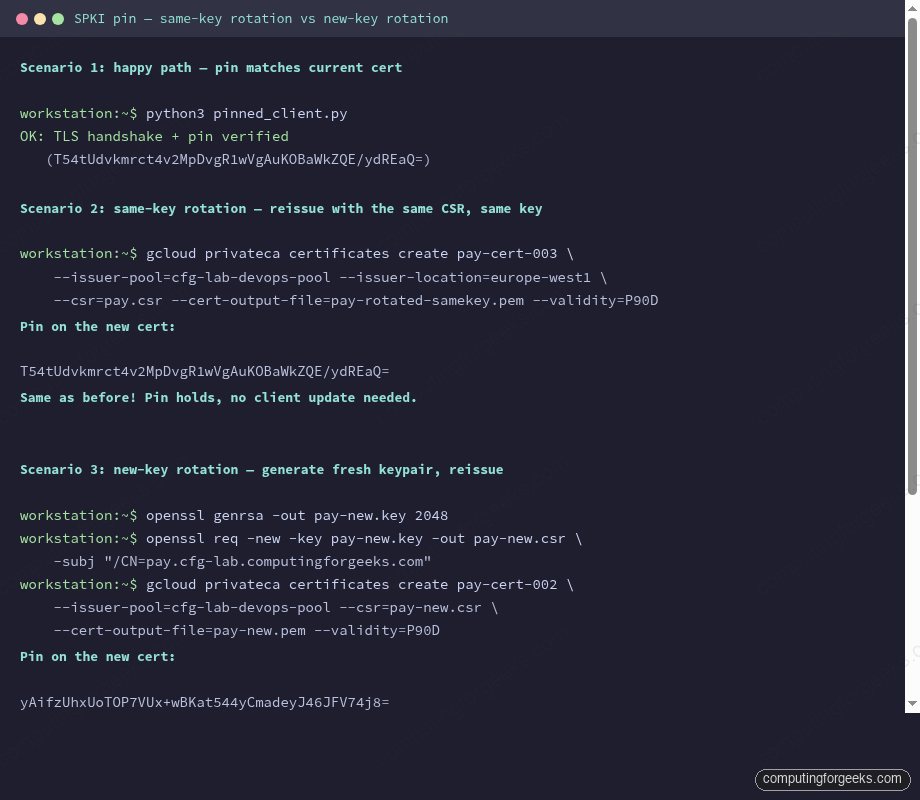
The three rotation scenarios side by side make the pattern obvious: same-key holds the pin, new-key breaks it. The fix is pre-pinning the next key before rotation.
Scenario 4: Backup Pin (Survive the Rotation)
Pre-pin the next key before you rotate. Generate the next keypair, compute its SPKI pin, ship a client update that accepts both the current pin AND the next pin. Once the fleet has the updated client, rotate the cert to the next key. The client validates against the backup pin:
PINS = {
    "T54tUdvkmrct4v2MpDvgR1wVgAuKOBaWkZQE/ydREaQ=",  # current
    "yAifzUhxUoTOP7VUx+wBKat544yCmadeyJ46JFV74j8=",  # next, pre-pinned
}
Run the client against the rotated endpoint:
python3 pinned_client.py
OK: TLS handshake + pin verified (yAifzUhxUoTOP7VUx+wBKat544yCmadeyJ46JFV74j8=)
After the rotation soaks cleanly, ship another client update that removes the old pin, leaving only the new one. And during this window you generate the next-next keypair, pre-pin it, and the cycle continues.
Always have a backup pin in production. Never run with a single-pin configuration unless the cost of a full app redeploy is acceptable as a rotation cost. For most organizations with mobile apps, it isn’t.
Backup Pin Strategy
Three patterns in use:
- Two-pin rolling. Always pin the current key and the next key. Rotate via the next key, generate a new “next key”, update clients. Most organizations converge on this.
- Three-pin rolling. Adds a recovery pin separate from the rotation schedule, for emergency key replacement. Overkill for most teams, mandatory for some regulated environments.
- Pin per environment. Dev/staging/prod each have their own cert, own key, own pin. Mobile app reads the right pin from an environment selector. This is orthogonal to rotation strategy and is a good idea regardless.
Rotation Playbook (Minimal)
- Generate next keypair and CSR during the current cert’s validity window.
- Compute the SPKI pin on the next key. Ship a client update adding the pin to the approved set.
- Wait for fleet adoption (measured by your client telemetry, not by the calendar).
- Issue the new cert from Private CA using the next key’s CSR.
- Deploy the new cert to the LB. Retire the old cert.
- Ship a client update removing the old pin after soak.
- Generate the next-next keypair; the cycle begins again.
The full rotation playbook with monitoring and runbook details is in Article 11 of this series. This article is the mechanics; the runbook is the operational discipline around it.
What Can Still Go Wrong
SPKI pinning catches the cert-issuance class of attacks. It does not catch:
- Root CA compromise. An attacker who controls the Private CA can sign any key; pinning against a cert issued by a compromised CA is no protection. CA key material protection (HSMs, KMS, offline roots for high-stakes cases) is the defense.
- Client-side compromise. If an attacker controls the device, they can replace the pinned client code. Pinning is not a malware defense.
- Wrong pin deployed. If the wrong pin ships to production, the client locks itself out of its own service. This is why backup pins exist.
Pinning is one layer. Private CA + SAN validation + pin + trust chain + CAA policy is the layered defense. Each layer catches different failure modes.
Cleanup
The certs issued during this article sit in CA Service under the DevOps-tier pool. DevOps tier doesn’t expose per-cert lifecycle management, so there’s no gcloud privateca certificates delete for them; they expire naturally on their 90-day validity. For the private key files on the local filesystem:
rm /tmp/pay.key /tmp/pay-new.key /tmp/pay*.pem /tmp/pay*.csrDon’t leave key material in /tmp on a shared workstation. The cleanup step is mandatory, not optional.
What’s Next
The Private CA + SPKI-pinned client closes the financial-services side of the consolidation plan. The next article in this series turns to the platform-engineering side: the cert inventory Terraform module that forces every onboarding service onto the shared LB by default, and the OPA/Conftest guardrail that blocks any PR trying to create a per-service google_compute_managed_ssl_certificate outside the module. That’s where consolidation stops depending on good intentions and starts being enforced by CI.